Supports optional integration with GitHub-hosted models as debate participants when configured with a custom endpoint
Enables using GPT-4o as one of the AI agents in the multi-agent debate simulation
Click on "Install Server".
Wait a few minutes for the server to deploy. Once ready, it will show a "Started" state.
In the chat, type
@followed by the MCP server name and your instructions, e.g., "@MultiMind MCP Serverbrainstorm and refine a marketing strategy for our new AI product"
That's it! The server will respond to your query, and you can continue using it as needed.
Here is a step-by-step guide with screenshots.
MultiMind: Constructive Multi-Agent LLM Dialogue Tool
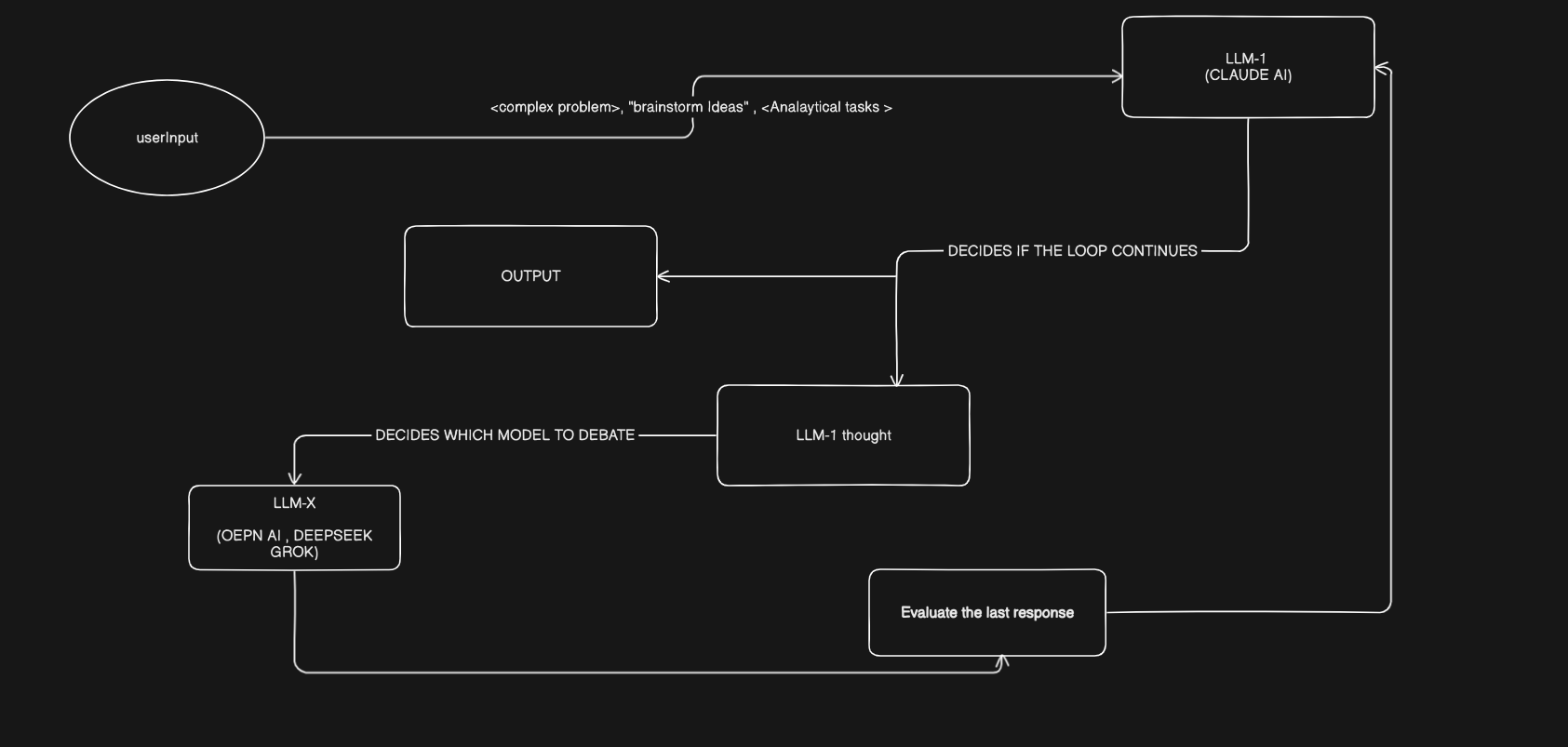
MultiMind is a structured, reasoning-first tool where multiple AI agents (LLMs) simulate reflective debate to produce better solutions. Inspired by multi-agent debate research, it lets one LLM generate an idea, then route it through critique by others — refining it step-by-step until a high-quality output is reached.
🚀 Use Cases
Brainstorming and refining complex ideas
Breaking down hard problems with feedback loops
Designing solutions with expert-like critique
Simulating expert review, debate, or argumentation
Generating hypotheses and iteratively improving them
⚠️ Important Note
MultiMind currently supports a limited set of agents:
🧠 GroqCloud models
🤖 OpenAI GPT-4o
More models and providers (Claude, Gemini, GitHub-hosted models) will be supported soon in upcoming versions.
Related MCP server: LLM Responses MCP Server
🧬 System Design
MultiMind runs on a flexible architecture designed to simulate debate between agents
📊 Architecture Diagram

📦 Installation
🟨 Claude (Anthropic Desktop AI)
To use MultiMind inside Claude, edit your Claude tools configuration and add this entry to your Claude.json file:
"MultiMind": {
"command": "npx",
"args": [
"-y",
"@hmodecode/multimind-mcpserver@latest"
],
"env": {
"GROQ_API_KEY": "your_groq_api_key",
"OPENAI_API_KEY": "your_openai_api_key",
"APPDATA": "/path/to/your/AppData/Roaming", // Optional:if you face path issues
"GITHUB_MODEL_ENDPOINT": "https://your-github-model-endpoint" // Optional: Only if you're using GitHub-hosted models
}
}🟦 VSCODE
To use MultiMind inside Vscode, edit your settings.json file and the following:
"MultiMind": {
"command": "npx",
"args": [
"-y",
"@hmodecode/multimind-mcpserver@latest"
],
"env": {
"GROQ_API_KEY": "your_groq_api_key",
"OPENAI_API_KEY": "your_openai_api_key",
"GITHUB_MODEL_ENDPOINT": "https://your-github-model-endpoint" // Optional: Only if you're using GitHub-hosted models
}
}