

A
licenseB
qualityD
maintenanceTypeScript-based MCP server designed to enhance code editing experiences by providing features such as hover information, code completion, and diagnostics.
3
24 npm
26
MIT

Exposes VSCode's LSP features through MCP, allowing for accurate code analysis and navigation in GitHub repositories
Click on "Deploy Server".
Wait a few minutes for the server to deploy. Once ready, it will show a "Started" state.
In the chat, type @ followed by the MCP server name and your instructions, e.g., "@VSCode LSP MCP Server get the definition of the calculateTotal function"
That's it! The server will respond to your query, and you can continue using it as needed.
Here is a step-by-step guide with screenshots.
VSCode LSP MCP is a Visual Studio Code extension that exposes Language Server Protocol (LSP) features through the Model Context Protocol (MCP).
Extension ID: cjl.lsp-mcp — open Extensions (Ctrl+Shift+X / Cmd+Shift+X) and search for cjl.lsp-mcp to find this plugin precisely.
This allows AI assistants and external tools to utilize VSCode's powerful language intelligence capabilities without direct integration.
Using Neovim? See vv-mcp.nvim, the sibling implementation that exposes Neovim LSP clients and live editor context through MCP.
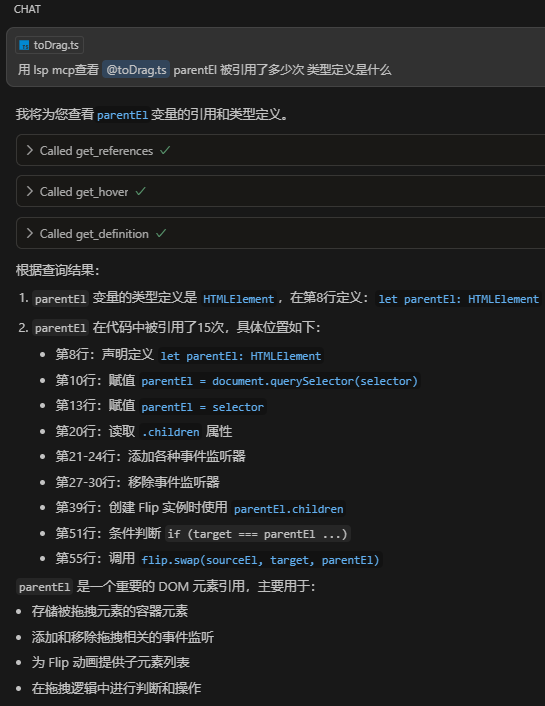
Large language models like Claude and Cursor struggle to understand your codebase accurately because:
They rely on regex patterns to find symbols, leading to false matches
They can't analyze import/export relationships properly
They don't understand type hierarchies or inheritance
They have limited code navigation capabilities
This extension bridges that gap, providing AI tools with the same code intelligence that VSCode uses internally!
Related MCP server: lsp-tools-mcp
🔄 LSP Bridge: Converts LSP features into MCP tools
🤖 VS Code Copilot integration: Registers the local MCP server directly with VS Code Chat / Copilot
🔌 Multi-Instance Broker: One stable MCP endpoint discovers and routes requests across all open VS Code windows
🧠 25 LSP operations covering navigation, diagnostics, document metadata, symbols, call hierarchy, transactional rename, and safe Code Actions
☕ Java dependency source: Get decompiled Java class source via jdt:// URI (from jdtls), so AI can read library implementations
📄 Dual output format: JSON for machine processing, Markdown for LLM-friendly reading
Tool | Description |
| Report the shared broker status |
| List active VS Code windows, workspace roots, and instance IDs |
| Execute an LSP operation in an explicitly selected or automatically matched instance |
| Rename a workspace file or directory in the matching instance |
Operation | Description |
| Get hover information (documentation, type, etc.) at a position |
| Get the definition location of a symbol |
| Get the declaration location of a symbol |
| Get the type definition location of a symbol |
| Get the implementation location(s) of a symbol |
| Find all references to a symbol |
| Find semantic occurrences of a symbol in the current document |
| Get navigable document links exposed by the active language extension |
| Get inferred type and parameter-name hints for a document range |
| Get signatures and active-parameter information at a call site |
| Get the symbol outline (tree) of a document |
| Search for symbols across the entire workspace by query |
| Get diagnostics for one file with optional severity, source, and code filters |
| Get filtered diagnostics under a workspace path |
| List editable Code Actions at a position |
| Preview one listed Code Action without side effects |
| Preview editable fix-all or quick-fix edits for an entire document |
| Apply one previously previewed Code Action transaction |
| Get decompiled Java class source via jdt:// URI (from jdtls), to read library/dependency implementations |
| Locate and validate a rename candidate |
| Preview a symbol rename without modifying files |
| Apply one previously previewed rename transaction |
| Prepare call hierarchy nodes and return recursive |
| Find all callers of a symbol |
| Find all callees (calls made by) a symbol |
All operations are invoked through the single execute_lsp MCP tool with a unified input format:
operation — which LSP operation to execute
uri — file path or URI string (supports both plain paths and file:///jdt:// URIs)
line — line number (1-based, matching editor display). Required for position-dependent operations
character — character offset (1-based, matching editor display). Required for position-dependent operations
newName / renameId — used by the three-stage rename flow
actionKind / actionId — filter and continue the Code Action transaction flow
query — required only for workspace_symbols
symbolKinds, includeDeclaration, includeExternal, pathPattern, severities, sources, codes — optional result filters applied before maxResults
startLine, endLine — optional inclusive range for inlay_hints
callId — returned by call hierarchy operations for recursive traversal
instanceId — optional instance returned by list_instances; takes precedence over automatic path routing
1-based positions: Both input and output use 1-based line/character values, matching what your editor displays. VS Code shows
Ln 9, Col 16→ passline: 9, character: 16. Output positions can be used directly as input for the next call — no conversion needed.
The extension starts one lightweight internal endpoint per VS Code window and registers it with a shared broker. External clients keep using a single MCP URL. The broker selects an instance in this order:
Exact instanceId, when provided
Longest workspace-root prefix matching the input file path
The only active instance, when no path can identify one
If two windows open the same project, routing is intentionally rejected as ambiguous until the caller passes instanceId. The registry contains no public credentials and stale window records expire automatically.
The first multi-instance release supports local desktop workspaces and file: resources. Remote SSH, WSL, Dev Containers, and virtual workspaces are not yet advertised as supported.
Tool | Description |
| Rename a file or directory through VS Code's |
For example, the built-in TypeScript provider updates relative imports and barrel exports when a referenced .ts or .tsx file is renamed. The exact companion edits remain language-provider dependent, so inspect diagnostics after applying a resource rename.
Key | Description | Type | Default |
| Enable or disable the LSP MCP server. |
|
|
| Preferred port for the shared MCP broker. |
|
|
| Enable CORS for browser-based MCP clients. Keep disabled for native clients. |
|
|
| Allowed origins for CORS. Use |
|
|
| Whether to allow credentials (cookies, authorization headers) in CORS requests. |
|
|
| Headers that browsers are allowed to access. Provide a comma-separated list of headers (e.g., |
|
|
| Maximum number of items returned for list-type results such as |
|
|
| Output format for LSP operation results. |
|
|
| Regular expressions that exclude an entire aggregated hover item when its content matches. Applies to JSON and Markdown output. |
|
|
| Path substrings used to classify dependency results for sorting and |
| language-specific defaults |
Hover exclusion patterns are applied to each complete aggregated hover item before output formatting. For example:
{
  "lsp-mcp.hover.excludePatterns": [
    "^翻译 `",
    "\\[Comment Translate\\]"
  ]
}No mcp.json setup is required. After the extension starts, it registers the local LSP MCP server with VS Code through an MCP server definition provider.
Use MCP: List Servers or the chat tools picker in VS Code to enable or manage the LSP MCP Server.
Config file: ~/.cursor/mcp.json (e.g. %USERPROFILE%\.cursor\mcp.json on Windows)
{
  "mcpServers": {
    "lsp-mcp": {
      "url": "http://127.0.0.1:9527/mcp"
    }
  }
}Config file: ~/.config/opencode/opencode.jsonc
{
  "mcp": {
    "lsp-mcp": {
      "type": "remote",
      "url": "http://127.0.0.1:9527/mcp",
      "enabled": true
    }
  }
}Config file: ~/.claude.json
{
  "mcpServers": {
    "lsp-mcp": {
      "type": "http",
      "url": "http://127.0.0.1:9527/mcp"
    }
  }
}Config file: ~/.gemini/settings.json
{
  "mcpServers": {
    "lsp-mcp": {
      "type": "streamable-http",
      "httpUrl": "http://127.0.0.1:9527/mcp"
    }
  }
}Config file: ~/.codex/config.toml
[mcp_servers.lsp-mcp]
url = "http://127.0.0.1:9527/mcp"{
"mcpServers": {
"lsp-mcp": {
"type": "streamable-http",
"url": "http://127.0.0.1:9527/mcp",
"disabled": false
}
}
}Clone the repository
Run pnpm install
Run pnpm run update to generate metadata
Press F5 to start debugging
This server cannot be deployed
The official Svelte MCP server providing docs and autofixing tools for Svelte development
Lean 4 MCP server: compile, prove theorems, and formalize math with Mathlib.
MCP server for developer documentation, generated by doc2mcp.