mcp-highcharts
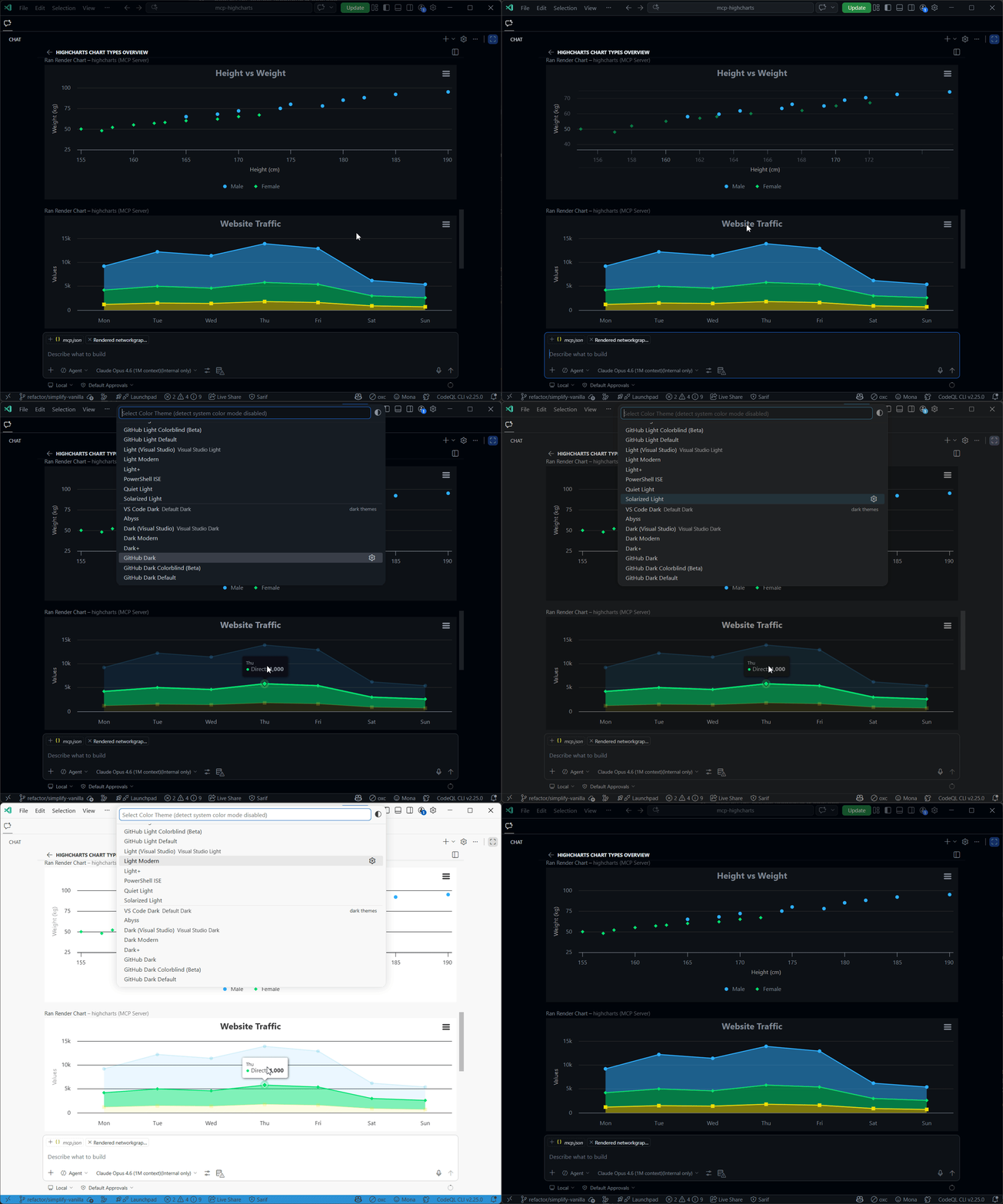
Enables rendering interactive Highcharts charts inline within GitHub Copilot chat interfaces, allowing AI assistants to visualize data through various chart types directly in the conversation.
Click on "Deploy Server".
Wait a few minutes for the server to deploy. Once ready, it will show a "Started" state.
In the chat, type
@followed by the MCP server name and your instructions, e.g., "@mcp-highchartsCreate a line chart showing our monthly revenue growth for the past year"
That's it! The server will respond to your query, and you can continue using it as needed.
Here is a step-by-step guide with screenshots.
mcp-highcharts
Render interactive Highcharts charts inline in AI chat — VS Code, GitHub Copilot, Claude Desktop, or any MCP client with MCP Apps support.
Setup
Click a badge above, or add to your MCP config:
{
"mcp": {
"servers": {
"highcharts": {
"command": "npx",
"args": ["-y", "mcp-highcharts@latest"]
}
}
}
}Add to claude_desktop_config.json:
{
"mcpServers": {
"highcharts": {
"command": "npx",
"args": ["-y", "mcp-highcharts@latest"]
}
}
}npx mcp-highcharts@latest --http # http://localhost:3001/mcp
PORT=8080 npx mcp-highcharts@latest --http # custom portRelated MCP server: Chart-Output MCP Server
Tools
Tool | Description |
| Any chart type — line, bar, pie, scatter, heatmap, sankey, gauge, treemap, wordcloud, and 60+ more |
| Financial charts with navigator, range selector, and 40+ technical indicators |
| Multi-component layouts with charts, KPIs, and data grids |
| Choropleth maps, map bubbles, map points (auto-fetches map data from CDN) |
| Project timelines with tasks, dependencies, and milestones |
| Standalone data tables with sorting, pagination, and formatting |
All tools accept the full Highcharts Options API.
Prompts
Prompt | What it does |
| Paste data → get the best chart |
| Scaffold a dashboard |
| Candlestick + volume + indicators |
| Side-by-side comparison patterns |
| Gantt with dependencies |
| Live-updating chart from a data URL |
Configuration
Theming
Charts auto-adapt to host light/dark mode. Override with environment variables:
{
"env": {
"HIGHCHARTS_THEME": "dark-unica",
"HIGHCHARTS_OPTIONS": "./my-theme.json"
}
}HIGHCHARTS_OPTIONS accepts .json, .js, .mjs, .ts, or inline JSON.
Built-in themes: adaptive (default), avocado, brand-dark, brand-light, dark-blue, dark-green, dark-unica, gray, grid, grid-light, high-contrast-dark, high-contrast-light, sand-signika, skies, sunset
Schema depth
Controls how much type information is sent to the LLM:
{ "env": { "SCHEMA_DEPTH": "1" } }Depth | Description |
| Property names only — zero context overhead |
| Top-level types + descriptions + examples |
| One level of typed children |
| Two levels deep — complete recursive Highcharts type tree |
Data sources
For live-updating charts, use the Highcharts data module with data.csvURL and data.enablePolling: true.
Image export (non-app fallback)
For MCP clients that don't support MCP Apps, enable server-side image export to include a PNG screenshot of each chart in the tool response:
{
"env": {
"IMAGE_EXPORT": "true"
}
}Charts are rendered as PNG and returned as base64 image content blocks. The interactive MCP app is still included for capable clients.
Rendering strategy (automatic):
Local (Puppeteer) — if
highcharts-export-serveris installed, charts render locally via a headless browser. No network calls, fastest option.Remote fallback — if local isn't available, chart config is POSTed to the Highcharts Export Server.
To enable local rendering, install the optional peer dependency:
npm install highcharts-export-serverTo use a custom remote export server:
{
"env": {
"IMAGE_EXPORT": "true",
"EXPORT_SERVER_URL": "https://your-export-server.example.com/"
}
}You can also enable it programmatically: createServer({ imageExport: true }).
Note: Image export works for standard charts, stock charts, and Gantt charts. Dashboards, data grids, and maps with string-based map keys (e.g.
"custom/world") are not exportable and will return text-only results.
Development
npm install
node scripts/generate-from-tree.mjs --multi # generate Zod schemas at depths 0, 1, 2
npm run build
npm testProject structure
main.ts Entry point (stdio + HTTP transports)
server.ts MCP server — tool registrations and handlers
src/
export-image.ts Server-side PNG export (local Puppeteer + remote fallback)
input-schema.ts Depth-based schema selection + LLM-friendly overrides
mcp-app.ts Client-side Highcharts rendering
module-loader.ts Dynamic Highcharts module loading
generated/ Auto-generated from Highcharts API (do not edit)
highcharts-depth-{0,1,2}.gen.ts Zod schemas at each depth
module-map.json Chart type → Highcharts module mapping
scripts/
generate-from-tree.mjs Generate Zod schemas from Highcharts tree.json
generate-module-map.mjs Generate module-map.json from Highcharts
example-providers.mjs Example extraction for schema generation
measure-schema.ts Measure tool context size at each depthChart types, module mappings, and schemas are auto-generated from the installed Highcharts version — just npm update highcharts and regenerate.
License
MIT
Available Tools
6 toolsrender_chartRender ChartBRead-only
Render an interactive Highcharts chart inline. Input is a Highcharts Options object (https://api.highcharts.com/highcharts/).
| Name | Required | Description | Default |
|---|---|---|---|
| accessibility | No | Options for configuring accessibility for the chart. Requires the accessibility module to be loaded. For a description of the module and information on its features, see Highcharts Accessibility. | |
| annotations | No | A collection of annotations to add to the chart. The basic annotation allows adding custom labels or shapes. The items can be tied to points, axis coordinates or chart pixel coordinates. General options for all annotations can be set using the `Highc | |
| boost | No | Options for the Boost module. The Boost module allows certain series types to be rendered by WebGL instead of the default SVG. This allows hundreds of thousands of data points to be rendered in milliseconds. In addition to the WebGL rendering it save | |
| caption | No | The chart's caption, which will render below the chart and will be part of exported charts. The caption can be updated after chart initialization through the `Chart.update` or `Chart.caption.update` methods. | |
| chart | No | General options for the chart. | |
| colorAxis | No | A color axis for series. Visually, the color axis will appear as a gradient or as separate items inside the legend, depending on whether the axis is scalar or based on data classes. For supported color formats, see the docs article about colors. A sc | |
| colors | No | An array containing the default colors for the chart's series. When all colors are used, new colors are pulled from the start again. Default colors can also be set on a series or series.type basis, see column.colors, pie.colors. In styled mode, the c | |
| credits | No | Highcharts by default puts a credits label in the lower right corner of the chart. This can be changed using these options. | |
| data | No | The Data module provides a simplified interface for adding data to a chart from sources like CVS, HTML tables or grid views. See also the tutorial article on the Data module. It requires the `modules/data.js` file to be loaded. Please note that the d | |
| defs | No | Options for configuring markers for annotations. An example of the arrow marker: { arrow: { id: 'arrow', tagName: 'marker', refY: 5, refX: 5, markerWidth: 10, markerHeight: 10, children: [{ tagName: 'path', attrs: { d: 'M 0 0 L 10 5 L 0 10 Z', 'strok | |
| drilldown | No | Options for drill down, the concept of inspecting increasingly high resolution data through clicking on chart items like columns or pie slices. | |
| exporting | No | Options for the exporting module. For an overview on the matter, see the docs and read our Fair Usage Policy. | |
| global | No | Global options that don't apply to each chart. These options must be set using the `Highcharts.setOptions` method. ```js Highcharts.setOptions({ global: { buttonTheme: { fill: '#d0d0d0' } } }); ``` | |
| lang | No | An object containing language-related strings and settings. A typical setup uses `Highcharts.setOptions` to make the options apply to all charts in the same page. ```js Highcharts.setOptions({ lang: { locale: 'fr' } }); ``` | |
| legend | No | The legend is a box containing a symbol and name for each series item or point item in the chart. Each series (or points in case of pie charts) is represented by a symbol and its name in the legend. It is possible to override the symbol creator funct | |
| loading | No | The loading options control the appearance of the loading screen that covers the plot area on chart operations. This screen only appears after an explicit call to `chart.showLoading()`. It is a utility for developers to communicate to the end user th | |
| navigation | No | A collection of options for buttons and menus appearing in the exporting module or in Stock Tools. | |
| noData | No | Options for displaying a message like "No data to display". This feature requires the file no-data-to-display.js to be loaded in the page. The actual text to display is set in the lang.noData option. | |
| pane | No | The pane serves as a container for axes and backgrounds for circular gauges and polar charts. When used in `Highcharts.setOptions` for theming, the pane must be a single object, otherwise arrays are supported. | |
| plotOptions | No | The plotOptions is a wrapper object for config objects for each series type. The config objects for each series can also be overridden for each series item as given in the series array. Configuration options for the series are given in three levels. | |
| responsive | No | Allows setting a set of rules to apply for different screen or chart sizes. Each rule specifies additional chart options. | |
| series | No | Series options for specific data and the data itself. In TypeScript you have to cast the series options to specific series types, to get all possible options for a series. ```ts // TypeScript example Highcharts.chart('container', { series: [{ color: | |
| sonification | No | ||
| subtitle | No | The chart's subtitle. This can be used both to display a subtitle below the main title, and to display random text anywhere in the chart. The subtitle can be updated after chart initialization through the `Chart.setTitle` method. | |
| time | No | Time options that can apply globally or to individual charts. These settings affect how `datetime` axes are laid out, how tooltips are formatted, how series pointIntervalUnit works and how the Highcharts Stock range selector handles time. The common | |
| title | No | The chart's main title. | |
| tooltip | No | Options for the tooltip that appears when the user hovers over a series or point. | |
| xAxis | No | The X axis or category axis. Normally this is the horizontal axis, though if the chart is inverted this is the vertical axis. In case of multiple axes, the xAxis node is an array of configuration objects. See the Axis class for programmatic access to | |
| yAxis | No | The Y axis or value axis. Normally this is the vertical axis, though if the chart is inverted this is the horizontal axis. In case of multiple axes, the yAxis node is an array of configuration objects. See the Axis object for programmatic access to t | |
| zAxis | No | The Z axis or depth axis for 3D plots. See the Axis class for programmatic access to the axis. |
TDQS
Does the description disclose side effects, auth requirements, rate limits, or destructive behavior?
Annotations indicate readOnlyHint=true, suggesting a safe read operation. The description adds context by specifying that it renders 'inline' and references the Highcharts API, but doesn't disclose behavioral traits like performance implications, rendering constraints, or what 'interactive' entails. No contradiction with annotations exists.
Agents need to know what a tool does to the world before calling it. Descriptions should go beyond structured annotations to explain consequences.
Is the description appropriately sized, front-loaded, and free of redundancy?
The description is a single, efficient sentence that front-loads the core action ('Render an interactive Highcharts chart inline') and provides essential context (input type and API link). Every word earns its place with no redundancy.
Shorter descriptions cost fewer tokens and are easier for agents to parse. Every sentence should earn its place.
Given the tool's complexity, does the description cover enough for an agent to succeed on first attempt?
Given the complexity (30 parameters, no output schema) and rich schema coverage, the description is adequate but lacks details on output format, error handling, or integration context. It assumes familiarity with Highcharts, which might be insufficient for users without prior knowledge.
Complex tools with many parameters or behaviors need more documentation. Simple tools need less. This dimension scales expectations accordingly.
Does the description clarify parameter syntax, constraints, interactions, or defaults beyond what the schema provides?
Schema description coverage is high (97%), so the schema already documents most parameters thoroughly. The description adds minimal value by mentioning the input is a 'Highcharts Options object' and linking to the API, but doesn't explain parameter usage beyond what's in the schema. Baseline 3 is appropriate given the comprehensive schema.
Input schemas describe structure but not intent. Descriptions should explain non-obvious parameter relationships and valid value ranges.
Does the description clearly state what the tool does and how it differs from similar tools?
The description clearly states the verb ('Render') and resource ('an interactive Highcharts chart inline'), specifying the chart type and interactivity. However, it doesn't explicitly differentiate from siblings like render_stock_chart or render_dashboard, which might also render charts but with different libraries or contexts.
Agents choose between tools based on descriptions. A clear purpose with a specific verb and resource helps agents select the right tool.
Does the description explain when to use this tool, when not to, or what alternatives exist?
No guidance is provided on when to use this tool versus alternatives like render_stock_chart or render_dashboard. The description mentions the input is a Highcharts Options object but doesn't specify contexts, prerequisites, or exclusions for usage.
Agents often have multiple tools that could apply. Explicit usage guidance like "use X instead of Y when Z" prevents misuse.
render_dashboardRender DashboardBRead-only
Render a Highcharts Dashboard with multiple components (charts, KPIs, data grids) in a synced layout. Uses @highcharts/dashboards.
| Name | Required | Description | Default |
|---|---|---|---|
| gui | No | Dashboard layout: layouts → rows → cells. Each cell has an id matched by component renderTo. | |
| components | Yes | Array of dashboard components (Highcharts charts, KPIs, DataGrid, HTML) | |
| dataPool | No | Data connectors for shared data between components | |
| editMode | No | Edit mode configuration |
TDQS
Does the description disclose side effects, auth requirements, rate limits, or destructive behavior?
Annotations provide readOnlyHint=true, indicating this is a safe read operation. The description adds context about rendering a dashboard with synced layout and multiple components, which is useful behavioral information beyond the annotation. However, it doesn't disclose performance characteristics, output format, or any limitations.
Agents need to know what a tool does to the world before calling it. Descriptions should go beyond structured annotations to explain consequences.
Is the description appropriately sized, front-loaded, and free of redundancy?
The description is a single, efficient sentence that clearly states the tool's purpose without unnecessary words. It's appropriately sized and front-loaded with the core functionality.
Shorter descriptions cost fewer tokens and are easier for agents to parse. Every sentence should earn its place.
Given the tool's complexity, does the description cover enough for an agent to succeed on first attempt?
Given the complex nested input schema (4 parameters with deep structure) and no output schema, the description is somewhat incomplete. It doesn't explain what the tool returns (e.g., HTML, image, URL) or provide guidance on the complex parameter structures, though annotations cover the safety aspect.
Complex tools with many parameters or behaviors need more documentation. Simple tools need less. This dimension scales expectations accordingly.
Does the description clarify parameter syntax, constraints, interactions, or defaults beyond what the schema provides?
Schema description coverage is 100%, so the schema already documents all 4 parameters thoroughly. The description adds no additional parameter semantics beyond what's in the schema, maintaining the baseline score for high schema coverage.
Input schemas describe structure but not intent. Descriptions should explain non-obvious parameter relationships and valid value ranges.
Does the description clearly state what the tool does and how it differs from similar tools?
The description clearly states the action ('Render') and resource ('Highcharts Dashboard with multiple components'), specifying it creates a synced layout using @highcharts/dashboards. It distinguishes from siblings by mentioning 'multiple components' and 'synced layout', though not explicitly naming alternatives.
Agents choose between tools based on descriptions. A clear purpose with a specific verb and resource helps agents select the right tool.
Does the description explain when to use this tool, when not to, or what alternatives exist?
No guidance on when to use this tool versus sibling tools like render_chart or render_grid. The description mentions 'multiple components' and 'synced layout' but doesn't provide explicit when/when-not criteria or alternative recommendations for simpler use cases.
Agents often have multiple tools that could apply. Explicit usage guidance like "use X instead of Y when Z" prevents misuse.
render_ganttRender Gantt ChartBRead-only
Render a Highcharts Gantt chart for project timelines and task scheduling. Uses Highcharts.ganttChart() (https://api.highcharts.com/gantt/).
| Name | Required | Description | Default |
|---|---|---|---|
| accessibility | No | Options for configuring accessibility for the chart. Requires the accessibility module to be loaded. For a description of the module and information on its features, see Highcharts Accessibility. | |
| annotations | No | A collection of annotations to add to the chart. The basic annotation allows adding custom labels or shapes. The items can be tied to points, axis coordinates or chart pixel coordinates. General options for all annotations can be set using the `Highc | |
| boost | No | Options for the Boost module. The Boost module allows certain series types to be rendered by WebGL instead of the default SVG. This allows hundreds of thousands of data points to be rendered in milliseconds. In addition to the WebGL rendering it save | |
| caption | No | The chart's caption, which will render below the chart and will be part of exported charts. The caption can be updated after chart initialization through the `Chart.update` or `Chart.caption.update` methods. | |
| chart | No | General options for the chart. | |
| colorAxis | No | A color axis for series. Visually, the color axis will appear as a gradient or as separate items inside the legend, depending on whether the axis is scalar or based on data classes. For supported color formats, see the docs article about colors. A sc | |
| colors | No | An array containing the default colors for the chart's series. When all colors are used, new colors are pulled from the start again. Default colors can also be set on a series or series.type basis, see column.colors, pie.colors. In styled mode, the c | |
| credits | No | Highcharts by default puts a credits label in the lower right corner of the chart. This can be changed using these options. | |
| data | No | The Data module provides a simplified interface for adding data to a chart from sources like CVS, HTML tables or grid views. See also the tutorial article on the Data module. It requires the `modules/data.js` file to be loaded. Please note that the d | |
| defs | No | Options for configuring markers for annotations. An example of the arrow marker: { arrow: { id: 'arrow', tagName: 'marker', refY: 5, refX: 5, markerWidth: 10, markerHeight: 10, children: [{ tagName: 'path', attrs: { d: 'M 0 0 L 10 5 L 0 10 Z', 'strok | |
| drilldown | No | Options for drill down, the concept of inspecting increasingly high resolution data through clicking on chart items like columns or pie slices. | |
| exporting | No | Options for the exporting module. For an overview on the matter, see the docs and read our Fair Usage Policy. | |
| global | No | Global options that don't apply to each chart. These options must be set using the `Highcharts.setOptions` method. ```js Highcharts.setOptions({ global: { buttonTheme: { fill: '#d0d0d0' } } }); ``` | |
| lang | No | An object containing language-related strings and settings. A typical setup uses `Highcharts.setOptions` to make the options apply to all charts in the same page. ```js Highcharts.setOptions({ lang: { locale: 'fr' } }); ``` | |
| legend | No | The legend is a box containing a symbol and name for each series item or point item in the chart. Each series (or points in case of pie charts) is represented by a symbol and its name in the legend. It is possible to override the symbol creator funct | |
| loading | No | The loading options control the appearance of the loading screen that covers the plot area on chart operations. This screen only appears after an explicit call to `chart.showLoading()`. It is a utility for developers to communicate to the end user th | |
| navigation | No | A collection of options for buttons and menus appearing in the exporting module or in Stock Tools. | |
| noData | No | Options for displaying a message like "No data to display". This feature requires the file no-data-to-display.js to be loaded in the page. The actual text to display is set in the lang.noData option. | |
| pane | No | The pane serves as a container for axes and backgrounds for circular gauges and polar charts. When used in `Highcharts.setOptions` for theming, the pane must be a single object, otherwise arrays are supported. | |
| plotOptions | No | The plotOptions is a wrapper object for config objects for each series type. The config objects for each series can also be overridden for each series item as given in the series array. Configuration options for the series are given in three levels. | |
| responsive | No | Allows setting a set of rules to apply for different screen or chart sizes. Each rule specifies additional chart options. | |
| series | Yes | Gantt series with task data | |
| sonification | No | ||
| subtitle | No | The chart's subtitle. This can be used both to display a subtitle below the main title, and to display random text anywhere in the chart. The subtitle can be updated after chart initialization through the `Chart.setTitle` method. | |
| time | No | Time options that can apply globally or to individual charts. These settings affect how `datetime` axes are laid out, how tooltips are formatted, how series pointIntervalUnit works and how the Highcharts Stock range selector handles time. The common | |
| title | No | The chart's main title. | |
| tooltip | No | Options for the tooltip that appears when the user hovers over a series or point. | |
| xAxis | No | The X axis or category axis. Normally this is the horizontal axis, though if the chart is inverted this is the vertical axis. In case of multiple axes, the xAxis node is an array of configuration objects. See the Axis class for programmatic access to | |
| yAxis | No | The Y axis or value axis. Normally this is the vertical axis, though if the chart is inverted this is the horizontal axis. In case of multiple axes, the yAxis node is an array of configuration objects. See the Axis object for programmatic access to t | |
| zAxis | No | The Z axis or depth axis for 3D plots. See the Axis class for programmatic access to the axis. | |
| connectors | No | Dependency connector styling |
TDQS
Does the description disclose side effects, auth requirements, rate limits, or destructive behavior?
The annotation provides readOnlyHint=true, indicating this is a safe read operation. The description adds context about using Highcharts.ganttChart() and provides a link to documentation, which is useful behavioral information beyond the annotation. However, it doesn't mention performance characteristics, output format, or any limitations.
Agents need to know what a tool does to the world before calling it. Descriptions should go beyond structured annotations to explain consequences.
Is the description appropriately sized, front-loaded, and free of redundancy?
The description is extremely concise with just two sentences that directly state the tool's purpose and underlying technology. Every word earns its place, and it's front-loaded with the core functionality.
Shorter descriptions cost fewer tokens and are easier for agents to parse. Every sentence should earn its place.
Given the tool's complexity, does the description cover enough for an agent to succeed on first attempt?
For a complex tool with 31 parameters and no output schema, the description is minimal. While annotations cover safety and the schema documents parameters well, the description doesn't address what the tool returns (image, HTML, data URL) or provide high-level guidance for using such a complex visualization tool.
Complex tools with many parameters or behaviors need more documentation. Simple tools need less. This dimension scales expectations accordingly.
Does the description clarify parameter syntax, constraints, interactions, or defaults beyond what the schema provides?
With 97% schema description coverage, the schema already documents most parameters thoroughly. The description doesn't add any parameter-specific information beyond what's in the schema. The baseline of 3 is appropriate given the comprehensive schema coverage.
Input schemas describe structure but not intent. Descriptions should explain non-obvious parameter relationships and valid value ranges.
Does the description clearly state what the tool does and how it differs from similar tools?
The description clearly states the tool renders a Highcharts Gantt chart for project timelines and task scheduling, specifying the exact chart type and underlying library. It distinguishes from siblings by mentioning 'Gantt chart' specifically, though it doesn't explicitly contrast with other render_* tools.
Agents choose between tools based on descriptions. A clear purpose with a specific verb and resource helps agents select the right tool.
Does the description explain when to use this tool, when not to, or what alternatives exist?
No guidance is provided on when to use this tool versus the sibling tools (render_chart, render_dashboard, render_grid, render_map, render_stock_chart). The description mentions the specific chart type but doesn't explain when a Gantt chart is appropriate compared to other visualization types.
Agents often have multiple tools that could apply. Explicit usage guidance like "use X instead of Y when Z" prevents misuse.
render_gridRender Data GridARead-only
Render a Highcharts Grid Lite data table for tabular data display. Standalone component — no chart required.
| Name | Required | Description | Default |
|---|---|---|---|
| columns | No | Column definitions array with id, header, cells options, sorting config | |
| data | No | Data provider options. Use data.columns (Record<columnId, values[]>) for column-oriented data | |
| dataTable | No | DataTable options. Deprecated — use data instead | |
| header | No | Header structure for grouped column headers | |
| columnDefaults | No | Default options applied to all columns | |
| pagination | No | Pagination options (enabled, pageSize) | |
| rendering | No | Rendering options (rows.strictHeights, columns.distribution) | |
| caption | No | Grid caption options | |
| description | No | Grid description options for accessibility | |
| lang | No | Language/localization options | |
| rows | No | Row data as array of objects (convenience — converted to column-oriented data internally) |
TDQS
Does the description disclose side effects, auth requirements, rate limits, or destructive behavior?
The annotation provides readOnlyHint=true, indicating this is a safe read operation. The description adds context by specifying it renders a data table as a standalone component, which is useful beyond the annotation. However, it doesn't disclose other behavioral traits like performance considerations, error handling, or output format details, leaving room for improvement.
Agents need to know what a tool does to the world before calling it. Descriptions should go beyond structured annotations to explain consequences.
Is the description appropriately sized, front-loaded, and free of redundancy?
The description is extremely concise with just two short sentences that directly state the tool's purpose and key constraint ('no chart required'). Every word earns its place, and it's front-loaded with essential information without any fluff or redundancy.
Shorter descriptions cost fewer tokens and are easier for agents to parse. Every sentence should earn its place.
Given the tool's complexity, does the description cover enough for an agent to succeed on first attempt?
Given the high complexity (11 parameters, nested objects) and lack of output schema, the description is somewhat incomplete. It explains what the tool does but doesn't cover return values, error cases, or detailed usage scenarios. With annotations only covering read-only status, more context would be helpful for effective tool invocation.
Complex tools with many parameters or behaviors need more documentation. Simple tools need less. This dimension scales expectations accordingly.
Does the description clarify parameter syntax, constraints, interactions, or defaults beyond what the schema provides?
With 100% schema description coverage, the input schema thoroughly documents all 11 parameters. The description adds no additional parameter semantics beyond what's in the schema, so it meets the baseline of 3. It doesn't compensate for any gaps because there are none, but also doesn't enhance understanding further.
Input schemas describe structure but not intent. Descriptions should explain non-obvious parameter relationships and valid value ranges.
Does the description clearly state what the tool does and how it differs from similar tools?
The description clearly states the tool renders a 'Highcharts Grid Lite data table for tabular data display' and specifies it's a 'standalone component — no chart required', which distinguishes it from chart-related siblings. However, it doesn't explicitly differentiate from other non-chart siblings like render_dashboard or render_gantt, keeping it from a perfect score.
Agents choose between tools based on descriptions. A clear purpose with a specific verb and resource helps agents select the right tool.
Does the description explain when to use this tool, when not to, or what alternatives exist?
The description implies usage by stating it's for 'tabular data display' and 'standalone component — no chart required', which suggests when to use it (for tables without charts) versus alternatives like render_chart. However, it lacks explicit guidance on when not to use it or comparisons to other non-chart siblings, making the guidance incomplete.
Agents often have multiple tools that could apply. Explicit usage guidance like "use X instead of Y when Z" prevents misuse.
render_mapRender MapBRead-only
Render an interactive Highcharts Map for geographic data visualization. Uses Highcharts.mapChart(). Input is a Highcharts Maps Options object (https://api.highcharts.com/highmaps/).
| Name | Required | Description | Default |
|---|---|---|---|
| accessibility | No | Options for configuring accessibility for the chart. Requires the accessibility module to be loaded. For a description of the module and information on its features, see Highcharts Accessibility. | |
| annotations | No | A collection of annotations to add to the chart. The basic annotation allows adding custom labels or shapes. The items can be tied to points, axis coordinates or chart pixel coordinates. General options for all annotations can be set using the `Highc | |
| boost | No | Options for the Boost module. The Boost module allows certain series types to be rendered by WebGL instead of the default SVG. This allows hundreds of thousands of data points to be rendered in milliseconds. In addition to the WebGL rendering it save | |
| caption | No | The chart's caption, which will render below the chart and will be part of exported charts. The caption can be updated after chart initialization through the `Chart.update` or `Chart.caption.update` methods. | |
| chart | No | Chart configuration — use chart.map to set the base map for all series | |
| colorAxis | No | A color axis for series. Visually, the color axis will appear as a gradient or as separate items inside the legend, depending on whether the axis is scalar or based on data classes. For supported color formats, see the docs article about colors. A sc | |
| colors | No | An array containing the default colors for the chart's series. When all colors are used, new colors are pulled from the start again. Default colors can also be set on a series or series.type basis, see column.colors, pie.colors. In styled mode, the c | |
| credits | No | Highcharts by default puts a credits label in the lower right corner of the chart. This can be changed using these options. | |
| data | No | The Data module provides a simplified interface for adding data to a chart from sources like CVS, HTML tables or grid views. See also the tutorial article on the Data module. It requires the `modules/data.js` file to be loaded. Please note that the d | |
| defs | No | Options for configuring markers for annotations. An example of the arrow marker: { arrow: { id: 'arrow', tagName: 'marker', refY: 5, refX: 5, markerWidth: 10, markerHeight: 10, children: [{ tagName: 'path', attrs: { d: 'M 0 0 L 10 5 L 0 10 Z', 'strok | |
| drilldown | No | Options for drill down, the concept of inspecting increasingly high resolution data through clicking on chart items like columns or pie slices. | |
| exporting | No | Options for the exporting module. For an overview on the matter, see the docs and read our Fair Usage Policy. | |
| global | No | Global options that don't apply to each chart. These options must be set using the `Highcharts.setOptions` method. ```js Highcharts.setOptions({ global: { buttonTheme: { fill: '#d0d0d0' } } }); ``` | |
| lang | No | An object containing language-related strings and settings. A typical setup uses `Highcharts.setOptions` to make the options apply to all charts in the same page. ```js Highcharts.setOptions({ lang: { locale: 'fr' } }); ``` | |
| legend | No | The legend is a box containing a symbol and name for each series item or point item in the chart. Each series (or points in case of pie charts) is represented by a symbol and its name in the legend. It is possible to override the symbol creator funct | |
| loading | No | The loading options control the appearance of the loading screen that covers the plot area on chart operations. This screen only appears after an explicit call to `chart.showLoading()`. It is a utility for developers to communicate to the end user th | |
| navigation | No | A collection of options for buttons and menus appearing in the exporting module or in Stock Tools. | |
| noData | No | Options for displaying a message like "No data to display". This feature requires the file no-data-to-display.js to be loaded in the page. The actual text to display is set in the lang.noData option. | |
| pane | No | The pane serves as a container for axes and backgrounds for circular gauges and polar charts. When used in `Highcharts.setOptions` for theming, the pane must be a single object, otherwise arrays are supported. | |
| plotOptions | No | The plotOptions is a wrapper object for config objects for each series type. The config objects for each series can also be overridden for each series item as given in the series array. Configuration options for the series are given in three levels. | |
| responsive | No | Allows setting a set of rules to apply for different screen or chart sizes. Each rule specifies additional chart options. | |
| series | Yes | Map series array. Use type:'map' with mapData (GeoJSON/TopoJSON FeatureCollection). Also supports mapline, mappoint, mapbubble series types. | |
| sonification | No | ||
| subtitle | No | The chart's subtitle. This can be used both to display a subtitle below the main title, and to display random text anywhere in the chart. The subtitle can be updated after chart initialization through the `Chart.setTitle` method. | |
| time | No | Time options that can apply globally or to individual charts. These settings affect how `datetime` axes are laid out, how tooltips are formatted, how series pointIntervalUnit works and how the Highcharts Stock range selector handles time. The common | |
| title | No | The chart's main title. | |
| tooltip | No | Options for the tooltip that appears when the user hovers over a series or point. | |
| xAxis | No | The X axis or category axis. Normally this is the horizontal axis, though if the chart is inverted this is the vertical axis. In case of multiple axes, the xAxis node is an array of configuration objects. See the Axis class for programmatic access to | |
| yAxis | No | The Y axis or value axis. Normally this is the vertical axis, though if the chart is inverted this is the horizontal axis. In case of multiple axes, the yAxis node is an array of configuration objects. See the Axis object for programmatic access to t | |
| zAxis | No | The Z axis or depth axis for 3D plots. See the Axis class for programmatic access to the axis. | |
| mapNavigation | No | Map navigation: zoom buttons, mouse wheel zoom, etc. | |
| mapView | No | Map view: projection (name, rotation), center, zoom |
TDQS
Does the description disclose side effects, auth requirements, rate limits, or destructive behavior?
The annotations declare readOnlyHint=true, indicating a safe read operation. The description adds that it 'Render[s] an interactive Highcharts Map,' which implies visual output generation but doesn't contradict the read-only hint. However, it lacks behavioral details like performance characteristics, output format (e.g., returns HTML, image, or URL), or any side effects. With annotations covering safety, the description adds minimal context beyond that.
Agents need to know what a tool does to the world before calling it. Descriptions should go beyond structured annotations to explain consequences.
Is the description appropriately sized, front-loaded, and free of redundancy?
The description is extremely concise—two sentences that directly state the tool's function and input format. Every word contributes essential information without redundancy. It is front-loaded with the core purpose and efficiently references external resources for details.
Shorter descriptions cost fewer tokens and are easier for agents to parse. Every sentence should earn its place.
Given the tool's complexity, does the description cover enough for an agent to succeed on first attempt?
Given the tool's complexity (32 parameters, nested objects, no output schema) and rich schema coverage, the description is minimal but not incomplete. It correctly identifies the tool as a map renderer and references external API docs. However, it doesn't explain the return value or provide usage examples, which could aid an agent in understanding what to expect after invocation. The annotations help with safety, but more context on output would improve completeness.
Complex tools with many parameters or behaviors need more documentation. Simple tools need less. This dimension scales expectations accordingly.
Does the description clarify parameter syntax, constraints, interactions, or defaults beyond what the schema provides?
Schema description coverage is 97%, meaning the schema thoroughly documents the 32 parameters. The description only adds that the input is a 'Highcharts Maps Options object' with a link to external documentation. This provides high-level context but no specific parameter semantics beyond what the schema already offers. Given the high coverage, a baseline score of 3 is appropriate.
Input schemas describe structure but not intent. Descriptions should explain non-obvious parameter relationships and valid value ranges.
Does the description clearly state what the tool does and how it differs from similar tools?
The description clearly states the tool's purpose: 'Render an interactive Highcharts Map for geographic data visualization.' It specifies the verb ('Render'), resource ('Highcharts Map'), and context ('geographic data visualization'). However, it doesn't explicitly differentiate from sibling tools like render_chart or render_stock_chart, which likely render different chart types.
Agents choose between tools based on descriptions. A clear purpose with a specific verb and resource helps agents select the right tool.
Does the description explain when to use this tool, when not to, or what alternatives exist?
The description provides no guidance on when to use this tool versus alternatives. It mentions the technical implementation ('Uses Highcharts.mapChart()') but doesn't indicate scenarios where a map is preferred over other chart types, nor does it reference sibling tools. This leaves the agent without context for tool selection.
Agents often have multiple tools that could apply. Explicit usage guidance like "use X instead of Y when Z" prevents misuse.
render_stock_chartRender Stock ChartBRead-only
Render a Highcharts Stock chart for financial/time-series data. Input is a Highcharts Stock Options object (https://api.highcharts.com/highstock/).
| Name | Required | Description | Default |
|---|---|---|---|
| accessibility | No | Options for configuring accessibility for the chart. Requires the accessibility module to be loaded. For a description of the module and information on its features, see Highcharts Accessibility. | |
| annotations | No | A collection of annotations to add to the chart. The basic annotation allows adding custom labels or shapes. The items can be tied to points, axis coordinates or chart pixel coordinates. General options for all annotations can be set using the `Highc | |
| boost | No | Options for the Boost module. The Boost module allows certain series types to be rendered by WebGL instead of the default SVG. This allows hundreds of thousands of data points to be rendered in milliseconds. In addition to the WebGL rendering it save | |
| caption | No | The chart's caption, which will render below the chart and will be part of exported charts. The caption can be updated after chart initialization through the `Chart.update` or `Chart.caption.update` methods. | |
| chart | No | General options for the chart. | |
| colorAxis | No | A color axis for series. Visually, the color axis will appear as a gradient or as separate items inside the legend, depending on whether the axis is scalar or based on data classes. For supported color formats, see the docs article about colors. A sc | |
| colors | No | An array containing the default colors for the chart's series. When all colors are used, new colors are pulled from the start again. Default colors can also be set on a series or series.type basis, see column.colors, pie.colors. In styled mode, the c | |
| credits | No | Highcharts by default puts a credits label in the lower right corner of the chart. This can be changed using these options. | |
| data | No | The Data module provides a simplified interface for adding data to a chart from sources like CVS, HTML tables or grid views. See also the tutorial article on the Data module. It requires the `modules/data.js` file to be loaded. Please note that the d | |
| defs | No | Options for configuring markers for annotations. An example of the arrow marker: { arrow: { id: 'arrow', tagName: 'marker', refY: 5, refX: 5, markerWidth: 10, markerHeight: 10, children: [{ tagName: 'path', attrs: { d: 'M 0 0 L 10 5 L 0 10 Z', 'strok | |
| drilldown | No | Options for drill down, the concept of inspecting increasingly high resolution data through clicking on chart items like columns or pie slices. | |
| exporting | No | Options for the exporting module. For an overview on the matter, see the docs and read our Fair Usage Policy. | |
| global | No | Global options that don't apply to each chart. These options must be set using the `Highcharts.setOptions` method. ```js Highcharts.setOptions({ global: { buttonTheme: { fill: '#d0d0d0' } } }); ``` | |
| lang | No | An object containing language-related strings and settings. A typical setup uses `Highcharts.setOptions` to make the options apply to all charts in the same page. ```js Highcharts.setOptions({ lang: { locale: 'fr' } }); ``` | |
| legend | No | The legend is a box containing a symbol and name for each series item or point item in the chart. Each series (or points in case of pie charts) is represented by a symbol and its name in the legend. It is possible to override the symbol creator funct | |
| loading | No | The loading options control the appearance of the loading screen that covers the plot area on chart operations. This screen only appears after an explicit call to `chart.showLoading()`. It is a utility for developers to communicate to the end user th | |
| navigation | No | A collection of options for buttons and menus appearing in the exporting module or in Stock Tools. | |
| noData | No | Options for displaying a message like "No data to display". This feature requires the file no-data-to-display.js to be loaded in the page. The actual text to display is set in the lang.noData option. | |
| pane | No | The pane serves as a container for axes and backgrounds for circular gauges and polar charts. When used in `Highcharts.setOptions` for theming, the pane must be a single object, otherwise arrays are supported. | |
| plotOptions | No | The plotOptions is a wrapper object for config objects for each series type. The config objects for each series can also be overridden for each series item as given in the series array. Configuration options for the series are given in three levels. | |
| responsive | No | Allows setting a set of rules to apply for different screen or chart sizes. Each rule specifies additional chart options. | |
| series | No | Series options for specific data and the data itself. In TypeScript you have to cast the series options to specific series types, to get all possible options for a series. ```ts // TypeScript example Highcharts.chart('container', { series: [{ color: | |
| sonification | No | ||
| subtitle | No | The chart's subtitle. This can be used both to display a subtitle below the main title, and to display random text anywhere in the chart. The subtitle can be updated after chart initialization through the `Chart.setTitle` method. | |
| time | No | Time options that can apply globally or to individual charts. These settings affect how `datetime` axes are laid out, how tooltips are formatted, how series pointIntervalUnit works and how the Highcharts Stock range selector handles time. The common | |
| title | No | The chart's main title. | |
| tooltip | No | Options for the tooltip that appears when the user hovers over a series or point. | |
| xAxis | No | The X axis or category axis. Normally this is the horizontal axis, though if the chart is inverted this is the vertical axis. In case of multiple axes, the xAxis node is an array of configuration objects. See the Axis class for programmatic access to | |
| yAxis | No | The Y axis or value axis. Normally this is the vertical axis, though if the chart is inverted this is the horizontal axis. In case of multiple axes, the yAxis node is an array of configuration objects. See the Axis object for programmatic access to t | |
| zAxis | No | The Z axis or depth axis for 3D plots. See the Axis class for programmatic access to the axis. | |
| navigator | No | Navigator configuration for data overview pane at bottom of chart | |
| rangeSelector | No | Range selector buttons and date input (1m, 3m, 6m, YTD, 1y, All) | |
| scrollbar | No | Scrollbar configuration | |
| stockTools | No | Stock tools toolbar configuration for technical analysis |
TDQS
Does the description disclose side effects, auth requirements, rate limits, or destructive behavior?
The annotation declares readOnlyHint=true, indicating this is a safe read operation. The description adds that it 'renders' a chart, which aligns with this being a visualization tool rather than a data mutation tool. However, it doesn't provide additional behavioral context like performance characteristics, output format (image vs. interactive), or any constraints beyond the Highcharts API reference.
Agents need to know what a tool does to the world before calling it. Descriptions should go beyond structured annotations to explain consequences.
Is the description appropriately sized, front-loaded, and free of redundancy?
The description is extremely concise—just two sentences that directly state the tool's purpose and input format. Every word serves a clear purpose with no redundancy or unnecessary elaboration. It's front-loaded with the core functionality.
Shorter descriptions cost fewer tokens and are easier for agents to parse. Every sentence should earn its place.
Given the tool's complexity, does the description cover enough for an agent to succeed on first attempt?
Given the complex 34-parameter schema with rich descriptions and the readOnlyHint annotation, the description is minimally adequate. However, it lacks information about what the tool actually returns (chart image, HTML, interactive widget) since there's no output schema. For a visualization tool, knowing the output format is crucial for proper usage.
Complex tools with many parameters or behaviors need more documentation. Simple tools need less. This dimension scales expectations accordingly.
Does the description clarify parameter syntax, constraints, interactions, or defaults beyond what the schema provides?
With 97% schema description coverage, the input schema already documents the 34 parameters extensively. The description adds minimal value by stating the input is a 'Highcharts Stock Options object' and providing a URL reference. This doesn't significantly enhance understanding beyond what's in the schema, meeting the baseline for high schema coverage.
Input schemas describe structure but not intent. Descriptions should explain non-obvious parameter relationships and valid value ranges.
Does the description clearly state what the tool does and how it differs from similar tools?
The description clearly states the tool's purpose: 'Render a Highcharts Stock chart for financial/time-series data.' It specifies the chart type (Highcharts Stock) and the data domain (financial/time-series). However, it doesn't explicitly differentiate from sibling tools like 'render_chart' or 'render_dashboard' beyond mentioning 'Stock' specifically.
Agents choose between tools based on descriptions. A clear purpose with a specific verb and resource helps agents select the right tool.
Does the description explain when to use this tool, when not to, or what alternatives exist?
The description provides no guidance on when to use this tool versus alternatives. It doesn't mention sibling tools or specify scenarios where this stock chart tool is preferred over general chart rendering tools. The only contextual clue is 'financial/time-series data,' but this isn't framed as explicit usage guidance.
Agents often have multiple tools that could apply. Explicit usage guidance like "use X instead of Y when Z" prevents misuse.
Tool Schema Changelog
Recent tool additions, removals, and schema changes observed during successful MCP inspections.
6 tool updates
v2.4.1- First observed
render_chart - First observed
render_dashboard - First observed
render_gantt - First observed
render_grid - First observed
render_map - First observed
render_stock_chart
TDQS
Scored across 6 tools
Each tool has a clearly distinct purpose targeting specific Highcharts chart types or components (e.g., standard chart, dashboard, Gantt, grid, map, stock chart). There is no overlap in functionality, and the descriptions clearly differentiate each tool's use case, preventing misselection.
All tool names follow a consistent verb_noun pattern with 'render_' as the prefix, followed by the specific chart or component type (e.g., render_chart, render_dashboard). This predictable naming scheme enhances readability and usability across the tool set.
With 6 tools, the server is well-scoped for rendering various Highcharts visualizations, covering key chart types and components. Each tool earns its place by addressing distinct visualization needs, making the count appropriate for the domain without being overwhelming or insufficient.
The tool set provides complete coverage for rendering Highcharts visualizations, including standard charts, dashboards, Gantt charts, data grids, maps, and stock charts. This covers the core Highcharts library and major extensions, leaving no obvious gaps for the server's purpose of chart rendering.
Maintenance
Related MCP Connectors
Renders interactive Chart.js charts and dashboards inline in AI conversations.
Renders interactive Chart.js charts and dashboards inline in AI conversations. Supports bar, line, area, pie, doughnut, scatter, and radar charts with multi-chart dashboard grids.
Generate production-ready chart code (Recharts, Chart.js, ECharts, Plotly) from a prompt.
Create, inspect, manage, and render charts and data visualizations as SVG/PNG or interactive embeds.
Related MCP Servers
- AlicenseBqualityBmaintenanceRenders 45+ interactive chart types, dashboards, and KPI widgets directly inside AI conversations. Supports drill-down, live API polling, 20 themes, and one-click export to PNG, PowerPoint, and A4 documents.4021544Functional Source , Version 1.1, MIT Future
- AlicenseAqualityDmaintenanceEnables AI agents to generate and render charts as PNG, SVG, or WebP images directly in chat interfaces. Supports Chart.js specifications and natural language descriptions for creating visualizations from data.391MIT
- AlicenseNot gradedqualityBmaintenanceLet AI agents create interactive visualizations that render live inside your chat — no code required.1BSD 3-Clause
- AlicenseAqualityBmaintenanceEnables AI assistants and clients to generate Highcharts-based charts with schema validation, export to PNG/SVG/PDF, and natural language to chart conversion.2101ISC