
FlyMemory
by aujurd22

README.md
# dsh-flymemory
English | [中文](README.zh.md)
[](https://www.npmjs.com/package/dsh-flymemory)
[](https://dsh-plugin.org/plugins/aujurd22/dsh-flymemory)
Long-term memory for [DeepSeek Harness](https://github.com/deepseek-ai/deepseek-harness).
This is a plugin (a DSH *bundle*) that runs [FlyMemory](https://github.com/aujurd22/flymemory)
as a local MCP service and plugs it into the harness. You end up with 16 memory
tools, plus a pair of hooks that quietly record what you've been working on and
pull the relevant bits back when they matter — so you stop re-explaining the same
context every session.
Everything stays on your machine. The service listens on `127.0.0.1:8791`, the
library is a single file under your DSH home, and nothing is sent anywhere.
```
DSH session ──┬── mcp__flymemory__* 15 tools the model can call
└── hooks recall before a turn, store after it
│
▼
FlyMemory service on 127.0.0.1:8791
│
▼
$DSH_HOME/flymemory-data/flymemory_v3.pkl
```
## Why not just a vector store
Most agent "memory" plugins are a note table plus cosine search. This is a full
store, and the differences show up in ordinary work:
| | a note table + cosine search | dsh-flymemory |
|---|---|---|
| A fact changed | old and new both come back | `supersede` retires the old one; recall hides it unless you ask for history |
| The same thing said twice | piles up | length-tiered dedup merges or strengthens instead |
| "What is X *now*" | you write the query yourself | `state_key`/`state_value` keep a current value plus its chain of previous ones |
| Age | everything looks equally fresh | power-law decay weights results by retention |
| Where an entry came from | lost | `source` (model-judged vs mechanically captured) and `app:<name>` |
| Several clients | one store each | ZCode, Qoder and DSH can share one store; `app=` tags say who wrote what |
| Per-turn cost | full text or nothing | a bounded pointer index (≤1.2 KB), and the model pulls what it needs |
| Did anyone use it | unknown | `usegate.jsonl`: every injected pointer accounted as expanded / recalled / superseded |
Measured upstream, not re-run here (protocols live in the FlyMemory repo):
- aggregation questions: one-shot top-5 scored **6% strict**, the "collect wide,
then read each entry verbatim" protocol **16%** (P-ANSWER);
- two-hop questions: letting a retriever filter candidates first cut the evidence
from **100% to 75%** (P-COMBO);
- pointer injection lifted evidence-in-pool **63.9% → 74.4%** but at **12.15×**
pool tokens (P-USEGATE, verdict PARTIAL) — which is exactly why this plugin
points at entries and never expands one by itself.
What this page does **not** claim: that a memory store makes a model smarter, or
that this recall wins on every metric. The honest summary of the upstream record
is that *structured* memory reproduces across runs, while adaptive read policies
have not (yet) survived independent replication.
## The notebook, and who does the thinking
The engine is easier to explain as a notebook than as an architecture.
Every sentence you send gets written on its own line, so topics don't blur
together. Say something nearly identical and the old line is underlined harder
instead of copied twice. *Correct* something ("actually I moved to Hangzhou") and
the old line is crossed out, not torn out — you can still read crossed-out lines
when you ask about history. Short scribbles condense into summary notes; anything
untouched for months fades (power law: the true half-life is 3τ, 90 days by
default). Finding a line works two ways at once: by meaning, and by the exact
keywords embeddings cannot see — part numbers, file paths, ids.
The division of labour is the design bet: **the server never runs an LLM.** It owns
the mechanical part — chunking, dedup, fusion, decay math, lineage hygiene,
persistence; the calling model owns every judgment — what matters, what is
outdated, what is worth forgetting. A wrong judgment is therefore a *recorded*
wrong judgment: `supersede` leaves a tombstone with `valid_from`/`valid_to`
instead of a hole.
An entry's life:
1. **write** — a hook captures it, or the model stores it deliberately (`source`
keeps the two apart);
2. **strengthen** — a near-duplicate updates the existing entry rather than
adding a second copy; dedup is length-tiered and prefers *not* merging;
3. **supersede** — `supersede(old, new)` retires an outdated state; it stays
queryable via `include_superseded` while normal recall skips it;
4. **consolidate** — `consolidate(ids, conclusion)` builds a higher-level entry
that keeps `evidence_ids` back-links, so abstraction never destroys the raw
material;
5. **fade or forget** — power-law decay prunes what nothing touches; `forget`
removes something that was simply wrong.
The ablated versions of these rules, including the ones that measured *worse* than
doing nothing, stay in the engine repo:
[source](https://github.com/aujurd22/flymemory) ·
[research ledger](https://github.com/aujurd22/flymemory/blob/main/research/RESEARCH.md).
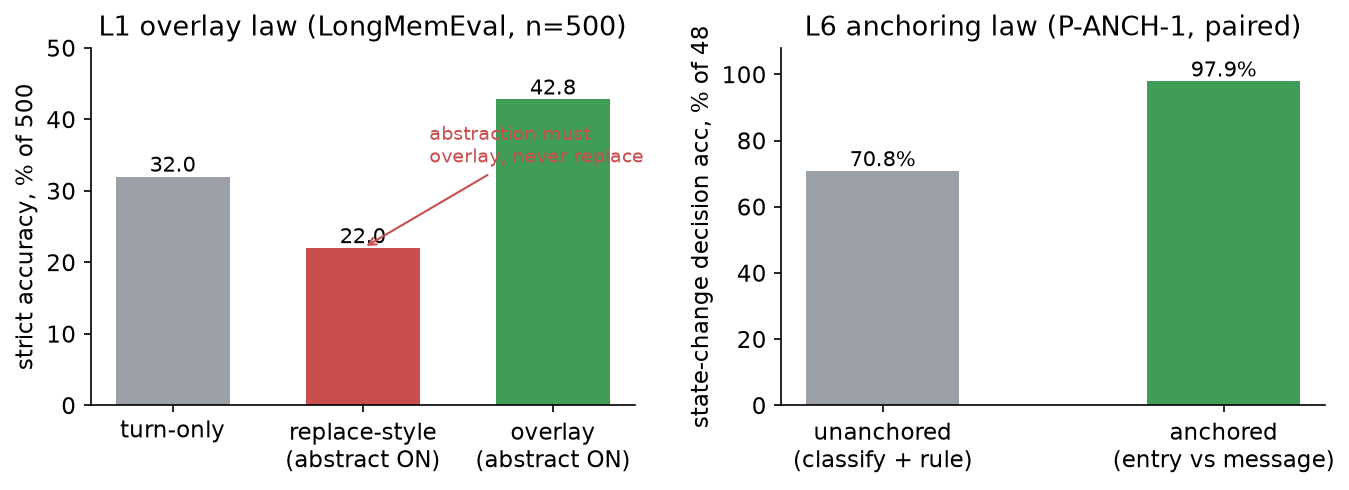
*Two of the engine's laws. Left: replace-style abstraction scores 10 points below
storing nothing, so consolidation overlays instead. Right: the same 48 turns
through two collection strategies — anchored judgment is near-mechanical,
pre-registered paired experiment, discordant 13:0.*
## What you get
Fifteen tools, all under the `mcp__flymemory__` prefix:
| Tool | What it's for |
|---|---|
| `flymemory_remember` | Store a decision or finding. Near-duplicates are merged automatically. `compartment` groups entries by topic; `state_key`/`state_value` track "the current value of X" and retire the old one. |
| `flymemory_recall` | Search. Dense embeddings and keyword matching are fused, older entries fade, and results come back with id, age and where they came from. `include_superseded` digs into history. |
| `flymemory_auto` | Recall and store in one call. This is what the hooks use. |
| `flymemory_recall_index` / `flymemory_get_memory` | Look first, read later: a one-line index, then the full text of whatever looks interesting. |
| `flymemory_supersede` | Say "this old entry is out of date, that one replaces it". |
| `flymemory_state_lookup` / `flymemory_state_history` | Current value for an entity key, or the whole history of it. |
| `flymemory_consolidate` | Fold several entries into one conclusion; the originals stay as evidence. |
| `flymemory_find_conflicts` / `flymemory_insights` | Pairs that look contradictory; valuable entries that are fading. |
| `flymemory_forget` / `flymemory_cleanup` | Delete one entry, or sweep everything that has decayed past a threshold. |
| `flymemory_session_pack` | A short pack of the recent trail and the latest conclusions. |
| `flymemory_stats` | Counts, ages, access counts. |
And two hooks that work on their own:
- **On every prompt** — the prompt is stored, and memories that match it get
appended to the turn. No model call, just local search.
- **On session start** — a recovery pack of recent activity, so a fresh session
isn't starting from nothing.
Both hooks are silent when the service is down, and neither can block a turn.
## Requirements
- DeepSeek Harness with `@deepseek-ai/dsh-mcp-client` available. Built and
tested against `0.2.0-rc.2` and `44.7.0`.
- Node 20+ (the add-on and its CLI).
- Python 3.10+ with the engine's dependencies:
```bash
pip install torch sentence-transformers "mcp>=1.30,<2" numpy
```
The plugin finds the interpreter for you: it checks `FLYMEMORY_PYTHON`, the
usual install locations, then `PATH`, and it verifies that
`sentence_transformers` actually imports before picking one. On a machine with
several Pythons that saves you the "why won't it start" half hour.
The first run downloads the multilingual embedding model (~470 MB) into the
HuggingFace cache. After that it works offline.
## Install
```bash
# from npm (published 2026-10-26)
dsh plugin --profile desktop add dsh-flymemory
# from GitHub (use your own profile name)
dsh plugin --profile desktop add github:aujurd22/dsh-flymemory
# from a local checkout (absolute path)
dsh plugin --profile desktop add /absolute/path/to/dsh-flymemory
```
Or, from inside an agent session, point the `plugin_manager` tool at the same
spec:
```
plugin_manager(action: "install_bundle", target: "dsh-flymemory")
plugin_manager(action: "install_bundle", target: "github:aujurd22/dsh-flymemory")
plugin_manager(action: "install_bundle", target: "/absolute/path/to/dsh-flymemory")
```
Or use the **Plugins** page in the Web sidebar and pick the folder. The harness
reloads, two rows come up (`flymemory`, `flymemory-mcp`), and the tools appear.
**Trust signals.** License: MIT. Profile: any base-backed profile
(`desktop`/`web`); written against DSH `0.2.0-rc.2` and verified on `44.7.0`.
Permissions: it writes one data directory under `$DSH_HOME`, starts a Python
child process, and talks to it over `127.0.0.1` only — no credentials required
and no outbound network calls. External requirement: Python 3.10+ with torch and
sentence-transformers (see above); the engine is vendored, so no separate
FlyMemory checkout is needed.
Check it:
```bash
node bin/flymemory.mjs status # what it resolved, and what's live
node bin/flymemory.mjs doctor # interpreter, dependencies, endpoint
```
Then ask the model to remember something and search for it. If the tools don't
show up, `doctor` usually says why.
Removing it is the same in reverse:
```
plugin_manager(action: "remove_bundle", target: "dsh-flymemory")
```
Your memory file is not deleted — remove it by hand if you want it gone.
## How it runs
The bundle inserts two rows:
| Row | Module | Job |
|---|---|---|
| `flymemory` | this package | Probes the port, starts the engine if nothing is there, records the resolved settings, registers the recall/capture hooks |
| `flymemory-mcp` | `@deepseek-ai/dsh-mcp-client` | Turns the service's tools into `mcp__flymemory__<tool>` |
The hooks used to ride DSH's Claude-Code hook bridge. Builds from 44.7 onwards no
longer ship that package, so the same logic now runs on the plugin's own
`agent/pre-step` listener and the bundle declares no hook-bridge dependency.
When the harness starts, the first row checks `127.0.0.1:8791`. If a FlyMemory
service is already answering there, it's reused — two harness windows share one
engine and one library. If the port is free, the bundled engine starts in the
background and the row waits for it before letting the next row connect. If
something else owns the port, the plugin says so and leaves it alone; it never
kills a process it didn't start.
Cold starts are slow: the engine imports torch before it can listen, which takes
15–20 seconds. The row waits up to 25 seconds by default, and the mcp-client
reconnects on its own if it has to.
If the engine can't start at all — no interpreter, missing dependency, port
conflict — the harness still boots. You just don't get the tools, and the reason
is in the log.
## Settings
Environment variables, read before the harness starts:
| Variable | Default | |
|---|---|---|
| `FLYMEMORY_MCP_PORT` | `8791` | Service port |
| `FLYMEMORY_MCP_URL` | `http://127.0.0.1:<port>/mcp?app=dsh` | Full endpoint (an `?app=` already present is kept) |
| `FLYMEMORY_APP` | `dsh` | Source tag written on every entry this plugin stores |
| `FLYMEMORY_DATA_DIR` | `$DSH_HOME/flymemory-data` | Library, logs, settings record, pid file |
| `FLYMEMORY_PYTHON` | auto-detected | Interpreter for the engine |
| `FLYMEMORY_DEVICE` / `FLYMEMORY_MODEL` | `cpu` / multilingual MiniLM | Passed to the engine |
A FlyMemory service can be shared by several clients, and each write carries an
`app:<name>` tag saying which one produced it. This plugin connects with
`?app=dsh`, so its entries are marked `app=dsh` in recall output and counted under
`Apps:` in `flymemory_stats` — next to ZCode's `app=zcode` and older untagged
`app=legacy` entries. Change the tag with `FLYMEMORY_APP` if you run several DSH
profiles against one store.
Anything else goes on the row itself, in your profile's `cordis.patch.yml`. A
patch entry replaces the whole `config`, so write out everything you need:
```yaml
- id: flymemory
name: 'dsh-flymemory'
config:
port: 8791
dataDir: 'D:\dsh-memory'
libraryPath: 'D:\dsh-memory\my-lib.pkl'
pythonExe: 'C:\Python313\python.exe'
device: cpu
readinessTimeoutMs: 25000 # 0 = don't wait, let the tools show up later
shutdownOnDispose: true # stop the engine this activation started
nativeHooks: true # recall/capture on every typed prompt
hookTimeoutMs: 6000 # budget per hook request
workingContext: true # publish a bounded memory digest per request
workingContextChars: 1200 # cap for that digest, wrapper included
workingContextMinutes: 240 # how far back the digest looks (pack mode only)
workingContextSource: index # index = retrieve against this step's text; pack = clock window
workingContextTopK: 8 # pointers per digest in index mode
useGate: true # account injected pointers -> expansions/re-calls
recallProtocol: true # tell the model to pull before answering (see below)
# engine-side: FLYMEMORY_SAVE_DEBOUNCE=5 (seconds) batches disk writes; 0 = write-through
writeHooksConfig: true # also write hooks.json for clients outside DSH
seedFromUpstream: false # don't import another library implicitly
upstreamLibrary: '' # set both to import one, once
autostart: true
```
The rest of the options are documented in `resolveOptions()` in
[lib/index.js](lib/index.js). Unknown keys are ignored.
## Where your memory lives
`$DSH_HOME/flymemory-data/flymemory_v3.pkl` — one file, plain data, easy to back
up or delete. Alongside it:
- `hooks.json` — regenerated on every activation; describes the two hooks
- `state.json` — what the last activation resolved (endpoint, library,
interpreter, how the service was obtained); `status` and `doctor` read it, so
they report an override instead of the defaults
- `engine.log` — stdout/stderr of the engine process
- `server.log` — the engine's own log
- `server.pid` — so `flymemory stop` knows what to kill
To run the service on its own, without the harness:
```bash
node bin/flymemory.mjs start
node bin/flymemory.mjs stop
node bin/flymemory.mjs log -n 40
node bin/flymemory.mjs mute 30m # silence the per-request digest (tools keep working)
node bin/flymemory.mjs mute off
node bin/flymemory.mjs ledger # injection -> use rate and hottest ids (add --json)
node bin/flymemory.mjs version # this copy vs the published one
```
Nothing auto-updates: DSH never polls the registry, so `dsh plugin --profile
<profile> add dsh-flymemory` again is the upgrade. `version` tells you whether
one exists.
After installing the bundle, the same CLI is linked into the profile at
`<profile>/node_modules/.bin/dsh-flymemory`.
## About the hooks
They're on by default, because automatic memory is the whole point of the thing.
**Injection is a character budget, not an entry count.** A k-sweep on the same
data (top-5 40.0%, top-10 44.2%, top-20 49.2%, top-50 56.7%) showed the score is
monotone in how much history reaches the reader, so the hook now asks the service
for `flymemory_recall_block`: the best entries' **full text**, packed until a
character budget (`FLYMEMORY_INJECT_CHARS`, default 6000) is spent. Servers older
than 1.6.0 do not expose that tool and the hook falls back to one-line recall, so
mixing this plugin with an older FlyMemory build still works.
**A measured comparison, and what it changed.** LongMemEval oracle, 200 questions,
one reader (2026-10-30): no memory 3.5%, top-5 full text 41.0%, pointer lines only
36.0%, pointers plus the top two hits inlined 37.0%, and the agentic protocol --
the model searches and reads what it needs -- **54.0%** (McNemar against top-5:
p<0.001). Two conclusions: the gain lives in *letting the model pull*, not in
prettier injection; and inlining the closest hits changes nothing (37.0 vs 36.0,
p=0.815), which is why `FLYMEMORY_HYBRID_FULL` defaults to off and exists only as
an experiment switch.
One thing they do **not** inject: upstream`s `RECENT CONTEXT (last ~90 min)` block. It is
a clock window over the whole library, and entries carry no session id — with several
conversations sharing one store, it pulls another conversation's work into this one.
Recall is scoped by the text you just typed instead. If you want the old behaviour,
start the engine with `FLYMEMORY_RECENT_MINUTES=90`.
They run inside this plugin on `agent/pre-step` — no hook bridge package needed.
Worth knowing exactly what that means:
- **Only messages you actually typed are stored and recalled.** The harness tags
a typed prompt `source.kind === "user"`; peer deliveries, system reminders,
automation prompts and model-change notices carry other kinds and are ignored.
A delegated agent gets one recall at task start, then nothing more.
- Credential-shaped text never gets stored, and automation/heartbeat prompts are
skipped before they reach the service.
- Recalled memories are appended to the turn, capped at about 2.5 KB, with a
header saying they are data rather than instructions.
- A second request pulls the top two entries of `compartment="lessons"` and
injects them on their own, so pitfalls come back every turn instead of
competing with ordinary recall. Store one with `flymemory_remember` and
`compartment="lessons"`, starting the text with the tool or environment names
that should bring it back — the keyword channel is what finds it.
If you'd rather have the tools and no automation, turn the hooks off on the row
(a patch entry replaces the whole `config`, so restate what you need):
```yaml
- id: flymemory
name: 'dsh-flymemory'
config:
port: 8791
nativeHooks: false
```
## Keeping context in a band
A session should not have to fill the window before anything happens. Four
pieces keep each request small and keep what matters available.
**1. The working context is an index, not a memory dump.** On every request the
plugin publishes `<working-context source="flymemory" type="index">`: at most
1.2 KB of pointers (`#id | age | app | one line`), with the header saying to call
`flymemory_get_memory(id)` before acting on one.
The pointers are **retrieved against the text entering this step**
(`flymemory_recall_index`), not against a clock. That matters more than it
sounds: the store has no session id, so any time-windowed digest is store-wide —
it shows whatever any host wrote last, and that is exactly how another
conversation's task leaks into this one. `workingContextSource: pack` restores
the old clock-windowed behaviour if you want it.
**A short memory protocol rides along.** Because the measured gain comes from the
model *choosing* to pull (54.0% vs 41.0%, see below), the plugin adds one system
section: when an answer depends on an earlier session, call
`flymemory_recall_index` first, `flymemory_get_memory` for the pointers the answer
hinges on, then answer with the id cited. `recallProtocol: false` removes it.
The model pulls the full text; the plugin never expands a pointer itself. That split is deliberate — upstream
measured the pointer form at +10.5pp evidence coverage **only when the pointer
was followed by an expansion**, and that expansion cost 12.15× pool tokens
(P-USEGATE, 2026-10-26), so expansion stays a model decision. The context is
optional: a runtime suppressor can drop it, `dsh-flymemory mute` silences it for
a while, and a memory outage just leaves the previous digest in place.
**2. use_gate accounting.** Every pointer id that reaches the prompt is stamped
into a per-session ledger (`<dataDir>/usegate.jsonl`, one JSON line per event,
shaped like upstream's `injected id -> uses`). A later `flymemory_get_memory`,
recall or `flymemory_supersede` is attributed to it as `expanded`, `recalled` or
`superseded`. `dsh-flymemory ledger` reports the injection→use rate and the
hottest ids — the measurement upstream adopted (it closes the "injected, but
nobody records whether it was ever used" gap).
**3. Condensation goes back to memory.** When the session logs a
`compaction/summary`, its text is stored as a `checkpoint,compaction` entry in
the `context` compartment. The condensed history stays recallable, and the store
remains the authority rather than the checkpoint being the only copy.
**4. Early compaction (opt-in).** DSH's `compaction-basic` row lives inside the
agent preset, so its threshold can only be changed by restating the preset.
[`examples/early-band.patch.yml`](examples/early-band.patch.yml) does that with
three numbers: compact at **45%** of the window instead of 80%, keep **12%**
verbatim instead of 16%, and a smaller headroom so small windows are valid. Paste
it into your profile patch. It pins a copy of the preset declaration — regenerate
it after a DSH upgrade instead of letting it go stale.
What this deliberately does *not* do: it does not replace DSH's compaction
backend, and cannot — a zero-dependency plugin cannot import
`@deepseek-ai/dsh-compaction`. So the condensing itself stays DSH's, driven
earlier by the preset change, while FlyMemory owns what the model sees every turn
and keeps whatever was condensed.
Prior art this borrows from:
- [MemGPT / Letta (arXiv 2310.08560)](https://arxiv.org/abs/2310.08560) — treat
the context window as RAM and an external store as disk, paging explicitly
between them.
- InfiAgent ([ACL Anthology](https://aclanthology.org/people/li-ming/)) — keep the
reasoning context bounded by rebuilding it from a state snapshot plus a fixed
recent window, instead of compressing only on overflow.
- [Chroma's "context rot" measurements](https://research.trychroma.com/context-rot)
— long contexts degrade; prefer fewer, higher-signal tokens over a bigger
window.
## Importing a library you already have
Nothing is imported unless you ask. If you have a FlyMemory library from
somewhere else and want to move it in, point the plugin at it once:
```yaml
- id: flymemory
name: 'dsh-flymemory'
config:
port: 8791
upstreamLibrary: 'D:\path\to\flymemory_v3.pkl'
seedFromUpstream: true
```
On the next activation the file is copied into place if the target doesn't exist
yet. The original is left alone. The format is the same in both directions, so
you can move it back out later.
## Sharing a service you already run
If a FlyMemory service is already running on this machine and you want DSH to
share its memory rather than keep its own, override both rows in your profile
patch:
```yaml
- id: flymemory
name: 'dsh-flymemory'
config:
port: 8765
libraryPath: 'D:\path\to\flymemory_v3.pkl'
- id: flymemory-mcp
name: '@deepseek-ai/dsh-mcp-client'
config:
serverName: flymemory
transport: streamable-http
url: 'http://127.0.0.1:8765/mcp'
```
`port` is where the plugin looks for the existing service; `libraryPath` is the
file it serves if it ever has to start the engine itself, so both routes lead to
the same memory. Leave the hooks row alone — it follows the endpoint the plugin
resolved. `node bin/flymemory.mjs status` prints "from hooks.json" when an
override like this is in effect, so you can tell it apart from the defaults.
<details>
<summary>Why the hooks row needs no override</summary>
The supervisor writes `<dataDir>/hooks.json` on every activation from the config
it resolved, so the hook scripts always post to whatever endpoint the plugin
actually uses. That file is also how `status` and `doctor` discover an override.
</details>
## Working on it
```bash
node --check lib/index.js # syntax
npm test # unit tests, no Python needed, ~0.3 s
node tests/engine_smoke.mjs # end-to-end against the real engine (needs torch)
python tests/http_smoke.py # protocol check against a running service
```
`npm test` covers the parts that are easy to get wrong: port and library
defaults, config precedence, the generated hook file, endpoint probing. The
engine smoke test runs `apply()` in a throwaway directory against a real Python
engine — it needs torch and sentence-transformers, and prints SKIP if they aren't
there. CI runs the syntax check and the unit tests on Linux, macOS and Windows
across Node 20, 22 and 24.
```
lib/index.js Host half: port probing, engine supervision, hook config
bin/flymemory.mjs CLI built on the same helpers
cordis.patch.yml the two rows this bundle inserts
python/ vendored FlyMemory engine (server, hooks, engine package)
locale/{en,zh}.json title and description for the Plugins page
tests/ unit tests, engine smoke test, protocol smoke test
```
## Rough edges
- **The first start takes 15–20 seconds.** That's torch loading. Set
`readinessTimeoutMs: 0` if you'd rather the harness start immediately and have
the tools appear a few seconds later.
- **The Python dependencies are heavy.** The plugin won't install them for you;
`doctor` tells you what's missing.
- **DSH has no `PreCompact` hook**, so the recovery pack runs at session start
rather than right after a compaction.
- **Tool names are long.** `mcp__flymemory__flymemory_recall` is what the
mcp-client naming rule produces — `mcp__<server>__<tool>` — and it's stable,
just not pretty.
- **One engine per port.** Two harnesses share it; a third instance needs its own
port and its own library, set explicitly.
- **Recall gets slower as the library grows.** Upstream measured ~11 ms per query
at about 1,400 entries on CPU.
## License
MIT. See [LICENSE](LICENSE).
The bundled FlyMemory engine is MIT as well, Copyright (c) 2026 Junrong Du.
[THIRD_PARTY_NOTICES.md](THIRD_PARTY_NOTICES.md) lists exactly which files were
copied, which were adapted, and why.
This server cannot be deployed
Maintenance
ActivityMaintained
ResponsivenessNo issues