A
licenseNot graded
qualityD
maintenanceAn MCP server for AI agents to automate token swaps on Uniswap DEX across multiple blockchains.
4 npm
40
MIT

アルファテスト バージョン 0.1.24
AIエージェントを暗号通貨エコシステムに統合するための単一のソースです。ウォレットの作成と管理、スワップ、送金、DCAなどのイベントベースの取引、ストップロスとテイクプロフィットなど、様々な機能を備えています。Armor MCPはアルファ版でSolanaをサポートしており、ベータ版ではEthereum、Base、Avalanche、Bitcoin、Sui、Berachain、megaETH、Optimism、Ton、BNB、Arbitrumなど、10以上のブロックチェーンをサポートする予定です。ArmorのMCPを使用すれば、統一されたロジックと包括的なツールセットを用いて、あらゆる暗号通貨をAIエージェントに組み込むことができます。
🧠 AIネイティブ
📙 ウォレット管理
🔃 スワップ
🌈 特殊な取引(DCA、ストップロスなど)
⛓️ マルチチェーン
↔️ クロスチェーン取引
🥩 ステーキング
🤖 Agentic フレームワークへの高速統合
👫 社会感情
🔮 予測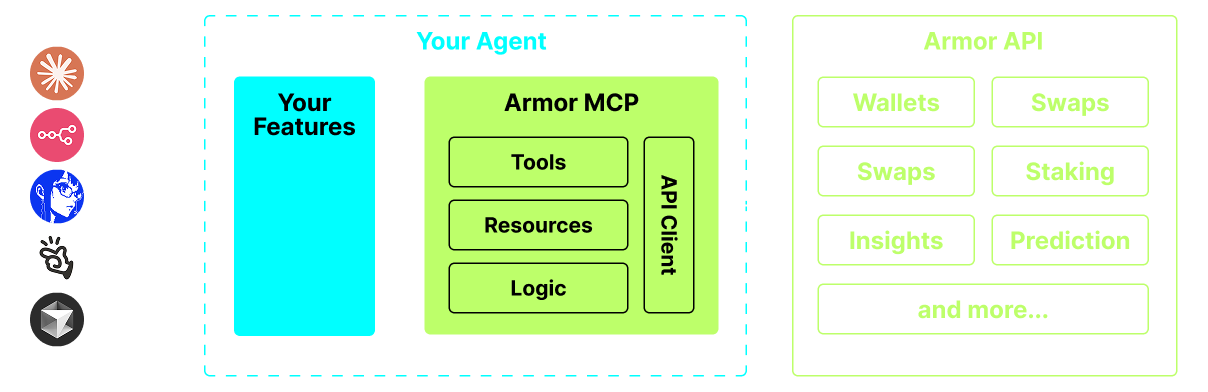
uvをインストールするLinux / Windows
pip install uvマック
brew install uv詳細については、 「使用方法と構成」を参照してください。
現在はプレアルファ版で、Claude Desktop、Cline、Cursor、n8n などのさまざまなエージェントとエージェント フレームワークの機能をテストしています。
ウォレット管理
グループ化と組織化
アーカイブ
スワップとトレード
通常のスワップ
DCA(配置/リスト/キャンセル)
スケジュール注文
指値注文(発注/リスト/キャンセル)
ステーキングとアンステーキング
トークン検索とトレンドトークン
正確な分析のための統計計算機
Solanaブロックチェーンをサポート
Related MCP server: bridge-rates-mcp
さらなるブロックチェーンサポート
鋳造
アーマーエージェントをツールとして使う(またはA2A)
現在、APIキーを取得するにはArmor NFTが必要です。こちらから取得してください。
エージェントで Armor MCP を使用するには、次の構成が必要です。 <PUT-YOUR-KEY-HERE> API キーに置き換えます。
{
  "mcpServers": {
    "armor-crypto-mcp": {
      "command": "uvx",
      "args": ["armor-crypto-mcp@latest", "--version"],
      "env": {
        "ARMOR_API_KEY": "<PUT-YOUR-KEY-HERE>"
      }
    }
  }
}開発者モードが有効になっている必要があります
ウィンドウの左上にあるClaude Desktopのファイルメニューを開きます。
ファイル > 設定に移動します
開発者の下で、構成の編集をクリックします
設定ファイルに、上記のarmor-wallet-mcpセクションを挿入します。
プレースホルダーをAPIキーに置き換えてください
ファイルを保存し、Claude Desktopで新しいチャットを開始します。
VSCodeの左パネルのClineタブにあるMCP Serversボタンをクリックします。
左パネルの一番下までスクロールし、 Configure MCP Serversをクリックします。
設定ファイルに上記のarmor-wallet-mcpセクションを挿入します
プレースホルダーをAPIキーに置き換えてください
ファイルを保存し、 MCP ServersタブのDoneをクリックして、Clineとのチャットを開始します。
n8nアプリを開く
画面の左下にあるユーザー名の横にある...をクリックし、 Settingsをクリックします。
左側のパネルで、 Community nodesをクリックし、 Install a Community Nodeボタンをクリックします。
npm Package Nameの検索フィールドにmcpと入力します。
MCP Nodesをインストールする
任意のMCPノードを追加します。例: List Tools
MCPクライアントParametersタブで、 Select Credentialをクリックし、 Create new credentialクリックします。
Commandの下にuvxと入力
Argumentsにarmor-crypto-mcpと入力する
Environmentsの下にARMOR_API_KEY=eyJhbGciOiJIUzI1NiIsIn...と入力し、 =の後に完全なAPIキー値を貼り付けます。
Parametersタブに戻ると、そのノードのMCP Operationを選択できます。
Armor MCPをセットアップしたら、開始するために使用できるいくつかのプロンプトがあります。
Add wallets to a specified group.

Expects the group name and a list of wallet names, returns a list of AddWalletToGroupResponse.
| Name | Required | Description | Default |
|---|---|---|---|
| add_wallet_to_group_requests | Yes |
| Name | Required | Description |
|---|---|---|
| result | Yes |
Does the description disclose side effects, auth requirements, rate limits, or destructive behavior?
No annotations provided. The description only mentions inputs and return type but lacks behavioral details like idempotency, error handling, or what happens if a wallet is already in the group.
Agents need to know what a tool does to the world before calling it. Descriptions should go beyond structured annotations to explain consequences.
Is the description appropriately sized, front-loaded, and free of redundancy?
Two sentences, 14 words, front-loaded with purpose, no wasted text.
Shorter descriptions cost fewer tokens and are easier for agents to parse. Every sentence should earn its place.
Given the tool's complexity, does the description cover enough for an agent to succeed on first attempt?
Given the tool's complexity (adding wallets to a group) and no annotations, the description is minimal. It covers purpose but not edge cases, partial failures, or group existence requirements. Output schema exists but is not leveraged.
Complex tools with many parameters or behaviors need more documentation. Simple tools need less. This dimension scales expectations accordingly.
Does the description clarify parameter syntax, constraints, interactions, or defaults beyond what the schema provides?
The description does not add meaning beyond the input schema. However, the schema itself has descriptions for parameters, so the baseline is 3.
Input schemas describe structure but not intent. Descriptions should explain non-obvious parameter relationships and valid value ranges.
Does the description clearly state what the tool does and how it differs from similar tools?
The description clearly states 'Add wallets to a specified group' which is a specific verb+resource. It distinguishes from siblings like remove_wallets_from_group and create_groups.
Agents choose between tools based on descriptions. A clear purpose with a specific verb and resource helps agents select the right tool.
Does the description explain when to use this tool, when not to, or what alternatives exist?
No guidance on when to use vs alternatives, no prerequisites (e.g., group must exist), and no mention of when not to use.
Agents often have multiple tools that could apply. Explicit usage guidance like "use X instead of Y when Z" prevents misuse.
Archive wallet groups.

Expects a list of group names, returns a list of GroupArchiveOrUnarchiveResponse.
| Name | Required | Description | Default |
|---|---|---|---|
| archive_wallet_group_requests | Yes |
| Name | Required | Description |
|---|---|---|
| result | Yes |
Does the description disclose side effects, auth requirements, rate limits, or destructive behavior?
With no annotations, the description must disclose behavioral traits. It states the tool archives groups and returns responses, but it does not explain what archiving entails (e.g., reversible? hides groups from lists? impacts wallets?), nor does it mention error handling or any destructive aspect. This lack of detail hinders safe invocation.
Agents need to know what a tool does to the world before calling it. Descriptions should go beyond structured annotations to explain consequences.
Is the description appropriately sized, front-loaded, and free of redundancy?
The description is concise, with only two sentences. The first sentence immediately states the action, and the second clarifies the expected input and output. While it lacks detail, it is well-structured and front-loaded, earning a high score for brevity.
Shorter descriptions cost fewer tokens and are easier for agents to parse. Every sentence should earn its place.
Given the tool's complexity, does the description cover enough for an agent to succeed on first attempt?
Given the tool's complexity (archiving with nested parameters), no annotations, and a rich output schema left unexplained, the description is insufficient. It does not clarify the meaning of archiving, the response structure, or how to handle multiple group requests, leaving critical gaps for an agent to fill.
Complex tools with many parameters or behaviors need more documentation. Simple tools need less. This dimension scales expectations accordingly.
Does the description clarify parameter syntax, constraints, interactions, or defaults beyond what the schema provides?
Schema description coverage is 0%, so the description must compensate. It mentions 'list of group names', but the schema reveals a nested container structure with a required array of ArchiveWalletGroupRequest objects. The description simplifies the actual parameter format and does not explain the need for a container or how to pass multiple groups, which could lead to incorrect parameter construction.
Input schemas describe structure but not intent. Descriptions should explain non-obvious parameter relationships and valid value ranges.
Does the description clearly state what the tool does and how it differs from similar tools?
The description explicitly states the action ('Archive wallet groups') and resource ('wallet groups'). It also distinguishes from sibling tools like unarchive_wallet_group by specifying the archiving action and mentions the input/output types, leaving no ambiguity about the tool's core function.
Agents choose between tools based on descriptions. A clear purpose with a specific verb and resource helps agents select the right tool.
Does the description explain when to use this tool, when not to, or what alternatives exist?
No guidance is provided on when to use this tool versus alternatives such as unarchive_wallet_group or list_groups. The description does not indicate prerequisites, side effects, or scenarios where archiving is appropriate, leaving the agent without decision-making support.
Agents often have multiple tools that could apply. Explicit usage guidance like "use X instead of Y when Z" prevents misuse.
Archive wallets.

Expects a list of wallet names, returns a list of WalletArchiveOrUnarchiveResponse.
| Name | Required | Description | Default |
|---|---|---|---|
| archive_wallet_requests | Yes |
| Name | Required | Description |
|---|---|---|
| result | Yes |
Does the description disclose side effects, auth requirements, rate limits, or destructive behavior?
With no annotations, the description should explain behavioral traits (e.g., side effects, reversibility, error handling). It only states the action and return type, omitting critical details like what 'archive' entails or what happens on failure.
Agents need to know what a tool does to the world before calling it. Descriptions should go beyond structured annotations to explain consequences.
Is the description appropriately sized, front-loaded, and free of redundancy?
Two efficient sentences: first states action, second describes input and output. No filler, front-loaded appropriately.
Shorter descriptions cost fewer tokens and are easier for agents to parse. Every sentence should earn its place.
Given the tool's complexity, does the description cover enough for an agent to succeed on first attempt?
Given the lack of annotations and sibling differentiation, the description is incomplete. It omits the purpose of archiving, effect on wallets, and when to use this tool versus 'archive_wallet_group' or 'unarchive_wallets'. The output type is mentioned but not explained.
Complex tools with many parameters or behaviors need more documentation. Simple tools need less. This dimension scales expectations accordingly.
Does the description clarify parameter syntax, constraints, interactions, or defaults beyond what the schema provides?
Schema coverage is 0%, so the description must compensate. It clarifies that the tool 'expects a list of wallet names', which maps to the nested container structure. But it adds no details about valid values or format, so improvement over schema is minimal.
Input schemas describe structure but not intent. Descriptions should explain non-obvious parameter relationships and valid value ranges.
Does the description clearly state what the tool does and how it differs from similar tools?
The description clearly states the action ('Archive wallets') and mentions the input and output types. However, it does not differentiate from sibling tools like 'archive_wallet_group' or 'unarchive_wallets', so clarity is good but not excellent.
Agents choose between tools based on descriptions. A clear purpose with a specific verb and resource helps agents select the right tool.
Does the description explain when to use this tool, when not to, or what alternatives exist?
No guidance is provided on when to use this tool over alternatives, nor any prerequisites or context. The agent receives no help in deciding between this and related tools.
Agents often have multiple tools that could apply. Explicit usage guidance like "use X instead of Y when Z" prevents misuse.
Perform token conversion quote between two tokens. Good for quickly calculating market prices.

Expects a ConversionRequestContainer, returns a list of ConversionResponse.
| Name | Required | Description | Default |
|---|---|---|---|
| conversion_requests | Yes |
| Name | Required | Description |
|---|---|---|
| result | Yes |
Does the description disclose side effects, auth requirements, rate limits, or destructive behavior?
No annotations are provided, so the description carries the full burden. It only mentions input and output types but does not disclose behavioral traits such as idempotency, error handling, or rate limits.
Agents need to know what a tool does to the world before calling it. Descriptions should go beyond structured annotations to explain consequences.
Is the description appropriately sized, front-loaded, and free of redundancy?
Three sentences efficiently convey the action, usage context, and input/output types without unnecessary words.
Shorter descriptions cost fewer tokens and are easier for agents to parse. Every sentence should earn its place.
Given the tool's complexity, does the description cover enough for an agent to succeed on first attempt?
The description is basic and lacks guidance against similar tools like swap_quote. It mentions output type but does not cover error scenarios or additional behavioral context.
Complex tools with many parameters or behaviors need more documentation. Simple tools need less. This dimension scales expectations accordingly.
Does the description clarify parameter syntax, constraints, interactions, or defaults beyond what the schema provides?
Schema description coverage for the top-level parameter is 0%. The description adds only that it expects a ConversionRequestContainer, which is already in the schema. It does not add meaning beyond the schema for the parameters.
Input schemas describe structure but not intent. Descriptions should explain non-obvious parameter relationships and valid value ranges.
Does the description clearly state what the tool does and how it differs from similar tools?
The description clearly states the tool performs a token conversion quote between two tokens. It provides a specific verb and resource, but does not differentiate from similar sibling tools like swap_quote.
Agents choose between tools based on descriptions. A clear purpose with a specific verb and resource helps agents select the right tool.
Does the description explain when to use this tool, when not to, or what alternatives exist?
The phrase 'Good for quickly calculating market prices' implies usage context, but there is no explicit guidance on when to use this tool versus alternatives like swap_quote or when not to use it.
Agents often have multiple tools that could apply. Explicit usage guidance like "use X instead of Y when Z" prevents misuse.
Safely evaluates a mathematical or statistical expression string using Python syntax.

Supports arithmetic operations (+, -, *, /, **, %, //), list expressions, and a range of math and statistics functions:
abs, round, min, max, len, sum, mean, median, stdev, variance, sin, cos, tan, sqrt, log, exp, floor, ceil, etc.

Custom variables can be passed via the 'variables' dict, including lists for time series data.
| Name | Required | Description | Default |
|---|---|---|---|
| variables | Yes | ||
| expression | Yes |
Does the description disclose side effects, auth requirements, rate limits, or destructive behavior?
The description mentions 'Safely evaluates' implying sandboxed execution, and lists supported functions, but does not disclose limitations like expression length, timeout, error handling, or side effects. With no annotations, more detail would be beneficial.
Agents need to know what a tool does to the world before calling it. Descriptions should go beyond structured annotations to explain consequences.
Is the description appropriately sized, front-loaded, and free of redundancy?
The description is concise with two paragraphs, first stating the core purpose and second listing capabilities. It is front-loaded with the key verb 'evaluates' and resource 'expression string', though the list of functions could be shortened.
Shorter descriptions cost fewer tokens and are easier for agents to parse. Every sentence should earn its place.
Given the tool's complexity, does the description cover enough for an agent to succeed on first attempt?
The description covers the expression syntax and variable usage, but lacks information about the return value format (e.g., numeric result) and any potential errors. Given the absence of an output schema, this omission reduces completeness.
Complex tools with many parameters or behaviors need more documentation. Simple tools need less. This dimension scales expectations accordingly.
Does the description clarify parameter syntax, constraints, interactions, or defaults beyond what the schema provides?
With 0% schema description coverage, the description adds significant meaning: explains that 'expression' uses Python syntax, and 'variables' can include lists for time series data. This compensates well for the lack of parameter descriptions in the schema.
Input schemas describe structure but not intent. Descriptions should explain non-obvious parameter relationships and valid value ranges.
Does the description clearly state what the tool does and how it differs from similar tools?
The description clearly states the tool evaluates mathematical/statistical expressions using Python syntax, lists supported operations and functions, and distinguishes it from sibling tools that are financial or data-oriented.
Agents choose between tools based on descriptions. A clear purpose with a specific verb and resource helps agents select the right tool.
Does the description explain when to use this tool, when not to, or what alternatives exist?
The description provides clear context for when to use the tool (evaluating math/stat expressions) but does not explicitly state when not to use it or suggest alternatives for more specific calculations, such as financial formulas.
Agents often have multiple tools that could apply. Explicit usage guidance like "use X instead of Y when Z" prevents misuse.
Create a DCA order.

Note: Make a single or multiple dca_order_requests
| Name | Required | Description | Default |
|---|---|---|---|
| cancel_dca_order_requests | Yes |
| Name | Required | Description |
|---|---|---|
| result | Yes |
Does the description disclose side effects, auth requirements, rate limits, or destructive behavior?
No annotations provided, and the description falsely describes the behavior as creation. It fails to disclose any cancellation specifics, side effects, or prerequisites.
Agents need to know what a tool does to the world before calling it. Descriptions should go beyond structured annotations to explain consequences.
Is the description appropriately sized, front-loaded, and free of redundancy?
Extremely short but factually incorrect. Conciseness is not beneficial when the content is misleading.
Shorter descriptions cost fewer tokens and are easier for agents to parse. Every sentence should earn its place.
Given the tool's complexity, does the description cover enough for an agent to succeed on first attempt?
Given the lack of annotations and the complex nested parameter structure, the description is completely inadequate and actively harmful, failing to inform the agent how to use the tool.
Complex tools with many parameters or behaviors need more documentation. Simple tools need less. This dimension scales expectations accordingly.
Does the description clarify parameter syntax, constraints, interactions, or defaults beyond what the schema provides?
The description does not explain the 'cancel_dca_order_requests' parameter structure. It incorrectly refers to 'dca_order_requests' in a creation context, adding no value and causing confusion.
Input schemas describe structure but not intent. Descriptions should explain non-obvious parameter relationships and valid value ranges.
Does the description clearly state what the tool does and how it differs from similar tools?
The description states 'Create a DCA order', which directly contradicts the tool's name and input schema that clearly indicate cancellation. This is severely misleading and provides no clear purpose.
Agents choose between tools based on descriptions. A clear purpose with a specific verb and resource helps agents select the right tool.
Does the description explain when to use this tool, when not to, or what alternatives exist?
No guidance on when to use this tool versus the sibling 'create_dca_order' or other order management tools. The description is actively misleading by suggesting creation instead of cancellation.
Agents often have multiple tools that could apply. Explicit usage guidance like "use X instead of Y when Z" prevents misuse.
Cancel a limit, take profit or stop loss order.

Expects a CancelOrderRequestContainer, returns a CancelOrderResponseContainer.
| Name | Required | Description | Default |
|---|---|---|---|
| cancel_order_requests | Yes |
| Name | Required | Description |
|---|---|---|
| cancel_order_responses | Yes |
Does the description disclose side effects, auth requirements, rate limits, or destructive behavior?
No annotations are provided, so the description must disclose behavioral traits. It mentions the expected request and response types but does not note side effects, required permissions, or idempotency, which are important for a cancellation action.
Agents need to know what a tool does to the world before calling it. Descriptions should go beyond structured annotations to explain consequences.
Is the description appropriately sized, front-loaded, and free of redundancy?
The description is two concise sentences, front-loading the purpose. It could be slightly longer to include usage hints, but it is not verbose.
Shorter descriptions cost fewer tokens and are easier for agents to parse. Every sentence should earn its place.
Given the tool's complexity, does the description cover enough for an agent to succeed on first attempt?
For a simple tool with one parameter and an output schema, the description covers the essential purpose and input/output format. However, it omits error scenarios and idempotency, leaving some completeness gaps.
Complex tools with many parameters or behaviors need more documentation. Simple tools need less. This dimension scales expectations accordingly.
Does the description clarify parameter syntax, constraints, interactions, or defaults beyond what the schema provides?
Schema description coverage is 0% for the top-level parameter, but the description adds that it expects a CancelOrderRequestContainer. This provides context beyond the schema, though it does not detail the structure of inner fields.
Input schemas describe structure but not intent. Descriptions should explain non-obvious parameter relationships and valid value ranges.
Does the description clearly state what the tool does and how it differs from similar tools?
The description clearly states the action ('Cancel') and the resource ('a limit, take profit or stop loss order'), using a specific verb and resource. This distinguishes it from sibling tools like 'create_order' or 'get_all_orders'.
Agents choose between tools based on descriptions. A clear purpose with a specific verb and resource helps agents select the right tool.
Does the description explain when to use this tool, when not to, or what alternatives exist?
The description does not provide guidance on when to use this tool versus alternatives like 'cancel_dca_order'. It simply states what it cancels, leaving the agent to infer usage context.
Agents often have multiple tools that could apply. Explicit usage guidance like "use X instead of Y when Z" prevents misuse.
Create a DCA order.

Expects a DCAOrderRequestContainer, returns a list of DCAOrderResponse.
| Name | Required | Description | Default |
|---|---|---|---|
| dca_order_requests | Yes |
| Name | Required | Description |
|---|---|---|
| result | Yes |
Does the description disclose side effects, auth requirements, rate limits, or destructive behavior?
With no annotations, description bears full burden. It confirms creation but omits side effects, permissions required, idempotency, or error conditions. Inadequate for a mutation tool.
Agents need to know what a tool does to the world before calling it. Descriptions should go beyond structured annotations to explain consequences.
Is the description appropriately sized, front-loaded, and free of redundancy?
Description is very short (two sentences), front-loading purpose. Acceptably concise but sacrifices necessary detail.
Shorter descriptions cost fewer tokens and are easier for agents to parse. Every sentence should earn its place.
Given the tool's complexity, does the description cover enough for an agent to succeed on first attempt?
Given the complex input schema (many nested fields) and lack of annotations, the description is severely incomplete. It fails to convey any context about how to construct the request or what the response contains, making it insufficient for effective tool use.
Complex tools with many parameters or behaviors need more documentation. Simple tools need less. This dimension scales expectations accordingly.
Does the description clarify parameter syntax, constraints, interactions, or defaults beyond what the schema provides?
Schema description coverage is 0% for the top-level parameter. The description adds only 'Expects a DCAOrderRequestContainer' without explaining its structure or required subfields, leaving the agent to parse the complex nested schema unaided.
Input schemas describe structure but not intent. Descriptions should explain non-obvious parameter relationships and valid value ranges.
Does the description clearly state what the tool does and how it differs from similar tools?
Description clearly states 'Create a DCA order,' identifying the verb and resource. However, it does not differentiate from sibling 'create_order' or other order creation tools.
Agents choose between tools based on descriptions. A clear purpose with a specific verb and resource helps agents select the right tool.
Does the description explain when to use this tool, when not to, or what alternatives exist?
No guidance on when to use this tool versus alternatives like 'create_order' or 'cancel_dca_order'. Lacks any context about prerequisites or typical use cases.
Agents often have multiple tools that could apply. Explicit usage guidance like "use X instead of Y when Z" prevents misuse.
Create new wallet groups.

Expects a list of group names, returns a list of CreateGroupResponse.
| Name | Required | Description | Default |
|---|---|---|---|
| create_groups_requests | Yes |
| Name | Required | Description |
|---|---|---|
| result | Yes |
Does the description disclose side effects, auth requirements, rate limits, or destructive behavior?
No annotations are provided, and the description does not disclose any behavioral traits beyond the basic creation action, such as idempotency, side effects, or permissions needed.
Agents need to know what a tool does to the world before calling it. Descriptions should go beyond structured annotations to explain consequences.
Is the description appropriately sized, front-loaded, and free of redundancy?
Two sentences, no wasted words, front-loaded with the core action and expected input/output.
Shorter descriptions cost fewer tokens and are easier for agents to parse. Every sentence should earn its place.
Given the tool's complexity, does the description cover enough for an agent to succeed on first attempt?
For a simple creation tool with output schema and one parameter, description is fairly complete. Could mention constraints like maximum groups, but sufficient for basic use.
Complex tools with many parameters or behaviors need more documentation. Simple tools need less. This dimension scales expectations accordingly.
Does the description clarify parameter syntax, constraints, interactions, or defaults beyond what the schema provides?
Schema description coverage is 0%, so the description should compensate. It simplifies input as 'list of group names' but actual schema expects array of objects with 'name'. Adds some context but not fully precise.
Input schemas describe structure but not intent. Descriptions should explain non-obvious parameter relationships and valid value ranges.
Does the description clearly state what the tool does and how it differs from similar tools?
Description clearly states the tool creates wallet groups and mentions input (list of group names) and output (list of CreateGroupResponse). However, it does not explicitly differentiate from sibling tools like add_wallets_to_group or archive_wallet_group.
Agents choose between tools based on descriptions. A clear purpose with a specific verb and resource helps agents select the right tool.
Does the description explain when to use this tool, when not to, or what alternatives exist?
No guidance on when to use this tool versus alternatives, no prerequisites or context provided. The description is purely functional.
Agents often have multiple tools that could apply. Explicit usage guidance like "use X instead of Y when Z" prevents misuse.
Create a order. Can be a limit, take profit or stop loss order.

Expects a CreateOrderRequestContainer, returns a CreateOrderResponseContainer.
| Name | Required | Description | Default |
|---|---|---|---|
| create_order_requests | Yes |
| Name | Required | Description |
|---|---|---|
| create_order_responses | Yes |
Does the description disclose side effects, auth requirements, rate limits, or destructive behavior?
No annotations are provided, so the description must fully disclose behavior. It mentions input/output container types but does not describe side effects (e.g., order lifecycle, wallet impact), authentication needs, or constraints. Minimal transparency.
Agents need to know what a tool does to the world before calling it. Descriptions should go beyond structured annotations to explain consequences.
Is the description appropriately sized, front-loaded, and free of redundancy?
Two concise sentences with no wasted words. However, it could be restructured to front-load the most critical info (order types) more clearly.
Shorter descriptions cost fewer tokens and are easier for agents to parse. Every sentence should earn its place.
Given the tool's complexity, does the description cover enough for an agent to succeed on first attempt?
Given the tool's complexity (many parameters, nested objects, multiple order types), the description is too brief. It does not explain when to use each order type, how parameters interact, or what the output looks like. Output schema exists but description does not leverage it.
Complex tools with many parameters or behaviors need more documentation. Simple tools need less. This dimension scales expectations accordingly.
Does the description clarify parameter syntax, constraints, interactions, or defaults beyond what the schema provides?
The input schema has detailed descriptions for most nested properties, so schema coverage is effectively high even though top-level schema has no descriptions. The description adds minimal extra meaning beyond listing order types. Baseline 3 is appropriate.
Input schemas describe structure but not intent. Descriptions should explain non-obvious parameter relationships and valid value ranges.
Does the description clearly state what the tool does and how it differs from similar tools?
Clearly states it creates an order and lists specific order types (limit, take profit, stop loss). Differentiates from sibling tools like cancel_order, list_orders, and create_dca_order by specifying the action and types.
Agents choose between tools based on descriptions. A clear purpose with a specific verb and resource helps agents select the right tool.
Does the description explain when to use this tool, when not to, or what alternatives exist?
No guidance on when to use create_order versus alternatives such as create_dca_order or swap_quote. No when-not-to-use or prerequisite information.
Agents often have multiple tools that could apply. Explicit usage guidance like "use X instead of Y when Z" prevents misuse.
Create new wallets.

Expects a list of wallet names, returns a list of WalletInfo.
| Name | Required | Description | Default |
|---|---|---|---|
| create_wallet_requests | Yes |
| Name | Required | Description |
|---|---|---|
| result | Yes |
Does the description disclose side effects, auth requirements, rate limits, or destructive behavior?
Without annotations, the description must disclose behavioral traits. It only mentions input/output format (list of names, returns WalletInfo) but omits details like idempotency, duplicate handling, limits, or side effects. This is insufficient for a mutation tool.
Agents need to know what a tool does to the world before calling it. Descriptions should go beyond structured annotations to explain consequences.
Is the description appropriately sized, front-loaded, and free of redundancy?
Two sentences with no wasted words. Front-loaded with the core action, followed by precise input/output expectations.
Shorter descriptions cost fewer tokens and are easier for agents to parse. Every sentence should earn its place.
Given the tool's complexity, does the description cover enough for an agent to succeed on first attempt?
Despite missing behavioral details, the description covers the essential input/output contract. The existence of an output schema (though not shown) reduces the need to explain return values. However, for a creation tool, more context (e.g., idempotency, conflicts) would be beneficial.
Complex tools with many parameters or behaviors need more documentation. Simple tools need less. This dimension scales expectations accordingly.
Does the description clarify parameter syntax, constraints, interactions, or defaults beyond what the schema provides?
Schema coverage is low (0% for main parameter containers), but the description clarifies that a list of wallet names is expected. It adds some meaning beyond the schema, which shows nested objects with name property. However, it does not fully compensate for coverage gaps.
Input schemas describe structure but not intent. Descriptions should explain non-obvious parameter relationships and valid value ranges.
Does the description clearly state what the tool does and how it differs from similar tools?
The description clearly states 'Create new wallets', which is a specific verb+resource. It distinguishes from siblings like rename_wallets or archive_wallets, as creating is a distinct action.
Agents choose between tools based on descriptions. A clear purpose with a specific verb and resource helps agents select the right tool.
Does the description explain when to use this tool, when not to, or what alternatives exist?
No guidance on when to use this tool versus alternatives (e.g., add_wallets_to_group). The description implies usage for creation but lacks exclusions or context-specific recommendations.
Agents often have multiple tools that could apply. Explicit usage guidance like "use X instead of Y when Z" prevents misuse.
Retrieve all limit, take profit and stop loss orders.

Returns a list of orders.
| Name | Required | Description | Default |
|---|---|---|---|
| get_all_orders_requests | Yes |
| Name | Required | Description |
|---|---|---|
| list_order_responses | Yes |
Does the description disclose side effects, auth requirements, rate limits, or destructive behavior?
The description fails to disclose that a status filter is required, that results are limited, or any ordering/pagination behavior. With no annotations, the description carries the full burden but is minimal and slightly inaccurate.
Agents need to know what a tool does to the world before calling it. Descriptions should go beyond structured annotations to explain consequences.
Is the description appropriately sized, front-loaded, and free of redundancy?
Two sentences, front-loaded with purpose. The second sentence is redundant but not harmful. No unnecessary information.
Shorter descriptions cost fewer tokens and are easier for agents to parse. Every sentence should earn its place.
Given the tool's complexity, does the description cover enough for an agent to succeed on first attempt?
Given the presence of output schema and two parameters, the description is insufficient. It omits the required status filter, the meaning of the limit parameter, and any details about the output beyond 'a list of orders.'
Complex tools with many parameters or behaviors need more documentation. Simple tools need less. This dimension scales expectations accordingly.
Does the description clarify parameter syntax, constraints, interactions, or defaults beyond what the schema provides?
Schema description coverage is 0% and the description adds no parameter details. It does not explain the required status parameter or the limit parameter. The schema has descriptions, but the description text fails to compensate for the low coverage.
Input schemas describe structure but not intent. Descriptions should explain non-obvious parameter relationships and valid value ranges.
Does the description clearly state what the tool does and how it differs from similar tools?
The description clearly states it retrieves limit, take profit, and stop loss orders and returns a list. It distinguishes from sibling tools like list_dca_orders. However, the word 'all' is misleading given the limit parameter.
Agents choose between tools based on descriptions. A clear purpose with a specific verb and resource helps agents select the right tool.
Does the description explain when to use this tool, when not to, or what alternatives exist?
No guidance on when to use this tool versus alternatives like list_dca_orders or search_calls. No mention of prerequisites or context.
Agents often have multiple tools that could apply. Explicit usage guidance like "use X instead of Y when Z" prevents misuse.
Retrieve all wallets with balances.

Returns a list of Wallets and asssets
| Name | Required | Description | Default |
|---|---|---|---|
| get_all_wallets_requests | Yes |
| Name | Required | Description |
|---|---|---|
| result | Yes |
Does the description disclose side effects, auth requirements, rate limits, or destructive behavior?
With no annotations provided, the description must carry the full burden of behavioral disclosure. It states that the tool returns a list but omits important details such as whether the operation is read-only, the effect of the 'is_archived' parameter, authentication requirements, or any rate limits. The description is insufficient to set accurate agent expectations.
Agents need to know what a tool does to the world before calling it. Descriptions should go beyond structured annotations to explain consequences.
Is the description appropriately sized, front-loaded, and free of redundancy?
The description is very short (two sentences) and front-loads the purpose. However, it contains a typo ('asssets') and the second sentence is incomplete ('Returns a list of Wallets and asssets'). The conciseness is good, but the structure could be improved by correcting the typo and integrating the parameter information.
Shorter descriptions cost fewer tokens and are easier for agents to parse. Every sentence should earn its place.
Given the tool's complexity, does the description cover enough for an agent to succeed on first attempt?
Given the existence of an output schema, the description does not need to detail return fields, but it fails to provide essential context such as the scope of wallets (all user wallets?), default filtering behavior (archived excluded), or how to paginate. The tool has one parameter and an output schema, yet the description is too sparse to enable confident use.
Complex tools with many parameters or behaviors need more documentation. Simple tools need less. This dimension scales expectations accordingly.
Does the description clarify parameter syntax, constraints, interactions, or defaults beyond what the schema provides?
Schema description coverage is 0%, meaning the tool description does not explain the parameter. Although the input schema itself describes the 'is_archived' property, the description fails to mention it, so the agent must infer its existence from the schema. The description adds no value beyond the schema for parameter understanding.
Input schemas describe structure but not intent. Descriptions should explain non-obvious parameter relationships and valid value ranges.
Does the description clearly state what the tool does and how it differs from similar tools?
The description uses a clear verb ('Retrieve') and resource ('all wallets'), and specifies that it returns balances. It effectively distinguishes this tool from siblings like 'get_wallet_token_balance' which targets a single wallet. However, it could be more explicit about the scope (e.g., user's wallets).
Agents choose between tools based on descriptions. A clear purpose with a specific verb and resource helps agents select the right tool.
Does the description explain when to use this tool, when not to, or what alternatives exist?
The description provides no guidance on when to use this tool versus alternatives, nor does it mention any prerequisites, exclusions, or context where other tools would be more appropriate. For example, it does not clarify that archived wallets are excluded by default or when 'get_wallet_token_balance' might be preferred.
Agents often have multiple tools that could apply. Explicit usage guidance like "use X instead of Y when Z" prevents misuse.
Get the current Armor Wallet version
| Name | Required | Description | Default |
|---|---|---|---|
No parameters | |||
Does the description disclose side effects, auth requirements, rate limits, or destructive behavior?
No annotations are provided, so the description carries the full burden. It states 'Get' implying a read-only operation, but does not disclose any additional behavioral traits such as caching, error conditions, or response format.
Agents need to know what a tool does to the world before calling it. Descriptions should go beyond structured annotations to explain consequences.
Is the description appropriately sized, front-loaded, and free of redundancy?
The description is extremely concise: one sentence with no wasted words. It is front-loaded and directly conveys the tool's purpose.
Shorter descriptions cost fewer tokens and are easier for agents to parse. Every sentence should earn its place.
Given the tool's complexity, does the description cover enough for an agent to succeed on first attempt?
Given the tool has no parameters and no output schema, the description is largely complete for a simple version retrieval. It could optionally mention that it returns a string, but that is implied.
Complex tools with many parameters or behaviors need more documentation. Simple tools need less. This dimension scales expectations accordingly.
Does the description clarify parameter syntax, constraints, interactions, or defaults beyond what the schema provides?
There are no parameters, so the schema coverage is 100%. The description does not need to add meaning beyond the schema. A baseline score of 4 is appropriate.
Input schemas describe structure but not intent. Descriptions should explain non-obvious parameter relationships and valid value ranges.
Does the description clearly state what the tool does and how it differs from similar tools?
The description clearly states the tool's function: 'Get the current Armor Wallet version'. It uses a specific verb and resource, and it distinguishes itself from sibling tools that perform operations like creating orders or managing wallets.
Agents choose between tools based on descriptions. A clear purpose with a specific verb and resource helps agents select the right tool.
Does the description explain when to use this tool, when not to, or what alternatives exist?
No explicit guidance on when to use this tool versus alternatives. However, the purpose is self-evident as a version check, so the lack of guidelines is acceptable but slightly limits utility.
Agents often have multiple tools that could apply. Explicit usage guidance like "use X instead of Y when Z" prevents misuse.
Gets the current time and date
| Name | Required | Description | Default |
|---|---|---|---|
No parameters | |||
| Name | Required | Description |
|---|---|---|
| result | Yes |
Does the description disclose side effects, auth requirements, rate limits, or destructive behavior?
The description accurately discloses the tool's behavior: it returns the current time and date. With no annotations, this is sufficient. However, it could specify timezone or format for better clarity.
Agents need to know what a tool does to the world before calling it. Descriptions should go beyond structured annotations to explain consequences.
Is the description appropriately sized, front-loaded, and free of redundancy?
The description is a single sentence with no wasted words. It is appropriately sized for the tool's simplicity.
Shorter descriptions cost fewer tokens and are easier for agents to parse. Every sentence should earn its place.
Given the tool's complexity, does the description cover enough for an agent to succeed on first attempt?
The tool is trivial, and an output schema exists (not shown but indicated). The description is complete enough for basic understanding, though adding timezone details would improve it.
Complex tools with many parameters or behaviors need more documentation. Simple tools need less. This dimension scales expectations accordingly.
Does the description clarify parameter syntax, constraints, interactions, or defaults beyond what the schema provides?
No parameters exist, so schema coverage is 100%. The description adds no parameter info, which is acceptable given zero parameters. Baseline 4 applies.
Input schemas describe structure but not intent. Descriptions should explain non-obvious parameter relationships and valid value ranges.
Does the description clearly state what the tool does and how it differs from similar tools?
The description clearly states 'Gets the current time and date', using a specific verb and resource. It uniquely distinguishes itself from sibling tools, none of which retrieve the current time.
Agents choose between tools based on descriptions. A clear purpose with a specific verb and resource helps agents select the right tool.
Does the description explain when to use this tool, when not to, or what alternatives exist?
While no explicit usage guidance is given, the simplicity and uniqueness of the tool imply its use case. It is the only time-related tool among siblings, so agents can infer when to use it.
Agents often have multiple tools that could apply. Explicit usage guidance like "use X instead of Y when Z" prevents misuse.
Get the balance of staked SOL (jupSOL).

Returns a StakeBalanceResponse.
| Name | Required | Description | Default |
|---|---|---|---|
No parameters | |||
| Name | Required | Description |
|---|---|---|
| total_stake_amount | Yes | Total stake balance in jupSol |
| total_stake_amount_in_usd | Yes | Total stake balance in USD |
Does the description disclose side effects, auth requirements, rate limits, or destructive behavior?
No annotations provided, so description must fully disclose behavior. It only mentions the return type without detailing auth needs, rate limits, or safety characteristics (e.g., read-only nature is implied but not stated).
Agents need to know what a tool does to the world before calling it. Descriptions should go beyond structured annotations to explain consequences.
Is the description appropriately sized, front-loaded, and free of redundancy?
Two short sentences, front-loaded with the core action. No unnecessary words, achieving maximum conciseness.
Shorter descriptions cost fewer tokens and are easier for agents to parse. Every sentence should earn its place.
Given the tool's complexity, does the description cover enough for an agent to succeed on first attempt?
With no parameters and an output schema, the description is minimally adequate. However, it could clarify the scope (e.g., per wallet or global) and the meaning of jupSOL. Adequate but leaves room for improvement.
Complex tools with many parameters or behaviors need more documentation. Simple tools need less. This dimension scales expectations accordingly.
Does the description clarify parameter syntax, constraints, interactions, or defaults beyond what the schema provides?
Input schema has no parameters (100% coverage). The description adds minimal value by restating the tool's purpose, but the schema already covers all param info. Baseline for 0 params is 4, and there is no missing semantic detail.
Input schemas describe structure but not intent. Descriptions should explain non-obvious parameter relationships and valid value ranges.
Does the description clearly state what the tool does and how it differs from similar tools?
The description clearly states 'Get the balance of staked SOL (jupSOL)', specifying the verb and resource. It distinguishes from sibling tools like get_wallet_token_balance by focusing specifically on staked SOL (jupSOL).
Agents choose between tools based on descriptions. A clear purpose with a specific verb and resource helps agents select the right tool.
Does the description explain when to use this tool, when not to, or what alternatives exist?
No guidance on when to use this tool versus alternatives (e.g., get_wallet_token_balance, stake_quote). There are no exclusions or prerequisites mentioned, leaving the agent to infer usage context.
Agents often have multiple tools that could apply. Explicit usage guidance like "use X instead of Y when Z" prevents misuse.
Get candle data about any token for analysis.
Expects a CandleStickRequest, returns a list of candle sticks.
| Name | Required | Description | Default |
|---|---|---|---|
| candle_stick_requests | Yes |
| Name | Required | Description |
|---|---|---|
| result | Yes |
Does the description disclose side effects, auth requirements, rate limits, or destructive behavior?
No annotations are provided, and the description only states input/output types. It does not disclose behavioral traits such as data limits, pagination, or permission requirements, which are critical for a data retrieval tool.
Agents need to know what a tool does to the world before calling it. Descriptions should go beyond structured annotations to explain consequences.
Is the description appropriately sized, front-loaded, and free of redundancy?
The description is short (2 sentences) with no wasted words. The first sentence states purpose, the second clarifies input/output. However, it could be more informative within the same length.
Shorter descriptions cost fewer tokens and are easier for agents to parse. Every sentence should earn its place.
Given the tool's complexity, does the description cover enough for an agent to succeed on first attempt?
Given the complexity of the nested CandleStickRequest object and the lack of annotations, the description is insufficient. It doesn't explain the token address requirement, time formats, or how to handle large datasets, leaving significant gaps for an agent.
Complex tools with many parameters or behaviors need more documentation. Simple tools need less. This dimension scales expectations accordingly.
Does the description clarify parameter syntax, constraints, interactions, or defaults beyond what the schema provides?
The input schema descriptions cover all parameters (100%), so baseline is 3. The tool description adds nothing beyond the schema, providing no additional context or validation hints.
Input schemas describe structure but not intent. Descriptions should explain non-obvious parameter relationships and valid value ranges.
Does the description clearly state what the tool does and how it differs from similar tools?
The description clearly states 'Get candle data about any token for analysis', which is a specific verb+resource. It distinguishes this tool from siblings by focusing on candle data, though it doesn't explicitly differentiate from other data retrieval tools.
Agents choose between tools based on descriptions. A clear purpose with a specific verb and resource helps agents select the right tool.
Does the description explain when to use this tool, when not to, or what alternatives exist?
No guidance on when to use this tool versus alternatives like search_token_details or get_wallet_token_balance. The description lacks context for appropriate usage scenarios.
Agents often have multiple tools that could apply. Explicit usage guidance like "use X instead of Y when Z" prevents misuse.
Get the top trending tokens in a particular time frame. Great for comparing market cap or volume.

Expects a TopTrendingTokensRequest, returns a list of tokens with their details.
| Name | Required | Description | Default |
|---|---|---|---|
| top_trending_tokens_requests | Yes |
| Name | Required | Description |
|---|---|---|
| result | Yes |
Does the description disclose side effects, auth requirements, rate limits, or destructive behavior?
With no annotations provided, the description carries full burden for behavioral disclosure. It mentions returning a list of tokens with details but does not explain what 'details' entail, nor does it disclose any read-only nature, rate limits, or potential costs.
Agents need to know what a tool does to the world before calling it. Descriptions should go beyond structured annotations to explain consequences.
Is the description appropriately sized, front-loaded, and free of redundancy?
The description is concise with two sentences, the first stating the main action and the second adding technical context. It is front-loaded and efficient, though the second sentence is somewhat redundant given the schema.
Shorter descriptions cost fewer tokens and are easier for agents to parse. Every sentence should earn its place.
Given the tool's complexity, does the description cover enough for an agent to succeed on first attempt?
The description lacks explanation of what 'trending' means (e.g., based on price change, volume, or social signals) and how tokens are ranked. Despite having an output schema, the agent lacks context to fully understand the tool's purpose relative to siblings like get_token_candle_data.
Complex tools with many parameters or behaviors need more documentation. Simple tools need less. This dimension scales expectations accordingly.
Does the description clarify parameter syntax, constraints, interactions, or defaults beyond what the schema provides?
Schema coverage is 0% as the description does not elaborate on the parameters. Although the schema itself describes the time_frame parameter with an enum, the description adds no value beyond stating it expects a TopTrendingTokensRequest, failing to compensate for the low coverage.
Input schemas describe structure but not intent. Descriptions should explain non-obvious parameter relationships and valid value ranges.
Does the description clearly state what the tool does and how it differs from similar tools?
The description clearly states the tool retrieves top trending tokens for a given time frame and mentions it's useful for comparing market cap or volume, which distinguishes it from sibling tools like search_token_details or get_token_candle_data.
Agents choose between tools based on descriptions. A clear purpose with a specific verb and resource helps agents select the right tool.
Does the description explain when to use this tool, when not to, or what alternatives exist?
The description implies usage for comparing market cap or volume over a time frame, but does not explicitly specify when to use this tool versus alternatives, nor does it provide when-not-to-use guidance.
Agents often have multiple tools that could apply. Explicit usage guidance like "use X instead of Y when Z" prevents misuse.
Get the balance for a list of wallet/token pairs.

Expects a WalletTokenPairsContainer, returns a list of WalletTokenBalance.
| Name | Required | Description | Default |
|---|---|---|---|
| wallet_token_pairs | Yes |
| Name | Required | Description |
|---|---|---|
| result | Yes |
Does the description disclose side effects, auth requirements, rate limits, or destructive behavior?
No annotations are provided. The description merely states it 'gets' balances, implying a read operation, but does not disclose any behavioral traits such as rate limits, caching, or error conditions.
Agents need to know what a tool does to the world before calling it. Descriptions should go beyond structured annotations to explain consequences.
Is the description appropriately sized, front-loaded, and free of redundancy?
The description is very short (two sentences) and front-loaded, but the second sentence is nearly redundant. It is not verbose, but could be more efficient.
Shorter descriptions cost fewer tokens and are easier for agents to parse. Every sentence should earn its place.
Given the tool's complexity, does the description cover enough for an agent to succeed on first attempt?
Given the complexity of the nested input and the presence of an output schema, the description lacks detail about the return structure and fails to provide context for using this tool among many siblings.
Complex tools with many parameters or behaviors need more documentation. Simple tools need less. This dimension scales expectations accordingly.
Does the description clarify parameter syntax, constraints, interactions, or defaults beyond what the schema provides?
Schema description coverage is 0%, and the tool description does not add meaning beyond what is already in the schema. It repeats that it expects a WalletTokenPairsContainer but does not clarify parameter formats or relationships.
Input schemas describe structure but not intent. Descriptions should explain non-obvious parameter relationships and valid value ranges.
Does the description clearly state what the tool does and how it differs from similar tools?
The description clearly states 'Get the balance for a list of wallet/token pairs', which specifies the action and resource. However, it does not differentiate from other similar balance queries like get_stake_balances, missing sibling differentiation.
Agents choose between tools based on descriptions. A clear purpose with a specific verb and resource helps agents select the right tool.
Does the description explain when to use this tool, when not to, or what alternatives exist?
The description only mentions input and output types ('Expects a WalletTokenPairsContainer, returns a list of WalletTokenBalance'), but provides no guidance on when to use this tool versus alternatives, or any exclusions.
Agents often have multiple tools that could apply. Explicit usage guidance like "use X instead of Y when Z" prevents misuse.
List all DCA orders.

Returns a list of DCAOrderResponse.
| Name | Required | Description | Default |
|---|---|---|---|
| list_dca_order_requests | Yes |
| Name | Required | Description |
|---|---|---|
| list_dca_order_responses | Yes |
Does the description disclose side effects, auth requirements, rate limits, or destructive behavior?
No annotations provided. Description 'List all DCA orders' is ambiguous given the schema requires a status parameter. No disclosure of pagination, defaults, or other behaviors.
Agents need to know what a tool does to the world before calling it. Descriptions should go beyond structured annotations to explain consequences.
Is the description appropriately sized, front-loaded, and free of redundancy?
Two concise sentences covering purpose and return type, no unnecessary words.
Shorter descriptions cost fewer tokens and are easier for agents to parse. Every sentence should earn its place.
Given the tool's complexity, does the description cover enough for an agent to succeed on first attempt?
Minimally complete for a simple listing tool but lacks behavioral details such as ordering, pagination behavior, and error cases, especially given no annotations.
Complex tools with many parameters or behaviors need more documentation. Simple tools need less. This dimension scales expectations accordingly.
Does the description clarify parameter syntax, constraints, interactions, or defaults beyond what the schema provides?
Schema provides descriptions for both parameters (limit and status). The description adds no additional meaning beyond what schema already provides.
Input schemas describe structure but not intent. Descriptions should explain non-obvious parameter relationships and valid value ranges.
Does the description clearly state what the tool does and how it differs from similar tools?
Clearly states the verb 'List' and the resource 'DCA orders', distinguishing it from sibling tools like create_dca_order or get_all_orders.
Agents choose between tools based on descriptions. A clear purpose with a specific verb and resource helps agents select the right tool.
Does the description explain when to use this tool, when not to, or what alternatives exist?
No guidance on when to use this tool vs alternatives like get_all_orders. Does not specify scenarios or limitations.
Agents often have multiple tools that could apply. Explicit usage guidance like "use X instead of Y when Z" prevents misuse.
List all wallet groups.

Returns a list of GroupInfo.
| Name | Required | Description | Default |
|---|---|---|---|
No parameters | |||
| Name | Required | Description |
|---|---|---|
| result | Yes |
Does the description disclose side effects, auth requirements, rate limits, or destructive behavior?
No annotations are provided, so the description must carry the burden. It only states that it returns a list of GroupInfo, which is already implied by the output schema. It does not disclose behavioral traits such as whether the operation is read-only or has any side effects.
Agents need to know what a tool does to the world before calling it. Descriptions should go beyond structured annotations to explain consequences.
Is the description appropriately sized, front-loaded, and free of redundancy?
Two short sentences that convey the purpose and output. No extraneous information, front-loaded, and every word earns its place.
Shorter descriptions cost fewer tokens and are easier for agents to parse. Every sentence should earn its place.
Given the tool's complexity, does the description cover enough for an agent to succeed on first attempt?
For a simple list tool with no parameters and an output schema, the description is complete enough. It states the action and return type, though it could add minimal usage context like 'read-only'.
Complex tools with many parameters or behaviors need more documentation. Simple tools need less. This dimension scales expectations accordingly.
Does the description clarify parameter syntax, constraints, interactions, or defaults beyond what the schema provides?
The tool has zero parameters, and the schema coverage is 100%. According to the baseline, 0 parameters merit a 4. The description does not need to add parameter details.
Input schemas describe structure but not intent. Descriptions should explain non-obvious parameter relationships and valid value ranges.
Does the description clearly state what the tool does and how it differs from similar tools?
The description clearly states it lists all wallet groups and returns GroupInfo. It is specific about the resource and action, but does not differentiate from sibling 'list_single_group', which could cause confusion.
Agents choose between tools based on descriptions. A clear purpose with a specific verb and resource helps agents select the right tool.
Does the description explain when to use this tool, when not to, or what alternatives exist?
No guidance on when to use this tool versus alternatives like 'list_single_group' or 'create_groups'. The agent is left to infer context from the tool name alone.
Agents often have multiple tools that could apply. Explicit usage guidance like "use X instead of Y when Z" prevents misuse.
Retrieve details for a single wallet group.

Expects the group name as a parameter, returns SingleGroupInfo.
| Name | Required | Description | Default |
|---|---|---|---|
| list_single_group_requests | Yes |
| Name | Required | Description |
|---|---|---|
| id | Yes | id of the group |
| name | Yes | name of the group |
| wallets | Yes | list of wallets in the group |
| is_archived | Yes | whether the group is archived |
Does the description disclose side effects, auth requirements, rate limits, or destructive behavior?
No annotations provided, so description carries the burden. It indicates a read operation ('retrieve') but lacks disclosure of auth needs, rate limits, or any side effects.
Agents need to know what a tool does to the world before calling it. Descriptions should go beyond structured annotations to explain consequences.
Is the description appropriately sized, front-loaded, and free of redundancy?
Two efficient sentences, front-loaded with core purpose, no redundant words.
Shorter descriptions cost fewer tokens and are easier for agents to parse. Every sentence should earn its place.
Given the tool's complexity, does the description cover enough for an agent to succeed on first attempt?
Given output schema exists, minimal description is adequate. Covers essential info for a simple single-retrieval tool, though could mention error cases.
Complex tools with many parameters or behaviors need more documentation. Simple tools need less. This dimension scales expectations accordingly.
Does the description clarify parameter syntax, constraints, interactions, or defaults beyond what the schema provides?
Schema already documents the 'group_name' parameter with description. The tool description merely repeats 'Expects the group name as a parameter' without adding new semantics.
Input schemas describe structure but not intent. Descriptions should explain non-obvious parameter relationships and valid value ranges.
Does the description clearly state what the tool does and how it differs from similar tools?
The description clearly states the verb 'retrieve' and the resource 'single wallet group'. It distinguishes from siblings like 'list_groups' by specifying it retrieves details for a single group.
Agents choose between tools based on descriptions. A clear purpose with a specific verb and resource helps agents select the right tool.
Does the description explain when to use this tool, when not to, or what alternatives exist?
The description implies usage when needing details of one specific group by name, but does not explicitly state when to use it over alternatives or exclude other contexts.
Agents often have multiple tools that could apply. Explicit usage guidance like "use X instead of Y when Z" prevents misuse.
Remove wallets from a specified group.

Expects the group name and a list of wallet names, returns a list of RemoveWalletFromGroupResponse.
| Name | Required | Description | Default |
|---|---|---|---|
| remove_wallets_from_group_requests | Yes |
| Name | Required | Description |
|---|---|---|
| result | Yes |
Does the description disclose side effects, auth requirements, rate limits, or destructive behavior?
No annotations are provided, so the description must disclose behavioral traits. It mentions returning a list of RemoveWalletFromGroupResponse, but fails to state whether the operation is destructive, reversible, or requires specific permissions, and does not mention error conditions.
Agents need to know what a tool does to the world before calling it. Descriptions should go beyond structured annotations to explain consequences.
Is the description appropriately sized, front-loaded, and free of redundancy?
The description is only two sentences, directly stating the action and expectations with no extraneous information.
Shorter descriptions cost fewer tokens and are easier for agents to parse. Every sentence should earn its place.
Given the tool's complexity, does the description cover enough for an agent to succeed on first attempt?
For a simple removal tool with an output schema, the description is adequate but misses contextual details like prerequisites, behavior when group doesn't exist, or comparison to sibling tools.
Complex tools with many parameters or behaviors need more documentation. Simple tools need less. This dimension scales expectations accordingly.
Does the description clarify parameter syntax, constraints, interactions, or defaults beyond what the schema provides?
The schema has 0% description coverage, so the description must compensate. It mentions 'group name' and 'list of wallet names', but the schema's 'wallet' field is a single string, and multiple removals are handled by an array of requests. This is potentially misleading and adds limited value over the schema.
Input schemas describe structure but not intent. Descriptions should explain non-obvious parameter relationships and valid value ranges.
Does the description clearly state what the tool does and how it differs from similar tools?
The description clearly states 'Remove wallets from a specified group', using a specific verb and resource. It distinguishes from sibling tools like 'add_wallets_to_group'.
Agents choose between tools based on descriptions. A clear purpose with a specific verb and resource helps agents select the right tool.
Does the description explain when to use this tool, when not to, or what alternatives exist?
The description implies usage by stating what it expects ('group name and a list of wallet names'), but no contextual guidance on when to use versus alternatives like 'add_wallets_to_group' or when not to use.
Agents often have multiple tools that could apply. Explicit usage guidance like "use X instead of Y when Z" prevents misuse.
Rename wallets.

Expects a RenameWalletRequestContainer, returns a list.
| Name | Required | Description | Default |
|---|---|---|---|
| rename_wallet_requests | Yes |
| Name | Required | Description |
|---|---|---|
| result | Yes |
Does the description disclose side effects, auth requirements, rate limits, or destructive behavior?
With no annotations, the description carries the full burden, but it only states the input/output format without disclosing any behavioral traits such as whether the operation is destructive, error handling, or permissions needed.
Agents need to know what a tool does to the world before calling it. Descriptions should go beyond structured annotations to explain consequences.
Is the description appropriately sized, front-loaded, and free of redundancy?
The description is extremely concise at two sentences, front-loading the purpose. Every word earns its place without redundancy.
Shorter descriptions cost fewer tokens and are easier for agents to parse. Every sentence should earn its place.
Given the tool's complexity, does the description cover enough for an agent to succeed on first attempt?
Given the simple single-parameter nested schema and presence of an output schema, the description fails to cover prerequisites, error conditions, or post-conditions, leaving significant gaps for an agent to use correctly.
Complex tools with many parameters or behaviors need more documentation. Simple tools need less. This dimension scales expectations accordingly.
Does the description clarify parameter syntax, constraints, interactions, or defaults beyond what the schema provides?
Despite the input schema having descriptions for 'wallet' and 'new_name', the context indicates 0% schema description coverage. The tool description adds no semantic value beyond the schema, only mentioning the container type and return list.
Input schemas describe structure but not intent. Descriptions should explain non-obvious parameter relationships and valid value ranges.
Does the description clearly state what the tool does and how it differs from similar tools?
The description clearly states the action 'Rename wallets', which is a specific verb-resource pair. It distinguishes the tool from siblings like 'archive_wallets' or 'create_wallet' by focusing solely on renaming.
Agents choose between tools based on descriptions. A clear purpose with a specific verb and resource helps agents select the right tool.
Does the description explain when to use this tool, when not to, or what alternatives exist?
No guidance is provided on when to use this tool versus alternatives like 'add_wallets_to_group' or 'archive_wallets'. There is no mention of prerequisites or scenarios where renaming is appropriate.
Agents often have multiple tools that could apply. Explicit usage guidance like "use X instead of Y when Z" prevents misuse.
Get the official token address and symbol for a token symbol or token address.
Try to use this first to get address and symbol of coin. If not found, use search_token_details to get details.

Expects a TokenDetailsRequestContainer, returns a TokenDetailsResponseContainer.
| Name | Required | Description | Default |
|---|---|---|---|
| token_details_requests | Yes |
| Name | Required | Description |
|---|---|---|
| token_details_responses | Yes |
Does the description disclose side effects, auth requirements, rate limits, or destructive behavior?
No annotations are present, so the description carries the full burden. It describes the operation (lookup) and expected I/O types, but does not explicitly state non-destructiveness or permissions. However, the name and context imply safe read, and the fallback advice adds transparency.
Agents need to know what a tool does to the world before calling it. Descriptions should go beyond structured annotations to explain consequences.
Is the description appropriately sized, front-loaded, and free of redundancy?
The description is three sentences, each earning its place: purpose, usage guidance, I/O types. No wasted words, front-loaded with the main action.
Shorter descriptions cost fewer tokens and are easier for agents to parse. Every sentence should earn its place.
Given the tool's complexity, does the description cover enough for an agent to succeed on first attempt?
Given the tool's simplicity and the presence of an output schema, the description sufficiently covers when to use, what input is expected, and what to do on failure. No critical gaps identified.
Complex tools with many parameters or behaviors need more documentation. Simple tools need less. This dimension scales expectations accordingly.
Does the description clarify parameter syntax, constraints, interactions, or defaults beyond what the schema provides?
The input schema has 0% description coverage at the top level, but the nested 'query' field has a schema description ('token symbol or address'). The tool description adds minimal semantic value beyond the schema, only confirming the parameter is for a token query. It does not explain the array container, which could mislead about multiple queries.
Input schemas describe structure but not intent. Descriptions should explain non-obvious parameter relationships and valid value ranges.
Does the description clearly state what the tool does and how it differs from similar tools?
The description clearly states the tool's purpose: 'Get the official token address and symbol for a token symbol or token address.' It also differentiates from the sibling 'search_token_details' by advising to use this tool first and fallback to the sibling if not found.
Agents choose between tools based on descriptions. A clear purpose with a specific verb and resource helps agents select the right tool.
Does the description explain when to use this tool, when not to, or what alternatives exist?
The description provides explicit when-to-use (first attempt for token address/symbol) and when-not-to-use (if not found, use search_token_details). It also names the alternative tool, giving clear guidance on tool selection.
Agents often have multiple tools that could apply. Explicit usage guidance like "use X instead of Y when Z" prevents misuse.
Search and retrieve details about single token.
If only address or symbol is needed, use get_official_token_address first.

Expects a TokenSearchRequest, returns a list of TokenDetailsResponse.
| Name | Required | Description | Default |
|---|---|---|---|
| token_search_requests | Yes |
| Name | Required | Description |
|---|---|---|
| token_search_responses | Yes |
Does the description disclose side effects, auth requirements, rate limits, or destructive behavior?
No annotations provided, so description must disclose behavioral traits. It only mentions input/output types without side effects, permissions, rate limits, or error behavior, leaving significant gaps.
Agents need to know what a tool does to the world before calling it. Descriptions should go beyond structured annotations to explain consequences.
Is the description appropriately sized, front-loaded, and free of redundancy?
Two sentences with no fluff. Front-loaded with action and differentiation. Could be slightly more structured but efficient.
Shorter descriptions cost fewer tokens and are easier for agents to parse. Every sentence should earn its place.
Given the tool's complexity, does the description cover enough for an agent to succeed on first attempt?
Output schema exists, so return explanation is adequate. Missing details on pagination, limits beyond limit parameter, and error handling. Usage tip partially compensates.
Complex tools with many parameters or behaviors need more documentation. Simple tools need less. This dimension scales expectations accordingly.
Does the description clarify parameter syntax, constraints, interactions, or defaults beyond what the schema provides?
Top-level parameter lacks description (0% coverage), but the nested schema defines properties. Description identifies the type (TokenSearchRequest) and return (list of TokenDetailsResponse), adding modest value beyond schema.
Input schemas describe structure but not intent. Descriptions should explain non-obvious parameter relationships and valid value ranges.
Does the description clearly state what the tool does and how it differs from similar tools?
Clear verb+resource combination ('Search and retrieve details about single token') and explicitly distinguishes from sibling get_official_token_address by advising to use that tool for minimal queries.
Agents choose between tools based on descriptions. A clear purpose with a specific verb and resource helps agents select the right tool.
Does the description explain when to use this tool, when not to, or what alternatives exist?
Provides explicit context for when to use an alternative (get_official_token_address) but does not cover other possible alternatives or when not to use this tool.
Agents often have multiple tools that could apply. Explicit usage guidance like "use X instead of Y when Z" prevents misuse.
Send the mnemonic or private key to telegram.
| Name | Required | Description | Default |
|---|---|---|---|
| private_key_request | Yes |
| Name | Required | Description |
|---|---|---|
| result | Yes |
Does the description disclose side effects, auth requirements, rate limits, or destructive behavior?
No annotations exist, so the description carries full burden. It fails to disclose that sending keys externally is a highly risky action, potentially exposing secrets. No warning or behavioral context about the tool's irreversible nature or security implications.
Agents need to know what a tool does to the world before calling it. Descriptions should go beyond structured annotations to explain consequences.
Is the description appropriately sized, front-loaded, and free of redundancy?
The description is extremely short (9 words), which is concise but sacrifices necessary content. Important warnings and parameter details are omitted, making it under-specified rather than efficiently concise.
Shorter descriptions cost fewer tokens and are easier for agents to parse. Every sentence should earn its place.
Given the tool's complexity, does the description cover enough for an agent to succeed on first attempt?
Despite having a complex input schema and an output schema, the description covers none of them. It does not explain input requirements, output format, or security implications, making it incomplete for safe tool usage.
Complex tools with many parameters or behaviors need more documentation. Simple tools need less. This dimension scales expectations accordingly.
Does the description clarify parameter syntax, constraints, interactions, or defaults beyond what the schema provides?
With 0% schema description coverage, the description adds no information about the parameters. It does not mention 'wallet', 'key_type', or the nested 'private_key_request' object, leaving the agent without guidance beyond the schema.
Input schemas describe structure but not intent. Descriptions should explain non-obvious parameter relationships and valid value ranges.
Does the description clearly state what the tool does and how it differs from similar tools?
The description clearly states the action (send) and the resource (mnemonic or private key) and destination (telegram). However, it could be more precise about the mechanism (e.g., to a specific chat) and lacks differentiation from siblings, though the action is unique among them.
Agents choose between tools based on descriptions. A clear purpose with a specific verb and resource helps agents select the right tool.
Does the description explain when to use this tool, when not to, or what alternatives exist?
No guidance on when to use this tool or alternatives is provided. The description does not mention prerequisites, risks, or when not to use it, which is critical for a tool that exposes sensitive keys.
Agents often have multiple tools that could apply. Explicit usage guidance like "use X instead of Y when Z" prevents misuse.
Retrieve a stake quote.

Expects a StakeQuoteRequestContainer, returns a SwapQuoteRequestContainer.
| Name | Required | Description | Default |
|---|---|---|---|
| stake_quote_requests | Yes |
| Name | Required | Description |
|---|---|---|
| swap_quote_requests | Yes |
Does the description disclose side effects, auth requirements, rate limits, or destructive behavior?
No annotations provided. The description lacks disclosure of behavioral traits such as side effects, permissions, or rate limits. Only input/output types are mentioned.
Agents need to know what a tool does to the world before calling it. Descriptions should go beyond structured annotations to explain consequences.
Is the description appropriately sized, front-loaded, and free of redundancy?
Two sentences, but includes redundant type names (e.g., 'StakeQuoteRequestContainer' and 'SwapQuoteRequestContainer'). Could be more concise while retaining clarity.
Shorter descriptions cost fewer tokens and are easier for agents to parse. Every sentence should earn its place.
Given the tool's complexity, does the description cover enough for an agent to succeed on first attempt?
The output schema exists, so return values don't need elaboration. However, missing usage context and behavioral details leaves gaps for an agent to properly invoke the tool.
Complex tools with many parameters or behaviors need more documentation. Simple tools need less. This dimension scales expectations accordingly.
Does the description clarify parameter syntax, constraints, interactions, or defaults beyond what the schema provides?
With 0% schema description coverage, the description adds no parameter details. It only references the request container without explaining individual fields, missing the opportunity to clarify parameter meaning.
Input schemas describe structure but not intent. Descriptions should explain non-obvious parameter relationships and valid value ranges.
Does the description clearly state what the tool does and how it differs from similar tools?
The description clearly states 'Retrieve a stake quote,' specifying a verb and resource. It distinguishes from sibling tools like swap_quote and unstake_quote by name, but does not explicitly differentiate behavior.
Agents choose between tools based on descriptions. A clear purpose with a specific verb and resource helps agents select the right tool.
Does the description explain when to use this tool, when not to, or what alternatives exist?
No guidance on when to use this tool vs alternatives (e.g., vs swap_quote or unstake_quote). No mentions of prerequisites or context.
Agents often have multiple tools that could apply. Explicit usage guidance like "use X instead of Y when Z" prevents misuse.
Execute a stake transaction.

Expects a StakeTransactionRequestContainer, returns a SwapTransactionRequestContainer.
| Name | Required | Description | Default |
|---|---|---|---|
| stake_transaction_requests | Yes |
| Name | Required | Description |
|---|---|---|
| swap_transaction_requests | Yes |
Does the description disclose side effects, auth requirements, rate limits, or destructive behavior?
With no annotations, the description must disclose behavior. It only says it executes a transaction and returns a container, without mentioning side effects, authorization needs, or the unexpected return type 'SwapTransactionRequestContainer,' which may mislead the agent about the tool's output.
Agents need to know what a tool does to the world before calling it. Descriptions should go beyond structured annotations to explain consequences.
Is the description appropriately sized, front-loaded, and free of redundancy?
The description is concise at two sentences, but it sacrifices necessary detail. It could be more informative without losing conciseness, e.g., by explaining the prerequisite of a stake quote.
Shorter descriptions cost fewer tokens and are easier for agents to parse. Every sentence should earn its place.
Given the tool's complexity, does the description cover enough for an agent to succeed on first attempt?
Given the tool's role in a staking workflow and the lack of annotations, the description should clarify the relationship to other tools (e.g., stake_quote) and the container content. It falls short, leaving the tool under-specified.
Complex tools with many parameters or behaviors need more documentation. Simple tools need less. This dimension scales expectations accordingly.
Does the description clarify parameter syntax, constraints, interactions, or defaults beyond what the schema provides?
The description merely repeats the parameter type name 'StakeTransactionRequestContainer' without explaining its structure or required fields. Schema coverage is 0%, so the description fails to compensate, leaving the agent to guess the meaning of 'transaction_id' and the array.
Input schemas describe structure but not intent. Descriptions should explain non-obvious parameter relationships and valid value ranges.
Does the description clearly state what the tool does and how it differs from similar tools?
The description states 'Execute a stake transaction,' which identifies the action and resource. However, it lacks specificity on what a stake transaction entails and does not differentiate it from related siblings like 'stake_quote' or 'unstake_transaction.'
Agents choose between tools based on descriptions. A clear purpose with a specific verb and resource helps agents select the right tool.
Does the description explain when to use this tool, when not to, or what alternatives exist?
No guidance is provided on when to use this tool versus alternatives. There is no mention of prerequisites (e.g., needing a stake quote first) or context for when to use this vs. other staking operations.
Agents often have multiple tools that could apply. Explicit usage guidance like "use X instead of Y when Z" prevents misuse.
Retrieve a swap quote. Be sure to add slippage!

Expects a SwapQuoteRequestContainer, returns a list of SwapQuoteResponse.
| Name | Required | Description | Default |
|---|---|---|---|
| swap_quote_requests | Yes |
| Name | Required | Description |
|---|---|---|
| result | Yes |
Does the description disclose side effects, auth requirements, rate limits, or destructive behavior?
With no annotations provided, the description must disclose behavioral traits. It states the tool returns a list of quotes and expects a container, but it does not mention idempotency, side effects, or required permissions, leaving significant gaps.
Agents need to know what a tool does to the world before calling it. Descriptions should go beyond structured annotations to explain consequences.
Is the description appropriately sized, front-loaded, and free of redundancy?
The description is concise with two sentences, front-loading the main purpose. It avoids unnecessary words, though the second sentence could be integrated more smoothly.
Shorter descriptions cost fewer tokens and are easier for agents to parse. Every sentence should earn its place.
Given the tool's complexity, does the description cover enough for an agent to succeed on first attempt?
Given the complexity (nested schema, no annotations), the description is too brief. It does not explain what a swap quote is, prerequisites, or how slippage should be set, leaving the agent with incomplete context.
Complex tools with many parameters or behaviors need more documentation. Simple tools need less. This dimension scales expectations accordingly.
Does the description clarify parameter syntax, constraints, interactions, or defaults beyond what the schema provides?
Schema description coverage is 0% at the top level, and the description only adds 'Expects a SwapQuoteRequestContainer' and mentions slippage. It does not explain the purpose of the container or the inner parameters beyond what the schema already provides.
Input schemas describe structure but not intent. Descriptions should explain non-obvious parameter relationships and valid value ranges.
Does the description clearly state what the tool does and how it differs from similar tools?
The description clearly states the tool retrieves a swap quote, which is a specific action. The name 'swap_quote' and verb 'retrieve' make the purpose obvious, but it does not explicitly differentiate from sibling tools like 'swap_transaction'.
Agents choose between tools based on descriptions. A clear purpose with a specific verb and resource helps agents select the right tool.
Does the description explain when to use this tool, when not to, or what alternatives exist?
The description implies usage context (before a swap) by mentioning slippage and expected input/output, but it lacks explicit guidance on when to use this tool vs alternatives, such as when a quote is needed before executing a swap.
Agents often have multiple tools that could apply. Explicit usage guidance like "use X instead of Y when Z" prevents misuse.
Execute a swap transaction.

Expects a SwapTransactionRequestContainer, returns a list of SwapTransactionResponse.
| Name | Required | Description | Default |
|---|---|---|---|
| swap_transaction_requests | Yes |
| Name | Required | Description |
|---|---|---|
| result | Yes |
Does the description disclose side effects, auth requirements, rate limits, or destructive behavior?
Description lacks behavioral details such as on-chain execution, irreversibility, permission requirements, or error handling. No annotations exist to compensate.
Agents need to know what a tool does to the world before calling it. Descriptions should go beyond structured annotations to explain consequences.
Is the description appropriately sized, front-loaded, and free of redundancy?
Two sentences, front-loading the purpose, but the description is too brief to provide necessary context while remaining clear.
Shorter descriptions cost fewer tokens and are easier for agents to parse. Every sentence should earn its place.
Given the tool's complexity, does the description cover enough for an agent to succeed on first attempt?
Given the complex nested schema and no annotations, the description omits prerequisites, output schema details, and error conditions, leaving the agent underinformed.
Complex tools with many parameters or behaviors need more documentation. Simple tools need less. This dimension scales expectations accordingly.
Does the description clarify parameter syntax, constraints, interactions, or defaults beyond what the schema provides?
Description names the expected container type but does not explain the meaning of 'transaction_id' or how to obtain it. Schema has 0% description coverage, and the description adds minimal semantic value.
Input schemas describe structure but not intent. Descriptions should explain non-obvious parameter relationships and valid value ranges.
Does the description clearly state what the tool does and how it differs from similar tools?
Description states 'Execute a swap transaction' with input/output types, clearly identifying the action and resource. Distinguished from sibling tools like 'swap_quote' by focusing on execution.
Agents choose between tools based on descriptions. A clear purpose with a specific verb and resource helps agents select the right tool.
Does the description explain when to use this tool, when not to, or what alternatives exist?
No guidance on when to use this tool vs alternatives (e.g., 'swap_quote' for quoting, 'stake_transaction' for staking) or prerequisites like obtaining a transaction_id from a quote.
Agents often have multiple tools that could apply. Explicit usage guidance like "use X instead of Y when Z" prevents misuse.
Transfer tokens from one wallet to another.

Expects a TransferTokensRequestContainer, returns a list of TransferTokenResponse.
| Name | Required | Description | Default |
|---|---|---|---|
| transfer_tokens_requests | Yes |
| Name | Required | Description |
|---|---|---|
| result | Yes |
Does the description disclose side effects, auth requirements, rate limits, or destructive behavior?
With no annotations, the description must disclose behavioral traits. It only mentions input and output types but omits critical details like network fees, authorization requirements, or whether the transfer is atomic. This is insufficient for an agent to safely invoke the tool.
Agents need to know what a tool does to the world before calling it. Descriptions should go beyond structured annotations to explain consequences.
Is the description appropriately sized, front-loaded, and free of redundancy?
The description is very concise (two sentences), but at the expense of missing essential information. It is front-loaded with the core action, yet lacks depth. Every sentence should earn its place, and here they are too brief to be useful.
Shorter descriptions cost fewer tokens and are easier for agents to parse. Every sentence should earn its place.
Given the tool's complexity, does the description cover enough for an agent to succeed on first attempt?
For a transfer tool with no annotations, the description is severely incomplete. It fails to mention preconditions (e.g., checking balances with get_wallet_token_balance), postconditions, or error states. The output schema exists but is not explained, leaving the agent without a full picture.
Complex tools with many parameters or behaviors need more documentation. Simple tools need less. This dimension scales expectations accordingly.
Does the description clarify parameter syntax, constraints, interactions, or defaults beyond what the schema provides?
Despite 0% schema description coverage according to context, the description adds no value beyond restating the expected input format. It does not explain how to construct the TransferTokensRequestContainer or clarify parameter usage, leaving the agent without necessary semantics.
Input schemas describe structure but not intent. Descriptions should explain non-obvious parameter relationships and valid value ranges.
Does the description clearly state what the tool does and how it differs from similar tools?
The description clearly states the action ('Transfer tokens') and the resource ('from one wallet to another'), which is specific and distinguishes from sibling tools like swap_transaction or create_order. However, it does not explicitly differentiate itself from similar transfer or order tools.
Agents choose between tools based on descriptions. A clear purpose with a specific verb and resource helps agents select the right tool.
Does the description explain when to use this tool, when not to, or what alternatives exist?
No guidance is provided on when to use this tool versus alternatives, such as swap_transaction for swaps or create_order for limit orders. The description gives no context about prerequisites or typical use cases.
Agents often have multiple tools that could apply. Explicit usage guidance like "use X instead of Y when Z" prevents misuse.
Unarchive wallet groups.

Expects a list of group names, returns a list of GroupArchiveOrUnarchiveResponse.
| Name | Required | Description | Default |
|---|---|---|---|
| unarchive_wallet_group_requests | Yes |
| Name | Required | Description |
|---|---|---|
| result | Yes |
Does the description disclose side effects, auth requirements, rate limits, or destructive behavior?
No annotations are provided, so the description must disclose behavioral traits. It states the tool unarchives (a mutation) and returns a list of responses, but does not mention side effects, permissions, error handling, or what happens if the group is already unarchived.
Agents need to know what a tool does to the world before calling it. Descriptions should go beyond structured annotations to explain consequences.
Is the description appropriately sized, front-loaded, and free of redundancy?
The description is only two sentences: the first states the purpose, the second describes input and output. It is front-loaded, concise, and contains no redundant information.
Shorter descriptions cost fewer tokens and are easier for agents to parse. Every sentence should earn its place.
Given the tool's complexity, does the description cover enough for an agent to succeed on first attempt?
The tool is simple, but given that the output schema exists (though not shown), the description does not need to detail return values. However, it lacks usage context and behavioral details. The description is minimally adequate but leaves gaps for a complete understanding.
Complex tools with many parameters or behaviors need more documentation. Simple tools need less. This dimension scales expectations accordingly.
Does the description clarify parameter syntax, constraints, interactions, or defaults beyond what the schema provides?
The schema has 0% description coverage, and the description adds some value by stating it expects a list of group names. However, it does not explain the nested structure (UnarchiveWalletGroupRequestContainer) or the exact format of the group name (schema says it's a string). This partially clarifies the input but is not fully comprehensive.
Input schemas describe structure but not intent. Descriptions should explain non-obvious parameter relationships and valid value ranges.
Does the description clearly state what the tool does and how it differs from similar tools?
The description clearly states the tool unarchives wallet groups. It is specific about the action (unarchive) and the resource (wallet groups), distinguishing it from siblings like archive_wallet_group and unarchive_wallets.
Agents choose between tools based on descriptions. A clear purpose with a specific verb and resource helps agents select the right tool.
Does the description explain when to use this tool, when not to, or what alternatives exist?
The description specifies that the tool expects a list of group names and returns responses, but it does not provide guidance on when to use this tool versus alternatives (e.g., undo an archive). The name implies the opposite of archive_wallet_group, but no explicit context is given.
Agents often have multiple tools that could apply. Explicit usage guidance like "use X instead of Y when Z" prevents misuse.
Unarchive wallets.

Expects a list of wallet names, returns a list of WalletArchiveOrUnarchiveResponse.
| Name | Required | Description | Default |
|---|---|---|---|
| unarchive_wallet_requests | Yes |
| Name | Required | Description |
|---|---|---|
| result | Yes |
Does the description disclose side effects, auth requirements, rate limits, or destructive behavior?
No annotations are provided, so the description must fully convey behavioral traits. It mentions the output type but lacks details on idempotency, error handling, or effects on wallet state. The input structure is oversimplified (says 'list of wallet names' but schema shows a nested container).
Agents need to know what a tool does to the world before calling it. Descriptions should go beyond structured annotations to explain consequences.
Is the description appropriately sized, front-loaded, and free of redundancy?
The description is concise (two sentences) and front-loads the primary action. It earns its place without fluff. However, it could be slightly more structured by separating input/output specifications.
Shorter descriptions cost fewer tokens and are easier for agents to parse. Every sentence should earn its place.
Given the tool's complexity, does the description cover enough for an agent to succeed on first attempt?
Given no annotations and only 0% schema description coverage, the description is insufficiently complete. It fails to explain edge cases, required permissions, or the full implications of unarchiving wallets. The output schema exists but isn't leveraged to simplify the description.
Complex tools with many parameters or behaviors need more documentation. Simple tools need less. This dimension scales expectations accordingly.
Does the description clarify parameter syntax, constraints, interactions, or defaults beyond what the schema provides?
Schema description coverage is 0%, so the description must compensate. It says 'Expects a list of wallet names' but the parameter is a nested container with an array of objects, not just a list of strings. This simplification may mislead an AI agent about the exact structure.
Input schemas describe structure but not intent. Descriptions should explain non-obvious parameter relationships and valid value ranges.
Does the description clearly state what the tool does and how it differs from similar tools?
Description clearly states the tool unarchives wallets, which is a specific verb+resource. It distinguishes from siblings like 'archive_wallets' by the inverse operation, and the input/output expectations are explicitly mentioned.
Agents choose between tools based on descriptions. A clear purpose with a specific verb and resource helps agents select the right tool.
Does the description explain when to use this tool, when not to, or what alternatives exist?
The description implies usage (unarchiving wallets) but does not provide when-not-to-use or differentiate precisely from alternatives like 'archive_wallet_group'. No explicit workflow context is given.
Agents often have multiple tools that could apply. Explicit usage guidance like "use X instead of Y when Z" prevents misuse.
Retrieve an unstake quote.
Expects a UnstakeQuoteRequestContainer, returns a SwapQuoteRequestContainer.
| Name | Required | Description | Default |
|---|---|---|---|
| unstake_quote_requests | Yes |
| Name | Required | Description |
|---|---|---|
| swap_quote_requests | Yes |
Does the description disclose side effects, auth requirements, rate limits, or destructive behavior?
No annotations provided, and the description only mentions input/output types. It does not disclose whether the operation is read-only, requires authentication, or any side effects. For a quote retrieval, these details are important for safe invocation.
Agents need to know what a tool does to the world before calling it. Descriptions should go beyond structured annotations to explain consequences.
Is the description appropriately sized, front-loaded, and free of redundancy?
Very brief at two sentences, which is concise but at the expense of useful detail. It could be improved by front-loading key behavioral information without expanding significantly.
Shorter descriptions cost fewer tokens and are easier for agents to parse. Every sentence should earn its place.
Given the tool's complexity, does the description cover enough for an agent to succeed on first attempt?
Given the complexity of a nested request container and the presence of an output schema, the description lacks completeness. It does not explain what the quote contains, any constraints on inputs, or how the output should be interpreted.
Complex tools with many parameters or behaviors need more documentation. Simple tools need less. This dimension scales expectations accordingly.
Does the description clarify parameter syntax, constraints, interactions, or defaults beyond what the schema provides?
The description adds no information beyond the input schema. Schema descriptions already cover parameter fields (from_wallet, input_token, etc.), so the description merely restates the container type. With 0% schema description coverage, this is insufficient.
Input schemas describe structure but not intent. Descriptions should explain non-obvious parameter relationships and valid value ranges.
Does the description clearly state what the tool does and how it differs from similar tools?
The description clearly states the action 'retrieve an unstake quote' and specifies the input/output container types. However, it lacks differentiation from sibling tools like 'stake_quote' and 'swap_quote', missing context on what makes an unstake quote unique.
Agents choose between tools based on descriptions. A clear purpose with a specific verb and resource helps agents select the right tool.
Does the description explain when to use this tool, when not to, or what alternatives exist?
No guidance on when to use this tool versus alternatives. There is no mention of prerequisites, context, or exclusions. The description does not help an agent decide between this and similar quote tools.
Agents often have multiple tools that could apply. Explicit usage guidance like "use X instead of Y when Z" prevents misuse.
Execute an unstake transaction.

Expects a UnstakeTransactionRequestContainer, returns a SwapTransactionRequestContainer.
| Name | Required | Description | Default |
|---|---|---|---|
| unstake_transaction_requests | Yes |
| Name | Required | Description |
|---|---|---|
| swap_transaction_requests | Yes |
Does the description disclose side effects, auth requirements, rate limits, or destructive behavior?
No annotations exist, and the description does not disclose side effects, state changes, or error behavior. It only states input/output types, which is minimal.
Agents need to know what a tool does to the world before calling it. Descriptions should go beyond structured annotations to explain consequences.
Is the description appropriately sized, front-loaded, and free of redundancy?
Two sentences, concise and to the point. The structure is clear, but the technical type reference could be simplified.
Shorter descriptions cost fewer tokens and are easier for agents to parse. Every sentence should earn its place.
Given the tool's complexity, does the description cover enough for an agent to succeed on first attempt?
Given the tool's complexity (single nested parameter, no descriptions, no annotations), the description is insufficient. It lacks information on prerequisites, return behavior, and failure cases.
Complex tools with many parameters or behaviors need more documentation. Simple tools need less. This dimension scales expectations accordingly.
Does the description clarify parameter syntax, constraints, interactions, or defaults beyond what the schema provides?
Schema description coverage is 0%, and the description adds no meaning beyond the schema structure. It mentions the container type but that is already defined in the schema.
Input schemas describe structure but not intent. Descriptions should explain non-obvious parameter relationships and valid value ranges.
Does the description clearly state what the tool does and how it differs from similar tools?
The description clearly states it executes an unstake transaction, with specific input and output types. However, it does not explicitly distinguish from sibling tools like 'unstake_quote' or 'stake_transaction', though the verb 'execute' contrasts with the quote tool.
Agents choose between tools based on descriptions. A clear purpose with a specific verb and resource helps agents select the right tool.
Does the description explain when to use this tool, when not to, or what alternatives exist?
No guidance on when to use this tool vs alternatives (e.g., after obtaining a quote). The description provides no context on prerequisites or scenarios.
Agents often have multiple tools that could apply. Explicit usage guidance like "use X instead of Y when Z" prevents misuse.
Wait for some short amount of time, no more than 10 seconds
| Name | Required | Description | Default |
|---|---|---|---|
| seconds | Yes |
Does the description disclose side effects, auth requirements, rate limits, or destructive behavior?
No annotations provided, so description carries full burden. It states the tool waits up to 10 seconds, but does not disclose whether it is blocking, async, or returns any value. Adequate for a simple sleep, but lacks depth (e.g., precision, thread behavior).
Agents need to know what a tool does to the world before calling it. Descriptions should go beyond structured annotations to explain consequences.
Is the description appropriately sized, front-loaded, and free of redundancy?
Single sentence of 10 words, front-loading the action. No unnecessary words. Excellent conciseness.
Shorter descriptions cost fewer tokens and are easier for agents to parse. Every sentence should earn its place.
Given the tool's complexity, does the description cover enough for an agent to succeed on first attempt?
For a simple tool with one parameter and no output schema, the description is adequate but minimal. Lacks details on return value, blocking behavior, and whether it can be interrupted. Could be more complete for an AI agent.
Complex tools with many parameters or behaviors need more documentation. Simple tools need less. This dimension scales expectations accordingly.
Does the description clarify parameter syntax, constraints, interactions, or defaults beyond what the schema provides?
Schema description coverage is 0%, so description must compensate. The description does not explain the 'seconds' parameter beyond implying time. Does not specify units (though implied), range, or format. Minimal value added over the schema.
Input schemas describe structure but not intent. Descriptions should explain non-obvious parameter relationships and valid value ranges.
Does the description clearly state what the tool does and how it differs from similar tools?
Description clearly states verb 'wait' and resource 'time', with a specific constraint (no more than 10 seconds). Distinguished from sibling tools which are all wallet/order/swap operations, making this a unique utility.
Agents choose between tools based on descriptions. A clear purpose with a specific verb and resource helps agents select the right tool.
Does the description explain when to use this tool, when not to, or what alternatives exist?
No guidance on when to use this tool versus alternatives. Does not mention context (e.g., before subsequent actions) or any exclusions. Agent has no basis for deciding when to invoke it.
Agents often have multiple tools that could apply. Explicit usage guidance like "use X instead of Y when Z" prevents misuse.
Recent tool additions, removals, and schema changes observed during successful MCP inspections.
v1.0.0add_wallets_to_grouparchive_wallet_grouparchive_walletscalculate_token_conversioncalculatorcancel_dca_ordercancel_ordercreate_dca_ordercreate_groupscreate_ordercreate_walletget_all_ordersget_all_walletsget_armor_mcp_versionget_current_timeget_stake_balancesget_token_candle_dataget_top_trending_tokensget_wallet_token_balancelist_dca_orderslist_groupslist_single_groupremove_wallets_from_grouprename_walletssearch_official_token_addresssearch_token_detailssend_key_to_telegramstake_quotestake_transactionswap_quoteswap_transactiontransfer_tokensunarchive_wallet_groupunarchive_walletsunstake_quoteunstake_transactionwait_a_momentScored across 37 tools
Most tools have distinct purposes, but `calculate_token_conversion` and `swap_quote` overlap somewhat, and `search_official_token_address` vs `search_token_details` could confuse without descriptions.
Naming follows a consistent verb_noun pattern (e.g., `create_order`, `get_all_wallets`), with only a few exceptions like `calculator` and `wait_a_moment`.
37 tools is high, covering wallets, orders, swaps, staking, and utilities. Some tools like `calculator`, `get_current_time`, and `wait_a_moment` seem tangential to the core crypto domain, making the set feel slightly bloated.
The tool set covers most CRUD operations for wallets and groups, order management (including DCA), swaps, staking, and token details. Missing wallet deletion and some advanced portfolio features, but core workflows are well covered.
MCP server giving AI agents one-connection access to crypto & DeFi data: DeFi protocol TVL, stableco
MCP server connecting AI agents to non-custodial staking data across 130+ networks.
Trade 16 crypto exchanges + MetaTrader 5 from your AI assistant via one MCP connection.
Trading MCP server for AI agents, with live market data, account reads and controlled execution.