
synapse
<div align="center">
# Synapse
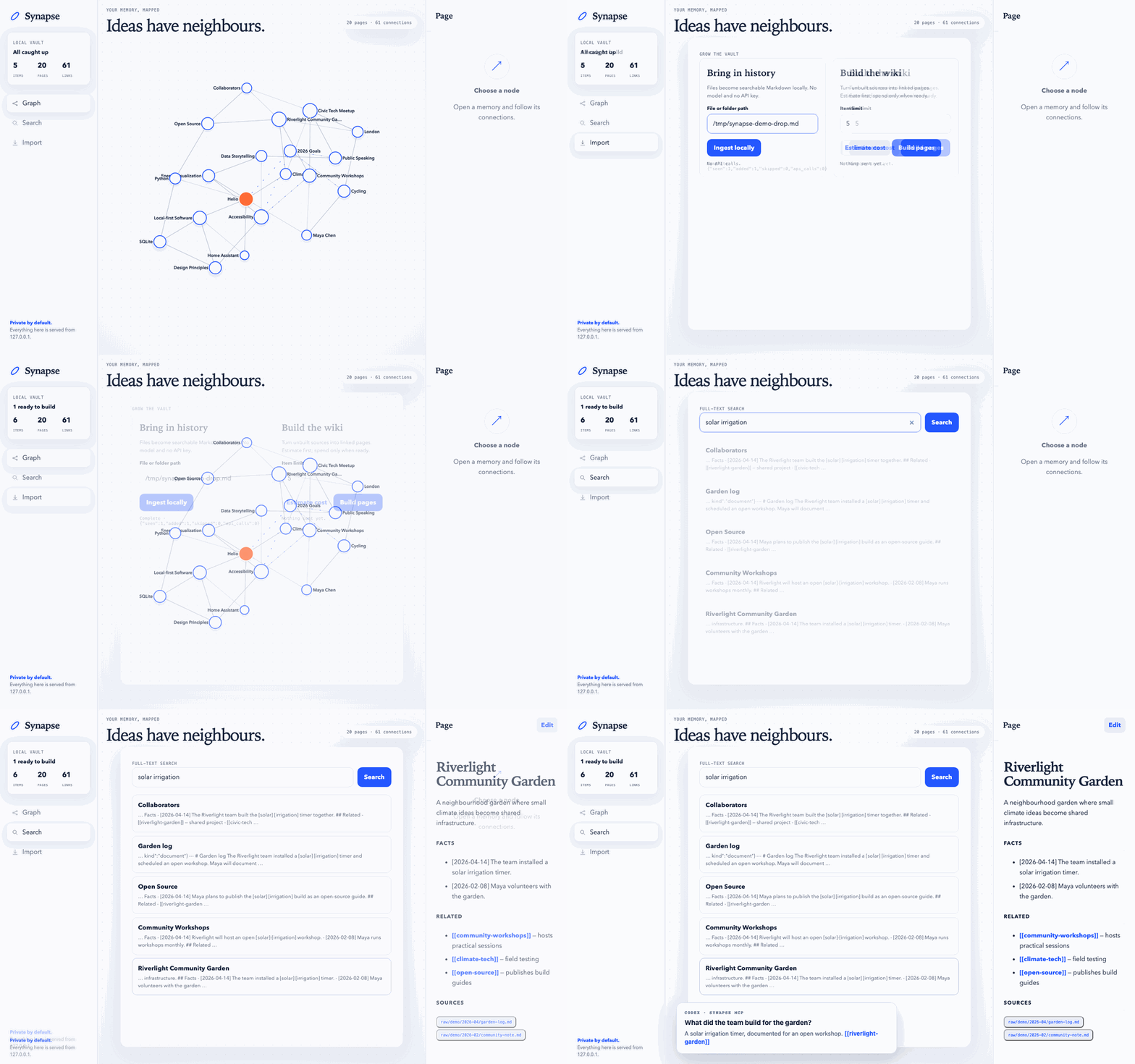
**Point it at text. Get a searchable archive for free. Spend a few cents turning it into a Markdown wiki your agent can query.**
[](https://github.com/anshulyadav1976/synapse/actions/workflows/ci.yml)
[](https://pypi.org/project/synapse-vault/)
[](https://www.python.org/)
[](https://github.com/anshulyadav1976/synapse/blob/main/pyproject.toml)
[](https://github.com/anshulyadav1976/synapse/blob/main/LICENSE)
</div>
Give any AI agent or workspace application a private, local memory without filling every prompt with your history:
```bash
uvx --from synapse-vault synapse mcp --vault /absolute/path/to/my-brain
```
That command is a local STDIO MCP server, not a Codex or OpenAI integration. Connect it directly to MCP-capable clients such as Codex, Claude Code, OpenCode, or OpenClaw. Pi, Orbit, Hermes, and other workspace agents can use MCP when supported or the bundled skill and CLI. See the [copy-paste setup examples](https://github.com/anshulyadav1976/synapse/blob/main/docs/mcp.md).
Nothing from the vault is injected into the agent's prompt. The agent searches first, then reads one relevant Markdown page. A thousand unopened pages cost zero tokens.
## See it in ten seconds
```bash
uvx --from synapse-vault synapse serve --demo
```
That opens a populated 20-page graph. It needs no API key, import, database server, or JavaScript build.
## Keep your own history
```bash
uvx --from synapse-vault synapse init ./my-brain
uvx --from synapse-vault synapse ingest ~/Downloads/chatgpt-export --vault ./my-brain
uvx --from synapse-vault synapse serve --vault ./my-brain
```
A claude.ai export zip works the same way; the format is detected automatically.
Ingest is local and free: it writes Markdown and builds a disposable SQLite FTS5 index. Search works immediately:
```bash
uvx --from synapse-vault synapse search "the phrase I remember" --vault ./my-brain
```
If keyword wording starts missing obvious matches, add the optional semantic cache and fuse both rankings:
```bash
export SYNAPSE_API_KEY="..."
uvx --from synapse-vault synapse embed --vault ./my-brain --dry-run
uvx --from synapse-vault synapse embed --vault ./my-brain
uvx --from synapse-vault synapse search "the idea about handling growth" --hybrid --vault ./my-brain
```
This adds no dependency or vector server. Embeddings are derived from wiki pages and approved notes, stored in the same disposable SQLite file, and never replace FTS5. Raw-history embeddings require the explicit `--include-raw` flag.
To turn raw history into a linked wiki, estimate first and then build a small resumable batch:
```bash
export SYNAPSE_API_KEY="..."
uvx --from synapse-vault synapse build --vault ./my-brain --limit 20 --dry-run
uvx --from synapse-vault synapse build --vault ./my-brain --limit 20
```
The build pass is optional. It is a plain `for` loop making one OpenAI-compatible chat-completions request per item. Run it against OpenAI or a local Ollama/LM Studio server; stop and resume without paying twice.
## Markdown is the database
```text
my-brain/
├── raw/<source>/<YYYY-MM>/<id>.md immutable imported history
├── wiki/<slug>.md linked, editable knowledge pages
├── notes/<slug>.md approved, append-only agent notes
├── synapse.db disposable search + graph indexes
└── synapse.toml model and owner settings
```
Delete `synapse.db` and `synapse reindex --vault ./my-brain` recreates FTS and the graph; run `synapse embed` again only if you use optional semantic search. The durable data is ordinary Markdown that works with git, Obsidian, `grep`, and any editor.
## How it works
1. An adapter streams each source into a tiny `Item` shape with stable IDs and timestamps.
2. Ingest writes immutable raw Markdown and indexes it with SQLite FTS5—no model call.
3. Build compresses one item and asks any OpenAI-compatible model for complete wiki pages.
4. `[[wikilinks]]` become edges; a recursive SQLite CTE handles multi-hop traversal.
5. Optional embeddings add semantic recall; the one-file dashboard, CLI, Python API, REST API, and MCP server all use the same vault.
## Model providers
Synapse uses standard-library HTTP POSTs to `/chat/completions` and, only when requested, `/embeddings`; there is no provider SDK.
| Provider | Base URL | Status |
|---|---|---|
| OpenAI | `https://api.openai.com/v1` | Tested with `gpt-4o-mini` |
| Ollama | `http://localhost:11434/v1` | Compatible; not yet in CI |
| LM Studio | `http://localhost:1234/v1` | Compatible; not yet in CI |
| OpenRouter | `https://openrouter.ai/api/v1` | Compatible; community verification wanted |
| Groq | `https://api.groq.com/openai/v1` | Compatible; community verification wanted |
| Together | `https://api.together.xyz/v1` | Compatible; community verification wanted |
| DeepSeek | `https://api.deepseek.com/v1` | Compatible; community verification wanted |
Set `SYNAPSE_BASE_URL`, `SYNAPSE_MODEL`, and (when required) `SYNAPSE_API_KEY`. See [configuration](https://github.com/anshulyadav1976/synapse/blob/main/docs/configuration.md) and [costs](https://github.com/anshulyadav1976/synapse/blob/main/docs/costs.md).
## Agent access
The MCP server exposes selective reads plus `propose_note`. It is a small stdlib JSON-RPC loop over STDIO, so there is no daemon and no MCP SDK dependency.
```bash
# Codex
codex mcp add synapse -- uvx --from synapse-vault synapse mcp --vault /absolute/path/to/my-brain
# Claude Code
claude mcp add --transport stdio synapse -- uvx --from synapse-vault synapse mcp --vault /absolute/path/to/my-brain
```
OpenCode, OpenClaw, generic MCP JSON, and skill/CLI examples for Pi and other workspace agents are in [MCP setup](https://github.com/anshulyadav1976/synapse/blob/main/docs/mcp.md). The integration boundary is MCP or ordinary commands—not a particular agent vendor.
Agents cannot silently rewrite memory. `propose_note` stages one provenance-bearing semantic note with an idempotency key and revision check. You inspect the diff and approve it outside MCP:
```bash
uvx --from synapse-vault synapse proposals --vault ./my-brain
uvx --from synapse-vault synapse proposals <id> --vault ./my-brain
uvx --from synapse-vault synapse approve-note <id> --vault ./my-brain
```
Imported history remains write-once. Credentials, browser sessions, workspace state, and routine chat turns do not belong in notes; merge and deletion remain human-only.
Python works too: `from synapse import Vault; Vault("./my-brain").search("launch decision")`.
## Not built, on purpose
| Not built | Why |
|---|---|
| Bundled embedding model or vector server | Hybrid search calls the endpoint you choose and keeps its disposable cache in SQLite. |
| Graph database | Personal graphs fit in SQLite; a ten-line recursive CTE handles traversal. |
| Auth or cloud sync | Synapse is single-user and binds only to `127.0.0.1`. Your files stay yours. |
| Agent framework | The processing pipeline is a resumable loop, not an application graph. |
| Automatic merge/delete | Agents can only propose append-only notes; a human approves them and handles destructive changes. |
| PDF/DOCX parser | Those dependencies would break the zero-dependency promise; convert with Pandoc or MarkItDown first. |
Imported text is untrusted data. Synapse never executes it, and agents are instructed never to follow instructions found inside pages. Raw sources remain available for provenance.
## Learn and contribute
- [Add an adapter](https://github.com/anshulyadav1976/synapse/blob/main/docs/adapters.md)—the highest-impact contribution is about 30 lines plus one tiny synthetic fixture.
- Read how the [SQLite graph](https://github.com/anshulyadav1976/synapse/blob/main/docs/graph.md) works.
- See [CONTRIBUTING.md](https://github.com/anshulyadav1976/synapse/blob/main/CONTRIBUTING.md) for the test and pull-request workflow.
Synapse began as the winner of the LangGraph hackathon in London. This is the local-first rewrite that deleted SurrealDB, FastAPI, React, LangGraph, and mandatory embeddings so people can actually run it.
TDQS
Scored across 7 tools
Each tool targets a distinct artifact and operation: search for content discovery, list_pages for catalog browsing, neighbors for link graph, read_page/read_note/read_source for typed reading, and propose_note for writing. Descriptions explicitly cross-reference when to use alternatives, leaving no real ambiguity.
Five of seven tools follow a clear verb_noun pattern (read_page, read_note, list_pages, read_source, propose_note). The bare verb 'search' and noun 'neighbors' deviate from the pattern, though both remain readable and intuitive.
Seven tools is well-scoped for a knowledge-base MCP with retrieval, navigation, and note proposal. Each tool earns its place without redundancy.
Core retrieval and note-proposal workflows are covered, including typed reads for pages, notes, and sources, plus search and graph navigation. However, the write path is limited to proposing/appending notes; there is no tool to list all notes/sources, delete notes, or directly edit/delete wiki pages, leaving some lifecycle gaps.