
Chronicle
by aniketxdey
README.md
# Chronicle
<!-- mcp-name: io.github.aniketxdey/chronicle -->
Record your screen and system events on your computer, write context files and workflows from them, and build them into LLM harnesses for any task. Any AI can use a harness over MCP or as downloaded files.
The [full documentation](https://aniketxdey.github.io/chronicle/docs.html) covers the app, every command, and the API.
An agent usually starts each task with no knowledge of your computer. It doesn't know your ticket, your open file, or your last search, so you paste that context by hand. Chronicle keeps that memory on your computer and lets the agent request it:
- **Continue your work.** "Finish the Acme export" works because the agent can see `export.ts`, the status of PR 882, and the Notion spec.
- **Teach by showing.** Record a task once. The agent gets the apps, pages, and steps in order.
- **Use tools without MCP.** Download a harness as a .zip or one Markdown file for ChatGPT, Claude Projects, NotebookLM, Neo4j, or a RAG pipeline.
Chronicle stores everything in `~/.chronicle`, with no account and no telemetry. See [Privacy](#privacy) for what leaves your computer.
## Quick start
Chronicle needs Python 3.10 or newer. macOS is the main platform, and Linux (X11) and Windows support is best effort.
These commands load a synthetic workday, so Chronicle records nothing.
```bash
uv tool install --python 3.12 "chronicle-context[graph]"
chronicle demo
chronicle context "finish the Acme export"
```
`chronicle context` prints the Markdown that the `get_context` MCP tool returns. The sample output starts like this:
```
# Computer context (Chronicle)
Task: finish the Acme export
Window: the most recent 2h of history.
## What you were doing
- 14:55-15:31 meeting Acme weekly · Jordan Hale (36m)
- 15:34-16:24 writing customer emails · export spec (50m)
- 16:28-16:48 coding export.ts · asking Priya (20m)
## On screen now
- Chrome · Checks · PR 882 (frame 18)
- URL: https://github.com/northwind/billing/actions
```
To open the app, connect an agent, and record your own work:
```bash
chronicle serve
chronicle mcp install cursor
chronicle doctor
chronicle record 30m --label "file an expense report"
```
The app runs at `http://127.0.0.1:3030`. `chronicle mcp clients` lists every client.
### Permissions and tools
| Platform | What Chronicle needs |
| --- | --- |
| macOS | Screen Recording and Accessibility for the app that runs Chronicle. Local sources also need Full Disk Access |
| Linux | X11, a window manager, `xdotool`, and `xprop`. Wayland sessions aren't supported for window tracking |
| Linux screenshots | One of `grim`, `gnome-screenshot`, `scrot`, or ImageMagick `import` |
| Linux clipboard and idle time | `xclip` or `wl-paste`, and `xprintidle` |
| Windows | Nothing extra. Chronicle uses user32 and PowerShell |
| OCR, optional | `brew install tesseract` or `apt install tesseract-ocr` |
On macOS, the app that runs Chronicle is your terminal or the MCP host, such as Claude Desktop or Cursor. Add it under System Settings › Privacy & Security, then quit and reopen it. Closing its windows isn't enough.
## How it works
**Record.** A session runs for a set time, such as `90s`, `30m`, or `2h`, or until you stop it. Every 5 seconds by default, Chronicle samples the front app, its window, and the browser URL. When something changes, and at least every 30 seconds, Chronicle also takes a screenshot and reads screen text. Chronicle never records keystrokes, and it skips password managers, System Settings, and private browser windows.
**Read sources.** Under Privacy & Sources, you can also turn on Apple Mail, Calendar, iMessage, WhatsApp, browser history, folders, and AI tool logs. Every source starts off.
**Build the graph.** Each session gets its own graph. Nodes include apps, pages, files, tickets, PRs, people, topics, and tasks. Every node and edge records its time and its source frames, so an agent can cite its evidence. The all-history graph combines the sessions, and older sessions count less.
**Write.** With a [model](#models) set up, Chronicle names the graph's work, then writes context files and workflows when a recording ends. Without a model, Chronicle runs offline and builds plain context files from the evidence.
**Serve.** Agents read everything over MCP.
| Level | What it is | Example |
| --- | --- | --- |
| Harness | Everything an agent needs for a whole line of work | Recruiting |
| Context file | General guidance for one kind of session | Researching job companies |
| Workflow | A short procedure for one specific job | Customizing resume bullets |
## Connect an agent
### Local clients
`chronicle mcp install <client>` adds Chronicle to a client's config and keeps a `.chronicle-backup` copy of the old file. `chronicle mcp config <client>` prints the snippet and writes nothing.
| Client | Command |
| --- | --- |
| Claude Desktop | `chronicle mcp install claude-desktop` |
| Claude Code | `chronicle mcp install claude-code` |
| Cursor | `chronicle mcp install cursor` |
| VS Code (Copilot agent mode) | `chronicle mcp install vscode` |
| Windsurf | `chronicle mcp install windsurf` |
| OpenAI Codex CLI | `chronicle mcp install codex` |
| Gemini CLI | `chronicle mcp install gemini-cli` |
| Cline | `chronicle mcp install cline` |
| LM Studio | `chronicle mcp install lm-studio` |
| Zed | `chronicle mcp config zed` |
| Continue | `chronicle mcp config continue` |
| Goose | `chronicle mcp config goose` |
Restart the client after an install. Only one Chronicle process captures at a time, so an agent can call `start_recording` without `chronicle serve`. `chronicle mcp --no-record` turns that off.
### Packaged installs
Packaged installs need only [uv](https://docs.astral.sh/uv/).
```bash
claude plugin marketplace add aniketxdey/chronicle
claude plugin install chronicle@chronicle
```
```bash
gemini extensions install https://github.com/aniketxdey/chronicle
```
MCP Registry clients can search for `io.github.aniketxdey/chronicle`.
### Hosted agents and APIs
Hosted agents need a public HTTPS URL. **Anyone with the URL that these commands print can read your Chronicle data.** Stop the tunnel when you finish.
```bash
export CHRONICLE_TOKEN=$(openssl rand -hex 16)
export CHRONICLE_PUBLIC_URL=https://YOUR-TUNNEL-HOST
chronicle serve &
cloudflared tunnel --url http://127.0.0.1:3030
echo "$CHRONICLE_PUBLIC_URL/mcp/$CHRONICLE_TOKEN"
```
`chronicle mcp config` prints a starting point for `chatgpt`, `openai-api`, `anthropic-api`, `gemini-api`, and `http`. Provider model names and beta flags change often, so check each provider's MCP documentation. The [examples folder](https://github.com/aniketxdey/chronicle/tree/main/examples) has longer scripts.
### Files
The harness editor exports a .zip or one Markdown file. Each context file and workflow has **Download .md**. Each graph downloads as JSON, text, GraphML, or Cypher.
## MCP tools
| Tool | What it does |
| --- | --- |
| `list_harnesses`, `get_harness`, `read_harness_file`, `search_harness_graph` | Read a harness, its files, and its graph engine |
| `get_context_file`, `get_workflow`, `get_graph` | Read one context file, workflow, or graph |
| `get_context` | A context pack for a task, with an optional preset |
| `search_history` | Full-text search over screen text, events, transcripts, and memories |
| `query_graph`, `get_entity`, `graph_summary` | Find nodes, read their evidence, and get graph totals |
| `list_tasks`, `activity_summary`, `list_meetings` | Timelines and summaries |
| `get_frame` | One frame, optionally with its screenshot |
| `start_recording`, `stop_recording`, `list_sessions` | Record a demonstration, and list recordings |
| `rebuild_graph`, `tune_graph` | Rebuild a graph, or refine it with your model |
| `graph_review`, `graph_apply` | The connected agent curates the graph, with no Chronicle model |
| `search`, `fetch` | The interface that ChatGPT connectors and deep research expect |
The server also has resources, such as `chronicle://context/current`, and two prompts: `use_my_computer_context(task)` and `learn_from_recording(session_id)`. The [MCP reference](https://aniketxdey.github.io/chronicle/docs.html#mcp) lists them all.
## App, API, and CLI
`chronicle serve` runs the app at `http://127.0.0.1:3030`:
| Page | What it does |
| --- | --- |
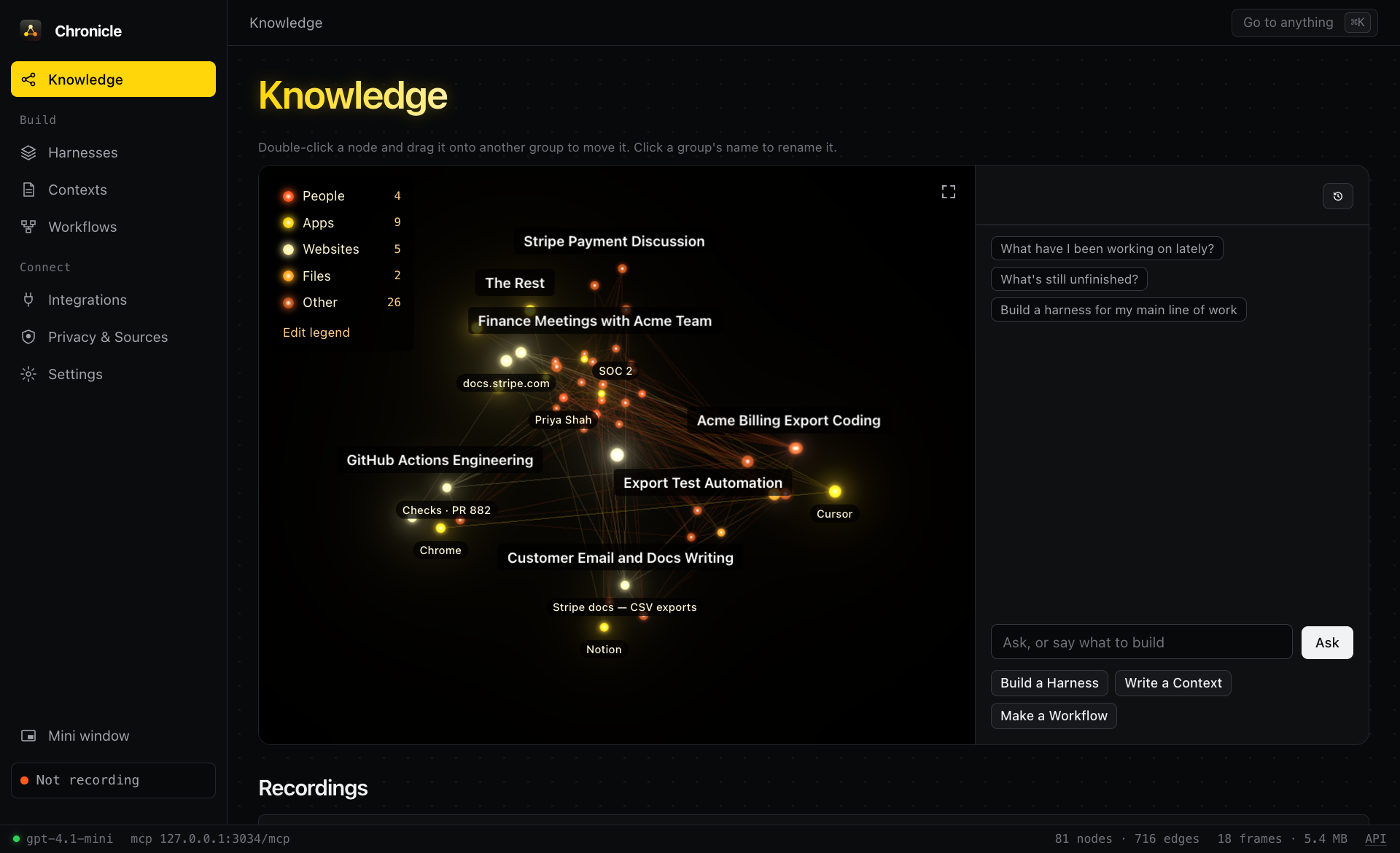
| Knowledge | Shows the graph of all your history, a chat, and your recordings. The chat can propose something to build, and builds nothing until you press its button |
| Harnesses | Builds a harness in five steps, then edits it by hand or by chat |
| Contexts | Holds general guidance for one kind of session |
| Workflows | Holds short procedures for one job |
| Integrations | Connects MCP clients and exports files |
| Privacy & Sources | Controls what Chronicle reads besides recordings |
| Settings | Controls capture, retention, and models |
The REST API has interactive documentation at `http://127.0.0.1:3030/docs`. The [CLI reference](https://aniketxdey.github.io/chronicle/docs.html#cli) and [REST reference](https://aniketxdey.github.io/chronicle/docs.html#api) list every command and route. The CLI has no harness commands.
## Configuration
| Variable | Default | Meaning |
| --- | --- | --- |
| `CHRONICLE_HOME` | `~/.chronicle` | Database, screenshots, and lock file |
| `CHRONICLE_HOST`, `CHRONICLE_PORT` | `127.0.0.1`, `3030` | Where `chronicle serve` listens |
| `CHRONICLE_TOKEN` | Unset | Require this token on the HTTP API and MCP |
| `CHRONICLE_PUBLIC_URL` | `http://127.0.0.1:3030` | Base URL for links and remote client snippets |
| `CHRONICLE_DEMO=1` | Off | Load the sample workday into an empty database on start |
| `CHRONICLE_DISABLE_CAPTURE=1` | Off | Never record from this process |
| `CHRONICLE_HALF_LIFE_HOURS` | `72` | How fast older recordings count less in All history. `0` or `off` disables it |
| `CHRONICLE_LLM` | Unset | `openai`, `anthropic`, `gemini`, `openrouter`, `local`, or `off` |
| `CHRONICLE_LLM_MODEL` | Provider default | Model for the provider named by `CHRONICLE_LLM` |
| `CHRONICLE_LLM_BASE_URL` | `http://localhost:11434/v1` | Endpoint for the local provider |
Chronicle reads these variables when a process starts. Settings in the app holds capture interval, idle threshold, screenshots, OCR, clipboard, redaction, and retention.
## Models
A model is optional. Open Settings › Model, add a key, and press **Use**.
| Provider | Default model | Key from the environment |
| --- | --- | --- |
| OpenAI | `gpt-4.1-mini` | `OPENAI_API_KEY` |
| Anthropic | `claude-sonnet-5-5` | `ANTHROPIC_API_KEY` |
| Google Gemini | `gemini-2.5-flash` | `GEMINI_API_KEY` |
| OpenRouter | `openai/gpt-4.1-mini` | `OPENROUTER_API_KEY` |
| Local (Ollama, LM Studio) | You choose | Not needed |
A key can also be in a `.env` file in `~/.chronicle` or the current directory. A `.env` file never overrides a variable that is already set. Your choice in Settings overrides `CHRONICLE_LLM`, except `CHRONICLE_LLM=off`, which turns models off whatever Settings says.
Workflows, harness chat, and context file names use tool calls, so choose a model that supports them. Small local models often fail at these tasks.
## Privacy
Recordings, screenshots, source items, and graphs stay in `~/.chronicle`. Data leaves your computer in these cases:
- **MCP clients:** a connected agent receives the tool results it requests.
- **Models:** a cloud model receives window titles, URLs, system events, redacted screen text, and matching source items.
- **Tunnels:** anyone with your URL and token can read your data.
- **Cloud sources:** a provider sees the requests that Chronicle makes to it.
Redaction applies to text only. Screenshots keep whatever was on screen. [PRIVACY.md](https://github.com/aniketxdey/chronicle/blob/main/PRIVACY.md) has the details.
## Development
```bash
git clone https://github.com/aniketxdey/chronicle && cd chronicle
uv pip install -e ".[dev,graph,llm]"
pytest
python examples/stdio_client.py "finish the Acme export"
npx @modelcontextprotocol/inspector --cli chronicle mcp --method tools/list
```
| Module | Role |
| --- | --- |
| `chronicle/probe.py` | Reads the computer: windows, URLs, screenshots, Accessibility text, and OCR |
| `capture.py`, `sessions.py` | The recorder and sessions |
| `sources/` | Local, cloud, and AI tool sources |
| `graph.py`, `itemgraph.py` | Graph building, aggregation, and decay |
| `tuner.py`, `llm.py`, `brain.py` | Graph refinement, model providers, and the Knowledge chat |
| `context.py`, `contexts.py`, `workflows.py`, `harness.py` | Context packs, context files, workflows, and harnesses |
| `mcp_server.py`, `clients.py` | The MCP server and client setup |
| `main.py`, `web/` | The HTTP server and the app |
[docs/PUBLISHING.md](https://github.com/aniketxdey/chronicle/blob/main/docs/PUBLISHING.md) describes releases. [bench/PROTOCOL.md](https://github.com/aniketxdey/chronicle/blob/main/bench/PROTOCOL.md) describes the OSWorld evaluation, which hasn't run yet.
## License
MIT
This server cannot be deployed
Maintenance
ActivityMaintained
ResponsivenessNo recent community issues