MCP-Creator-MCP 🚀
A meta-MCP server that democratizes MCP server creation through AI-guided workflows and intelligent templates.
Transform vague ideas into production-ready MCP servers with minimal cognitive overhead and maximum structural elegance.
🎯 Vision
Creating MCP servers should be as simple as describing what you want. MCP Creator bridges the gap between idea and implementation, providing intelligent guidance, proven templates, and streamlined workflows.
Related MCP server: mcp4mcp
✨ Core Features
🤖 AI-Guided Creation: Get intelligent suggestions and best practices tailored to your use case
📚 Template Library: Curated collection of proven MCP server patterns
🔄 Workflow Engine: Save and reuse creation workflows for consistent results
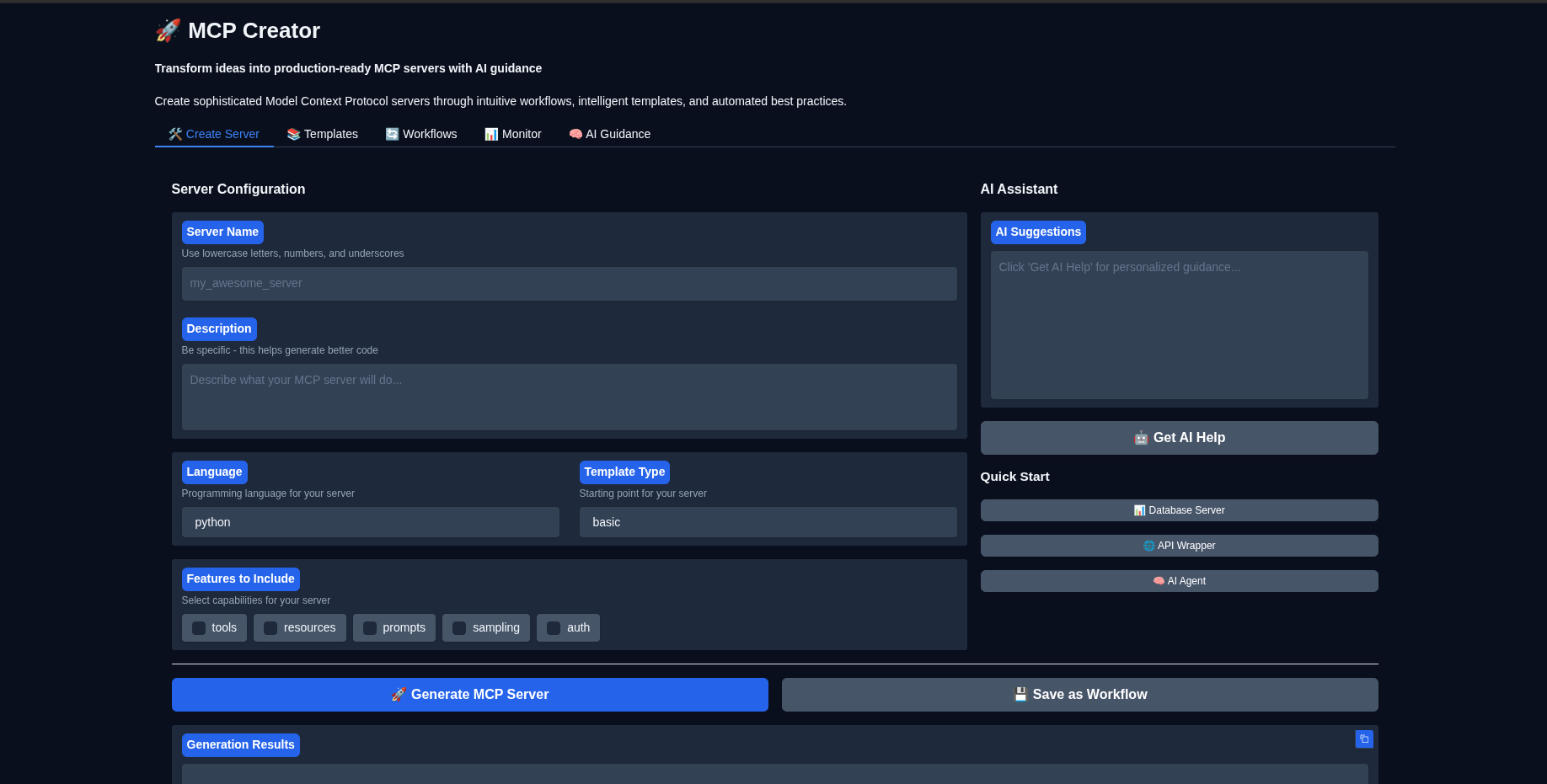
🎨 Gradio Interface: User-friendly web interface for visual server management
🔧 Multi-Language Support: Python, Gradio, and expanding language ecosystem
📊 Built-in Monitoring: Server health checks and operational visibility
🛡️ Best Practices: Automated validation and security recommendations
🚀 Quick Start
Prerequisites
Installation
# Clone and set up the project
git clone https://github.com/angrysky56/mcp-creator-mcp.git
cd mcp-creator-mcp

# Create and activate virtual environment
uv venv --python 3.12 --seed
source .venv/bin/activate

# Install dependencies
uv add -e .

# Configure environment
cp .env.example .env
# Edit .env with your API keys (see Configuration section)
Basic Usage
Option 1: As an MCP Server (Recommended)
Configure Claude Desktop:
# Copy the example config
cp example_mcp_config.json ~/path/to/claude_desktop_config.json
# Edit paths and API keys as needed
Start using in Claude Desktop:
Option 2: Standalone Interface
# Launch the Gradio interface
uv run gradio_interface.py

# Or use the CLI
uv run mcp-creator-gui
📖 Configuration
Environment Variables
Create a .env file with your settings:
# AI Model Providers (at least one required for AI guidance)
ANTHROPIC_API_KEY=your_anthropic_key_here
OPENAI_API_KEY=your_openai_key_here
OLLAMA_BASE_URL=http://localhost:11434

# MCP Creator Settings
DEFAULT_OUTPUT_DIR=./mcp_servers
LOG_LEVEL=INFO

# Gradio Interface
GRADIO_SERVER_PORT=7860
GRADIO_SHARE=false
Claude Desktop Integration
Edit your Claude Desktop config (usually at ~/.config/Claude/claude_desktop_config.json):
{
  "mcpServers": {
    "mcp-creator": {
      "command": "uv",
      "args": [
        "--directory",
        "/path/to/mcp-creator-mcp",
        "run",
        "python",
        "main.py"
      ],
      "env": {
        "ANTHROPIC_API_KEY": "your_key_here"
      }
    }
  }
}
Restart Claude Desktop
🛠️ Usage Examples
Creating Your First MCP Server
# In Claude Desktop, ask:
"Create an MCP server called 'weather_helper' that provides weather data and forecasts"

# Or use the tool directly:
create_mcp_server(
    name="weather_helper",
    description="Provides weather data and forecasts",
    language="python",
    template_type="basic",
    features=["tools", "resources"]
)
Getting AI Guidance
# Ask for specific guidance:
get_ai_guidance(
    topic="security",
    server_type="database"
)

# Or access guidance resources:
# Use resource: mcp-creator://guidance/sampling
Managing Templates
# List available templates
list_templates()

# Filter by language
list_templates(language="python")
🏗️ Architecture
Core Principles
Simplicity: Each component has a single, clear responsibility
Predictability: Consistent patterns reduce cognitive load
Extensibility: Modular design enables easy customization
Reliability: Comprehensive error handling and graceful degradation
Component Overview
├── src/mcp_creator/
│   ├── core/              # Core server functionality
│   │   ├── config.py      # Clean configuration management
│   │   ├── template_manager.py  # Template system
│   │   └── server_generator.py # Server creation engine
│   ├── workflows/         # Workflow management
│   ├── ai_guidance/       # AI assistance system
│   └── utils/             # Shared utilities
├── templates/             # Template library
├── ai_guidance/           # Guidance content
└── mcp_servers/          # Generated servers (default)
📚 Template System
Available Templates
Python Basic: Clean, well-structured foundation
Python with Resources: Database and API integration patterns
Python with Sampling: AI-enhanced server capabilities
Gradio Interface: Interactive UI with MCP integration
Creating Custom Templates
Templates use Jinja2 with clean abstractions:
# Template structure
templates/languages/{language}/{template_name}/
├── metadata.json          # Template configuration
├── template.py.j2        # Main template file
└── README.md.j2          # Documentation template
🔄 Workflow System
Saving Workflows
save_workflow(
    name="Database MCP Server",
    description="Complete database integration workflow",
    steps=[
        {
            "id": "collect_requirements",
            "type": "input",
            "config": {"fields": ["db_type", "connection_string"]}
        },
        {
            "id": "security_review",
            "type": "ai_guidance",
            "config": {"topic": "database_security"}
        },
        {
            "id": "generate_server",
            "type": "generation",
            "config": {"template": "python:database"}
        }
    ]
)
🔧 Development
Project Structure
The codebase follows clean architecture principles:
Separation of Concerns: Each module has a single responsibility
Dependency Injection: Components are loosely coupled
Error Boundaries: Graceful failure handling throughout
Type Safety: Comprehensive type hints and validation
Adding New Templates
Create template directory: templates/languages/{lang}/{name}/
Add metadata.json with template configuration
Create template.{ext}.j2 with Jinja2 template
Test with the template manager
Contributing
Fork the repository
Create a feature branch with descriptive name
Follow the existing code patterns and style
Add tests for new functionality
Submit a pull request with clear description
🛡️ Security & Best Practices
Built-in Protections
Input Validation: All user inputs are validated and sanitized
Process Management: Proper cleanup prevents resource leaks
Error Handling: Graceful failure with helpful messages
Logging: Comprehensive operational visibility
Recommended Practices
Use environment variables for sensitive data
Implement rate limiting for production deployments
Regular security audits of generated servers
Monitor server performance and resource usage
🐛 Troubleshooting
Common Issues
Server won't start:
# Check dependencies
uv add -e .

# Verify configuration
cat .env

# Check logs
tail -f logs/mcp-creator.log
Claude Desktop integration:
# Verify config file syntax
python -m json.tool claude_desktop_config.json

# Check server connectivity
python main.py --test
Template errors:
# List available templates
uv run python -c "from src.mcp_creator import TemplateManager; print(TemplateManager().list_templates())"
📊 Monitoring & Operations
Health Checks
The server provides built-in health monitoring:
Resource usage tracking
Error rate monitoring
Performance metrics
Template validation
Logging
All operations are logged to stderr (MCP compliance):
# View logs in real-time
python main.py 2>&1 | tee mcp-creator.log
🚀 What's Next?
Multi-language expansion: TypeScript, Go, Rust templates
Cloud deployment: Integration with major cloud platforms
Collaboration features: Team workflows and template sharing
Advanced AI: Enhanced code generation and optimization
Marketplace: Community template and workflow ecosystem
📝 License
MIT License - see LICENSE for details.
🤝 Contributing
We welcome contributions! Please see CONTRIBUTING.md for guidelines.
💬 Support
Built with ❤️ for the MCP community
MCP Creator makes sophisticated AI integrations accessible to everyone, from hobbyists to enterprise teams.

