

A
licenseB
qualityD
maintenanceA TypeScript-based MCP server that implements a simple notes system, allowing users to create, access, and generate summaries of text notes.
12
857 npm
3
MIT

これはTypeScriptベースのMCPサーバーで、キーワードに基づいて過去30日間のニューヨーク・タイムズの記事を検索できます。以下の機能を提供することで、MCPのコアコンセプトを実証しています。
記事検索ツール
ニューヨークタイムズAPIとの統合
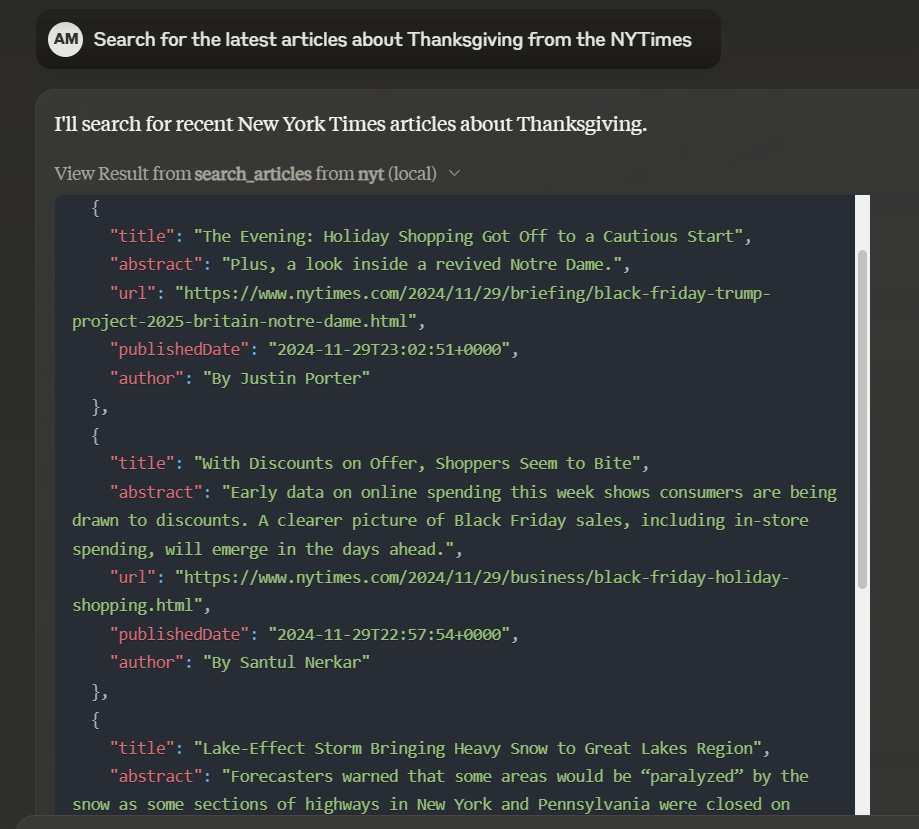
search_articles - キーワードに基づいて過去30日間のNYTimesの記事を検索します
keyword必須パラメータとして受け取ります
タイトル、概要、URL、公開日、著者を含む記事のリストを返します。
Related MCP server: image-reader MCP Server
依存関係をインストールします:
npm installサーバーを構築します。
npm run build自動リビルドを使用した開発の場合:
npm run watchMCPサーバーはstdio経由で通信するため、デバッグが困難になる場合があります。パッケージスクリプトとして提供されているMCP Inspectorの使用をお勧めします。
npm run inspectorインスペクターは、ブラウザでデバッグ ツールにアクセスするための URL を提供します。
Smithery経由で Claude Desktop に NYTimes Article Search を自動的にインストールするには:
npx -y @smithery/cli install nyt --client claudeClaude Desktop で使用するには、サーバー設定を追加します。
MacOS の場合: ~/Library/Application Support/Claude/claude_desktop_config.json Windows の場合: %APPDATA%/Claude/claude_desktop_config.json
{
  "mcpServers": {
    "nyt": {
      "command": "node",
      "args": ["path/to/your/build/index.js"],
      "env": {
        "NYTIMES_API_KEY": "your_api_key_here"
      }
    }
  }
}プロジェクトのルートに.envファイルを作成し、New York Times API キーを追加します。
NYTIMES_API_KEY=your_api_key_hereプロジェクトをビルドした後、次のコマンドでサーバーを実行できます。
node build/index.jsサーバーが起動し、stdio 経由で MCP 要求をリッスンします。
このプロジェクトは MIT ライセンスに基づいてライセンスされています。
Search NYTimes articles from the last 30 days based on a keyword
| Name | Required | Description | Default |
|---|---|---|---|
| keyword | Yes | Keyword to search for in articles |
Does the description disclose side effects, auth requirements, rate limits, or destructive behavior?
No annotations are provided, so the description carries the full burden of behavioral disclosure. It mentions the 30-day time constraint, which is useful, but fails to describe critical behaviors such as response format, pagination, error handling, or any rate limits. For a search tool with zero annotation coverage, this leaves significant gaps.
Agents need to know what a tool does to the world before calling it. Descriptions should go beyond structured annotations to explain consequences.
Is the description appropriately sized, front-loaded, and free of redundancy?
The description is a single, efficient sentence that front-loads the core functionality without unnecessary words. Every part ('Search NYTimes articles from the last 30 days based on a keyword') contributes directly to understanding the tool's purpose.
Shorter descriptions cost fewer tokens and are easier for agents to parse. Every sentence should earn its place.
Given the tool's complexity, does the description cover enough for an agent to succeed on first attempt?
Given the lack of annotations and output schema, the description is incomplete. It covers the basic purpose and time constraint but omits details on behavioral traits, response structure, and usage guidelines. For a search tool, this leaves the agent with insufficient context to use it effectively.
Complex tools with many parameters or behaviors need more documentation. Simple tools need less. This dimension scales expectations accordingly.
Does the description clarify parameter syntax, constraints, interactions, or defaults beyond what the schema provides?
Schema description coverage is 100%, with the parameter 'keyword' well-documented in the schema. The description adds minimal value by implying keyword-based filtering but doesn't provide additional semantics like search syntax or examples. Baseline 3 is appropriate when the schema handles parameter documentation effectively.
Input schemas describe structure but not intent. Descriptions should explain non-obvious parameter relationships and valid value ranges.
Does the description clearly state what the tool does and how it differs from similar tools?
The description clearly states the action ('Search NYTimes articles') and resource ('articles'), specifying the scope ('from the last 30 days') and filtering criteria ('based on a keyword'). It lacks sibling tool differentiation, but since there are no sibling tools, this doesn't reduce clarity.
Agents choose between tools based on descriptions. A clear purpose with a specific verb and resource helps agents select the right tool.
Does the description explain when to use this tool, when not to, or what alternatives exist?
The description provides basic context (searching recent articles by keyword) but offers no explicit guidance on when to use this tool versus alternatives, prerequisites, or exclusions. Without siblings, the need for differentiation is lower, but it still lacks usage context like rate limits or authentication needs.
Agents often have multiple tools that could apply. Explicit usage guidance like "use X instead of Y when Z" prevents misuse.
Recent tool additions, removals, and schema changes observed during successful MCP inspections.
v1.0.0search_articlesScored across 1 tool
With only one tool, there is no possibility of ambiguity or overlap between tools. The single tool 'search_articles' has a clearly defined and distinct purpose.
The single tool name follows a clear verb_noun pattern ('search_articles'), and with only one tool, there is no inconsistency to evaluate. The naming is straightforward and appropriate.
One tool is too few for a server with the apparent scope of 'NYTimes Article Search,' which suggests a domain that could benefit from additional operations like filtering by date, retrieving article details, or accessing different sections. A single search tool feels thin and limits functionality.
The tool surface is severely incomplete for the domain. While search is a core function, there are obvious gaps such as the inability to retrieve full article content, filter beyond keywords, or access other NYTimes data like sections or authors. This will likely cause agent failures when more comprehensive interactions are needed.
A simple Typescript MCP server built using the official MCP Typescript SDK and smithery/cli. This…
An MCP server that provides congressional transcripts
MCP server for searching Airweave collections with natural language queries.
A TypeScript MCP server for Home Assistant, enabling programmatic management of entities, automati…