Amazon Business Integrations MCP Server
OfficialProvides access to Amazon Business API documentation, sample code, and troubleshooting resources. Enables searching and reading documentation for Product Search API, Ordering API, Reconciliation API, Reporting API, User Management API, Document API, and Application Management API.
Click on "Install Server".
Wait a few minutes for the server to deploy. Once ready, it will show a "Started" state.
In the chat, type
@followed by the MCP server name and your instructions, e.g., "@Amazon Business Integrations MCP Serversearch for Product Search API documentation"
That's it! The server will respond to your query, and you can continue using it as needed.
Here is a step-by-step guide with screenshots.
Amazon Business Integrations MCP Server
The Amazon Business Integrations Model Context Protocol (MCP) Server empowers AI-enabled developer environments by providing direct, contextual access to Amazon Business API documentation, sample code, and troubleshooting resources. This server acts as a bridge between your IDE and Amazon Business’s technical knowledge base, enabling AI models to instantly retrieve relevant API details, generate sample integration code, and offer guided solutions for common errors. You can use this MCP Server throughout your API integration process to simplify and accelerate development.
This MCP Server is currently in preview release and is intended for testing and evaluation purposes. This MCP Server is subject to Amazon’s Conditions of Use.
Features
Search Documentation: Search through documentation using natural language queries.
Read Documentation: Retrieve documentation content using references.
With these functions, you can search for and read Amazon Business API documentation to understanding various API offerings, and extract sample code during your integration.
Prerequisites
Before using the Amazon Business Integrations MCP Server, complete these steps:
Ensure that you have installed an IDE that supports MCPs and developer agents, such as Amazon Q.
Install node.js and npm if you do not have them on your system.
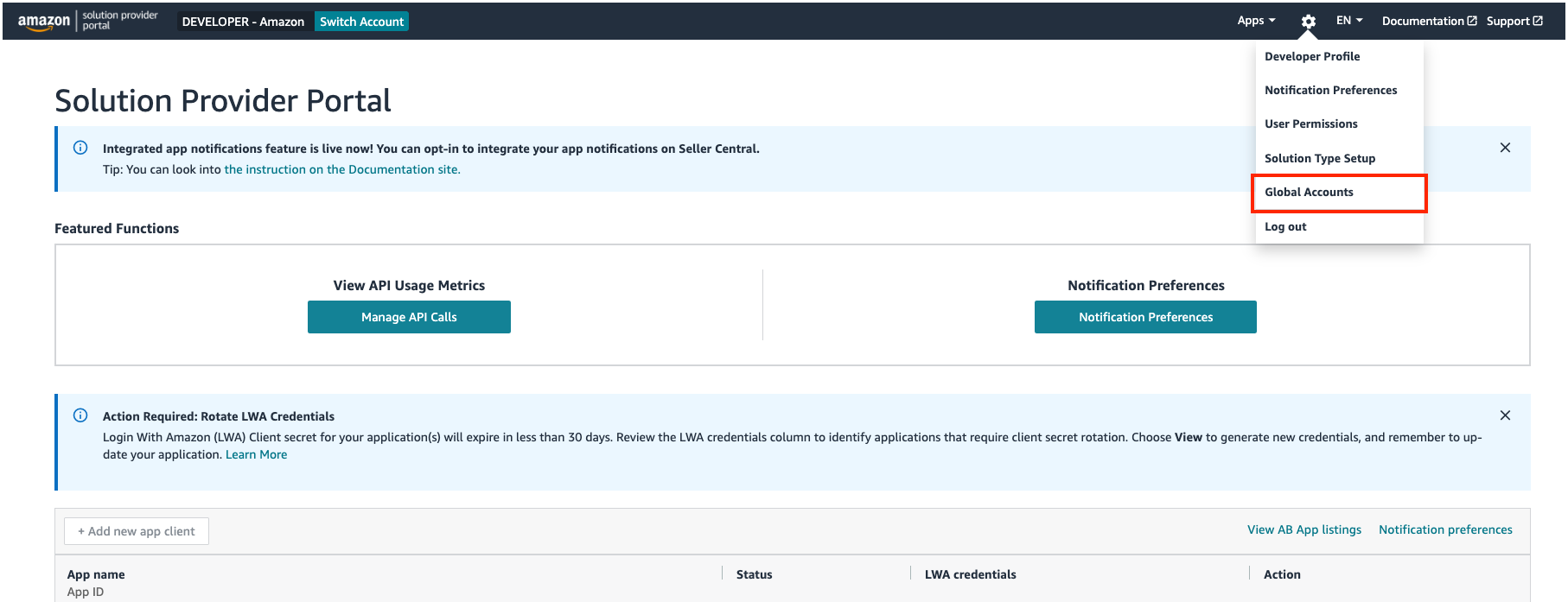
Access your account ID in your Solution Provider Portal (SPP) account. You can find this ID from the Global Accounts section in SPP.
You will use this ID to complete the MCP Server configuration. If you do not have this ID, complete the API onboarding process to generate your ID. For more information, see Onboarding overview.
If you only plan to use the MCP Server to search and read Amazon Business documentation, complete Onboarding Step 1 to create your developer account and generate your account ID. If you plan to use the MCP Server to help generate code, complete Onboarding Step 1, Step 2, and Step 3 to receive the access and refresh tokens required for production API calls.
Installation
Follow the appropriate steps below to install the MCP server in your preferred IDE:
Add Amazon Business Integrations MCP Server to the MCP configuration file (for example, for Amazon Q Developer CLI, edit
~/.aws/amazonq/mcp.jsonby using the below JSON snippet).In the
--dev-account-id=<account_id>field in theargslist, provide your account ID from Prerequisites Step 3:
{
"mcpServers": {
"ab-integrations-mcp-server": {
"command": "npx",
"args": ["@amazonbusiness/ab-integrations-mcp-server@latest", "--dev-account-id=<account_id>"],
"disabled": false,
"autoApprove": []
}
}
}Quick start
Once you’ve installed the Amazon Business Integrations MCP Server, you can ask your AI assistant questions such as:
“I want to build a react-based shopping application that displays products and product detail pages using Product Search API.”
“I want to build a shopping application that displays products using Product Search API and places orders using Ordering API.”
"Search for information about the Product Search API"
"Find documentation about authentication requirements"
“How can I test my Amazon Business API calls?”
Available MCP tools
search-documentation
Perform semantic searches across the documentation corpus using natural language queries. Returns relevant documentation snippets with document references.
Here is the folder structure that determines the documentationPath to use for searches in the MCP server:
📂
├── API Swagger Models/ - API schemas, data structures, request/response formats, field definitions, and models for building applications and generating code
├── OAuth/ - Essential authentication and authorization documentation covering tokens, login processes, credentials, access control, and security implementation. OAuth authentication is a prerequisite for all Amazon Business API implementations.
├── Ordering API/ - Order placement, creation, purchasing, and buying operations
├── Product Search API/ - Product searching, catalog browsing, item discovery, and product details
├── Reconciliation API/ - Purchase data reconciliation, transaction matching, and financial records management
├── Reporting API/ - Order history, tracking information, payment details, and analytics reports
├── User Management API/ - User account management and user operations
├── Document API/ - Invoice generation, receipts, and document reports
├── Application Management API/ - Client secrets, application management, and secret rotation
└── Guides and FAQs/ - Step-by-step tutorials, implementation guides, frequently asked questions, best practices, getting started resources, and practical examplesParameters
Name | Description | Schema | Required |
query | Natural language search query to find documentation. | string | Yes |
maxResults | Maximum number of results to return. (default: 5, maximum: 20) | number | No |
documentationPath | List of documentation paths to search (e.g. API Swagger Models, OAuth, Ordering API, Product Search API) to narrow down the search results (maximum: 5). | string | No |
read-documentation
Retrieve complete documentation content using document references obtained from documentation and search results.
Parameters
Name | Description | Schema | Required |
documentReference | Reference to the document from the search results. | string | Yes |
Authentication
The Amazon Business Integrations MCP Server does not require authentication but is subject to rate limits.
For support or questions about the MCP Server, please contact abapi-integrations@amazon.com.
Disclaimer
This MCP Server is provided as an open-source tool to allow users to access their own AI tools to query documentation and generate sample code. The sample code generated is intended solely for demonstration and educational purposes. Amazon Business makes no representations and bears no responsibility related to the accuracy, completeness, or suitability of any generated code. Amazon’s Conditions of Use apply.
Users are advised to exercise their own discretion and perform independent verification before using any code in production or critical environments. The maintainers and contributors of this project shall not be held liable for any errors, omissions, or damages arising from the use of this server or its outputs.
By using the MCP Server, you acknowledge that you are responsible for evaluating the suitability and correctness of the generated content for your specific use case.
Available Tools
2 toolsread-documentationA
Retrieve complete documentation content using a document reference.
This tool fetches the full content of documentation files identified by documentReference. The documentReference parameter is typically obtained from search-documentation results. However, when searching documentation, if a document contains documentReference: and the referenced document is relevant to the user's query, you should use read_documentation tool with as documentReference.
HIGHLY RECOMMENDED: Start by reading the following documents (using read-documentation tool) when interacting with this server:
Getting started guide : "Guides and FAQs/amazon-business-apis-getting-started-guide.md"
To understand authentication requirements: "OAuth/oauth-instructions.md"
Common use cases:
Retrieving a complete API reference document
Accessing full documentation sections after discovering them via search
Getting detailed information about specific API endpoints, parameters, or data models
Reading implementation guides and tutorials in their entirety
| Name | Required | Description | Default |
|---|---|---|---|
| documentReference | Yes | Reference to the document file from search results |
TDQS
Does the description disclose side effects, auth requirements, rate limits, or destructive behavior?
With no annotations provided, the description carries the full burden of behavioral disclosure. It clearly describes what the tool does (retrieves complete documentation content) and provides usage context, but doesn't address potential behavioral aspects like error conditions, rate limits, authentication requirements (beyond the recommendation to read auth docs), or what happens with invalid references. It adds value beyond the minimal schema but doesn't fully compensate for the lack of annotations.
Agents need to know what a tool does to the world before calling it. Descriptions should go beyond structured annotations to explain consequences.
Is the description appropriately sized, front-loaded, and free of redundancy?
The description is well-structured with clear sections (purpose, usage guidance, recommendations, common use cases) and front-loads the core functionality. While comprehensive, some sentences could be more concise (e.g., the second paragraph repeats similar information). Overall, it's appropriately sized for a tool with important usage context, though slightly verbose in places.
Shorter descriptions cost fewer tokens and are easier for agents to parse. Every sentence should earn its place.
Given the tool's complexity, does the description cover enough for an agent to succeed on first attempt?
Given the tool's single parameter with full schema coverage and no output schema, the description provides substantial contextual information. It explains the relationship with the sibling tool, gives specific usage examples, and recommends starting points. The main gap is the lack of output format description (what 'complete documentation content' actually returns), but otherwise it's quite complete for a read-only documentation retrieval tool.
Complex tools with many parameters or behaviors need more documentation. Simple tools need less. This dimension scales expectations accordingly.
Does the description clarify parameter syntax, constraints, interactions, or defaults beyond what the schema provides?
With 100% schema description coverage for the single parameter, the baseline would be 3. However, the description adds significant value by explaining that 'documentReference parameter is typically obtained from search-documentation results' and providing concrete examples of valid references like 'Guides and FAQs/amazon-business-apis-getting-started-guide.md'. This gives practical context beyond the schema's generic description of 'Reference to the document file from search results'.
Input schemas describe structure but not intent. Descriptions should explain non-obvious parameter relationships and valid value ranges.
Does the description clearly state what the tool does and how it differs from similar tools?
The description clearly states the tool's purpose as 'Retrieve complete documentation content using a document reference' and 'fetches the full content of documentation files identified by documentReference'. It distinguishes from its sibling tool 'search-documentation' by explaining that this tool retrieves full content while search-documentation provides references. The verb+resource combination is specific and unambiguous.
Agents choose between tools based on descriptions. A clear purpose with a specific verb and resource helps agents select the right tool.
Does the description explain when to use this tool, when not to, or what alternatives exist?
The description provides explicit guidance on when to use this tool versus alternatives. It states that 'documentReference parameter is typically obtained from search-documentation results' and gives specific examples of when to use it (when a document contains references to other docs). It also provides 'HIGHLY RECOMMENDED' starting points and lists common use cases, giving clear context for appropriate usage.
Agents often have multiple tools that could apply. Explicit usage guidance like "use X instead of Y when Z" prevents misuse.
search-documentationA
Search through documentation using a natural language query.
This tool provides semantic search capabilities across the entire API documentation corpus. It analyzes your query and returns the most relevant documentation chunks based on semantic similarity.
The results include document snippets with relevance scores and document references that can be used with the read-documentation tool to fetch complete documents. Document snippets can also contain documentReference: and if the referenced document is relevant to the user's query, you should use read_documentation tool with as documentReference.
DOCUMENTATION PATH SELECTION: Select the most specific documentation path that matches your query intent to filter the search radius:
├── API Swagger Models/ - API schemas, data structures, request/response formats, field definitions, and models for building applications and generating code ├── OAuth/ - Essential authentication and authorization documentation covering tokens, login processes, credentials, access control, and security implementation. OAuth authentication is a prerequisite for all Amazon Business API implementations. ├── Ordering API/ - Order placement, creation, purchasing, and buying operations ├── Product Search API/ - Product searching, catalog browsing, item discovery, and product details ├── Reconciliation API/ - Purchase data reconciliation, transaction matching, and financial records management ├── Reporting API/ - Order history, tracking information, payment details, and analytics reports ├── User Management API/ - User account management and user operations ├── Document API/ - Invoice generation, receipts, and document reports ├── Application Management API/ - Client secrets, application management, and secret rotation ├── Guides and FAQs/ - Step-by-step tutorials, implementation guides, frequently asked questions, best practices, getting started resources, and practical examples
Helpful Hints:
If you are searching for code generation/building applications → API Swagger Model
If you are searching for specific API → Use that API documentation path to narrow down the search radius
If your query matches more than one documentation path, you can search across all the matching documentation paths
If you are looking for guidance/examples → Guides and FAQs
If uncertain → Use the most relevant API documentation path based on the core functionality described
If nothing is relevant, search across all the documentation paths. DO NOT provide any documentation path
HIGHLY RECOMMENDED: Start by reading the following documents (using read-documentation tool) when interacting with this server:
Getting started guide : "Guides and FAQs/amazon-business-apis-getting-started-guide.md"
To understand authentication requirements: "OAuth/oauth-instructions.md"
Common use cases:
Finding API details by describing functionality ("how to search products")
Searching for specific parameters, field definitions or data models
Locating code examples and implementation guidance
Discovering endpoint requirements and constraints
Note: When you are implementing or building application, ALWAYS search for the swagger model, code snippets and any specific instructions given for generating code. Verify that Amazon Business API OAuth is implemented before implementing any APIs. It is recommended to understand and avoid common pitfalls, by using read-documentation tool with reference "Guides and FAQs/common-pitfalls.md"
| Name | Required | Description | Default |
|---|---|---|---|
| query | Yes | Natural language search query to find relevant documentation (e.g., "How to search for products", "What are the parameters for the searchProducts endpoint") | |
| maxResults | No | Maximum number of results to return (default: 5) | |
| documentationPath | No | List of documentation paths to search (e.g. API Swagger Models, OAuth, Ordering API, Product Search API) |
TDQS
Does the description disclose side effects, auth requirements, rate limits, or destructive behavior?
With no annotations provided, the description carries the full burden of behavioral disclosure. It effectively describes the tool's behavior: semantic search returning relevant documentation chunks with relevance scores and document references, explains how to handle referenced documents, and provides important implementation guidance (e.g., OAuth prerequisites, recommended starting documents). It doesn't mention rate limits or authentication requirements beyond OAuth, but covers most behavioral aspects well.
Agents need to know what a tool does to the world before calling it. Descriptions should go beyond structured annotations to explain consequences.
Is the description appropriately sized, front-loaded, and free of redundancy?
The description is comprehensive but verbose, with multiple sections (DOCUMENTATION PATH SELECTION, Helpful Hints, Common use cases, Note) that could be more streamlined. While all content is relevant, it could be more front-loaded and concise. Some redundancy exists in explaining the relationship with read-documentation tool.
Shorter descriptions cost fewer tokens and are easier for agents to parse. Every sentence should earn its place.
Given the tool's complexity, does the description cover enough for an agent to succeed on first attempt?
Given the tool's complexity (semantic search across documentation corpus with path filtering) and no output schema, the description provides substantial context: explains result format (snippets with relevance scores and references), relationship to sibling tool, implementation guidance, and extensive usage rules. It lacks explicit information about output structure details, but covers most aspects needed for effective use.
Complex tools with many parameters or behaviors need more documentation. Simple tools need less. This dimension scales expectations accordingly.
Does the description clarify parameter syntax, constraints, interactions, or defaults beyond what the schema provides?
Schema description coverage is 100%, so the baseline is 3. The description adds significant value beyond the schema by explaining the semantics of documentationPath parameter through the detailed documentation path tree and helpful hints that guide parameter selection. It provides context about how to choose appropriate paths based on query intent, which goes beyond the schema's basic description.
Input schemas describe structure but not intent. Descriptions should explain non-obvious parameter relationships and valid value ranges.
Does the description clearly state what the tool does and how it differs from similar tools?
The description clearly states the tool's purpose: 'Search through documentation using a natural language query' and 'provides semantic search capabilities across the entire API documentation corpus.' It specifically distinguishes from its sibling tool 'read-documentation' by explaining that search-documentation returns snippets while read-documentation fetches complete documents.
Agents choose between tools based on descriptions. A clear purpose with a specific verb and resource helps agents select the right tool.
Does the description explain when to use this tool, when not to, or what alternatives exist?
The description provides extensive guidance on when to use this tool vs alternatives, including explicit rules for documentation path selection (e.g., 'If you are searching for code generation/building applications → API Swagger Model'), when to use the sibling read-documentation tool, and common use cases. It also specifies when NOT to provide a documentation path ('If nothing is relevant, search across all the documentation paths. DO NOT provide any documentation path').
Agents often have multiple tools that could apply. Explicit usage guidance like "use X instead of Y when Z" prevents misuse.
TDQS
The two tools have clearly distinct purposes: 'search-documentation' is for finding relevant documentation through semantic search, while 'read-documentation' is for retrieving the full content of specific documents. There is no overlap in functionality, and the descriptions clearly differentiate their roles in the documentation workflow.
Both tools follow a consistent verb-noun pattern ('search-documentation' and 'read-documentation'), which is clear and predictable. The minor inconsistency is the use of hyphens instead of underscores, but this is consistent across both tools, so it does not cause confusion.
With only 2 tools, the server feels under-scoped for its purpose of Amazon Business API integrations. While the tools cover documentation search and retrieval, there are no tools for actual API operations (e.g., ordering, product search, user management), which are implied by the server name and documentation paths. This limited set may hinder agent effectiveness in performing integration tasks.
The tool surface is severely incomplete for an Amazon Business Integrations server. It only provides documentation tools, missing all core API operations like creating orders, searching products, managing users, or generating reports. This creates significant gaps that will cause agent failures when attempting to perform actual integration tasks beyond reading documentation.
Maintenance
Resources
Unclaimed servers have limited discoverability.
Looking for Admin?
If you are the server author, to access and configure the admin panel.
Related MCP Connectors
Amazon Seller Central and Amazon Ads for AI assistants: catalog, orders, FBA, pricing, PPC.
Discover, compare, and monitor 1,400+ APIs directly from your AI coding agent.
Hosted Amazon Seller Central and Amazon Ads MCP server for Claude, ChatGPT, Cursor, and agents.
Hosted Amazon Seller and Vendor MCP server for Claude, ChatGPT, Cursor, Codex, Gemini, Copilot.
Related MCP Servers
- FlicenseAqualityDmaintenanceEnables AI assistants to access Ramp's developer documentation and API schemas through natural language queries. Provides contextual answers about API endpoints, authentication methods, data relationships, and implementation patterns for developers building on Ramp's platform.4
- AlicenseNot gradedqualityFmaintenanceEnables developers to access kintone API specifications, field type documentation, and development best practices through natural language queries. Supports API request validation and provides comprehensive development guidance for kintone customizations.22MIT
- AlicenseNot gradedqualityDmaintenanceProvides AI assistants with access to comprehensive Safaricom Daraja API documentation for all 22 M-Pesa APIs through searchable tools, enabling developers to query payment processing, transaction management, and business operations documentation.15MIT
- AlicenseAqualityAmaintenanceEnables querying and interacting with Adobe VIP Marketplace Partner API documentation through structured tools and prompts, allowing users to search endpoints, validate requests, generate code, and get operational tips.20Apache 2.0
Appeared in Searches
Latest Blog Posts
- Who's Calling? MCP Hosts Are an Identity Blind Spot (And the Spec Knows It)By Om-Shree-0709 on .mcpAgent IdentityOAuth 2.1
- Your AI Chatbot Just Exposed Your CEO's Salary to an InternBy Om-Shree-0709 on .Agent IdentityMCP SecurityOAuth Delegation
- Why MCP Servers Need Execution Sandboxing (And Why Your Current Stack Isn't Enough)By Om-Shree-0709 on .Agentic AiPrompt InjectionWebAssembly
MCP directory API
We provide all the information about MCP servers via our MCP API.
curl -X GET 'https://glama.ai/api/mcp/v1/servers/amazonbusiness/ab-integrations-mcp-server'
If you have feedback or need assistance with the MCP directory API, please join our Discord server