
The AnalyticDB for MySQL MCP Server enables AI agents to interact with AnalyticDB for MySQL databases through a standardized interface, providing comprehensive database querying, analysis, and metadata retrieval capabilities.
Core Capabilities:
Execute SQL queries - Run SQL operations directly on AnalyticDB for MySQL clusters
Analyze query performance - Get query execution plans and actual execution plans with runtime statistics to optimize query performance
Browse databases and tables - List all databases in the cluster and tables within specific databases
Access table schemas - Retrieve DDL scripts to understand table structure and definitions
Check cluster configuration - Fetch configuration values for specific keys
Key Features:
Flexible deployment options via pip package or local source code
Local debugging support using the MCP Inspector tool
Seamless integration for AI agents to perform data retrieval, SQL operations, and performance optimization
Provides a universal interface for AI agents to interact with Alibaba Cloud AnalyticDB for MySQL, enabling database metadata retrieval, SQL query execution, query plan analysis, and access to table structures across databases.
Click on "Install Server".
Wait a few minutes for the server to deploy. Once ready, it will show a "Started" state.
In the chat, type
@followed by the MCP server name and your instructions, e.g., "@Adb MySQL MCP Servershow me the top 10 customers by total sales"
That's it! The server will respond to your query, and you can continue using it as needed.
Here is a step-by-step guide with screenshots.
AnalyticDB for MySQL MCP Server
English | 中文
AnalyticDB for MySQL MCP Server is a universal interface between AI Agents and AnalyticDB MySQL. It provides two categories of capabilities:
OpenAPI Tools (
openapigroup): Manage clusters, whitelists, accounts, networking, monitoring, diagnostics, and audit logs via Alibaba Cloud OpenAPI.SQL Tools & Resources (
sqlgroup): Connect directly to ADB MySQL clusters to execute SQL, view execution plans, and browse database metadata.
Read-only tools are annotated with ToolAnnotations(readOnlyHint=True) per the MCP protocol, allowing clients to distinguish them from mutating operations.
一、Prerequisites
Python >= 3.13
uv (recommended package manager and runner)
Alibaba Cloud AccessKey (required for OpenAPI tools)
Optional: ADB MySQL connection credentials (for SQL tools in direct-connection mode)
Related MCP server: MySql MCP Server
二、Quick Start
2.1 Using cherry-studio (Recommended)
Download and install cherry-studio
Follow the documentation to install
uv, which is required for the MCP environmentConfigure and use ADB MySQL MCP according to the documentation. You can quickly import the configuration using the JSON below.
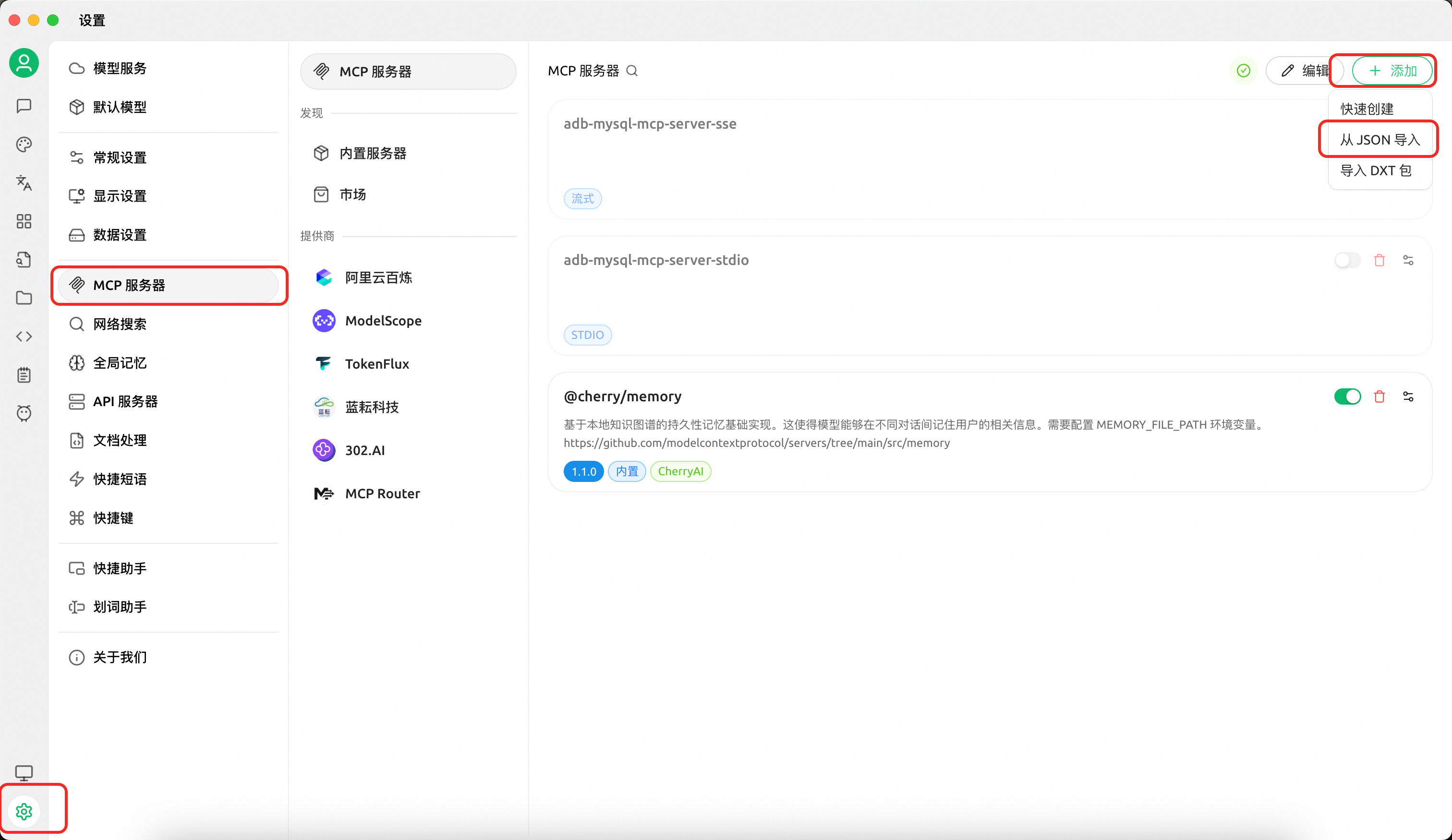
Configuration A — SQL tools only (execute queries, view plans, browse metadata):
{
  "mcpServers": {
    "adb-mysql-mcp-server": {
      "name": "adb-mysql-mcp-server",
      "type": "stdio",
      "isActive": true,
      "command": "uv",
      "args": [
        "--directory",
        "/path/to/alibabacloud-adb-mysql-mcp-server",
        "run",
        "adb-mysql-mcp-server"
      ],
      "env": {
        "ADB_MYSQL_HOST": "your_adb_mysql_host",
        "ADB_MYSQL_PORT": "3306",
        "ADB_MYSQL_USER": "your_username",
        "ADB_MYSQL_PASSWORD": "your_password",
        "ADB_MYSQL_DATABASE": "your_database"
      }
    }
  }
}
Configuration B — OpenAPI tools (cluster management, diagnostics, monitoring):
Note: Please set
ALIBABA_CLOUD_ACCESS_KEY_IDandALIBABA_CLOUD_ACCESS_KEY_SECRETto your Alibaba Cloud AccessKey credentials.
{
  "mcpServers": {
    "adb-mysql-mcp-server": {
      "name": "adb-mysql-mcp-server",
      "type": "stdio",
      "isActive": true,
      "command": "uv",
      "args": [
        "--directory",
        "/path/to/alibabacloud-adb-mysql-mcp-server",
        "run",
        "adb-mysql-mcp-server"
      ],
      "env": {
        "ALIBABA_CLOUD_ACCESS_KEY_ID": "your_access_key_id",
        "ALIBABA_CLOUD_ACCESS_KEY_SECRET": "your_access_key_secret"
      }
    }
  }
}
You can combine both configurations by setting all environment variables together. When AK/SK is not configured, OpenAPI tools are automatically disabled — only SQL tools remain active.
2.2 Using Claude Code
Download from GitHub and sync dependencies:
git clone https://github.com/aliyun/alibabacloud-adb-mysql-mcp-server
cd alibabacloud-adb-mysql-mcp-server
uv sync
Add the following configuration to the Claude Code MCP config file (project-level: .mcp.json in the project root, or user-level: ~/.claude/settings.json):
stdio transport:
{
  "mcpServers": {
    "adb-mysql-mcp-server": {
      "command": "uv",
      "args": [
        "--directory",
        "/path/to/alibabacloud-adb-mysql-mcp-server",
        "run",
        "adb-mysql-mcp-server"
      ],
      "env": {
        "ALIBABA_CLOUD_ACCESS_KEY_ID": "your_access_key_id",
        "ALIBABA_CLOUD_ACCESS_KEY_SECRET": "your_access_key_secret",
        "ALIBABA_CLOUD_SECURITY_TOKEN": "",
        // Uncomment the following lines to enable SQL tools for direct database connection:
        // "ADB_MYSQL_HOST": "your_adb_mysql_host",
        // "ADB_MYSQL_PORT": "3306",
        // "ADB_MYSQL_USER": "your_username",
        // "ADB_MYSQL_PASSWORD": "your_password",
        // "ADB_MYSQL_DATABASE": "your_database"
      }
    }
  }
}
SSE transport — start the server first, then configure the client:
export ALIBABA_CLOUD_ACCESS_KEY_ID="your_access_key_id"
export ALIBABA_CLOUD_ACCESS_KEY_SECRET="your_access_key_secret"
# Uncomment the following lines to enable SQL tools for direct database connection:
# export ADB_MYSQL_HOST="your_adb_mysql_host"
# export ADB_MYSQL_PORT="3306"
# export ADB_MYSQL_USER="your_username"
# export ADB_MYSQL_PASSWORD="your_password"
# export ADB_MYSQL_DATABASE="your_database"
export SERVER_TRANSPORT=sse
export SERVER_PORT=8000

uv --directory /path/to/alibabacloud-adb-mysql-mcp-server run adb-mysql-mcp-server
{
"mcpServers": {
"adb-mysql-mcp-server": {
"url": "http://localhost:8000/sse"
}
}
}Streamable HTTP transport — start the server first, then configure the client:
export ALIBABA_CLOUD_ACCESS_KEY_ID="your_access_key_id"
export ALIBABA_CLOUD_ACCESS_KEY_SECRET="your_access_key_secret"
# Uncomment the following lines to enable SQL tools for direct database connection:
# export ADB_MYSQL_HOST="your_adb_mysql_host"
# export ADB_MYSQL_PORT="3306"
# export ADB_MYSQL_USER="your_username"
# export ADB_MYSQL_PASSWORD="your_password"
# export ADB_MYSQL_DATABASE="your_database"
export SERVER_TRANSPORT=streamable_http
export SERVER_PORT=8000

uv --directory /path/to/alibabacloud-adb-mysql-mcp-server run adb-mysql-mcp-server
{
"mcpServers": {
"adb-mysql-mcp-server": {
"url": "http://localhost:8000/mcp"
}
}
}Note: When
ADB_MYSQL_USERandADB_MYSQL_PASSWORDare not configured but AK/SK is available, a temporary database account is automatically created via OpenAPI for SQL execution and cleaned up afterward.
2.3 Using Cline
Set environment variables and run the MCP server:
export ALIBABA_CLOUD_ACCESS_KEY_ID="your_access_key_id"
export ALIBABA_CLOUD_ACCESS_KEY_SECRET="your_access_key_secret"
export SERVER_TRANSPORT=sse
export SERVER_PORT=8000

uv --directory /path/to/alibabacloud-adb-mysql-mcp-server run adb-mysql-mcp-server
Then configure the Cline remote server:
remote_server = "http://127.0.0.1:8000/sse"三、Environment Variables
Variable | Required | Description |
| Yes (OpenAPI tools) | Alibaba Cloud AccessKey ID |
| Yes (OpenAPI tools) | Alibaba Cloud AccessKey Secret |
| No | STS temporary security token |
| No | Database host (direct-connection mode) |
| No | Database port, default 3306 (direct-connection mode) |
| No | Database username (direct-connection mode) |
| No | Database password (direct-connection mode) |
| No | Default database name (direct-connection mode) |
| No | Database connection timeout in seconds, default 2 |
| No | OpenAPI connection timeout in milliseconds, default 10000 (10s) |
| No | OpenAPI read timeout in milliseconds, default 300000 (5min) |
| No | Transport protocol: |
| No | SSE/HTTP server port, default 8000 |
四、Tool List
4.1 Cluster Management (group: openapi)
Tool | Description |
| List ADB MySQL clusters in a region |
| Get detailed cluster attributes |
| Get cluster IP whitelist |
| Modify cluster IP whitelist |
| List database accounts in a cluster |
| Get cluster network connection info |
| Get current server time |
4.2 Diagnostics & Monitoring (group: openapi)
Tool | Description |
| Query cluster performance metrics (CPU, memory, QPS, etc.) |
| Query cluster health status |
| Query SQL diagnosis summary records |
| Get SQL execution details (plan, runtime info) |
| Detect bad SQL impacting cluster stability |
| Query SQL pattern list |
| Query table-level statistics |
4.3 Administration & Audit (group: openapi)
Tool | Description |
| Create a database account |
| Modify cluster description |
| Get cluster storage space summary |
| Query SQL audit log records |
4.4 Advanced Diagnostics (group: openapi)
Tool | Description |
| Compute node diagnostics |
| Storage node diagnostics |
| Access node diagnostics |
| Get optimization advices |
| Kill a running query process |
| Get resource group configuration |
| Detect tables with excessive primary keys |
| Detect oversized non-partition tables |
| Diagnose table partitioning issues |
| Detect data-skewed tables |
4.5 SQL Tools (group: sql)
Tool | Description |
| Execute SQL on an ADB MySQL cluster |
| Get EXPLAIN execution plan |
| Get EXPLAIN ANALYZE actual execution plan |
4.6 MCP Resources (group: sql)
Resource URI | Description |
| List all databases |
| List all tables in a database |
| Get table DDL |
| Get a config key value |
五、Local Development
git clone https://github.com/aliyun/alibabacloud-adb-mysql-mcp-server
cd alibabacloud-adb-mysql-mcp-server
uv sync
Run tests:
uv run python -m pytest test/ -vDebug with MCP Inspector:
npx @modelcontextprotocol/inspector \
  -e ALIBABA_CLOUD_ACCESS_KEY_ID=your_ak \
  -e ALIBABA_CLOUD_ACCESS_KEY_SECRET=your_sk \
  uv --directory /path/to/alibabacloud-adb-mysql-mcp-server run adb-mysql-mcp-server
六、SKILL
In addition to the MCP server above, this project also provides an independent SKILL under the skill/ directory. The Skill can be deployed directly to Claude Code without relying on this MCP server (it calls ADB MySQL OpenAPI through call_adb_api.py in the SKILL directory).
The Skill covers cluster information queries, performance monitoring, slow query diagnosis, SQL Pattern analysis, and SQL execution, with built-in guided diagnostic workflows for common scenarios.
For setup and usage details, see skill/skill_readme.md.
Note: The evolution of this Skill will be aligned with our next-generation Agent in the future. Stay tuned.
License
Apache License 2.0
Resources
Looking for Admin?
Admins can modify the Dockerfile, update the server description, and track usage metrics. If you are the server author, to access the admin panel.