
A
licenseC
qualityD
maintenanceEnables interaction with SAP ABAP systems through ADT APIs, allowing management of ABAP objects, transport requests, and code analysis via natural language.
100
81 npm
MIT

Provides integration for SAP's Git-enabled Change and Transport System (gCTS), allowing users to list repositories and perform pull operations directly from the SAP environment.
Enables comprehensive SAP ABAP development by providing tools for reading and writing source code, managing the lifecycle of ABAP objects, handling transports, performing syntax and ATC quality checks, and executing SQL queries or ABAP code.
Click on "Deploy Server".
Wait a few minutes for the server to deploy. Once ready, it will show a "Started" state.
In the chat, type @ followed by the MCP server name and your instructions, e.g., "@abap-mcpb Show me the source code for the ABAP class ZCL_SALES_ORDER_HANDLER"
That's it! The server will respond to your query, and you can continue using it as needed.
Here is a step-by-step guide with screenshots.
An MCPB (MCP Bundle) package for SAP ABAP development via the ADT API. Connect Claude Desktop to your SAP system and let it read, write, test, and deploy ABAP code — no build step required.
This MCPB is packaged from dassian-adt (v2.0), which is itself a production rewrite of mcp-abap-abap-adt-api by Mario Andreschak. The underlying ADT HTTP communication is powered by Marcello Urbani's abap-adt-api library.
Only two files were modified from the original compiled output:
handlers/QualityHandlers.js — The ATC check (abap_atc_run) was rewritten to actively trigger a new ATC run and return structured findings grouped by severity (error/warning/info) with fields like checkId, checkTitle, messageTitle, and location (line/column). The original passively fetched an existing worklist.
index.js — Added global uncaughtException and unhandledRejection handlers, ENV diagnostic logging at startup, and try/catch wrapping around runStdio() for better error reporting. The original had bare .catch(console.error).
All other 24 files (handlers, lib, auth, types) are identical to the dassian-adt v2.0 dist/ output.
Related MCP server: sap-mcp
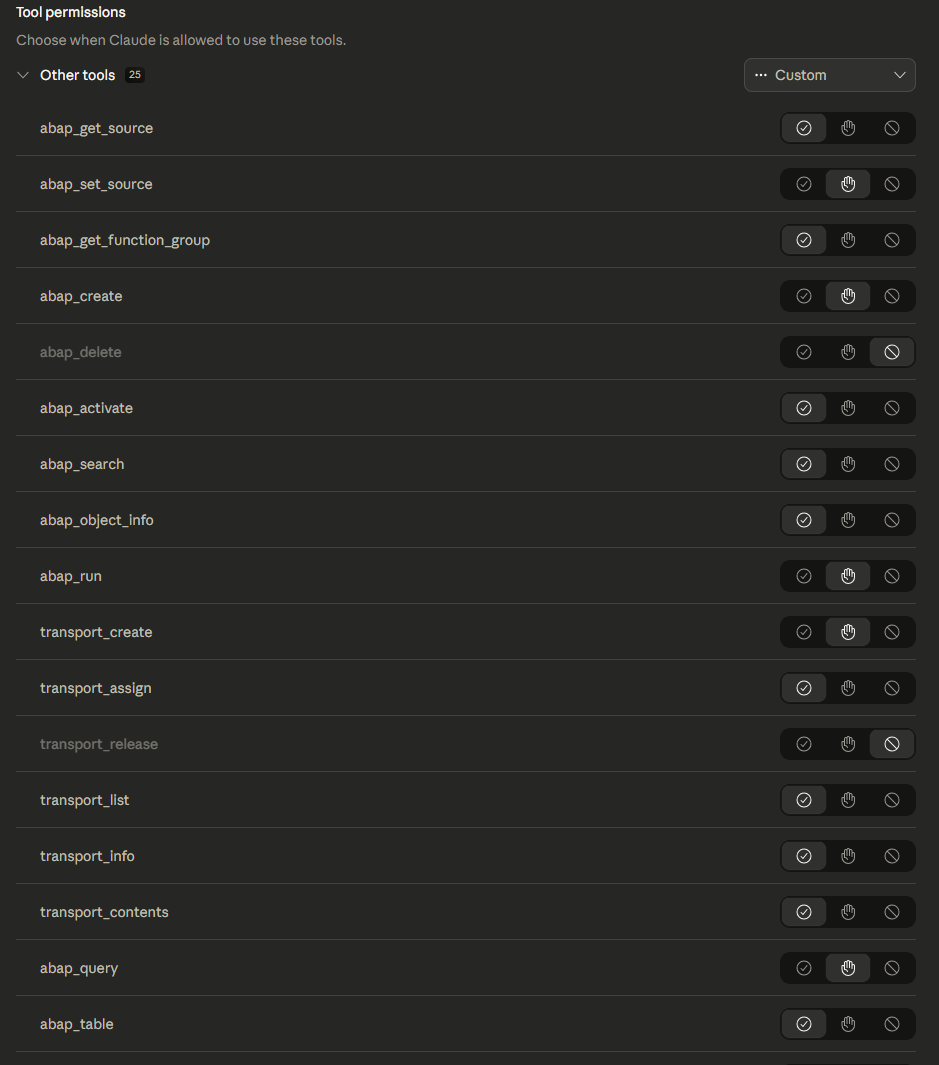
25 tools covering the full ABAP development lifecycle:
Category | Tools | What They Do |
Source |
| Read/write ABAP source for any object type. Function group tool fetches all includes and FMs in one call. |
Objects |
| Full object lifecycle. Create in $TMP or real packages. |
Transports |
| Create, populate, and release transports. |
Quality |
| Syntax check and ATC with structured severity grouping. |
Data |
| Read tables/CDS views with WHERE/LIKE/BETWEEN. Execute freestyle SQL. |
Run |
| Create temp class, run ABAP code, capture output, clean up. |
System |
| Session management, connectivity test, ST22 dumps, raw ADT access. |
Git |
| gCTS repository listing and pull. |
An MCPB (MCP Bundle) is a self-contained package that installs directly into Claude Desktop — no cloning repos, no npm install, no build steps. You get:
One-click install — download the .mcpb file and open it in Claude Desktop
Built-in configuration UI — enter your SAP connection details in a form, no JSON editing required
Per-tool permissions — enable or disable individual tools from the Claude Desktop settings, so you control exactly what the AI can do on your SAP system
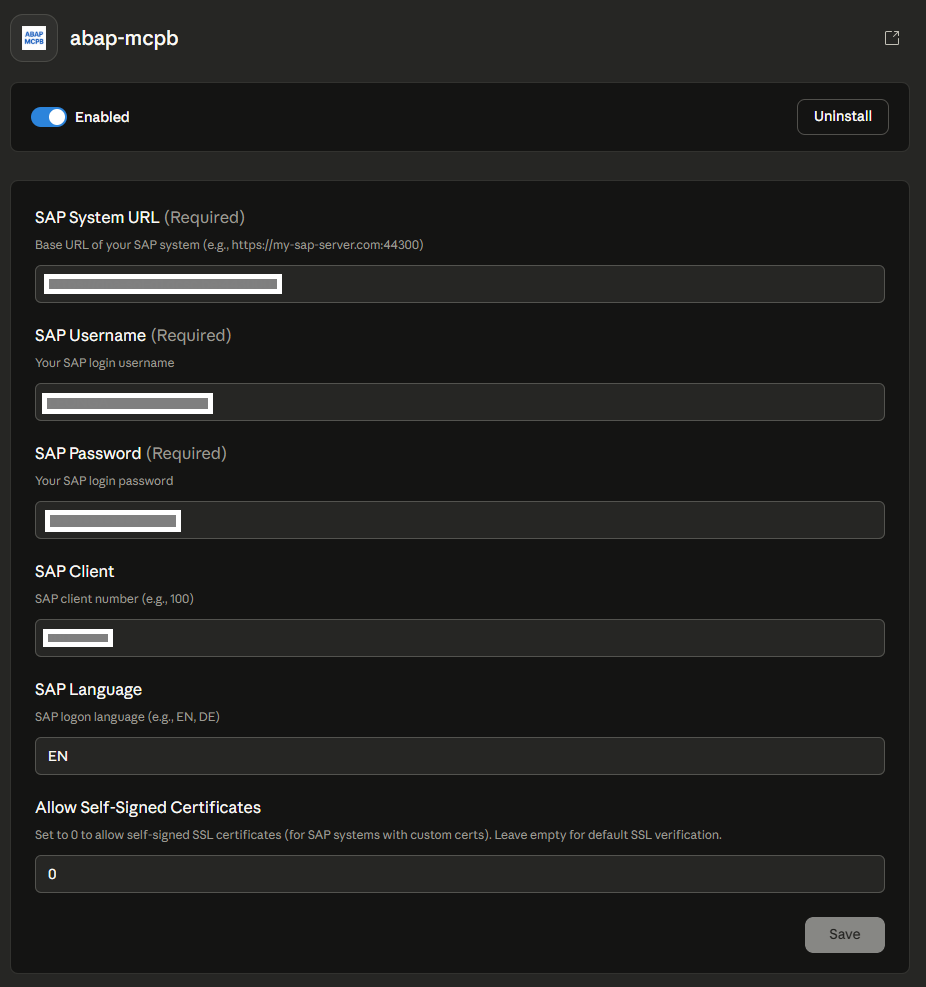
After installing, Claude Desktop presents a configuration form for your SAP connection:
All 25 tools are listed in the Claude Desktop permissions panel. You can enable or disable each tool individually — for example, keep read-only tools on while disabling write operations until you're ready:
Claude Desktop with MCPB support
Access to an SAP system with ADT enabled (typically port 44300)
SAP user with development authorization
Download abap-mcpb.mcpb from the Releases page
Open Claude Desktop and install the bundle
Configure your SAP connection when prompted:
SAP System URL — e.g. https://your-sap-server:44300
SAP Username
SAP Password
SAP Client — e.g. 100 (optional, defaults to 100)
SAP Language — e.g. EN (optional, defaults to EN)
Allow Self-Signed Certificates — set to 0 if your SAP system uses self-signed certs
This section documents how the bundle was created from the dassian-adt source, for reproducibility.
git clone https://github.com/DassianInc/dassian-adt.git
cd dassian-adt
npm install
npm run build
This produces a dist/ folder with compiled JavaScript.
mkdir abap-mcpb
cp -r dist/ abap-mcpb/server/
cp -r node_modules/ abap-mcpb/node_modules/
cp package.json package-lock.json abap-mcpb/
The dist/ folder was renamed to server/ to match the MCPB convention.
Two files were modified from the original dist/ output:
server/index.js — Added global error handlers (uncaughtException, unhandledRejection), ENV diagnostic logging at startup, and try/catch around runStdio()
server/handlers/QualityHandlers.js — Rewrote ATC check to actively trigger runs and return structured findings grouped by severity
A manifest.json was created defining the server entry point (server/index.js), user configuration schema (SAP connection details), and the 25 tool declarations.
An .mcpbignore file excludes tests, dev config, TypeScript source, build artifacts, and dev-only node_modules (jest, babel, types) from the bundle.
The .mcpb bundle was created using the Claude Desktop MCPB tooling, producing abap-mcpb.mcpb.
abap-mcpb/
  manifest.json       MCPB metadata, tool declarations, user config schema
  abap-mcpb-icon.png  Extension icon
  server/             Runtime JavaScript (compiled from dassian-adt)
    index.js          MCP server entry point
    handlers/         Tool handler modules (Source, Object, Transport, etc.)
    lib/              URL builder, error classification, logger
    auth/             Browser-based SAP login page
    types/            Tool schema definitions
  node_modules/       Runtime dependencies
  package.json        Dependency manifest
  .mcpbignore         Bundle exclusion rules
abap-mcpb.mcpb The built bundleMario Andreschak — original mcp-abap-abap-adt-api server scaffold
Marcello Urbani — abap-adt-api library powering all ADT HTTP communication
Dassian Inc. — dassian-adt v2.0 production rewrite (the source this MCPB is built from)
MIT — see LICENSE.
This server cannot be deployed
Any REST/SOAP/GraphQL/OData/SQL API as MCP tools for Claude & ChatGPT. 475 connectors: SAP, ERP.
Amazon Seller Central, Ads and Vendor Central in ChatGPT & Claude. 106 tools; writes need approval.
One workspace of tools for Claude and ChatGPT: connect 600+ apps, generate media, build tools.
Teamfight Tactics data & AI coaching for Claude and ChatGPT — 19 tools, built-in Riot key.