Playwright MCP Server 🎭
🚀 Active Fork of executeautomation/mcp-playwright
This repository is an actively maintained continuation of the original MCP Playwright server:
👉 https://github.com/executeautomation/mcp-playwright


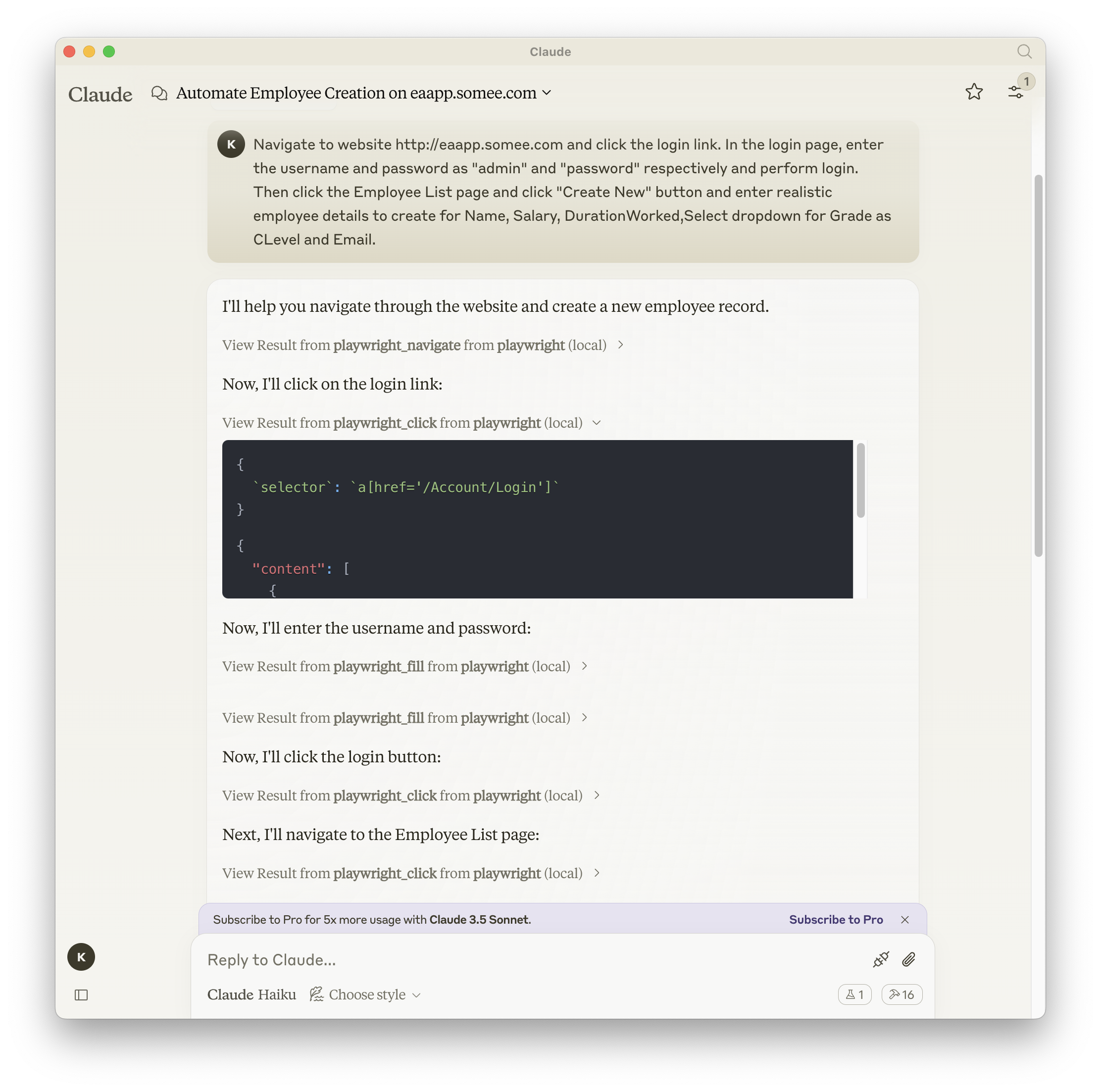
A Model Context Protocol server that provides browser automation capabilities using Playwright. This server enables LLMs to interact with web pages, take screenshots, generate test code, web scraps the page and execute JavaScript in a real browser environment.
It is optimized for QA and E2E automation: screenshots, logs, assertions, API testing, plus full MCP HTTP/gateway support — built on the same Playwright foundations, complementary to Microsoft’s server.
Screenshot
Related MCP server: MCP Selenium Server
Installation
You can install the package using either npm, mcp-get, or Smithery:
Using npm:
npm install -g @executeautomation/playwright-mcp-server
Using mcp-get:
npx @michaellatman/mcp-get@latest install @executeautomation/playwright-mcp-server
Using Smithery
To install Playwright MCP for Claude Desktop automatically via Smithery:
npx @smithery/cli install @executeautomation/playwright-mcp-server --client claude
Installation in VS Code
Install the Playwright MCP server in VS Code using one of these buttons:
Alternatively, you can install the Playwright MCP server using the VS Code CLI:
# For VS Code
code --add-mcp '{"name":"playwright","command":"npx","args":["@executeautomation/playwright-mcp-server"]}'
# For VS Code Insiders
code-insiders --add-mcp '{"name":"playwright","command":"npx","args":["@executeautomation/playwright-mcp-server"]}'
After installation, the ExecuteAutomation Playwright MCP server will be available for use with your GitHub Copilot agent in VS Code.
Configuration to use Playwright Server
Here's the Claude Desktop configuration to use the Playwright server:
{
  "mcpServers": {
    "playwright": {
      "command": "npx",
      "args": ["-y", "@executeautomation/playwright-mcp-server"]
    }
  }
}
Streamable HTTP mode
The server supports the MCP Streamable HTTP transport so it can run behind gateways.
How files are shared in HTTP mode
Generated artifacts (screenshots, PDFs, console logs, generated tests) are written into /data/<session>/<resourceId>.<ext> on the server.
Each Streamable HTTP session gets its own isolated resource namespace; links are only valid for that session and expire after the configured TTL (--resource-ttl, default 600s). Session close or TTL expiry removes the files and their directories.
Tool results return resourceLinks pointing to download URLs:
{scheme}://{host}:{port}{path}/resources/{sessionId}/{resourceId}/{filename}
(host from --host-name, scheme from --insecure, path from --path, default /mcp).
In stdio mode, resource linking is disabled; tools only emit local paths.
This scope-based sharing prevents content leakage between sessions/clients while still giving HTTP clients and gateways stable download URIs.
Uploads in HTTP mode
The playwright_upload_file tool accepts a local filePath only in stdio mode. In HTTP mode, you must first upload the file and pass uploadResourceUri.
Get the session-scoped upload URL by calling construct_upload_url (HTTP mode only). It returns a POST multipart endpoint like {path}/uploads/{sessionId}; the session ID is embedded in the URL so no header is usually needed.
Upload with multipart/form-data (field file). On success, the server responds with a session-scoped resourceUri such as mcp-uploads://<session>/<id>.
Then call playwright_upload_file with uploadResourceUri to attach the uploaded file to the file input. Uploads are isolated per session/client like other resources.
Agents must be able to run terminal/CLI commands (curl on Linux/macOS, Invoke-WebRequest/iwr on Windows) to upload the file before calling playwright_upload_file in HTTP mode.
Stdio mode continues to use local filePath; HTTP mode prefers uploaded resources.
Client Configuration
Claude Desktop / VS Code (mcp.json):
{
  "mcpServers": {
    "playwright": {
      "transport": {
        "type": "http",
        "url": "http://localhost:8000/mcp"
      }
    }
  }
}
Adjust url to match your host/port/path and use https if terminated by a proxy.
CLI flags
--http: Enable Streamable HTTP transport (default: off; stdio is used when omitted).
--port <number>: HTTP port (default: 8000, only relevant when --http is set).
--path <path>: Base HTTP path (default: /mcp, only relevant when --http is set).
--host-name <hostname>: Hostname used in generated download URLs (default: system hostname, only relevant when --http is set).
--listen <address>: Bind address for the HTTP server (default: 0.0.0.0, only relevant when --http is set).
--insecure: Use http scheme for download links; omit to use https (only relevant when --http is set).
--resource-ttl <seconds>: TTL for generated resources (default: 600 seconds; only affects HTTP mode).
--static-user-agent: Disable the default randomized User-Agent rotation (by default, each new browser launch picks a modern UA to reduce bot detection/CAPTCHAs).
Agents / Prompts
A starter agent prompt is provided in AGENTS.md. Create an agent in VS Code (or your client) using that prompt as a template; customize as needed.
For file uploads in HTTP mode, ensure the agent has permission to run terminal/CLI commands (curl on Linux/macOS, Invoke-WebRequest/iwr on Windows) because uploads are performed via the session-specific HTTP endpoint before calling playwright_upload_file.
Contributing
Read the CONTRIBUTING.md guidelines for required tooling (pre-commit hooks, lint/test/build steps, conventional commits, documentation updates).
The CI workflow enforces the same standards; please mirror them locally before opening a PR.
Available Tools
Tool | Purpose | Notes |
playwright_navigate
| Open a URL with optional viewport/headless/browser type | Browser launched if needed |
playwright_screenshot
| Capture screenshot of page/element | HTTP mode returns resource link |
playwright_save_as_pdf
| Save page as PDF | HTTP mode returns resource link |
playwright_console_logs
| Retrieve browser console logs with filters | Log file registered when saved |
playwright_upload_file
| Set a file into an <input type="file"> | In HTTP mode, upload file via construct_upload_url then pass uploadResourceUri; stdio uses filePath |
construct_upload_url (HTTP)
| Return session-scoped upload URL/instructions | Use POST multipart (file field) to get uploadResourceUri |
playwright_click / playwright_fill / playwright_select / playwright_hover / playwright_drag / playwright_press_key
| Core page interactions | Browser required |
playwright_iframe_click / playwright_iframe_fill
| Interact inside iframes | Provide iframe selector |
playwright_get_visible_text / playwright_get_visible_html
| Read visible page content | HTML tool supports cleaning options |
playwright_custom_user_agent
| Override User-Agent for browser context | |
playwright_go_back / playwright_go_forward / playwright_close
| Navigation or close browser | |
playwright_evaluate
| Execute JS in page | |
playwright_expect_response / playwright_assert_response
| Wait for and assert network responses | |
playwright_get / playwright_post / playwright_put / playwright_patch / playwright_delete
| HTTP API helpers | |
start_codegen_session / end_codegen_session / get_codegen_session / clear_codegen_session
| Record and generate Playwright tests | Generated tests are exposed as resources in HTTP mode |
Docker Support
The Playwright MCP Server is available as a pre-built Docker image with all browsers and system dependencies included. This avoids slow first-run downloads and version drift.
Using Docker
To use Docker, pull the latest image from GitHub Container Registry:
docker pull ghcr.io/aakashh242/mcp-playwright:latest
Running with Docker directly
# Run the server (stdin/stdout communication)
docker run -i --rm ghcr.io/aakashh242/mcp-playwright:latest
Streamable HTTP mode in Docker
docker run --rm -p 8000:8000 -v /data:/data \
  ghcr.io/aakashh242/mcp-playwright:latest \
  node dist/index.js --http --insecure --host-name localhost --listen 0.0.0.0 --path /mcp
Mount /data to persist session-scoped artifacts if desired.
Adjust --host-name to the public hostname your clients/gateways use. Use --insecure for http; omit it for https behind a terminating proxy.
Resource download URLs will be http://<host>:8000/mcp/resources/<session>/<resourceId>/<filename> by default.
The container default is headless (PLAYWRIGHT_HEADLESS=1) and the Playwright base image already includes browsers.
Using Docker Compose (recommended for production HTTP)
Use the provided docker-compose.yml to run streamable HTTP with sensible defaults:
Defaults:
HTTP mode with --path=/mcp, --listen=0.0.0.0, --port=8000, and a --host-name placeholder (replace with your public hostname).
Ports: 8000:8000
Volumes: ./data/app-data:/app/data and ./data/resource-data:/data for persisted session artifacts.
Using Docker with MCP Clients
To use the Dockerized server with Claude Desktop or other MCP clients, you can configure them to use Docker:
{
  "mcpServers": {
    "playwright": {
      "command": "docker",
      "args": ["run", "-i", "--rm", "ghcr.io/aakashh242/mcp-playwright:latest"]
    }
  }
}
Building Locally
If you need to build the Docker image locally:
The Docker build handles dependencies and the TypeScript build for you:
docker build -t mcp-playwright .
Then use mcp-playwright instead of ghcr.io/aakashh242/mcp-playwright:latest in the commands above.
Testing
This project uses Jest for testing. The tests are located in the src/__tests__ directory.
Running Tests
You can run the tests using one of the following commands:
# Run tests using the custom script (with coverage)
node run-tests.cjs

# Run tests using npm scripts
npm test           # Run tests without coverage
npm run test:coverage  # Run tests with coverage
npm run test:custom    # Run tests with custom script (same as node run-tests.cjs)
The test coverage report will be generated in the coverage directory.
Running evals
The evals package loads an mcp client that then runs the index.ts file, so there is no need to rebuild between tests. You can load environment variables by prefixing the npx command. Full documentation can be found here.
OPENAI_API_KEY=your-key npx mcp-eval src/evals/evals.ts src/tools/codegen/index.ts
Contributing
When adding new tools, please be mindful of the tool name length. Some clients, like Cursor, have a 60-character limit for the combined server and tool name (server_name:tool_name).
Our server name is playwright-mcp. Please ensure your tool names are short enough to not exceed this limit.
Star History