Glama

Playwright MCP Server 🎭

πŸš€ Active Fork of executeautomation/mcp-playwright
This repository is an actively maintained continuation of the original MCP Playwright server: πŸ‘‰ https://github.com/executeautomation/mcp-playwright

Release Latest Tag Build Lint Unit Tests Coverage Release Please Docker Publish

A Model Context Protocol server that provides browser automation capabilities using Playwright. This server enables LLMs to interact with web pages, take screenshots, generate test code, web scraps the page and execute JavaScript in a real browser environment. It is optimized for QA and E2E automation: screenshots, logs, assertions, API testing, plus full MCP HTTP/gateway support β€” built on the same Playwright foundations, complementary to Microsoft’s server.

Screenshot
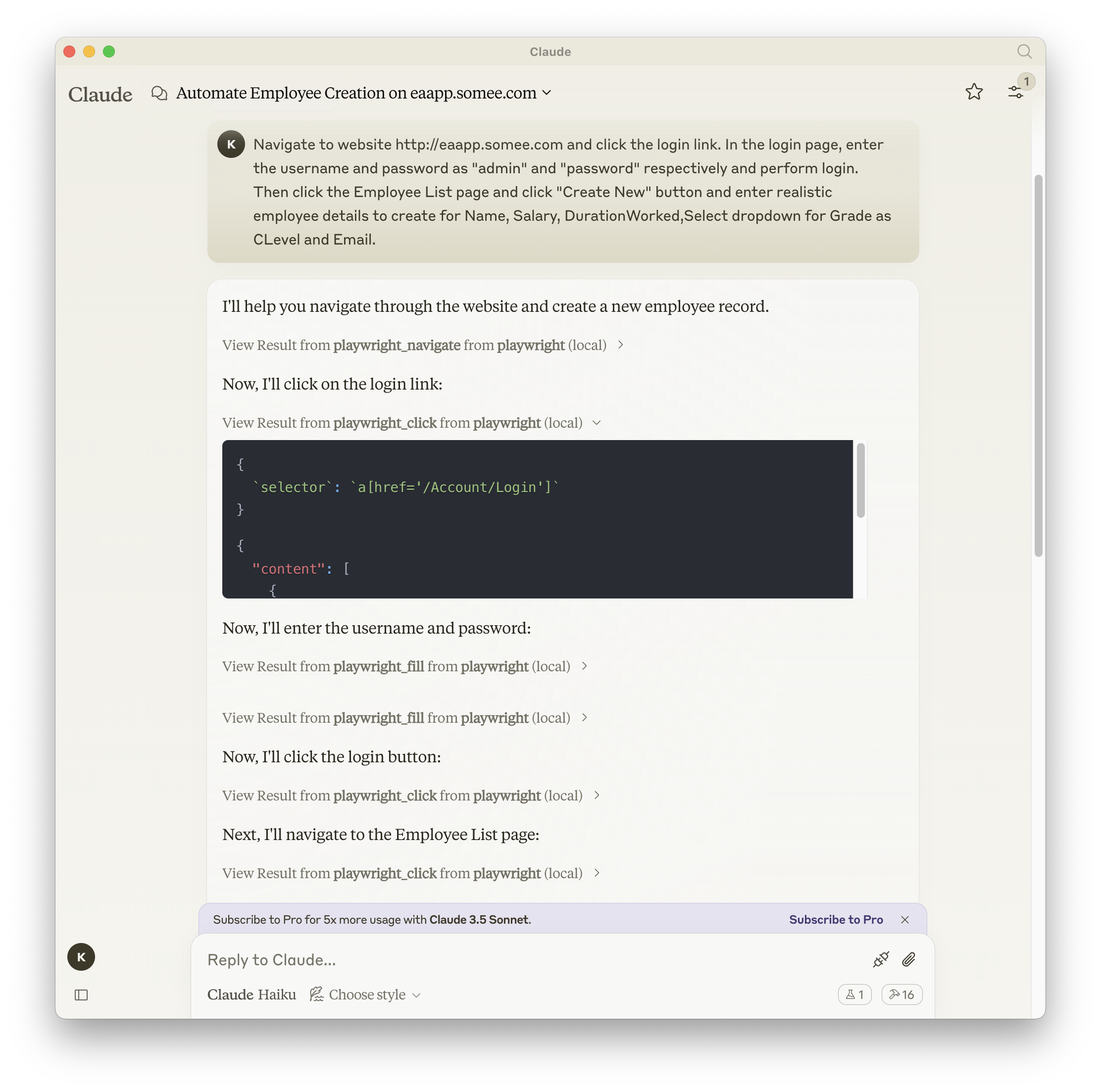
Playwright + Claude

Related MCP server: MCP Selenium Server

Documentation | API reference

Installation

You can install the package using either npm, mcp-get, or Smithery:

Using npm:

npm install -g @executeautomation/playwright-mcp-server

Using mcp-get:

npx @michaellatman/mcp-get@latest install @executeautomation/playwright-mcp-server

Using Smithery

To install Playwright MCP for Claude Desktop automatically via Smithery:

npx @smithery/cli install @executeautomation/playwright-mcp-server --client claude

Installation in VS Code

Install the Playwright MCP server in VS Code using one of these buttons:

Alternatively, you can install the Playwright MCP server using the VS Code CLI:

# For VS Code
code --add-mcp '{"name":"playwright","command":"npx","args":["@executeautomation/playwright-mcp-server"]}'
# For VS Code Insiders
code-insiders --add-mcp '{"name":"playwright","command":"npx","args":["@executeautomation/playwright-mcp-server"]}'

After installation, the ExecuteAutomation Playwright MCP server will be available for use with your GitHub Copilot agent in VS Code.

Configuration to use Playwright Server

Here's the Claude Desktop configuration to use the Playwright server:

{
  "mcpServers": {
    "playwright": {
      "command": "npx",
      "args": ["-y", "@executeautomation/playwright-mcp-server"]
    }
  }
}

Streamable HTTP mode

The server supports the MCP Streamable HTTP transport so it can run behind gateways.

  • Start in HTTP mode (defaults to port 8000 and path /mcp):

    npx @executeautomation/playwright-mcp-server --http
  • Override the port or path:

    npx @executeautomation/playwright-mcp-server --http --port 3000 --path /custom-mcp

How files are shared in HTTP mode

  • Generated artifacts (screenshots, PDFs, console logs, generated tests) are written into /data/<session>/<resourceId>.<ext> on the server.

  • Each Streamable HTTP session gets its own isolated resource namespace; links are only valid for that session and expire after the configured TTL (--resource-ttl, default 600s). Session close or TTL expiry removes the files and their directories.

  • Tool results return resourceLinks pointing to download URLs:
    {scheme}://{host}:{port}{path}/resources/{sessionId}/{resourceId}/{filename}
    (host from --host-name, scheme from --insecure, path from --path, default /mcp).

  • In stdio mode, resource linking is disabled; tools only emit local paths.

This scope-based sharing prevents content leakage between sessions/clients while still giving HTTP clients and gateways stable download URIs.

Uploads in HTTP mode

  • The playwright_upload_file tool accepts a local filePath only in stdio mode. In HTTP mode, you must first upload the file and pass uploadResourceUri.

  • Get the session-scoped upload URL by calling construct_upload_url (HTTP mode only). It returns a POST multipart endpoint like {path}/uploads/{sessionId}; the session ID is embedded in the URL so no header is usually needed.

  • Upload with multipart/form-data (field file). On success, the server responds with a session-scoped resourceUri such as mcp-uploads://<session>/<id>.

  • Then call playwright_upload_file with uploadResourceUri to attach the uploaded file to the file input. Uploads are isolated per session/client like other resources.

  • Agents must be able to run terminal/CLI commands (curl on Linux/macOS, Invoke-WebRequest/iwr on Windows) to upload the file before calling playwright_upload_file in HTTP mode.

  • Stdio mode continues to use local filePath; HTTP mode prefers uploaded resources.

Client Configuration

Claude Desktop / VS Code (mcp.json):

{
  "mcpServers": {
    "playwright": {
      "transport": {
        "type": "http",
        "url": "http://localhost:8000/mcp"
      }
    }
  }
}

Adjust url to match your host/port/path and use https if terminated by a proxy.

CLI flags

  • --http: Enable Streamable HTTP transport (default: off; stdio is used when omitted).

  • --port <number>: HTTP port (default: 8000, only relevant when --http is set).

  • --path <path>: Base HTTP path (default: /mcp, only relevant when --http is set).

  • --host-name <hostname>: Hostname used in generated download URLs (default: system hostname, only relevant when --http is set).

  • --listen <address>: Bind address for the HTTP server (default: 0.0.0.0, only relevant when --http is set).

  • --insecure: Use http scheme for download links; omit to use https (only relevant when --http is set).

  • --resource-ttl <seconds>: TTL for generated resources (default: 600 seconds; only affects HTTP mode).

  • --static-user-agent: Disable the default randomized User-Agent rotation (by default, each new browser launch picks a modern UA to reduce bot detection/CAPTCHAs).

Agents / Prompts

  • A starter agent prompt is provided in AGENTS.md. Create an agent in VS Code (or your client) using that prompt as a template; customize as needed.

  • For file uploads in HTTP mode, ensure the agent has permission to run terminal/CLI commands (curl on Linux/macOS, Invoke-WebRequest/iwr on Windows) because uploads are performed via the session-specific HTTP endpoint before calling playwright_upload_file.

Contributing

  • Read the CONTRIBUTING.md guidelines for required tooling (pre-commit hooks, lint/test/build steps, conventional commits, documentation updates).

  • The CI workflow enforces the same standards; please mirror them locally before opening a PR.

Available Tools

Tool

Purpose

Notes

playwright_navigate

Open a URL with optional viewport/headless/browser type

Browser launched if needed

playwright_screenshot

Capture screenshot of page/element

HTTP mode returns resource link

playwright_save_as_pdf

Save page as PDF

HTTP mode returns resource link

playwright_console_logs

Retrieve browser console logs with filters

Log file registered when saved

playwright_upload_file

Set a file into an <input type="file">

In HTTP mode, upload file via construct_upload_url then pass uploadResourceUri; stdio uses filePath

construct_upload_url (HTTP)

Return session-scoped upload URL/instructions

Use POST multipart (file field) to get uploadResourceUri

playwright_click / playwright_fill / playwright_select / playwright_hover / playwright_drag / playwright_press_key

Core page interactions

Browser required

playwright_iframe_click / playwright_iframe_fill

Interact inside iframes

Provide iframe selector

playwright_get_visible_text / playwright_get_visible_html

Read visible page content

HTML tool supports cleaning options

playwright_custom_user_agent

Override User-Agent for browser context

playwright_go_back / playwright_go_forward / playwright_close

Navigation or close browser

playwright_evaluate

Execute JS in page

playwright_expect_response / playwright_assert_response

Wait for and assert network responses

playwright_get / playwright_post / playwright_put / playwright_patch / playwright_delete

HTTP API helpers

start_codegen_session / end_codegen_session / get_codegen_session / clear_codegen_session

Record and generate Playwright tests

Generated tests are exposed as resources in HTTP mode

Docker Support

The Playwright MCP Server is available as a pre-built Docker image with all browsers and system dependencies included. This avoids slow first-run downloads and version drift.

Using Docker

To use Docker, pull the latest image from GitHub Container Registry:

docker pull ghcr.io/aakashh242/mcp-playwright:latest

Running with Docker directly

# Run the server (stdin/stdout communication)
docker run -i --rm ghcr.io/aakashh242/mcp-playwright:latest

Streamable HTTP mode in Docker

docker run --rm -p 8000:8000 -v /data:/data \
  ghcr.io/aakashh242/mcp-playwright:latest \
  node dist/index.js --http --insecure --host-name localhost --listen 0.0.0.0 --path /mcp
  • Mount /data to persist session-scoped artifacts if desired.

  • Adjust --host-name to the public hostname your clients/gateways use. Use --insecure for http; omit it for https behind a terminating proxy.

  • Resource download URLs will be http://<host>:8000/mcp/resources/<session>/<resourceId>/<filename> by default.

  • The container default is headless (PLAYWRIGHT_HEADLESS=1) and the Playwright base image already includes browsers.

Use the provided docker-compose.yml to run streamable HTTP with sensible defaults:

docker compose up -d

Defaults:

  • HTTP mode with --path=/mcp, --listen=0.0.0.0, --port=8000, and a --host-name placeholder (replace with your public hostname).

  • Ports: 8000:8000

  • Volumes: ./data/app-data:/app/data and ./data/resource-data:/data for persisted session artifacts.

Using Docker with MCP Clients

To use the Dockerized server with Claude Desktop or other MCP clients, you can configure them to use Docker:

{
  "mcpServers": {
    "playwright": {
      "command": "docker",
      "args": ["run", "-i", "--rm", "ghcr.io/aakashh242/mcp-playwright:latest"]
    }
  }
}

Building Locally

If you need to build the Docker image locally:

The Docker build handles dependencies and the TypeScript build for you:

docker build -t mcp-playwright .

Then use mcp-playwright instead of ghcr.io/aakashh242/mcp-playwright:latest in the commands above.

Testing

This project uses Jest for testing. The tests are located in the src/__tests__ directory.

Running Tests

You can run the tests using one of the following commands:

# Run tests using the custom script (with coverage)
node run-tests.cjs

# Run tests using npm scripts
npm test           # Run tests without coverage
npm run test:coverage  # Run tests with coverage
npm run test:custom    # Run tests with custom script (same as node run-tests.cjs)

The test coverage report will be generated in the coverage directory.

Running evals

The evals package loads an mcp client that then runs the index.ts file, so there is no need to rebuild between tests. You can load environment variables by prefixing the npx command. Full documentation can be found here.

OPENAI_API_KEY=your-key  npx mcp-eval src/evals/evals.ts src/tools/codegen/index.ts

Contributing

When adding new tools, please be mindful of the tool name length. Some clients, like Cursor, have a 60-character limit for the combined server and tool name (server_name:tool_name).

Our server name is playwright-mcp. Please ensure your tool names are short enough to not exceed this limit.

Star History

Star History Chart

Available Tools

32 tools
clear_codegen_sessionC

Clear a code generation session without generating a test

ParametersJSON Schema
NameRequiredDescriptionDefault
sessionIdYesID of the session to clear

TDQS

C2.9/5.0
Behavior2/5

Does the description disclose side effects, auth requirements, rate limits, or destructive behavior?

With no annotations provided, the description carries the full burden of behavioral disclosure. It states the action ('Clear') but doesn't explain what 'clear' entailsβ€”e.g., whether it deletes data, resets state, requires specific permissions, or has side effects. This leaves significant gaps in understanding the tool's behavior.

Agents need to know what a tool does to the world before calling it. Descriptions should go beyond structured annotations to explain consequences.

Conciseness5/5

Is the description appropriately sized, front-loaded, and free of redundancy?

The description is a single, efficient sentence that directly states the tool's purpose without unnecessary words. It's appropriately sized and front-loaded, with every part contributing to understanding.

Shorter descriptions cost fewer tokens and are easier for agents to parse. Every sentence should earn its place.

Completeness2/5

Given the tool's complexity, does the description cover enough for an agent to succeed on first attempt?

Given the tool's potential complexity (clearing a session could involve data deletion or state changes), no annotations, and no output schema, the description is inadequate. It lacks details on behavior, outcomes, or error conditions, making it incomplete for safe and effective use.

Complex tools with many parameters or behaviors need more documentation. Simple tools need less. This dimension scales expectations accordingly.

Parameters3/5

Does the description clarify parameter syntax, constraints, interactions, or defaults beyond what the schema provides?

Schema description coverage is 100%, with the parameter 'sessionId' fully documented in the schema. The description adds no additional meaning or context about the parameter beyond what the schema provides, so it meets the baseline for high coverage without compensating value.

Input schemas describe structure but not intent. Descriptions should explain non-obvious parameter relationships and valid value ranges.

Purpose4/5

Does the description clearly state what the tool does and how it differs from similar tools?

The description clearly states the action ('Clear') and resource ('a code generation session'), and distinguishes it from generating a test. However, it doesn't explicitly differentiate from the sibling tool 'end_codegen_session', which might have similar functionality, leaving some ambiguity about when to use one over the other.

Agents choose between tools based on descriptions. A clear purpose with a specific verb and resource helps agents select the right tool.

Usage Guidelines2/5

Does the description explain when to use this tool, when not to, or what alternatives exist?

The description mentions 'without generating a test', which implies an alternative action but doesn't specify when to use this tool versus other options like 'end_codegen_session' or 'get_codegen_session'. No explicit guidance on context, prerequisites, or exclusions is provided.

Agents often have multiple tools that could apply. Explicit usage guidance like "use X instead of Y when Z" prevents misuse.

end_codegen_sessionC

End a code generation session and generate the test file

ParametersJSON Schema
NameRequiredDescriptionDefault
sessionIdYesID of the session to end

TDQS

C2.9/5.0
Behavior2/5

Does the description disclose side effects, auth requirements, rate limits, or destructive behavior?

With no annotations provided, the description carries the full burden of behavioral disclosure. It states the tool ends a session and generates a test file, but lacks details on permissions, side effects (e.g., if the session is deleted or archived), or error handling, which is insufficient for a mutation tool.

Agents need to know what a tool does to the world before calling it. Descriptions should go beyond structured annotations to explain consequences.

Conciseness5/5

Is the description appropriately sized, front-loaded, and free of redundancy?

The description is a single, efficient sentence that directly states the tool's purpose without unnecessary words. It is front-loaded and wastes no space, earning a perfect score for conciseness.

Shorter descriptions cost fewer tokens and are easier for agents to parse. Every sentence should earn its place.

Completeness2/5

Given the tool's complexity, does the description cover enough for an agent to succeed on first attempt?

Given the tool's complexity as a mutation operation with no annotations and no output schema, the description is incomplete. It fails to explain what 'generate the test file' entails (e.g., format, location, or success criteria), leaving significant gaps for the agent.

Complex tools with many parameters or behaviors need more documentation. Simple tools need less. This dimension scales expectations accordingly.

Parameters3/5

Does the description clarify parameter syntax, constraints, interactions, or defaults beyond what the schema provides?

The input schema has 100% description coverage, clearly documenting the 'sessionId' parameter. The description adds no additional parameter details beyond what the schema provides, so it meets the baseline score of 3 for high schema coverage.

Input schemas describe structure but not intent. Descriptions should explain non-obvious parameter relationships and valid value ranges.

Purpose4/5

Does the description clearly state what the tool does and how it differs from similar tools?

The description clearly states the action ('End') and resource ('a code generation session'), and mentions generating a test file as an outcome. However, it doesn't explicitly differentiate from sibling tools like 'clear_codegen_session' or 'get_codegen_session', which prevents a perfect score.

Agents choose between tools based on descriptions. A clear purpose with a specific verb and resource helps agents select the right tool.

Usage Guidelines2/5

Does the description explain when to use this tool, when not to, or what alternatives exist?

The description provides no guidance on when to use this tool versus alternatives, such as 'clear_codegen_session' or 'get_codegen_session', nor does it mention prerequisites like needing an active session. This leaves the agent without context for selection.

Agents often have multiple tools that could apply. Explicit usage guidance like "use X instead of Y when Z" prevents misuse.

get_codegen_sessionC

Get information about a code generation session

ParametersJSON Schema
NameRequiredDescriptionDefault
sessionIdYesID of the session to retrieve

TDQS

C2.9/5.0
Behavior2/5

Does the description disclose side effects, auth requirements, rate limits, or destructive behavior?

With no annotations provided, the description carries the full burden of behavioral disclosure. It states this is a 'Get' operation, implying it's likely read-only, but doesn't confirm safety aspects like whether it requires authentication, has rate limits, or what happens if the session doesn't exist. This leaves significant gaps for a tool that presumably retrieves session data.

Agents need to know what a tool does to the world before calling it. Descriptions should go beyond structured annotations to explain consequences.

Conciseness5/5

Is the description appropriately sized, front-loaded, and free of redundancy?

The description is a single, efficient sentence that directly states the tool's purpose without unnecessary words. It's appropriately sized and front-loaded, making it easy for an agent to parse quickly.

Shorter descriptions cost fewer tokens and are easier for agents to parse. Every sentence should earn its place.

Completeness2/5

Given the tool's complexity, does the description cover enough for an agent to succeed on first attempt?

Given the lack of annotations and output schema, the description is incomplete. It doesn't explain what information is returned (e.g., session status, metadata, or code), behavioral traits like error handling, or how it relates to sibling tools. For a retrieval tool in a codegen context, this leaves the agent with insufficient context.

Complex tools with many parameters or behaviors need more documentation. Simple tools need less. This dimension scales expectations accordingly.

Parameters3/5

Does the description clarify parameter syntax, constraints, interactions, or defaults beyond what the schema provides?

The input schema has 100% description coverage, with the single parameter 'sessionId' clearly documented. The description doesn't add any additional meaning beyond what the schema provides, such as format examples or context about valid session IDs, so it meets the baseline for high schema coverage.

Input schemas describe structure but not intent. Descriptions should explain non-obvious parameter relationships and valid value ranges.

Purpose4/5

Does the description clearly state what the tool does and how it differs from similar tools?

The description clearly states the verb ('Get') and resource ('information about a code generation session'), making the purpose unambiguous. However, it doesn't differentiate from sibling tools like 'clear_codegen_session' or 'end_codegen_session', which prevents a perfect score.

Agents choose between tools based on descriptions. A clear purpose with a specific verb and resource helps agents select the right tool.

Usage Guidelines2/5

Does the description explain when to use this tool, when not to, or what alternatives exist?

The description provides no guidance on when to use this tool versus alternatives like 'start_codegen_session' or other codegen-related siblings. It lacks context about prerequisites or typical use cases, leaving the agent with minimal direction.

Agents often have multiple tools that could apply. Explicit usage guidance like "use X instead of Y when Z" prevents misuse.

playwright_assert_responseB

Wait for and validate a previously initiated HTTP response wait operation.

ParametersJSON Schema
NameRequiredDescriptionDefault
idYesIdentifier of the HTTP response initially expected using `Playwright_expect_response`.
valueNoData to expect in the body of the HTTP response. If provided, the assertion will fail if this value is not found in the response body.

TDQS

B3.3/5.0
Behavior2/5

Does the description disclose side effects, auth requirements, rate limits, or destructive behavior?

No annotations are provided, so the description carries the full burden. It mentions 'Wait for and validate' and that assertion fails if the value isn't found, which hints at blocking behavior and validation logic. However, it lacks details on timeouts, error handling, or what happens if the response never arrives, making it insufficient for a mutation/validation tool with no annotation coverage.

Agents need to know what a tool does to the world before calling it. Descriptions should go beyond structured annotations to explain consequences.

Conciseness5/5

Is the description appropriately sized, front-loaded, and free of redundancy?

The description is a single, efficient sentence that front-loads the core purpose without unnecessary words. It directly communicates the tool's function, making it highly concise and well-structured for quick understanding.

Shorter descriptions cost fewer tokens and are easier for agents to parse. Every sentence should earn its place.

Completeness3/5

Given the tool's complexity, does the description cover enough for an agent to succeed on first attempt?

Given no annotations and no output schema, the description is moderately complete. It covers the basic purpose and hints at validation behavior but lacks details on return values, error cases, or integration with sibling tools. For a tool that performs waiting and assertion with parameters, this leaves gaps in full contextual understanding.

Complex tools with many parameters or behaviors need more documentation. Simple tools need less. This dimension scales expectations accordingly.

Parameters3/5

Does the description clarify parameter syntax, constraints, interactions, or defaults beyond what the schema provides?

Schema description coverage is 100%, so the schema already documents both parameters ('id' and 'value') well. The description adds minimal value beyond this, as it doesn't explain parameter interactions or provide additional context like format examples. With high schema coverage, the baseline score of 3 is appropriate.

Input schemas describe structure but not intent. Descriptions should explain non-obvious parameter relationships and valid value ranges.

Purpose4/5

Does the description clearly state what the tool does and how it differs from similar tools?

The description clearly states the tool's purpose: 'Wait for and validate a previously initiated HTTP response wait operation.' It specifies the action (wait for and validate) and the resource (HTTP response from a previous wait operation), making it understandable. However, it doesn't explicitly differentiate from sibling tools like 'playwright_expect_response', which likely initiates the wait, so it misses full sibling distinction.

Agents choose between tools based on descriptions. A clear purpose with a specific verb and resource helps agents select the right tool.

Usage Guidelines3/5

Does the description explain when to use this tool, when not to, or what alternatives exist?

The description implies usage by referencing 'previously initiated HTTP response wait operation' and 'initially expected using `Playwright_expect_response`', suggesting this tool is used after that sibling. However, it doesn't provide explicit when-to-use guidance, alternatives, or exclusions, leaving some ambiguity about its role in the workflow.

Agents often have multiple tools that could apply. Explicit usage guidance like "use X instead of Y when Z" prevents misuse.

playwright_clickC

Click an element on the page

ParametersJSON Schema
NameRequiredDescriptionDefault
selectorYesCSS selector for the element to click

TDQS

C2.9/5.0
Behavior2/5

Does the description disclose side effects, auth requirements, rate limits, or destructive behavior?

No annotations are provided, so the description carries the full burden. It states the basic action but lacks critical behavioral details: it doesn't specify if the click waits for navigation, handles visibility/accessibility, requires the element to be interactable, or what happens on failure (e.g., timeout). For a UI automation tool with zero annotation coverage, this is a significant gap.

Agents need to know what a tool does to the world before calling it. Descriptions should go beyond structured annotations to explain consequences.

Conciseness5/5

Is the description appropriately sized, front-loaded, and free of redundancy?

The description is a single, efficient sentence with zero wasted words. It's front-loaded with the core action ('click') and immediately specifies the target, making it easy to parse. Every word earns its place.

Shorter descriptions cost fewer tokens and are easier for agents to parse. Every sentence should earn its place.

Completeness2/5

Given the tool's complexity, does the description cover enough for an agent to succeed on first attempt?

Given the complexity of UI automation (interactive, state-dependent) and lack of annotations or output schema, the description is incomplete. It doesn't cover behavioral nuances like waiting, error handling, or interaction constraints, which are essential for an agent to use this tool correctly in a dynamic environment.

Complex tools with many parameters or behaviors need more documentation. Simple tools need less. This dimension scales expectations accordingly.

Parameters3/5

Does the description clarify parameter syntax, constraints, interactions, or defaults beyond what the schema provides?

Schema description coverage is 100%, with the parameter 'selector' fully documented in the schema. The description adds no additional parameter semantics beyond implying the selector targets a clickable element, which is already inferred from the tool's purpose. This meets the baseline for high schema coverage.

Input schemas describe structure but not intent. Descriptions should explain non-obvious parameter relationships and valid value ranges.

Purpose4/5

Does the description clearly state what the tool does and how it differs from similar tools?

The description clearly states the action ('click') and target ('an element on the page'), which is specific and unambiguous. However, it doesn't explicitly differentiate from sibling tools like 'playwright_iframe_click' or 'playwright_click_and_switch_tab', which would require mentioning the scope (main page vs iframe) or additional behavior (tab switching).

Agents choose between tools based on descriptions. A clear purpose with a specific verb and resource helps agents select the right tool.

Usage Guidelines2/5

Does the description explain when to use this tool, when not to, or what alternatives exist?

The description provides no guidance on when to use this tool versus alternatives. It doesn't mention prerequisites (e.g., needing a page loaded), exclusions (e.g., not for iframes), or comparisons to siblings like 'playwright_iframe_click' for iframe elements or 'playwright_click_and_switch_tab' for tab interactions.

Agents often have multiple tools that could apply. Explicit usage guidance like "use X instead of Y when Z" prevents misuse.

playwright_click_and_switch_tabA

Click a link and switch to the newly opened tab

ParametersJSON Schema
NameRequiredDescriptionDefault
selectorYesCSS selector for the link to click

TDQS

A3.7/5.0
Behavior2/5

Does the description disclose side effects, auth requirements, rate limits, or destructive behavior?

No annotations are provided, so the description carries the full burden of behavioral disclosure. It mentions the action and outcome but lacks details on error handling (e.g., if no new tab opens), performance implications (e.g., waiting for tab load), or side effects (e.g., closing previous tabs). For a tool with no annotations, this is a significant gap in transparency.

Agents need to know what a tool does to the world before calling it. Descriptions should go beyond structured annotations to explain consequences.

Conciseness5/5

Is the description appropriately sized, front-loaded, and free of redundancy?

The description is a single, efficient sentence that front-loads the core action and outcome with zero wasted words. It is appropriately sized for the tool's complexity, making it easy to understand at a glance without unnecessary elaboration.

Shorter descriptions cost fewer tokens and are easier for agents to parse. Every sentence should earn its place.

Completeness3/5

Given the tool's complexity, does the description cover enough for an agent to succeed on first attempt?

Given the tool's moderate complexity (interacting with web pages and tabs), no annotations, and no output schema, the description is minimally adequate. It covers the basic purpose but lacks details on return values, error cases, or integration with other Playwright tools. A score of 3 reflects a viable but incomplete description for this context.

Complex tools with many parameters or behaviors need more documentation. Simple tools need less. This dimension scales expectations accordingly.

Parameters3/5

Does the description clarify parameter syntax, constraints, interactions, or defaults beyond what the schema provides?

The schema description coverage is 100%, with the parameter 'selector' fully documented in the schema as a CSS selector. The description does not add any additional meaning beyond what the schema provides, such as examples or constraints on the selector. Baseline 3 is appropriate when the schema handles parameter documentation effectively.

Input schemas describe structure but not intent. Descriptions should explain non-obvious parameter relationships and valid value ranges.

Purpose5/5

Does the description clearly state what the tool does and how it differs from similar tools?

The description clearly states the specific action ('Click a link') and the outcome ('switch to the newly opened tab'), distinguishing it from sibling tools like 'playwright_click' (which only clicks) and 'playwright_navigate' (which navigates without clicking). It uses precise verbs and identifies the resource (a link) and the result (new tab).

Agents choose between tools based on descriptions. A clear purpose with a specific verb and resource helps agents select the right tool.

Usage Guidelines4/5

Does the description explain when to use this tool, when not to, or what alternatives exist?

The description implies usage when clicking a link that opens a new tab, providing clear context for its purpose. However, it does not explicitly state when not to use it (e.g., for links that don't open new tabs) or name specific alternatives like 'playwright_click' for non-tab-opening clicks, which would elevate it to a 5.

Agents often have multiple tools that could apply. Explicit usage guidance like "use X instead of Y when Z" prevents misuse.

playwright_closeB

Close the browser and release all resources

ParametersJSON Schema
NameRequiredDescriptionDefault

No parameters

TDQS

B3.2/5.0
Behavior2/5

Does the description disclose side effects, auth requirements, rate limits, or destructive behavior?

With no annotations provided, the description carries the full burden of behavioral disclosure. It states the tool closes the browser and releases resources, which implies a destructive, irreversible action, but it does not detail effects like terminating all open pages, clearing sessions, or potential errors if no browser is open. More context on these behavioral traits would improve transparency.

Agents need to know what a tool does to the world before calling it. Descriptions should go beyond structured annotations to explain consequences.

Conciseness5/5

Is the description appropriately sized, front-loaded, and free of redundancy?

The description is a single, efficient sentence that directly states the tool's purpose without any unnecessary words. It is front-loaded and every part of the sentence contributes to understanding the action and its scope.

Shorter descriptions cost fewer tokens and are easier for agents to parse. Every sentence should earn its place.

Completeness3/5

Given the tool's complexity, does the description cover enough for an agent to succeed on first attempt?

Given the tool has 0 parameters, no annotations, and no output schema, the description is minimal but adequate for a simple close operation. However, it lacks details on behavioral aspects like error handling or side effects, which would be helpful for an agent to use it correctly in context with sibling tools.

Complex tools with many parameters or behaviors need more documentation. Simple tools need less. This dimension scales expectations accordingly.

Parameters4/5

Does the description clarify parameter syntax, constraints, interactions, or defaults beyond what the schema provides?

The tool has 0 parameters, and schema description coverage is 100%, so there is no need for parameter details in the description. The description appropriately focuses on the tool's action without redundant parameter information, aligning with the baseline for zero parameters.

Input schemas describe structure but not intent. Descriptions should explain non-obvious parameter relationships and valid value ranges.

Purpose4/5

Does the description clearly state what the tool does and how it differs from similar tools?

The description clearly states the action ('Close') and the target resource ('the browser'), specifying that it also 'release[s] all resources'. This distinguishes it from other playwright tools that perform actions within the browser, but it does not explicitly differentiate from sibling tools like 'end_codegen_session' or 'clear_codegen_session' which might also involve cleanup.

Agents choose between tools based on descriptions. A clear purpose with a specific verb and resource helps agents select the right tool.

Usage Guidelines2/5

Does the description explain when to use this tool, when not to, or what alternatives exist?

The description provides no guidance on when to use this tool versus alternatives. It does not mention prerequisites (e.g., after completing browser operations) or exclusions (e.g., not for temporary pauses), nor does it refer to sibling tools like 'end_codegen_session' that might relate to session management.

Agents often have multiple tools that could apply. Explicit usage guidance like "use X instead of Y when Z" prevents misuse.

playwright_console_logsC

Retrieve console logs from the browser with filtering options

ParametersJSON Schema
NameRequiredDescriptionDefault
typeNoType of logs to retrieve (all, error, warning, log, info, debug, exception)
searchNoText to search for in logs (handles text with square brackets)
limitNoMaximum number of logs to return
clearNoWhether to clear logs after retrieval (default: false)

TDQS

C2.9/5.0
Behavior2/5

Does the description disclose side effects, auth requirements, rate limits, or destructive behavior?

With no annotations provided, the description carries the full burden of behavioral disclosure. It mentions 'retrieve' and 'filtering options' but fails to disclose critical traits such as whether this operation is safe (read-only vs. potentially destructive), if it requires specific browser states, or how logs are structured in the response. The mention of 'clear' in the schema hints at potential side effects, but the description doesn't address this.

Agents need to know what a tool does to the world before calling it. Descriptions should go beyond structured annotations to explain consequences.

Conciseness5/5

Is the description appropriately sized, front-loaded, and free of redundancy?

The description is a single, efficient sentence that front-loads the core purpose ('retrieve console logs') and briefly mentions key features ('from the browser with filtering options'). There is no wasted verbiage, making it highly concise and well-structured for quick comprehension.

Shorter descriptions cost fewer tokens and are easier for agents to parse. Every sentence should earn its place.

Completeness2/5

Given the tool's complexity, does the description cover enough for an agent to succeed on first attempt?

Given the complexity of a browser logging tool with no annotations and no output schema, the description is insufficient. It lacks details on behavioral aspects (e.g., side effects, prerequisites), output format, or error handling, leaving significant gaps for an agent to understand how to use this tool effectively in context.

Complex tools with many parameters or behaviors need more documentation. Simple tools need less. This dimension scales expectations accordingly.

Parameters3/5

Does the description clarify parameter syntax, constraints, interactions, or defaults beyond what the schema provides?

Schema description coverage is 100%, so the schema fully documents all four parameters. The description adds minimal value beyond the schema by implying filtering capabilities ('with filtering options'), but it doesn't elaborate on parameter interactions or provide additional semantic context. This meets the baseline for high schema coverage.

Input schemas describe structure but not intent. Descriptions should explain non-obvious parameter relationships and valid value ranges.

Purpose4/5

Does the description clearly state what the tool does and how it differs from similar tools?

The description clearly states the verb ('retrieve') and resource ('console logs from the browser'), making the purpose unambiguous. However, it doesn't explicitly differentiate from sibling tools like playwright_get_visible_html or playwright_get_visible_text, which also retrieve browser content but of different types.

Agents choose between tools based on descriptions. A clear purpose with a specific verb and resource helps agents select the right tool.

Usage Guidelines2/5

Does the description explain when to use this tool, when not to, or what alternatives exist?

The description provides no guidance on when to use this tool versus alternatives. It mentions 'filtering options' but doesn't specify scenarios where filtering logs is preferable over other retrieval methods or when this tool should be avoided, leaving the agent without contextual usage cues.

Agents often have multiple tools that could apply. Explicit usage guidance like "use X instead of Y when Z" prevents misuse.

playwright_custom_user_agentC

Set a custom User Agent for the browser

ParametersJSON Schema
NameRequiredDescriptionDefault
userAgentYesCustom User Agent for the Playwright browser instance

TDQS

C2.9/5.0
Behavior2/5

Does the description disclose side effects, auth requirements, rate limits, or destructive behavior?

With no annotations provided, the description carries full burden for behavioral disclosure. It states what the tool does but doesn't describe how it behaves: whether the User Agent persists across navigation, if it affects all tabs, what happens on errors, or if there are side effects. For a mutation tool (setting configuration) with zero annotation coverage, this leaves critical behavioral traits undocumented.

Agents need to know what a tool does to the world before calling it. Descriptions should go beyond structured annotations to explain consequences.

Conciseness5/5

Is the description appropriately sized, front-loaded, and free of redundancy?

The description is a single, clear sentence that directly states the tool's function with zero wasted words. It's appropriately sized for a simple configuration tool and front-loads the essential information immediately. Every word earns its place.

Shorter descriptions cost fewer tokens and are easier for agents to parse. Every sentence should earn its place.

Completeness2/5

Given the tool's complexity, does the description cover enough for an agent to succeed on first attempt?

Given this is a mutation tool (setting browser configuration) with no annotations and no output schema, the description is insufficiently complete. It doesn't cover behavioral aspects like persistence, scope, error handling, or what success looks like. For a tool that modifies browser state, more context is needed to use it safely and effectively.

Complex tools with many parameters or behaviors need more documentation. Simple tools need less. This dimension scales expectations accordingly.

Parameters3/5

Does the description clarify parameter syntax, constraints, interactions, or defaults beyond what the schema provides?

Schema description coverage is 100%, so the schema already fully documents the single parameter 'userAgent'. The description adds no additional semantic context about the parameter beyond what's in the schema (e.g., format examples, common values, or constraints). This meets the baseline for high schema coverage but doesn't enhance understanding.

Input schemas describe structure but not intent. Descriptions should explain non-obvious parameter relationships and valid value ranges.

Purpose4/5

Does the description clearly state what the tool does and how it differs from similar tools?

The description clearly states the action ('Set') and resource ('custom User Agent for the browser'), making the purpose immediately understandable. It distinguishes itself from siblings by focusing on User Agent configuration rather than navigation, interaction, or session management. However, it doesn't specify whether this applies to the current browser instance or future ones, which prevents a perfect score.

Agents choose between tools based on descriptions. A clear purpose with a specific verb and resource helps agents select the right tool.

Usage Guidelines2/5

Does the description explain when to use this tool, when not to, or what alternatives exist?

The description provides no guidance on when to use this tool versus alternatives. It doesn't mention prerequisites (e.g., requires an active browser session), when it's appropriate (e.g., for testing different browsers or bypassing detection), or what other tools might be related (e.g., playwright_get for navigation after setting). Without any usage context, the agent must infer everything from the tool name alone.

Agents often have multiple tools that could apply. Explicit usage guidance like "use X instead of Y when Z" prevents misuse.

playwright_deleteC

Perform an HTTP DELETE request

ParametersJSON Schema
NameRequiredDescriptionDefault
urlYesURL to perform DELETE operation

TDQS

C2.9/5.0
Behavior2/5

Does the description disclose side effects, auth requirements, rate limits, or destructive behavior?

No annotations are provided, so the description carries full burden. It states the action but lacks behavioral details: it doesn't mention authentication needs, error handling, rate limits, or what the tool returns (e.g., response status, body). For a mutation tool with zero annotation coverage, this is a significant gap in transparency.

Agents need to know what a tool does to the world before calling it. Descriptions should go beyond structured annotations to explain consequences.

Conciseness5/5

Is the description appropriately sized, front-loaded, and free of redundancy?

The description is a single, direct sentence with zero waste. It's front-loaded and efficiently conveys the core action without unnecessary elaboration, making it highly concise and well-structured.

Shorter descriptions cost fewer tokens and are easier for agents to parse. Every sentence should earn its place.

Completeness2/5

Given the tool's complexity, does the description cover enough for an agent to succeed on first attempt?

Given the tool's complexity (a mutation operation with no annotations and no output schema), the description is incomplete. It doesn't explain return values, error cases, or behavioral traits like side effects. For a DELETE tool, which typically modifies server state, more context is needed for safe and effective use.

Complex tools with many parameters or behaviors need more documentation. Simple tools need less. This dimension scales expectations accordingly.

Parameters3/5

Does the description clarify parameter syntax, constraints, interactions, or defaults beyond what the schema provides?

Schema description coverage is 100%, with the 'url' parameter fully documented in the schema. The description adds no additional meaning beyond what the schema provides (e.g., no examples or constraints on URL format). Baseline 3 is appropriate as the schema handles parameter documentation adequately.

Input schemas describe structure but not intent. Descriptions should explain non-obvious parameter relationships and valid value ranges.

Purpose4/5

Does the description clearly state what the tool does and how it differs from similar tools?

The description clearly states the action ('Perform an HTTP DELETE request'), which is a specific HTTP method. It distinguishes from siblings like playwright_get, playwright_post, etc., by specifying the DELETE method. However, it doesn't explicitly mention what resource it operates on beyond 'HTTP request', making it slightly less specific than a perfect 5.

Agents choose between tools based on descriptions. A clear purpose with a specific verb and resource helps agents select the right tool.

Usage Guidelines2/5

Does the description explain when to use this tool, when not to, or what alternatives exist?

The description provides no guidance on when to use this tool versus alternatives. It doesn't mention scenarios for DELETE requests (e.g., deleting resources in REST APIs) or differentiate from other HTTP methods in the sibling list (like playwright_post or playwright_put). This leaves the agent without context for tool selection.

Agents often have multiple tools that could apply. Explicit usage guidance like "use X instead of Y when Z" prevents misuse.

playwright_dragC

Drag an element to a target location

ParametersJSON Schema
NameRequiredDescriptionDefault
sourceSelectorYesCSS selector for the element to drag
targetSelectorYesCSS selector for the target location

TDQS

C2.9/5.0
Behavior2/5

Does the description disclose side effects, auth requirements, rate limits, or destructive behavior?

With no annotations provided, the description carries the full burden of behavioral disclosure. While 'drag' implies a UI interaction, it doesn't specify whether this requires the element to be visible, what happens if selectors are invalid, whether it waits for page stability, or any error conditions. This leaves significant gaps in understanding the tool's behavior.

Agents need to know what a tool does to the world before calling it. Descriptions should go beyond structured annotations to explain consequences.

Conciseness5/5

Is the description appropriately sized, front-loaded, and free of redundancy?

The description is a single, efficient sentence that directly states the tool's function without unnecessary words. It's front-loaded with the core action and appropriately sized for a straightforward UI interaction tool.

Shorter descriptions cost fewer tokens and are easier for agents to parse. Every sentence should earn its place.

Completeness2/5

Given the tool's complexity, does the description cover enough for an agent to succeed on first attempt?

For a UI interaction tool with no annotations and no output schema, the description is insufficient. It doesn't explain what constitutes success/failure, what the tool returns (if anything), or important behavioral aspects like timing, visibility requirements, or error handling that are critical for proper use.

Complex tools with many parameters or behaviors need more documentation. Simple tools need less. This dimension scales expectations accordingly.

Parameters3/5

Does the description clarify parameter syntax, constraints, interactions, or defaults beyond what the schema provides?

The input schema has 100% description coverage, clearly documenting both parameters as CSS selectors. The description adds no additional parameter information beyond what the schema provides, so it meets the baseline for high schema coverage without compensating value.

Input schemas describe structure but not intent. Descriptions should explain non-obvious parameter relationships and valid value ranges.

Purpose4/5

Does the description clearly state what the tool does and how it differs from similar tools?

The description clearly states the action ('drag') and the resource ('an element to a target location'), making the purpose immediately understandable. However, it doesn't differentiate this tool from potential sibling interactions like 'playwright_click' or 'playwright_hover' beyond the specific drag action.

Agents choose between tools based on descriptions. A clear purpose with a specific verb and resource helps agents select the right tool.

Usage Guidelines2/5

Does the description explain when to use this tool, when not to, or what alternatives exist?

The description provides no guidance on when to use this tool versus alternatives like 'playwright_click' for simple interactions or other playwright tools for different actions. It lacks context about prerequisites (e.g., whether the page must be loaded) or typical use cases.

Agents often have multiple tools that could apply. Explicit usage guidance like "use X instead of Y when Z" prevents misuse.

playwright_evaluateC

Execute JavaScript in the browser console

ParametersJSON Schema
NameRequiredDescriptionDefault
scriptYesJavaScript code to execute

TDQS

C2.9/5.0
Behavior2/5

Does the description disclose side effects, auth requirements, rate limits, or destructive behavior?

With no annotations provided, the description carries full burden but only states what the tool does without behavioral details. It doesn't disclose execution context (e.g., current page, frame), error handling, security implications, or what happens with the JavaScript return value. For a JavaScript execution tool with zero annotation coverage, this is insufficient.

Agents need to know what a tool does to the world before calling it. Descriptions should go beyond structured annotations to explain consequences.

Conciseness5/5

Is the description appropriately sized, front-loaded, and free of redundancy?

The description is extremely concise at just 5 words, front-loading the core functionality with zero wasted words. Every element ('Execute', 'JavaScript', 'in the browser console') contributes essential information.

Shorter descriptions cost fewer tokens and are easier for agents to parse. Every sentence should earn its place.

Completeness2/5

Given the tool's complexity, does the description cover enough for an agent to succeed on first attempt?

For a JavaScript execution tool with no annotations and no output schema, the description is incomplete. It doesn't explain what gets returned, error conditions, execution scope, or security considerations. Given the complexity of browser JavaScript execution, more context is needed for safe and effective use.

Complex tools with many parameters or behaviors need more documentation. Simple tools need less. This dimension scales expectations accordingly.

Parameters3/5

Does the description clarify parameter syntax, constraints, interactions, or defaults beyond what the schema provides?

Schema description coverage is 100%, so the schema already documents the single 'script' parameter. The description doesn't add any additional semantic context about the JavaScript execution environment, supported APIs, or return value handling beyond what the schema provides.

Input schemas describe structure but not intent. Descriptions should explain non-obvious parameter relationships and valid value ranges.

Purpose4/5

Does the description clearly state what the tool does and how it differs from similar tools?

The description clearly states the action ('Execute JavaScript') and location ('in the browser console'), which distinguishes it from other browser automation tools. However, it doesn't explicitly differentiate from potential sibling tools that might also execute JavaScript in different contexts.

Agents choose between tools based on descriptions. A clear purpose with a specific verb and resource helps agents select the right tool.

Usage Guidelines2/5

Does the description explain when to use this tool, when not to, or what alternatives exist?

The description provides no guidance on when to use this tool versus alternatives like other Playwright tools for browser interaction. There's no mention of prerequisites, typical use cases, or limitations compared to similar tools.

Agents often have multiple tools that could apply. Explicit usage guidance like "use X instead of Y when Z" prevents misuse.

playwright_expect_responseB

Ask Playwright to start waiting for a HTTP response. This tool initiates the wait operation but does not wait for its completion.

ParametersJSON Schema
NameRequiredDescriptionDefault
idYesUnique & arbitrary identifier to be used for retrieving this response later with `Playwright_assert_response`.
urlYesURL pattern to match in the response.

TDQS

B3.3/5.0
Behavior2/5

Does the description disclose side effects, auth requirements, rate limits, or destructive behavior?

No annotations are provided, so the description carries full burden. It discloses that the tool starts waiting without completion, which is a key behavioral trait. However, it misses critical details: it doesn't specify timeout behavior, error handling, or how it integrates with Playwright's async operations. For a tool with no annotations, this leaves significant gaps in understanding its behavior.

Agents need to know what a tool does to the world before calling it. Descriptions should go beyond structured annotations to explain consequences.

Conciseness5/5

Is the description appropriately sized, front-loaded, and free of redundancy?

The description is extremely concise with two sentences that directly state the tool's function and limitation. Every word earns its place, and it's front-loaded with the core purpose. There is no wasted text, making it efficient and easy to parse.

Shorter descriptions cost fewer tokens and are easier for agents to parse. Every sentence should earn its place.

Completeness3/5

Given the tool's complexity, does the description cover enough for an agent to succeed on first attempt?

Given no annotations, no output schema, and 2 parameters with full schema coverage, the description is minimally adequate. It explains the tool's purpose and hints at usage with 'playwright_assert_response,' but lacks details on behavioral aspects like timeouts or integration patterns. For a tool that initiates async operations, more context would improve completeness.

Complex tools with many parameters or behaviors need more documentation. Simple tools need less. This dimension scales expectations accordingly.

Parameters3/5

Does the description clarify parameter syntax, constraints, interactions, or defaults beyond what the schema provides?

Schema description coverage is 100%, so the schema already documents both parameters ('id' and 'url') fully. The description adds no additional meaning beyond what the schema provides, such as explaining the relationship between 'id' and later retrieval. With high schema coverage, the baseline score of 3 is appropriate, as the description doesn't compensate but doesn't need to heavily.

Input schemas describe structure but not intent. Descriptions should explain non-obvious parameter relationships and valid value ranges.

Purpose4/5

Does the description clearly state what the tool does and how it differs from similar tools?

The description clearly states the tool's purpose: 'Ask Playwright to start waiting for a HTTP response.' It specifies the verb ('start waiting') and resource ('HTTP response'), distinguishing it from sibling tools like 'playwright_assert_response' which retrieves the response. However, it doesn't explicitly differentiate from other waiting or response-related tools beyond the sibling list context.

Agents choose between tools based on descriptions. A clear purpose with a specific verb and resource helps agents select the right tool.

Usage Guidelines3/5

Does the description explain when to use this tool, when not to, or what alternatives exist?

The description implies usage by stating it 'initiates the wait operation but does not wait for its completion,' suggesting it should be used before an action that triggers a response. It references 'playwright_assert_response' for retrieval, providing some alternative guidance. However, it lacks explicit when-to-use vs. when-not-to-use scenarios or comparisons with other tools like 'playwright_get' or navigation tools.

Agents often have multiple tools that could apply. Explicit usage guidance like "use X instead of Y when Z" prevents misuse.

playwright_fillC

fill out an input field

ParametersJSON Schema
NameRequiredDescriptionDefault
selectorYesCSS selector for input field
valueYesValue to fill

TDQS

C2.9/5.0
Behavior2/5

Does the description disclose side effects, auth requirements, rate limits, or destructive behavior?

No annotations are provided, so the description carries full burden. It states the action but lacks behavioral details such as whether it waits for the element to be visible, clears existing content first, handles validation, or requires specific page states. This is inadequate for a mutation tool with zero annotation coverage.

Agents need to know what a tool does to the world before calling it. Descriptions should go beyond structured annotations to explain consequences.

Conciseness5/5

Is the description appropriately sized, front-loaded, and free of redundancy?

The description is a single, efficient sentence with zero waste. It is appropriately sized for a simple tool and front-loaded with the core action, making it easy to scan and understand quickly.

Shorter descriptions cost fewer tokens and are easier for agents to parse. Every sentence should earn its place.

Completeness2/5

Given the tool's complexity, does the description cover enough for an agent to succeed on first attempt?

Given no annotations, no output schema, and a mutation tool with behavioral complexity (e.g., potential side effects), the description is incomplete. It should address prerequisites, error conditions, or return values to help an agent use it correctly in context with other Playwright tools.

Complex tools with many parameters or behaviors need more documentation. Simple tools need less. This dimension scales expectations accordingly.

Parameters3/5

Does the description clarify parameter syntax, constraints, interactions, or defaults beyond what the schema provides?

Schema description coverage is 100%, with clear descriptions for both parameters (selector and value). The description adds no additional meaning beyond the schema, such as examples or constraints on selector syntax. Baseline 3 is appropriate as the schema does the heavy lifting.

Input schemas describe structure but not intent. Descriptions should explain non-obvious parameter relationships and valid value ranges.

Purpose4/5

Does the description clearly state what the tool does and how it differs from similar tools?

The description 'fill out an input field' clearly states the action (fill) and target (input field) with a specific verb. It distinguishes from siblings like playwright_click or playwright_select by focusing on text input, though it doesn't explicitly differentiate from playwright_iframe_fill which serves a similar purpose in iframes.

Agents choose between tools based on descriptions. A clear purpose with a specific verb and resource helps agents select the right tool.

Usage Guidelines2/5

Does the description explain when to use this tool, when not to, or what alternatives exist?

No guidance is provided on when to use this tool versus alternatives like playwright_type or playwright_set_input_value (if they existed in the sibling list). The description implies usage for input fields but doesn't specify prerequisites (e.g., page must be loaded) or exclusions (e.g., not for non-input elements).

Agents often have multiple tools that could apply. Explicit usage guidance like "use X instead of Y when Z" prevents misuse.

playwright_getC

Perform an HTTP GET request

ParametersJSON Schema
NameRequiredDescriptionDefault
urlYesURL to perform GET operation

TDQS

C2.9/5.0
Behavior2/5

Does the description disclose side effects, auth requirements, rate limits, or destructive behavior?

No annotations are provided, so the description carries full burden. It states what the tool does but reveals nothing about behavioral traits: no mention of error handling, timeout behavior, response format, authentication needs, rate limits, or side effects. For an HTTP tool with zero annotation coverage, this leaves critical operational details unspecified.

Agents need to know what a tool does to the world before calling it. Descriptions should go beyond structured annotations to explain consequences.

Conciseness5/5

Is the description appropriately sized, front-loaded, and free of redundancy?

The description is extremely conciseβ€”a single sentence with zero wasted words. It's front-loaded with the core action and resource. Every word earns its place, making it efficient for quick comprehension.

Shorter descriptions cost fewer tokens and are easier for agents to parse. Every sentence should earn its place.

Completeness2/5

Given the tool's complexity, does the description cover enough for an agent to succeed on first attempt?

Given the complexity of HTTP operations and the lack of both annotations and output schema, the description is incomplete. It doesn't explain what the tool returns (e.g., response body, status code, headers) or any behavioral expectations. For a tool that likely interacts with web resources, this leaves too many unknowns for effective agent use.

Complex tools with many parameters or behaviors need more documentation. Simple tools need less. This dimension scales expectations accordingly.

Parameters3/5

Does the description clarify parameter syntax, constraints, interactions, or defaults beyond what the schema provides?

Schema description coverage is 100%, with the single parameter 'url' fully documented in the schema. The description adds no additional parameter semantics beyond what's already in the structured data. According to scoring rules, when schema coverage is high (>80%), the baseline is 3 even with no param info in the description.

Input schemas describe structure but not intent. Descriptions should explain non-obvious parameter relationships and valid value ranges.

Purpose4/5

Does the description clearly state what the tool does and how it differs from similar tools?

The description clearly states the action ('Perform an HTTP GET request') and the resource (HTTP endpoint via URL), making the purpose immediately understandable. It doesn't explicitly distinguish from sibling tools like playwright_post or playwright_navigate, but the verb 'GET' is specific enough to imply basic HTTP semantics.

Agents choose between tools based on descriptions. A clear purpose with a specific verb and resource helps agents select the right tool.

Usage Guidelines2/5

Does the description explain when to use this tool, when not to, or what alternatives exist?

The description provides no guidance on when to use this tool versus alternatives. With siblings like playwright_navigate (for page navigation) and playwright_post (for POST requests), there's no indication of when GET is appropriate versus other HTTP methods or navigation approaches. The description is purely functional without contextual usage advice.

Agents often have multiple tools that could apply. Explicit usage guidance like "use X instead of Y when Z" prevents misuse.

playwright_get_visible_htmlB

Get the HTML content of the current page. By default, all tags are removed from the output unless removeScripts is explicitly set to false.

ParametersJSON Schema
NameRequiredDescriptionDefault
selectorNoCSS selector to limit the HTML to a specific container
removeScriptsNoRemove all script tags from the HTML (default: true)
removeCommentsNoRemove all HTML comments (default: false)
removeStylesNoRemove all style tags from the HTML (default: false)
removeMetaNoRemove all meta tags from the HTML (default: false)
cleanHtmlNoPerform comprehensive HTML cleaning (default: false)
minifyNoMinify the HTML output (default: false)
maxLengthNoMaximum number of characters to return (default: 20000)

TDQS

B3.1/5.0
Behavior2/5

Does the description disclose side effects, auth requirements, rate limits, or destructive behavior?

With no annotations provided, the description carries full burden. It discloses that script tags are removed by default, which is useful behavioral context. However, it doesn't mention other critical traits: whether this is a read-only operation, potential performance impacts, error conditions, or output format details. For a tool with 8 parameters and no annotations, this is insufficient.

Agents need to know what a tool does to the world before calling it. Descriptions should go beyond structured annotations to explain consequences.

Conciseness5/5

Is the description appropriately sized, front-loaded, and free of redundancy?

The description is two sentences, front-loaded with the core purpose. Every word earns its place: the first sentence states what the tool does, and the second clarifies a key default behavior. No redundancy or fluff, making it highly efficient for an AI agent.

Shorter descriptions cost fewer tokens and are easier for agents to parse. Every sentence should earn its place.

Completeness3/5

Given the tool's complexity, does the description cover enough for an agent to succeed on first attempt?

Given 8 parameters with full schema coverage and no output schema, the description is minimally complete. It covers the basic purpose and one behavioral trait (script removal), but lacks context about when to use it, error handling, or output structure. For a tool with many configuration options, more guidance would be helpful, but it's not entirely inadequate.

Complex tools with many parameters or behaviors need more documentation. Simple tools need less. This dimension scales expectations accordingly.

Parameters3/5

Does the description clarify parameter syntax, constraints, interactions, or defaults beyond what the schema provides?

Schema description coverage is 100%, so the schema fully documents all 8 parameters. The description adds minimal value beyond the schema: it only explains the default for removeScripts (true) and implies it's a key parameter. No additional semantics, examples, or constraints are provided, meeting the baseline for high schema coverage.

Input schemas describe structure but not intent. Descriptions should explain non-obvious parameter relationships and valid value ranges.

Purpose4/5

Does the description clearly state what the tool does and how it differs from similar tools?

The description clearly states the tool's purpose: 'Get the HTML content of the current page.' It specifies the verb ('Get') and resource ('HTML content'), but doesn't explicitly differentiate from sibling tools like playwright_get_visible_text, which suggests similar but text-focused functionality. The mention of script tag removal adds specificity but not sibling distinction.

Agents choose between tools based on descriptions. A clear purpose with a specific verb and resource helps agents select the right tool.

Usage Guidelines2/5

Does the description explain when to use this tool, when not to, or what alternatives exist?

The description provides no guidance on when to use this tool versus alternatives like playwright_get_visible_text or playwright_screenshot. It mentions a default behavior (removing script tags) but doesn't explain use cases, prerequisites, or exclusions. This leaves the agent without contextual decision-making help.

Agents often have multiple tools that could apply. Explicit usage guidance like "use X instead of Y when Z" prevents misuse.

playwright_get_visible_textB

Get the visible text content of the current page

ParametersJSON Schema
NameRequiredDescriptionDefault

No parameters

TDQS

B3.1/5.0
Behavior2/5

Does the description disclose side effects, auth requirements, rate limits, or destructive behavior?

With no annotations provided, the description carries the full burden of behavioral disclosure. It states what the tool does but fails to mention critical aspects like whether it returns only human-visible text (excluding hidden elements), performance implications, error conditions, or output format. This leaves significant gaps in understanding the tool's behavior.

Agents need to know what a tool does to the world before calling it. Descriptions should go beyond structured annotations to explain consequences.

Conciseness5/5

Is the description appropriately sized, front-loaded, and free of redundancy?

The description is a single, clear sentence that directly states the tool's function without any fluff or redundancy. It is front-loaded and efficiently communicates the core purpose, making it easy for an agent to parse and understand quickly.

Shorter descriptions cost fewer tokens and are easier for agents to parse. Every sentence should earn its place.

Completeness2/5

Given the tool's complexity, does the description cover enough for an agent to succeed on first attempt?

Given the lack of annotations and output schema, the description is insufficient for a tool that interacts with web pages. It omits details about return values (e.g., text format, handling of whitespace), error handling, and dependencies on page state, leaving the agent with incomplete information for reliable use.

Complex tools with many parameters or behaviors need more documentation. Simple tools need less. This dimension scales expectations accordingly.

Parameters4/5

Does the description clarify parameter syntax, constraints, interactions, or defaults beyond what the schema provides?

The input schema has 0 parameters with 100% coverage, so no parameter documentation is needed. The description appropriately avoids redundant parameter details, focusing solely on the tool's purpose. A baseline of 4 is applied since no parameters exist, and the description doesn't introduce unnecessary complexity.

Input schemas describe structure but not intent. Descriptions should explain non-obvious parameter relationships and valid value ranges.

Purpose4/5

Does the description clearly state what the tool does and how it differs from similar tools?

The description clearly states the action ('Get') and resource ('visible text content of the current page'), making the tool's purpose immediately understandable. However, it doesn't explicitly differentiate from its sibling 'playwright_get_visible_html', which likely retrieves HTML content rather than just text, leaving room for ambiguity in sibling distinction.

Agents choose between tools based on descriptions. A clear purpose with a specific verb and resource helps agents select the right tool.

Usage Guidelines2/5

Does the description explain when to use this tool, when not to, or what alternatives exist?

No guidance is provided on when to use this tool versus alternatives like 'playwright_get_visible_html' or other text-extraction methods. The description lacks context about prerequisites (e.g., requiring an active page) or typical use cases, offering minimal direction for an agent.

Agents often have multiple tools that could apply. Explicit usage guidance like "use X instead of Y when Z" prevents misuse.

playwright_go_backB

Navigate back in browser history

ParametersJSON Schema
NameRequiredDescriptionDefault

No parameters

TDQS

B3.4/5.0
Behavior2/5

Does the description disclose side effects, auth requirements, rate limits, or destructive behavior?

With no annotations provided, the description carries the full burden of behavioral disclosure. It states the action ('Navigate back') but does not cover critical traits like whether it requires an active browser session, what happens if no history exists, error conditions, or side effects. This leaves significant gaps for a mutation tool in a browser automation context.

Agents need to know what a tool does to the world before calling it. Descriptions should go beyond structured annotations to explain consequences.

Conciseness5/5

Is the description appropriately sized, front-loaded, and free of redundancy?

The description is a single, clear sentence ('Navigate back in browser history') that is front-loaded and wastes no words. It directly conveys the core functionality without redundancy or fluff, making it highly efficient and easy to parse.

Shorter descriptions cost fewer tokens and are easier for agents to parse. Every sentence should earn its place.

Completeness2/5

Given the tool's complexity, does the description cover enough for an agent to succeed on first attempt?

Given the tool's complexity (a mutation action in browser automation), lack of annotations, and no output schema, the description is insufficient. It does not address behavioral aspects like session requirements, error handling, or what 'back' entails (e.g., page reloads, state changes). For a tool with potential side effects, more context is needed.

Complex tools with many parameters or behaviors need more documentation. Simple tools need less. This dimension scales expectations accordingly.

Parameters4/5

Does the description clarify parameter syntax, constraints, interactions, or defaults beyond what the schema provides?

The tool has 0 parameters, and schema description coverage is 100%, so no parameter documentation is needed. The description appropriately omits parameter details, focusing on the tool's purpose. A baseline of 4 is applied as it efficiently handles the lack of parameters without unnecessary elaboration.

Input schemas describe structure but not intent. Descriptions should explain non-obvious parameter relationships and valid value ranges.

Purpose5/5

Does the description clearly state what the tool does and how it differs from similar tools?

The description 'Navigate back in browser history' clearly states the verb ('Navigate back') and resource ('browser history'), making the purpose specific and unambiguous. It distinguishes from siblings like 'playwright_go_forward' by specifying the direction of navigation, avoiding tautology with the tool name.

Agents choose between tools based on descriptions. A clear purpose with a specific verb and resource helps agents select the right tool.

Usage Guidelines2/5

Does the description explain when to use this tool, when not to, or what alternatives exist?

The description provides no guidance on when to use this tool versus alternatives, such as 'playwright_navigate' for direct URL navigation or 'playwright_go_forward' for forward navigation. It lacks context about prerequisites (e.g., requiring a browser session) or exclusions, offering only basic functional intent.

Agents often have multiple tools that could apply. Explicit usage guidance like "use X instead of Y when Z" prevents misuse.

playwright_go_forwardB

Navigate forward in browser history

ParametersJSON Schema
NameRequiredDescriptionDefault

No parameters

TDQS

B3.1/5.0
Behavior2/5

Does the description disclose side effects, auth requirements, rate limits, or destructive behavior?

With no annotations provided, the description carries full burden for behavioral disclosure. It states the action but doesn't mention potential side effects (e.g., page reload, navigation state changes), error conditions (e.g., what happens if no forward history exists), or performance characteristics. This leaves significant behavioral gaps for a navigation operation.

Agents need to know what a tool does to the world before calling it. Descriptions should go beyond structured annotations to explain consequences.

Conciseness5/5

Is the description appropriately sized, front-loaded, and free of redundancy?

The description is a single, efficient sentence that communicates the core functionality without any wasted words. It's appropriately sized for a simple navigation tool and front-loads the essential information.

Shorter descriptions cost fewer tokens and are easier for agents to parse. Every sentence should earn its place.

Completeness2/5

Given the tool's complexity, does the description cover enough for an agent to succeed on first attempt?

Given no annotations, no output schema, and a simple but potentially state-changing operation, the description is insufficient. It doesn't explain what happens on success/failure, what the return value might be, or how this interacts with other navigation tools. For a browser history navigation tool, more context about behavior and outcomes is needed.

Complex tools with many parameters or behaviors need more documentation. Simple tools need less. This dimension scales expectations accordingly.

Parameters4/5

Does the description clarify parameter syntax, constraints, interactions, or defaults beyond what the schema provides?

The tool has 0 parameters with 100% schema description coverage, so the baseline is 4. The description appropriately doesn't discuss parameters since none exist, and it doesn't need to compensate for any schema gaps.

Input schemas describe structure but not intent. Descriptions should explain non-obvious parameter relationships and valid value ranges.

Purpose4/5

Does the description clearly state what the tool does and how it differs from similar tools?

The description clearly states the action ('Navigate forward') and target ('in browser history'), providing a specific verb+resource combination. However, it doesn't explicitly differentiate from its sibling 'playwright_go_back' beyond the directional implication, missing explicit sibling comparison.

Agents choose between tools based on descriptions. A clear purpose with a specific verb and resource helps agents select the right tool.

Usage Guidelines2/5

Does the description explain when to use this tool, when not to, or what alternatives exist?

No guidance is provided about when to use this tool versus alternatives like 'playwright_navigate' or 'playwright_go_back'. The description only states what it does, not when it's appropriate or what prerequisites might exist (e.g., requiring browser history to have forward pages available).

Agents often have multiple tools that could apply. Explicit usage guidance like "use X instead of Y when Z" prevents misuse.

playwright_hoverC

Hover an element on the page

ParametersJSON Schema
NameRequiredDescriptionDefault
selectorYesCSS selector for element to hover

TDQS

C2.9/5.0
Behavior2/5

Does the description disclose side effects, auth requirements, rate limits, or destructive behavior?

With no annotations provided, the description carries the full burden of behavioral disclosure. It states the action but lacks details on what 'hover' entails (e.g., mouse simulation, potential side effects like triggering CSS events, error handling if element not found, or performance implications). This is a significant gap for an interaction tool.

Agents need to know what a tool does to the world before calling it. Descriptions should go beyond structured annotations to explain consequences.

Conciseness5/5

Is the description appropriately sized, front-loaded, and free of redundancy?

The description is a single, efficient sentence with zero wasteβ€”it directly states the tool's function without unnecessary words. It is appropriately sized and front-loaded, making it easy to parse quickly.

Shorter descriptions cost fewer tokens and are easier for agents to parse. Every sentence should earn its place.

Completeness2/5

Given the tool's complexity, does the description cover enough for an agent to succeed on first attempt?

Given the complexity of a UI interaction tool with no annotations and no output schema, the description is incomplete. It doesn't explain what happens after hovering (e.g., visual feedback, event triggers, or return values), leaving gaps in understanding the tool's full behavior and outcomes.

Complex tools with many parameters or behaviors need more documentation. Simple tools need less. This dimension scales expectations accordingly.

Parameters3/5

Does the description clarify parameter syntax, constraints, interactions, or defaults beyond what the schema provides?

The input schema has 100% description coverage, with the 'selector' parameter fully documented in the schema. The description adds no additional meaning beyond implying the selector targets an element to hover, which is already covered by the schema. This meets the baseline for high schema coverage.

Input schemas describe structure but not intent. Descriptions should explain non-obvious parameter relationships and valid value ranges.

Purpose4/5

Does the description clearly state what the tool does and how it differs from similar tools?

The description clearly states the action ('hover') and target ('an element on the page'), providing a specific verb+resource combination. However, it doesn't explicitly differentiate from sibling tools like playwright_click or playwright_drag, which are also element interaction tools, so it misses full sibling differentiation.

Agents choose between tools based on descriptions. A clear purpose with a specific verb and resource helps agents select the right tool.

Usage Guidelines2/5

Does the description explain when to use this tool, when not to, or what alternatives exist?

The description provides no guidance on when to use this tool versus alternatives. It doesn't mention prerequisites (e.g., requiring a page to be loaded), exclusions, or compare it to similar sibling tools like playwright_click or playwright_drag, leaving usage context implied at best.

Agents often have multiple tools that could apply. Explicit usage guidance like "use X instead of Y when Z" prevents misuse.

playwright_iframe_clickB

Click an element in an iframe on the page

ParametersJSON Schema
NameRequiredDescriptionDefault
iframeSelectorYesCSS selector for the iframe containing the element to click
selectorYesCSS selector for the element to click

TDQS

B3.1/5.0
Behavior2/5

Does the description disclose side effects, auth requirements, rate limits, or destructive behavior?

With no annotations provided, the description carries the full burden of behavioral disclosure. It states the action ('click') but doesn't describe what happens after clicking (e.g., page navigation, element state changes, error handling), whether it waits for elements to be visible, or any side effects. For a UI interaction tool with zero annotation coverage, this leaves significant behavioral gaps.

Agents need to know what a tool does to the world before calling it. Descriptions should go beyond structured annotations to explain consequences.

Conciseness5/5

Is the description appropriately sized, front-loaded, and free of redundancy?

The description is a single, efficient sentence that directly states the tool's purpose with zero wasted words. It's appropriately sized for a simple action tool and front-loaded with the core functionality.

Shorter descriptions cost fewer tokens and are easier for agents to parse. Every sentence should earn its place.

Completeness3/5

Given the tool's complexity, does the description cover enough for an agent to succeed on first attempt?

Given the tool's moderate complexity (interacting with iframes), no annotations, and no output schema, the description is minimally adequate but incomplete. It covers the basic action but lacks context about behavioral outcomes, error conditions, or relationship to sibling tools, which would help an agent use it correctly.

Complex tools with many parameters or behaviors need more documentation. Simple tools need less. This dimension scales expectations accordingly.

Parameters3/5

Does the description clarify parameter syntax, constraints, interactions, or defaults beyond what the schema provides?

Schema description coverage is 100%, with both parameters ('iframeSelector' and 'selector') clearly documented in the schema. The description doesn't add any additional meaning beyond what the schema provides (e.g., no examples of selector syntax, no context about nested iframes). Baseline 3 is appropriate when the schema does the heavy lifting.

Input schemas describe structure but not intent. Descriptions should explain non-obvious parameter relationships and valid value ranges.

Purpose4/5

Does the description clearly state what the tool does and how it differs from similar tools?

The description clearly states the action ('click') and target ('element in an iframe on the page'), providing a specific verb+resource combination. However, it doesn't explicitly differentiate from sibling tools like 'playwright_click' (which clicks elements not in iframes) or 'playwright_iframe_fill' (which fills iframe elements), though the 'iframe' prefix in the name provides some implicit distinction.

Agents choose between tools based on descriptions. A clear purpose with a specific verb and resource helps agents select the right tool.

Usage Guidelines2/5

Does the description explain when to use this tool, when not to, or what alternatives exist?

No guidance is provided on when to use this tool versus alternatives. The description doesn't mention when to choose this over 'playwright_click' (for non-iframe elements) or 'playwright_iframe_fill' (for filling iframe elements instead of clicking), nor does it specify prerequisites like needing an iframe context or page navigation state.

Agents often have multiple tools that could apply. Explicit usage guidance like "use X instead of Y when Z" prevents misuse.

playwright_iframe_fillC

Fill an element in an iframe on the page

ParametersJSON Schema
NameRequiredDescriptionDefault
iframeSelectorYesCSS selector for the iframe containing the element to fill
selectorYesCSS selector for the element to fill
valueYesValue to fill

TDQS

C2.9/5.0
Behavior2/5

Does the description disclose side effects, auth requirements, rate limits, or destructive behavior?

With no annotations provided, the description carries full burden but offers minimal behavioral insight. It mentions filling an element but doesn't disclose whether this is a mutation, requires page interaction, has side effects, or handles errors. For a tool with three parameters and no annotation coverage, this is inadequate.

Agents need to know what a tool does to the world before calling it. Descriptions should go beyond structured annotations to explain consequences.

Conciseness5/5

Is the description appropriately sized, front-loaded, and free of redundancy?

The description is a single, efficient sentence that directly states the tool's function without unnecessary words. It's appropriately sized and front-loaded, making it easy to parse quickly.

Shorter descriptions cost fewer tokens and are easier for agents to parse. Every sentence should earn its place.

Completeness2/5

Given the tool's complexity, does the description cover enough for an agent to succeed on first attempt?

Given the tool's complexity (interacting with iframes, likely involving page state changes) and lack of annotations or output schema, the description is insufficient. It doesn't explain what 'fill' entails (e.g., input field population), potential errors, or return values, leaving significant gaps for an AI agent.

Complex tools with many parameters or behaviors need more documentation. Simple tools need less. This dimension scales expectations accordingly.

Parameters3/5

Does the description clarify parameter syntax, constraints, interactions, or defaults beyond what the schema provides?

The input schema has 100% description coverage, clearly documenting all three parameters (iframeSelector, selector, value). The description adds no additional parameter semantics beyond what the schema provides, so it meets the baseline score of 3.

Input schemas describe structure but not intent. Descriptions should explain non-obvious parameter relationships and valid value ranges.

Purpose4/5

Does the description clearly state what the tool does and how it differs from similar tools?

The description clearly states the action ('Fill') and target ('an element in an iframe on the page'), making the purpose immediately understandable. However, it doesn't explicitly differentiate from sibling tools like 'playwright_fill' (which presumably fills elements not in iframes), so it misses the highest score.

Agents choose between tools based on descriptions. A clear purpose with a specific verb and resource helps agents select the right tool.

Usage Guidelines2/5

Does the description explain when to use this tool, when not to, or what alternatives exist?

No guidance is provided on when to use this tool versus alternatives like 'playwright_fill' or other iframe-related tools such as 'playwright_iframe_click'. The description implies usage for iframe elements but doesn't specify prerequisites, exclusions, or contextual alternatives.

Agents often have multiple tools that could apply. Explicit usage guidance like "use X instead of Y when Z" prevents misuse.

playwright_navigateC

Navigate to a URL

ParametersJSON Schema
NameRequiredDescriptionDefault
urlYesURL to navigate to the website specified
browserTypeNoBrowser type to use (chromium, firefox, webkit). Defaults to chromium
widthNoViewport width in pixels (default: 1280)
heightNoViewport height in pixels (default: 720)
timeoutNoNavigation timeout in milliseconds
waitUntilNoNavigation wait condition
headlessNoRun browser in headless mode (default: false)

TDQS

C2.7/5.0
Behavior2/5

Does the description disclose side effects, auth requirements, rate limits, or destructive behavior?

With no annotations provided, the description carries full burden but only states the basic action. It doesn't disclose behavioral traits like whether this opens/closes browsers, handles authentication, manages sessions, has side effects, or what happens on failure (e.g., timeout). For a browser automation tool with 7 parameters, this is inadequate.

Agents need to know what a tool does to the world before calling it. Descriptions should go beyond structured annotations to explain consequences.

Conciseness5/5

Is the description appropriately sized, front-loaded, and free of redundancy?

The description is a single, efficient sentence with zero waste. It's appropriately sized and front-loaded, though it could benefit from more detail given the tool's complexity.

Shorter descriptions cost fewer tokens and are easier for agents to parse. Every sentence should earn its place.

Completeness2/5

Given the tool's complexity, does the description cover enough for an agent to succeed on first attempt?

For a browser navigation tool with 7 parameters, no annotations, and no output schema, the description is incomplete. It lacks context on return values, error handling, dependencies on other tools (e.g., session management), and behavioral nuances, leaving significant gaps for an AI agent.

Complex tools with many parameters or behaviors need more documentation. Simple tools need less. This dimension scales expectations accordingly.

Parameters3/5

Does the description clarify parameter syntax, constraints, interactions, or defaults beyond what the schema provides?

Schema description coverage is 100%, so parameters are well-documented in the schema. The description adds no meaning beyond the schemaβ€”it doesn't explain parameter interactions, default behaviors, or usage examples. Baseline 3 is appropriate when schema does the heavy lifting.

Input schemas describe structure but not intent. Descriptions should explain non-obvious parameter relationships and valid value ranges.

Purpose3/5

Does the description clearly state what the tool does and how it differs from similar tools?

The description 'Navigate to a URL' clearly states the action (navigate) and target (URL), but it's vague about scope and doesn't distinguish from siblings like 'playwright_get' or 'playwright_go_forward'. It doesn't specify if this opens a new browser/page or navigates an existing one.

Agents choose between tools based on descriptions. A clear purpose with a specific verb and resource helps agents select the right tool.

Usage Guidelines2/5

Does the description explain when to use this tool, when not to, or what alternatives exist?

No guidance on when to use this tool versus alternatives like 'playwright_get' (which might be similar) or other navigation-related siblings. The description provides no context about prerequisites, sequencing, or exclusions.

Agents often have multiple tools that could apply. Explicit usage guidance like "use X instead of Y when Z" prevents misuse.

playwright_patchC

Perform an HTTP PATCH request

ParametersJSON Schema
NameRequiredDescriptionDefault
urlYesURL to perform PUT operation
valueYesData to PATCH in the body

TDQS

C2.4/5.0
Behavior2/5

Does the description disclose side effects, auth requirements, rate limits, or destructive behavior?

With no annotations provided, the description carries the full burden of behavioral disclosure but only states the HTTP method. It doesn't describe what the tool actually does (e.g., sends a PATCH request to a URL with data, returns a response), potential side effects, authentication needs, error handling, or rate limits. This is inadequate for a mutation tool with zero annotation coverage.

Agents need to know what a tool does to the world before calling it. Descriptions should go beyond structured annotations to explain consequences.

Conciseness5/5

Is the description appropriately sized, front-loaded, and free of redundancy?

The description is a single, efficient sentence with zero waste. It's appropriately sized and front-loaded, though its brevity contributes to the lack of detail in other dimensions.

Shorter descriptions cost fewer tokens and are easier for agents to parse. Every sentence should earn its place.

Completeness2/5

Given the tool's complexity, does the description cover enough for an agent to succeed on first attempt?

Given the tool's complexity (HTTP mutation with 2 parameters), lack of annotations, and no output schema, the description is incomplete. It fails to explain what the tool does beyond the HTTP verb, what to expect in return, or behavioral traits, leaving significant gaps for agent understanding.

Complex tools with many parameters or behaviors need more documentation. Simple tools need less. This dimension scales expectations accordingly.

Parameters3/5

Does the description clarify parameter syntax, constraints, interactions, or defaults beyond what the schema provides?

Schema description coverage is 100%, with both parameters ('url' and 'value') clearly documented in the schema. The description adds no additional meaning beyond what the schema provides, such as format examples or constraints. Baseline 3 is appropriate since the schema does the heavy lifting.

Input schemas describe structure but not intent. Descriptions should explain non-obvious parameter relationships and valid value ranges.

Purpose2/5

Does the description clearly state what the tool does and how it differs from similar tools?

The description 'Perform an HTTP PATCH request' is tautological with the tool name 'playwright_patch' and merely restates the HTTP method without specifying what resource or action it applies to. It doesn't distinguish from siblings like playwright_put or playwright_post beyond the HTTP method name.

Agents choose between tools based on descriptions. A clear purpose with a specific verb and resource helps agents select the right tool.

Usage Guidelines2/5

Does the description explain when to use this tool, when not to, or what alternatives exist?

No guidance is provided on when to use this tool versus alternatives like playwright_put or playwright_post. The description lacks context about typical PATCH use cases (e.g., partial updates) or prerequisites, leaving the agent to infer usage from the HTTP method alone.

Agents often have multiple tools that could apply. Explicit usage guidance like "use X instead of Y when Z" prevents misuse.

playwright_postC

Perform an HTTP POST request

ParametersJSON Schema
NameRequiredDescriptionDefault
urlYesURL to perform POST operation
valueYesData to post in the body
tokenNoBearer token for authorization
headersNoAdditional headers to include in the request

TDQS

C2.9/5.0
Behavior2/5

Does the description disclose side effects, auth requirements, rate limits, or destructive behavior?

With no annotations provided, the description carries full burden but lacks behavioral details. It doesn't disclose error handling, timeout behavior, response format (e.g., JSON, HTML), rate limits, or side effects. 'Perform an HTTP POST request' is minimal and doesn't add context beyond the basic action, leaving the agent to infer behavior from the tool name alone.

Agents need to know what a tool does to the world before calling it. Descriptions should go beyond structured annotations to explain consequences.

Conciseness5/5

Is the description appropriately sized, front-loaded, and free of redundancy?

The description is a single, efficient sentence with zero waste. It's front-loaded with the core action and resource, making it easy to parse. Every word earns its place by directly stating the tool's function without redundancy or unnecessary elaboration.

Shorter descriptions cost fewer tokens and are easier for agents to parse. Every sentence should earn its place.

Completeness2/5

Given the tool's complexity, does the description cover enough for an agent to succeed on first attempt?

Given no annotations, no output schema, and a tool that performs HTTP operations (which can have complex behaviors like authentication, errors, and response formats), the description is incomplete. It doesn't address what the tool returns, error conditions, or environmental needs (e.g., network connectivity), leaving significant gaps for an AI agent to use it effectively.

Complex tools with many parameters or behaviors need more documentation. Simple tools need less. This dimension scales expectations accordingly.

Parameters3/5

Does the description clarify parameter syntax, constraints, interactions, or defaults beyond what the schema provides?

Schema description coverage is 100%, with clear parameter descriptions in the schema (e.g., 'URL to perform POST operation', 'Data to post in the body'). The description adds no additional meaning beyond what the schema provides, such as examples or constraints. Baseline 3 is appropriate since the schema adequately documents parameters.

Input schemas describe structure but not intent. Descriptions should explain non-obvious parameter relationships and valid value ranges.

Purpose4/5

Does the description clearly state what the tool does and how it differs from similar tools?

The description 'Perform an HTTP POST request' clearly states the action (POST) and resource type (HTTP request), making the purpose immediately understandable. It distinguishes from siblings like playwright_get (GET) and playwright_put (PUT) by specifying the HTTP method, though it doesn't explicitly mention what distinguishes it from playwright_patch or playwright_delete beyond the method.

Agents choose between tools based on descriptions. A clear purpose with a specific verb and resource helps agents select the right tool.

Usage Guidelines2/5

Does the description explain when to use this tool, when not to, or what alternatives exist?

The description provides no guidance on when to use this tool versus alternatives. It doesn't mention typical POST use cases (e.g., creating resources, submitting forms), prerequisites like authentication, or comparisons to siblings like playwright_put for updates or playwright_patch for partial updates. Usage is implied only by the HTTP method name.

Agents often have multiple tools that could apply. Explicit usage guidance like "use X instead of Y when Z" prevents misuse.

playwright_press_keyC

Press a keyboard key

ParametersJSON Schema
NameRequiredDescriptionDefault
keyYesKey to press (e.g. 'Enter', 'ArrowDown', 'a')
selectorNoOptional CSS selector to focus before pressing key

TDQS

C2.9/5.0
Behavior2/5

Does the description disclose side effects, auth requirements, rate limits, or destructive behavior?

No annotations are provided, so the description carries full burden for behavioral disclosure. 'Press a keyboard key' implies a simulated user action but doesn't specify whether it requires a focused element, what happens if no selector is provided, or if it triggers page events. For a tool with potential side effects and no annotation coverage, this leaves significant behavioral gaps.

Agents need to know what a tool does to the world before calling it. Descriptions should go beyond structured annotations to explain consequences.

Conciseness5/5

Is the description appropriately sized, front-loaded, and free of redundancy?

The description is a single, efficient sentence with zero wasted words. It's front-loaded with the core action and resource, making it immediately scannable. Every word earns its place by conveying essential information without redundancy or fluff.

Shorter descriptions cost fewer tokens and are easier for agents to parse. Every sentence should earn its place.

Completeness2/5

Given the tool's complexity, does the description cover enough for an agent to succeed on first attempt?

Given no annotations, no output schema, and a tool that performs an interactive action (key press), the description is incomplete. It doesn't address behavioral aspects like focus requirements, error conditions, or what constitutes success. For a tool with potential side effects in a browser automation context, more context is needed to guide safe and effective use.

Complex tools with many parameters or behaviors need more documentation. Simple tools need less. This dimension scales expectations accordingly.

Parameters3/5

Does the description clarify parameter syntax, constraints, interactions, or defaults beyond what the schema provides?

Schema description coverage is 100%, with clear documentation for both parameters (key and optional selector). The description adds no additional parameter semantics beyond what the schema provides, such as key combination examples or selector interaction details. With high schema coverage, the baseline score of 3 is appropriate as the description doesn't compensate but doesn't detract either.

Input schemas describe structure but not intent. Descriptions should explain non-obvious parameter relationships and valid value ranges.

Purpose4/5

Does the description clearly state what the tool does and how it differs from similar tools?

The description 'Press a keyboard key' clearly states the action (press) and resource (keyboard key), making the tool's purpose immediately understandable. It distinguishes from sibling tools like playwright_click or playwright_fill by focusing on keyboard input rather than mouse interactions or form filling. However, it doesn't specify whether this simulates a single keypress or a combination, which prevents a perfect score.

Agents choose between tools based on descriptions. A clear purpose with a specific verb and resource helps agents select the right tool.

Usage Guidelines2/5

Does the description explain when to use this tool, when not to, or what alternatives exist?

The description provides no guidance on when to use this tool versus alternatives. It doesn't mention scenarios like form submission (vs playwright_fill), navigation (vs playwright_click), or text input, nor does it reference sibling tools. Without context about appropriate use cases, the agent must infer usage from the tool name alone.

Agents often have multiple tools that could apply. Explicit usage guidance like "use X instead of Y when Z" prevents misuse.

playwright_putC

Perform an HTTP PUT request

ParametersJSON Schema
NameRequiredDescriptionDefault
urlYesURL to perform PUT operation
valueYesData to PUT in the body

TDQS

C2.7/5.0
Behavior2/5

Does the description disclose side effects, auth requirements, rate limits, or destructive behavior?

No annotations are provided, so the description carries full burden. It states the action but doesn't disclose behavioral traits such as authentication needs, error handling, rate limits, or what happens on success/failure (e.g., response codes, side effects). For a mutation tool with zero annotation coverage, this is a significant gap in transparency.

Agents need to know what a tool does to the world before calling it. Descriptions should go beyond structured annotations to explain consequences.

Conciseness5/5

Is the description appropriately sized, front-loaded, and free of redundancy?

The description is a single, efficient sentence with zero waste. It's front-loaded and appropriately sized for a basic tool definition, making it easy to parse quickly.

Shorter descriptions cost fewer tokens and are easier for agents to parse. Every sentence should earn its place.

Completeness2/5

Given the tool's complexity, does the description cover enough for an agent to succeed on first attempt?

Given the complexity of an HTTP PUT request (a mutation tool), lack of annotations, and no output schema, the description is incomplete. It doesn't cover expected behavior, response format, error cases, or integration with sibling tools. For a tool that modifies data, more context is needed to ensure safe and correct usage.

Complex tools with many parameters or behaviors need more documentation. Simple tools need less. This dimension scales expectations accordingly.

Parameters3/5

Does the description clarify parameter syntax, constraints, interactions, or defaults beyond what the schema provides?

Schema description coverage is 100%, so the schema already documents both parameters (url and value). The description adds no meaning beyond what the schema providesβ€”it doesn't explain parameter interactions, format expectations (e.g., JSON for value), or examples. Baseline 3 is appropriate when schema does the heavy lifting.

Input schemas describe structure but not intent. Descriptions should explain non-obvious parameter relationships and valid value ranges.

Purpose3/5

Does the description clearly state what the tool does and how it differs from similar tools?

The description states the action ('Perform an HTTP PUT request') which is clear but generic. It doesn't specify what resource is being modified or differentiate from sibling tools like playwright_post or playwright_patch, which are also HTTP methods. The purpose is understandable but lacks specificity about the domain or target.

Agents choose between tools based on descriptions. A clear purpose with a specific verb and resource helps agents select the right tool.

Usage Guidelines2/5

Does the description explain when to use this tool, when not to, or what alternatives exist?

No guidance is provided on when to use this tool versus alternatives. It doesn't mention scenarios for PUT requests (e.g., updating existing resources), contrast with POST (create) or PATCH (partial update), or refer to sibling tools like playwright_post. The description offers no context for selection among HTTP methods.

Agents often have multiple tools that could apply. Explicit usage guidance like "use X instead of Y when Z" prevents misuse.

playwright_save_as_pdfC

Save the current page as a PDF file

ParametersJSON Schema
NameRequiredDescriptionDefault
outputPathYesDirectory path where PDF will be saved
filenameNoName of the PDF file (default: page.pdf)
formatNoPage format (e.g. 'A4', 'Letter')
printBackgroundNoWhether to print background graphics
marginNoPage margins

TDQS

C2.9/5.0
Behavior2/5

Does the description disclose side effects, auth requirements, rate limits, or destructive behavior?

With no annotations provided, the description carries full burden but offers minimal behavioral insight. It mentions saving but doesn't disclose whether this is a read-only operation, if it modifies browser state, what happens on failure, or any performance implications. For a tool that creates files, this is insufficient.

Agents need to know what a tool does to the world before calling it. Descriptions should go beyond structured annotations to explain consequences.

Conciseness5/5

Is the description appropriately sized, front-loaded, and free of redundancy?

The description is a single, clear sentence with zero wasted words. It's front-loaded with the core action and efficiently communicates the essential function without unnecessary elaboration.

Shorter descriptions cost fewer tokens and are easier for agents to parse. Every sentence should earn its place.

Completeness2/5

Given the tool's complexity, does the description cover enough for an agent to succeed on first attempt?

For a tool with 5 parameters, no annotations, and no output schema, the description is inadequate. It doesn't explain what 'current page' means contextually, how the PDF is generated, error conditions, or return values. Given the complexity and lack of structured data, more completeness is needed.

Complex tools with many parameters or behaviors need more documentation. Simple tools need less. This dimension scales expectations accordingly.

Parameters3/5

Does the description clarify parameter syntax, constraints, interactions, or defaults beyond what the schema provides?

Schema description coverage is 100%, so the schema fully documents all 5 parameters. The description adds no additional parameter semantics beyond implying PDF generation from the current page. This meets the baseline for high schema coverage but doesn't enhance understanding.

Input schemas describe structure but not intent. Descriptions should explain non-obvious parameter relationships and valid value ranges.

Purpose4/5

Does the description clearly state what the tool does and how it differs from similar tools?

The description clearly states the action ('Save') and resource ('current page as a PDF file'), making the tool's function immediately understandable. However, it doesn't differentiate from sibling tools like 'playwright_screenshot' which also captures page content, missing an opportunity for clearer distinction.

Agents choose between tools based on descriptions. A clear purpose with a specific verb and resource helps agents select the right tool.

Usage Guidelines2/5

Does the description explain when to use this tool, when not to, or what alternatives exist?

No guidance is provided on when to use this tool versus alternatives like 'playwright_screenshot' for image capture or other PDF-related operations. The description lacks context about prerequisites (e.g., requires a page to be loaded) or typical use cases.

Agents often have multiple tools that could apply. Explicit usage guidance like "use X instead of Y when Z" prevents misuse.

playwright_screenshotC

Take a screenshot of the current page or a specific element

ParametersJSON Schema
NameRequiredDescriptionDefault
nameYesName for the screenshot
selectorNoCSS selector for element to screenshot
widthNoWidth in pixels (default: 800)
heightNoHeight in pixels (default: 600)
storeBase64NoStore screenshot in base64 format (default: true)
fullPageNoStore screenshot of the entire page (default: false)
savePngNoSave screenshot as PNG file (default: false)
downloadsDirNoCustom downloads directory path (default: user's Downloads folder)

TDQS

C2.9/5.0
Behavior2/5

Does the description disclose side effects, auth requirements, rate limits, or destructive behavior?

With no annotations provided, the description carries the full burden of behavioral disclosure. It states what the tool does but doesn't mention important behavioral aspects like whether it requires an active browser session, what happens if the selector isn't found, error conditions, or what the output looks like (e.g., file path, base64 string). This leaves significant gaps for a mutation tool that captures visual content.

Agents need to know what a tool does to the world before calling it. Descriptions should go beyond structured annotations to explain consequences.

Conciseness5/5

Is the description appropriately sized, front-loaded, and free of redundancy?

The description is a single, efficient sentence that directly states the tool's purpose without unnecessary words. It's appropriately sized and front-loaded with the core functionality, making it easy to understand at a glance.

Shorter descriptions cost fewer tokens and are easier for agents to parse. Every sentence should earn its place.

Completeness2/5

Given the tool's complexity, does the description cover enough for an agent to succeed on first attempt?

For a tool with 8 parameters, no annotations, and no output schema, the description is incomplete. It doesn't address behavioral aspects like session requirements, error handling, or output format, which are crucial for proper tool invocation. The description provides only basic purpose information without the necessary context for effective use.

Complex tools with many parameters or behaviors need more documentation. Simple tools need less. This dimension scales expectations accordingly.

Parameters3/5

Does the description clarify parameter syntax, constraints, interactions, or defaults beyond what the schema provides?

The input schema has 100% description coverage, so the schema already documents all 8 parameters thoroughly. The description adds no parameter-specific information beyond what's in the schema, establishing the baseline score of 3 where the schema does the heavy lifting for parameter documentation.

Input schemas describe structure but not intent. Descriptions should explain non-obvious parameter relationships and valid value ranges.

Purpose4/5

Does the description clearly state what the tool does and how it differs from similar tools?

The description clearly states the action ('Take a screenshot') and target ('current page or a specific element'), providing a specific verb+resource combination. However, it doesn't distinguish this tool from sibling tools like playwright_save_as_pdf, which also captures visual content from pages.

Agents choose between tools based on descriptions. A clear purpose with a specific verb and resource helps agents select the right tool.

Usage Guidelines2/5

Does the description explain when to use this tool, when not to, or what alternatives exist?

The description provides no guidance on when to use this tool versus alternatives like playwright_save_as_pdf or playwright_get_visible_html. It mentions 'current page or a specific element' which gives some context but doesn't specify use cases, prerequisites, or exclusions compared to sibling tools.

Agents often have multiple tools that could apply. Explicit usage guidance like "use X instead of Y when Z" prevents misuse.

playwright_selectC

Select an element on the page with Select tag

ParametersJSON Schema
NameRequiredDescriptionDefault
selectorYesCSS selector for element to select
valueYesValue to select

TDQS

C2.9/5.0
Behavior2/5

Does the description disclose side effects, auth requirements, rate limits, or destructive behavior?

No annotations are provided, so the description carries full burden. It states the action but lacks behavioral details: it doesn't specify if this requires a loaded page, whether it waits for the element, what happens on failure (e.g., timeout), or if it triggers page events. For a UI interaction tool with zero annotation coverage, this is insufficient.

Agents need to know what a tool does to the world before calling it. Descriptions should go beyond structured annotations to explain consequences.

Conciseness5/5

Is the description appropriately sized, front-loaded, and free of redundancy?

The description is a single, direct sentence with zero wasted words. It front-loads the core action and target efficiently, making it easy to parse quickly without unnecessary elaboration.

Shorter descriptions cost fewer tokens and are easier for agents to parse. Every sentence should earn its place.

Completeness2/5

Given the tool's complexity, does the description cover enough for an agent to succeed on first attempt?

Given no annotations, no output schema, and a UI interaction tool with potential side effects, the description is incomplete. It doesn't cover behavioral aspects like error handling, prerequisites, or return values, leaving significant gaps for an agent to use it correctly in context.

Complex tools with many parameters or behaviors need more documentation. Simple tools need less. This dimension scales expectations accordingly.

Parameters3/5

Does the description clarify parameter syntax, constraints, interactions, or defaults beyond what the schema provides?

Schema description coverage is 100%, with clear parameter descriptions in the schema. The description adds no additional meaning beyond implying the tool works with 'Select tag' elements, which loosely relates to the parameters but doesn't clarify syntax, format, or examples. Baseline 3 is appropriate as the schema does the heavy lifting.

Input schemas describe structure but not intent. Descriptions should explain non-obvious parameter relationships and valid value ranges.

Purpose4/5

Does the description clearly state what the tool does and how it differs from similar tools?

The description clearly states the action ('Select') and target ('element on the page with Select tag'), which is specific and unambiguous. It distinguishes from siblings like playwright_click or playwright_fill by focusing on selection operations for dropdown/select elements. However, it doesn't explicitly mention it's for dropdowns/select boxes, which would make it fully distinct.

Agents choose between tools based on descriptions. A clear purpose with a specific verb and resource helps agents select the right tool.

Usage Guidelines2/5

Does the description explain when to use this tool, when not to, or what alternatives exist?

The description provides no guidance on when to use this tool versus alternatives. It doesn't mention prerequisites (e.g., requires a page to be loaded), contrast with similar tools like playwright_fill for input fields, or specify scenarios where selection is appropriate over other interactions.

Agents often have multiple tools that could apply. Explicit usage guidance like "use X instead of Y when Z" prevents misuse.

playwright_upload_fileA

Upload a file to an input[type='file'] element on the page. In HTTP mode (disabled), provide an uploadResourceUri from construct_upload_url (preferred) or a reachable filePath.

ParametersJSON Schema
NameRequiredDescriptionDefault
selectorYesCSS selector for the file input element
filePathNoAbsolute path to the file to upload (stdio mode only; ignored in HTTP mode)
uploadResourceUriNoResource URI returned from the upload endpoint (HTTP mode)

TDQS

A4.4/5.0
Behavior4/5

Does the description disclose side effects, auth requirements, rate limits, or destructive behavior?

With no annotations provided, the description carries the full burden of behavioral disclosure. It effectively explains key behavioral traits: the tool's dual-mode operation (HTTP vs. stdio), parameter dependencies (filePath ignored in HTTP mode, uploadResourceUri required for HTTP mode), and the need for a prior construct_upload_url call in preferred HTTP mode. However, it doesn't mention potential errors, permissions, or what happens after upload.

Agents need to know what a tool does to the world before calling it. Descriptions should go beyond structured annotations to explain consequences.

Conciseness5/5

Is the description appropriately sized, front-loaded, and free of redundancy?

The description is perfectly front-loaded with the core purpose in the first sentence, followed by essential mode-specific guidance. Both sentences earn their place by providing critical operational context without any redundant or verbose language. It's appropriately sized for a tool with three parameters and complex mode dependencies.

Shorter descriptions cost fewer tokens and are easier for agents to parse. Every sentence should earn its place.

Completeness4/5

Given the tool's complexity, does the description cover enough for an agent to succeed on first attempt?

For a tool with no annotations, no output schema, and moderate complexity (dual modes, parameter dependencies), the description is quite complete. It covers the purpose, usage contexts, and behavioral constraints effectively. The main gap is lack of information about return values or error conditions, but given the tool's focus on file upload interaction rather than data retrieval, this is acceptable.

Complex tools with many parameters or behaviors need more documentation. Simple tools need less. This dimension scales expectations accordingly.

Parameters3/5

Does the description clarify parameter syntax, constraints, interactions, or defaults beyond what the schema provides?

Schema description coverage is 100%, so the schema already documents all three parameters thoroughly. The description adds some value by clarifying the relationship between parameters and modes (e.g., 'filePath' is for stdio mode only, 'uploadResourceUri' is for HTTP mode), but doesn't provide additional syntax, format, or constraint details beyond what the schema offers. Baseline 3 is appropriate given high schema coverage.

Input schemas describe structure but not intent. Descriptions should explain non-obvious parameter relationships and valid value ranges.

Purpose5/5

Does the description clearly state what the tool does and how it differs from similar tools?

The description clearly states the specific action ('Upload a file') and target ('to an input[type='file'] element on the page'), distinguishing it from sibling tools like playwright_fill or playwright_click which handle different interactions. It precisely identifies both the verb and resource without being vague or tautological.

Agents choose between tools based on descriptions. A clear purpose with a specific verb and resource helps agents select the right tool.

Usage Guidelines5/5

Does the description explain when to use this tool, when not to, or what alternatives exist?

The description provides explicit guidance on when to use this tool versus alternatives by specifying two modes (HTTP and stdio) and recommending a preferred approach ('provide an uploadResourceUri from construct_upload_url (preferred)'). It clearly distinguishes usage contexts, helping the agent choose between filePath and uploadResourceUri parameters based on mode.

Agents often have multiple tools that could apply. Explicit usage guidance like "use X instead of Y when Z" prevents misuse.

start_codegen_sessionC

Start a new code generation session to record Playwright actions

ParametersJSON Schema
NameRequiredDescriptionDefault
optionsYesCode generation options

TDQS

C2.9/5.0
Behavior2/5

Does the description disclose side effects, auth requirements, rate limits, or destructive behavior?

No annotations are provided, so the description carries the full burden of behavioral disclosure. It states the tool starts a session to record actions, implying a stateful, write-like operation, but doesn't describe what 'recording' entails (e.g., does it capture all subsequent actions automatically?), whether it requires specific permissions, if it has side effects like creating files, or what happens on failure. This leaves significant gaps for a tool that likely initiates a complex process.

Agents need to know what a tool does to the world before calling it. Descriptions should go beyond structured annotations to explain consequences.

Conciseness5/5

Is the description appropriately sized, front-loaded, and free of redundancy?

The description is a single, efficient sentence that directly states the tool's purpose without unnecessary words. It is front-loaded with the core action ('Start a new code generation session') and specifies the outcome ('to record Playwright actions'), making it easy to parse. Every part of the sentence earns its place by conveying essential information.

Shorter descriptions cost fewer tokens and are easier for agents to parse. Every sentence should earn its place.

Completeness2/5

Given the tool's complexity, does the description cover enough for an agent to succeed on first attempt?

Given the complexity of starting a code generation session (likely a stateful, write operation with nested parameters) and the absence of both annotations and an output schema, the description is incomplete. It doesn't explain what the tool returns (e.g., a session ID, success status), behavioral details like error handling, or how it interacts with sibling tools (e.g., 'clear_codegen_session'). For a tool with no structured safety or output information, more descriptive context is needed.

Complex tools with many parameters or behaviors need more documentation. Simple tools need less. This dimension scales expectations accordingly.

Parameters3/5

Does the description clarify parameter syntax, constraints, interactions, or defaults beyond what the schema provides?

The input schema has 100% description coverage, documenting all parameters (options, outputPath, testNamePrefix, includeComments) with clear descriptions. The tool description adds no additional parameter semantics beyond what's in the schema, such as explaining how options affect recording behavior or providing examples. With high schema coverage, the baseline score of 3 is appropriate as the description doesn't compensate but also doesn't detract.

Input schemas describe structure but not intent. Descriptions should explain non-obvious parameter relationships and valid value ranges.

Purpose4/5

Does the description clearly state what the tool does and how it differs from similar tools?

The description clearly states the verb ('Start') and resource ('new code generation session') with the specific purpose 'to record Playwright actions'. It distinguishes from obvious siblings like 'end_codegen_session' and 'get_codegen_session' by indicating this initiates a session rather than terminating or retrieving one. However, it doesn't explicitly differentiate from all sibling tools that might also involve code generation or recording.

Agents choose between tools based on descriptions. A clear purpose with a specific verb and resource helps agents select the right tool.

Usage Guidelines2/5

Does the description explain when to use this tool, when not to, or what alternatives exist?

The description provides no guidance on when to use this tool versus alternatives. It doesn't mention prerequisites (e.g., whether a session must be active or not), when to prefer this over other session-related tools, or what happens if multiple sessions are started. The context is implied through the name 'start' but lacks explicit usage instructions.

Agents often have multiple tools that could apply. Explicit usage guidance like "use X instead of Y when Z" prevents misuse.

Tool Schema Changelog

Recent tool additions, removals, and schema changes observed during successful MCP inspections. Dates show when Glama detected each change.

  1. 32 tool updatesv1.0.0
    • First observedclear_codegen_session
    • First observedend_codegen_session
    • First observedget_codegen_session
    • First observedplaywright_assert_response
    • First observedplaywright_click
    • First observedplaywright_click_and_switch_tab
    • First observedplaywright_close
    • First observedplaywright_console_logs
    • First observedplaywright_custom_user_agent
    • First observedplaywright_delete
    • First observedplaywright_drag
    • First observedplaywright_evaluate
    • First observedplaywright_expect_response
    • First observedplaywright_fill
    • First observedplaywright_get
    • First observedplaywright_get_visible_html
    • First observedplaywright_get_visible_text
    • First observedplaywright_go_back
    • First observedplaywright_go_forward
    • First observedplaywright_hover
    • First observedplaywright_iframe_click
    • First observedplaywright_iframe_fill
    • First observedplaywright_navigate
    • First observedplaywright_patch
    • First observedplaywright_post
    • First observedplaywright_press_key
    • First observedplaywright_put
    • First observedplaywright_save_as_pdf
    • First observedplaywright_screenshot
    • First observedplaywright_select
    • First observedplaywright_upload_file
    • First observedstart_codegen_session

TDQS

B3.2/5.0
Disambiguation4/5

Most tools have distinct purposes, but there is some overlap between HTTP request tools (get, post, put, patch, delete) and navigation/action tools that could cause confusion in selection. The codegen session tools are clearly separated from browser interaction tools, but within browser actions, some tools like playwright_click and playwright_iframe_click have similar purposes with minor context differences.

Naming Consistency5/5

All tools follow a consistent snake_case naming convention with a clear 'playwright_' prefix for browser interaction tools and descriptive verb_noun patterns. The codegen session tools use similar patterns (clear_codegen_session, start_codegen_session, etc.), and HTTP tools maintain consistency (playwright_get, playwright_post, etc.).

Tool Count3/5

With 32 tools, the count feels heavy for a Playwright automation server, suggesting potential over-fragmentation of functionality. While Playwright has many capabilities, this many tools might overwhelm agents and could be consolidated (e.g., HTTP methods into fewer tools). It's borderline excessive but still manageable.

Completeness5/5

The tool set provides comprehensive coverage for Playwright automation, including navigation, interaction, HTTP requests, iframe handling, code generation sessions, and utilities like screenshots and PDFs. There are no obvious gapsβ€”it supports full browser automation workflows from basic clicks to advanced response validation and file operations.

Maintenance

ActivityInactive
ResponsivenessNo issues

Resources

Unclaimed servers have limited discoverability.

Looking for Admin?

If you are the server author, to access and configure the admin panel.

Related MCP Connectors

Related MCP Servers

  • A
    license
    Not graded
    quality
    D
    maintenance
    A Model Context Protocol server implementation that enables browser automation through standardized MCP clients, supporting features like navigation, element interaction, and screenshots across Chrome, Firefox, and Edge browsers.
    907
    MIT
  • A
    license
    B
    quality
    D
    maintenance
    A universal browser automation MCP server using Playwright, enabling programmatic control of Chrome with 63 tools for navigation, interaction, media control, and CDP-based diagnostics.
    63
    24
    2
    MIT

Latest Blog Posts

MCP directory API

We provide all the information about MCP servers via our MCP API.

curl -X GET 'https://glama.ai/api/mcp/v1/servers/aakashH242/mcp-playwright'

If you have feedback or need assistance with the MCP directory API, please join our Discord server

