

A
licenseA
qualityF
maintenanceA Model Context Protocol (MCP) server for validating Mermaid diagram syntax and providing comprehensive grammar checking capabilities
1
13 npm
5
MIT

Provides comprehensive validation of Mermaid diagrams with support for 28+ diagram types including flowcharts, sequence diagrams, class diagrams, ER diagrams, Gantt charts, and more. Validates diagram syntax using real grammar parsers and supports batch processing of markdown files and ZIP archives.
This server does not currently have a deployable release on Glama. Follow the repository's setup instructions to install and configure it for your MCP client, including any required credentials and local dependencies.

High-performance API and Model Context Protocol (MCP) server for validating Mermaid diagrams with comprehensive security features, multiple transport options, and enterprise-grade capabilities.
Author: Gregorio Elias Roecker Momm (gregoriomomm@gmail.com)
The MCP HTTP server is now backed by the official StreamableHTTPServerTransport
from @modelcontextprotocol/sdk@^1.29.0, replacing the previous custom SSE
implementation. It is MCP-spec-compliant and runs in stateless mode by
default — every request is independent, so the server fits cleanly behind load
balancers and in serverless runtimes.
✅ Default container CMD: stateless Streamable HTTP MCP on port 8080
✅ Three image variants (multi-arch amd64+arm64):
:1.2.0 (alpine, ~282 MB), :1.2.0-distroless (~200 MB, no shell),
:1.2.0-ubi (~304 MB, FIPS-friendly)
✅ REST API still ships in the same image — override CMD to start it
✅ Stateful mode opt-in via MCP_STATEFUL=true
✅ 42 of 46 npm security advisories cleared since v1.0.32
(the residual 4 are in the jison parser-generator chain — see
RELEASE_NOTES_v1.1.1.md for exploitability
analysis and the audit-ci.json allowlist)
✅ Node engine: >=20 (was 18); ESLint 9 + flat config; Jest 30; uuid 14
✅ Express 5 with patched path-to-regexp
✅ Integration tests: 25 passed / 0 failed / 1 skipped (exampleDiagram,
with skip: 'reason' so it doesn't false-positive)
Endpoints
Endpoint | Default port | What |
| 8080 | Streamable HTTP MCP (POST/GET/DELETE) |
| 8080 | MCP server liveness probe |
| 8080 | MCP server metadata (name, version, transport, mode) |
| 8000 | REST API: validate diagrams (JSON) |
| 8000 | REST API: upload files (multipart) |
| 8000 | REST API liveness probe |
MCP commands (npm install path)
npx @ai-of-mine/fast-mermaid-validator-mcp --mcp-http     # Streamable HTTP (stateless), port 8080
npx @ai-of-mine/fast-mermaid-validator-mcp --mcp-stdio    # stdio (for Claude Desktop / Claude Code)
npx @ai-of-mine/fast-mermaid-validator-mcp --mcp-secure   # Streamable HTTP + HMAC/rate-limit
npx @ai-of-mine/fast-mermaid-validator-mcp                # REST API (default), port 8000
Related MCP server: Mermaid Lint MCP
This project provides two complementary interfaces:
🌐 REST API: Traditional HTTP API for web applications and direct integrations
🤖 MCP Server: Model Context Protocol server for LLM integrations (Claude Desktop, etc.)
# Install from npm (recommended)
npm install @ai-of-mine/fast-mermaid-validator-mcp

# Start REST API server (default)
npx @ai-of-mine/fast-mermaid-validator-mcp

# Start MCP HTTP server
npx @ai-of-mine/fast-mermaid-validator-mcp --mcp-http

# Start MCP stdio server
npx @ai-of-mine/fast-mermaid-validator-mcp --mcp-stdio

# Start MCP secure server
npx @ai-of-mine/fast-mermaid-validator-mcp --mcp-secure

# Show help
npx @ai-of-mine/fast-mermaid-validator-mcp --help
Alternative: Install from source
git clone https://github.com/ai-of-mine/fast-mermaid-validator-mcp.git
cd mermaid-validator-mcp
npm install
npm run build:mcp

# Use npm scripts
npm start              # REST API server
npm run start:mcp      # MCP stdio
npm run start:mcp-http # MCP HTTP
npm run start:mcp-secure # MCP secure
Test MCP HTTP server:
npx @modelcontextprotocol/inspector http://localhost:8080/mcp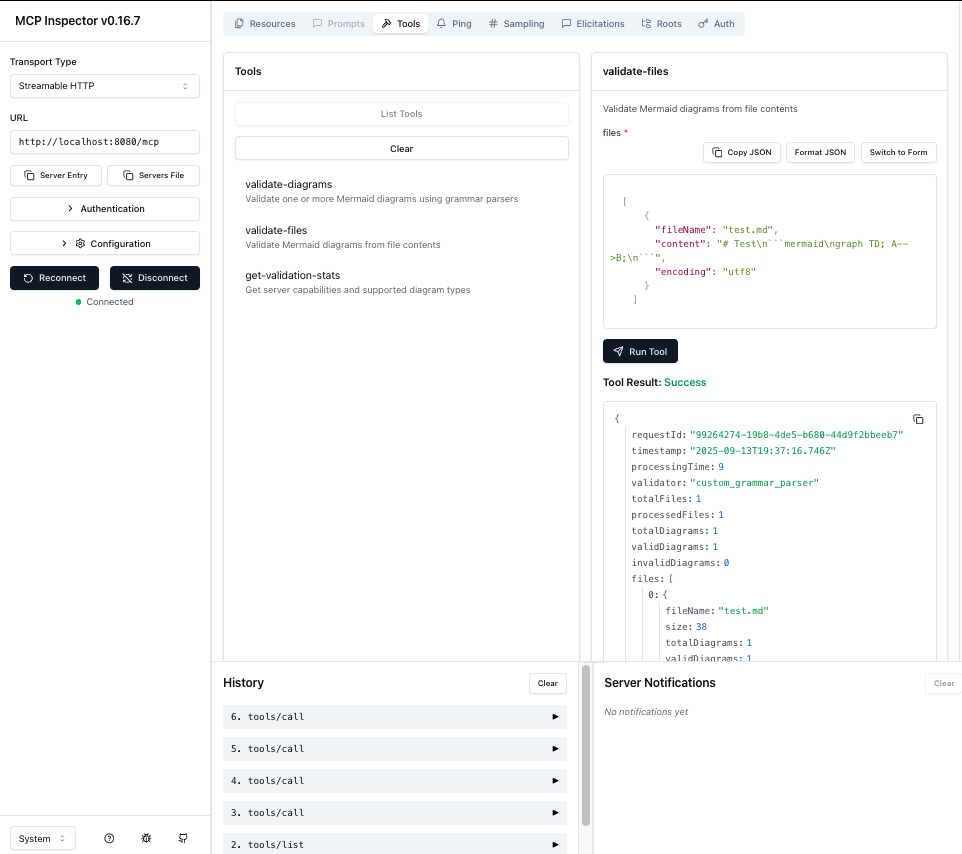
28 Mermaid Diagram Types: Complete support with real grammar parsing
Multi-format Support: Markdown files, ZIP archives, direct input
Real Grammar Validation: Jison, ANTLR, and Langium parsers
High Performance: Optimized with minimal dependencies
Multiple Transports: Stdio, HTTP streamable, Server-Sent Events (SSE)
3 MCP Tools: validate-diagrams, validate-files, get-validation-stats
2 MCP Resources: config://limits, info://diagram-types
Full Protocol Compliance: JSON-RPC 2.0, MCP specification 2024-11-05
Security Compliant: Complete audit logging and security best practices
Authentication: API key and Bearer token support
Rate Limiting: Configurable request throttling
Input Validation: Comprehensive sanitization and validation
Container Ready: Docker deployment with optimized images
Flowchart: flowchart, graph - Flow diagrams and process charts ✅
Sequence: sequenceDiagram - UML sequence diagrams ✅
Class: classDiagram - UML class diagrams ✅
State: stateDiagram, stateDiagram-v2 - UML state diagrams ✅
ER: erDiagram - Entity relationship diagrams ✅
Gantt: gantt - Project timeline charts ✅
User Journey: journey - User experience journey maps ✅
Requirement: requirement, requirementDiagram - Requirements engineering diagrams ✅
Sankey: sankey-beta - Sankey flow diagrams ✅
XY Chart: xychart-beta - Line and bar charts ✅
Kanban: kanban - Kanban boards ✅
Block: block, block-beta - Block diagrams ✅
C4: c4, C4Context - C4 architecture diagrams ✅
Mindmap: mindmap - Mind maps ✅
Quadrant: quadrant, quadrantChart - Four-quadrant charts ✅
Timeline: timeline - Timeline diagrams ✅
Example: exampleDiagram - Example/test diagrams ✅
Packet: packet, packet-beta - Packet diagrams ✅
Architecture: architecture, architecture-beta - Architecture diagrams ✅
Treemap: treemap - Treemap diagrams ✅
Validation Results: 28/28 types supported with real grammar parsing
For complete MCP server documentation, see: docs/api/README-MCP.md
# Stdio transport (for Claude Desktop)
npm run start:mcp

# HTTP streamable transport (for web integrations)
npm run start:mcp-http

# Secure transport (production ready)
npm run start:mcp-secure

# Test with MCP Inspector
npx @modelcontextprotocol/inspector http://localhost:8080/mcpvalidate_mermaid: Direct diagram validation with comprehensive error reporting
validate_file: File content validation (Markdown, ZIP support) with base64 encoding
get_examples: Get sample diagrams for all 28+ supported diagram types
config://limits: Validation limits and configuration
info://diagram-types: All 28 supported diagram types
Install and start the MCP server:
# Install from npm
npm install @ai-of-mine/fast-mermaid-validator-mcp

# Or from source
git clone https://github.com/ai-of-mine/fast-mermaid-validator-mcp.git
cd mermaid-validator-mcp
npm install
npm run build:mcp
npm run start:mcp-http  # HTTP transport for Claude Code
Configure Claude Code using the CLI:
claude mcp add --transport http -s project mermaid-validator http://localhost:8080/mcpThis creates a .mcp.json file in your project:
{
  "mcpServers": {
    "mermaid-validator": {
      "type": "http",
      "url": "http://localhost:8080/mcp"
    }
  }
}
Available Tools in Claude Code:
🔍 validate_file - Validate ZIP Archives and Markdown Files
Process Base64-encoded ZIP archives containing multiple markdown files,
or individual markdown files. Automatically extracts ZIP contents,
finds ```mermaid code blocks, and validates all diagrams.

Perfect for: Documentation validation, CI/CD checks, bulk processing
🔧 validate_mermaid - Validate Individual Mermaid Diagrams
Validate raw Mermaid diagram code blocks directly.
Supports all 28+ diagram types with detailed syntax checking.
Returns comprehensive error information with line numbers.

Perfect for: Single diagram validation, syntax checking, error debugging
📊 get_examples - Get Sample Diagrams
Retrieve sample Mermaid diagrams for all supported diagram types.
Perfect for learning syntax, testing validation, and development.Validate a documentation repository:
Use the validate_file tool with this ZIP file containing our documentation:
[Upload ZIP file with multiple .md files]
Check a single diagram:
Use validate_mermaid to check this flowchart:
flowchart TD
    A[Start] --> B{Decision}
    B -->|Yes| C[Action 1]
    B -->|No| D[Action 2]
Get sample diagrams:
Use get_examples to show sample diagrams for all supported typesDeveloper Workflow Example:
1. "Show me examples of flowchart diagrams"
2. "Validate this sequence diagram: [paste diagram]"
3. "Check all diagrams in this documentation folder: [upload ZIP]"
4. "Fix the syntax errors you found and re-validate"✅ Claude Code (HTTP transport)
✅ MCP Inspector (SSE/HTTP)
✅ Claude Desktop (stdio transport)
✅ Custom MCP clients (all transports)
Start the API server:
npx @ai-of-mine/fast-mermaid-validator-mcpThe server runs on http://localhost:8000 by default.
POST /api/v1/validate
Content-Type: application/json
Examples:
Valid Flowchart:
curl -X POST http://localhost:8000/api/v1/validate \
  -H "Content-Type: application/json" \
  -d '{
    "diagram": "flowchart TD\n    A[Start] --> B[Process]\n    B --> C[End]"
  }'
Invalid Flowchart:
curl -X POST http://localhost:8000/api/v1/validate \
  -H "Content-Type: application/json" \
  -d '{
    "diagram": "flowchart TD\n    A[Start -->> B[Invalid]"
  }'
Valid Sequence Diagram:
curl -X POST http://localhost:8000/api/v1/validate \
  -H "Content-Type: application/json" \
  -d '{
    "diagram": "sequenceDiagram\n    Alice->>Bob: Hello\n    Bob-->>Alice: Hi there"
}'POST /api/v1/upload/file
Content-Type: multipart/form-dataParameters:
file: One or multiple markdown files (.md, .markdown, .txt) or ZIP archives (.zip)
timeout: Optional timeout in milliseconds
Examples:
Single File Upload:
curl -X POST http://localhost:8000/api/v1/upload/file \
  -F "file=@diagram.md"
Multiple Files Upload:
curl -X POST http://localhost:8000/api/v1/upload/file \
  -F "file=@diagram1.md" \
  -F "file=@diagram2.md" \
  -F "file=@diagram3.md"
Upload ZIP Archive:
curl -X POST http://localhost:8000/api/v1/upload/file \
  -F "file=@diagrams.zip"
With Validation Timeout:
curl -X POST http://localhost:8000/api/v1/upload/file \
  -F "file=@diagram.md" \
  -F "timeout=60000"
Response:
{
  "requestId": "db4d2fd2-d16c-42b5-b09f-a4e67408ea06",
  "timestamp": "2025-09-12T00:40:02.595Z",
  "processingTime": 2,
  "validator": "custom_grammar_parser",
  "totalFiles": 1,
  "processedFiles": 1,
  "totalDiagrams": 1,
  "validDiagrams": 0,
  "invalidDiagrams": 1,
  "fileProcessing": {
    "totalFiles": 1,
    "processedFiles": 1,
    "errors": [],
    "processingTime": 1
  },
  "files": [
    {
      "fileName": "sequence_test.md",
      "size": 152,
      "totalDiagrams": 1,
      "validDiagrams": 0,
      "invalidDiagrams": 1,
      "results": [
        {
          "diagramId": "diagram_1",
          "valid": false,
          "errors": [
            {
              "type": "syntax_error",
              "message": "Parse error on line 2: Expecting 'TEXT', got 'ID'",
              "line": 2,
              "column": 1
            }
          ],
          "warnings": [],
          "metadata": {
            "diagramType": "sequenceDiagram",
            "validationMethod": "real_jison_grammar",
            "contentLength": 112,
            "lineCount": 5,
            "processingTime": 1
          }
        }
      ],
      "errors": []
    }
  ],
  "validationOptions": {
    "timeout": 30000
  }
}
Multiple Files Upload:
curl -X POST http://localhost:8000/api/v1/upload/file \
  -F "file=@valid_diagrams.md" \
  -F "file=@invalid_diagrams.md"
Response:
{
  "requestId": "f47ac10b-58cc-4372-a567-0e02b2c3d479",
  "timestamp": "2025-09-12T00:40:05.123Z",
  "processingTime": 15,
  "validator": "custom_grammar_parser",
  "totalFiles": 2,
  "processedFiles": 2,
  "totalDiagrams": 5,
  "validDiagrams": 3,
  "invalidDiagrams": 2,
  "fileProcessing": {
    "totalFiles": 2,
    "processedFiles": 2,
    "errors": [],
    "processingTime": 8
  },
  "files": [
    {
      "fileName": "valid_diagrams.md",
      "size": 456,
      "totalDiagrams": 3,
      "validDiagrams": 3,
      "invalidDiagrams": 0,
      "results": [
        {
          "diagramId": "diagram_1",
          "valid": true,
          "errors": [],
          "warnings": [],
          "metadata": {
            "diagramType": "flowchart",
            "validationMethod": "real_jison_grammar",
            "contentLength": 45,
            "lineCount": 3,
            "processingTime": 2
          }
        }
      ],
      "errors": []
    },
    {
      "fileName": "invalid_diagrams.md",
      "size": 234,
      "totalDiagrams": 2,
      "validDiagrams": 0,
      "invalidDiagrams": 2,
      "results": [
        {
          "diagramId": "diagram_1",
          "valid": false,
          "errors": [
            {
              "type": "syntax_error",
              "message": "Parse error: Invalid syntax on line 1",
              "line": 1
            }
          ],
          "metadata": {
            "diagramType": "flowchart",
            "validationMethod": "real_jison_grammar"
          }
        }
      ],
      "errors": []
    }
  ],
  "validationOptions": {
    "timeout": 30000
  }
}
ZIP Archive Upload:
curl -X POST http://localhost:8000/api/v1/upload/file \
  -F "file=@diagrams.zip;type=application/zip"
Response:
{
  "requestId": "a1b2c3d4-e5f6-7890-abcd-ef1234567890",
  "timestamp": "2025-09-12T00:40:10.456Z",
  "processingTime": 25,
  "validator": "custom_grammar_parser",
  "totalFiles": 1,
  "processedFiles": 1,
  "totalDiagrams": 8,
  "validDiagrams": 6,
  "invalidDiagrams": 2,
  "fileProcessing": {
    "totalFiles": 1,
    "processedFiles": 1,
    "errors": [],
    "processingTime": 12
  },
  "files": [
    {
      "fileName": "diagrams.zip",
      "size": 2048,
      "totalDiagrams": 8,
      "validDiagrams": 6,
      "invalidDiagrams": 2,
      "results": [
        {
          "diagramId": "diagram_1",
          "valid": true,
          "errors": [],
          "metadata": {
            "diagramType": "flowchart",
            "sourceFile": "diagrams.zip/flowchart.md",
            "validationMethod": "real_jison_grammar"
          }
        },
        {
          "diagramId": "diagram_2",
          "valid": true,
          "errors": [],
          "metadata": {
            "diagramType": "sequenceDiagram",
            "sourceFile": "diagrams.zip/sequence.md",
            "validationMethod": "real_jison_grammar"
          }
        }
      ],
      "errors": []
    }
  ]
}
Error Response Example:
{
  "error": "File validation failed",
  "message": "File size exceeds maximum allowed (10MB)",
  "requestId": "error-123-456",
  "timestamp": "2025-09-12T00:40:15.789Z"
}
Test Results - All 25 Diagram Types:
# Comprehensive test with all supported diagram types
curl -X POST http://localhost:8000/api/v1/validate \
  -H "Content-Type: application/json" \
  -d '{"diagrams": [
    {"content": "flowchart TD\n    A[Start] --> B[Process]\n    B --> C[End]", "type": "flowchart"},
    {"content": "sequenceDiagram\n    participant A\n    participant B\n    A->>B: Hello", "type": "sequenceDiagram"},
    {"content": "classDiagram\n    class Animal\n    Animal : +name string", "type": "classDiagram"},
    {"content": "stateDiagram-v2\n    [*] --> Still\n    Still --> [*]", "type": "stateDiagram-v2"},
    {"content": "erDiagram\n    CUSTOMER {\n        string name\n    }", "type": "erDiagram"},
    {"content": "gantt\n    title A Gantt\n    dateFormat YYYY-MM-DD\n    section Section\n    A task: 2014-01-01, 30d", "type": "gantt"},
    {"content": "journey\n    title My day\n    section Go to work\n      Make tea: 5: Me", "type": "journey"},
    {"content": "requirementDiagram\n    requirement test_req {\n    id: 1\n    text: test\n    }", "type": "requirement"},
    {"content": "xychart-beta\n    title Sales\n    x-axis [jan, feb]\n    bar [5000, 6000]", "type": "xychart-beta"},
    {"content": "kanban\n    Todo\n        Task 1\n    Done\n        Task 2", "type": "kanban"},
    {"content": "C4Context\n    Person(user, \"User\")", "type": "c4"},
    {"content": "mindmap\n  root((idea))\n    branch1\n    branch2", "type": "mindmap"},
    {"content": "quadrantChart\n    title Chart\n    x-axis Low --> High\n    quadrant-1 Expand", "type": "quadrant"},
    {"content": "timeline\n    title History\n    2020 : Event 1\n    2021 : Event 2", "type": "timeline"},
    {"content": "pie title Data\n    \"A\" : 50\n    \"B\" : 30", "type": "pie"},
    {"content": "gitGraph\n    commit\n    commit\n    branch dev\n    commit", "type": "gitGraph"},
    {"content": "info\n    showInfo", "type": "info"},
    {"content": "architecture-beta\n    service db(database)[DB]", "type": "architecture"},
    {"content": "radar\n    title Analysis\n    \"Metric\" : [8, 6]", "type": "radar"},
    {"content": "packet-beta\n    0-15: Source Port", "type": "packet"},
    {"content": "treemap-beta\n    title Tree\n    Branch\n        Leaf: 100", "type": "treemap"}
  ]}'

# Result: 21/23 diagrams validated successfully
# ✅ All Jison parsers working (18 types)
# ✅ All Langium parsers working (7 types)
# ❌ 2 expected syntax failures in test dataGET /api/v1/healthResponse:
{
  "status": "healthy",
  "timestamp": "2025-09-13T02:40:00.000Z",
  "uptime": 3600.5,
  "version": "1.0.15",
  "environment": "production"
}POST /api/v1/validate
Content-Type: application/jsonRequest:
{
  "diagrams": [
    {
      "content": "flowchart TD\\n    A --> B",
      "type": "flowchart"
    },
    {
      "content": "pie title Sample\\n    \"A\" : 50\\n    \"B\" : 30",
      "type": "pie"
    }
  ],
  "options": {
    "generateSvg": false,
    "timeout": 30000
  }
}
Response:
{
  "requestId": "6e7ffdb8-b023-4c6b-8576-1cc60229c381",
  "timestamp": "2025-09-11T06:21:45.793Z",
  "totalDiagrams": 2,
  "validDiagrams": 2,
  "invalidDiagrams": 0,
  "processingTime": 33,
  "validator": "custom_grammar_parser",
  "results": [
    {
      "diagramId": "direct_1",
      "valid": true,
      "errors": [],
      "warnings": [],
      "metadata": {
        "diagramType": "flowchart",
        "validationMethod": "real_jison_grammar",
        "contentLength": 25,
        "lineCount": 2,
        "processingTime": 3,
        "customValidator": true
      }
    },
    {
      "diagramId": "direct_2",
      "valid": true,
      "errors": [],
      "warnings": [],
      "metadata": {
        "diagramType": "pie",
        "validationMethod": "langium_grammar",
        "contentLength": 35,
        "lineCount": 3,
        "processingTime": 1,
        "customValidator": true
      }
    }
  ]
}GET /api/v1/validate/statsResponse:
{
  "supportedDiagramTypes": [
    "flowchart", "graph", "sequenceDiagram", "classDiagram",
    "stateDiagram", "stateDiagram-v2", "erDiagram", "gantt",
    "journey", "requirement", "sankey-beta", "xychart-beta",
    "kanban", "block", "c4", "mindmap", "quadrant", "timeline",
    "pie", "gitGraph", "info", "architecture", "radar",
    "packet", "treemap"
  ],
  "validationMethods": {
    "jison": 18,
    "langium": 7,
    "total": 25
  },
  "limits": {
    "maxFileSize": 10485760,
    "maxFiles": 20,
    "maxDiagramsPerFile": 50,
    "maxTotalDiagrams": 200,
    "validationTimeout": 30000
  },
  "features": {
    "realGrammarValidation": true,
    "markdownSupport": true,
    "multiFileValidation": true,
    "diagramGrammarParsers": true,
    "jisonParsers": true,
    "langiumParsers": true
  }
}All images on Docker Hub are multi-arch (linux/amd64 + linux/arm64).
Default CMD is the stateless Streamable HTTP MCP server on port 8080.
# Default — Streamable HTTP MCP, port 8080
podman run --rm -p 8080:8080 gregoriomomm/fast-mermaid-validator-mcp:1.2.0

# Most secure (no shell, no pkg mgr inside; ~200 MB)
podman run --rm -p 8080:8080 gregoriomomm/fast-mermaid-validator-mcp:1.2.0-distroless

# IBM / RHEL / OpenShift / FIPS-friendly (~304 MB)
podman run --rm -p 8080:8080 gregoriomomm/fast-mermaid-validator-mcp:1.2.0-ubi

# Override to run the REST API instead (port 8000)
podman run --rm -p 8000:8000 \
  gregoriomomm/fast-mermaid-validator-mcp:1.2.0 \
  node src/server.js

# Verify
curl -s http://localhost:8080/health | jq      # MCP /health
curl -s http://localhost:8080/info | jq        # MCP /info

# Send an MCP tools/list request
curl -s -X POST http://localhost:8080/mcp \
  -H 'Content-Type: application/json' \
  -H 'Accept: application/json, text/event-stream' \
  -d '{"jsonrpc":"2.0","method":"tools/list","id":1}'

# Send a tool call to validate a diagram
curl -s -X POST http://localhost:8080/mcp \
  -H 'Content-Type: application/json' \
  -H 'Accept: application/json, text/event-stream' \
  -d '{"jsonrpc":"2.0","method":"tools/call","params":{"name":"validate-diagrams","arguments":{"diagrams":[{"type":"flowchart","content":"graph TD\nA-->B"}]}},"id":2}'
Build from source:
git clone https://github.com/ai-of-mine/fast-mermaid-validator-mcp.git
cd fast-mermaid-validator-mcp
npm install
npm run build:mcp
docker build -t fast-mermaid-validator-mcp:local .                   # alpine
docker build -f Dockerfile.distroless -t ...:local-distroless .      # distroless
docker build -f Dockerfile.ubi -t ...:local-ubi . # UBI# Install from npm
npm install @ai-of-mine/fast-mermaid-validator-mcp
# Or install development dependencies from source
git clone https://github.com/ai-of-mine/fast-mermaid-validator-mcp.git
cd mermaid-validator-mcp
npm install
# Start development server
npm run dev
# Start production server
npm start# Server Configuration
PORT=8000
HOST=0.0.0.0
NODE_ENV=production
# Server Performance Optimization
SERVER_TIMEOUT=30000 # Server timeout in milliseconds
KEEP_ALIVE_TIMEOUT=5000 # Keep-alive timeout
HEADERS_TIMEOUT=6000 # Headers timeout (must be > keep-alive)
MAX_CONNECTIONS=1000 # Maximum concurrent connections
MAX_HEADERS_COUNT=2000 # Maximum headers per request
MAX_REQUESTS_PER_SOCKET=0 # Max requests per socket (0 = unlimited)
# Security (Rate limiting delegated to API Gateway)
CORS_ORIGIN=*
HSTS_MAX_AGE=31536000 # HTTPS Strict Transport Security
# File Upload Limits (All configurable, use -1 for unlimited)
MAX_FILE_SIZE=104857600 # 100MB (was 10MB)
MAX_FILES=100000 # 100k files (was 20)
MAX_TOTAL_DIAGRAMS=1000000 # 1M diagrams (was 200)
MAX_DIAGRAMS_PER_FILE=10000 # 10k per file (was 50)
# Validation Limits (All configurable, use -1 for unlimited)
VALIDATION_TIMEOUT=30000
MAX_DIAGRAM_CONTENT_LENGTH=1048576 # 1MB per diagram (was 50KB)
MAX_TIMEOUT_MS=60000 # Max validation timeout
MAX_FILENAME_LENGTH=255 # Max filename length
# Mermaid Parser Limits (All configurable, use -1 for unlimited)
MERMAID_MAX_TEXT_SIZE=1048576 # 1MB (was 50KB)
MERMAID_MAX_EDGES=10000 # 10k edges (was 500)
MERMAID_MAX_VERTICES=5000 # 5k vertices (was 200)
# Logging
LOG_LEVEL=info
LOG_TO_FILE=true
LOG_FILE=logs/app.log
LOG_MAX_FILES=5
LOG_MAX_SIZE=10m
# Health Monitoring
MEMORY_THRESHOLD=90
DISK_THRESHOLD=90
# Cleanup
TEMP_DIR=./tmp
CLEANUP_INTERVAL=3600000 # 1 hour cleanup intervalSet any limit to -1 to disable it completely:
# Unlimited processing configuration
MAX_FILES=-1                   # Process unlimited files
MAX_FILE_SIZE=-1               # Accept any file size
MAX_DIAGRAM_CONTENT_LENGTH=-1  # Process any diagram size
MERMAID_MAX_TEXT_SIZE=-1       # No text size limits
MERMAID_MAX_EDGES=-1           # No edge count limits
MERMAID_MAX_VERTICES=-1        # No vertex count limits
📋 See docs/CONFIGURATION.md for complete configuration guide.
Kubernetes cluster with kubectl access
Container registry access (Docker Hub, GitHub Container Registry, etc.)
Docker/Podman for building images
Helm 3.x (for Helm deployments)
make install        # Install dependencies
make dev           # Start development server
make test          # Run tests
make lint          # Code linting
make security # Security checksmake deployment-amd64 # Build AMD64 deployment
make deployment-arm64 # Build ARM64 deployment (local)
make push-amd64 # Push AMD64 to registry
make push-arm64 # Push ARM64 to registrymake k8s-deploy-dev # Deploy to mmjc-dev namespace
make k8s-deploy-test # Deploy to mmjc-test namespace
make k8s-status-dev # Check dev deployment status
make k8s-status-test # Check test deployment status
make k8s-logs-dev # View dev logs
make k8s-logs-test # View test logsmake helm-install-dev # Install Helm chart (dev)
make helm-install-test # Install Helm chart (test)
make helm-uninstall-dev # Uninstall Helm chart (dev)
make helm-uninstall-test # Uninstall Helm chart (test)docker-compose --profile dev updocker-compose --profile production updocker-compose --profile monitoring upVariable | Description | Default |
NODE_ENV | Application environment | production |
PORT | Server port | 8000 |
LOG_LEVEL | Logging level | info |
See DEPLOYMENT.md for comprehensive deployment instructions.
GET /api/v1/health - Basic health check
GET /api/v1/health/detailed - Detailed system information
GET /api/v1/health/live - Kubernetes liveness probe
GET /api/v1/health/ready - Kubernetes readiness probe
Request rate and response times
Error rates by endpoint
Memory and CPU usage
File processing statistics
Validation success/failure rates
API performance metrics
System resource utilization
Error rate monitoring
Request volume trends
Rate Limiting: Configurable per-IP request limits (100 requests per 15 minutes)
Input Validation: Comprehensive request validation with express-validator
File Security: Dual MIME type and file extension validation for robust upload security
Content Security: CSP headers, XSS protection, and security headers via Helmet
CORS Protection: Configurable cross-origin policies with whitelist support
Process Security: Non-root container execution with dedicated nodejs user
Resource Limits: Memory and disk usage monitoring with configurable thresholds
Upload Protection: File size limits, suspicious filename detection, and malware prevention
# Run all tests
npm test

# Run with coverage
npm run test:coverage

# Run in watch mode
npm run test:watch

# Lint code
npm run lintInteractive API documentation is available at /docs when running in development mode.
Custom Grammar Parser: Fast validation without browser dependencies
Concurrent Processing: Multiple diagrams processed in parallel
Memory Efficient: Automatic cleanup of temporary files
Minimal Dependencies: Reduced attack surface and faster startup
Response Compression: Built-in compression for faster responses
See src/config/config.js for all available configuration options. Most settings can be controlled via environment variables for easy deployment customization.
For comprehensive examples of using this validator with Claude Code, see:
CLAUDE_CODE_USAGE_EXAMPLE.md - Original validation examples
LATEST_CHANGES.md - Latest features and capabilities
docs/CONFIGURATION.md - Complete configuration guide
docs/PERFORMANCE_TESTING.md - Load testing methodology
docs/LOAD_TESTING_EVIDENCE.md - Performance evidence
Recent validation of the examples/ folder:
Total Files Processed: 9
Total Diagrams Found: 43
Valid Diagrams: 32 (74% success rate)
Invalid Diagrams: 11
1. Quoted Text in Node Labels
# ❌ Invalid (causes parser error)
flowchart TD
    A --> B[Error: "No COMMAREA Received"]

# ✅ Fixed (remove quotes)
flowchart TD
    A --> B[Error: No COMMAREA Received]
2. Diagram Type Syntax
# ❌ Invalid
quadrant
    title Chart

# ✅ Fixed
quadrantChart
    title Chart
3. Beta Suffix Requirements
# ❌ Invalid
treemap
    title Tree

# ✅ Fixed
treemap-beta
title TreeDiscovery: claude validate all diagrams in examples folder
Batch Processing: Validates 43 diagrams across 9 files with unlimited processing
Error Analysis: Comprehensive error reporting with line numbers and context
Systematic Fixes: Apply corrections based on detailed error messages
Re-validation: Instant re-validation with optimized performance
Enterprise Scale: Process 100MB files, 100k+ diagrams with zero limits
Single Pod: 500+ concurrent connections (with nginx proxy)
Cluster Scale: Auto-scale to 10,000+ concurrent connections
Processing: 145 req/sec sustained throughput
Zero-Error Experience: Aggressive HPA prevents connection failures
Enterprise Limits: 100MB files, 1MB diagrams, unlimited processing
Apache License 2.0 — see LICENSE for the full text.
Gregorio Elias Roecker Momm
This server cannot be deployed
Validate Mermaid syntax and get error details your coding agent can use to correct a diagram. Check the source again before adding it to your documentation. Validation works without saving a diagram. Render SVG, PNG, or PDF, save diagrams privately, and publish selected snapshots. Your existing agent writes and corrects the source; MermaidDesk checks and renders it. Validation checks syntax, not whether a diagram accurately describes a system. Connect through MCP with Streamable HTTP and a scoped bearer API key. Enable MERMAID_RENDER for validation and rendering. A REST API is also available. MCP setup: https://www.mermaiddesk.com/developers/mcp REST API guide: https://www.mermaiddesk.com/developers/api
Render, validate, encode/decode PlantUML diagram-as-code; 22 diagram types. Free, no auth.
Render, verify, describe, and safely edit Mermaid diagrams through MCP.
Generate dynamic Mermaid diagrams and charts with AI assistance. Customize styles and export diagr…