OpenDSS MCP Server
Conversational Power System Analysis with AI
Reduce distribution planning studies from weeks to minutes through natural language interaction








Features •
Installation •
Quick Start •
Documentation •
Examples •
Contributing
Overview
The OpenDSS MCP Server is a Model Context Protocol (MCP) server that connects Claude AI with EPRI's OpenDSS power system simulator. It enables distribution planning engineers, utilities, and researchers to perform sophisticated power system analysis through conversational natural language instead of complex scripting.
The Problem
Traditional distribution system analysis requires:
⏱️ 2-3 weeks per study
💻 Complex Python/DSS scripting
📊 Manual data processing
🎨 Custom visualization code
📝 Extensive documentation
The Solution
With OpenDSS MCP Server:
⚡ 30 minutes per study (100x faster)
💬 Natural language commands via Claude
🤖 Automatic analysis and insights
📈 Professional visualizations generated automatically
📋 Instant report generation
Example:
You: "Load IEEE13 feeder, optimize 2MW solar placement, and show voltage improvements"

Claude: ✓ Loaded IEEE13 (13 buses)
        ✓ Optimized solar placement → Bus 675
        ✓ Loss reduction: 32.4%
        ✓ Voltage violations fixed: 3
        [Voltage profile visualization shown]
Related MCP server: Merlin Energy
Features
🎯 Core Capabilities
7 Comprehensive MCP Tools
🔌 IEEE Feeder Loading
IEEE 13, 34, and 123 bus test systems
Official EPRI test cases
On-the-fly circuit modifications
Full topology and component data
⚡ Power Flow Analysis
Snapshot, daily, and yearly modes
Convergence checking
Harmonic frequency analysis
Loss calculations and voltage profiles
📊 Voltage Quality Assessment
🌞 DER Placement Optimization
Solar, battery, wind, and EV chargers
Multiple objectives (minimize losses, maximize capacity, reduce violations)
Smart inverter volt-var control
Ranked candidate bus comparison
📈 Hosting Capacity Analysis
Incremental capacity testing
Voltage and thermal constraint identification
Capacity curves generation
Multi-location assessment
⏰ Time-Series Simulation
Daily/seasonal load profiles
Solar/wind generation patterns
Energy analysis (kWh, not just kW)
Convergence tracking
🎨 Professional Visualization
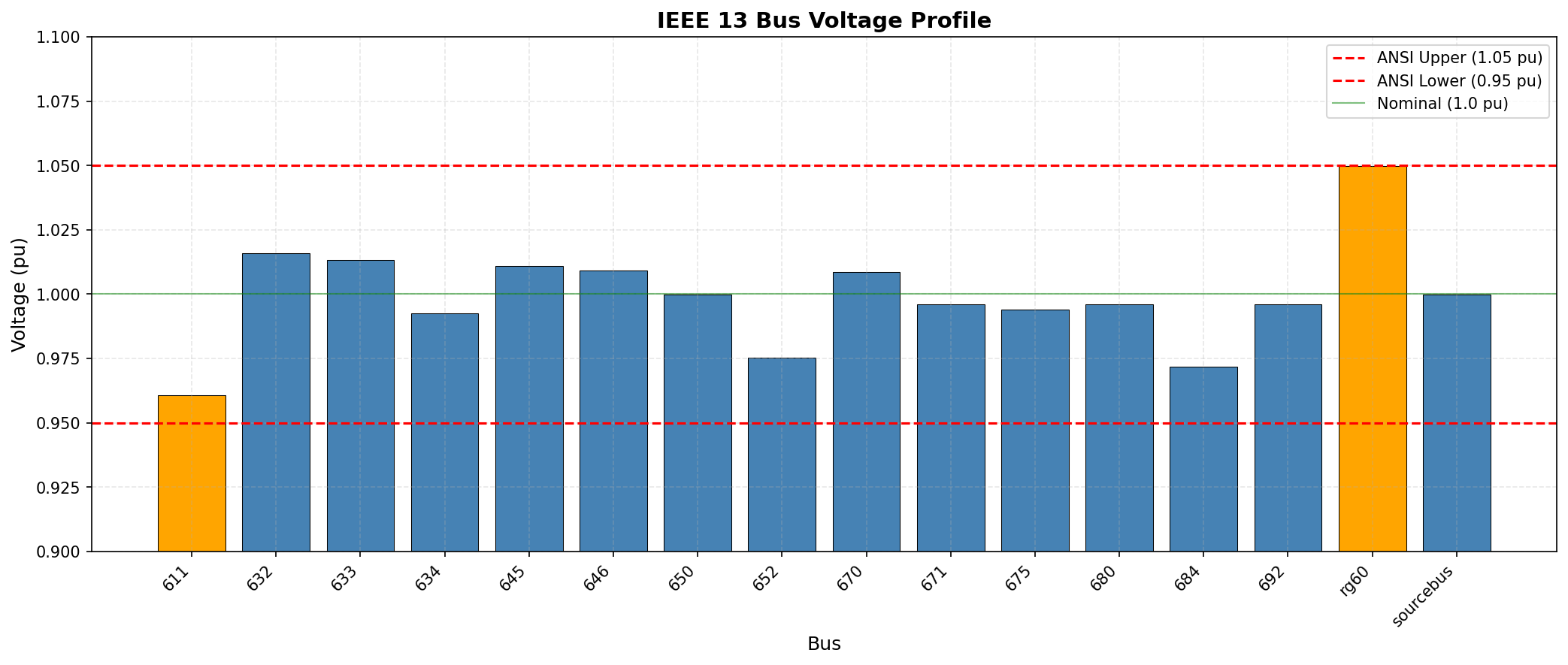
Voltage profile bar charts
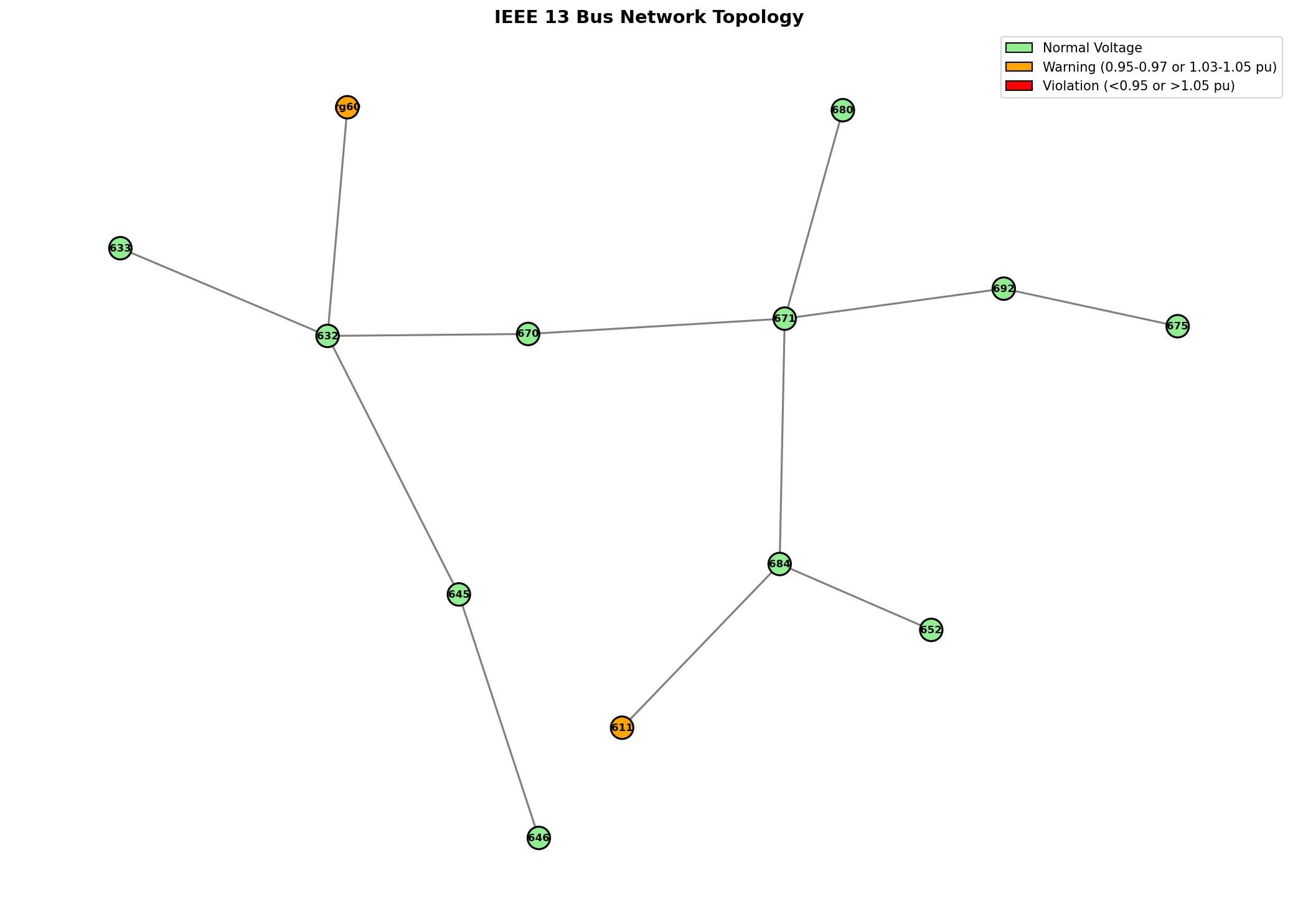
Network topology diagrams
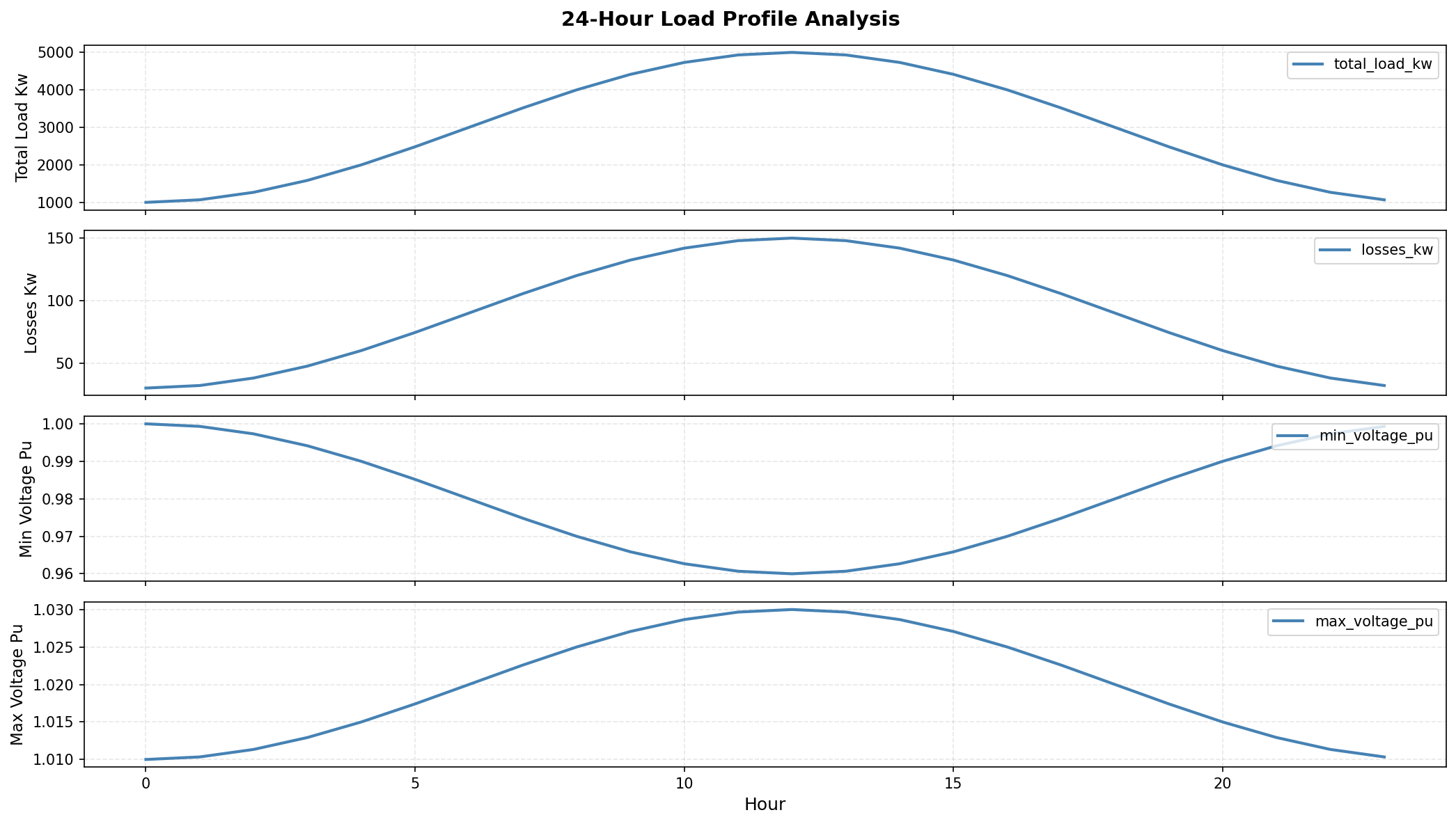
Time-series multi-panel plots
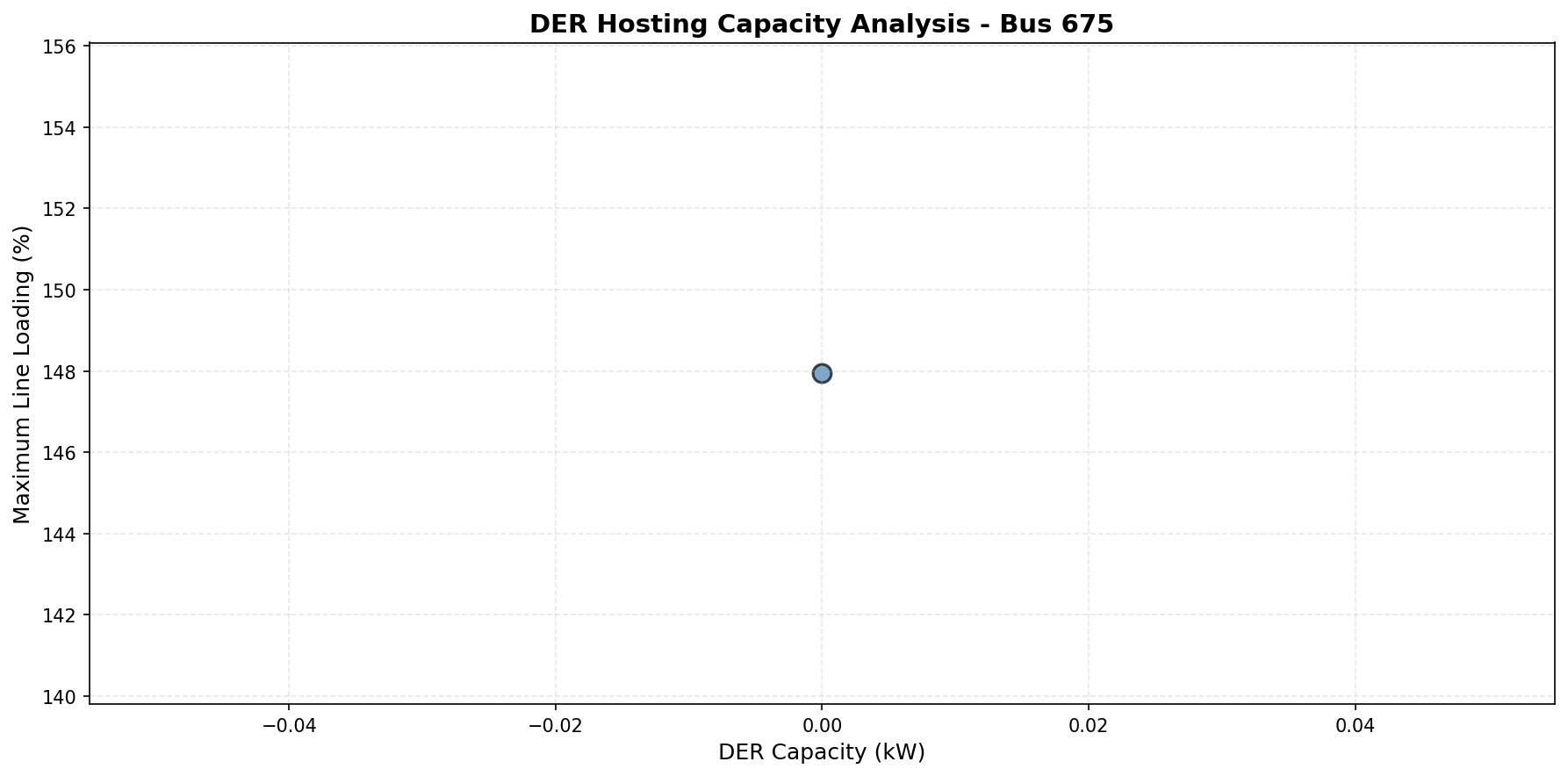
Capacity curves
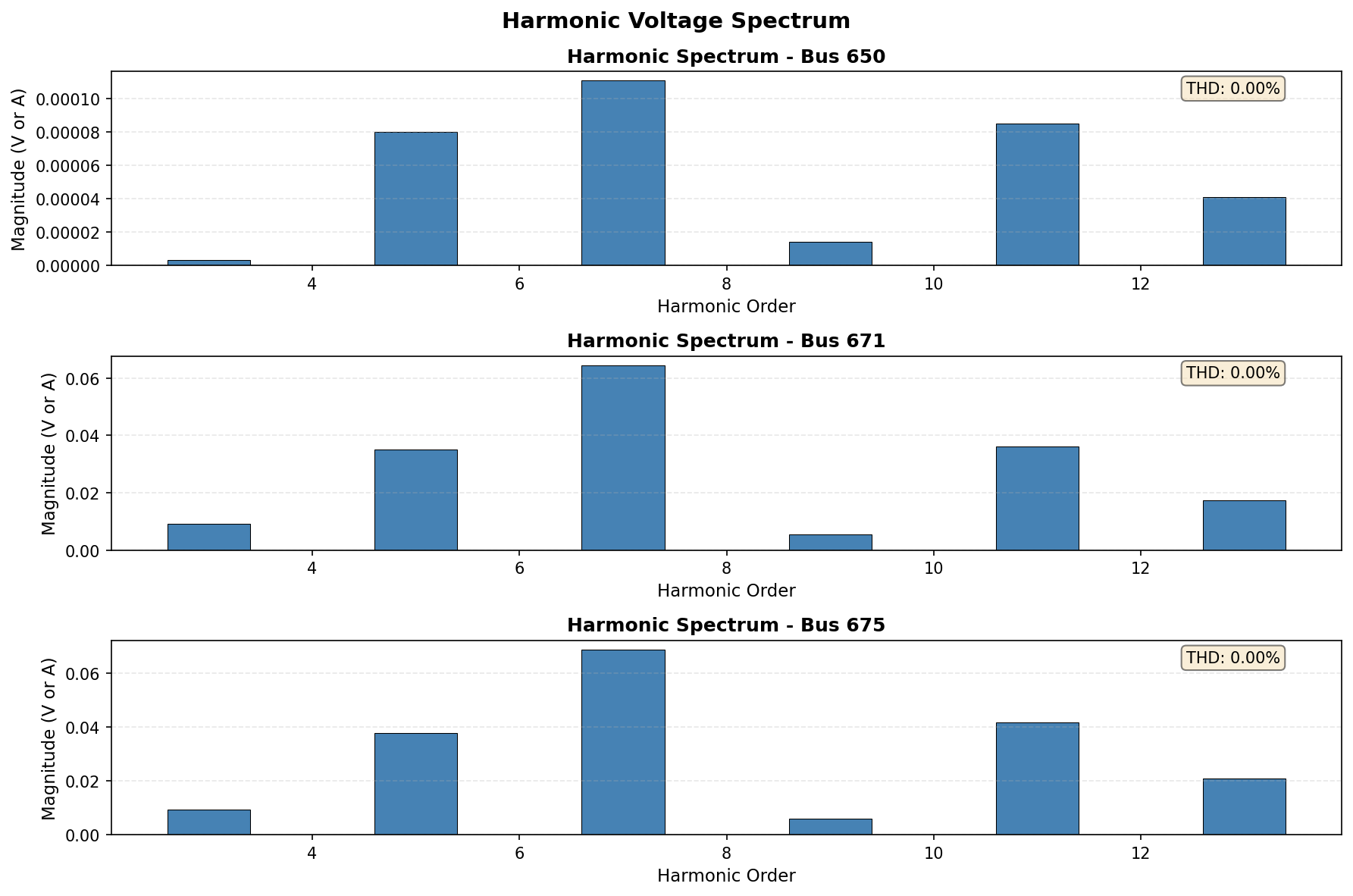
Harmonics spectrum analysis
⚙️ Advanced Features
🎼 Harmonics Analysis
IEEE 519 compliance checking
Total Harmonic Distortion (THD) calculation
Individual harmonic magnitudes (3rd, 5th, 7th, etc.)
Frequency scan support
Multi-bus harmonic spectrum visualization
🔄 Smart Inverter Control
IEEE 1547-2018 compliant volt-var curves
California Rule 21 support
Custom control curve definition
Volt-watt curtailment
Real-time inverter status monitoring
🧪 IEEE Test Feeders
IEEE 13-bus: Small system, ideal for testing
IEEE 34-bus: Medium system with multiple regulators
IEEE 123-bus: Large system for comprehensive studies
Official EPRI-validated models
Complete DSS source files included
🔗 MCP Integration
Seamless Claude Desktop integration
Natural language command interface
Automatic tool selection
Structured JSON responses
Error handling and recovery
Installation
Quick Install
# Clone the repository
git clone https://github.com/ahmedelshazly27/opendss-mcp-server.git
cd opendss-mcp-server

# Install the package
pip install -e .

# Verify installation
python -c "from opendss_mcp import server; print('✓ OpenDSS MCP Server installed successfully!')"
Claude Desktop Configuration
Add to your Claude Desktop config file:
macOS: ~/Library/Application Support/Claude/claude_desktop_config.json
Windows: %APPDATA%\Claude\claude_desktop_config.json
Linux: ~/.config/Claude/claude_desktop_config.json
{
  "mcpServers": {
    "opendss": {
      "command": "python",
      "args": ["-m", "opendss_mcp.server"],
      "env": {
        "PYTHONPATH": "/absolute/path/to/opendss-mcp-server/src"
      }
    }
  }
}
📖 For detailed installation instructions, see INSTALLATION.md
Quick Start
1. Basic Power Flow Analysis
Ask Claude:
Load the IEEE13 feeder and run a power flow analysis. Show me the voltage range and total losses.
Result:
✓ IEEE13 feeder loaded (13 buses, 11 lines)
✓ Power flow converged in 8 iterations

Voltage Range: 0.9542 - 1.0500 pu
Total Losses: 116.2 kW + 68.3 kVAr
2. DER Integration Study
Ask Claude:
Optimize placement of 2000 kW solar to minimize losses on the IEEE13 feeder.
Show the optimal location and improvement metrics.
Result:
✓ Optimal Location: Bus 675

Improvements:
  • Loss Reduction: 37.7 kW (32.4%)
  • Voltage Improvement: +0.017 pu
  • Violations Fixed: 3

[Voltage profile visualization shown]
3. Hosting Capacity Assessment
Ask Claude:
Analyze solar hosting capacity at bus 675 with 500 kW increments up to 5000 kW.
Generate a capacity curve showing the limiting constraint.
Result:
✓ Maximum Capacity: 2500 kW
✓ Limiting Constraint: Overvoltage (1.05 pu)

At 3000 kW: Bus 675 exceeds 1.05 pu limit

[Capacity curve visualization shown]
4. Time-Series Simulation
Ask Claude:
Run a 24-hour time-series simulation with residential load profile and solar generation.
Show voltage variations and energy losses throughout the day.
Result:
✓ 24 timesteps completed (100% convergence)

Summary:
  • Energy Delivered: 78,234 kWh
  • Energy Losses: 2,364 kWh (3.02%)
  • Peak Load: 3,842 kW at 18:00
  • Voltage Violation Hours: 2

[Time-series plots shown]
5. Python API Usage
You can also use the tools directly in Python:
from opendss_mcp.tools.feeder_loader import load_ieee_test_feeder
from opendss_mcp.tools.power_flow import run_power_flow
from opendss_mcp.tools.der_optimizer import optimize_der_placement
from opendss_mcp.tools.visualization import generate_visualization

# Load feeder
result = load_ieee_test_feeder('IEEE13')
print(f"✓ Loaded {result['data']['num_buses']} buses")

# Run power flow
pf_result = run_power_flow('IEEE13')
print(f"✓ Converged: {pf_result['data']['converged']}")
print(f"  Voltage: {pf_result['data']['min_voltage']:.4f} - {pf_result['data']['max_voltage']:.4f} pu")

# Optimize DER placement
der_result = optimize_der_placement(
    der_type="solar",
    capacity_kw=2000,
    objective="minimize_losses"
)
print(f"✓ Optimal Bus: {der_result['data']['optimal_bus']}")
print(f"  Loss Reduction: {der_result['data']['improvement_metrics']['loss_reduction_pct']:.1f}%")

# Generate visualization
viz_result = generate_visualization(
    plot_type="voltage_profile",
    data_source="circuit",
    options={"save_path": "voltage_profile.png", "dpi": 300}
)
print(f"✓ Visualization saved: {viz_result['data']['file_path']}")
Workflow Example
Engineer: "Load the Al-Ahmadi-North feeder model and baseline it"
Claude: ✓ Loaded (87 buses, 12.5 MVA peak load)

Engineer: "Find optimal locations for 5 MW total solar across 5 sites"
Claude: ✓ Optimized placement:
          Site 1: Bus 42 (1.2 MW)
          Site 2: Bus 58 (1.1 MW)
          Site 3: Bus 71 (0.9 MW)
          Site 4: Bus 23 (1.0 MW)
          Site 5: Bus 65 (0.8 MW)
        ✓ Total loss reduction: 18.3%
        ✓ No voltage violations

Engineer: "Run time-series with summer load and solar profiles"
Claude: ✓ Simulation complete
        ✓ Energy savings: 4,200 MWh/year
        ✓ Peak demand reduction: 8.2%
        [Daily profile plots shown]

Engineer: "Generate executive summary report"
Claude: ✓ Report generated with:
          • Technical findings
          • Cost-benefit analysis
          • Implementation recommendations
          [PDF report attached]
Examples
Example Visualizations
All visualizations are generated automatically and can be saved at publication quality (300 DPI):
Voltage Profile:
Network Diagram:
Time-Series Analysis:
Hosting Capacity Curve:
Harmonics Spectrum:
Running Examples
# Generate all example plots
cd examples
python generate_plots.py

# Check output in examples/plots/
ls -lh examples/plots/
See examples/README.md for detailed documentation.
Documentation
📚 Complete Documentation Suite
Document | Description |
Installation Guide | Complete setup instructions for all platforms with troubleshooting |
User Guide | Comprehensive tutorial with quick start, tool reference, and use cases |
API Reference | Technical specifications for all 7 tools and utility functions |
🎯 Quick Links
Architecture
System Overview
┌─────────────────────────────────────────────────────────────┐
│                        Claude Desktop                        │
│                  (Natural Language Interface)                │
└────────────────────────────┬────────────────────────────────┘
                             │ MCP Protocol
┌────────────────────────────▼────────────────────────────────┐
│                    OpenDSS MCP Server                        │
│  ┌────────────────────────────────────────────────────────┐ │
│  │  7 MCP Tools:                                          │ │
│  │  • load_feeder                                         │ │
│  │  • run_power_flow_analysis                             │ │
│  │  • check_voltages                                      │ │
│  │  • analyze_capacity                                    │ │
│  │  • optimize_der                                        │ │
│  │  • run_timeseries                                      │ │
│  │  • create_visualization                                │ │
│  └────────────────────────────────────────────────────────┘ │
│  ┌────────────────────────────────────────────────────────┐ │
│  │  Utilities:                                            │ │
│  │  • Validators • Formatters • Harmonics • Controls      │ │
│  └────────────────────────────────────────────────────────┘ │
└────────────────────────────┬────────────────────────────────┘
                             │ OpenDSSDirect.py
┌────────────────────────────▼────────────────────────────────┐
│                    EPRI OpenDSS Engine                       │
│         (Open Distribution System Simulator)                 │
└─────────────────────────────────────────────────────────────┘
Project Structure
opendss-mcp-server/
├── src/opendss_mcp/
│   ├── server.py              # MCP server entry point
│   ├── tools/                 # 7 MCP tools
│   │   ├── feeder_loader.py
│   │   ├── power_flow.py
│   │   ├── voltage_checker.py
│   │   ├── capacity.py
│   │   ├── der_optimizer.py
│   │   ├── timeseries.py
│   │   └── visualization.py
│   ├── utils/                 # Utilities
│   │   ├── dss_wrapper.py     # OpenDSS wrapper
│   │   ├── validators.py      # Input validation
│   │   ├── formatters.py      # Response formatting
│   │   ├── harmonics.py       # Harmonics analysis
│   │   └── inverter_control.py # Smart inverter control
│   └── data/                  # Data files
│       ├── ieee_feeders/      # IEEE 13/34/123 bus systems
│       ├── load_profiles/     # Time-series load profiles
│       └── control_curves/    # Volt-var/volt-watt curves
├── tests/                     # Test suite (41% coverage)
│   ├── test_feeder_loader.py
│   ├── test_power_flow.py
│   ├── test_voltage_checker.py
│   ├── test_capacity.py
│   ├── test_der_optimizer.py
│   ├── test_timeseries.py
│   ├── test_visualization.py
│   └── test_integration.py
├── examples/                  # Example scripts and outputs
│   ├── generate_plots.py
│   ├── plots/                 # Example visualizations
│   └── README.md
├── docs/                      # Complete documentation
│   ├── INSTALLATION.md
│   ├── USER_GUIDE.md
│   └── API_REFERENCE.md
├── pyproject.toml            # Project configuration
└── README.md                 # This file
Development
Running Tests
# Install development dependencies
pip install -e ".[test]"

# Run all tests
pytest

# Run with coverage
pytest --cov=src/opendss_mcp --cov-report=term-missing --cov-report=html

# Run specific test suite
pytest tests/test_integration.py -v

# Run with verbose output
pytest -vv
Current test coverage: 41% (ongoing improvement)
Code Quality
# Format code with black
black src/ tests/

# Lint with pylint
pylint src/opendss_mcp

# Type checking with mypy
mypy src/opendss_mcp

# Sort imports
isort src/ tests/
Pre-commit Hooks
# Install pre-commit hooks
pip install pre-commit
pre-commit install

# Run hooks manually
pre-commit run --all-files
Contributing
We welcome contributions from the community! Whether you're fixing bugs, adding features, improving documentation, or sharing use cases, your help is appreciated.
How to Contribute
Fork the repository on GitHub
Create a feature branch (git checkout -b feature/amazing-feature)
Make your changes with clear commit messages
Add tests for new functionality
Ensure tests pass (pytest)
Update documentation as needed
Submit a pull request with a clear description
Contribution Areas
We're particularly interested in contributions for:
🐛 Bug fixes and error handling improvements
✨ New features (additional tools, analysis capabilities)
📖 Documentation improvements and translations
🧪 Test coverage expansion
🎨 Visualization enhancements
🌍 Real-world use cases and examples
🔧 Performance optimizations
Code Style
Follow PEP 8 style guidelines
Use type hints for all functions
Write Google-style docstrings
Maximum line length: 100 characters
Use black for code formatting
Target pylint score > 8.0
Testing Guidelines
Write tests for all new features
Maintain or improve code coverage
Use descriptive test names
Include both positive and negative test cases
Test error handling paths
Reporting Issues
Please use GitHub Issues to report bugs or request features. Include:
Description of the issue or feature request
Steps to reproduce (for bugs)
Expected behavior vs. actual behavior
Environment details (OS, Python version, OpenDSS version)
Error messages and stack traces
Minimal reproducible example (if applicable)
Citation
If you use OpenDSS MCP Server in academic research, please cite:
BibTeX
@software{opendss_mcp_server,
  title = {OpenDSS MCP Server: Conversational Power System Analysis with AI},
  author = {El-Shazly, Ahmed},
  year = {2025},
  url = {https://github.com/ahmedelshazly27/opendss-mcp-server},
  version = {1.0.0},
  note = {Model Context Protocol server for EPRI OpenDSS}
}
APA Format
El-Shazly, A. (2025). OpenDSS MCP Server: Conversational Power System Analysis
with AI (Version 1.0.0) [Computer software].
https://github.com/ahmedelshazly27/opendss-mcp-server
IEEE Format
A. El-Shazly, "OpenDSS MCP Server: Conversational Power System Analysis with AI,"
version 1.0.0, 2025. [Online].
Available: https://github.com/ahmedelshazly27/opendss-mcp-server
Acknowledgments
Built With
IEEE Test Feeders
This project uses official IEEE test feeders:
IEEE 13-bus Test Feeder - IEEE Distribution Test Feeders Working Group
IEEE 34-bus Test Feeder - IEEE Distribution Test Feeders Working Group
IEEE 123-bus Test Feeder - IEEE Distribution Test Feeders Working Group
Source: IEEE PES Test Feeders
License
This project is licensed under the MIT License - see the LICENSE file for details.
MIT License

Copyright (c) 2025 Ahmed El-Shazly

Permission is hereby granted, free of charge, to any person obtaining a copy
of this software and associated documentation files (the "Software"), to deal
in the Software without restriction, including without limitation the rights
to use, copy, modify, merge, publish, distribute, sublicense, and/or sell
copies of the Software, and to permit persons to whom the Software is
furnished to do so, subject to the following conditions:

The above copyright notice and this permission notice shall be included in all
copies or substantial portions of the Software.

THE SOFTWARE IS PROVIDED "AS IS", WITHOUT WARRANTY OF ANY KIND, EXPRESS OR
IMPLIED, INCLUDING BUT NOT LIMITED TO THE WARRANTIES OF MERCHANTABILITY,
FITNESS FOR A PARTICULAR PURPOSE AND NONINFRINGEMENT. IN NO EVENT SHALL THE
AUTHORS OR COPYRIGHT HOLDERS BE LIABLE FOR ANY CLAIM, DAMAGES OR OTHER
LIABILITY, WHETHER IN AN ACTION OF CONTRACT, TORT OR OTHERWISE, ARISING FROM,
OUT OF OR IN CONNECTION WITH THE SOFTWARE OR THE USE OR OTHER DEALINGS IN THE
SOFTWARE.
Support
Getting Help
Contact
Roadmap
Version 1.1 (Planned Q1 2026)
Additional IEEE test feeders (8500-node, European LV)
Protection coordination analysis
Fault current calculation
Reliability indices (SAIDI, SAIFI)
Multi-feeder optimization
Version 1.2 (Planned Q2 2026)
Real-time SCADA integration
Battery energy storage optimization
Electric vehicle integration
Demand response modeling
Microgrids and islanding analysis
Version 2.0 (Planned Q3 2026)
⚡ Accelerating the renewable energy transition, one feeder at a time ⚡
Made with ❤️ for power system engineers worldwide
⬆ Back to Top

