A
licenseD
qualityD
maintenanceA powerful research assistant that conducts intelligent, iterative research through web searches, analysis, and comprehensive report generation on any topic.
4
15 npm
27
Apache 2.0

The MCP Hub server provides a comprehensive multi-agent AI system for research-driven code generation and execution with robust monitoring capabilities.
Core Capabilities:
Complete Research & Code Workflow: Process complex user requests through question enhancement, web research, intelligent Python code generation, and secure execution in isolated Modal sandboxes
Individual Agent Access: Use specialized agents independently for specific tasks like query enhancement, web searching, text processing, or code generation
Secure Code Execution: Run generated code in pre-warmed sandbox environments with automatic package installation and clear error handling
Research Integration: Perform targeted web searches with automatic summarization and APA-style citation formatting
Text Processing: Summarize content, perform reasoning, or extract keywords using large language models
System Monitoring: Access comprehensive health status, performance analytics, cache statistics, and sandbox pool management
Multi-LLM Support: Compatible with Nebius, OpenAI, Anthropic, and HuggingFace providers
Advanced Features: Intelligent caching to reduce redundant API calls, fault tolerance, and resource utilization tracking
Uses .env file for managing API keys and environment configuration
Built on Gradio's MCP server capabilities for creating a multi-agent architecture with interconnected agent services and a web interface
Uses Nebius (OpenAI-compatible) models for text processing, summarization, and question enhancement
Requires Python 3.12+ as the core runtime environment for the MCP server implementation
Click on "Deploy Server".
Wait a few minutes for the server to deploy. Once ready, it will show a "Started" state.
In the chat, type @ followed by the MCP server name and your instructions, e.g., "@MCP Hub research how to implement feature scaling in Python pandas"
That's it! The server will respond to your query, and you can continue using it as needed.
Here is a step-by-step guide with screenshots.
title: ShallowCodeResearch emoji: 📉 colorFrom: red colorTo: pink sdk: gradio sdk_version: 5.33.1 app_file: app.py pinned: false short_description: Coding research assistant that generates code and tests it tags:
mcp
multi-agent
research
code-generation
ai-assistant
gradio
python
web-search
llm
modal
mcp-server-track python_version: '3.12'
This is part of the MCP track for the Hackathon (with a smidge of Agents)
Gradio for the UI and MCP logic
Modal AI for spinning up sandboxes for code execution
Nebius, OpenAI, Anthropic and Hugging Face can be used for LLM calls
Nebius set by default for inference, with a priority on token speed that can be found on the platform
❤️ A very big thank you to the sponsors for the generous credits for this hackathon and Hugging Face and Gradio for putting this event together 🔥
Special thanks to Yuvi for putting up with us in the Discord asking for credits 😂
Related MCP server: Gemini DeepSearch MCP
Shallow Research Code Assistant is a sophisticated multi-agent research and code assistant built using Gradio's Model Context Protocol (MCP) server functionality. It orchestrates specialized AI agents to provide comprehensive research capabilities and generate executable Python code. This "shallow" research tool (Its definitely not deep research) augments the initial user query to broaden scope before performing web searches for grounding.
The coding agent then generates the code to answer the user question and checks for errors. To ensure the code is valid, the code is executed in a remote sandbox using the Modal infrustructure. These sandboxes are spawned when needed with a small footprint (only pandas, numpy, request and scikit-learn are installed).
However, if additional packages are required, this will be installed prior to execution (some delays expected here depending on the request).
Once executed the whole process is summarised and returned to the user.
Click the badge above to watch the complete demonstration of the MCP Demo Shallow Research Code Assistant in action
I've found that whilst using VS Code for the MCP interaction, its useful to type the main agent function name to ensure the right tool is picked.
For example "agent research request: How do you write a python script to perform scaling of features in a dataframe"
This is the JSON script required to set up the MCP in VS Code
{
    "mcp": {
        "inputs": [],
        "servers": {
        "gradiocodeassist": {
            "command": "npx",
            "args": [
                "mcp-remote",
                "https://agents-mcp-hackathon-shallowcoderesearch.hf.space/gradio_api/mcp/sse",
            ]
        }
    }
}
This is the JSON script required to set up the MCP Via Cline in VS Code
{
  "mcpServers": {
    "gradiocodeassist": {
      "autoApprove": [],
      "disabled": false,
      "timeout": 300,
      "type": "sse",
      "url": "https://agents-mcp-hackathon-shallowcoderesearch.hf.space/gradio_api/mcp/sse",
      "headers": {}
    }
  }
}🧠 Multi-Agent Architecture: Specialized agents working in orchestrated workflows
🔍 Intelligent Research: Web search with automatic summarization and citation formatting
💻 Code Generation: Context-aware Python code creation with secure execution
🔗 MCP Server: Built-in MCP server for seamless agent communication
🎯 Multiple LLM Support: Compatible with Nebius, OpenAI, Anthropic, and HuggingFace (Currently set to Nebius Inference)
🛡️ Secure Execution: Modal sandbox environment for safe code execution
📊 Performance Monitoring: Advanced metrics collection and health monitoring
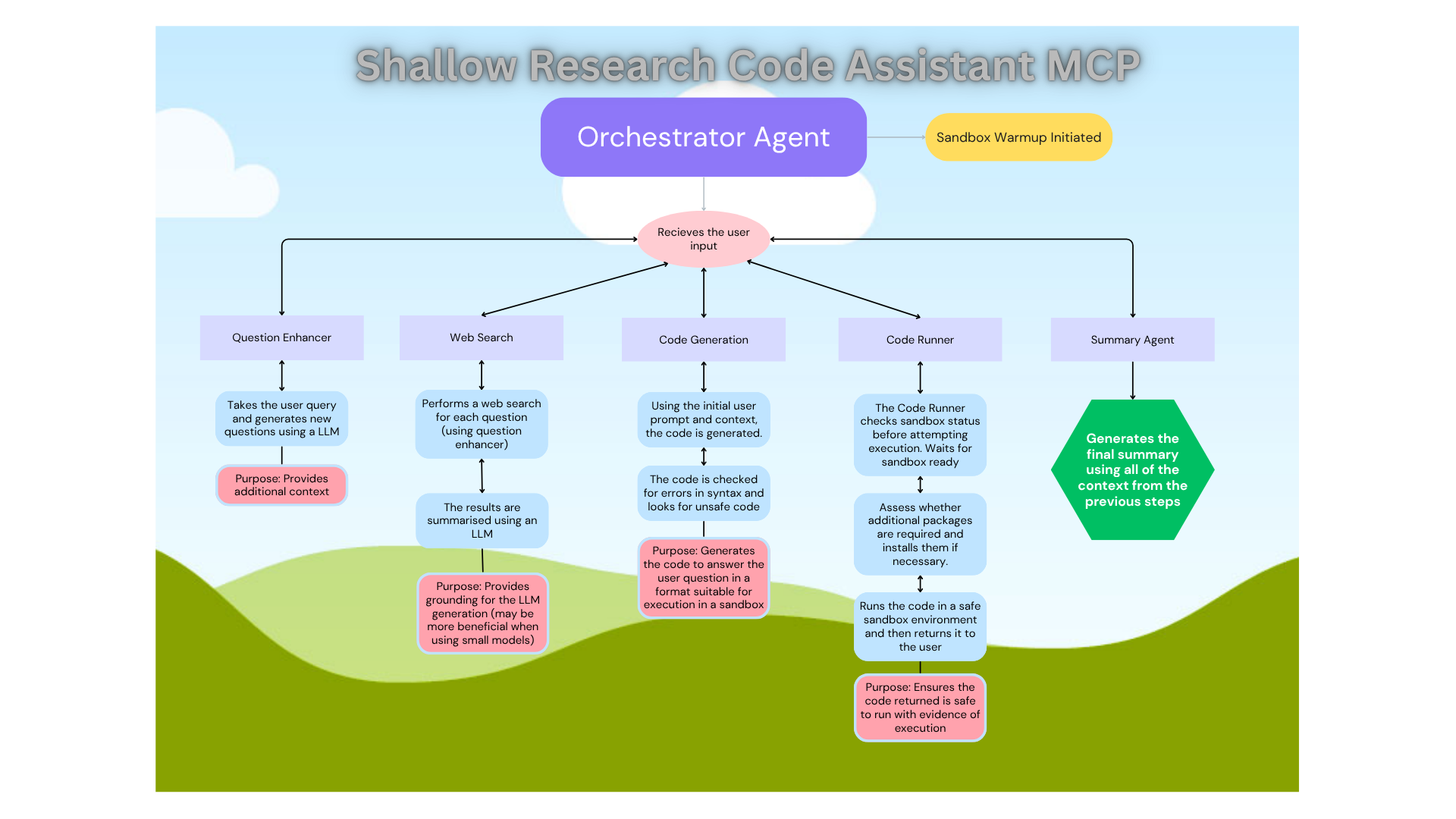
The diagram above illustrates the complete Multi-Agent workflow architecture, showing how different agents communicate through the MCP (Model Context Protocol) server to deliver comprehensive research and code generation capabilities.
Configure your environment by setting up API keys in the Settings tab
Choose your LLM provider Nebius Set By Default in the Space
Input your research query in the Orchestrator Flow tab
Watch the magic happen as agents collaborate to research and generate code
Question Enhancer: Breaks down complex queries into focused sub-questions
Web Search Agent: Performs targeted searches using Tavily API
LLM Processor: Handles text processing, summarization, and analysis
Citation Formatter: Manages academic citation formatting (APA style)
Code Generator: Creates contextually-aware Python code
Code Runner: Executes code in secure Modal sandboxes
Orchestrator: Coordinates the complete workflow
User Query: "Create Python code to analyze Twitter sentiment"
    ↓
Question Enhancement: Split into focused sub-questions
    ↓
Web Research: Search for Twitter APIs, sentiment libraries, examples
    ↓
Context Integration: Combine research into comprehensive context
    ↓
Code Generation: Create executable Python script
    ↓
Secure Execution: Run code in Modal sandbox
    ↓
Results: Code + output + research summary + citationsLLM Provider (choose one):
Nebius API (recommended)
OpenAI API
Anthropic API
HuggingFace Inference API
Tavily API (for web search)
Modal Account (for code execution)
Set these environment variables or configure in the app:
LLM_PROVIDER=nebius  # Your chosen provider
NEBIUS_API_KEY=your_key_here
TAVILY_API_KEY=your_key_here
MODAL_ID=your-id-here
MODEL_SECRET_TOKEN=your-token-herePrototype Development: Rapidly create functional code based on requirements
IDE Integration: Add this to your IDE for grounded LLM support
Code Examples: Generate educational code samples with explanations
Concept Exploration: Research and understand complex programming concepts
Best Practices: Learn current industry standards and methodologies
Real-time metrics collection
Response time tracking
Success rate monitoring
Resource usage analytics
Reduces redundant API calls
Improves response times
Configurable TTL settings
Circuit breaker protection
Rate limiting management
Graceful error handling
Automatic retry mechanisms
Pre-warmed execution environments
Optimized performance
Resource pooling
Automatic scaling
Orchestrator Flow: Complete end-to-end workflow
Individual Agents: Access each agent separately for specific tasks
Advanced Features: System monitoring and performance analytics
This application demonstrates advanced MCP (Model Context Protocol) implementation:
Server Architecture: Full MCP server with schema generation
Function Registry: Proper MCP function definitions with typing
Multi-Agent Communication: Structured data flow between agents
Error Handling: Robust error management across agent interactions
Response Times: Optimized for sub-second agent responses
Scalability: Handles concurrent requests efficiently
Reliability: Built-in fault tolerance and monitoring
Resource Management: Intelligent caching and pooling
Python: 3.12+ required
Framework: Gradio with MCP server capabilities
Execution: Modal for secure sandboxed code execution
Search: Tavily API for real-time web research
Monitoring: Comprehensive performance and health tracking
Ready to experience the future of AI-assisted research and development?
Start by configuring your API keys and dive into the world of multi-agent AI collaboration! 🚀
This project is licensed under the MIT License.
You are free to use, modify, and distribute this software with proper attribution. See the LICENSE file for details.
Wrapper for CitationFormatterAgent to format citations. Returns: Formatted citations result with APA-style references
Inputs: text_block.
Wrapper for CodeGeneratorAgent to generate Python code. Returns: A tuple containing the generation result and raw code
Inputs: user_request, grounded_context.
Wrapper for LLMProcessorAgent to process text with LLM. Returns: LLM processing result with output and metadata
Inputs: text_input, task, context.
Wrapper for QuestionEnhancerAgent to provide question enhancement. Returns: Enhanced question result with sub-questions
Inputs: user_request.
This function researches a coding request from the user, generates code, executes it, and returns a clean summary of the results. This is an mcp server function that responds to research coding requests from users. Returns: A tuple containing the JSON result from the orchestrator and a clean summary
Inputs: user_request.
Wrapper for WebSearchAgent to perform web searches. Returns: Web search results with summaries and URLs
Inputs: query.
Wrapper for CodeRunnerAgent that uses async execution with warm pool. Ensures a sandbox is spawned if not already present, waits for readiness, and then executes the code. Provides user-friendly error messages. Returns: The execution result or user-friendly error message
Inputs: code_or_obj.
Get cache status and statistics.
Inputs: no named parameters.
Get comprehensive system health status including advanced monitoring features. Retrieves detailed health information about the system including availability of advanced features, system resources, and operational metrics. Returns basic information if advanced monitoring is not available. Returns: A dictionary containing system health status and metrics
Inputs: no named parameters.
Get performance metrics and analytics for the MCP Hub system. Collects and returns performance metrics including execution times, success rates, error counts, and resource utilization. Provides basic information if advanced metrics collection is not available. Returns: A dictionary containing performance metrics and statistics
Inputs: no named parameters.
Synchronous wrapper for sandbox pool status.
Inputs: no named parameters.
Recent tool additions, removals, and schema changes observed during successful MCP inspections.
Loading tool schema changelog…
Scored across 11 tools
Multiple tools have overlapping or unclear boundaries. For example, ShallowCodeResearch_agent_research_request appears to combine research, code generation, and execution, which overlaps with ShallowCodeResearch_agent_code_generator and ShallowCodeResearch_code_runner_wrapper. The distinction between ShallowCodeResearch_agent_llm_processor and ShallowCodeResearch_agent_question_enhancer is also vague, as both involve LLM-based text processing. This ambiguity could lead to agent misselection.
The naming follows a mostly consistent pattern with a prefix 'ShallowCodeResearch_' and snake_case throughout. However, there are minor deviations: ShallowCodeResearch_agent_research_request uses 'research_request' while others use more specific terms like 'code_generator', and ShallowCodeResearch_get_sandbox_pool_status_sync includes 'sync' as a suffix, which is not present in other getter tools. Overall, the naming is readable and largely predictable.
With 11 tools, the count is reasonable for a server focused on code research and system monitoring. It covers a range of functions from code generation and execution to health checks, which aligns with the apparent scope of an MCP Hub. While not perfectly scoped (some tools could be consolidated), it does not feel overly heavy or thin for the domain.
The tool surface has notable gaps in coverage. For a code research domain, there are tools for generation, execution, and monitoring, but missing operations like code editing, debugging, or version control integration. The set includes getters for status and metrics but lacks corresponding setters or configuration tools. Agents may encounter dead ends when trying to perform comprehensive coding workflows beyond basic generation and execution.
Real-time web and scholarly search with cited answers and multi-step deep research.
Web search, fetch, extract, and research for AI agents. Markdown output + AI-synthesized answers.
Retrieve citation-ready technical context and coordinate evidence-backed work between AI agents.
Research paper search with real citations and reference formatting for AI assistants