
Amazon Bedrock Knowledge Base MCP Server
<div align="center">
<h1>Amazon Bedrock Knowledge Base MCP Server</h1>
<p>
<a href="https://github.com/Zlash65/amazon-bedrock-knowledge-base-mcp"><img src="https://img.shields.io/badge/github-Zlash65%2Famazon--bedrock--knowledge--base--mcp-blue.svg?style=flat&logo=github" alt="GitHub repo"></a>
<a href="https://pypi.org/project/amazon-bedrock-knowledge-base-mcp/"><img src="https://img.shields.io/pypi/v/amazon-bedrock-knowledge-base-mcp?color=blue&label=pypi" alt="PyPI version"></a>
<a href="https://pypi.org/project/amazon-bedrock-knowledge-base-mcp/"><img src="https://img.shields.io/pypi/dm/amazon-bedrock-knowledge-base-mcp?color=blue" alt="PyPI downloads"></a>
<a href="https://pypi.org/project/amazon-bedrock-knowledge-base-mcp/"><img src="https://img.shields.io/pypi/pyversions/amazon-bedrock-knowledge-base-mcp?color=blue" alt="Python versions"></a>
<a href="LICENSE"><img src="https://img.shields.io/pypi/l/amazon-bedrock-knowledge-base-mcp?color=blue" alt="License"></a>
</p>
<p>A powerful MCP server for querying Amazon Bedrock Knowledge Bases. Retrieve semantically relevant passages with metadata filtering, reranking, and multi-transport support.</p>
<div class="toc">
<a href="#features">Features</a> •
<a href="#architecture">Architecture</a> •
<a href="#quick-start">Quick Start</a> •
<a href="#available-tools">Available Tools</a> •
<a href="#metadata-schema">Metadata Schema</a> •
<a href="#limitations">Limitations</a> •
<a href="#license">License</a>
</div>
</div>
---
## Features
- **Dual Transport** - STDIO for Claude Desktop, Streamable HTTP for ChatGPT
- **Smart Filtering** - Schema-driven `where` constraints + raw Bedrock filters + implicit filtering
- **Reranking** - Optional AMAZON or COHERE reranking for improved relevance
- **Auto Schema Discovery** - Automatically infer metadata schemas from retrieval results
- **OAuth Support** - Auth0 integration for secure ChatGPT connections
- **Read-Only** - Safe by design; no write operations to your knowledge bases
---
## Architecture
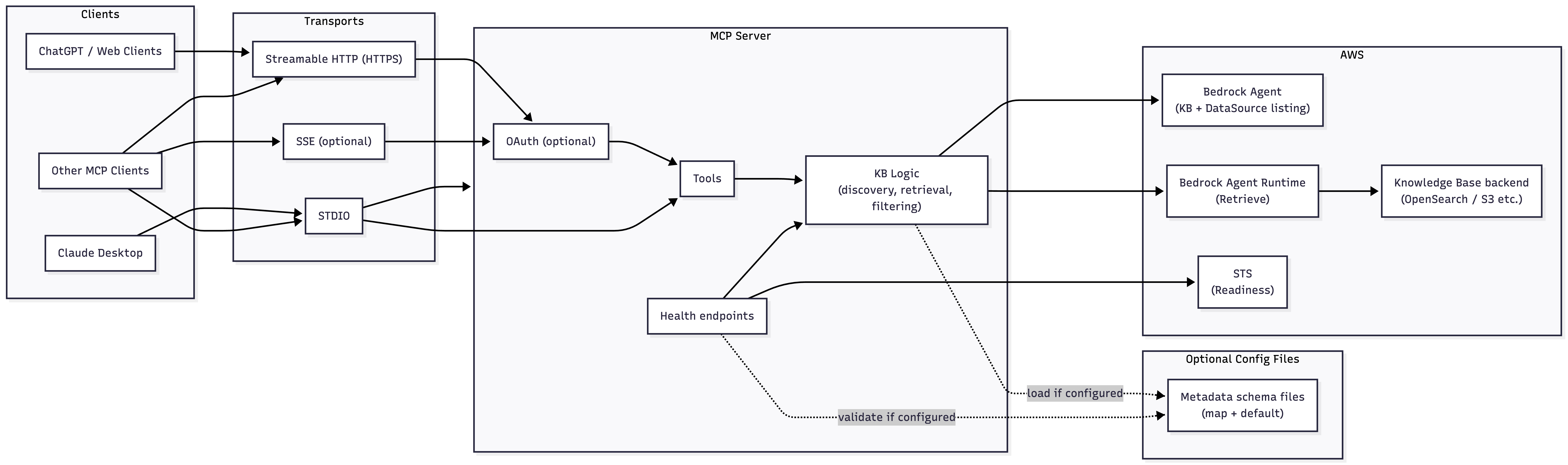
---
## Quick Start
### Claude Desktop (STDIO)
Add to your Claude Desktop config:
| Platform | Config Location |
|----------|-----------------|
| macOS | `~/Library/Application Support/Claude/claude_desktop_config.json` |
| Windows | `%APPDATA%/Claude/claude_desktop_config.json` |
```json
{
"mcpServers": {
"bedrock-kb": {
"command": "uvx",
"args": ["amazon-bedrock-knowledge-base-mcp"],
"env": {
"AWS_PROFILE": "your-profile",
"AWS_REGION": "us-west-2"
}
}
}
}
```
### ChatGPT (Streamable HTTP)
```bash
AWS_PROFILE=your-profile \
AWS_REGION=us-west-2 \
MCP_TRANSPORT=streamable-http \
uvx amazon-bedrock-knowledge-base-mcp
```
Then configure ChatGPT to connect to `https://your-domain.example.com/mcp`.
> **Note:** ChatGPT requires HTTPS. Use a tunnel (ngrok, Cloudflare Tunnel) for local testing.
---
## Available Tools
### Discovery Tools
| Tool | Description |
|------|-------------|
| `ListKnowledgeBases` | List available knowledge bases and their data sources. Filters by tag. |
| `DescribeMetadataSchema` | Show the resolved metadata schema for filtering (static or auto-discovered). |
### Query Tools
| Tool | Description |
|------|-------------|
| `QueryKnowledgeBases` | Retrieve relevant passages. Content-focused, minimal output. |
| `QueryKnowledgeBasesWithMetadata` | Retrieve passages + full metadata. Ideal for exploration and filter tuning. |
### Recommended Workflow
1. **List** - Call `ListKnowledgeBases` to find available knowledge bases
2. **Explore** - Use `QueryKnowledgeBasesWithMetadata` to discover metadata keys/values
3. **Schema** - Call `DescribeMetadataSchema` to see available filter fields
4. **Query** - Use `QueryKnowledgeBases` with `where` filters for precise retrieval
---
## Environment Variables
### AWS Configuration
| Variable | Required | Default | Description |
|----------|----------|---------|-------------|
| `AWS_PROFILE` | Yes* | - | AWS profile name (recommended) |
| `AWS_REGION` | Yes* | - | AWS region (e.g., `us-west-2`) |
*Either `AWS_PROFILE` or IAM role credentials are required.
### Knowledge Base Discovery
| Variable | Default | Description |
|----------|---------|-------------|
| `KB_INCLUSION_TAG_KEY` | `mcp-multirag-kb` | Only include KBs tagged with `<key>=true` |
### Retrieval Defaults
| Variable | Default | Description |
|----------|---------|-------------|
| `BEDROCK_KB_RERANKING_ENABLED` | `false` | Enable reranking by default |
| `BEDROCK_KB_SEARCH_TYPE` | `DEFAULT` | `DEFAULT`, `HYBRID`, or `SEMANTIC` |
### Filtering
| Variable | Default | Description |
|----------|---------|-------------|
| `BEDROCK_KB_FILTER_MODE` | `explicit_then_implicit` | How to combine explicit and implicit filters |
| `BEDROCK_KB_ALLOW_RAW_FILTER` | `false` | Allow raw Bedrock RetrievalFilter passthrough |
| `BEDROCK_KB_SCHEMA_MAP_JSON` | - | Path to KB ID → schema-path mapping (JSON) |
| `BEDROCK_KB_SCHEMA_DEFAULT_PATH` | - | Default schema file path (JSON) |
| `BEDROCK_KB_IMPLICIT_FILTER_MODEL_ARN` | - | Model ARN for implicit filtering |
### HTTP Server (Streamable HTTP only)
| Variable | Default | Description |
|----------|---------|-------------|
| `MCP_TRANSPORT` | `stdio` | Transport mode: `stdio`, `sse`, or `streamable-http` |
| `MCP_HOST` | `127.0.0.1` | HTTP server bind address |
| `PORT` | `8000` | HTTP server port |
| `MCP_STATELESS` | `true` | Stateless mode (recommended for production) |
| `MCP_ALLOWED_ORIGINS` | - | Comma-separated allowed CORS origins (`*` for any) |
| `MCP_ALLOWED_HOSTS` | - | Comma-separated allowed Host headers |
### OAuth (Auth0)
| Variable | Required | Description |
|----------|----------|-------------|
| `MCP_AUTH_MODE` | No | Set to `oauth` to enable Auth0 authentication |
| `AUTH0_DOMAIN` | Yes* | Auth0 tenant domain (e.g., `tenant.us.auth0.com`) |
| `AUTH0_AUDIENCE` | Yes* | Auth0 API identifier / audience |
| `MCP_RESOURCE_URL` | Yes* | Public URL clients connect to |
*Required when `MCP_AUTH_MODE=oauth`
### Logging
| Variable | Default | Description |
|----------|---------|-------------|
| `FASTMCP_LOG_LEVEL` | `INFO` | Log level (`DEBUG`, `INFO`, `WARNING`, `ERROR`) |
---
## Documentation
| Guide | Description |
|-------|-------------|
| [STDIO Setup](docs/stdio-setup.md) | Claude Desktop and local development |
| [Streamable HTTP](docs/streamable-http.md) | HTTP server setup and configuration |
| [Server Setup](docs/server-setup.md) | Deploy to production with nginx and SSL |
| [ChatGPT Setup](docs/chatgpt-setup.md) | Complete Auth0 OAuth setup for ChatGPT |
---
## Docker
```bash
# Build the image
docker build -t amazon-bedrock-knowledge-base-mcp:local .
# Run with AWS credentials
docker run --rm \
-v "$HOME/.aws:/home/app/.aws:ro" \
-e AWS_PROFILE=your-profile \
-e AWS_REGION=us-west-2 \
amazon-bedrock-knowledge-base-mcp:local
# Run as HTTP server
docker run --rm \
-p 8000:8000 \
-v "$HOME/.aws:/home/app/.aws:ro" \
-e AWS_PROFILE=your-profile \
-e AWS_REGION=us-west-2 \
-e MCP_TRANSPORT=streamable-http \
-e MCP_HOST=0.0.0.0 \
amazon-bedrock-knowledge-base-mcp:local
```
### Health Endpoints
| Endpoint | Description |
|----------|-------------|
| `GET /health` | Basic health check (always returns 200 if running) |
| `GET /health/ready` | Readiness check (validates AWS credentials via STS) |
---
## Development
```bash
# Clone and install
git clone https://github.com/Zlash65/amazon-bedrock-knowledge-base-mcp.git
cd amazon-bedrock-knowledge-base-mcp
uv sync --group dev
# Run tests
uv run pytest -q
# Type check
uv run pyright
# Lint
uv run ruff check .
# Format
uv run ruff format .
```
---
## Metadata Schema
Schema files define available metadata fields for filtering. See [`schemas/README.md`](schemas/README.md) for examples.
Example schema:
```json
{
"fields": [
{
"key": "x-amz-bedrock-kb-source-uri",
"type": "string",
"description": "Source document URI",
"alias": "source"
},
{
"key": "category",
"type": "string",
"description": "Document category",
"filterable": true
}
]
}
```
Use in queries:
```python
# Using alias
{"where": {"source": "s3://bucket/doc.pdf"}}
# Using direct key
{"where": {"category": ["finance", "legal"]}}
```
---
## Limitations
- Results with `IMAGE` content type are not included in query responses
- Reranking requires additional IAM permissions and is only available in specific regions
- Knowledge bases must be tagged with `KB_INCLUSION_TAG_KEY=true` to be discoverable
---
## License
Apache-2.0 - see [LICENSE](LICENSE) and [NOTICE](NOTICE).
<!-- Badge links -->
[pypi-package]: https://pypi.org/project/amazon-bedrock-knowledge-base-mcp/
[github-repo-badge]: https://img.shields.io/badge/github-Zlash65%2Famazon--bedrock--knowledge--base--mcp-blue.svg?style=flat&logo=github
[github-repo-link]: https://github.com/Zlash65/amazon-bedrock-knowledge-base-mcp
[pypi-version-badge]: https://img.shields.io/pypi/v/amazon-bedrock-knowledge-base-mcp?color=blue&label=pypi
[pypi-downloads-badge]: https://img.shields.io/pypi/dm/amazon-bedrock-knowledge-base-mcp?color=blue
[python-version-badge]: https://img.shields.io/pypi/pyversions/amazon-bedrock-knowledge-base-mcp?color=blue
[license-badge]: https://img.shields.io/pypi/l/amazon-bedrock-knowledge-base-mcp?color=blue
[license-link]: LICENSE
TDQS
Scored across 4 tools
ListKnowledgeBases and DescribeMetadataSchema are clearly distinct, but QueryKnowledgeBases and QueryKnowledgeBasesWithMetadata overlap heavily. The descriptions do explain the difference—metadata inclusion versus standard retrieval—so an agent can disambiguate with care, though misselection remains plausible.
All tools use consistent PascalCase verb-noun naming: Describe..., List..., Query..., Query...WithMetadata. The suffix variant on the last tool is descriptive rather than a convention break.
Four tools is well-scoped for a read-only knowledge base retrieval server. Each tool maps to a distinct retrieval concern: listing, schema discovery, standard query, and metadata-aware query.
The surface covers the core read-only workflow: discover knowledge bases, inspect metadata schema, and query with or without metadata. Minor gaps exist around data source detail or pagination, but agents can work around them using list and query tools.