A
licenseA
qualityA
maintenancePrivacy-first local document search using semantic search. Runs entirely on your machine with no cloud services, supporting PDF, DOCX, TXT, and Markdown files.
9
2,150 npm
417
MIT

If you find this useful, consider giving it a ⭐ — it helps others discover the project.
Local semantic search for your documents. No API keys. No cloud. Works with any MCP client.
AI coding tools are powerful, but they have blind spots when it comes to your local files:
Frozen knowledge -- training data has a cutoff. Your latest reports, notes, and contracts don't exist in the model's world.
Context window limits -- you can't paste 500 documents into a prompt.
No cross-file search -- your AI tool can read one file at a time, but can't search across your entire document library for the relevant pieces.
This plugin bridges that gap. It indexes your local documents into a small, fast vector database. When you ask a question, it retrieves only the relevant pieces -- so your AI tool can answer with your actual data.
Your documents --> chunked --> embedded --> local vector DB
                                                 |
         Your question --> embedded --> similarity search --> relevant chunks --> AI answers
Related MCP server: rag-mcp
Fully offline -- one-time model download (~120MB), then no network calls. No data leaves your machine.
Incremental indexing -- SHA-256 content hashing. Only changed files get reprocessed. Re-indexing 1000 files where 3 changed takes seconds.
Multilingual -- handles 50+ languages natively. Search in one language, find results in another.
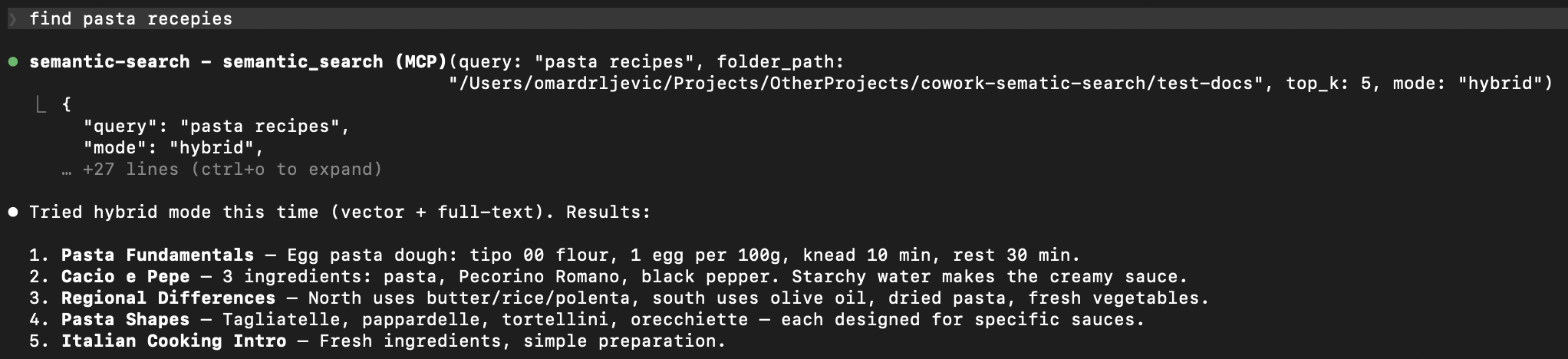
Hybrid search -- combines semantic similarity with full-text keyword search via Reciprocal Rank Fusion. Catches what pure vector search misses.
Multiple formats -- txt, md, pdf, docx, pptx, csv out of the box.
Any MCP client -- works with Claude Code, Cursor, Windsurf, Cline, and any other MCP-compatible tool.
Zero infrastructure -- LanceDB stores everything as local files. No server, no Docker, no database to manage.
Format | Extension | Details |
Plain text |
| UTF-8 with fallback |
Markdown |
| Raw text preserved |
| Page-level extraction with metadata | |
Word |
| Full paragraph extraction |
PowerPoint |
| Slide-level extraction with metadata |
CSV |
| Row-based text extraction |
git clone https://github.com/ZhuBit/cowork-semantic-search.git
cd cowork-semantic-search
python3 -m venv .venv && source .venv/bin/activate
pip install -e ".[all]"Add the server to your MCP client's config. Replace paths with your own.
{
  "mcpServers": {
    "semantic-search": {
      "command": "/absolute/path/to/.venv/bin/python",
      "args": ["-m", "server.main"],
      "cwd": "/absolute/path/to/cowork-semantic-search",
      "env": {
        "PYTHONPATH": "/absolute/path/to/cowork-semantic-search"
      }
    }
  }
}
{
"mcpServers": {
"semantic-search": {
"command": "/absolute/path/to/.venv/bin/python",
"args": ["-m", "server.main"],
"env": {
"PYTHONPATH": "/absolute/path/to/cowork-semantic-search"
}
}
}
}{
"mcpServers": {
"semantic-search": {
"command": "/absolute/path/to/.venv/bin/python",
"args": ["-m", "server.main"],
"env": {
"PYTHONPATH": "/absolute/path/to/cowork-semantic-search"
}
}
}
}Open Cline > MCP Servers icon > Configure > Advanced MCP Settings, then add:
{
  "mcpServers": {
    "semantic-search": {
      "command": "/absolute/path/to/.venv/bin/python",
      "args": ["-m", "server.main"],
      "env": {
        "PYTHONPATH": "/absolute/path/to/cowork-semantic-search"
      }
    }
  }
}"Index all documents in ~/Documents/projects"
"Search for 'quarterly revenue report'"
First run downloads the embedding model (~120MB), then everything runs offline.
If you keep notes in Obsidian (or any folder of markdown files), this plugin turns your AI tool into a search engine for your knowledge base.
You: "Index my vault at ~/Documents/ObsidianVault"
AI:  Indexed 847 files -> 3,291 chunks in 42s

You: "What did I write about API rate limiting?"
AI:  Found 6 relevant chunks across 3 files:
       - notes/backend/rate-limiting-strategies.md
       - projects/acme-api/design-decisions.md
       - daily/2025-11-03.md
       ...

You: "Find anything about the client meeting last November, use hybrid search"
AI:  Found 4 results using hybrid search (vector + keyword):
       - meetings/2025-11-12-acme-kickoff.md
       - daily/2025-11-12.md
       ...
Works the same with PDFs, Word docs, PowerPoints, and CSVs -- just point it at a folder.
Tool | Description |
| Index or re-index all documents in a folder. Incremental -- skips unchanged files. |
| Search indexed documents using natural language. Supports |
| Show total chunks, file count, and list of indexed files. |
| Force re-index a single file, bypassing the hash cache. |
Parse -- extract text from each document, preserving structure (pages, slides)
Chunk -- split into ~400 character overlapping pieces for precise retrieval
Embed -- convert each chunk into a 384-dimensional vector using paraphrase-multilingual-MiniLM-L12-v2
Store -- save chunks + vectors in a LanceDB database (a local file, no server needed)
Search -- embed your query, find nearest chunks by cosine similarity, optionally combine with full-text keyword search via RRF
from server.indexer import index_folder
from server.search import semantic_search

# Index a folder
result = index_folder("/path/to/docs")
print(f"{result['files_indexed']} files -> {result['total_chunks']} chunks")

# Search
results = semantic_search("project deadline", mode="hybrid")
for r in results["results"]:
print(f" {r['file_name']}: {r['text'][:100]}...")server/
main.py # MCP server + tool definitions
parsers.py # Per-format text extraction
chunker.py # Text splitting with metadata
indexer.py # Discovery, hashing, embedding pipeline
store.py # LanceDB vector store + FTS + hybrid search
search.py # Query embedding + search orchestrationComponent | Choice | Why |
MCP framework | FastMCP | Clean tool definitions, async support |
Embeddings | sentence-transformers | Offline, multilingual, fast |
Vector DB | LanceDB | Serverless, embedded, FTS built-in |
Chunking | langchain-text-splitters | Battle-tested recursive splitting |
PyMuPDF | Fast, accurate extraction | |
DOCX | python-docx | Lightweight, no system deps |
PPTX | python-pptx | Slide-level extraction |
source .venv/bin/activate
pytest tests/ -v
56 tests covering parsers, chunking, indexing, search, and MCP tool integration.
Contributions welcome -- open an issue or submit a PR.
ONNX runtime for faster embeddings (drop PyTorch dependency)
Configurable chunk size and overlap via tool params
Multi-folder named indexes
Metadata filtering (date ranges, tags, custom fields)
Watch mode (auto-reindex on file changes)
If this is useful to you, consider giving it a ⭐ — it helps others find the project.
AGPL-3.0 -- free to use, modify, and self-host. If you offer this as a network service, you must share your source code. See LICENSE for details.
Get status information about the current search index.
Returns total chunks, list of indexed files with chunk counts, and file type distribution.
| Name | Required | Description | Default |
|---|---|---|---|
| db_path | No | Path to the LanceDB database. Uses LANCEDB_PATH env var if omitted. |
| Name | Required | Description |
|---|---|---|
No output parameters | ||
Does the description disclose side effects, auth requirements, rate limits, or destructive behavior?
readOnlyHint=true already establishes this as a safe read. The description's added disclosure is a summary of the returned fields (chunk totals, file list, type distribution), which partially duplicates the existing output schema rather than adding new behavioral context like cost, scope, or staleness.
Agents need to know what a tool does to the world before calling it. Descriptions should go beyond structured annotations to explain consequences.
Is the description appropriately sized, front-loaded, and free of redundancy?
Two sentences, front-loaded with the core action and followed by the return summary; no filler. Slightly wasteful given the return details are already captured by the output schema.
Shorter descriptions cost fewer tokens and are easier for agents to parse. Every sentence should earn its place.
Given the tool's complexity, does the description cover enough for an agent to succeed on first attempt?
With annotations covering the safety profile, a complete output schema, and a fully documented parameter, the description provides enough for correct invocation. Only the absence of any usage/routing guidance keeps it from being fully complete.
Complex tools with many parameters or behaviors need more documentation. Simple tools need less. This dimension scales expectations accordingly.
Does the description clarify parameter syntax, constraints, interactions, or defaults beyond what the schema provides?
Schema description coverage is 100% and the single db_path parameter is fully documented, including the LANCEDB_PATH fallback. The description adds no parameter-level meaning beyond that, so the baseline 3 is warranted.
Input schemas describe structure but not intent. Descriptions should explain non-obvious parameter relationships and valid value ranges.
Does the description clearly state what the tool does and how it differs from similar tools?
Names a specific verb and resource ('Get status information about the current search index') and enumerates what the status comprises. It is implicitly distinguishable from the mutating siblings (index_folder, reindex_file) and the query sibling (semantic_search), but it never names or contrasts them explicitly.
Agents choose between tools based on descriptions. A clear purpose with a specific verb and resource helps agents select the right tool.
Does the description explain when to use this tool, when not to, or what alternatives exist?
Usage is implied rather than stated — an agent would infer this is the read-only inspection call versus the mutating siblings. There is no explicit when-to-use, when-not-to-use, or prerequisite guidance, so it stays at minimum viable.
Agents often have multiple tools that could apply. Explicit usage guidance like "use X instead of Y when Z" prevents misuse.
Index or re-index all documents in a folder for semantic search.
Scans the folder for supported document types (.txt, .md, .pdf, .docx, .pptx, .csv), extracts text, splits into chunks, computes embeddings, and stores them in a local vector database. Only processes files that have changed since the last indexing run. Safe to call multiple times — unchanged files are skipped automatically.
| Name | Required | Description | Default |
|---|---|---|---|
| recursive | No | Whether to index subdirectories recursively | |
| file_types | No | File extensions to index, e.g. ['.pdf', '.md']. Defaults to all supported types: .txt, .md, .pdf, .docx, .pptx, .csv | |
| folder_path | Yes | Absolute path to the folder to index |
| Name | Required | Description |
|---|---|---|
No output parameters | ||
Does the description disclose side effects, auth requirements, rate limits, or destructive behavior?
Annotations already declare idempotentHint=true and destructiveHint=false, yet the description still adds real value: it enumerates the pipeline (scan, extract, chunk, embed, store in a local vector database), lists supported extensions, and explains the incremental 'changed since last run' behavior that justifies idempotency. It does not cover cost/duration, permission needs, or what happens on unsupported or missing paths.
Agents need to know what a tool does to the world before calling it. Descriptions should go beyond structured annotations to explain consequences.
Is the description appropriately sized, front-loaded, and free of redundancy?
Front-loaded with the core purpose, then the mechanics, then the safety note — a sensible order. Minor redundancy: 'Only processes files that have changed since the last indexing run' and 'unchanged files are skipped automatically' say the same thing twice.
Shorter descriptions cost fewer tokens and are easier for agents to parse. Every sentence should earn its place.
Given the tool's complexity, does the description cover enough for an agent to succeed on first attempt?
With an output schema present, return values need no explanation, and the description covers the operation pipeline, file-type scope, and idempotency well. What is missing is prerequisite/edge-case handling (nonexistent folder, unsupported files) and routing guidance against the three siblings.
Complex tools with many parameters or behaviors need more documentation. Simple tools need less. This dimension scales expectations accordingly.
Does the description clarify parameter syntax, constraints, interactions, or defaults beyond what the schema provides?
Schema description coverage is 100%, so the baseline is 3. The description restates the supported file-type list already in the file_types schema description and says nothing extra about recursive or folder_path, adding essentially no semantics beyond the schema.
Input schemas describe structure but not intent. Descriptions should explain non-obvious parameter relationships and valid value ranges.
Does the description clearly state what the tool does and how it differs from similar tools?
States a specific verb and resource — indexing/re-indexing all documents in a folder for semantic search — and the scope ('all documents in a folder') implicitly separates it from the single-file sibling reindex_file. It never names or explicitly contrasts with get_index_status or semantic_search, so differentiation is left partly to inference.
Agents choose between tools based on descriptions. A clear purpose with a specific verb and resource helps agents select the right tool.
Does the description explain when to use this tool, when not to, or what alternatives exist?
Usage context is implied by 'Only processes files that have changed' and 'Safe to call multiple times,' which tell an agent this is a repeatable maintenance operation. However, there is no explicit when-to-use guidance or routing to alternatives (e.g., reindex_file for a single document, or get_index_status to check before indexing).
Agents often have multiple tools that could apply. Explicit usage guidance like "use X instead of Y when Z" prevents misuse.
Force re-index a single file, ignoring the content hash cache.
Deletes existing chunks for this file, re-parses, re-chunks, re-embeds, and stores new chunks. Useful when you know a file has changed or when parsing was updated.
| Name | Required | Description | Default |
|---|---|---|---|
| db_path | No | Path to the LanceDB database. Uses LANCEDB_PATH env var if omitted. | |
| file_path | Yes | Absolute path to the file to re-index |
| Name | Required | Description |
|---|---|---|
No output parameters | ||
Does the description disclose side effects, auth requirements, rate limits, or destructive behavior?
The description discloses non-obvious behavior beyond the annotations: that it ignores the content hash cache, and that existing chunks are deleted before re-parse/re-chunk/re-embed/store. This aligns with idempotentHint=true and destructiveHint=false (only derived chunks are replaced). It doesn't mention cost/latency of re-embedding, which is the main missing behavioral detail.
Agents need to know what a tool does to the world before calling it. Descriptions should go beyond structured annotations to explain consequences.
Is the description appropriately sized, front-loaded, and free of redundancy?
Front-loaded with the action and its key property (force, ignore cache), followed by the mechanics and the use case. Every sentence earns its place with no filler.
Shorter descriptions cost fewer tokens and are easier for agents to parse. Every sentence should earn its place.
Given the tool's complexity, does the description cover enough for an agent to succeed on first attempt?
An output schema exists, so return values need not be explained, and the annotations cover the safety profile. Combined with the pipeline description and use case, an agent has what it needs; only a note on relative cost versus a normal index pass is absent.
Complex tools with many parameters or behaviors need more documentation. Simple tools need less. This dimension scales expectations accordingly.
Does the description clarify parameter syntax, constraints, interactions, or defaults beyond what the schema provides?
Schema description coverage is 100% for both parameters, so the schema already documents file_path (absolute path) and db_path (env var fallback). The description adds nothing about either parameter, so the baseline 3 applies.
Input schemas describe structure but not intent. Descriptions should explain non-obvious parameter relationships and valid value ranges.
Does the description clearly state what the tool does and how it differs from similar tools?
States a specific verb (re-index) plus resource (a single file) and scope, explicitly contrasting with the folder-level sibling index_folder. An agent can distinguish it from index_folder and semantic_search without opening any schema.
Agents choose between tools based on descriptions. A clear purpose with a specific verb and resource helps agents select the right tool.
Does the description explain when to use this tool, when not to, or what alternatives exist?
"Useful when you know a file has changed or when parsing was updated" gives a clear triggering condition. It stops short of naming alternatives (e.g. index_folder for bulk work) or stating when not to use it, so it falls short of a 5.
Agents often have multiple tools that could apply. Explicit usage guidance like "use X instead of Y when Z" prevents misuse.
Search indexed documents using natural language.
Finds the most relevant document chunks matching the query using semantic similarity. Returns ranked results with source file paths and relevance scores.
Use mode='hybrid' to combine vector search with full-text search via Reciprocal Rank Fusion for better keyword + semantic matching.
The folder must be indexed first with index_folder.
| Name | Required | Description | Default |
|---|---|---|---|
| mode | No | Search mode: 'vector' (default) or 'hybrid' (vector + full-text via RRF) | vector |
| query | Yes | Natural language search query | |
| top_k | No | Number of results to return | |
| file_type | No | Filter results by file extension, e.g. '.pdf' | |
| folder_path | No | Limit search to a specific indexed folder. If omitted, searches all indexed folders. |
| Name | Required | Description |
|---|---|---|
No output parameters | ||
Does the description disclose side effects, auth requirements, rate limits, or destructive behavior?
Annotations only declare readOnlyHint=true, so the description carries most of the burden and does add real context: the retrieval mechanism, the RRF fusion used by hybrid mode, and the hard dependency on prior indexing. It omits cost/latency considerations for large indexes or anything about how results are truncated, which keeps it from a 5.
Agents need to know what a tool does to the world before calling it. Descriptions should go beyond structured annotations to explain consequences.
Is the description appropriately sized, front-loaded, and free of redundancy?
Four short, front-loaded blocks: what it does, what it returns, the mode option, and the prerequisite. No filler sentences and the most consequential routing information (indexing prerequisite) is stated plainly.
Shorter descriptions cost fewer tokens and are easier for agents to parse. Every sentence should earn its place.
Given the tool's complexity, does the description cover enough for an agent to succeed on first attempt?
An output schema exists, so the description is not obligated to detail return values, yet it still summarizes them. Combined with the stated prerequisite and mode guidance, an agent has enough to call this correctly; only edge behavior (empty index, scope of 'all indexed folders') is left implicit.
Complex tools with many parameters or behaviors need more documentation. Simple tools need less. This dimension scales expectations accordingly.
Does the description clarify parameter syntax, constraints, interactions, or defaults beyond what the schema provides?
Schema coverage is 100%, so the baseline is 3. The description's note about mode='hybrid' restates what the schema already says ('vector + full-text via RRF') rather than extending it, and top_k, file_type, and folder_path are left entirely to the schema.
Input schemas describe structure but not intent. Descriptions should explain non-obvious parameter relationships and valid value ranges.
Does the description clearly state what the tool does and how it differs from similar tools?
States a specific verb and resource ('search indexed documents using natural language') plus the mechanism (semantic similarity) and the return shape (ranked chunks with source paths and relevance scores). It names index_folder as the enabling prerequisite, which cleanly separates it from get_index_status and reindex_file.
Agents choose between tools based on descriptions. A clear purpose with a specific verb and resource helps agents select the right tool.
Does the description explain when to use this tool, when not to, or what alternatives exist?
Gives explicit conditions for the key decision point: default vector mode vs mode='hybrid' when keyword + semantic matching is wanted, and it clearly states the folder must be indexed first with index_folder. It stops short of naming when-not-to-use or a competing sibling for the same job, so it is not a full 5.
Agents often have multiple tools that could apply. Explicit usage guidance like "use X instead of Y when Z" prevents misuse.
Recent tool additions, removals, and schema changes observed during successful MCP inspections.
v0.1.0get_index_statusindex_folderreindex_filesemantic_searchScored across 4 tools
Tools cover distinct lifecycle stages: status check, folder indexing, querying, and forced single-file reindexing. The only mild overlap is between index_folder and reindex_file, but descriptions clarify bulk vs. targeted cache-bypassing use.
Three of four names follow verb_noun snake_case (get_index_status, index_folder, reindex_file). semantic_search is an adjective_noun outlier, but the overall pattern remains readable and consistent.
Four tools is a tight, well-scoped set for a focused semantic-search server. Each operation (index, query, status, targeted reindex) maps to a distinct user need without bloat.
Core index/search/reindex/status flows are covered, but there is no delete or remove-from-index operation. Deleted or moved files would leave stale chunks, creating a notable lifecycle gap.
Local ML: speech to text (SRT/VTT), text embeddings, reranking, similarity, entities, zero-shot.
Ingest, manage, and retrieve documents for RAG-powered AI applications
Self-hosted AI workspace: semantic RAG document search, long-term memory, and AI chat via MCP.
Semantic nearest-neighbour search over your datasets, plus indices and projections.