
verdi-bridge
<!-- mcp-name: io.github.RuihongY/verdi-bridge -->
<p align="center">
<img src="https://raw.githubusercontent.com/RuihongY/verdi_bridge/main/assets/banner.svg" alt="Verdi Bridge — connect AI agents to your live Verdi session" width="100%" />
</p>
<p align="center">
<a href="https://pypi.org/project/verdi-bridge/"><img src="https://img.shields.io/pypi/v/verdi-bridge" alt="PyPI" /></a>
<a href="https://github.com/RuihongY/verdi_bridge/actions/workflows/test.yml"><img src="https://github.com/RuihongY/verdi_bridge/actions/workflows/test.yml/badge.svg" alt="Tests" /></a>
<a href="https://github.com/RuihongY/verdi_bridge/blob/main/LICENSE"><img src="https://img.shields.io/badge/license-MIT-green" alt="MIT license" /></a>
<a href="https://github.com/RuihongY/verdi_bridge/blob/main/pyproject.toml"><img src="https://img.shields.io/badge/python-3.11%2B-blue" alt="Python 3.11 or newer" /></a>
</p>
<p align="center">
<a href="https://github.com/RuihongY/verdi_bridge/blob/main/docs/guide.md"><b>Getting started</b></a> ·
<a href="https://github.com/RuihongY/verdi_bridge/blob/main/docs/tools.md">Tool reference</a> ·
<a href="https://github.com/RuihongY/verdi_bridge/blob/main/docs/architecture.md">Architecture</a> ·
<a href="https://github.com/RuihongY/verdi_bridge/blob/main/README.zh-CN.md">中文</a>
</p>
# Give your RTL debugging agent eyes on the waveform
Connect your AI agent to **live Synopsys Verdi**. Let it find signals, inspect
transitions, move through simulation time, and open the driving RTL—all in the
same GUI you use to debug.
> “Add the FIFO read/write pointers, go 20 cycles before the error, and investigate why full stayed high.”
>
> “When did BVALID drop? Show the handshake signals and the code that drives it.”
Verdi Bridge turns those requests into observations from your simulation and
visible actions in nWave and nTrace. The agent reasons; the bridge observes.
Eighteen typed MCP tools work locally or over SSH with your existing Verdi setup.
## Video walkthrough
Ask an agent to investigate a bug, then watch it choose signals, inspect live waveforms and navigate RTL. A 1m38s silent demo: an English prompt and original English agent replies beside synchronized Verdi capture. This is a separate English-language run, not a translation. Tool calls are selected by the agent, not a replay script.
https://github.com/user-attachments/assets/b041c1bd-4be5-4040-b281-2f15001b1e35
[English video](https://github.com/user-attachments/assets/b041c1bd-4be5-4040-b281-2f15001b1e35) · [中文视频](https://github.com/user-attachments/assets/3294e374-5c43-4b67-8e20-b8a6f319d8f7)
[How this was recorded](https://github.com/RuihongY/verdi_bridge/blob/main/docs/agent-demo.md) · [Installation tutorial](https://github.com/RuihongY/verdi_bridge/blob/main/docs/video-walkthrough.md)
## Offline Zero-Dependency Edition (Python 3.10+)
This repository is adapted from upstream [RuihongY/verdi_bridge](https://github.com/RuihongY/verdi_bridge) (v0.3.3, MIT): **all third-party dependencies (`mcp`, `pydantic`, `pydantic-core`) have been removed** in favor of a pure Python standard-library MCP stdio server, compatible with **Python 3.10+**.
In air-gapped environments without `uv`/`uvx`, internal PyPI, or a Rust toolchain, run it directly in any of 3 ways:
1. **Zero-install wrapper script (recommended)**:
```sh
chmod +x bin/verdi-bridge
./bin/verdi-bridge tcl-path
./bin/verdi-bridge serve
```
Example MCP client configuration:
```json
{
"mcpServers": {
"verdi-bridge": {
"command": "/absolute/path/to/verdi-bridge-offline/bin/verdi-bridge",
"args": ["serve"]
}
}
}
```
2. **Zero-install via `PYTHONPATH`**:
```sh
PYTHONPATH=/absolute/path/to/verdi-bridge-offline/src python3 -m verdi_bridge serve
```
3. **Offline local install**:
```sh
pip install --no-build-isolation --no-deps .
```
## Quick start
```sh
pip install verdi-bridge
```
Or run without a checkout using uv:
```sh
uvx verdi-bridge tcl-path
```
This prints the bundled Tcl adapter path. [Load it in Verdi and connect your MCP
client](https://github.com/RuihongY/verdi_bridge/blob/main/docs/guide.md), then use `uvx verdi-bridge serve` as the stdio server.
A licensed Verdi installation is required. Client: Python 3.11+; remote host:
Python 3.6+ and Verdi's Tcl 8.6. No vendor software is bundled.
## What you can do
| Workflow | Tools |
|---|---|
| Find and display signals | `find_signals`, `browse_scope`, `add_signals` |
| Navigate an error window | `set_cursor`, `set_time_window`, `jump_before_error` |
| Inspect actual waveform values | `find_transitions`, `get_value_changes`, `sample_signals` |
| Summarize long windows | `count_changes`, `sample_on_clock` |
| Discover error times and clocks | `read_log`, `measure_clock` |
| Follow drivers into RTL | `trace_driver`, `read_source`, `read_source_file`, `goto_source` |
Waveform queries preserve X/Z values. Long windows on large FSDBs can run through
Verdi's NPI reader outside the GUI, so the GUI stays responsive. Time arguments carry explicit units.
The same interface works with different RTL designs; no FIFO-specific logic is
built into the bridge. See the [Python and CLI examples](https://github.com/RuihongY/verdi_bridge/blob/main/docs/tools.md).
## See it in a real debugging session
Tested with UART TX, AXI-Lite, FIFO and arbiter RTL in licensed VCS/Verdi sessions.
The agent can put relevant signals on screen, inspect their changes, and navigate
to source while you follow along.
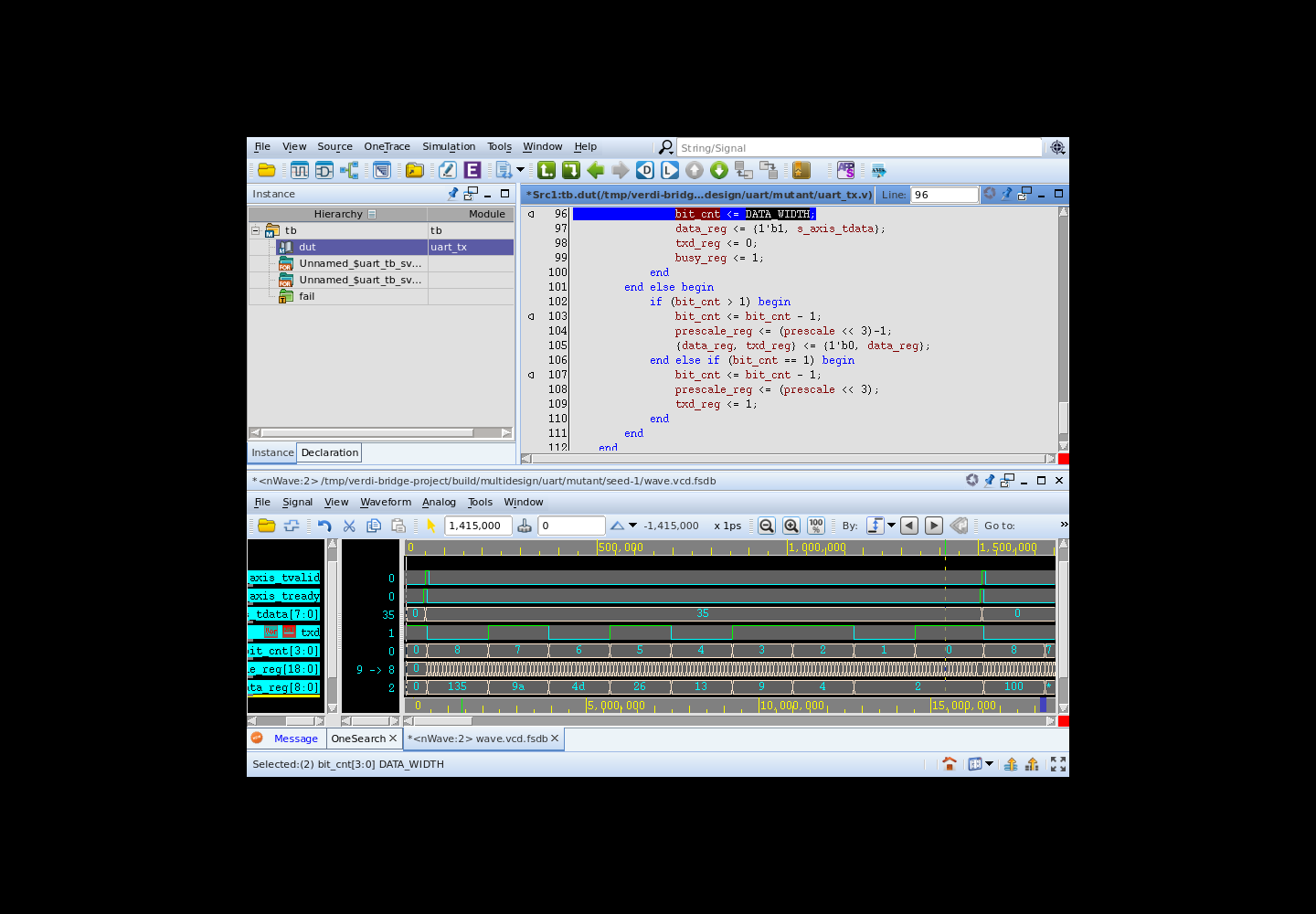
[Real RTL examples](https://github.com/RuihongY/verdi_bridge/blob/main/docs/multidesign-validation.md) ·
[Blind debugging trial](https://github.com/RuihongY/verdi_bridge/blob/main/docs/blind-validation.md) ·
[Validation results and limitations](https://github.com/RuihongY/verdi_bridge/blob/main/docs/validation-index.md)
## Project status
Experimental **v0.3.3**. Live checks used Verdi T-2022.06-SP2-1 on Linux, including the
SSH, session and large-FSDB changes of v0.3.2–v0.3.3 (up to a 2.7 GB FSDB).
New-session startup is verified; attachment to an arbitrary existing GUI is not yet
separately validated. The bridge does not automatically compile, edit or repair RTL.
[Contributing](https://github.com/RuihongY/verdi_bridge/blob/main/CONTRIBUTING.md) · [Trust boundary](https://github.com/RuihongY/verdi_bridge/blob/main/SECURITY.md) ·
[Validation limits](https://github.com/RuihongY/verdi_bridge/blob/main/docs/validation.md) · [Report an issue](https://github.com/RuihongY/verdi_bridge/issues)
Inspired by the agent-to-EDA-tool workflow of
[virtuoso-bridge-lite](https://github.com/Arcadia-1/virtuoso-bridge-lite).
This is an independent implementation. MIT licensed; see [third-party notices](https://github.com/RuihongY/verdi_bridge/blob/main/NOTICE).
Not affiliated with Synopsys. Verdi is a Synopsys trademark.
TDQS
Scored across 18 tools
Most tools target clearly distinct actions, and descriptions give useful selection hints. However, several interval-based waveform queries (find_transitions, get_value_changes, count_changes) and two source readers (read_source_file, read_source) overlap enough that an agent could misselect without close reading.
Names are consistently snake_case and mostly action-oriented, making the set easy to scan. Minor deviations such as the noun-phrase session_status and the read_source_file/read_source pair keep it from perfect uniformity.
At 18 tools the server is slightly above the typical 3–15 range, but the domain is broad: discovery, waveform sampling, navigation, source/log inspection, and session state. Each tool generally earns its place, though a few query/source tools could potentially be consolidated.
The surface covers the core waveform-debug lifecycle: scope and signal discovery, adding signals, sampling, transitions, clock measurement, driver tracing, source/log reading, cursor/time navigation, and session inspection. Minor gaps remain, such as removing displayed signals or broader view-format controls, but there are no major dead ends.