
io.github.Yantrakar/gitpro
by Yantrakar
README.md
<a href="https://gitpro.dev"><img src="https://gitpro.dev/icon.png" alt="gitpro" width="72" height="72"></a>
# gitpro
<!-- mcp-name: io.github.Yantrakar/gitpro -->
**The right Git identity, SSH key and signature for every repository.**
[gitpro.dev](https://gitpro.dev) · [PyPI](https://pypi.org/project/gitpro/) · [VS Code](https://marketplace.visualstudio.com/items?itemName=yantrakar.gitpro) · made by [Yantrakar](https://yantrakar.com)
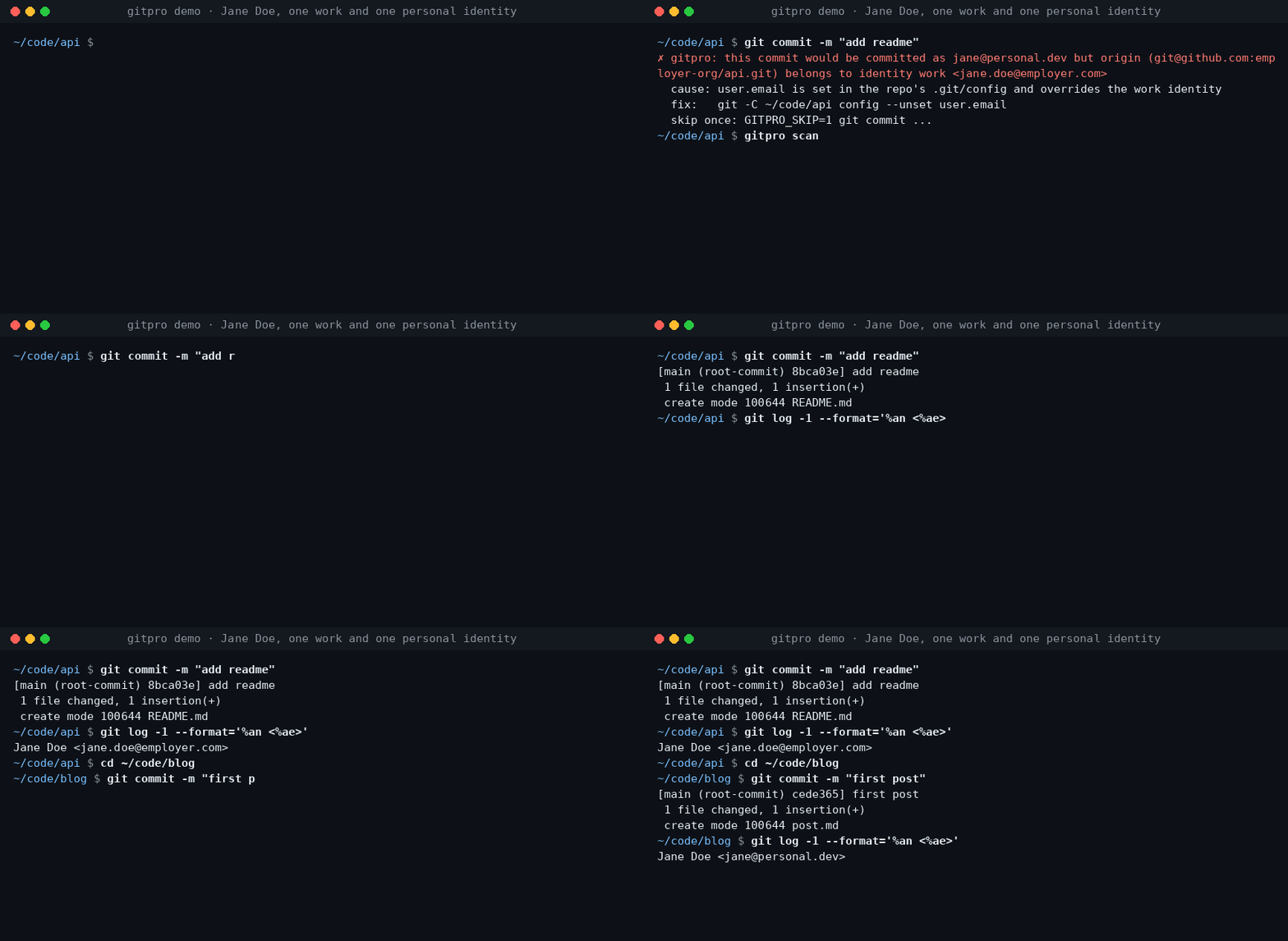
Work on a company repository, commit with your work email. Switch to a personal
project, use your personal identity. Gitpro chooses by **remote URL**, not by
where you happened to clone the repository.
Useful when you have more than one GitHub/GitLab account, separate work and
personal keys, or keep finding the wrong email on your commits.
## Try it
Requires **Linux or macOS**, Git **2.36+**, Python **3.9+** and OpenSSH.
Install from [PyPI](https://pypi.org/project/gitpro/) with pipx.
```sh
pipx install gitpro
gitpro setup
```
Setup offers to look through your repos and proposes your identities. Accept,
edit or answer the questions yourself; **no TOML editing is needed.** One
preview shows everything, including the commit guard and, with Claude Code, its
hook and MCP server. One yes applies it all. Setup never changes your repos.
```mermaid
flowchart LR
S["gitpro setup"] --> HC{"Config <br/>exists?"}
HC -->|no| L["Read your repos, <br/>SSH config and <br/>editor recents, <br/>if you agree"]
L --> Q["Propose <br/>identities; you <br/>accept or edit"]
Q --> I
HC -->|yes| I["Inspect config, <br/>Git and SSH files, <br/>keys, guard, <br/>agent hook, MCP"]
I -->|all current| OK["Nothing <br/>to do"]
I -->|something to do| PV["One preview, <br/>each part with <br/>its undo"]
PV --> ASK{"Apply <br/>all?"}
ASK -->|no| NONE["Nothing <br/>written"]
ASK -->|yes| AP["Write it, print <br/>the public keys <br/>to register"]
AP --> NX["Next: <br/>gitpro scan"]
```
Then:
```sh
gitpro why # inside a repository: the expected identity and anything overriding it
gitpro scan # repos that need a fix, with the command for each
```
Already have a config? `gitpro setup` brings this machine up to date with it.
`gitpro setup -n` only shows what is left to do. Prefer editing files? The
[user guide](docs/guide.md#configuration) covers the full TOML format.
## What you get
- **Work/personal separation:** names, emails, SSH keys and signing per host/owner.
- **Answers, not guesswork:** `gitpro why` explains mismatches and suggests a fix.
- **A safety net:** optional hooks can block wrong-identity commits and pushes.
- **Editor and container support:** see your identity in VS Code and carry it into dev containers.
Gitpro generates ordinary Git and SSH configuration; it needs no background
service. Changes can be previewed, existing hand-written files are backed up,
and key uploads are never part of setup.
## Using VS Code?
The extension shows the current identity and helps find repository-level
overrides. It runs the same commands as the terminal. [Install the extension](vscode/README.md).
## Go further when you need to
AI agents get the same answers through the MCP server and the Claude Code hook:
see [agent workflows](docs/agent-workflows.md).
| I want to… | Start here |
|---|---|
| Understand matching, SSH keys or signing | [Configuration](docs/guide.md#configuration) |
| Find wrong identities or forgotten work | [Daily use](docs/guide.md#daily-use) · [Finding things](docs/guide.md#finding-things) |
| Use dev containers | [Container setup](docs/guide.md#dev-containers) |
| Configure team policy, CI or AI assistants | [Teams and CI](docs/guide.md#teams) · [AI assistants](docs/guide.md#ai-assistants) |
| Look up a command or undo changes | [Command reference](docs/guide.md#commands) · [Undo](docs/guide.md#undo-everything) |
| Troubleshoot or contribute | [Troubleshooting](docs/guide.md#troubleshooting) · [Development](docs/guide.md#development) |
## Problems and questions
Run `gitpro report` to draft an issue with the versions and a redacted `gitpro why`; it shows
you the draft and opens nothing until you say yes. Or open an issue at [github.com/Yantrakar/gitpro/issues](https://github.com/Yantrakar/gitpro/issues).
Report a security problem privately with `gitpro report --security`, as the
[security policy](https://github.com/Yantrakar/gitpro/security/policy) describes, not in a public issue.
## License
[MIT](LICENSE)
This server cannot be deployed
Maintenance
ActivityNo data
ResponsivenessSyncing