
PageSift
<div align="center">
<img src="https://raw.githubusercontent.com/YOLOW92/pagesift/main/docs/assets/logo.png" alt="PageSift Logo" width="300" />
# pagesift 0.81.4
**Turn web pages, PDFs and Office files into clean Markdown for LLMs and AI agents.**
One self-hosted Rust binary: CLI, Firecrawl-compatible HTTP API, Jina Reader endpoint, MCP server, Python and Node.js packages.
[](LICENSE)
[](docs/COMMERCIAL.md)
[](https://github.com/YOLOW92/pagesift/releases)
[](https://crates.io/crates/pagesift)
[](https://pypi.org/project/pagesift/)
[](https://www.npmjs.com/package/@pagesift/node)
[](https://discord.gg/esA3wMZVvA)
**English** · [简体中文](docs/README.zh-CN.md) · [日本語](docs/README.ja.md) · [Español](docs/README.es.md)
</div>
<!-- readme-template: v1 -->
<!-- section: overview -->
## What it is
pagesift fetches a URL (rendering JavaScript only when the page needs it) or reads a local file, keeps the
main content, and returns Markdown plus metadata. It scrapes single pages, batches and whole sites, and
runs as a command, a library, an HTTP service or an MCP server.
Can replace or sit alongside: **Firecrawl** (same v1/v2 API, self-hosted), **Jina Reader** (`/r/<url>`),
**Crawl4AI**, **trafilatura** / **Readability**, **pymupdf4llm** / **pypdf**, **Kreuzberg**.
<!-- section: facts -->
## At a glance
- **Input:** URLs (HTTP, or a headless browser when needed), HTML, PDF, Word (.docx), Excel (.xlsx), PowerPoint (.pptx), EPUB, CSV
- **Output:** Markdown, HTML, raw HTML, links, images, metadata (title, publication date, …), JSON; warnings when a result is incomplete
- **Interfaces:** CLI · Firecrawl v1/v2 HTTP API · Jina Reader `/r/` · MCP (stdio or HTTP) · Python · Node.js / TypeScript · Rust crate
- **Platforms:** Linux x86_64 / aarch64 (glibc and musl), macOS x86_64 / arm64, Windows x86_64; Docker image `ghcr.io/yolow92/pagesift`
- **Crawling:** robots.txt and per-host rate limits by default, sitemaps, focused crawls by query, bounded memory
- **Memory:** 14–380 MB peak per worker across the 0.81 benchmarks (lowest at 16 workers on HTML and PDF); capacity is sized from the cgroup limit (no OOM at 768 MiB)
- **Not for:** OCR of scanned PDFs or images; pagesift reads the text layer only (see *When to use it* below)
- **License:** AGPL-3.0, or a [commercial license](docs/COMMERCIAL.md)
- **Latest:** 0.81.4 · [release notes](docs/releases/0.81.4.md)
<!-- section: install -->
## Install and use
| | Install | First call |
|---|---|---|
| CLI | `cargo install pagesift --locked` | `pagesift scrape https://example.com` |
| Python | `pip install pagesift` | `pagesift.scrape("https://example.com").markdown` |
| Node.js | `npm install @pagesift/node` | `(await scrape("https://example.com")).markdown` |
| Server | `docker run -p 3002:3002 ghcr.io/yolow92/pagesift:0.81.4` | `curl localhost:3002/r/https://example.com` |
| MCP | — | `claude mcp add pagesift -- pagesift mcp` |
**CLI**
```bash
pagesift scrape "https://news.ycombinator.com" # Markdown to stdout
pagesift scrape report.pdf # local PDF, Office, EPUB, CSV or HTML file
pagesift crawl "https://docs.rs" --limit 500 --out ./data/ # one Markdown file per page
pagesift crawl "https://www.example.edu" --query "graduate admission" --adaptive
pagesift map "https://docs.rs" # list a site's URLs
pagesift doctor # check browsers and environment
```
**Python**
```python
import pagesift
page = pagesift.scrape("https://example.com", formats=["markdown", "metadata"])
print(page.markdown)
print(page.metadata.title, page.metadata.published_date)
results = pagesift.scrape_many(["https://site1.com", "https://site2.com"], concurrency=8)
```
**Node.js / TypeScript**
```typescript
import { scrape, scrapeMany } from '@pagesift/node'
const page = await scrape('https://example.com', { formats: ['markdown', 'links'] })
console.log(page.markdown)
for await (const p of scrapeMany(['https://a.com', 'https://b.com'], { concurrency: 4 })) {
console.log(p.url, p.elapsedMs)
}
```
**HTTP server (Firecrawl and Jina Reader compatible)**
```bash
docker run -d -p 3002:3002 -v pagesift-data:/data \
-e PAGESIFT_API_KEYS=sk-test ghcr.io/yolow92/pagesift:0.81.4
```
```python
from firecrawl import FirecrawlApp
app = FirecrawlApp(api_url="http://localhost:3002", api_key="sk-test") # existing Firecrawl code, new URL
print(app.scrape_url("https://example.com", params={"formats": ["markdown"]})["markdown"])
```
```bash
curl -s http://localhost:3002/r/https://example.com -H 'Authorization: Bearer sk-test' # Jina Reader style
curl -s http://localhost:3002/v2/parse -H 'Authorization: Bearer sk-test' \
-F file=@report.pdf -F 'options={"formats":["markdown"]}' # upload a file
```
Endpoints: `/v1` and `/v2` `scrape`, `batch/scrape`, `crawl`, `map`; `/v2/parse` (file upload, up to 50 MB,
[details](docs/parse-api.md)); `/r/<url>` (plain Markdown or `text/event-stream`).
**MCP server for AI agents**
```bash
pagesift mcp # stdio, for one agent
pagesift mcp http --port 3003 # one shared local service (127.0.0.1 only)
claude mcp add --scope user --transport http pagesift http://127.0.0.1:3003/mcp
```
Tools: `pagesift_scrape`, `pagesift_batch_scrape`, `pagesift_crawl`, `pagesift_crawl_status`, `pagesift_map`.
Shared browsers and cache, an audit log and an issue-report tool: [shared MCP service](docs/mcp-service.md).
<!-- section: choose -->
## When to use it, and when not
**Good fit**
- Feeding web pages and documents to an LLM, a RAG index or an agent, with Markdown that keeps headings, lists, tables and links
- Self-hosting a Firecrawl- or Jina Reader-style service on your own machines, with no per-page fees
- Mixed input: the same call handles HTML, PDF, Office files and e-books
- Small machines and containers: memory is bounded and sized from the cgroup limit
**Pick something else when**
- **Scanned PDFs or images need OCR.** pagesift reads the text layer only; on 134 scanned pages it completed 0.112 against 1.000 for Docling on a GPU. Use Docling, olmOCR or another OCR pipeline.
- **You want the fastest possible crawl and do not need politeness.** pagesift waits between requests to the same host, follows robots.txt and retries failures; spider is much faster on raw crawl time (1.4 s vs 16.6 s on 40 sites × 60 pages).
- **AGPL does not work for you** and a commercial license is not an option: use a permissively licensed tool.
- **You need a managed cloud service today.** pagesift is self-hosted; a hosted API is not open yet.
<!-- section: performance -->
## Performance
<!-- perf-glance -->
↑ higher is better · ↓ lower is better. Strongest result per domain; methods and sources in the full report.
| Task | Metric | PageSift | Best other tool | Gap |
|---|---|---:|---|---:|
| PDF → Markdown — olmOCR-bench 1,269 pages, per page (single thread) | ms/page ↓ | **2.2** | pypdf 50.0 | **×22.32** |
| HTML → Markdown — 600 generated documents, per page | ms/page ↓ | **0.24** | Turndown 1.9 | **×8.24** |
| Main content — Firecrawl 597 pages, single thread | p50 ms/page ↓ | **1.0** | crw 7.4 | **×7.23** |
| Publication dates — htmldate 1,000 pages, date search | ms/page ↓ | **0.31** | htmldate (fast) 2.0 | **×6.45** |
| Office / e-books — B4 81 files, in-process | files/s ↑ | **94.1** | Kreuzberg 19.5 | **×4.82** |
| RAG chunking — 5 corpora, 1.4 MB | total ms ↓ | **11** | chonkie recursive 35 | **×3.24** |
| RAG query filter — 472 questions, default settings | answer recall ↑ | **0.929** | Crawl4AI BM25 0.673 | **+0.256** |
| Wild crawl — polite, 40 sites × 60 pages, coverage | coverage ↑ | **0.740** | Crawl4AI (HTTP) 0.529 | **+0.211** |
**Still behind:** A2 replay, 269 pages, 1 worker 2.4 pages/s vs spider 156.6 pages/s; fast, 40 sites × 60 pages, time 16.6 seconds vs spider 1.4 seconds; B5 134 pages, completion 0.112 vs Docling (GPU) 1.000.
*A2 throughput is measured against a replay server on a single loopback address, so all 269 pages count as one host. PageSift waits 1 s between requests to the same host by default; spider has no such limit. This row mostly reflects that politeness interval, not engine speed.*
[Full report](benchmarks/history/0.81/results/20261029-102426/report.md)
<!-- /perf-glance -->
Scale (0.70, synthetic local origin, not real-internet speed): 200,000,000 requests on 192 vCPU with 0 failures at
947,611 pages/s and 888 MiB peak RSS; inside a 768 MiB cgroup it still sustained 817,346 pages/s with no OOM.
Sources: [0.70 run](docs/history/0.70_200m_regression.md), [all benchmarks](docs/benchmarks.md).
<!-- section: features -->
## Features
- **Extraction:** main-content detection, Markdown that round-trips headings, lists, tables, code and math; publication dates; `includeTags` / `excludeTags` CSS filters; warnings such as `partial_content`, `pages_missing`, `output_truncated` instead of silently incomplete results
- **Documents:** own Rust readers for PDF (structure tree, bookmarks, headers/footers, CJK fonts without ToUnicode, damaged files), Word, Excel, PowerPoint, EPUB and CSV
- **Rendering:** `engine: auto` fetches over HTTP first and opens a headless browser only when that adds content; the Docker image ships one
- **Crawling:** focused crawls (`--query … --adaptive`) that stop when pages stop adding relevant content; attachments (linked PDFs and Office files); crawl trace per page; sitemaps; duplicate and trap URL handling; per-host token buckets and backoff on 429/503
- **Operations:** bounded queues, capacity sized from CPU and cgroup memory, job persistence, webhooks, per-key limits and metrics in the server; audit log of every fetch
- **Safety:** private-network and DNS-rebinding guards by default (`--allow-cidr` to opt in), browser sandboxing
Architecture: [docs/architecture.md](docs/architecture.md).
<!-- section: license -->
## License
[AGPL-3.0](LICENSE). For proprietary linking or private deployment without AGPL obligations, see the
[commercial license](docs/COMMERCIAL.md) or write to `licensing@pagesift.dev`.
<!-- section: changelog -->
## What's new in 0.81.4
Dependency security update: tokio 1.54.1 and zstd 0.14.3 (zstd-safe 8.2.0) fix four RustSec advisories
(RUSTSEC-2026-0384, -0391, -0398, -0403). No API changes.
[Release notes](docs/releases/0.81.4.md) · [all releases](docs/releases/) · [CHANGELOG](CHANGELOG.md)
---
## Community
Questions or feedback: [Discord](https://discord.gg/esA3wMZVvA) · [Issues](https://github.com/YOLOW92/pagesift/issues) · [Discussions](https://github.com/YOLOW92/pagesift/discussions)
## Citation
```bibtex
@software{pagesift2026,
title = {PageSift: Rust Web and Document Extraction Engine for AI Pipelines},
author = {YOLOW92},
year = {2026},
url = {https://github.com/YOLOW92/pagesift},
note = {Version 0.81.4}
}
```
## Star History
[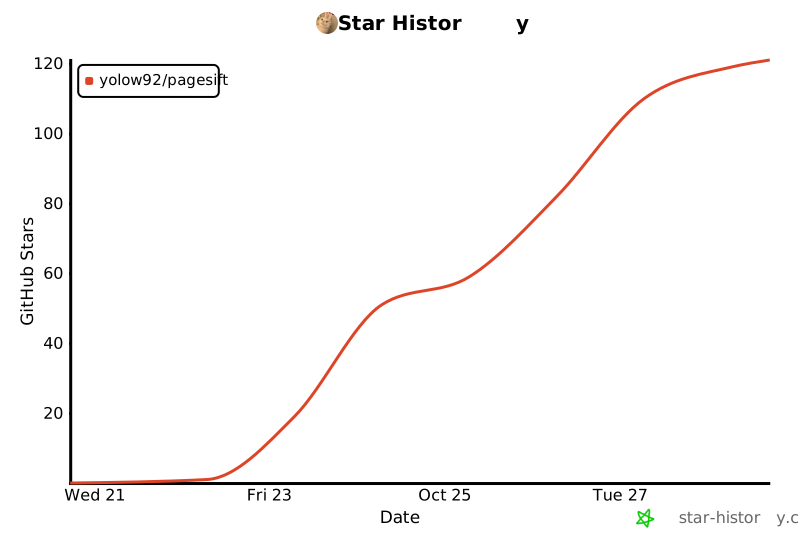](https://star-history.com/#YOLOW92/pagesift&Date)
TDQS
Scored across 5 tools
Each tool has a clearly distinct role: single-page scrape, URL discovery via map, whole-site crawl, job status polling, and batch scraping. Descriptions explicitly cross-reference the alternatives, making selection straightforward.
All names use the pagesift_ prefix and snake_case, which is highly consistent. The only slight deviation is crawl_status, which is a noun/state phrase rather than a verb_noun action like the others.
Five tools are well-scoped for a web scraping service and each earns its place. There are no redundant tools, and the set covers the core workflows without bloat.
The surface covers single-page scraping, batch scraping, URL mapping, crawling, and crawl status. Minor gaps include no explicit job cancellation or deletion operation, but agents can work around these limitations.