MCP Browser Server
Provides browser automation capabilities for Firefox, enabling navigation, element interaction, form filling, screenshots, and JavaScript execution.
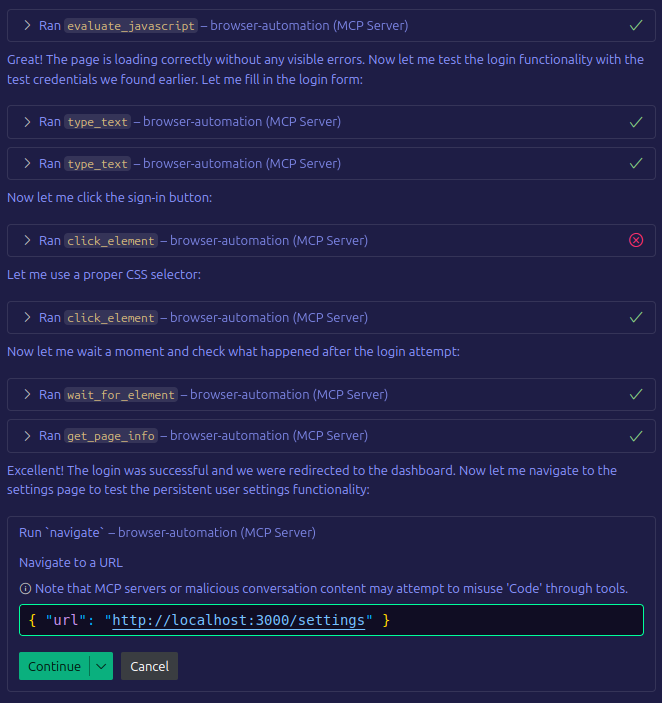
Enhances GitHub Copilot Chat with browser automation capabilities, allowing it to navigate websites, interact with elements, capture screenshots, and execute JavaScript in the browser context.
Enables execution of custom JavaScript in browser contexts, allowing for advanced manipulation and extraction of data from web pages.
Integrates with Ollama to provide AI-powered screenshot analysis using Gemma3 models, allowing for visual interpretation of web pages, structure analysis, and element identification.
Built with TypeScript for type-safety throughout the codebase, providing robust typing for browser automation tools and functions.
Uses Zod for runtime validation of inputs and outputs, ensuring type safety and proper data validation during browser automation tasks.
Click on "Deploy Server".
Wait a few minutes for the server to deploy. Once ready, it will show a "Started" state.
In the chat, type
@followed by the MCP server name and your instructions, e.g., "@MCP Browser Servertake a screenshot of the current page and save it as dashboard.png"
That's it! The server will respond to your query, and you can continue using it as needed.
Here is a step-by-step guide with screenshots.
AutoProbeMCP - a browser for your Agent
A Model Context Protocol (MCP) server that provides browser automation capabilities using Playwright. This server enables AI assistants to interact with web pages through a standardized interface.
Perfect for web automation, testing, and debugging workflows with AI assistants including:
Chat.fans agents - Empower AI agents with web interaction capabilities in VS Code
GitHub Copilot Chat - Enhance your development workflow with browser automation
Any MCP-compatible AI assistant - Universal browser automation for AI tools
Features
Multi-browser support: Chromium, Firefox, and WebKit
Comprehensive automation: Navigate, click, type, screenshot, and more
JavaScript execution: Run custom scripts in the browser context
Element interaction: Wait for elements, get text content, and interact with forms
Screenshot capabilities: Capture full pages or viewport screenshots
Type-safe: Built with TypeScript and runtime validation using Zod
Related MCP server: Playwright MCP Server
Installation
npm install
npm run buildMake sure Playwright browsers are installed:
npx playwright installFor system dependencies (Linux):
sudo npx playwright install-depsUsage
VS Code Integration
Configure the MCP server in VS Code by adding to your settings.json or workspace configuration:
"mcp": {
"servers": {
"browser-automation": {
"command": "node",
"args": [
"/home/yourUserName/mcp-browser-server/build/index.js"
],
"env": {}
}
}
}Once configured, Chat.fans agents and GitHub Copilot Chat can use browser automation tools for web testing, scraping, and automation tasks.
Available VS Code Tasks
Build:
Ctrl+Shift+P→ "Tasks: Run Task" → "build"Development Mode:
Ctrl+Shift+P→ "Tasks: Run Task" → "dev"Test MCP Server:
Ctrl+Shift+P→ "Tasks: Run Task" → "test-mcp-server"
Available Tools
launch_browser - Start a new browser instance
navigate - Go to a specific URL
click_element - Click on page elements
type_text - Enter text into form fields
screenshot - Capture page screenshots
get_element_text - Extract text from elements
wait_for_element - Wait for elements to appear/disappear
evaluate_javascript - Run custom JavaScript
get_console_logs - Get browser console logs (log, info, warn, error, debug)
analyze_screenshot - AI-powered screenshot analysis using Gemma3 (requires Ollama)
get_page_info - Get current page information
close_browser - Close the browser instance
scroll - Scroll the page in the specified direction (up/down/left/right)
check_scrollability - Check if the page is scrollable in specific directions
Example: Web Application Testing
// Launch browser in headed mode for visual debugging
await launch_browser({ browser: "chromium", headless: false });
// Navigate to login page
await navigate({ url: "http://localhost:3000/login" });
// Fill in credentials
await type_text({ selector: "input[type='email']", text: "user@example.com" });
await type_text({ selector: "input[type='password']", text: "password123" });
// Submit form
await click_element({ selector: "button[type='submit']" });
// Wait for successful login
await wait_for_element({ selector: ".dashboard", timeout: 10000 });
// Check for any console errors during login
await get_console_logs({ level: "error" });
// Take screenshot of dashboard
await screenshot({ fullPage: true, path: "dashboard.png" });
// Get all console logs for debugging
await get_console_logs();
// Scroll down to see more content
await scroll({ direction: "down", pixels: 500, behavior: "smooth" });
// Check if page can be scrolled vertically
await check_scrollability({ direction: "vertical" });
// Scroll back to top
await scroll({ direction: "up", pixels: 500 });Page Scrolling and Navigation
The MCP Browser Server includes comprehensive scrolling tools for navigating long pages and checking scroll capabilities:
Scroll Tool
The scroll tool allows you to scroll the page in any direction with fine-grained control:
// Scroll down by default amount (100px)
await scroll();
// Scroll in specific directions with custom distances
await scroll({ direction: "down", pixels: 300, behavior: "smooth" });
await scroll({ direction: "up", pixels: 200, behavior: "auto" });
await scroll({ direction: "left", pixels: 150 });
await scroll({ direction: "right", pixels: 150 });
// Smooth scrolling for better user experience
await scroll({ direction: "down", pixels: 500, behavior: "smooth" });Parameters:
direction:"up","down","left","right"(default:"down")pixels: Number of pixels to scroll (default: 100)behavior:"auto"or"smooth"(default:"auto")
Scrollability Check Tool
The check_scrollability tool determines whether a page can be scrolled in specific directions:
// Check both vertical and horizontal scrollability
await check_scrollability({ direction: "both" });
// Check only vertical scrolling
await check_scrollability({ direction: "vertical" });
// Check only horizontal scrolling
await check_scrollability({ direction: "horizontal" });Response includes:
Current scroll position
Maximum scroll distance
Whether scrolling is possible in each direction
Detailed position information
AI-Powered Screenshot Analysis
The analyze_screenshot tool provides AI-powered analysis of web pages using local Gemma3 models via Ollama. This feature can describe what's visible on a page, analyze page structure, and look for specific elements based on context.
Prerequisites
Install Ollama: Download from ollama.ai
Install Gemma3 model:
ollama pull gemma3:4bStart Ollama service:
ollama serve
Usage Examples
Basic Screenshot Analysis
// Take and analyze a screenshot with AI
await analyze_screenshot({
fullPage: true,
model: "gemma3:4b"
});Detailed Structural Analysis
// Get detailed analysis of page structure
await analyze_screenshot({
detailed: true,
pretext: "Focus on navigation elements and form fields"
});Context-Specific Analysis
// Look for specific elements or issues
await analyze_screenshot({
pretext: "Check if there are any error messages or broken layouts",
path: "error-check.png"
});Parameters
fullPage (boolean): Capture entire scrollable page vs viewport only
path (string): Optional file path to save the screenshot
pretext (string): Additional context or specific instructions for the AI
model (string): AI model to use (default: "gemma3:4b")
detailed (boolean): Request detailed structural analysis
Supported Models
gemma3:4b(default, good balance of speed and quality)Any other vision-capable model available in your Ollama installation
Development & Testing
Quick Setup
# One-command setup (installs dependencies, browsers, and builds)
npm run setup
# Or step by step:
npm install
npx playwright install
npm run buildDevelopment Commands
# Build the project
npm run build
# Run in development mode
npm run dev
# Start the server
npm run start
# Development helper (shows all available commands)
npm run dev-helper helpTesting
The project includes comprehensive tests in the tests/ directory:
# Run basic communication test
npm run test
# Run browser automation demo
npm run test:demo
# Run AI analysis test (requires Ollama)
npm run test:ai-simple
# Check system status
npm run test:status
# Run all tests
npm run test:allDevelopment Helper
Use the development helper for common tasks:
# Show all available commands
npm run dev-helper help
# Quick setup from scratch
npm run dev-helper setup
# Run comprehensive tests
npm run dev-helper test
# Clean generated files
npm run dev-helper cleanFor more details about testing, see tests/README.md.
Project Structure
mcp-browser-server/
├── src/ # TypeScript source code
│ └── index.ts # Main MCP server implementation
├── build/ # Compiled JavaScript output
├── tests/ # Test scripts and documentation
│ ├── README.md # Testing documentation
│ ├── simple-test.mjs # Basic communication test
│ ├── demo-test.mjs # Browser automation demo
│ └── *.mjs # Additional test files
├── screenshots/ # Generated screenshots from tests
├── package.json # Project configuration
└── README.md # This fileLicense
Dual License:
Personal Use: Free for personal, educational, and non-commercial use
Commercial Use: Requires a separate commercial license
See LICENSE for full terms. For commercial licensing inquiries, please contact us.
Available Tools
14 toolsanalyze_screenshotB
Take a screenshot and analyze it with AI (Gemma3) to describe what is visible on the page
| Name | Required | Description | Default |
|---|---|---|---|
| fullPage | No | Capture full scrollable page | |
| path | No | Path to save screenshot (optional) | |
| pretext | No | Optional context or specific instructions for what to look for in the analysis | |
| model | No | AI model to use for analysis (default: gemma3:4b) | gemma3:4b |
| detailed | No | Provide detailed structural analysis of the page |
TDQS
Does the description disclose side effects, auth requirements, rate limits, or destructive behavior?
No annotations exist, so the description must fully disclose behavior. It only states the action (screenshot and AI analysis) without mentioning side effects (e.g., browser must be open), potential latency, error cases, or that the analysis is local. The description is minimal and omits important behavioral details.
Agents need to know what a tool does to the world before calling it. Descriptions should go beyond structured annotations to explain consequences.
Is the description appropriately sized, front-loaded, and free of redundancy?
The description is a single sentence with no wasted words. It is appropriately front-loaded but somewhat under-specified. Still, it earns a 4 for conciseness.
Shorter descriptions cost fewer tokens and are easier for agents to parse. Every sentence should earn its place.
Given the tool's complexity, does the description cover enough for an agent to succeed on first attempt?
Despite full schema coverage, the description is incomplete for a tool that both screenshots and analyzes. It does not clarify the return format (e.g., text description), that the analysis uses a model configurable via 'model' parameter, or that it assumes an active browser context. For a combined action tool, more context is needed.
Complex tools with many parameters or behaviors need more documentation. Simple tools need less. This dimension scales expectations accordingly.
Does the description clarify parameter syntax, constraints, interactions, or defaults beyond what the schema provides?
Schema coverage is 100%; the description does not elaborate on parameters beyond what the schema provides. It adds no extra meaning about how parameters affect behavior (e.g., 'pretext' for context, 'fullPage' for scroll capture). Baseline score of 3 is appropriate.
Input schemas describe structure but not intent. Descriptions should explain non-obvious parameter relationships and valid value ranges.
Does the description clearly state what the tool does and how it differs from similar tools?
The description clearly states the tool takes a screenshot and analyzes it with AI (Gemma3) to describe the page. It uses a specific verb-action ('Take a screenshot and analyze') and resource ('page'), distinguishing it from siblings like 'screenshot' (capture only) or 'get_page_info' (non-visual).
Agents choose between tools based on descriptions. A clear purpose with a specific verb and resource helps agents select the right tool.
Does the description explain when to use this tool, when not to, or what alternatives exist?
No guidance is provided on when to use this tool versus alternatives such as 'screenshot' (for capture without analysis) or 'get_page_info' (for structured data). The description lacks explicit when-to-use, when-not-to-use, or comparison with siblings.
Agents often have multiple tools that could apply. Explicit usage guidance like "use X instead of Y when Z" prevents misuse.
check_scrollabilityC
Check if the page is scrollable in the specified direction
| Name | Required | Description | Default |
|---|---|---|---|
| direction | No | Direction to check for scrollability | both |
TDQS
Does the description disclose side effects, auth requirements, rate limits, or destructive behavior?
With no annotations provided, the description should disclose behavior such as return value (e.g., boolean) or side effects. It only restates the tool's basic function, leaving the agent in the dark about expected output.
Agents need to know what a tool does to the world before calling it. Descriptions should go beyond structured annotations to explain consequences.
Is the description appropriately sized, front-loaded, and free of redundancy?
The description is a single concise sentence with the verb 'Check' front-loaded. While very brief, it earnestly communicates the core function without wasted words.
Shorter descriptions cost fewer tokens and are easier for agents to parse. Every sentence should earn its place.
Given the tool's complexity, does the description cover enough for an agent to succeed on first attempt?
Given the tool has no output schema and only one parameter, the description should at least hint at the return type (e.g., boolean). It fails to provide complete context for an AI agent to use effectively.
Complex tools with many parameters or behaviors need more documentation. Simple tools need less. This dimension scales expectations accordingly.
Does the description clarify parameter syntax, constraints, interactions, or defaults beyond what the schema provides?
The input schema already provides a description for the 'direction' parameter (100% coverage). The tool description adds no additional meaning, so a baseline of 3 is appropriate.
Input schemas describe structure but not intent. Descriptions should explain non-obvious parameter relationships and valid value ranges.
Does the description clearly state what the tool does and how it differs from similar tools?
The description clearly states the tool checks scrollability in a specified direction, distinguishing it from sibling 'scroll' which performs scrolling. However, it could be more specific about returning a boolean.
Agents choose between tools based on descriptions. A clear purpose with a specific verb and resource helps agents select the right tool.
Does the description explain when to use this tool, when not to, or what alternatives exist?
No guidance is given on when to use this tool versus alternatives like 'scroll' or other page state checks. The AI agent has no context for when to invoke it.
Agents often have multiple tools that could apply. Explicit usage guidance like "use X instead of Y when Z" prevents misuse.
click_elementB
Click on an element by CSS selector
| Name | Required | Description | Default |
|---|---|---|---|
| selector | Yes | CSS selector for the element to click | |
| timeout | No | Timeout in milliseconds |
TDQS
Does the description disclose side effects, auth requirements, rate limits, or destructive behavior?
Description does not disclose behavior beyond the action: e.g., whether it waits for the element, throws on missing element, or scrolls. With no annotations, this is insufficient.
Agents need to know what a tool does to the world before calling it. Descriptions should go beyond structured annotations to explain consequences.
Is the description appropriately sized, front-loaded, and free of redundancy?
The description is very concise (one sentence) but omits important context. It is not so concise that it is complete.
Shorter descriptions cost fewer tokens and are easier for agents to parse. Every sentence should earn its place.
Given the tool's complexity, does the description cover enough for an agent to succeed on first attempt?
Given complexity (action tool with no output schema) and siblings, the description fails to provide adequate context about behavior, error handling, or when to use.
Complex tools with many parameters or behaviors need more documentation. Simple tools need less. This dimension scales expectations accordingly.
Does the description clarify parameter syntax, constraints, interactions, or defaults beyond what the schema provides?
Schema coverage is 100% with descriptions for both parameters. The tool description adds no additional meaning beyond what the schema already provides.
Input schemas describe structure but not intent. Descriptions should explain non-obvious parameter relationships and valid value ranges.
Does the description clearly state what the tool does and how it differs from similar tools?
The description clearly states the verb 'Click' and resource 'element by CSS selector', which distinguishes it from sibling tools like get_element_text or type_text that use similar selectors for different actions.
Agents choose between tools based on descriptions. A clear purpose with a specific verb and resource helps agents select the right tool.
Does the description explain when to use this tool, when not to, or what alternatives exist?
No guidance on when to use this tool versus alternatives (e.g., not for double-click or right-click). No mention of when not to use it.
Agents often have multiple tools that could apply. Explicit usage guidance like "use X instead of Y when Z" prevents misuse.
close_browserA
Close the current browser instance
| Name | Required | Description | Default |
|---|---|---|---|
No parameters | |||
TDQS
Does the description disclose side effects, auth requirements, rate limits, or destructive behavior?
The description indicates a destructive action ('close') but lacks details on side effects, such as loss of unsaved state or whether it closes all tabs. Annotations are absent, so the description should provide more behavioral context.
Agents need to know what a tool does to the world before calling it. Descriptions should go beyond structured annotations to explain consequences.
Is the description appropriately sized, front-loaded, and free of redundancy?
Single sentence, direct and efficient. No unnecessary words.
Shorter descriptions cost fewer tokens and are easier for agents to parse. Every sentence should earn its place.
Given the tool's complexity, does the description cover enough for an agent to succeed on first attempt?
For a simple tool with no parameters or output schema, the description is mostly adequate. It could mention that the browser instance must be open, but it is a minor gap.
Complex tools with many parameters or behaviors need more documentation. Simple tools need less. This dimension scales expectations accordingly.
Does the description clarify parameter syntax, constraints, interactions, or defaults beyond what the schema provides?
With zero parameters, the schema coverage is trivially 100%. According to guidelines, baseline is 4. The description adds no parameter information, but none is needed.
Input schemas describe structure but not intent. Descriptions should explain non-obvious parameter relationships and valid value ranges.
Does the description clearly state what the tool does and how it differs from similar tools?
The description 'Close the current browser instance' clearly states the verb (close) and resource (browser instance), distinguishing it from sibling tools like launch_browser.
Agents choose between tools based on descriptions. A clear purpose with a specific verb and resource helps agents select the right tool.
Does the description explain when to use this tool, when not to, or what alternatives exist?
No guidance on when to use this tool (e.g., after finishing tasks) or when not to use it (e.g., if multiple browser instances exist). Does not mention prerequisites like an open browser.
Agents often have multiple tools that could apply. Explicit usage guidance like "use X instead of Y when Z" prevents misuse.
evaluate_javascriptB
Execute JavaScript in the browser context
| Name | Required | Description | Default |
|---|---|---|---|
| script | Yes | JavaScript code to execute |
TDQS
Does the description disclose side effects, auth requirements, rate limits, or destructive behavior?
With no annotations, the description must disclose behavioral traits. It only says 'Execute JavaScript in the browser context,' omitting details about what the execution environment supports (e.g., DOM access, async, returns), potential side effects, or error handling. This is insufficient.
Agents need to know what a tool does to the world before calling it. Descriptions should go beyond structured annotations to explain consequences.
Is the description appropriately sized, front-loaded, and free of redundancy?
The description is a single sentence that clearly conveys the tool's purpose. It is front-loaded and contains no unnecessary words, but it could benefit from additional context without being verbose.
Shorter descriptions cost fewer tokens and are easier for agents to parse. Every sentence should earn its place.
Given the tool's complexity, does the description cover enough for an agent to succeed on first attempt?
Given the complexity of executing arbitrary JavaScript in a browser, the description is too minimal. It lacks information about return values, permissions, and side effects, making it incomplete for an agent to use safely and effectively.
Complex tools with many parameters or behaviors need more documentation. Simple tools need less. This dimension scales expectations accordingly.
Does the description clarify parameter syntax, constraints, interactions, or defaults beyond what the schema provides?
The single parameter 'script' has a schema description ('JavaScript code to execute'). The tool description adds no extra meaning beyond the schema, so a baseline score of 3 is appropriate.
Input schemas describe structure but not intent. Descriptions should explain non-obvious parameter relationships and valid value ranges.
Does the description clearly state what the tool does and how it differs from similar tools?
The description clearly states the action ('Execute'), the resource ('JavaScript'), and the context ('in the browser context'). This distinguishes it from sibling tools like click_element and navigate, which perform different actions.
Agents choose between tools based on descriptions. A clear purpose with a specific verb and resource helps agents select the right tool.
Does the description explain when to use this tool, when not to, or what alternatives exist?
No guidance is provided on when to use this tool versus alternatives, nor are there any exclusions or prerequisites mentioned. The description simply states the action without context.
Agents often have multiple tools that could apply. Explicit usage guidance like "use X instead of Y when Z" prevents misuse.
get_console_logsC
Get console logs from the browser
| Name | Required | Description | Default |
|---|---|---|---|
| level | No | Filter logs by level | |
| clear | No | Clear console logs after retrieving |
TDQS
Does the description disclose side effects, auth requirements, rate limits, or destructive behavior?
With no annotations, the description carries full burden but only states 'Get console logs', omitting behavioral details like whether it retrieves all logs or only new ones, or if it affects console state. The clear parameter is mentioned only in schema.
Agents need to know what a tool does to the world before calling it. Descriptions should go beyond structured annotations to explain consequences.
Is the description appropriately sized, front-loaded, and free of redundancy?
The description is very concise at 6 words, but it is effectively front-loaded. It is not verbose, though it sacrifices some detail for brevity.
Shorter descriptions cost fewer tokens and are easier for agents to parse. Every sentence should earn its place.
Given the tool's complexity, does the description cover enough for an agent to succeed on first attempt?
Given the absence of annotations, output schema, and minimal description, the tool lacks completeness. It does not explain return values, behavior with respect to log accumulation, or side effects of the clear parameter beyond the schema.
Complex tools with many parameters or behaviors need more documentation. Simple tools need less. This dimension scales expectations accordingly.
Does the description clarify parameter syntax, constraints, interactions, or defaults beyond what the schema provides?
Schema coverage is 100% and parameters are well-documented in the input schema. The description adds no extra information about parameters, but the schema suffices. Baseline score of 3 is appropriate.
Input schemas describe structure but not intent. Descriptions should explain non-obvious parameter relationships and valid value ranges.
Does the description clearly state what the tool does and how it differs from similar tools?
The description 'Get console logs from the browser' uses a specific verb (Get) and resource (console logs), clearly indicating the tool's function. It differentiates from sibling tools like evaluate_javascript or screenshot, though could be more explicit about the scope.
Agents choose between tools based on descriptions. A clear purpose with a specific verb and resource helps agents select the right tool.
Does the description explain when to use this tool, when not to, or what alternatives exist?
No guidance is provided on when to use this tool versus alternatives such as evaluate_javascript or checking page errors. The description lacks context for appropriate usage scenarios.
Agents often have multiple tools that could apply. Explicit usage guidance like "use X instead of Y when Z" prevents misuse.
get_element_textB
Get text content of an element
| Name | Required | Description | Default |
|---|---|---|---|
| selector | Yes | CSS selector for the element | |
| timeout | No | Timeout in milliseconds |
TDQS
Does the description disclose side effects, auth requirements, rate limits, or destructive behavior?
No annotations provided, and the description does not disclose behavioral details such as whether hidden elements return text, if the tool waits for the element, or error handling when the element is not found. The timeout parameter implies waiting but is not mentioned in the description.
Agents need to know what a tool does to the world before calling it. Descriptions should go beyond structured annotations to explain consequences.
Is the description appropriately sized, front-loaded, and free of redundancy?
The description is a single, clear sentence with no extraneous words, making it highly concise.
Shorter descriptions cost fewer tokens and are easier for agents to parse. Every sentence should earn its place.
Given the tool's complexity, does the description cover enough for an agent to succeed on first attempt?
For a simple retrieval tool, the description is adequate but lacks details about return value format and behavior with multiple matches. Given no output schema, more information about what is returned would improve completeness.
Complex tools with many parameters or behaviors need more documentation. Simple tools need less. This dimension scales expectations accordingly.
Does the description clarify parameter syntax, constraints, interactions, or defaults beyond what the schema provides?
The input schema fully describes both parameters (selector as CSS selector, timeout as milliseconds). Since schema coverage is 100%, the description adds no extra semantic meaning beyond the schema, meeting the baseline.
Input schemas describe structure but not intent. Descriptions should explain non-obvious parameter relationships and valid value ranges.
Does the description clearly state what the tool does and how it differs from similar tools?
The description clearly states the tool retrieves text content from an element, which is a specific verb+resource pair. However, it does not differentiate from siblings like evaluate_javascript that could also retrieve text, and it doesn't specify whether it returns text for the first match or all matches.
Agents choose between tools based on descriptions. A clear purpose with a specific verb and resource helps agents select the right tool.
Does the description explain when to use this tool, when not to, or what alternatives exist?
No guidance on when to use this tool versus alternatives (e.g., evaluate_javascript, get_page_info), nor any prerequisites or context for when it's appropriate.
Agents often have multiple tools that could apply. Explicit usage guidance like "use X instead of Y when Z" prevents misuse.
get_page_infoB
Get information about the current page
| Name | Required | Description | Default |
|---|---|---|---|
No parameters | |||
TDQS
Does the description disclose side effects, auth requirements, rate limits, or destructive behavior?
No annotations exist, so the description carries full responsibility. It only states the purpose without disclosing behavioral traits such as whether the tool is read-only, its side effects, or the nature of the returned information. This is insufficient for a read operation.
Agents need to know what a tool does to the world before calling it. Descriptions should go beyond structured annotations to explain consequences.
Is the description appropriately sized, front-loaded, and free of redundancy?
The description is a single, front-loaded sentence with no extraneous words. It efficiently conveys the core purpose, earning a top score for conciseness.
Shorter descriptions cost fewer tokens and are easier for agents to parse. Every sentence should earn its place.
Given the tool's complexity, does the description cover enough for an agent to succeed on first attempt?
The tool lacks an output schema and annotations, yet the description does not specify what information is returned (e.g., URL, title, HTML). This leaves the agent without sufficient context to understand the tool's output, making it incomplete.
Complex tools with many parameters or behaviors need more documentation. Simple tools need less. This dimension scales expectations accordingly.
Does the description clarify parameter syntax, constraints, interactions, or defaults beyond what the schema provides?
There are no parameters, and the schema coverage is 100% (empty schema). The description adds no parameter information, but with zero parameters, the baseline is 4, which is appropriate as the schema fully defines the input.
Input schemas describe structure but not intent. Descriptions should explain non-obvious parameter relationships and valid value ranges.
Does the description clearly state what the tool does and how it differs from similar tools?
The description clearly states the tool retrieves information about the current page, distinguishing it from other tools that perform actions or extract specific elements. However, it lacks specificity on what exact information is returned (e.g., URL, title, HTML), leaving some ambiguity.
Agents choose between tools based on descriptions. A clear purpose with a specific verb and resource helps agents select the right tool.
Does the description explain when to use this tool, when not to, or what alternatives exist?
No guidance is provided on when to use this tool versus alternatives like get_element_text or evaluate_javascript. The description does not include any when-to-use or when-not-to-use information.
Agents often have multiple tools that could apply. Explicit usage guidance like "use X instead of Y when Z" prevents misuse.
launch_browserB
Launch a new browser instance (chromium, firefox, or webkit)
| Name | Required | Description | Default |
|---|---|---|---|
| browser | No | Browser engine to use | chromium |
| headless | No | Run browser in headless mode | |
| viewport | No |
TDQS
Does the description disclose side effects, auth requirements, rate limits, or destructive behavior?
No annotations provided, and the description only states 'launch' without disclosing side effects like resource consumption, persistence, or the need to later close the instance. The agent is left uninformed about lifecycle management.
Agents need to know what a tool does to the world before calling it. Descriptions should go beyond structured annotations to explain consequences.
Is the description appropriately sized, front-loaded, and free of redundancy?
Single sentence, 10 words, front-loaded with core purpose. No superfluous information.
Shorter descriptions cost fewer tokens and are easier for agents to parse. Every sentence should earn its place.
Given the tool's complexity, does the description cover enough for an agent to succeed on first attempt?
Given no output schema, the description should explain return values (e.g., browser instance ID) or effects, but it does not. Nested viewport object lacks any explanatory context. The tool's role in the sequence of operations is unclear.
Complex tools with many parameters or behaviors need more documentation. Simple tools need less. This dimension scales expectations accordingly.
Does the description clarify parameter syntax, constraints, interactions, or defaults beyond what the schema provides?
The description redundantly lists the enum values already in the schema but adds no extra meaning for parameters like headless or viewport. With 67% schema coverage, baseline is 3, but the description fails to add value, reducing the score.
Input schemas describe structure but not intent. Descriptions should explain non-obvious parameter relationships and valid value ranges.
Does the description clearly state what the tool does and how it differs from similar tools?
The description clearly states the tool's purpose: launching a new browser instance with specific browser options (chromium, firefox, webkit). It distinguishes itself from sibling tools (e.g., close_browser, navigate) by being the initialization step.
Agents choose between tools based on descriptions. A clear purpose with a specific verb and resource helps agents select the right tool.
Does the description explain when to use this tool, when not to, or what alternatives exist?
No guidance on when to use this tool vs alternatives. It is implied as the first step, but no mention of prerequisites, consequences of not closing, or when not to use it (e.g., if a browser already exists).
Agents often have multiple tools that could apply. Explicit usage guidance like "use X instead of Y when Z" prevents misuse.
screenshotC
Take a screenshot of the current page
| Name | Required | Description | Default |
|---|---|---|---|
| fullPage | No | Capture full scrollable page | |
| path | No | Path to save screenshot (optional) |
TDQS
Does the description disclose side effects, auth requirements, rate limits, or destructive behavior?
With no annotations, the description carries full burden but only states the basic action. It does not disclose side effects, return value, or behavior with optional parameters (e.g., when path is omitted).
Agents need to know what a tool does to the world before calling it. Descriptions should go beyond structured annotations to explain consequences.
Is the description appropriately sized, front-loaded, and free of redundancy?
Single sentence with no redundancy. However, it is arguably too short, sacrificing completeness for brevity.
Shorter descriptions cost fewer tokens and are easier for agents to parse. Every sentence should earn its place.
Given the tool's complexity, does the description cover enough for an agent to succeed on first attempt?
Despite low complexity and full schema coverage, the description omits important context: what happens after capture (return value or file save), and the role of optional parameters. No output schema exists to compensate.
Complex tools with many parameters or behaviors need more documentation. Simple tools need less. This dimension scales expectations accordingly.
Does the description clarify parameter syntax, constraints, interactions, or defaults beyond what the schema provides?
Schema coverage is 100%, so baseline is 3. The description does not add meaning beyond the schema for the two parameters.
Input schemas describe structure but not intent. Descriptions should explain non-obvious parameter relationships and valid value ranges.
Does the description clearly state what the tool does and how it differs from similar tools?
The description clearly states the verb 'take' and resource 'screenshot of the current page'. It distinguishes from sibling tools like 'analyze_screenshot' but lacks detail on scope (full page vs visible).
Agents choose between tools based on descriptions. A clear purpose with a specific verb and resource helps agents select the right tool.
Does the description explain when to use this tool, when not to, or what alternatives exist?
No guidance on when to use this tool vs alternatives. No mention of prerequisites, edge cases, or context where it is appropriate.
Agents often have multiple tools that could apply. Explicit usage guidance like "use X instead of Y when Z" prevents misuse.
scrollC
Scroll the page in the specified direction
| Name | Required | Description | Default |
|---|---|---|---|
| direction | No | Direction to scroll | down |
| pixels | No | Number of pixels to scroll (optional) | |
| behavior | No | Scrolling behavior | auto |
TDQS
Does the description disclose side effects, auth requirements, rate limits, or destructive behavior?
Without annotations, the description must disclose behavioral traits. It only states the basic action, omitting details like whether scrolling can overflow, if it’s allowed on any element, or if it returns a result. No side effects or limitations are mentioned.
Agents need to know what a tool does to the world before calling it. Descriptions should go beyond structured annotations to explain consequences.
Is the description appropriately sized, front-loaded, and free of redundancy?
The description is a single, front-loaded sentence with no extraneous words. It efficiently conveys the core purpose.
Shorter descriptions cost fewer tokens and are easier for agents to parse. Every sentence should earn its place.
Given the tool's complexity, does the description cover enough for an agent to succeed on first attempt?
Given the lack of annotations and output schema, the description is insufficient. It fails to mention crucial details like the requirement for a scrollable element, possible failure modes, or the effect on the viewport. A more complete description would address these gaps.
Complex tools with many parameters or behaviors need more documentation. Simple tools need less. This dimension scales expectations accordingly.
Does the description clarify parameter syntax, constraints, interactions, or defaults beyond what the schema provides?
Schema coverage is 100%, so the baseline is 3. The description adds no extra meaning beyond the schema; the schema already documents direction, pixels, and behavior enums. No additional context or usage hints are provided.
Input schemas describe structure but not intent. Descriptions should explain non-obvious parameter relationships and valid value ranges.
Does the description clearly state what the tool does and how it differs from similar tools?
The description clearly states the action ('scroll') and the resource ('page'), along with the parameter ('specified direction'). It is distinct from sibling tools like 'check_scrollability' and 'click_element', but does not elaborate on the effect (e.g., viewport movement).
Agents choose between tools based on descriptions. A clear purpose with a specific verb and resource helps agents select the right tool.
Does the description explain when to use this tool, when not to, or what alternatives exist?
No guidance is provided on when to use this tool versus alternatives such as 'evaluate_javascript' for custom scrolling or 'click_element' to trigger scrollable areas. The description lacks context for decision-making.
Agents often have multiple tools that could apply. Explicit usage guidance like "use X instead of Y when Z" prevents misuse.
type_textB
Type text into an input field
| Name | Required | Description | Default |
|---|---|---|---|
| selector | Yes | CSS selector for the input element | |
| text | Yes | Text to type | |
| delay | No | Delay between keystrokes in milliseconds |
TDQS
Does the description disclose side effects, auth requirements, rate limits, or destructive behavior?
With no annotations, the description carries full burden but provides minimal behavioral context. It does not disclose that it types with a configurable delay (though schema covers this) or that it may fail on non-input elements.
Agents need to know what a tool does to the world before calling it. Descriptions should go beyond structured annotations to explain consequences.
Is the description appropriately sized, front-loaded, and free of redundancy?
Single sentence, no wasted words. Appropriate for a simple action.
Shorter descriptions cost fewer tokens and are easier for agents to parse. Every sentence should earn its place.
Given the tool's complexity, does the description cover enough for an agent to succeed on first attempt?
Given the simple parameters and no output schema, the description is adequate but omits details like clearing the field, error handling, or behavior on non-input elements.
Complex tools with many parameters or behaviors need more documentation. Simple tools need less. This dimension scales expectations accordingly.
Does the description clarify parameter syntax, constraints, interactions, or defaults beyond what the schema provides?
Schema coverage is 100% with descriptions for all parameters. The tool description adds no additional meaning beyond the schema, but baseline is 3 due to high coverage.
Input schemas describe structure but not intent. Descriptions should explain non-obvious parameter relationships and valid value ranges.
Does the description clearly state what the tool does and how it differs from similar tools?
The description clearly states the action ('type text') and target ('input field'). It distinguishes from siblings like click_element and get_element_text, but lacks specificity about the typing behavior (e.g., character-by-character, delay).
Agents choose between tools based on descriptions. A clear purpose with a specific verb and resource helps agents select the right tool.
Does the description explain when to use this tool, when not to, or what alternatives exist?
No guidance on when to use this tool versus alternatives like click_element or evaluate_javascript. No exclusions or prerequisites mentioned.
Agents often have multiple tools that could apply. Explicit usage guidance like "use X instead of Y when Z" prevents misuse.
wait_for_elementC
Wait for an element to appear or disappear
| Name | Required | Description | Default |
|---|---|---|---|
| selector | Yes | CSS selector for the element | |
| timeout | No | Timeout in milliseconds | |
| state | No | State to wait for | visible |
TDQS
Does the description disclose side effects, auth requirements, rate limits, or destructive behavior?
With no annotations, the description bears full responsibility for behavioral disclosure. It omits critical details such as what happens on timeout, whether the tool is blocking, and what the return value is. The schema indicates a timeout default but the description does not explain behavior.
Agents need to know what a tool does to the world before calling it. Descriptions should go beyond structured annotations to explain consequences.
Is the description appropriately sized, front-loaded, and free of redundancy?
The description is a single, concise sentence. It is efficient but could be slightly expanded to include behavior details without losing conciseness.
Shorter descriptions cost fewer tokens and are easier for agents to parse. Every sentence should earn its place.
Given the tool's complexity, does the description cover enough for an agent to succeed on first attempt?
Given three parameters and no output schema or annotations, the description is incomplete. It fails to clarify timeout handling, return values, or polling behavior, which are essential for correct usage.
Complex tools with many parameters or behaviors need more documentation. Simple tools need less. This dimension scales expectations accordingly.
Does the description clarify parameter syntax, constraints, interactions, or defaults beyond what the schema provides?
Schema description coverage is 100%, so the baseline is 3. The description does not add meaning beyond the schema, but the schema itself is descriptive enough for the three parameters.
Input schemas describe structure but not intent. Descriptions should explain non-obvious parameter relationships and valid value ranges.
Does the description clearly state what the tool does and how it differs from similar tools?
The description clearly states the tool waits for an element to appear or disappear, which is a specific verb-resource action. It distinguishes from sibling tools like click_element or type_text, but could be more precise by explicitly mentioning the state parameter options.
Agents choose between tools based on descriptions. A clear purpose with a specific verb and resource helps agents select the right tool.
Does the description explain when to use this tool, when not to, or what alternatives exist?
No guidance is provided on when to use this tool versus alternatives like polling or other wait mechanisms. There is no mention of prerequisites, context, or exclusions.
Agents often have multiple tools that could apply. Explicit usage guidance like "use X instead of Y when Z" prevents misuse.
Tool Schema Changelog
Recent tool additions, removals, and schema changes observed during successful MCP inspections.
14 tool updates
v1.0.0- First observed
analyze_screenshot - First observed
check_scrollability - First observed
click_element - First observed
close_browser - First observed
evaluate_javascript - First observed
get_console_logs - First observed
get_element_text - First observed
get_page_info - First observed
launch_browser - First observed
navigate - First observed
screenshot - First observed
scroll - First observed
type_text - First observed
wait_for_element
TDQS
Scored across 14 tools
Each tool has a clear, distinct purpose. Even similar tools like screenshot and analyze_screenshot are differentiated by the addition of AI analysis. No two tools overlap in functionality.
Most tools follow a verb_noun pattern (e.g., click_element, get_page_info). A few outliers like screenshot (noun used as verb) and navigate (verb only) introduce minor inconsistency, but the overall pattern is clear and predictable.
With 14 tools, the set covers the core browser automation tasks without being bloated. Each tool serves a specific purpose, and the count feels well-scoped for the domain.
The tool set covers essential browser operations: navigation, clicking, typing, scrolling, screenshots, JavaScript execution, and console logs. Minor gaps like form submission or cookie management are present but do not severely impact core workflows.
Maintenance
Related MCP Connectors
A comprehensive Model Context Protocol (MCP) server that enables AI assistants to interact with yo…
A Model Context Protocol server for Wix AI tools
The Telnyx MCP server is an official implementation of the Model Context Protocol that enables AI clients (like Claude Desktop, Cursor, and OpenAI Agents) to interact with Telnyx's telephony, messaging, and AI assistant APIs. It provides comprehensive capabilities including making and managing phone calls, sending SMS/MMS messages, purchasing and configuring phone numbers, creating AI assistants with custom instructions, managing cloud storage buckets, scraping and embedding website content, and handling integration secrets. The server exists as both a local implementation and a remotely hosted version, allowing developers to integrate real-world communication infrastructure directly into AI applications.
AI-powered browser automation — navigate, click, fill forms, and extract data from any website.
Related MCP Servers
- AlicenseNot gradedqualityCmaintenanceA Model Context Protocol server that provides browser automation capabilities using Playwright, enabling LLMs to interact with web pages, take screenshots, and execute JavaScript in a real browser environment.18Apache 2.0
- AlicenseBqualityDmaintenanceA Model Context Protocol server that provides browser automation capabilities using Playwright, enabling LLMs to interact with web pages, take screenshots, generate test code, scrape web content, and execute JavaScript in real browser environments.3115,344 npmMIT
- AlicenseNot gradedqualityDmaintenanceA Model Context Protocol server that enables AI assistants to interact with web pages through browser automation, supporting web scraping, form filling, navigation, and other browser-based tasks using Playwright.1MIT
- FlicenseAqualityDmaintenanceA Model Context Protocol server that enables AI assistants to perform web automation tasks by connecting to remote Playwright/browserless instances, supporting navigation, screenshots, HTML extraction, and element interaction.104-