
Obsidian MCP Server
README.md
# Obsidian MCP Server
[](https://www.python.org/)
[](LICENSE)
[](https://modelcontextprotocol.io)
[](https://www.postgresql.org/)
**A memory system for your AI agents — stored as plain markdown you
can open in Obsidian.**
A self-hosted [Model Context Protocol](https://modelcontextprotocol.io)
server that gives every agent you connect a durable, shared place to
remember things. The storage isn't a vector database you can't see
into: it's a folder of markdown files in your Obsidian vault, backed
by full-text and semantic search and by your own wikilink graph.
Obsidian is the human window onto it — open a note, read exactly what
an agent wrote about you, correct it, delete it, or take the whole
folder somewhere else. Self-describing, too —
agents read what you read, link what you link, and pick up your folder
layout, frontmatter schema, and tag conventions on the first call
instead of being briefed from scratch every session.
To be precise about the scope: what the server supplies is
MCP-accessible storage, keyword and semantic search, and graph
operations over markdown notes, for whatever MCP clients you connect.
The agents direct their own reads and writes. There is no automatic
extraction, consolidation, or decay pipeline running behind them — an
agent remembers something because it wrote a note, and forgets it
because someone deleted one.
Stack: Python 3.12, FastAPI, PostgreSQL with pgvector. Pluggable
embeddings (Ollama bge-m3, or OpenAI `text-embedding-3-{small,large}`).
## Contents
- [Why this exists](#why-this-exists)
- [A session at the keyboard](#a-session-at-the-keyboard)
- [A session away from the keyboard](#a-session-away-from-the-keyboard)
- [What's in the box](#whats-in-the-box)
- [vs. other Obsidian MCP servers](#vs-other-obsidian-mcp-servers)
- [vs. hosted memory systems](#vs-hosted-memory-systems)
- [vs. an agent with raw file access](#vs-an-agent-with-raw-file-access)
- [Who this is for](#who-this-is-for)
- [Control panel](#control-panel)
- [Quick start](#quick-start)
- [Upgrading](#upgrading)
- [Cost expectations](#cost-expectations)
- [The self-describing vault](#the-self-describing-vault)
- [Multi-user mode](#multi-user-mode)
- [Federated login with PocketID (OIDC)](#federated-login-with-pocketid-oidc)
- [Configuration](#configuration)
- [Architecture](#architecture)
- [Project layout](#project-layout)
- [Development](#development)
- [Security notes](#security-notes)
## Why this exists
There are three things going on here, and they're more interesting
together than apart.
<a id="2-agent-memory-that-you-can-actually-read"></a>
### 1. Agent memory that you can actually read
If you let an agent run for a while, it needs memory. Most setups
solve this with an opaque vector store, a SQLite blob, or a managed
"memory" service that you can't see into. That works until you want to
know what the agent thinks it knows about you, or you need to correct
something, or you want to understand why it just made a weird
suggestion.
This server gives you a different deal. Agent memory lives as markdown
files in your vault. Folder structure, file names, frontmatter, all
visible. You can open the file in Obsidian and read it. You can edit
it. You can delete it. You can grep it. The agent's "memory" is a
human-auditable artifact that sits in the same place as your own
notes, with the same tools available.
The home lab is the use case that sold me on this. My vault has notes
on the rack, the network, and every Home Assistant integration. I can
say "set up a night-light mode in the master bathroom, 1% after 11pm"
and a sysadmin agent finds the right config, makes the change, and
updates the doc in the same pass. Six months later when I've
forgotten how it works, the answer is in the vault, not buried in
some chat history I can't search.
The semantic search and wikilink graph still work over that material,
so retrieval is fast and conceptual. But the substrate is files you
own, not a black box.
<a id="1-a-shared-memory-layer-between-you-and-your-agents"></a>
### 2. A shared memory layer between you and your agents
The other half runs the other way: the vault isn't only the agents'
memory, it's mine. I think of my Obsidian vault as my exocortex. The
"big me" that includes notes, calendars, scripts, search, and AI
assistants is substantially more capable than the "small me" of the
biological brain alone. It's also where I do most of my thinking,
because writing something down is itself a form of thought.
The problem is that until recently, the vault was passive. I had to go
find things. Agents that wanted to help me had to be briefed from
scratch every session, and they had no way to see what I'd already
written about a topic.
This server fixes that. Now the same vault feeds my own daily writing
and any agent I plug into it. The agent reads what I read, links what
I link, follows the same wikilinks, sees the same frontmatter. When I
write a project note on Sunday, my Monday-morning briefing agent
already knows about it. When the agent leaves notes from a research
session, they show up in my normal Obsidian search.
A concrete version of this: I'll spend a session in Claude Code on a
project, wrap up, push the commits, and then just say "update
Obsidian." The agent reads the vault guide, figures out where project
notes live in my structure, picks the right format and frontmatter,
and leaves a session log I can later roll into a status report. No
path-passing, no telling it what to write — the conventions are
already in the vault, and it follows them.
That's the exocortex idea made concrete: one place that holds
context, and both the human and the agents reading and writing into it
on the same terms.
### 3. The vault follows you
The thing that still surprises me is that this is internet-facing.
Same vault, same notes, reachable from anywhere I happen to be
talking to an agent — Claude in a browser tab, Claude on my phone on
the train, an n8n workflow firing on a schedule, a Claude Code
session on whatever laptop is in front of me. All behind OAuth or a
bearer key, all hitting the same source of truth.
So when I hear an interesting podcast on a commute and want to think
out loud about it with Claude on my phone, the agent isn't starting
cold. It can pull up what I've already written on adjacent topics,
surface a note I half-finished six months ago, and at the end of the
conversation suggest updates and write them in. The vault doesn't
have to be near me to be the thing I'm working in. ([A session away
from the keyboard](#a-session-away-from-the-keyboard) walks through
exactly one of these.)
## A session at the keyboard
To make the abstract concrete, a short transcript from a real
session. Tool calls inline; the user types in plain English and the
agent picks the right tool.
```
you > find anything I've written about why retrieval-augmented
chat is hard
claude
→ semantic_search(query="why retrieval-augmented chat is hard")
• 2025-12-03 - RAG failure modes.md
• 2025-10-18 - Chunking tradeoffs.md
• 2024-06-22 - Vector recall vs precision.md
the closest hit is your December note on RAG failure modes. let
me see what it's connected to.
→ get_neighborhood(path="2025-12-03 - RAG failure modes.md",
depth=1)
8 connected notes. notable ones:
• "Hybrid search" — a re-ranking design you sketched but
didn't ship
• "Out-of-distribution queries" — a half-finished draft from
October
• "Embedding model choice" — links to bge-m3, your current
model
you have three connected pieces here: a failure-modes catalog,
an unshipped hybrid-search sketch, and an abandoned O-O-D draft.
want me to summarize all three together, or pull up the draft
so you can decide whether to finish it?
you > pull up the draft, and tag it #revisit-2026 in frontmatter
while you're there
claude
→ read_note(path="2025-10-18 - OOD queries (draft).md")
→ set_frontmatter(
path="2025-10-18 - OOD queries (draft).md",
updates={"tags": ["draft", "rag", "revisit-2026"]}
)
here's the draft, and the tag is on. you stopped right before
the section on confidence thresholds; the open question you
left yourself was…
```
Two things to notice. First, the agent didn't need to be told what
folder to look in or what tools to use — it picked them. Second, the
write at the end is structured (`set_frontmatter` mutating YAML, not
a regex over the file body), so the note round-trips cleanly. The
self-describing vault and the wikilink graph are doing the work that
makes this feel natural.
## A session away from the keyboard
The transcript above is the easy case: I'm at a desk, I can see what
the agent is doing, and Obsidian is one alt-tab away. The session that
actually changed how I think about this server had none of that.
I was out walking with a health podcast in my ears — a long one, two
people who clearly disagreed with each other, an hour of it. I had my
phone and no intention of going home to a laptop. So I pulled the
episode's transcript, handed it to Claude on my phone, and we talked
it through while I kept walking: what the actual claim was, which
parts I already had notes on, where it cut against something I'd
decided months ago and written down at the time.
The agent had the vault the whole way. It surfaced what I'd already
written on the topic, flagged that two dates in an older note were
wrong, and asked whether a decision I'd recorded last year still stood
given what the episode argued. By the time I got back it had written
all of it in: the health-related decisions I'd actually landed on
during the walk, the date corrections in the old note, a couple of new
notes on the episode itself — and, because the conversation kept
circling back to it, a durable note on how I decide which experts to
trust on medical questions in the first place. That last one is the
artifact I keep returning to. It wasn't about the episode at all; it
was the reasoning underneath a whole class of decisions, and it now
sits in the vault where the next agent will find it.
I never opened Obsidian. Not on the walk, not when I got home. The
whole session — retrieval, argument, correction, and the writing that
came out of it — went through an agent, and the vault is simply where
it landed. Obsidian is how I check the work afterwards, not how the
work gets done. That inversion is most of the reason this project
looks the way it does.
## What's in the box
The server exposes 28 MCP tools across six families, plus the auth
and ops layer around them.
### Search and discovery
- `keyword_search(query, folder?, tags?, frontmatter?, limit=20)`,
full-text via PostgreSQL `tsvector`; the text-search config(s) are
configurable via `FTS_CONFIGS` (see
[Full-text search language(s)](#full-text-search-languages))
- `semantic_search(query, folder?, tags?, frontmatter?, limit=15)`,
vector similarity via pgvector, one preview chunk per note
- `list_notes(folder?, limit=50)`, sorted by modified time
- `get_recent(folder?, limit=20)`, recently changed
- `get_tags(limit=50)`, tag and count
- `get_vault_guide()`, the Obsidian primer plus this vault's
`CLAUDE.md`, served live
### Read and write
- `read_note(path, section?, offset=0, limit?, include_relationships=false, relationship_limit=10)` returns a **structured
result** — `path`, `title`, `tags`, `frontmatter_yaml` and a JSON
`frontmatter` view, `heading` (section reads), `content`, and
truncation as data (`truncated`, `offset`, `next_offset`,
`total_chars`, `outline`, `notice`). Bounded by
`MAX_READ_RESPONSE_CHARS` (default 40,000) — see
[Response size limits](#response-size-limits). `section=<heading>`
returns one section's body instead of the whole note; `offset`
continues a truncated read. Opt in with `include_relationships=true` for
indexed resolved targets and backlinks (default 10, maximum 50 per direction).
The snapshot declares source freshness and truncation; it cannot certify
unindexed notes or current target bytes. This mode shares one cap across the
entire MCP result, including metadata and both SDK renderings, so it may
omit optional metadata and return fewer neighbors. See
[relationship context](docs/architecture/vault-tools.md#optional-relationship-context-on-read_note).
- `create_note(path, content)`, atomic write, refuses overwrite
- `edit_note(path, …)` with four mutually exclusive modes: full
replace (default), `append=True`, `find=…` (with optional
`replace_all`), or `section=<heading>` (ATX headings, supports
`Parent/Child` path-style and `#N` ordinal disambiguation).
`dry_run=True` returns a unified diff without writing. Legacy clients
may use `operation="append"`; `operation="replace"` explicitly selects
full replace.
- `move_note(from_path, to_path, rewrite_links=False)`, relocates and
optionally rewrites incoming `[[Old]]`, `[[Old|alias]]`,
`[[Old#anchor]]`, `![[Old]]`, and `[[folder/Old]]` references in
source notes
- `delete_note(path, permanent=False)`, soft-delete to
`.trash/<YYYYMMDD-HHMMSS>-<basename>-<8 hex>` by default, via a single
non-replacing rename, so it never overwrites an existing trash entry
(a filesystem that cannot do that rename makes the soft delete refuse
with a named error rather than fall back). `permanent=True` unlinks.
- `set_frontmatter(path, updates, remove?)`, structured YAML
mutation. Body is byte-identical when only frontmatter changes.
### File access (non-markdown)
Raw read/write/browse of arbitrary vault files (PDFs, images, skill
assets, data files) — distinct peers to the note tools, which stay
markdown-only. Pure byte transport: no server-side PDF/text extraction,
no embedding or indexing of non-markdown files.
- `read_file(path, encoding="auto", offset=0, limit?)`, returns
text-like files as text, images as an inline image block that renders
in-client, and other binaries as a base64 string. `text`/`base64`
force the form. Refuses files over `MAX_FILE_READ_BYTES` (default
10 MB); text results are additionally bounded by
`MAX_READ_RESPONSE_CHARS` and continue via `offset`. `hash_only=True`
returns the whole file's `content_hash` without content; base64 results
include that hash in their header. Text results remain plain text.
- `write_file(path, content, encoding="base64", overwrite=False)`,
lands a file in the vault; base64 for binary, `text` for UTF-8.
No-clobber by default, auto-creates parent dirs, atomic write.
Capped at `MAX_FILE_WRITE_BYTES` (default 25 MB).
- `list_files(folder=".", pattern="*", recursive=False, limit=200)`,
`ls`-style browse of files and subdirectories with size and mtime,
glob-filterable and result-capped.
- `delete_file(path, permanent=False)`, soft-deletes a non-markdown
file to `.trash/<YYYYMMDD-HHMMSS>-<basename>-<8 hex>` with a single
atomic rename. Refuses markdown (that is `delete_note`), directories,
and symlinks.
All four reuse the path-traversal guard and exclude any path with a
component starting with `.` (dot-directories and dot-files)
(`.obsidian`, `.git`, `.trash`, …), matching the indexer's visibility
rule.
### Guarding edits against stale reads
Pass a read's `content_hash` as `expected_hash` when editing, updating
frontmatter, moving or deleting a note, overwriting a raw file, or deleting
a raw file. The canonical token is `sha256:<64 lowercase hex>`, computed
over the complete raw file bytes; a section or truncated `read_note` still
returns the whole-file hash. For raw files, use `read_file(hash_only=True)`
or the base64 header. Do not hash the returned text yourself.
A stale token refuses the operation before mutation, with a final
`MCP-REFUSAL` JSON line naming `stale_precondition` and the current hash.
Re-read and reconsider the edit before retrying. Moves bind the source
note only; moves and deletes still allow an in-place edit after their
preflight comparison. Overwrites retain their separate in-call byte check.
Successful publishing writes report a new hash when available.
The argument is optional by default. `WRITE_PRECONDITION_REQUIRED=true`
requires it on the supported destructive calls; enable this only after
clients supply tokens. Creation is exempt and refuses a supplied token
as `no_incumbent`. Files above their read cap cannot be guarded.
### Git-backed vault
`expected_hash` stops a write from clobbering something you have not
seen. Git answers the other half of the same worry, months later: *when*
did this paragraph appear, and was it you or an agent?
Set `GIT_VAULT_ENABLED=true` on a vault directory that is a git working
clone, and every write tool makes its own commit as the write lands —
named for the tool and the calling credential:
```
mcp(edit_note): update Projects/Roadmap.md
Tool: edit_note
Principal: laptop-key
```
`Tool:` and `Principal:` are real git trailers, so
`git log --format='%(trailers:key=Principal,valueonly)'` and
`git log --grep '^mcp(delete_note)'` both work, and `git blame` on any
line tells you which tool wrote it and under which credential. Agent
commits are authored by `GIT_AGENT_NAME`; the commits you make in your
own clone of the same repository stay authored by you, because nothing
here writes git config — the identity travels in `GIT_AUTHOR_*` /
`GIT_COMMITTER_*` on the one invocation.
Three properties worth knowing before relying on it:
- **Off by default, and a no-op on a vault that is not a git
repository.** Nothing changes for an existing deployment.
- **A git failure never fails or rolls back a write.** The bytes are
already published when the commit is attempted; a failure is logged at
WARNING and swallowed. History can be a few minutes stale; the vault is
never wrong.
- **`--workers 1` still applies.** The commit lock is process-local, like
the rate limiter's buckets.
Out-of-band edits — Obsidian writing straight into the mounted vault, a
file copied in over ssh — are not commits anybody made through a tool, so
a reconcile sweep picks them up on a timer and syncs with a bare repo.
[`deploy/`](deploy/) holds the sweep, its systemd units, a bare-repo
`post-receive` hook, and a vault `.gitignore` template you should install
**before** the first commit (Obsidian workspace state conflicts on every
sync, and plugin caches reach hundreds of megabytes that git keeps for
ever). Full setup: [DEPLOYMENT.md, Step 4, Option C](DEPLOYMENT.md#option-c-git).
### File transfer
No MCP client can hand a tool the bytes of a file the user is looking
at, so `write_file` is only usable when the agent already has the
content. These tools close that gap with short-lived capability links,
redeemed over the public `/transfer/*` routes.
- `request_upload(path, overwrite=False, expires_in?)`, mints a
single-use link bound to exactly one destination path. The human
opens it, picks a file, and it lands at `path` — nothing else can be
written with it.
- `check_upload(upload_id)`, reports `pending` / `uploading` /
`completed` (with path, size, sha256 and MIME) / `unknown` (a stream
started and the server never recorded how it ended — read the path
before re-minting) / `revoked` (the credential or vault root changed
under the link) / `expired`, scoped to the identity that minted it.
- `request_download(path, expires_in?)`, mints a link the human can
save one vault file from. Usable more than once until it expires, and
bound to the file's exact bytes at mint time.
- `import_from_url(url, path, overwrite=False)`, fetches a public https
asset straight into the vault under an explicit outbound deny policy
(no private, loopback, link-local, metadata or tunnelled addresses,
in any spelling, re-checked at every redirect).
The token travels in the URL *fragment*, which browsers never send, so
no server-generated request target or access log contains it. Uploads
are claimed before a body byte is read, published atomically with
no-clobber semantics, and bound at mint time to the file state they
were minted against — a link cannot silently undo an edit made while it
was waiting. `MCP_HOSTNAME` or `BASE_URL` must be set; without a public
origin the mint tools refuse rather than emit a localhost link.
### Wikilink graph
- `get_backlinks(path, limit=50)`, notes linking TO `path`
- `get_links(path)`, outgoing links: resolved, dangling, and
attachments (a `![[diagram.png]]` names a real file and can never
resolve to a note, so it is not reported as broken)
- `get_neighborhood(path, depth=1, limit=50)`, undirected BFS over the
resolved-link graph, capped at depth ≤ 5 and limit ≤ 200
- `find_related(path, limit=10)`, semantic neighbors via averaged
chunk embeddings and pgvector cosine distance, deduped per note
- `find_orphans(folder?, limit=50)`, notes with zero in or out
resolved links
Links resolve the way Obsidian resolves them, not the way a markdown
parser would: `[[Note]]`, `[[folder/Note]]`, `[[Note#Heading]]`,
`[[Note#^block-id]]`, `[[Note|alias]]` and `![[Note]]` all reach the
same note; matching ignores case; a link written through a note's
frontmatter `aliases:` is an ordinary edge; and when two notes share a
basename the link goes to the one nearest the vault root, which is
Obsidian's rule. `%%comments%%` are excluded from the graph, from the
tag vocabulary and from the embedded text — a commented-out link is a
relationship the author withdrew. Tags follow Obsidian's grammar,
including nested `#parent/child` and non-English tags, and exclude the
things that merely look like tags: hex colours, issue numbers, and `#`
tokens inside code. The full audit, including what is deliberately out
of scope, is in
[docs/architecture/obsidian-compatibility.md](docs/architecture/obsidian-compatibility.md).
### Git history
When the vault is a git repository, three read-only tools answer the
question the index cannot: *when*, and *by whom*, was this written.
They shell out to `git` with an explicit argv list — never a shell —
under a per-invocation timeout and a byte cap, on a worker thread, with
paths validated by the same containment the note tools use.
- `note_history(path, limit=50)`, `git log --follow` over one note.
Reports the note's **birth commit** — its creation date, original
path and author — separately from the list, so a `limit` short of the
whole history never costs the creation date. Each commit carries
short and full sha, author name and email, authored *and* committed
timestamps as ISO 8601 with the original offset, the subject, and
whether the note was added, modified, renamed or deleted.
- `note_blame(path, section?, start_line?, end_line?)`, per-line
authorship from `git blame -w -M -C`: whitespace-only changes are
ignored, a line moved within the file keeps its author, and a line
copied out of another file is attributed to where it came from. It
blames the working tree, so line numbers match `read_note` and a line
edited since the last commit comes back `(not committed yet)` rather
than credited to whoever wrote what it replaced.
`section=` takes the same heading selectors as `read_note` and blames
only that section; `start_line`/`end_line` take an explicit range. A
`.git-blame-ignore-revs` file at the vault root is passed to git, so
a bulk reformat does not become the author of the vault — the
response says whether it was present and applied. Capped at 2,000
lines and 200 characters per line, and it says when it capped.
- `find_when_written(text, limit=20, path?, regex=False)`, the pickaxe
(`git log -S`): the commit that **introduced** a given string. It
returns only commits that changed the *number of occurrences* of the
text, so a later commit that merely edits around it is not reported
and the oldest result is the one that wrote it. This is the tool that
answers "on `<datetime>` you wrote `<text>`". `regex=True` switches
to `--pickaxe-regex`.
The authored and committed timestamps are both reported because on a
history reconstructed from file timestamps they differ: the authored
time is when the note was written, the committed time is when the
import ran.
### Auth and ops
- API keys with the `omcp_` prefix, stored as SHA-256 hashes, with
`read` and `readwrite` permission scopes. Write tools refuse on
read-only keys.
- OAuth 2.0 PKCE (S256) flow for public and confidential clients,
including ChatGPT, Claude Desktop, and claude.ai. Dynamic registration
defaults to both vault permission levels; the user chooses the actual
grant on the consent screen.
- Control panel (Jinja2, hand-written CSS, vendored Chart.js, nonce-based
CSP) for keys, usage logs,
indexer status, embedding-provider info, and a danger-zone reset.
- Every tool call is logged to `usage_logs` with name, params
(truncated to 200 chars), duration, response size, and the calling
credential's name — recorded at call time, so the audit trail
survives deleting the key or OAuth client it describes.
- `/health` is unauthenticated and returns `status` plus two capability
fields: `transfer_mount_check_available` (the kernel supports the
mount check transfer writes need) and
`vault_named_staging_fallback_active` (a write has actually staged
under a name on this process).
- `/health` also carries an `indexer` object (`status`, `task_running`,
`failing_scopes`, `embedding_failing_scopes`,
`max_consecutive_failures`, `quarantined_notes`, `last_success_at`),
and the top-level `status` becomes `"degraded"` when the indexer task
has died, any index, embedding or enumeration failure counter — or a
scope's run of incomplete re-derives — reaches
`INDEXER_DEGRADED_AFTER_FAILURES`, or a note is quarantined. **The HTTP
code stays 200** — a restart cannot repair vault content or a provider
outage, and Kubernetes uses `/health` for liveness — so **monitor the
`status` field** (a keyword or JSON check for `"status":"ok"`), not
the status code. Counts only: no path, error text or user id.
Every write — note tools, `write_file`, uploads and imports — stages
the new bytes in a temporary inode, `fsync`s them, and only then
publishes. Creation publishes with a kernel-atomic hard link that
refuses to clobber; `move_note` and the soft delete publish with a
single non-replacing rename; an overwrite is a same-directory rename
onto the destination. The destination directory (and any directory the
call created) is `fsync`ed afterwards, so a crash mid-write can neither
truncate a note nor lose one the server reported as written.
Staging happens in an unnamed inode wherever the filesystem supports
one, so no temporary name is ever visible in the vault. On a mount that
refuses that (some NFS exports do), those writes refuse with an error
naming `VAULT_ALLOW_NAMED_STAGING_FALLBACK`; setting that flag takes
named staging back on both write paths as a declared, weaker guarantee.
See [System requirements](#system-requirements).
## vs. other Obsidian MCP servers
There are several existing MCP servers for Obsidian, and most of them
solve a different problem than this one. The lightweight ones are
glue over Obsidian's Local REST API plugin or the filesystem: they
let an agent reach the files, but don't build any infrastructure of
their own. They're great if "I just want Claude to read my notes"
is the goal and you keep Obsidian running locally.
This server is on the other end of the spectrum: a real backend with
a persistent index, semantic retrieval, a wikilink graph, OAuth, and
an admin UI. The cost is Postgres and Docker. The benefit is
everything you can build on top of that.
| | This server | [MarkusPfundstein/mcp-obsidian][mp] | [StevenStavrakis/obsidian-mcp][sg] | [jacksteamdev/obsidian-mcp-tools][js] |
| --- | --- | --- | --- | --- |
| Persistent index (Postgres) | ✅ | — | — | — |
| Semantic search (vectors) | ✅ | — | — | — |
| Wikilink graph queries | ✅ | — | — | partial |
| Runs without Obsidian open | ✅ | — | ✅ | — |
| OAuth 2.0 client flow | ✅ | — | — | — |
| Multi-user / per-user vaults | ✅ | — | — | — |
| Admin UI + usage logs | ✅ | — | — | — |
| Atomic writes + dry-run diffs | ✅ | — | — | — |
| Setup tax | Postgres + Docker | Obsidian + REST plugin | Python only | Obsidian plugin |
[mp]: https://github.com/MarkusPfundstein/mcp-obsidian
[sg]: https://github.com/StevenStavrakis/obsidian-mcp
[js]: https://github.com/jacksteamdev/obsidian-mcp-tools
Comparison reflects each project's documented features at time of
writing; verify the specifics before betting on them.
### vs. hosted memory systems
The comparison that matters more, now that most of my vault traffic is
agents rather than me, is against memory as a *service*: your agent
calls an API, the service stores what it's told, and it hands back
what it judges relevant later. mem0, Zep and Letta are the names
people usually reach for. What follows is about that architecture —
memory behind a service boundary — not about any one product's current
feature list, which moves faster than a README can track.
The difference is where the memory lives and who can open it.
- **Readability.** When memory sits behind a service API, reading it
means whatever endpoint or console the service exposes, in whatever
shape it stores. Here the memory *is* the artifact:
`Health/2026-08 - Trusting expertise.md`, in a folder, in your
editor, in `grep`. There's no gap between what the agent stored and
what you can look at.
- **Shared with you, and between agents.** A memory service is
generally scoped to an application and its users; the human's own
writing is a different system. Here it's one corpus. I write into it
by hand, and every connected client — Claude Desktop, Claude Code,
Claude on the phone, an n8n workflow — reads and writes the same
files on the same terms. A note I type on Sunday is context for an
agent on Monday with no import step.
- **Portability.** The exit path from a folder of markdown is `cp -r`.
No export format, no migration script, no question about what you'd
be left holding if a project stopped being maintained. That's a
property of files, not something this server does for you.
- **Self-description.** The rules live in the corpus rather than in
client config. `CLAUDE.md` at the vault root tells every agent, on
its first call, where things go and what frontmatter they carry, so
conventions are versioned next to the notes they govern.
What the hosted shape buys you in exchange is real, and worth saying
plainly. There's no Postgres to run, no pgvector version to keep
current, no container to babysit — you get a memory layer by adding a
dependency, which is a genuinely better trade for most people. And
systems in that class typically do work this server deliberately
doesn't attempt: pulling facts out of a conversation automatically,
reconciling ones that contradict each other, and scoring relevance or
decaying old memories so they stop crowding out new ones. Here an
agent remembers something because it decided to write a note, and the
judgment about what's worth keeping is the agent's, not the server's.
If you want memory that curates itself, that's a fair reason to pick
the other shape.
### vs. an agent with raw file access
The other baseline isn't an MCP server at all: point Claude Code, a
generic filesystem MCP, or any agent with file tools straight at the
vault folder. That works — until a write goes wrong. An agent
rewriting a whole file from its memory of an earlier read will
eventually clobber a note, follow a symlink somewhere it shouldn't,
or "tidy up" your `.obsidian` config. Nothing in a raw file API
pushes back. This server's write path is shaped by exactly that kind
of incident, and it assumes the caller will eventually do something
wrong:
- **Targeted edits instead of rewrites.** `edit_note` can address a
find-string or a single section rather than replacing the file, and
`dry_run=True` returns the unified diff before anything lands.
`set_frontmatter` mutates YAML structurally and leaves the body
byte-identical.
- **No-clobber defaults.** `create_note` and `write_file` refuse to
overwrite an existing file; replacing one is an explicit opt-in.
- **Atomic writes.** Content is staged and renamed into place against
a descriptor opened at validation time — a note is never left
half-written, and the file that gets replaced is the file that was
checked.
- **Reversible deletes.** `delete_note` and `delete_file` soft-delete
into `.trash/` with a non-replacing rename; `permanent=True` is the
explicit escape hatch, not the default.
- **Kernel-proved containment.** Paths resolve under the vault root
via `openat2(RESOLVE_BENEATH | RESOLVE_NO_SYMLINKS |
RESOLVE_NO_MAGICLINKS)`, writes refuse a symlink as the final
component, and dot-directories (`.obsidian`, `.git`, `.trash`) are
out of reach of every tool.
- **Bounded responses.** Reads are capped and truncation is data
(`truncated`, `next_offset`, an outline) rather than silent loss,
so one huge note can't flood an agent's context into a bad edit.
- **An audit trail.** Every call is attributed to a key and logged;
the control panel shows who touched what, and when.
When an agent misbehaves through this server you get a refused call,
a diff, a trash entry, and a usage-log line. When it misbehaves with
raw file access you get whatever `git diff` can recover — if the
vault was in git at all.
## Who this is for
- Homelab folks who already run Postgres and Docker, or are happy
to spin them up. The setup tax is the price of admission for the
semantic and graph layers.
- People who keep an opinionated vault — task placement logic,
frontmatter schemas, tag taxonomy — and want agents to follow
those conventions on the first call instead of being briefed
every session.
- Anyone running more than one MCP client (Claude Desktop, Claude
Code, Claude in a browser, n8n) against the same notes and tired
of re-explaining the vault to each.
- Folks who want agent memory to live as plain markdown files they
can read, edit, grep, and version-control, not in an opaque
vector store or a managed memory service.
### Who this isn't for
- "I just want Claude to read my notes" with the lightest possible
setup. Use one of the filesystem-glue projects above; you don't
need this.
- Anyone unwilling to run a database. There is no SQLite fallback;
pgvector is doing real work, and a managed Postgres with
pgvector support is part of the stack.
- People who want a turnkey hosted product. This is a self-hosted
server you run yourself.
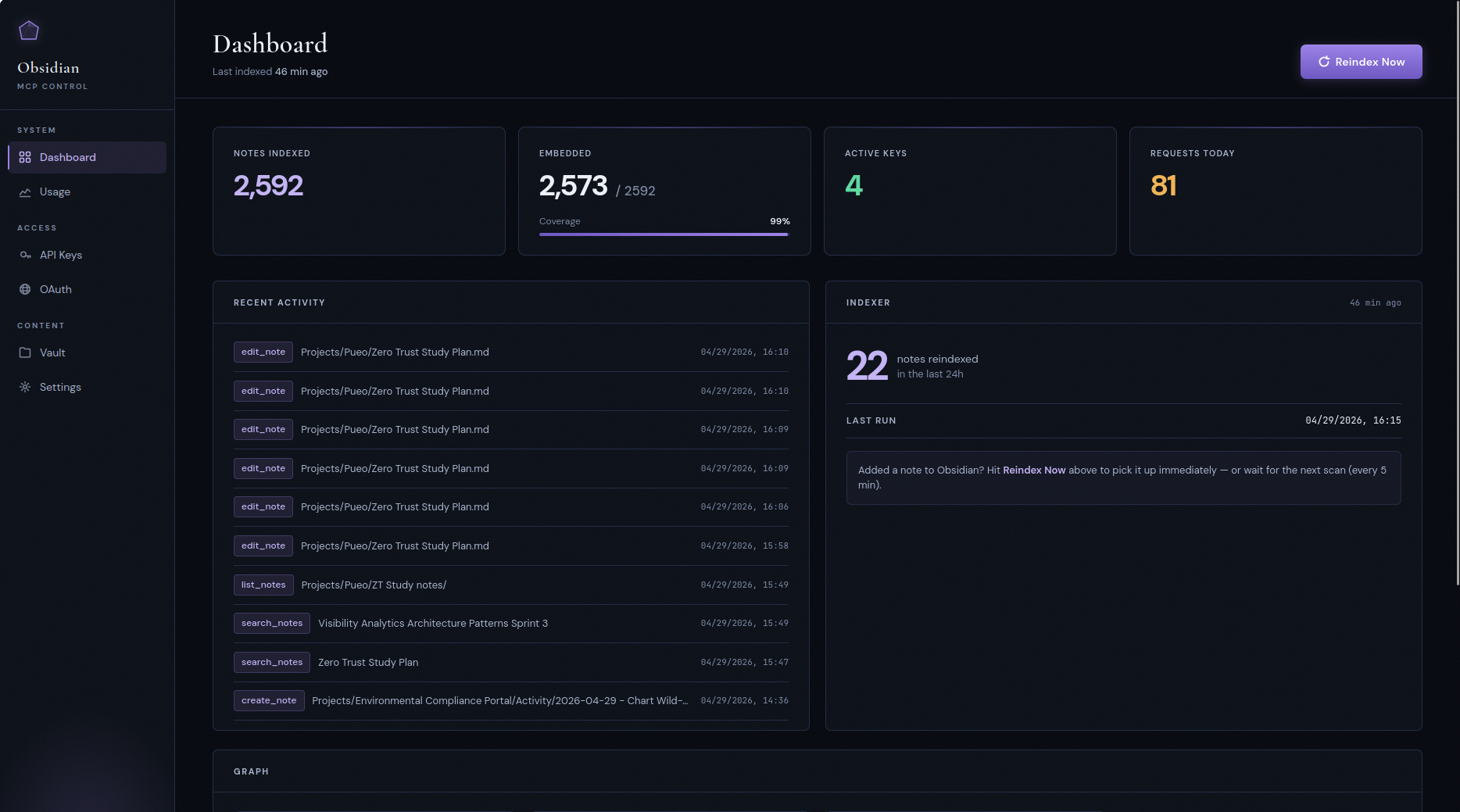
## Control panel
The server ships with a built-in admin UI for the parts of operations
that are easier to look at than to query: minting keys, watching the
indexer, eyeballing tool-call traffic, and resetting embeddings when
you switch providers.
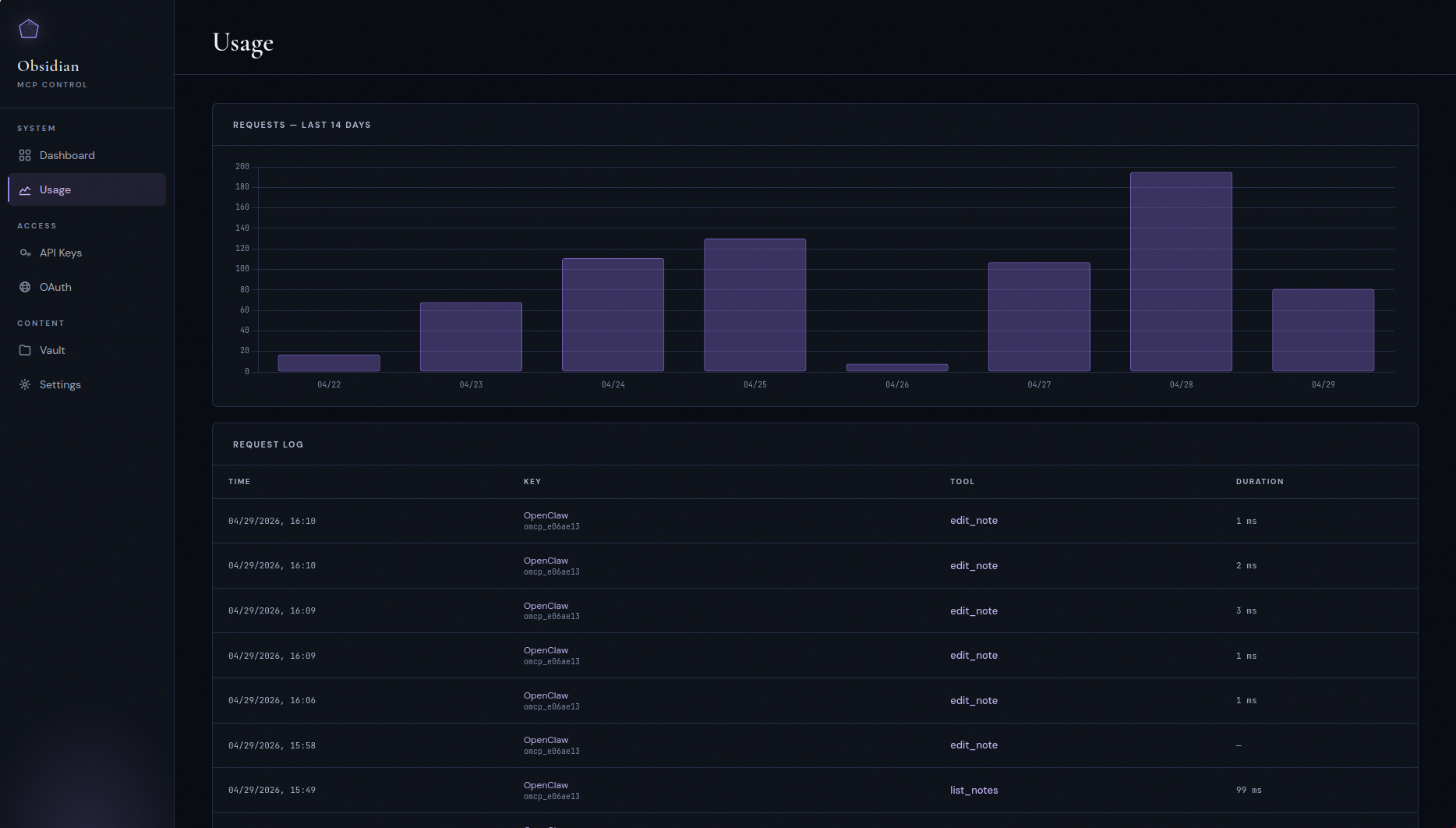
### Usage
Per-tool-call audit log with a 14-day request histogram. Every MCP
call is recorded with the calling key, tool name, duration, and
response size — useful for noticing a misbehaving agent burning
tokens on something it shouldn't.
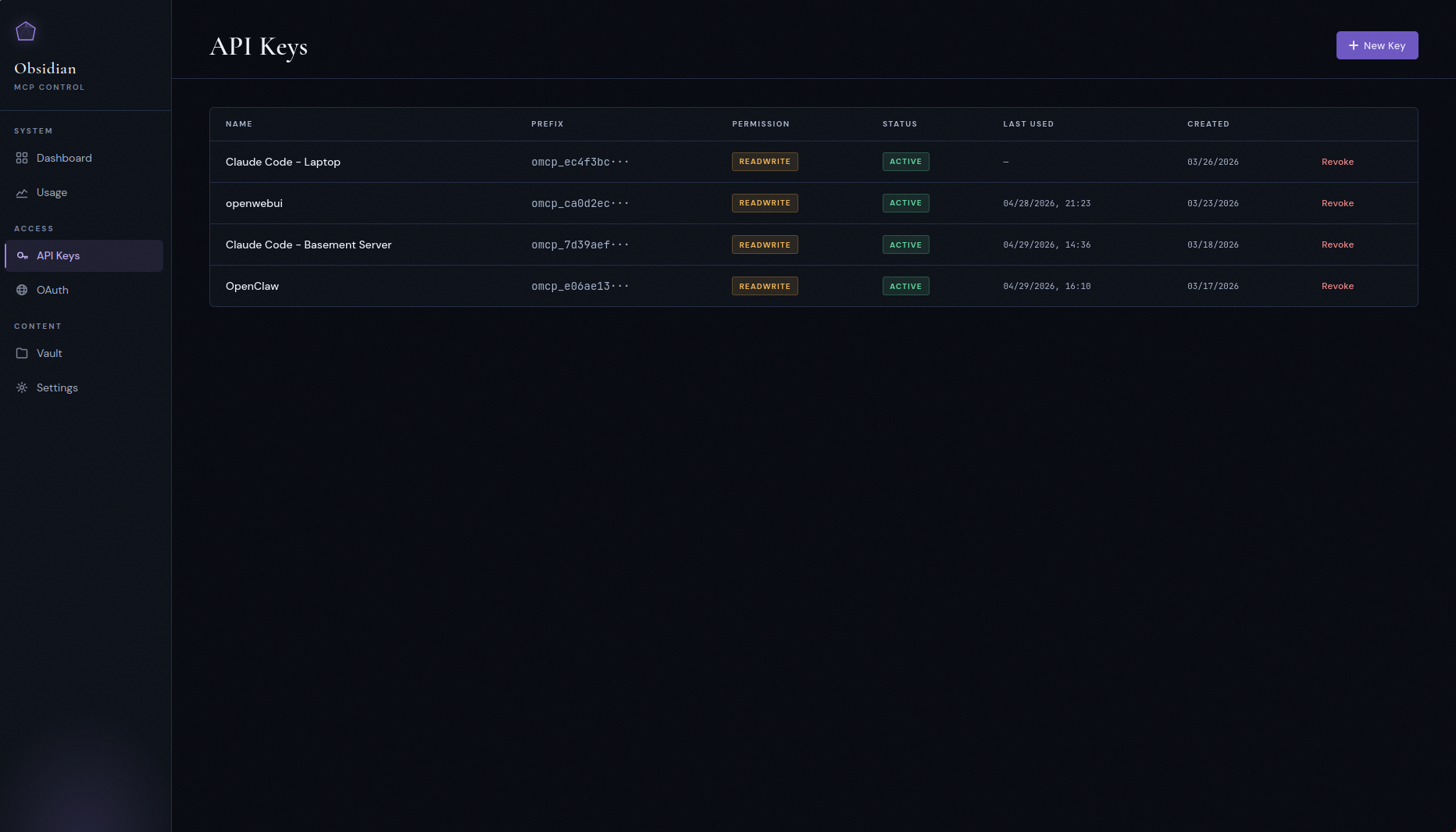
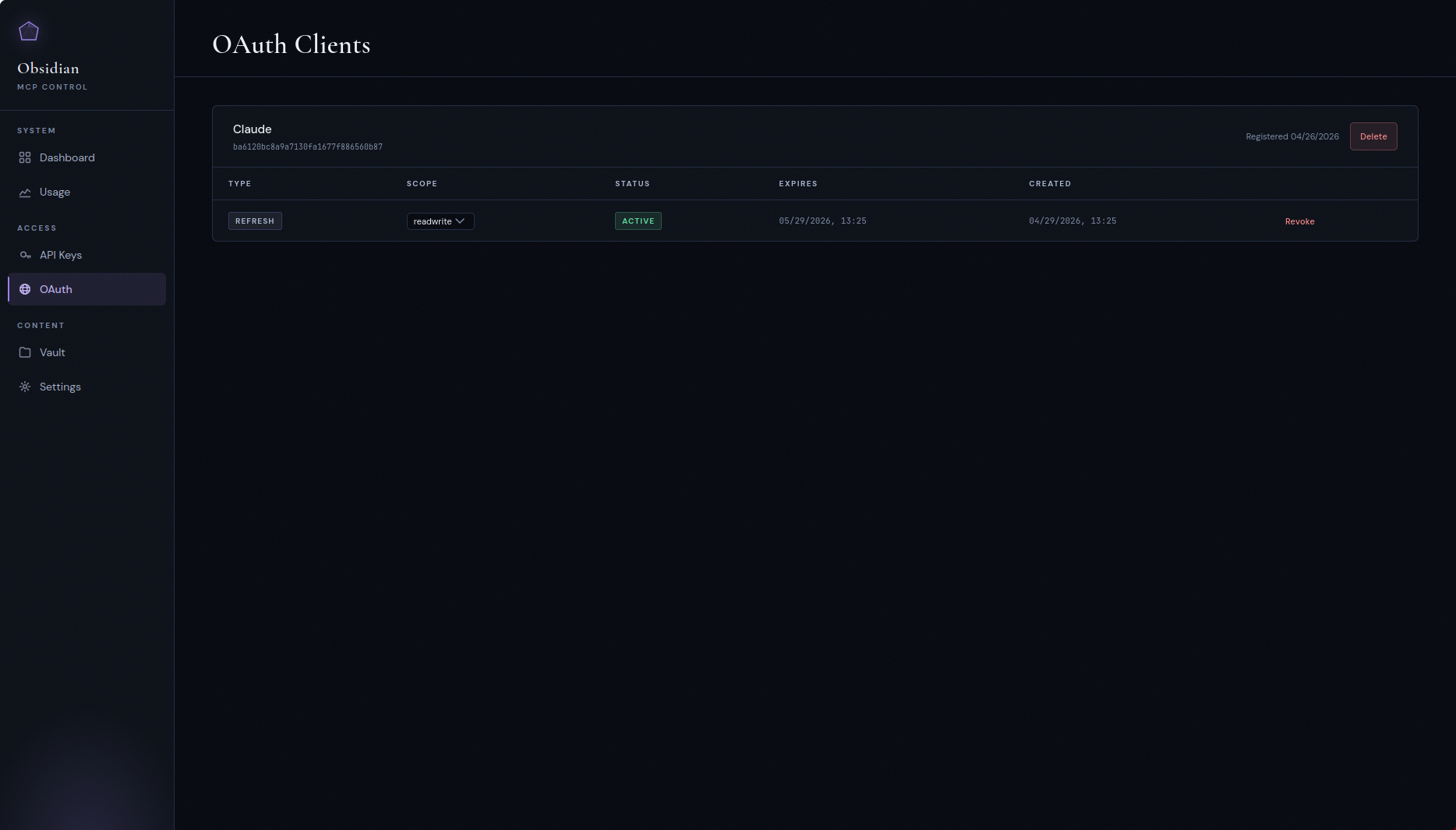
### API keys and OAuth clients
Bearer keys with `read` / `readwrite` scopes for API clients, and a
separate OAuth 2.0 PKCE flow for clients like ChatGPT, Claude Desktop,
and claude.ai that expect a proper authorization-code dance. The OAuth
server supports public (`none`) and confidential (`client_secret_post`)
token-endpoint authentication plus refresh tokens.
Each client's page lists its grants — one row per `/authorize` approval,
not per token — with a Revoke control and a permission select per grant,
so revoking really ends the session instead of leaving a refresh token
to mint a replacement. Revoked and expired rows stay listed, dimmed, for
a week.
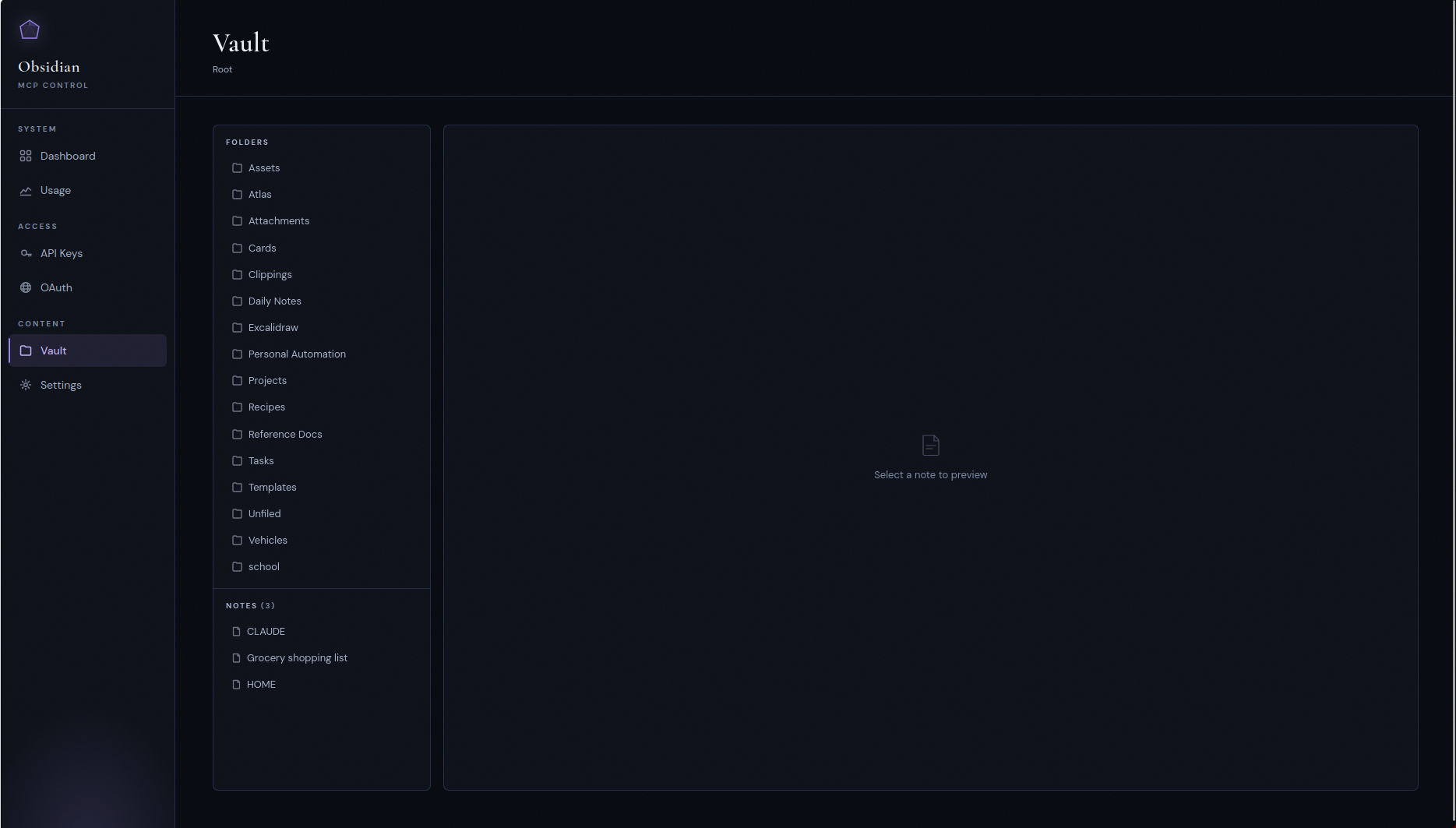
### Vault browser
A read-only file tree of the mounted vault, mostly for sanity-checking
that the container sees what you think it sees.
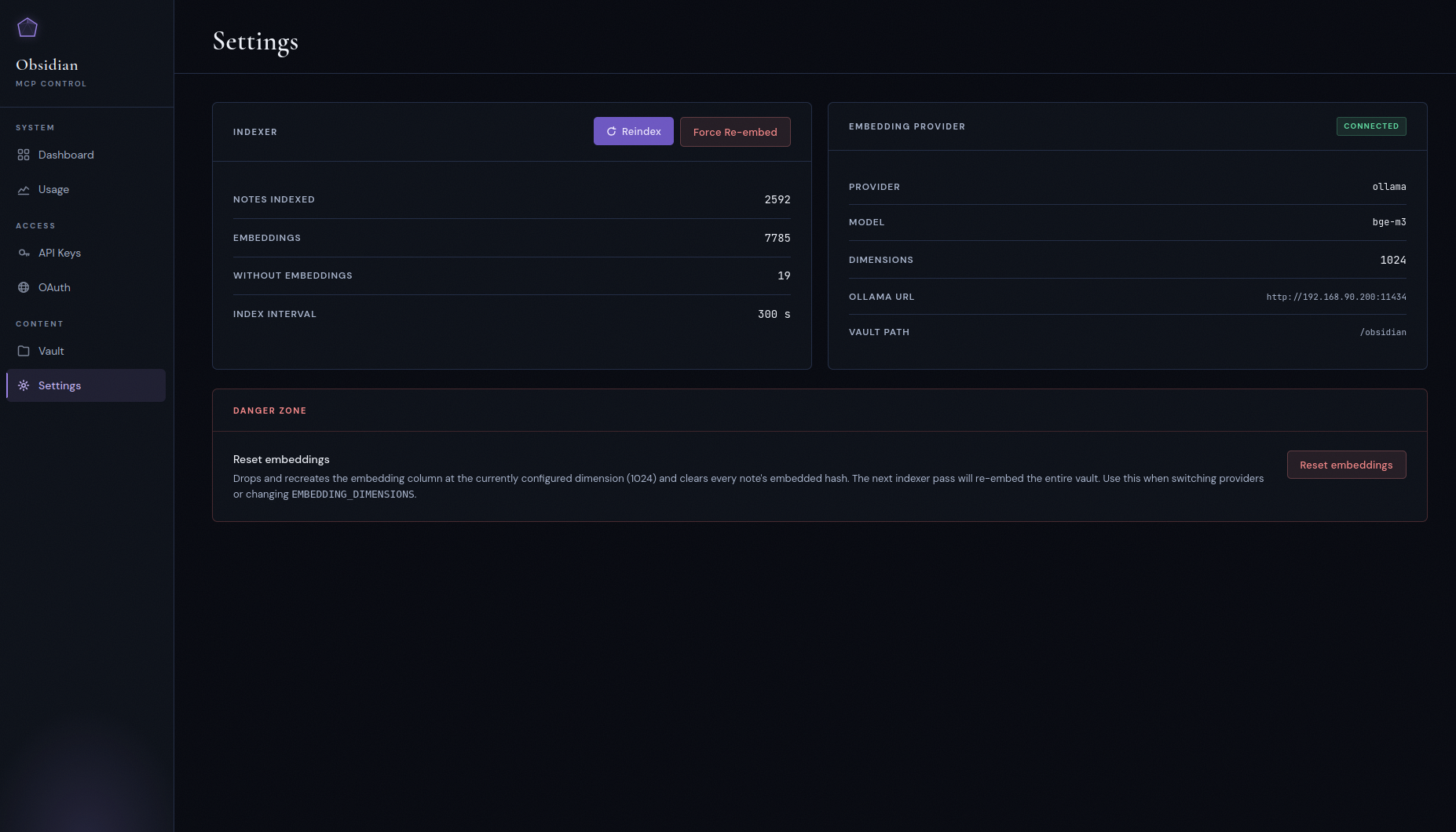
### Settings
Indexer status, current embedding provider and model, vault path, and
the danger zone: **Reset embeddings** (drops and recreates the
embeddings column at the configured dimension — use it when switching
providers) and **Force re-embed** (keeps the column, clears every
note's embedded-content hash so the next pass re-embeds the vault).
Both pause the indexer while they run.
The dashboard separates two things that used to be conflated: **Last
run** is the indexer's own heartbeat — the last pass that completed,
whether or not anything had changed — and **Last change detected** is
the newest `indexed_at` on any note. A quiet vault makes the second one
old while the indexer is perfectly healthy.
## Quick start
> Deploying on a VPS from scratch? See [`DEPLOYMENT.md`](./DEPLOYMENT.md)
> for the full walkthrough: Postgres setup, Caddy and TLS, vault sync
> via Nextcloud, and the gotchas that bite first-time deploys.
> Running Kubernetes? See
> [`docs/deployment-kubernetes.md`](./docs/deployment-kubernetes.md) and the
> kustomize manifests in [`deploy/kubernetes/`](./deploy/kubernetes/).
The bundled Caddy configuration fails closed on `/admin`, `/api`, and
`/authorize`; replace its placeholder basic-auth hash before starting it.
### Prerequisites
- Docker and Docker Compose
- A PostgreSQL 16 instance reachable from the container, with
`pgvector` **0.8.0 or newer** installed
- Either an Ollama instance running `bge-m3`, or an OpenAI API key.
Anything that speaks the OpenAI embeddings protocol works (Azure
OpenAI, OpenRouter, Together, etc.).
- Linux, kernel 5.6 or newer (see below)
### System requirements
The server checks these at startup and tells you which one failed
rather than misbehaving later.
**Linux kernel ≥ 5.6.** Every directory below the vault root is opened
with a single `openat2(RESOLVE_BENEATH | RESOLVE_NO_SYMLINKS |
RESOLVE_NO_MAGICLINKS)`, which is what makes the kernel — not the
application — prove that a write stayed inside the vault. There is no
fallback: on an older kernel, or under a container seccomp profile that
blocks `openat2`, the server logs the reason and exits non-zero.
**Kernel ≥ 5.8 for file transfer.** `statx()`'s `STATX_MNT_ID` is how a
publication refuses a destination that sits on a different mount than
the staging directory (a nested bind mount under the vault root would
otherwise fail only after a whole upload body had streamed). Below 5.8
the server logs one warning and starts: `request_upload`,
`import_from_url` and `PUT /transfer/upload` refuse, and everything else
— reads, note writes, search, downloads, the panel, OAuth — is
unaffected. `/health` reports it as `transfer_mount_check_available`.
**pgvector ≥ 0.8.0.** Filtered semantic search needs
`hnsw.iterative_scan`, which landed in 0.8.0. An older extension accepts
the setting as an unknown placeholder and silently runs a plan that
drops post-filter candidates — silently worse search results — so the
server exits instead. Fix with `ALTER EXTENSION vector UPDATE` or a
newer database image.
**Filesystem.** Case-sensitive and non-normalising (ext4, xfs, and the
usual bind mounts). It must support hard links within the vault root and
`renameat2(RENAME_NOREPLACE)`; without those, note creation, `move_note`
and the soft delete refuse with a named error rather than degrading to a
publish that can clobber. `O_TMPFILE` is wanted but optional: where it
is unavailable, set `VAULT_ALLOW_NAMED_STAGING_FALLBACK=true` to accept
named staging instead (see [Configuration](#configuration)). macOS and
Windows hosts are out of scope; run the container on a Linux VM.
### 1. Clone, configure, point at your vault
```bash
git clone https://github.com/maxkuminov/obsidian-mcp.git
cd obsidian-mcp
cp .env.example .env
$EDITOR .env
```
Using the bundled `docker-compose.yml` stack? It runs PostgreSQL with two identities: set
`OBSIDIAN_DB_PASSWORD` in `.env` (the app's non-superuser role, from
which the compose file builds `DATABASE_URL`) and copy
`postgres.env.example` to `postgres.env` with its own
`POSTGRES_PASSWORD` (the database superuser, which only the postgres
container sees). `make init` generates both. See
[`DEPLOYMENT.md`](./DEPLOYMENT.md#step-2-clone-and-configure).
Point the bind mount at your vault by setting `VAULT_HOST_PATH` in
`.env` — `docker-compose.yml` reads it and refuses to start without it:
```env
VAULT_HOST_PATH=/path/to/your/vault
```
The container runs as **uid:gid 1000:1000**, not root, and the write
tools mutate that directory. If it belongs to another account, either
`chown -R 1000:1000` it or set `APP_UID` / `APP_GID` in `.env` to the
owner you already have. See DEPLOYMENT.md, "Vault ownership".
### 2. Pick an embedding backend
Option A, OpenAI (zero local infra):
```env
EMBEDDING_PROVIDER=openai
OPENAI_API_KEY=sk-...
EMBEDDING_DIMENSIONS=1024
OPENAI_EMBEDDING_MODEL=text-embedding-3-small
```
The server validates `OPENAI_API_KEY` at startup and refuses to boot
if it's missing.
Option B, Ollama (self-hosted, GPU recommended):
```env
EMBEDDING_PROVIDER=ollama
OLLAMA_URL=http://your-ollama-host:11434
EMBEDDING_ALLOW_PLAINTEXT=true
EMBEDDING_MODEL=bge-m3
EMBEDDING_DIMENSIONS=1024
```
This is the default. Omitting `EMBEDDING_PROVIDER` falls back to
Ollama.
The embedding URL must be `https`, or `http` to a loopback host
(`localhost`, `127.x`, `::1`). Plaintext `http` to any other host —
another container such as `http://ollama:11434` included — refuses to
start unless `EMBEDDING_ALLOW_PLAINTEXT=true` acknowledges that chunks
and queries cross that hop unencrypted. `.env.example` ships with it
set for that reason; drop it once the endpoint is `https` (use
`EMBEDDING_CA_FILE` for an internal CA). Inside a container, `localhost`
is the container itself, so an Ollama on the Docker host still needs
the override.
### 3. Deploy
```bash
make init # data dirs and .env from template (skip if you've already edited)
make db-init # create database, user, and pgvector extension
make deploy # build, push to local registry, run migrations, recreate container
```
The first deploy backfills the index, the wikilink graph, and the
embeddings. For a 2 to 3k-note vault on Ollama with a GPU this takes
a few minutes. On `text-embedding-3-small` it's seconds.
### 4. Connect a client
Mint an API key in the control panel, then point your MCP client at:
```
URL: https://obsidian-mcp.<your-domain>/mcp
Auth: Bearer omcp_...
```
For Claude Desktop, add to `claude_desktop_config.json`:
```json
{
"mcpServers": {
"obsidian": {
"url": "https://obsidian-mcp.<your-domain>/mcp",
"headers": { "Authorization": "Bearer omcp_..." }
}
}
}
```
For Claude Code:
```bash
claude mcp add obsidian --transport http \
--url "https://obsidian-mcp.<your-domain>/mcp" \
--header "Authorization: Bearer omcp_..."
```
The first thing any agent should do in a new session is call
`get_vault_guide()`. That's how it learns your folder structure,
naming conventions, and YAML schema before it writes anything.
## Upgrading
Pull, then `make deploy` (or rebuild your compose stack); migrations
run on start. Read this first when upgrading across the internal-transport
and panel-CSP release:
- **Breaking: the server refuses to run as a PostgreSQL superuser
(#324).** A Compose install created from `docker-compose.yml` or
`docker-compose.yml` before this release connects as the cluster
superuser and must run the one-time conversion in
[DEPLOYMENT.md, "Upgrading: split database roles"](./DEPLOYMENT.md#upgrading-split-database-roles)
(a backup, a new `postgres.env`, `OBSIDIAN_DB_PASSWORD` in `.env`, one
script); the new compose files will not serve on an unconverted volume.
Any other deployment whose `DATABASE_URL` names a superuser is refused
at startup with a message; switch it to a non-superuser owner of the
database, or set `DATABASE_ALLOW_SUPERUSER=true` as a stop-gap. The
Kubernetes bundle is unaffected. A `DATABASE_URL` password of
`changeme` / `CHANGE_ME` is now refused, and the built-in default URL
carries no password.
- **Breaking: plaintext embedding endpoints must be acknowledged.** If
the active embedding URL (`OLLAMA_URL`, or `OPENAI_BASE_URL` with the
OpenAI provider) is `http://` to a non-loopback host — the
`http://ollama:11434` default included — add
`EMBEDDING_ALLOW_PLAINTEXT=true` to `.env` **before** deploying, or
the server refuses to start with a message naming the setting.
- **Database TLS has one source.** A TLS parameter in `DATABASE_URL`
(`?ssl=…`, `?sslmode=…`) or any `PGSSL*` environment variable is
refused at startup; move it to `DATABASE_SSL_MODE`. The default,
`prefer`, is the behaviour you had before.
- **Embedding clients ignore the environment's network settings.**
`HTTP(S)_PROXY`, `SSL_CERT_FILE` / `SSL_CERT_DIR` and `.netrc` no
longer apply to the embedding hop. Use `EMBEDDING_CA_FILE` for an
internal CA.
- **The panel now sends a nonce-based Content-Security-Policy**
(`PANEL_CSP=enforce`), and htmx is gone from it. If a panel control
misbehaves, set `PANEL_CSP=report-only` (or `off`) and recreate the
container; no rebuild.
- **New optional settings:** `DATABASE_SSL_MODE`,
`DATABASE_SSL_CA_FILE`, `DATABASE_SSL_CERT_FILE`,
`DATABASE_SSL_KEY_FILE`, `EMBEDDING_ALLOW_PLAINTEXT`,
`EMBEDDING_CA_FILE`, `PANEL_CSP`. See [Configuration](#configuration),
and [`DEPLOYMENT.md`](./DEPLOYMENT.md#internal-transport-the-database-and-embedding-hops)
for moving both hops to verified TLS.
## Cost expectations
If you go the OpenAI route (the realistic path on a CPU-only VPS),
the first-index spend is small and the steady state is nearly free.
Rough numbers assuming an average note around 1,500 tokens (three
512-token chunks), at OpenAI's published rate at time of writing:
| Model | $/1M tokens | 1k notes | 10k notes | 100k notes |
| --- | --- | --- | --- | --- |
| `text-embedding-3-small` | $0.02 | ~$0.05 | ~$0.50 | ~$5.00 |
| `text-embedding-3-large` | $0.13 | ~$0.30 | ~$3.00 | ~$30.00 |
After the first index, only changed notes are re-embedded. Ongoing
cost is proportional to edits — pennies a month for a typical vault.
If you self-host Ollama with a GPU, embedding cost is whatever your
power bill is. Ollama on CPU works but is too slow to be usable on
a vault of more than a few hundred notes.
## The self-describing vault
This is the part most "MCP for Obsidian" projects miss. They stop at
read, write, and list. The interesting question isn't "can the agent
reach the files," it's "does the agent know the rules?"
If you have an opinionated vault — task placement logic, folder
conventions, required frontmatter, tag taxonomy — an agent with write
access can do real damage without that context. Tasks land in the
wrong folder. Bare-date filenames collide with templates. Wrong tags
break Dataview queries. The data layer works fine; the context layer
is where the failures show up.
The fix is small. Keep a machine-readable instruction file
(`CLAUDE.md` at the vault root) that describes the system's own rules.
Expose it as a dedicated tool. Every connecting agent calls it once at
the start of a session and immediately knows how the vault works.
Update the file, every agent sees the change on the next call. No
client-side config. No system-prompt injection. The vault is
authoritative about its own rules.
`get_vault_guide()` does exactly this. It returns a generic Obsidian
primer (wikilink syntax, embed syntax, tag conventions, common plugin
literals) plus the vault's `CLAUDE.md` live. The hint to call it first
is baked into the write-tool descriptions so the agent gets pulled
into the right behavior even without prompting.
## Multi-user mode
Single-user mode is the default and works exactly as described above —
one vault, one set of API keys, no in-app user concept. Multi-user mode
is an opt-in flag that turns the same container into a small
multi-tenant deployment: in-app username/password login, per-user vault
scoping, an admin role for troubleshooting, and a regular-user role
that sees only its own keys/OAuth clients/usage. One container, one
Postgres, strict isolation between users.
Enable it on an existing deployment with no data loss — your current
vault and keys carry over to the bootstrap admin.
### Enabling
1. Set `MULTI_USER_MODE=true` and a strong `SECRET_KEY` in `.env`
(`openssl rand -hex 32` is fine). The app refuses to start with a
placeholder `SECRET_KEY` **unconditionally** — single-user mode
included — so this is not something the flag turns on.
2. `make deploy` (or `docker compose up -d --force-recreate`).
3. Visit the panel. Because the `users` table is empty, you're routed
to `/admin/register` — the one-time bootstrap form. It's still
behind Traefik's `chain-oauth@file` middleware, so only people
Traefik already trusts can claim admin.
4. Register with a chosen username and password. The bootstrap form
pre-fills `vault_path` with whatever `VAULT_PATH` was set to, so
your existing notes immediately belong to this new admin. No
re-index, no re-embed, no data loss — every previously indexed
note, API key, OAuth client, and usage log row gets backfilled
to the bootstrap user in a single transaction.
### Inviting users
1. Add a volume mount for the new user's vault under
`/vaults/<username>`. Put it in a small override file of your own
rather than in the tracked `docker-compose.yml` — host paths name
real people and real directories, and this repository is public:
```yaml
# docker-compose.users.yml, gitignored
services:
obsidian-mcp:
volumes:
- "/storage/vaults/alice:/vaults/alice"
- "/storage/shared/bob/Obsidian:/vaults/bob"
```
Host paths with spaces must be quoted as a single YAML string.
`volumes` merges by concatenation, so these are added to the base
file's `/obsidian` mount rather than replacing it. Bring the stack up
with the extra `-f docker-compose.users.yml` to apply.
2. In the panel, `/admin/users/create` — pick a username and set an
initial password.
3. `/admin/users/{id}/edit` — set the user's `vault_path` to the
container path you just mounted (e.g. `/vaults/bob`). The form
shows a dropdown of unassigned `/vaults/*` directories that exist
on disk.
4. Share the credentials out-of-band. The user logs in at
`/admin/auth/login`, gets their own keys/OAuth/usage views, and
cannot see other users' notes.
### What admins see
Admins see API keys, OAuth clients, and usage logs for all users; they
own the Settings page (embedding provider, indexer trigger, danger
zone) and the Users page. Admins do **not** browse other users' vault
contents through the panel — that's intentional. Troubleshooting
another user's vault means either inspecting it via `docker exec` or
temporarily reassigning their `vault_path`, not UI snooping.
### Rolling back
Set `MULTI_USER_MODE=false`, restart. Existing API keys keep working
(per-user filters skip when no user context is set), the login UI and
session cookies disappear, and the panel falls back to its
Traefik-OAuth-only mode. The schema stays in place, so flipping back
to multi-user later resumes where you left off without re-bootstrapping
(the `users` table is non-empty, so `/admin/register` is closed).
### Constraints and known limits
- The indexer iterates active users sequentially each cycle. Fine for
tens of users; hundreds would need parallelization.
- Password recovery is admin-driven — there's no email-based reset. A
signed-in user *can* rotate their own password at `/admin/account`
(current password, new password, confirmation; minimum 12
characters), which signs their other browsers out and keeps the one
they changed it from signed in. The admin reset stays the recovery
path for somebody who cannot sign in at all, and it also ends every
live session of the account it resets.
- `/admin/auth/login` and `/admin/account/password` are rate-limited
at 5 requests per minute; the login limit is keyed on the client
address, and the password change carries two independent limits —
one per account, one per address. The limiter's storage is in-memory
and per-process, so counters reset on restart. The Traefik OAuth
gate in front of the panel is still the main brute-force defense; if
you expose `/admin/auth/login` to the open internet, put a rate-limit
middleware in front of it as well.
- Panel sessions are server-side rows (`user_sessions`), so logging
out, changing a password, a deactivation or a delete really ends
them. The trade-off: **the first deploy of the build that introduced
the registry signs every live panel session out once**, because a
cookie issued before it carries no session id and is refused rather
than grandfathered. Everyone signs in again; nothing else changes.
- The `vault_path` validator does not resolve symlinks, so an admin
can technically point a user at host files via a symlinked
`/vaults/<name>`. Treat `/vaults/` as an admin-trust boundary.
**What *is* checked, since the vault-root overlap guard:** two active
users' roots may not name overlapping directories. Each root is
opened once and compared by inode identity — `(st_dev, st_ino)`,
which catches a symlink alias or a bind mount naming one directory
twice — and by a component-wise containment test over the two
canonical real paths in both directions, which catches an
ancestor/descendant pair like `/vaults/team` and
`/vaults/team/private`. A conflicting assignment is refused in the
panel naming the other user, and the same checks re-run before every
index pass, so an alias created *after* the assignment quarantines
both accounts: their MCP tools, index passes and transfer
redemptions are refused until an administrator corrects it, and no
index rows are deleted. A root that cannot be opened at all
quarantines only its own account.
**What is still not detected, and the consequence:** a bind mount
that grafts one user's vault — or any mount nested inside it — to a
path *inside* another user's root. `mount --bind /vaults/b
/vaults/a/inner` leaves both root inodes distinct and both canonical
paths outside each other, so neither check sees it, and user A can
then **read, overwrite and delete every note in user B's vault**
through the ordinary write tools, while A's index pass files B's
notes under A's account so A's searches return B's content. The same
gap covers an accessible alias of a root that could not be examined:
that peer keeps serving. Neither condition is reported anywhere.
Both require an administrator to write a bind mount into the deploy
configuration — which is why `/vaults/` **and the compose file's
mounts** are the admin-trust boundary, not just the path strings.
This is a permanent, stated limit rather than a pending fix: mount
detection was specified, failed on a new topology in each of three
review rounds, and was dropped. **The operator rule: never mount one
user's directory, or anything nested in it, inside another user's
root.**
## Federated login with PocketID (OIDC)
Multi-user mode's login form is the built-in username/password one by
default. `AUTH_MODE=pocketid` replaces it with an OIDC provider —
[PocketID](https://github.com/pocket-id/pocket-id), or any other
standards-compliant one — so the people using the panel sign in with the
identity you already run for everything else, and this server stops being
somewhere passwords are kept.
**What this changes and what it does not.** It changes exactly one thing: how
the *human* behind the panel and the OAuth consent screen proves who they are.
It does **not** touch the server's own OAuth 2.0 authorization server. MCP
clients — Claude, Claude Code, ChatGPT — keep registering dynamically, keep
doing PKCE, keep seeing the consent screen, keep refreshing and revoking, all
exactly as before.
That split is forced rather than chosen. MCP clients require dynamic client
registration (RFC 7591), and PocketID does not implement it: its discovery
document has no `registration_endpoint`. So PocketID cannot be the authorization
server those clients talk to. What it can be — and what it is here — is the
identity provider *behind* this server's consent screen. This server stays the
authorization server for MCP clients and becomes a relying party to PocketID
for human logins. Nothing about the MCP-facing protocol moves.
### Register the client in PocketID
Create one **OIDC client** with:
| Field | Value |
| --- | --- |
| Callback / redirect URL | `https://obsidian-mcp.example.com/admin/auth/oidc/callback` — your own hostname, exactly, with no trailing slash |
| Client type | **Confidential** (a client secret is issued and used) |
| PKCE | **Enabled** |
| Logout callback URL | `https://obsidian-mcp.example.com/admin/auth/login` (optional; only needed if you want a panel logout to end the PocketID session too) |
Copy the client ID and client secret it gives you. If you want to gate access
by group, create the group in PocketID and assign the users who should be able
to sign in.
The redirect URI must match byte for byte on both sides — it is sent on the
authorization request *and* again on the token exchange, and a provider that
sees two different values refuses the exchange.
### Configure this server
```bash
MULTI_USER_MODE=true # required: the auth routes are mounted only here
AUTH_MODE=pocketid
OIDC_ISSUER=https://auth.example.com
OIDC_CLIENT_ID=<from PocketID>
OIDC_CLIENT_SECRET=<from PocketID>
OIDC_REDIRECT_URI=https://obsidian-mcp.example.com/admin/auth/oidc/callback
# Optional
OIDC_REQUIRED_GROUP=obsidian-mcp # unset = anyone PocketID authenticates
OIDC_SCOPES=openid profile email groups # the default
```
`make deploy` (the migration adding `users.oidc_subject` runs as part of it).
The server **refuses to start** if `AUTH_MODE=pocketid` is set without
`MULTI_USER_MODE`, without all four required values, with a non-HTTPS issuer,
or with a redirect URI that is not an absolute HTTPS URL (plain `http://` is
allowed only for loopback development). That is deliberate: in this mode the
local password form is gone, so a half-configured provider would be a
deployment nobody can sign in to.
### Bootstrap the first admin *before* you switch
Under `AUTH_MODE=pocketid`, `/admin/register` and `POST /admin/auth/login`
return **404** — there is no password path around the identity provider — and a
user created by a first federated login is **never** an admin and has **no**
vault assigned. So:
1. Deploy with `AUTH_MODE=local` (or leave it unset) and bootstrap your admin
at `/admin/register` as described under
[Multi-user mode](#multi-user-mode).
2. Then set `AUTH_MODE=pocketid` and redeploy.
On that admin's first federated login, their existing local account is adopted
— see below — so they keep their admin flag, their vault, their keys and their
OAuth clients.
### How accounts are matched
Accounts are linked by the ID token's **`sub`** claim, stored in
`users.oidc_subject`, and never by email. `sub` is stable for the life of the
account at the provider; an email address is reassignable, and a provider that
later handed a former address to somebody else would otherwise hand them the
first person's vault.
On a first login for an unseen `sub`, a local username is derived from the
email's local part (`max@example.com` → `max`), folded to
lowercase `[a-z0-9_]`, and:
- if a local account with that username exists and is **not yet linked** to any
provider identity, it is adopted — it keeps its admin flag, vault, keys and
history;
- if it exists and is already linked to a *different* `sub`, the login is
**refused** rather than reassigned, and an operator resolves it by renaming
one of the accounts;
- otherwise a new account is created, `is_admin=false`, with no `vault_path`.
A new account can therefore sign in to the panel immediately and can do nothing
with the vault until an admin assigns it one at `/admin/users/{id}/edit` —
the same fail-closed state a local user with no assignment is already in.
### Operational notes
- **Every login failure renders one identical page.** Which check refused —
a bad signature, a wrong audience, an expired token, a missing group, an
unreachable provider — is in the security log as
`panel_oidc_login_refused` with a `reason`, and nowhere else. Account
creations and adoptions are logged as `panel_oidc_user_created` /
`panel_oidc_user_linked`; a successful sign-in emits the same
`panel_login_succeeded` a password login does.
- **Logout** revokes the local session row first (so it really ends), then
redirects to the provider's `end_session_endpoint` when it advertises one. If
the provider is unreachable, logout still succeeds locally.
- **The callback is rate-limited** at 10 requests/minute per client address.
- **Rolling back** is `AUTH_MODE=local` and a restart. The password form and
`/admin/register` come back; `users.oidc_subject` stays in place, so
switching forward again re-links every account without a second adoption.
Note that an account *created* by a federated login has no usable local
password — an admin sets one through the reset path if it needs one.
- **`AUTH_MODE=local` remains the default**, and nothing above applies to it.
Local development, the test suite and every existing deployment keep the
username/password form with no OIDC settings present at all.
## Configuration
| Variable | Default | Purpose |
| --- | --- | --- |
| `DATABASE_URL` | — | `postgresql+asyncpg://user:pass@host/db`. No TLS parameters here — they are refused; use `DATABASE_SSL_MODE`. A `changeme` / `CHANGE_ME` password is refused. The bundled compose files set it themselves from `OBSIDIAN_DB_PASSWORD`. |
| `DATABASE_ALLOW_SUPERUSER` | `false` | The server refuses to start when its database role is a PostgreSQL superuser. `true` downgrades that to a warning; a stop-gap while converting an install, not a setting to keep. |
| `DATABASE_SSL_MODE` | `prefer` | Database TLS: `disable`, `prefer` (try TLS, fall back to plaintext), `require` (encrypt, no verification), `verify-ca`, `verify-full`. Strict modes exit if the session is not encrypted. Any `PGSSL*` variable is refused. |
| `DATABASE_SSL_CA_FILE` | — | CA bundle (PEM) for `verify-ca` / `verify-full`; required by both, refused with any other mode. No system-store fallback. |
| `DATABASE_SSL_CERT_FILE` | — | Client certificate (PEM). Strict modes (`require`, `verify-ca`, `verify-full`) only; set together with `DATABASE_SSL_KEY_FILE` or not at all. |
| `DATABASE_SSL_KEY_FILE` | — | Client private key for `DATABASE_SSL_CERT_FILE`. Both or neither. |
| `VAULT_PATH` | `/obsidian` | In-container vault mount |
| `SECRET_KEY` | — | itsdangerous signer key |
| `INDEX_INTERVAL_SECONDS` | `300` | Periodic reindex cadence |
| `INDEXER_DEGRADED_AFTER_FAILURES` | `3` | Consecutive failures of any indexer counter (a scope's index passes, its embed passes, its incomplete re-derives, or the tick's own user enumeration) at which `/health` reports `degraded` and one CRITICAL "manual intervention required" line is logged. |
| `INDEXER_QUARANTINE_RETRIES_PER_TICK` | `5` | How many times one index pass may roll back and re-run a scope after quarantining a note the database refuses (a data-exception or program-limit error on its row, keyword vector, move or links). Beyond it the pass fails as an ordinary failure; the notes already found stay quarantined for the next tick. |
| `MULTI_USER_MODE` | `false` | In-app login, per-user vaults. See [Multi-user mode](#multi-user-mode). |
| `AUTH_MODE` | `local` | How the *human* signs in to the panel: `local` (username/password) or `pocketid` (OIDC). Governs the panel login only — the server's own OAuth authorization server for MCP clients is unchanged either way. `pocketid` requires `MULTI_USER_MODE=true` and removes the password form and self-registration (both 404). See [Federated login with PocketID](#federated-login-with-pocketid-oidc). |
| `OIDC_ISSUER` | — | Required when `AUTH_MODE=pocketid`. The provider's issuer, e.g. `https://auth.example.com`. HTTPS with no loopback exemption; discovery appends `/.well-known/openid-configuration`. |
| `OIDC_CLIENT_ID` | — | Required when `AUTH_MODE=pocketid`. |
| `OIDC_CLIENT_SECRET` | — | Required when `AUTH_MODE=pocketid`. Confidential client; sent as `client_secret_post` on the token exchange. |
| `OIDC_REDIRECT_URI` | — | Required when `AUTH_MODE=pocketid`. Absolute HTTPS URL (http only for loopback), registered byte-for-byte with the provider: `https://<host>/admin/auth/oidc/callback`. |
| `OIDC_REQUIRED_GROUP` | — | When set, the ID token's `groups` claim must contain it or the login is refused. Unset defers to the provider's own client assignment. |
| `OIDC_SCOPES` | `openid profile email groups` | Space-separated. `openid` is mandatory and is re-added if omitted. |
| `VAULT_ROOT_OBSERVE_TIMEOUT_SECONDS` | `10` | How long the vault-root overlap check waits on one root before giving up on it. Expiry quarantines that one account (`root unexaminable`) and the check carries on, so a hung mount cannot hold up startup. Multi-user mode only. |
| `MCP_HOSTNAME` | — | Public hostname. Derives `BASE_URL`, `ALLOWED_ORIGINS` and `ALLOWED_HOSTS` as `https://<host>`. Required (or `BASE_URL`) for the transfer tools. |
| `BASE_URL` | derived | Explicit public origin. HTTPS except on loopback. |
| `ALLOWED_ORIGINS` | derived | CORS origins, JSON list |
| `ALLOWED_HOSTS` | derived | Accepted `Host` headers, JSON list. `localhost` is always added. |
| `SESSION_MAX_AGE` | `604800` | Panel session lifetime, seconds (multi-user mode). Absolute — the server-side row is never extended, so a session used daily still expires |
| `SESSION_COOKIE_NAME` | `omcp_session` | Panel session cookie name |
| `PANEL_CSP` | `enforce` | Content-Security-Policy on the panel, login and consent pages: `enforce`, `report-only` (same policy, reports only), or `off`. A rollback lever — change it and recreate the container, no rebuild. Anything but `enforce` logs a WARNING at each start. |
| `SESSION_TOUCH_INTERVAL_SECONDS` | `60` | How stale a session's `last_seen_at` may get before a validated `GET`/`HEAD` rewrites it. Telemetry only — nothing authorizes on it. Must be ≥ 1. |
| `SESSION_PURGE_RETAIN_DAYS` | `7` | How long a dead panel session row is kept, measured from the *later* of its expiry and its revocation, so a revocation stays visible for the full window. Must be ≥ 1. |
| `OAUTH_KNOWN_REDIRECT_HOSTS` | `claude.ai,chatgpt.com` | Redirect **hosts** the consent screen badges as known connector destinations. JSON or CSV. Matched by exact host equality — no wildcards, no suffixes; entries containing `*`, `/`, `@` or internal whitespace are refused at startup. An empty list means every client is shown as unverified. |
| `OAUTH_GRANT_ABSOLUTE_LIFETIME_DAYS` | `90` | Absolute lifetime of an OAuth grant, in whole days (1–365), counted from when the application first receives its tokens. Refresh never extends it; after it the user must approve again. Stated on the consent page. **No off value** — empty, `null`, `none` and `0` refuse to start. Lowering it applies to every grant at its next request; raising it extends existing grants. |
| `MAX_FILE_READ_BYTES` | `10485760` | `read_file` cap (10 MB); bounds what the server reads from disk |
| `MAX_FILE_WRITE_BYTES` | `26214400` | `write_file` cap (25 MB), decoded byte length |
| `MAX_READ_RESPONSE_CHARS` | `40000` | `read_note` / `read_file` cap on what is returned to the caller (≈10K tokens). See [Response size limits](#response-size-limits). |
| `FTS_CONFIGS` | `english` | Keyword-search text-search config(s). JSON or CSV. See [Full-text search language(s)](#full-text-search-languages). |
| `TRANSFER_TOKEN_TTL_SECONDS` | `600` | Default life of a transfer link. Per-call `expires_in` is clamped to 60–3600. |
| `TRANSFER_MAX_UPLOAD_SECONDS` | `600` | How long one claimed upload may stream before the token is spent |
| `TRANSFER_MAX_CONCURRENT_UPLOADS` | `4` | Simultaneous upload streams |
| `IMPORT_ALLOW_HTTP` | `false` | Let `import_from_url` fetch plain http. Off by default. |
| `VAULT_ALLOW_NAMED_STAGING_FALLBACK` | `false` | Accept named staging on filesystems without `O_TMPFILE`. One flag, both write paths. See [System requirements](#system-requirements). |
| `WRITE_PRECONDITION_REQUIRED` | `false` | Require `expected_hash` on supported destructive calls. Creation is exempt; enable after clients adopt read hashes. |
| `GIT_VAULT_ENABLED` | `false` | Treat the vault directory as a git working clone. A clean no-op on a vault that is not a git repository, and a git failure never fails or rolls back a write. See [Git-backed vault](#git-backed-vault). |
| `GIT_COMMIT_ON_WRITE` | `true` | Whether each write tool makes its own commit. Off leaves the reconcile sweep as the only committer — useful while first bringing a large vault under version control. Ignored when `GIT_VAULT_ENABLED` is false. |
| `GIT_AGENT_NAME` | `obsidian-mcp agent` | Author and committer for agent-made commits. Deliberately not the human's: telling the two apart by author in `git log` is the point. Applied per invocation; git config is never written. |
| `GIT_AGENT_EMAIL` | `agent@obsidian-mcp.invalid` | The address beside it. `.invalid` (RFC 2606) never resolves; set a real one if this history is going somewhere that cares. Neither field may be empty or contain a newline, `<` or `>` — refused at startup. |
| `GIT_COMMIT_TIMEOUT_SECONDS` | `15` | Wall-clock bound on one git invocation (0 < n ≤ 120). git blocks indefinitely on a held index lock or an unresponsive filesystem, and this runs in a worker thread. |
| `EMBEDDING_PROVIDER` | `ollama` | `ollama` or `openai` |
| `EMBEDDING_DIMENSIONS` | `1024` | pgvector column width |
| `OLLAMA_URL` | `http://ollama:11434` | Used when provider is Ollama. Must be `https`, loopback `http`, or covered by `EMBEDDING_ALLOW_PLAINTEXT`. |
| `EMBEDDING_MODEL` | `bge-m3` | Ollama model name. Changing it post-deploy requires `make reset-embeddings`; the server refuses to start until the stored vectors match. See [Switching providers or models](#switching-providers-or-models). |
| `OLLAMA_KEEP_ALIVE` | `-1` | How long Ollama keeps the model resident. `-1` pins it; a Go duration (`30m`) frees VRAM when idle. Ollama only. |
| `OPENAI_API_KEY` | — | Required when provider is OpenAI |
| `OPENAI_BASE_URL` | `https://api.openai.com/v1` | Override for Azure or proxies. Same transport rule as `OLLAMA_URL` when this provider is active. |
| `EMBEDDING_ALLOW_PLAINTEXT` | `false` | Permit `http` to a non-loopback embedding host. Without it such a URL refuses to start. `.env.example` sets it `true` to match its `http://ollama:11434` default. |
| `EMBEDDING_CA_FILE` | — | Trust anchor (PEM) for an `https` embedding endpoint behind an internal CA; replaces the default certifi bundle. Refused with an `http` URL. Embedding clients ignore `HTTP(S)_PROXY`, `SSL_CERT_*` and `.netrc`. |
| `OPENAI_EMBEDDING_MODEL` | `text-embedding-3-small` | OpenAI model. Changing it post-deploy requires `make reset-embeddings`; the server refuses to start until the stored vectors match. See [Switching providers or models](#switching-providers-or-models). |
| `CHUNK_SIZE` | `512` | Approx tokens per chunk (4-char heuristic) |
| `CHUNK_OVERLAP` | `0` | Token overlap between chunks |
| `EMBEDDING_EXCLUDE_PATTERNS` | `["*.excalidraw.md","Excalidraw/*"]` | Globs skipped by the embedder. Excluded files stay keyword-searchable. |
| `MCP_AUTH_FAILURE_LIMIT` | `60` | Failed `/mcp` authentications one client address may make per window before a 429. Checked before the credential lookup, so a refused probe costs no query. Null disables. See [Rate limits](#rate-limits). |
| `MCP_AUTH_FAILURE_WINDOW_SECONDS` | `300` | The window that budget is counted over. |
| `MCP_AUTH_FAILURE_TABLE_SIZE` | `4096` | Counter slots in the fixed-size, per-process-salted address table. Memory is O(size); collisions only make the control stricter. |
| `MCP_RATE_LIMIT_PER_MINUTE` | `120` | Sustained tool calls per minute per principal (an API key, or an OAuth *grant*). Null — with the burst — disables the general bucket. |
| `MCP_RATE_LIMIT_BURST` | `30` | Capacity of the general bucket. Must be set together with its rate or nulled together with it. |
| `MCP_WRITE_RATE_LIMIT_PER_MINUTE` | `60` | Sustained vault-mutating calls per minute per principal — the eight write tools, plus `PUT /transfer/upload` charged to the principal that minted the capability. |
| `MCP_WRITE_RATE_LIMIT_BURST` | `15` | Capacity of the write bucket. |
| `MCP_LIMITER_MAX_TRACKED_PRINCIPALS` | `10000` | Principals holding their own limiter entry before further ones share one overflow entry. |
| `MCP_REFUSAL_LOG_INTERVAL_SECONDS` | `10` | How long one rate/slot-refusal coalescing window stays open. Inside it a refusal writes nothing; the row that lands stands for `1 + suppressed` refusals. |
| `MCP_CONCURRENCY_MODE` | `shadow` | `off`, `shadow`, or `enforce`. Shadow observes pressure without rejecting or waiting. See [Concurrency admission](#concurrency-admission). |
| `MCP_CONCURRENCY_WAIT_SECONDS` | `0` | Tool admission wait in enforce mode, 0–5 seconds. Shadow requires zero. |
| `MCP_CONCURRENCY_TOOLS` | `4` | Global tool ceiling in enforce mode, also subject to class, tenant (3), and principal (2) ceilings. |
| `MCP_CONCURRENCY_REQUESTS` | `32` | Full MCP request ceiling, including open streams; per bearer fingerprint ceiling defaults to 4. |
| `MCP_CONCURRENCY_AUTH` | `2` | Authentication database-session ceiling. Released before response delivery or downstream work. |
| `MCP_CONCURRENCY_WRITERS` | `1` | Usage-log writer ceiling; includes fallback inserts. Defaults: 64 pending writers and a 0.25-second enforce-mode wait. |
| `MCP_BODY_MEMORY_BUDGET_BYTES` | unset | The `/mcp` body-memory budget (≥ 64 MiB). Unset derives it from the container's memory limit — it never means off. Refused at startup above half the limit (less fixed headroom). |
| `MCP_BODY_MEMORY_FRACTION` / `MCP_BODY_MEMORY_MULTIPLIER` | `0.5` / `8` | The derivation: limit × fraction ÷ multiplier = raw body bytes in flight. Fraction 0.1–0.5, multiplier 8–32. |
| `MCP_BODY_BUDGET_WAIT_SECONDS` / `MCP_BODY_BUDGET_WAITERS` | `15` / `8` | How long a body that does not fit waits before its 429, and how many may wait at once. |
| `DEFAULT_DAILY_REQUEST_LIMIT` | `5000` | Daily quota a **newly created** API key receives when the caller names none (an omitted JSON field or a blank panel field). Existing keys are untouched. Only an administrator can create or restore an unlimited key, with the panel's Unlimited box or an explicit JSON `null`. Null makes a limit required on create. |
| `KEY_CREATION_ACCOUNT_LIMIT` | `10` | API keys one account may create per window, across `POST /api/keys` and the panel form together. Null disables. |
| `KEY_CREATION_ADDRESS_LIMIT` | `20` | API keys created from one client address per window, across both routes and all accounts. Null disables. |
| `KEY_CREATION_WINDOW_SECONDS` | `3600` | The fixed window both key-creation limits are counted over. |
| `KEY_MAX_ACTIVE_PER_ACCOUNT` | `25` | Active API keys a non-admin account may hold; beyond it, creation is refused until a key is revoked. Admins exempt. Null disables. |
| `MCP_REJECT_UNKNOWN_ARGUMENTS` | `true` | Refuse a tool call carrying an argument the tool does not declare (a tool error naming it), and publish `additionalProperties: false` on every input schema. `false` restores the SDK's silent ignore — a rollback for a client that sends extras; change it and recreate the container. `false` logs a WARNING at each start. |
| `MCP_SANDBOX_MODE` | `false` | Registry-eval only. Skips DB, indexer, embedding provider, and `/mcp` auth so introspection works without external deps. Do not enable in production. |
See `.env.example` for the full set with comments. For first-index
spend on OpenAI, see [Cost expectations](#cost-expectations) above.
The MCP transport's request-body limit is **derived, not configured**:
`max(2 × MAX_FILE_WRITE_BYTES, 6 × 10 MB) + 1 MiB`, which is 61 MiB with
the defaults. It has to track the write caps so that every supported
write is refused by the tool — with an actionable message — rather than
by the transport with a bare HTTP 413. Raise `MAX_FILE_WRITE_BYTES` and
the transport limit follows.
That limit is per request. The **sum** of request bodies in flight is
bounded too, always (#322): each `/mcp` POST reserves its declared size
against a budget derived from the container's memory limit (half of it,
÷ 8 for the parsing overhead — 128 MiB of raw body on a 2 GiB container),
waits up to 15 s if it does not fit, and otherwise gets HTTP 429 with
`code: body_memory` and `Retry-After: 2`. The server refuses to start in a
container too small to admit one maximum-size body (about 1.1 GiB with the
defaults). The `MCP_BODY_*` settings in `.env.example` only allow the safe
direction.
### Switching providers or models
Different models produce vectors in different spaces, and cosine
distance between two spaces is meaningless. So **any** change to what
produced the stored vectors requires a full re-embed — not only a
provider switch. That is every one of:
- `EMBEDDING_PROVIDER`
- `EMBEDDING_MODEL` (Ollama) or `OPENAI_EMBEDDING_MODEL` (OpenAI) —
**including a swap between two models of the same dimension**, which
the dimension guard cannot see
- `EMBEDDING_DIMENSIONS`
- `CHUNK_SIZE` and `CHUNK_OVERLAP`
The server stores a fingerprint of that configuration and compares it at
startup. On a mismatch it logs both fingerprints and the fields that
differ, names the repair, and exits non-zero — so a model swap that used
to mix two vector spaces in one column silently, for ever, now stops the
process instead.
The steps, in this order:
1. Update `.env`.
2. `make deploy` (or `docker compose up -d --force-recreate`). **The new
container will refuse to start** — at the fingerprint guard, or at
the dimension guard if the width changed — and that refusal is the
point: a container that will not start embeds nothing while the reset
runs.
3. `make reset-embeddings` while it is down. The target is `docker
compose run --rm`, so it starts a one-off container that reads your
edited `.env`: it recreates the column at the *new* dimension, clears
every `embedded_content_hash`, and records the new fingerprint in the
same transaction.
4. Restart the service. It starts silently, because the stored rows
really were produced under the configuration it is now running, and
the next indexer pass re-embeds the vault.
**This inverts the older reset-before-recreate advice.** That ordering
was safe only while nothing depended on a stored claim about the
configuration; now the reset is what *writes* that claim, so it has to
run with the new `.env` in place and with no old-configuration container
able to embed against it. Skipping a step costs time rather than
correctness — a database-level generation lock makes an
old-configuration container's certifications refuse rather than land —
but the ordering above is the one that never has to rely on it.
**Maintenance waits for an in-flight index pass.** That same generation
lock is taken at the head of the index pass's transaction and held until
it commits, so `make reset-embeddings` and `make rebuild-tsvectors` block
until the pass finishes — up to a few minutes on a large vault — rather
than interleaving with it. That wait is the required behaviour, not a
stall to work around: a reset that landed mid-pass is precisely the
interleaving that stores vectors from one configuration under a
fingerprint naming another. Neither command sets a short lock timeout,
and neither should be given one — and because the server sets a 60-second
`statement_timeout` on every connection, both commands (and the panel's
Danger-zone resets) lift that timeout for the acquisition itself and
restore it once the lock is theirs. Without that, a command started
against a live service was cancelled after a minute rather than waiting,
which reads as a broken command instead of a busy index.
You can also use Settings → Danger zone → Reset embeddings in the
control panel, which performs the same SQL — including the fingerprint
record — while the server is running (pauses the indexer, runs the SQL,
resumes).
> **The fingerprint records the configuration, not the model artifact.**
> `bge-m3` is a mutable Ollama tag, so `ollama pull` can replace the
> weights behind it, and `OLLAMA_URL` / `OPENAI_BASE_URL` are
> deliberately excluded from the fingerprint — repointing at another host
> or proxy is usually an infrastructure move that serves the identical
> artifact, and including it would demand a full re-embed for one.
> The consequence is an **accepted limitation**: replacing the artifact
> behind an unchanged model name — re-pulling a tag, or pointing at a
> host serving different weights under the same name — mixes vector
> spaces undetected. **It requires `make reset-embeddings`, and no
> startup check will catch it if you skip that.** No value available to
> the server distinguishes the two cases, and a probe would have to trust
> the endpoint it is checking.
### Full-text search language(s)
`keyword_search` runs over a PostgreSQL `tsvector`. The *text-search
configuration* it uses — the stemmer and stop-word dictionary — is
controlled by `FTS_CONFIGS`. It defaults to `english`, which reproduces
the historical behavior exactly, so existing deployments need no action.
`FTS_CONFIGS` is a **list**, settable as JSON
(`FTS_CONFIGS=["simple","norwegian"]`) or comma-separated
(`FTS_CONFIGS=simple,norwegian`). Each note is indexed under *every*
listed config, and a query matches if *any* listed config's parse hits.
This is what makes a mixed-language vault work:
| `FTS_CONFIGS` | Behavior |
| --- | --- |
| `english` | English Snowball stemmer (default; `running` ↔ `run`). |
| `simple` | Language-agnostic. No stemming or stop-words — matches exact word *forms*. A principled default for mixed-language vaults: keyword search is the exact-match arm, while `semantic_search` (bge-m3 is multilingual) handles morphological recall. |
| `english,norwegian` | Both stemmers applied — keyword-side morphology for two languages at once. |
| `simple,norwegian` | Verbatim lexemes **plus** Norwegian stems. |
The setting is **global** — applied to every vault (consistent with
`EMBEDDING_MODEL`, `CHUNK_SIZE`, etc., which are global too). For a
mixed-language multi-user instance, set a superset (e.g.
`["english","norwegian"]`, or `["simple"]`). Per-user FTS config is a
clean future extension but is not implemented.
A typo'd or uninstalled config name fails fast at startup with a message
listing the configs available in your Postgres instance, rather than
producing silent zero-result searches.
**Changing `FTS_CONFIGS` requires a rebuild, and the server refuses to
start until it has run.** Stored tsvectors are computed at index time,
so they go stale when the config list changes — and a stale stemmer is
not merely incomplete. Under `english` the token `running` is stored as
the lexeme `run`, so a query under `simple` for `run` **matches a note
that does not contain the word** — a false positive, indistinguishable
from a real hit. Keyword vectors therefore fail closed exactly as
embeddings do: the server stores a fingerprint of `FTS_CONFIGS`, compares
it at startup, and on a membership change logs both lists and the
differing entries, names the rebuild, and exits non-zero. (Reordering the
same names is *not* a change: a note is indexed under every config and a
query matches if any hits, so order changes nothing and is not compared.)
The runbook:
1. Edit `FTS_CONFIGS` in `.env`.
2. `make deploy`. The new container refuses at the keyword fingerprint
guard and stays down.
3. `make rebuild-tsvectors`. It rebuilds **every scope that holds rows**
— every owner, including rows with no owner in single-user mode — in
one transaction, and records the new fingerprint only if every one of
them reported a completed rebuild. It is **all-or-nothing**: one scope
it cannot rebuild rolls the whole thing back, names the scope and the
reason, and writes no fingerprint, because the fingerprint is a single
claim about *every* retained row.
4. Restart. It starts silently.
If step 3 names a scope it could not rebuild — a user whose vault is not
assigned, a tenant still re-deriving its provenance, or ownerless rows
under multi-user mode — there are three recourses, in order of
preference:
- **Settle the scope**: assign or delete the user, or let the re-derive
finish, then re-run the rebuild.
- **Delete or reassign the ownerless rows**, then re-run the rebuild.
- **Put `FTS_CONFIGS` back** to its previous value. That clears the
refusal immediately, with no rebuild at all — a configuration edit is
always reversible, which is what keeps this refusal from being an
outage.
The rebuild re-reads each note and recomputes its `content_tsvector`
under the new config(s). It rebuilds the **keyword index only** — it does
**not** touch embeddings/vectors and makes **no API calls**, so it
finishes in seconds for a few thousand notes. (Do not confuse it with the
expensive `make reset-embeddings` flow.)
> **Tokenization caveat:** the tsvector *parser* still splits on
> punctuation and hyphens regardless of config, so `bge-m3` tokenizes to
> `bge` + `m3`. `simple` preserves word *forms*, not punctuation-bearing
> strings; exact-string-with-punctuation matching would need a trigram
> index and is out of scope.
### Response size limits
A tool result is model input. Whatever `read_note` returns is fed
straight back into the caller's next request, so an unbounded read is
an unbounded prompt — and the caller usually finds out only when its
inference provider rejects the request.
`MAX_READ_RESPONSE_CHARS` (default 40,000, roughly 10K tokens) bounds
what `read_note` and the text results of `read_file` return. It is a
**different limit** from `MAX_FILE_READ_BYTES`, which bounds what the
server reads off disk. A 3 MB note is comfortably within the 10 MB read
cap and will still destroy a context window; both caps are needed and
they have different correct values.
It applies **per component**, not once to the whole response: the
`content` window gets the cap, the heading `outline` gets it
independently, and the metadata fields (`title`, `tags`,
`frontmatter_yaml` and its JSON view, `heading`) share a third. A
truncated read can carry all three, so budget for a worst case of
roughly `3 × MAX_READ_RESPONSE_CHARS` plus fixed prose — doubled again
because the MCP result carries both structured content and a JSON text
block, and multiplied by JSON escaping for content that is mostly
control characters.
When a note exceeds the cap you get the first window plus truncation as
data — `truncated`, the `next_offset` to continue from, `total_chars` —
and, for a whole-note read, an `outline` of the note's sections:
```json
{"entries": [
{"ordinal": 1, "depth": 1, "text": "Client Records",
"size": 2855343, "exceeds_cap": true, "duplicate": false},
{"ordinal": 2, "depth": 2, "text": "Balance Sheet.xlsx",
"size": 391199, "exceeds_cap": true, "duplicate": false},
{"ordinal": 3, "depth": 2, "text": "Lease Agreement.pdf",
"size": 464, "exceeds_cap": false, "duplicate": false},
{"ordinal": 4, "depth": 2, "text": "Invoice 2025-044.pdf",
"size": 1075, "exceeds_cap": false, "duplicate": true}
], "truncated": false}
```
Paging a multi-megabyte note 40K at a time is technically possible and
practically useless, so prefer the outline: read the one section you
want with `read_note(path, section="Lease Agreement.pdf")`. Sections are
addressable three ways — the `#N` ordinal shown in the outline, the
`Parent/Child` path-style form, and exact heading text. The ordinal is
the only form that separates **duplicate sibling** headings, which share
every ancestor and so cannot be disambiguated by path; notes generated
by bulk extraction tend to be full of them.
A bare `#N` **always** selects by position, so an ordinal we hand you in
an outline can never be shadowed by a heading that happens to be titled
`#2`. Such a heading stays reachable via the path form (`Parent/#2`) or
via its own ordinal.
The outline is itself bounded by the cap: a note with thousands of
headings gets a truncated listing that reports how many sections were
omitted (`omitted`) and the full ordinal range (`first_ordinal`,
`last_ordinal`), rather than an outline larger than the content window
it accompanies. Metadata that does not fit its budget is dropped whole
and reported in `metadata_omissions` — never cut short and never marked
inside the field itself, so nothing in a note-controlled field is ever
a prefix or server prose. `frontmatter_yaml` is the frontmatter block's
YAML source with the fence lines removed, LF-normalized (the same
declared terminator residual `content` carries); it is the authoritative
copy, and the `frontmatter` JSON view beside it is a convenience that is
omitted, with a reason, when YAML holds something JSON cannot say.
`limit` can lower the cap for a single call but never raise it. If your
clients genuinely want larger reads, raise `MAX_READ_RESPONSE_CHARS` —
that is an operator decision, made once, by someone who knows the
deployment.
> **Upgrading:** three visible contract changes.
>
> `read_note` on a large note used to return the whole thing; it now
> truncates. The response is self-describing, so an agent needs no prior
> knowledge to continue, but a script that assumed whole-note reads
> should either pass `section=` or raise the cap.
>
> And `read_note` used to return one rendered string — a `# <title>` /
> `**Path:**` header, a `\n---\n` separator, then the content. It now
> returns fields, because every component of that header was
> note-controlled: a note could forge the separator, so an agent
> recovering the section body by splitting the response could recover a
> crafted string and write it back over the section. A client that
> parsed the old envelope must read `content` (and, for section reads,
> `heading`) instead; clients that ignore `structuredContent` still get
> an unambiguous JSON text block.
>
> **Panel sessions are now server-side rows, so everyone is signed out
> once at that upgrade.** A cookie issued before it carries no session
> identifier, and such a cookie is refused rather than grandfathered —
> accepting it would keep the old replay window open for another seven
> days after the fix shipped. Sign in again; there is nothing to
> migrate.
### Rate limits
The consumer of this server is an agent, and a retry-storming or
prompt-injected agent is an ordinary input. Three controls bound how
fast one credential can create work.
- **A general bucket** — `MCP_RATE_LIMIT_PER_MINUTE` (120) sustained,
`MCP_RATE_LIMIT_BURST` (30) capacity — on every tool call.
- **A write bucket** — 60/min, burst 15 — that the eight vault-mutating
tools must pass in addition, and that `PUT /transfer/upload` consumes
too, charged to the principal that **minted** the capability so the
write rate cannot be escaped by minting links and redeeming them.
- **A per-address budget on failed `/mcp` authentication** — 60 failures
per 5 minutes — checked before the credential lookup, so a refused
probe costs no database query.
The bucket is per **principal**: an API key, or an OAuth **grant**.
Refreshing an access token continues the same allowance rather than
minting a fresh one, and two separate `/authorize` approvals for the same
client hold independent allowances.
**What an agent actually sees.** A refusal is an ordinary tool result —
never a protocol error, never a silent empty result set — and it ends
with one machine-readable line:
```
Error: this credential exceeded its general rate limit of 120 calls per minute, so the call was refused before it ran. Nothing was read, written, or counted against the daily quota. Retry in 3 seconds, or slow the calling loop down.
MCP-REFUSAL {"code":"rate_limited","scope":"principal","limit":120,"limit_unit":"calls_per_minute","retry_after_seconds":3}
```
The `MCP-REFUSAL` sentinel is line-initial and the JSON is one line, so
it survives being quoted into a transcript. A structured tool returns the
identical text in its declared error field. `retry_after_seconds` is
present only where waiting can actually help — a refusal for an
unassigned vault or an unencodable argument omits it rather than invite a
loop that cannot end. The same shape covers the daily quota
(`over_quota`), the query length cap (`argument_too_long`), and tool-body
refusals such as `not_found`, `already_exists`, and `invalid_path`. A partial
write also carries a typed outcome: read its explanation before retrying,
because some bytes may already have changed. Empty search results and
successful no-op calls remain successes.
The **transport** refusals are outside that contract, because there
is no tool call to answer: an over-budget unauthenticated request or an enforced MCP request/authentication
concurrency refusal gets an HTTP 429 with `Retry-After`, and so does an over-rate `PUT
/transfer/upload` — which **releases** its claim rather than consuming
it, so the same link is still redeemable once the bucket refills.
**Operational notes.**
- Limiter state is in-process and is not persisted, so a restart begins
with every bucket full. That is sound only because the container runs
`--workers 1`; raising the worker count multiplies every rate above by
the worker count.
- Refusals appear on `/admin/performance` as refusal counts, not in the
latency percentiles. Repeated rate and enforced slot refusals are **coalesced** — one row
per credential/tool/scope per `MCP_REFUSAL_LOG_INTERVAL_SECONDS`, each
standing for `1 + suppressed` refusals — so that a refusal loop cannot
make writing the log the load.
- The velocity defaults are estimates against a small sample. Read
`/admin/performance` for a week before treating any as settled, and
disable one by setting it empty, `null` or `none` (zero is refused at
startup).
- The daily quota is the durable ceiling and it is separate: keys created
from now on get `DEFAULT_DAILY_REQUEST_LIMIT` (5,000) unless they name a
limit — a blank panel field gets the default too — and only an
administrator can make a key unlimited, explicitly. Keys that already
existed keep whatever they had, and OAuth grants have no daily ceiling at
all — velocity bounds only.
- Every new key is a new principal with full bursts, so key creation has its
own budget: 10 keys per account and 20 per client address per hour, shared
by the JSON API and the panel form, and a non-admin account may hold at
most 25 active keys.
The rationale lives in
[`docs/architecture/rate-limits.md`](docs/architecture/rate-limits.md).
### Concurrency admission
Concurrency admission ships with `MCP_CONCURRENCY_MODE=shadow`. It records
pressure under `concurrency_shadow` on existing usage rows and emits bounded
security events for request/authentication pressure. Calls keep their actual
outcome, quota accounting and duration. Shadow mode observes current occupancy
with zero wait; it does not predict how traffic would behave under enforcement.
In `enforce` mode, the server limits full MCP requests (including open SSE
streams), authentication database sessions, tools, and usage-log writers.
Tools pass velocity, vault and argument checks before acquiring slots; daily
quota is checked afterward. A rejected tool receives `slot_timeout` without
spending daily quota. Zero wait means immediate admission or refusal; a positive
wait uses a bounded queue and one deadline. A retry hint is not a promise that
a running call will finish by that time.
The four tool classes each default to one concurrent call: `semantic_search`
uses embedding, `find_related` uses vector, the eight vault-mutating tools use
write, and the remaining tools use other. Global, tenant and principal ceilings
default to 4, 3 and 2. OAuth refresh keeps the same principal. Full request and
per-bearer ceilings default to 32 and 4, authentication to 2, and usage writers
to 1. All settings and queue limits are listed in `.env.example`.
Startup validates the pool budget as `auth + 2 × tools + writers + 4 ≤ 15`.
The four connections of headroom are shared with panel, OAuth, indexing and
transfer work; this arithmetic cannot guarantee availability when those other
consumers exhaust it. Shadow mode does not enforce that budget. The controller
is in-process and requires the existing single-worker deployment.
Review pressure observations and long-lived stream occupancy before enabling
`enforce`. Choose `off` to disable concurrency admission; the existing velocity
limits and daily quotas still apply. Shadow requires a zero tool wait and never
adds a writer wait or drops a usage row because of its observed pressure.
## Architecture
```
┌──────────────┐ ┌──────────────────────┐
│ MCP clients │ HTTP + Bearer key │ FastAPI app │
│ Claude Desk │ ────────────────────▶ │ ┌────────────────┐ │
│ Claude Code │ │ │ MCP server │ │
│ n8n agents │ │ │ (28 tools) │ │
│ OpenWebUI │ │ └─────┬──────────┘ │
└──────────────┘ │ ▼ │
│ ┌────────────────┐ │
│ │ Services: │ │
│ │ - vault │ │
│ │ - search │ │
│ │ - embeddings │ │
│ │ - links │ │
│ │ - indexer │ │
│ └─────┬──────────┘ │
│ ▼ │
│ ┌────────────────┐ │
│ │ Postgres + │ │
│ │ pgvector │ │
│ └────────────────┘ │
└──────────┬───────────┘
▼
┌────────────────────┐
│ Embedding │
│ provider │
│ (Ollama / OpenAI) │
└────────────────────┘
```
### Indexing pipeline
```
.md files in vault
↓ skip dot-dirs
parse frontmatter, extract tags (YAML + inline #hashtags)
↓ SHA-256 hash
skip if unchanged
↓
UPSERT notes_metadata (path, title, tags[], frontmatter JSONB,
content_hash, tsvector, modified_at)
↓
extract wikilinks/embeds/markdown-links → resolve targets →
note_links (source_id, target_id or NULL for dangling)
↓
chunk content (512 tokens, no overlap) → embed via provider →
note_embeddings (note_id, chunk_index, chunk_text, embedding[N])
↓
set embedded_content_hash = content_hash
```
The indexer runs on startup and every `INDEX_INTERVAL_SECONDS` (5
minutes by default). Hashes are content-only, so the change detector
ignores mtime jitter. Stale embeddings are caught by the
`embedded_content_hash != content_hash` mismatch.
### Database schema
| Table | Purpose |
| --- | --- |
| `notes_metadata` | Path, title, tags, frontmatter, content hash, embedded hash, tsvector, modified time |
| `note_embeddings` | One row per chunk. `embedding` is `vector(EMBEDDING_DIMENSIONS)`. |
| `note_links` | Wikilink graph: source/target IDs, target_path, kind (`link`, `embed`, `markdown`) |
| `api_keys` | Hashed bearer tokens, prefix for display, permission, expiry |
| `usage_logs` | Per-tool-call audit |
| `oauth_clients`, `oauth_codes`, `oauth_tokens` | OAuth 2.0 PKCE state, including the grant id that ties a consent's tokens together |
| `transfer_tokens` | Capability rows behind the `/transfer/*` links: direction, destination path, state, fingerprint, expiry |
| `users` | Multi-user mode: login, role, per-user `vault_path`, and the vault the index was last built under |
| `user_sessions` | One revocable row per live panel browser session, keyed on the SHA-256 of the cookie's session id. Cascades with the user. |
GIN indexes on `content_tsvector` and `tags[]`. B-tree indexes on the
hot foreign keys. pgvector HNSW expression index
`(embedding::halfvec(N)) halfvec_cosine_ops` (`m=16, ef_construction=64`),
built when the dimension is ≤ 2000; results are re-ranked by the
full-precision distance. Queries set
`hnsw.ef_search=80` and dedupe per note in Python after a 5x overfetch.
## Project layout
```
src/
main.py FastAPI app, lifespan, MCP mount
config.py pydantic-settings
database.py async SQLAlchemy engine/session
models/db.py ORM models
mcp_server/ MCP server, tools, auth middleware
services/ vault ops, anchored filesystem, search, FTS,
embeddings, links, indexer, transfer
transfer/ public /transfer/* capability-redemption routes
auth/ login, sessions, per-request identity context
api/ control-panel REST endpoints
control_panel/ Jinja2 templates and static assets
oauth/ OAuth 2.0 authorization-code flow
alembic/ database migrations
scripts/ one-off ops scripts (e.g. reset_embeddings.py)
tests/ pytest suite + smoke-test docs
openspec/ change proposals (spec-driven workflow)
```
## Development
```bash
pip install -r requirements-dev.txt
pytest
```
The unit-test suite covers the embedding-provider abstraction, OpenAI
batching and retry behavior, config validation, and the
dimension-mismatch startup check. Network-bound tests use `respx` to
mock httpx, so no real network access is required.
To run the server outside Docker:
```bash
DATABASE_URL=... SECRET_KEY=... VAULT_PATH=... uvicorn src.main:app --reload --no-proxy-headers
```
## Make targets
```
make init First-time setup (data dirs, .env)
make build Build Docker image (no cache)
make build-cached Build Docker image (with cache)
make push Push the image to the configured registry
make image Build and push
make deploy Build, scan, push, backup, migrate, recreate container
make up / down / restart / shell Container lifecycle
make logs Tail container logs
make db-init Create database, user, and pgvector extension
make db-migrate Run alembic migrations
make db-check alembic check — schema vs. ORM models (must be clean)
make test-schema Schema gate: migrations vs. models on a throwaway pgvector container
make db-backup Dump database to backups dir
make db-restore FILE=<path> Restore from a backup
make reindex Explain how to trigger a reindex (panel only; there is no headless trigger)
make reset-embeddings Drop and recreate embedding column at configured dim
make rebuild-tsvectors Recompute keyword index for FTS_CONFIGS (no embeddings, no API calls)
make status Show container and health status
make audit Audit Python dependencies (pip-audit)
make trivy Scan the local image for HIGH/CRITICAL CVEs (SCAN_IMAGE=obsidian-mcp:local for the bundled stacks)
make clean Remove containers and images (data preserved)
```
`make deploy` runs the whole pipeline: build, image scan, push, database
backup, `alembic upgrade head`, then recreate the container. Run
`make test-schema` before any deploy that carries a migration, and
`make db-check` after one.
## Security notes
- API keys use the `omcp_` prefix and are stored as SHA-256 hashes.
The raw key is shown exactly once at creation.
- The control panel is intended to sit behind an external auth
gateway. `docker-compose.caddy.yml` puts basic auth in front of it and
`docker-compose.traefik.yml` puts a middleware chain there; the base
file publishes the app on loopback only, for a proxy of your own.
Don't expose `/admin` directly to the internet.
- Panel sessions are server-side rows. The signed cookie carries a
256-bit random id; the database stores only its SHA-256, so a
database dump contains no usable session. Logging out revokes that
row, and a password change, an admin reset, a deactivation or a
delete revokes every session of the account.
- The OAuth consent screen identifies the client it is asking about:
the redirect **host** the authorization code would be sent to (taken
from the URI's hostname, never its `netloc`, and shown in punycode
rather than decoded), the server-generated client id, and the
registration date. Every render says the application registered
itself and is not verified by this server; a host outside
`OAUTH_KNOWN_REDIRECT_HOSTS` is called out as unrecognised.
- The OpenAI key is rendered on the settings page as
`key[:8] + "..." + key[-4:]` and never appears in full in HTML or
JS sources.
- Path traversal is blocked at the service layer, and containment is
proved by the kernel: every directory below the vault root is opened
with one `openat2(RESOLVE_BENEATH | RESOLVE_NO_SYMLINKS |
RESOLVE_NO_MAGICLINKS)` from an open root descriptor, and the rest of
the operation acts on that descriptor rather than re-walking a name.
- Mutating tools act on the path as named. A final component that is a
symlink is refused (naming the link's target) instead of being
followed, so an in-vault alias cannot redirect a write. Reads still
follow links, which is what an alias is for.
- Every path guard also refuses hidden components, so `.obsidian`,
`.git`, `.trash` and friends are out of reach of every tool.
- Transfer links carry their token in the URL fragment, which browsers
never send, and are redeemed only from an `Authorization: Bearer`
header. Keep header logging off at your reverse proxy and APM.
Unknown, expired, consumed and revoked tokens all get one identical
404 from the public routes; precise status comes from the
authenticated `check_upload` tool.
- `import_from_url` fetches only genuinely public addresses, under an
explicit deny list re-applied at every redirect.
- Failed `/mcp` authentication is budgeted per client address, counted
before the credential lookup so a refused probe costs no database
session and no query. The address comes from the proxy headers the app
trusts, never from a header read directly, and a request with no
resolvable address is charged to a shared slot rather than exempted.
What it bounds is the database work an unauthenticated caller can
force; it is not a defence against guessing a 256-bit key. See
[Rate limits](#rate-limits).
- Parameterized queries everywhere. No string interpolation into SQL.
- Response headers include HSTS, `X-Content-Type-Options: nosniff`,
`X-Frame-Options: DENY` and `Referrer-Policy: no-referrer`. The panel,
login and consent pages add a per-response nonce
Content-Security-Policy with no inline script (`PANEL_CSP`).
- The app's own hops are checked at startup: the database follows
`DATABASE_SSL_MODE`, and the embedding endpoint must be `https` or
loopback unless `EMBEDDING_ALLOW_PLAINTEXT` says otherwise. Each start
logs one transport line per hop and an `internal_transport_plaintext`
security event for each hop still in cleartext.
## Status
Single-author, in active use as the maintainer's personal exocortex
(2,500+ notes, multiple connecting agents). Public for anyone who
wants to fork it. Issues and PRs welcome but expect opinionated review.
This is a working system, not a generic platform.
## License
MIT. See `LICENSE`.
### Hosted vault synchronization
A Git-backed vault can use a private hosted remote and any configured upstream
branch. See [vault sync and recovery](docs/operations/runbooks.md#the-vault-sync-loop)
for clean cloning, editor/timer coordination, local-edit preservation, conflict
recovery, and service ownership. Creating the hosted repository and migrating
an existing vault remain explicit operator actions.
This server cannot be deployed
Maintenance
ActivityActive
ResponsivenessNo issues