
@topazlabs/mcp
Officialby TopazLabs
README.md
# @topazlabs/mcp
[](https://www.npmjs.com/package/@topazlabs/mcp)
[](https://www.npmjs.com/package/@topazlabs/mcp)
[](https://github.com/topazlabs/topaz-mcp/blob/main/LICENSE)
**AI image enhancement for LLMs.** An [MCP server](https://modelcontextprotocol.io) that lets Claude and other AI assistants enhance images using [Topaz Labs](https://www.topazlabs.com) AI models.
Topaz Labs makes AI-powered image and video enhancement software used by photographers, filmmakers, and developers worldwide.
## See It in Action
| Before | After |
|--------|-------|
| 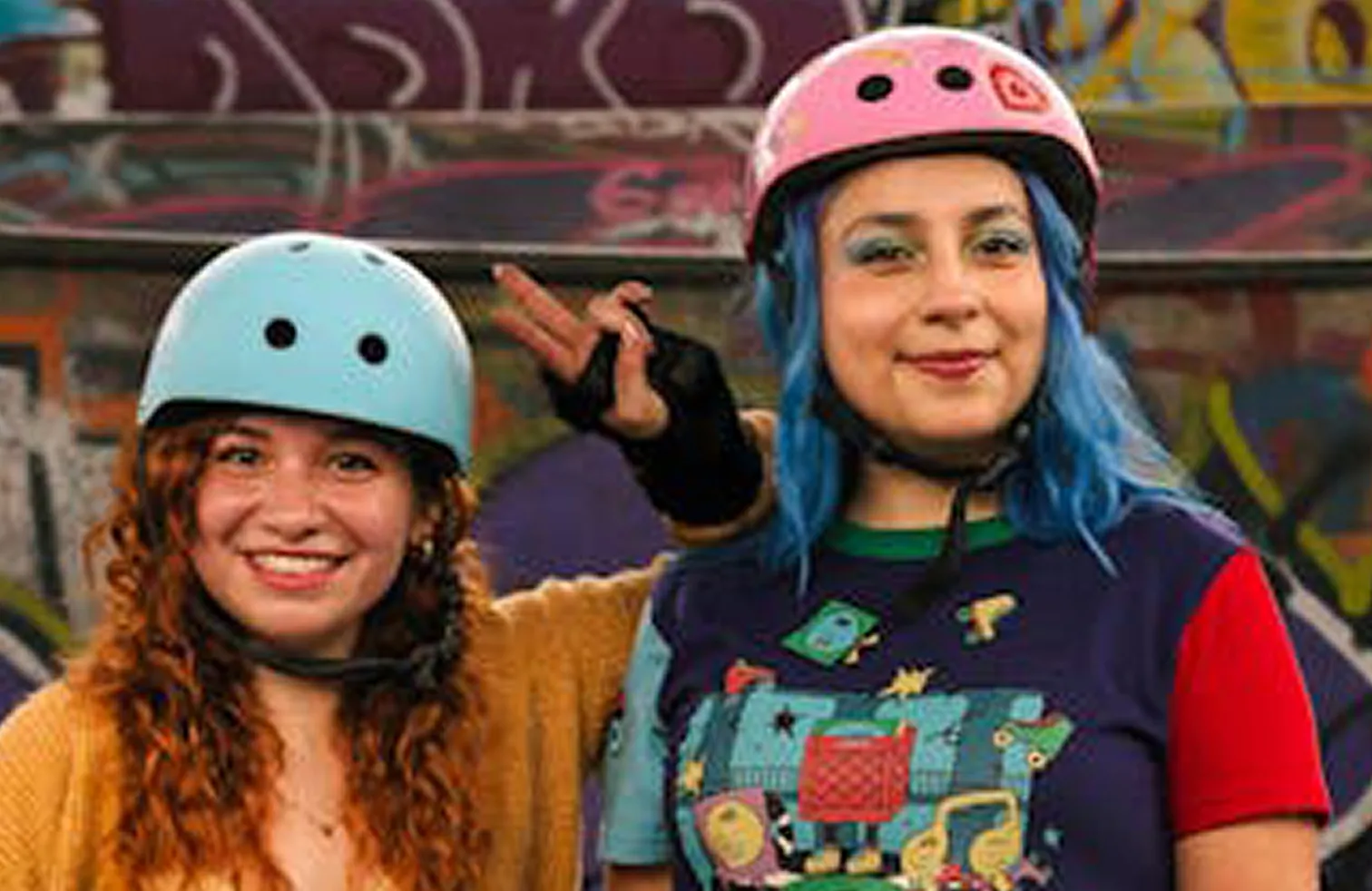 | 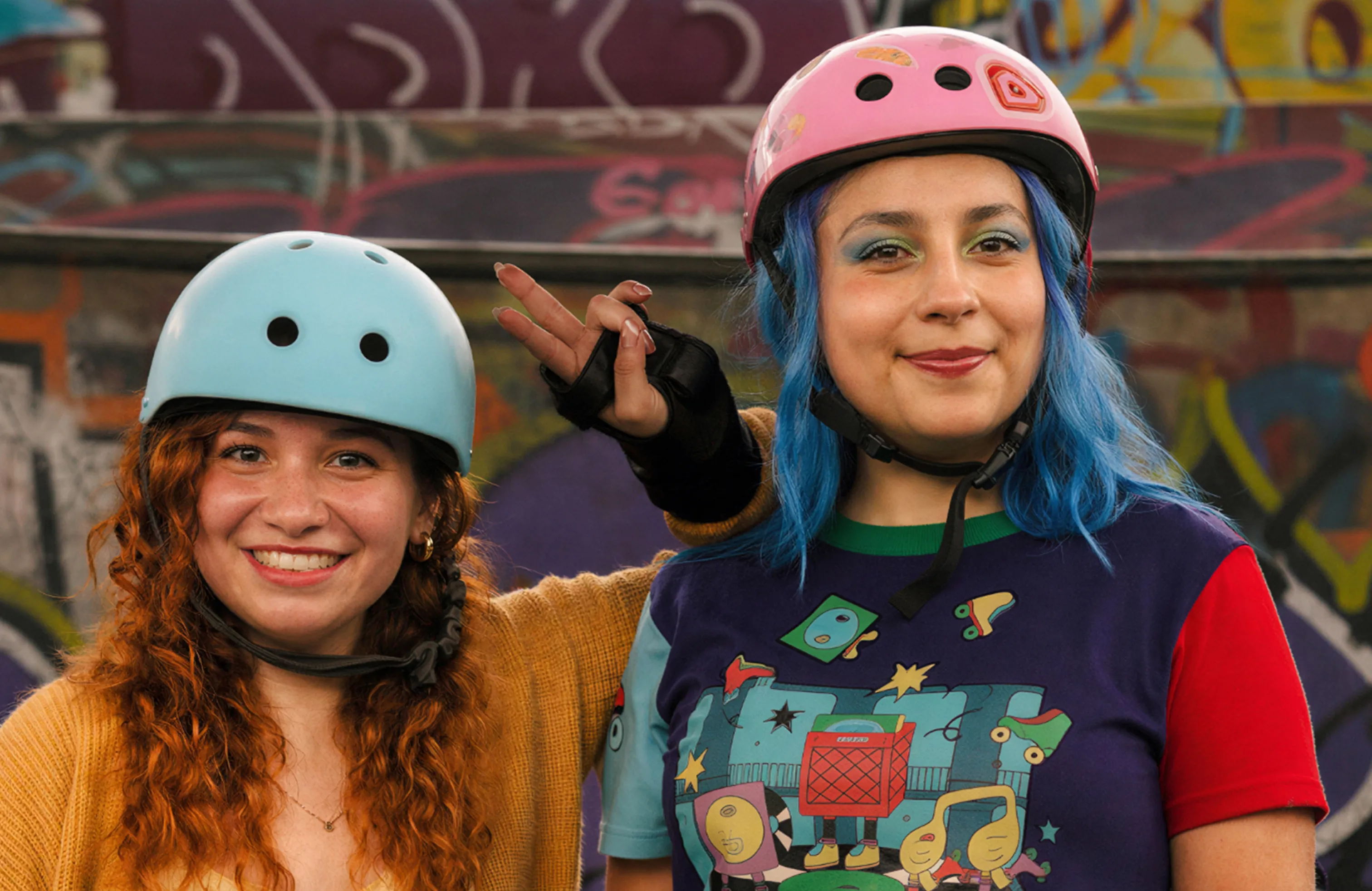 |
Enhanced with the **Wonder 2** model. [View interactive comparison →](https://compare.topazlabs.com/share/image?src1=https%3A%2F%2Fcdn.prod.website-files.com%2F6005fac27a49a9cd477afb63%2F696fce95820c4035f17a1159_wondercompare-fidelity-1-original.webp&src1label=Before&src2=https%3A%2F%2Fcdn.prod.website-files.com%2F6005fac27a49a9cd477afb63%2F696fce96e2494c7a7935814b_wondercompare-fidelity-1-wonder2.webp&src2label=After&view=slider&zoom=1)
## Quick Start
### 1. Get an API key
Sign up at [developer.topazlabs.com](https://developer.topazlabs.com/getting-started/how-do-i-get-my-api-key).
### 2. Add to your MCP client
Add to your Claude Desktop config (`~/Library/Application Support/Claude/claude_desktop_config.json` on macOS, `%APPDATA%\Claude\claude_desktop_config.json` on Windows):
```json
{
"mcpServers": {
"Topaz Labs": {
"command": "npx",
"args": ["-y", "@topazlabs/mcp"],
"env": {
"TOPAZ_API_KEY": "<your-api-key>"
}
}
}
}
```
### 3. Enhance images
> **You:** "Enhance ~/Desktop/photo.jpg with Wonder 2"
>
> **Claude:** I'll enhance your photo using Topaz Labs' Wonder 2 model.
>
> *\[calls image-enhance tool\]*
> **Note:** This tool requires a file path or URL — it cannot process images uploaded directly in the chat. It works best with **Claude Cowork**, which has file system access. It does not work in Claude Chat mode (no file system access).
> Here's your enhanced image -- upscaled and sharpened with improved detail and clarity.
## Compatibility
This server uses **stdio transport**, supported by all major MCP desktop clients:
| Client | Status |
|--------|--------|
| Claude Cowork | ✅ (recommended — has file system access) |
| Claude Desktop (Chat) | ⚠️ Requires user to provide file paths manually |
| Cursor | ✅ |
| Windsurf | ✅ |
| VS Code (Copilot) | ✅ |
| Cline | ✅ |
| Claude Code | ✅ |
| Zed | ✅ |
HTTP streaming transport (for ChatGPT, remote agents, web/mobile clients) is not yet supported but may be added in a future release.
## Tool
### `image-enhance`
Send an image, get back an enhanced version. Defaults to Standard V2 and auto-upscales to 2K.
```
image: "~/Photos/photo.jpg" # Local path or URL (required)
size: { scale: 2 } # Optional: exact dims, single dim, or scale factor
model: "Standard V2" # Optional: defaults to Standard V2
```
**Size options:** `{ width, height }` for exact, `{ width }` or `{ height }` for proportional, `{ scale }` for a multiplier. If omitted, images under 2K are auto-upscaled to 2K width.
**Models:**
| Model | Type | Best for |
|-------|------|----------|
| Standard V2 | standard | General photos (default) |
| Low Resolution V2 | standard | Tiny images, thumbnails |
| CGI | standard | Digital art, renders, illustrations |
| High Fidelity V2 | standard | High-quality sources needing upscale |
| Redefine | generative | Creative reinterpretation |
| Recover 3 | generative | Low-res images, old photos |
| Standard MAX | generative | Maximum quality, slower |
| Wonder 2 | generative | Nature photography, portraits, fine detail |
## Environment Variables
| Variable | Required | Description |
|----------|----------|-------------|
| `TOPAZ_API_KEY` | Yes | [Topaz Labs API key](https://developer.topazlabs.com/getting-started/how-do-i-get-my-api-key) |
## Architecture
```
src/
api/ -- Topaz API client, types, model definitions
lib/ -- Path security, URL fetching utilities
tools/ -- enhance tool handler
server.ts -- MCP server setup and tool registration
main.ts -- Entry point (stdio transport)
test/ -- Vitest test suite
```
## Development
```bash
npm install
npm run build
npm test
```
## Limitations
- **Image only** -- video enhancement is not yet supported
- **Paid API key required** -- sign up at [developer.topazlabs.com](https://developer.topazlabs.com/getting-started/how-do-i-get-my-api-key)
- **Cloud processing** -- images are sent to the Topaz Labs API for enhancement
## Contributing
Found a bug or have a feature request? [Open an issue](https://github.com/topazlabs/topaz-mcp/issues) on GitHub.
## License
MIT -- [Topaz Labs](https://www.topazlabs.com)
This server cannot be deployed
Maintenance
ActivityInactive
ResponsivenessNo issues