
MCP MySQL Server
# MCP MySQL Server
<p align="center">
<img src="https://img.shields.io/badge/Node.js-18%2B-green" alt="Node.js Version">
<img src="https://img.shields.io/badge/License-ISC-blue.svg" alt="License">
<img src="https://img.shields.io/badge/Platform-Windows%20%7C%20Linux%20%7C%20MacOS-lightgrey" alt="Platform">
</p>
<p align="center">
<img src="https://raw.githubusercontent.com/github/explore/main/topics/mysql/mysql.png" width="120" alt="MySQL Logo" />
</p>
## 项目简介
MCP MySQL Server 是一个基于 [@modelcontextprotocol/sdk](https://www.npmjs.com/package/@modelcontextprotocol/sdk) 的 MySQL 工具服务,支持 SQL 查询、表结构获取、连接检测等功能,适用于 AI 代理、自动化工具等场景。
## 主要功能
- 执行 SQL 查询(SELECT、INSERT、UPDATE、DELETE)
- 获取数据库表结构信息
- 检测数据库连接状态
- SQL 语句和参数安全校验
- 优雅的服务启动与关闭
## 架构说明
- **入口文件**:`src/index.js` 启动和管理 MCP 服务器实例
- **服务实现**:`src/server.js` 实现 MCP Server,注册工具、处理请求
- **数据库管理**:`src/database.js` 管理 MySQL 连接池、执行 SQL、获取表结构
- **配置管理**:`src/config.js` 支持 .env 环境变量和默认配置
- **安全校验**:`src/validators.js` 校验 SQL 语句和参数,防止危险操作和注入
## 安装与使用
1. 克隆项目
```bash
git clone https://github.com/yourname/mcp-mysql-server.git
cd mcp-mysql-server
```
2. 安装依赖
```bash
npm install
```
3. 配置数据库连接(可选,支持 .env 文件)
```env
DB_HOST=localhost
DB_PORT=3306
DB_USER=root
DB_PASSWORD=yourpassword
DB_NAME=yourdatabase
```
4. 启动服务
```bash
node src/index.js
```
## 配置说明
- 支持通过环境变量或 `.env` 文件配置数据库和服务参数
- 主要配置项见 `src/config.js`
## 主要实现细节
- 使用 `mysql2/promise` 实现高效的连接池和异步 SQL 执行
- 所有 SQL 语句和参数均经过安全校验,防止危险操作和 SQL 注入
- MCP Server 支持三大工具:
- `execute_sql`:执行 SQL 查询
- `get_tables_info`:获取所有表及字段结构
- `get_connection_status`:检测数据库连接
- 优雅处理进程信号,支持平滑关闭
## 安全性说明
- 禁止 DROP/TRUNCATE/ALTER 等危险操作
- 检查常见 SQL 注入模式
- 限制参数数量,防止滥用
- 禁用多语句执行
## 在 Cursor 中 验证 开发的 MCP Server 是否能运行
### Cursor 添加 MCP Server
通过 `Cursor Settings` -> `MCP Add new global MCP server`,可以将 `MCP` 服务添加为全局可用。这意味着你配置的 MCP 服务将在所有项目中生效。
**也可以只针对 项目级别 添加**
在项目的 `.cursor`目录下,新建一个 `mcp.json`文件进行配置,这样的设置只会对特定项目生效。
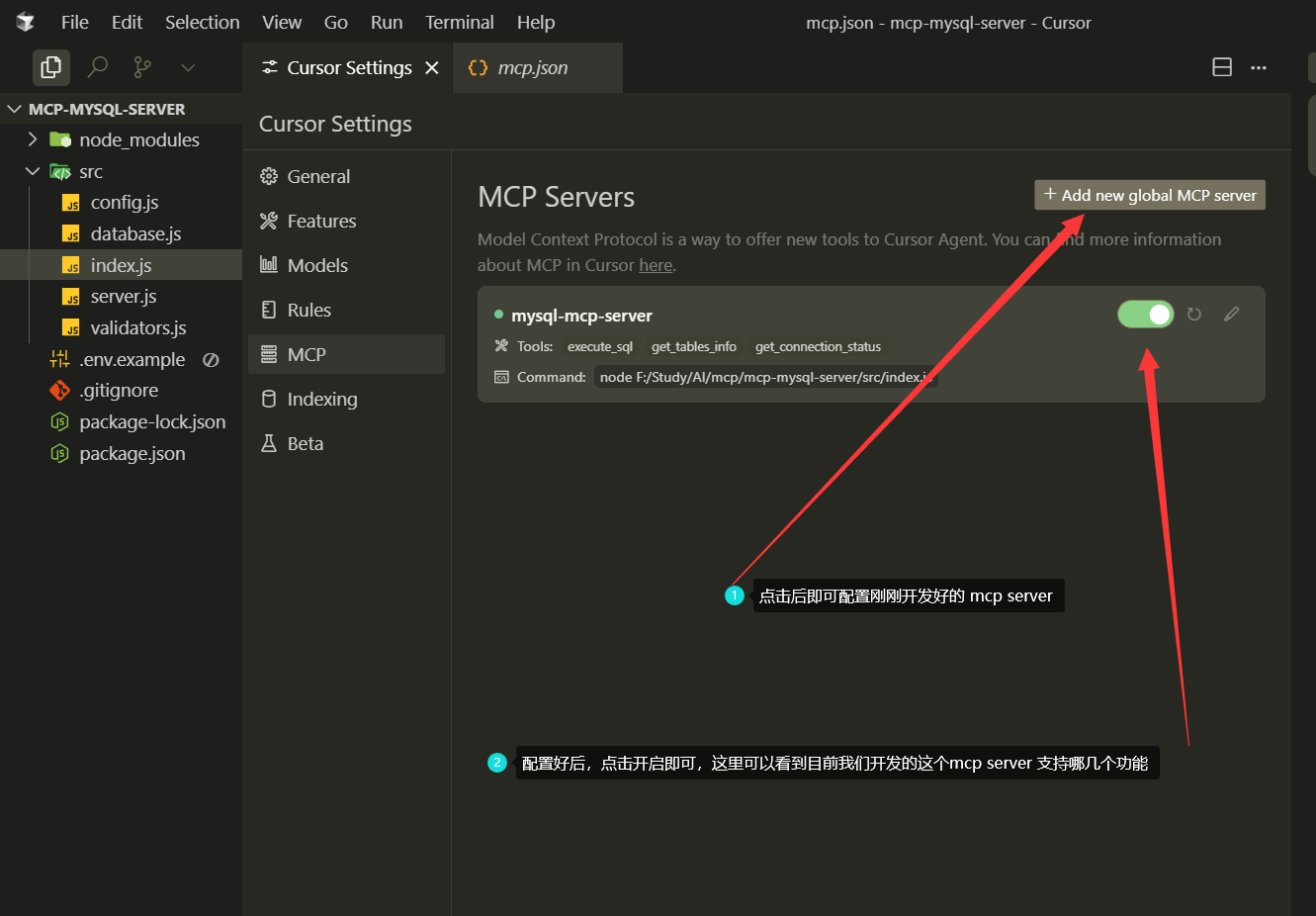
mcp server 的格式是如何呢
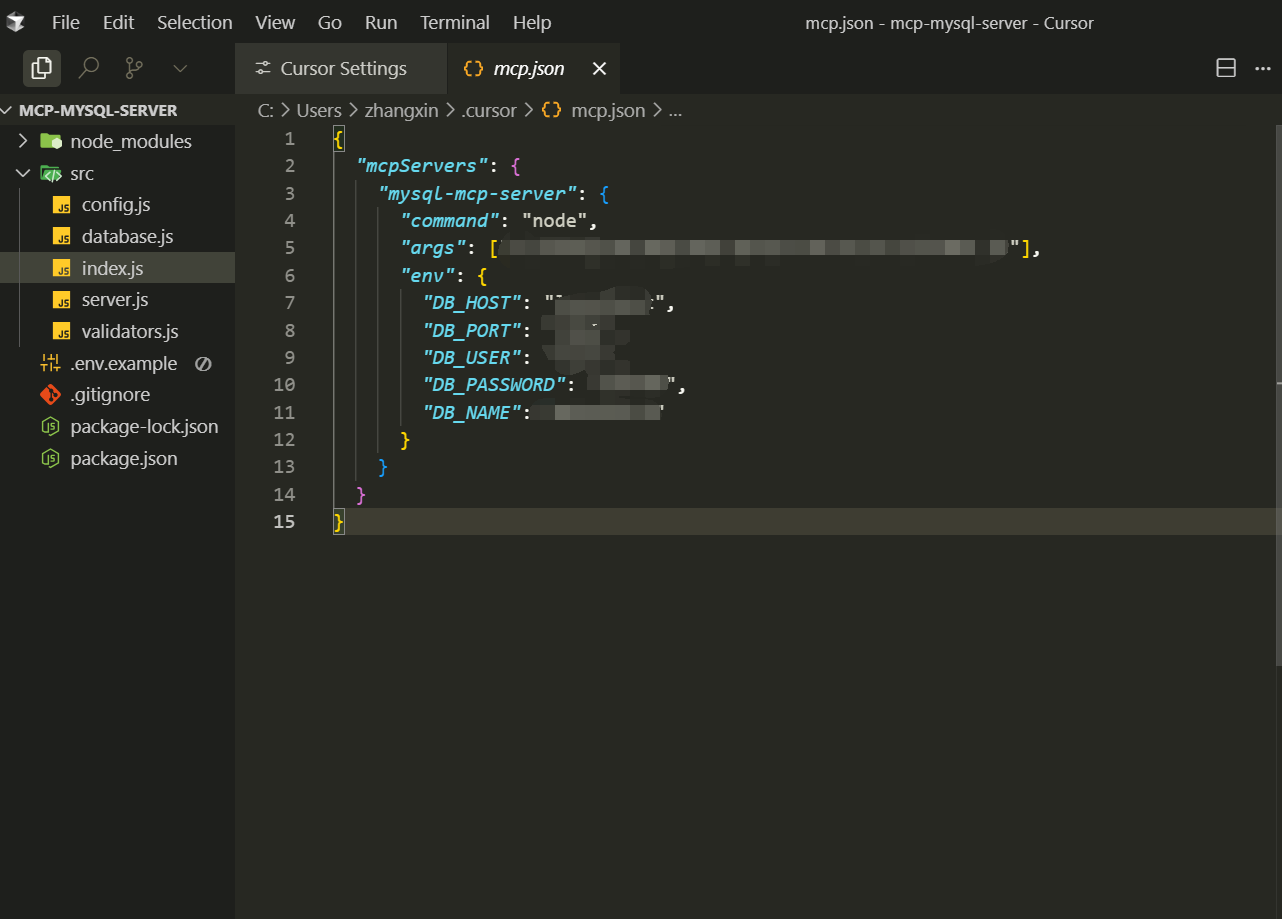
配置 server 基本格式规范
```jsx
{
"mcpServers": {
"<server-name>": {
"command": "<启动命令>",
"args": ["<参数1>", "<参数2>", ...],
"env": {
"<环境变量名1>": "<值1>",
"<环境变量名2>": "<值2>",
...
},
"transport": "<传输协议>",
"port": <端口号>,
"host": "<主机地址>"
}
}
}
```
### 查询数据库表和字段信息
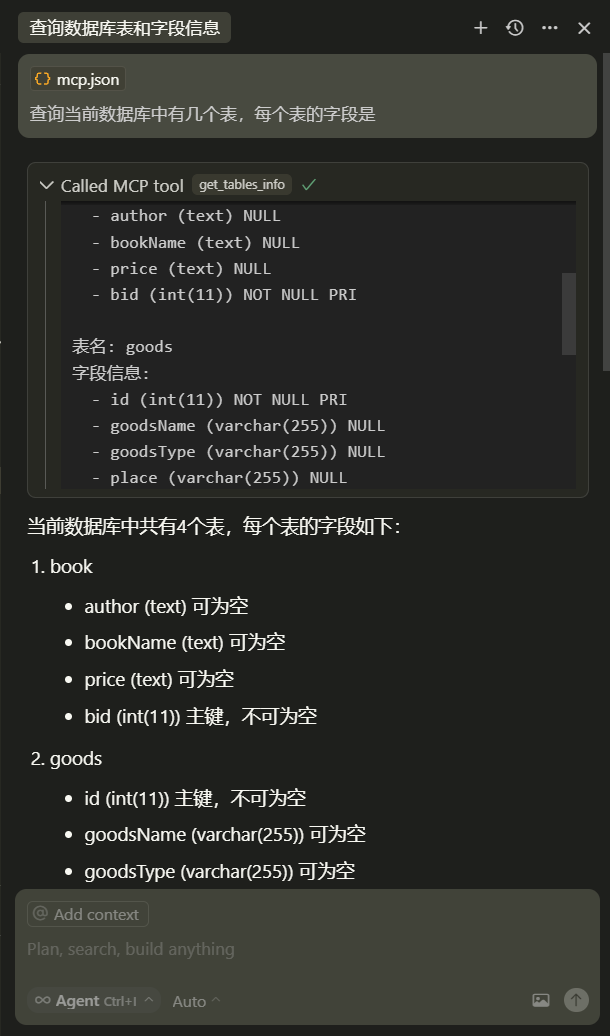
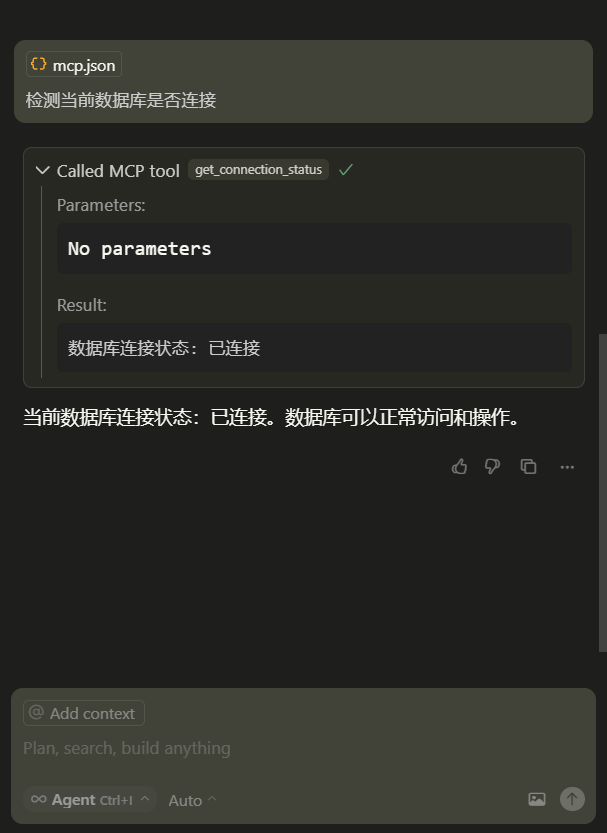
### 查看当前数据库是否连接
### 
### 查询表里数据
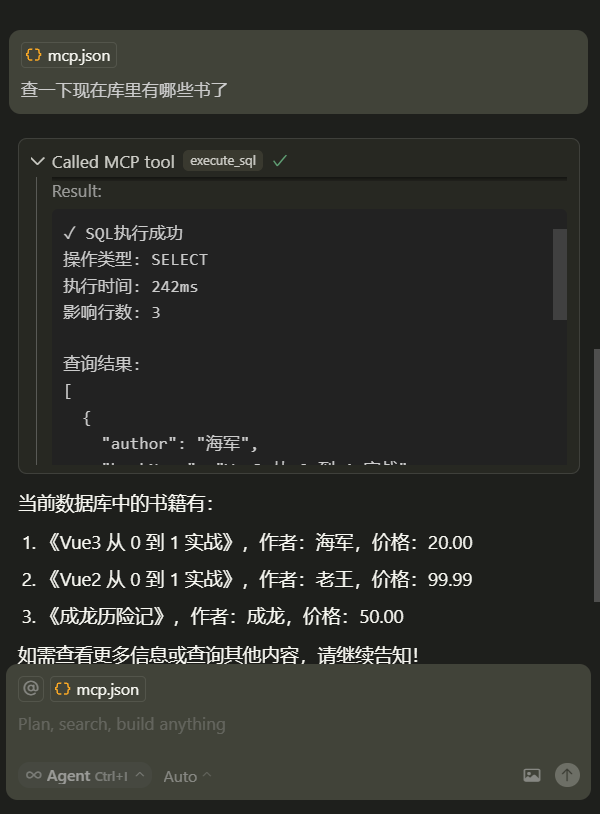
看到这里,是不是觉得很神奇?我们用自然语言描述需求,AI助手自动生成并执行SQL,然后分析结果给出结论。
## 依赖
- [@modelcontextprotocol/sdk](https://www.npmjs.com/package/@modelcontextprotocol/sdk)
- [mysql2](https://www.npmjs.com/package/mysql2)
- [dotenv](https://www.npmjs.com/package/dotenv)
- [express](https://www.npmjs.com/package/express)
- [helmet](https://www.npmjs.com/package/helmet)
- [cors](https://www.npmjs.com/package/cors)
- [express-rate-limit](https://www.npmjs.com/package/express-rate-limit)
## 贡献方式
欢迎提交 Issue 和 PR 参与贡献!
## 许可证
[ISC License](https://github.com/TickHaiJun/mysql-mcp-server/blob/main/LICENSE)
TDQS
Scored across 7 tools
Each tool has a clearly distinct purpose with no overlap: add_column modifies table structure, connect_db handles connections, create_table creates tables, describe_table inspects structure, execute handles write queries, list_tables enumerates tables, and query handles read queries. The separation between execute (for INSERT/UPDATE/DELETE) and query (for SELECT) is particularly well-defined.
All tools follow a consistent verb_noun pattern with clear, descriptive names in snake_case: add_column, connect_db, create_table, describe_table, execute, list_tables, query. The naming convention is uniform throughout the set, making it easy to predict tool functions.
With 7 tools, this server is well-scoped for MySQL database operations. Each tool serves a distinct, essential function in the database management workflow, from connection and table listing to query execution and schema modification. The count is neither too sparse nor bloated.
The tool set covers core MySQL operations effectively: connection management, table CRUD (create, list, describe), schema modification (add_column), and query execution (both read and write). A minor gap is the lack of tools for deleting tables or columns, which might require workarounds using execute, but the surface is otherwise complete for basic database interactions.