
shield-kya
README.md
# `@shield-agent/kya`
[](https://www.npmjs.com/package/@shield-agent/kya)
[](https://www.npmjs.com/package/@shield-agent/kya)
[](https://www.npmjs.com/package/@shield-agent/kya)
[](./LICENSE)
[](https://shield-agent.com/install)
[](https://x.com/coscosmico)
**Audit trail and traceability for AI agents.** See what every coding agent did, block risky calls, ask a human for approval, and prove it with signed trust checks. Every tool call is recorded on a live local dashboard and can be checked against the Agent Trust Baseline. Locally KYA gives warnings, not blocks, and fails open (an error lets the call through). The one exception is a small never-list (a short list of dangerous calls that is always denied). Real enforcement runs on the MCP gate path and the hosted plane (the Shield Agent cloud service). One command. Free forever under MIT.
```bash
npm i -g @shield-agent/kya@latest && kya start
```
Requires **Node.js 22+** (24 recommended). Restart Cursor / Claude Code / Codex once so MCP loads. Hosted desk: [shield-agent.com](https://shield-agent.com/install).
CLI and local MCP gate for Shield’s Know Your Agent path.
An agent that asks Shield first gets Allow, Review, or Deny: you register the agent, wrap the tool (or route it through the MCP gate or the hosted plane), and Review waits for a person. Local hooks only record and block the never-list (see [Hook interception](#hook-interception)). Hosted is where enforcement lives. This package does not scan your network. Agents that never call evaluate stay invisible on purpose.
Walkthrough: [how you use it](https://shield-agent.com/how-kya-works#using).
```bash
npx @shield-agent/kya@latest --help
```
Requires **Node.js 22+** (`engines.node: >=22`); 24 is the recommended line. Node 20 and 21 are unsupported but work: the CLI prints a one-line warning. Node 18 and older are unsupported and some features break there (HTTP `serve-mcp`, the gateway OTLP receiver). Below 22 the CLI offers to install Node 24 for you (via volta / fnm / nvm / brew), reinstall itself, and finish the command. If you decline, it just prints the warning and continues. `kya hook` never warns or prompts.
It works with any host that speaks MCP or OpenAPI. Vertical packs are optional. Shield is the only policy decision point (the one place that decides Allow or Deny). This gate never auto-approves an irreversible side effect (a change you cannot undo).
If `KYA_API_KEY` is empty against an authenticated plane, network commands exit non-zero. `eval-tool`, `wrap`, and `invoke` exit `0` on ALLOW, `4` on REQUIRE_APPROVE, and `1` on DENY or unknown, so a line like `eval-tool && write` cannot skip the gate.
`--offline` runs sample evaluate without a paid cloud (useful for DENY and REQUIRE_APPROVE demos). Creating an agent is itself a tool: offline, `kya.agent.register` comes back REQUIRE_APPROVE. Allow, break-glass, and approve mint modes (the modes that create approvals) live on the control plane.
## One liner
```bash
npm i -g @shield-agent/kya@latest && kya start
```
Run it in your project directory. (From a clone of this repo, `./scripts/install-local.sh` replaces the npm install.)
More ways to install (same package; npm stays the reference path):
```bash
# Homebrew. Homebrew 7 may ask you to trust a third-party tap: run `brew tap The-Pixel-Boys/tap` first.
# The formula installs about 270MB because of the optional semantic-search runtime.
brew install The-Pixel-Boys/tap/shield-kya
# Scoop (not yet verified on Windows)
scoop bucket add The-Pixel-Boys https://github.com/The-Pixel-Boys/scoop-bucket.git
scoop install shield-kya
```
Claude Code users can also install the [plugin](#claude-code-plugin); GitHub Copilot CLI users the [Copilot CLI plugin](#github-copilot-cli-plugin) (read its first paragraph before installing); Codex CLI users the [Codex plugin](#codex-plugin); Gemini CLI users the [Gemini CLI extension](#gemini-cli-extension). Cline users: `npm install -g @shield-agent/kya@latest`, then follow [`llms-install.md`](llms-install.md). It is written so Cline can follow it; a Cline run from that file alone has not been tested yet.
That **inits** `.kya/`, **wires** local MCP (`.mcp.json`, `mcp.json`, `.cursor/mcp.json` → `kya serve-mcp --stdio`), also **wires user-level configs for every installed host it detects** (`~/.claude.json`, `~/.kimi-code/`, `~/.grok/`, `~/.cursor/`, …), and **opens** the live activity report. The report runs in the background, so you get your terminal back. `kya stop` stops it. `kya receipt --open` reopens it. Cursor, Kiro, Qwen, Amp, Droid, Cline, and Grok pick the server up live with no restart (Kimi: just a new session). Claude Code, Codex, OpenCode, Gemini, Copilot CLI, and Kilo CLI load it on next launch. `claude --resume` keeps your conversation.
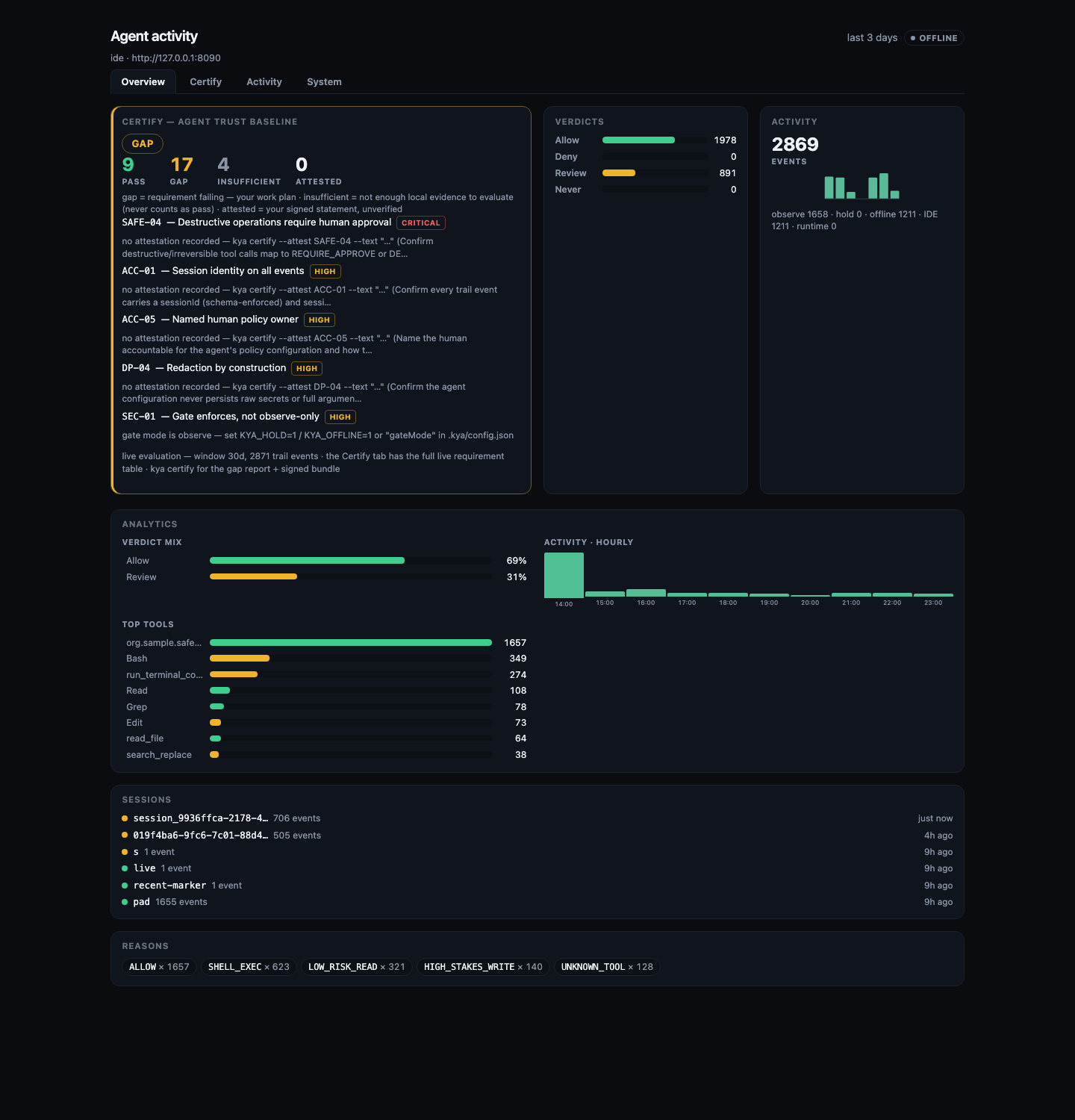
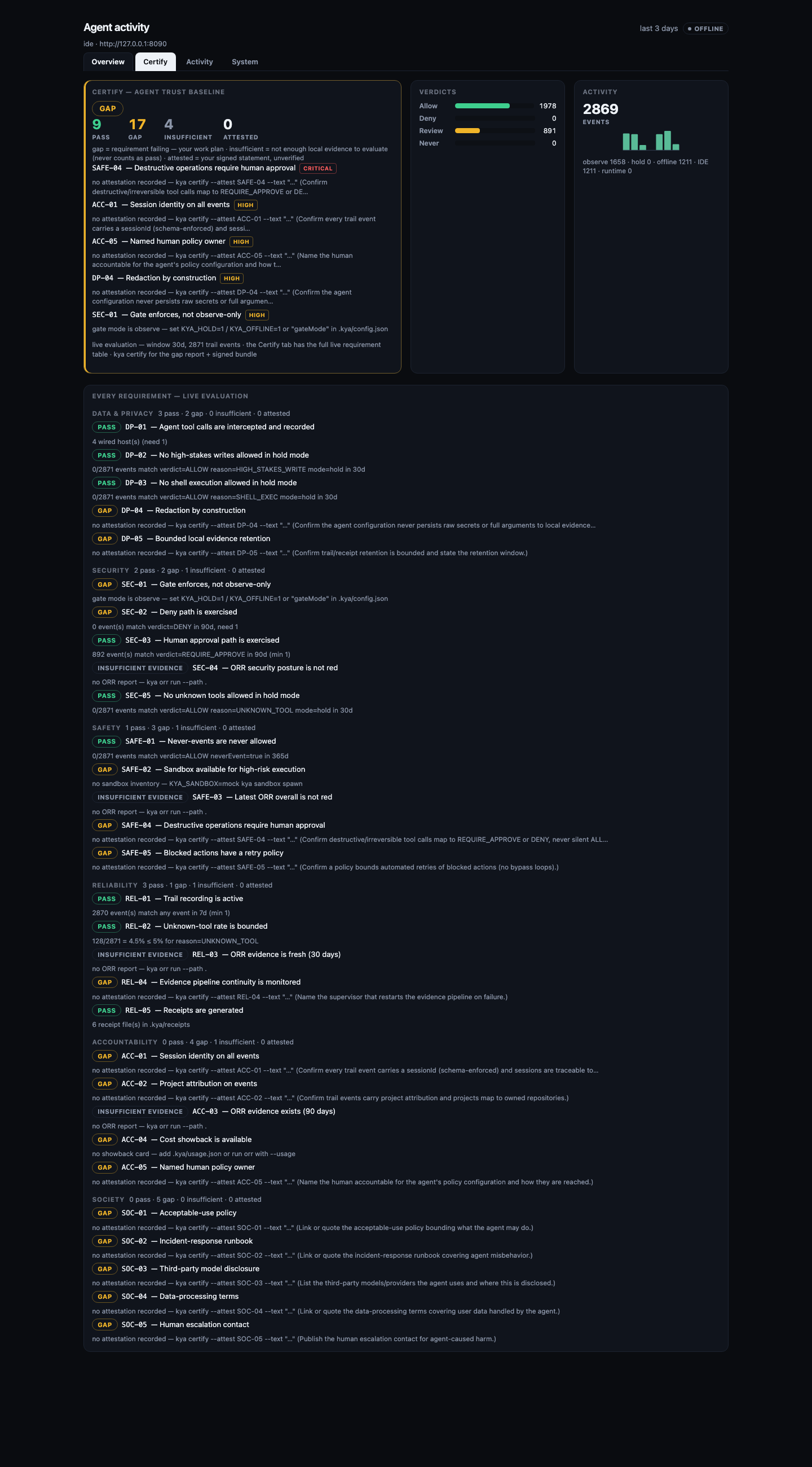
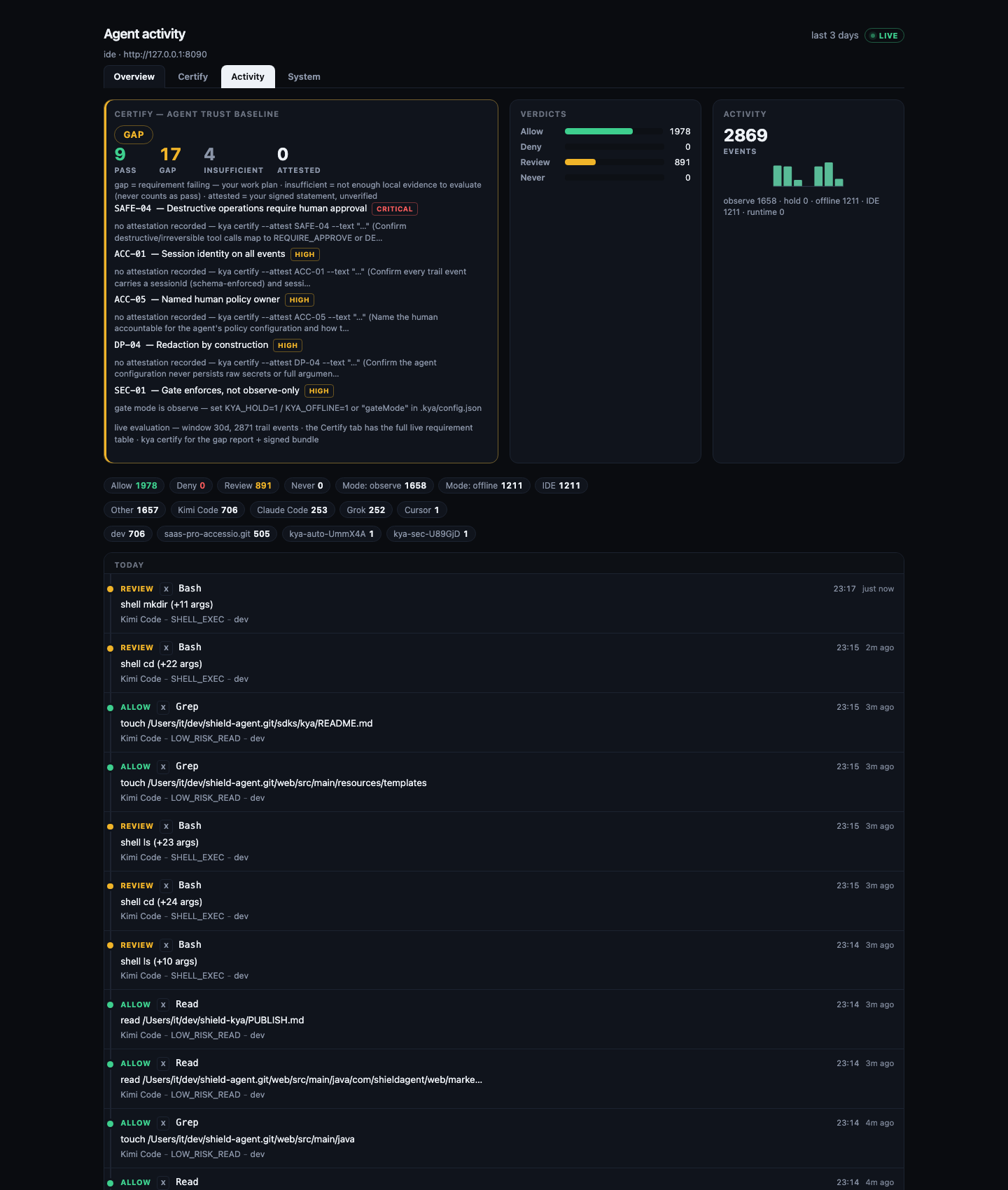
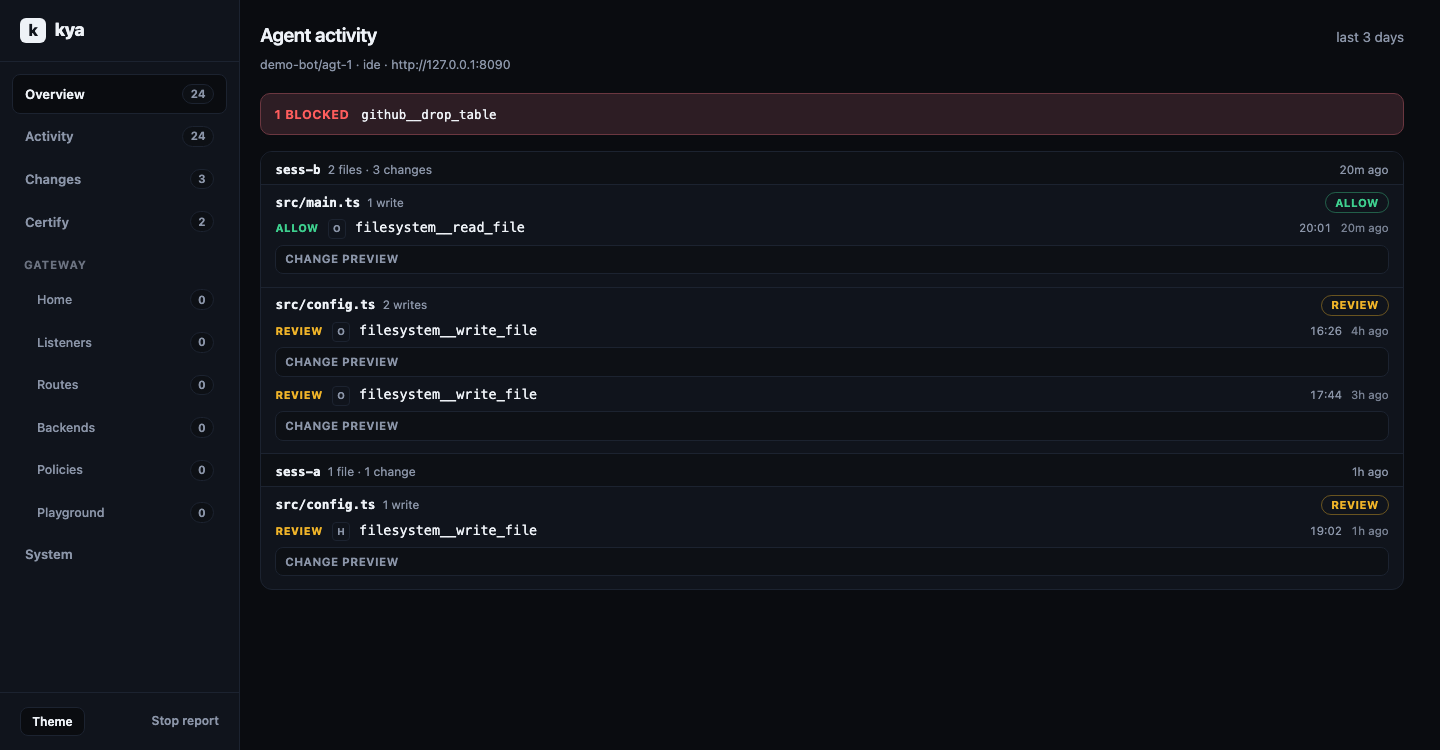
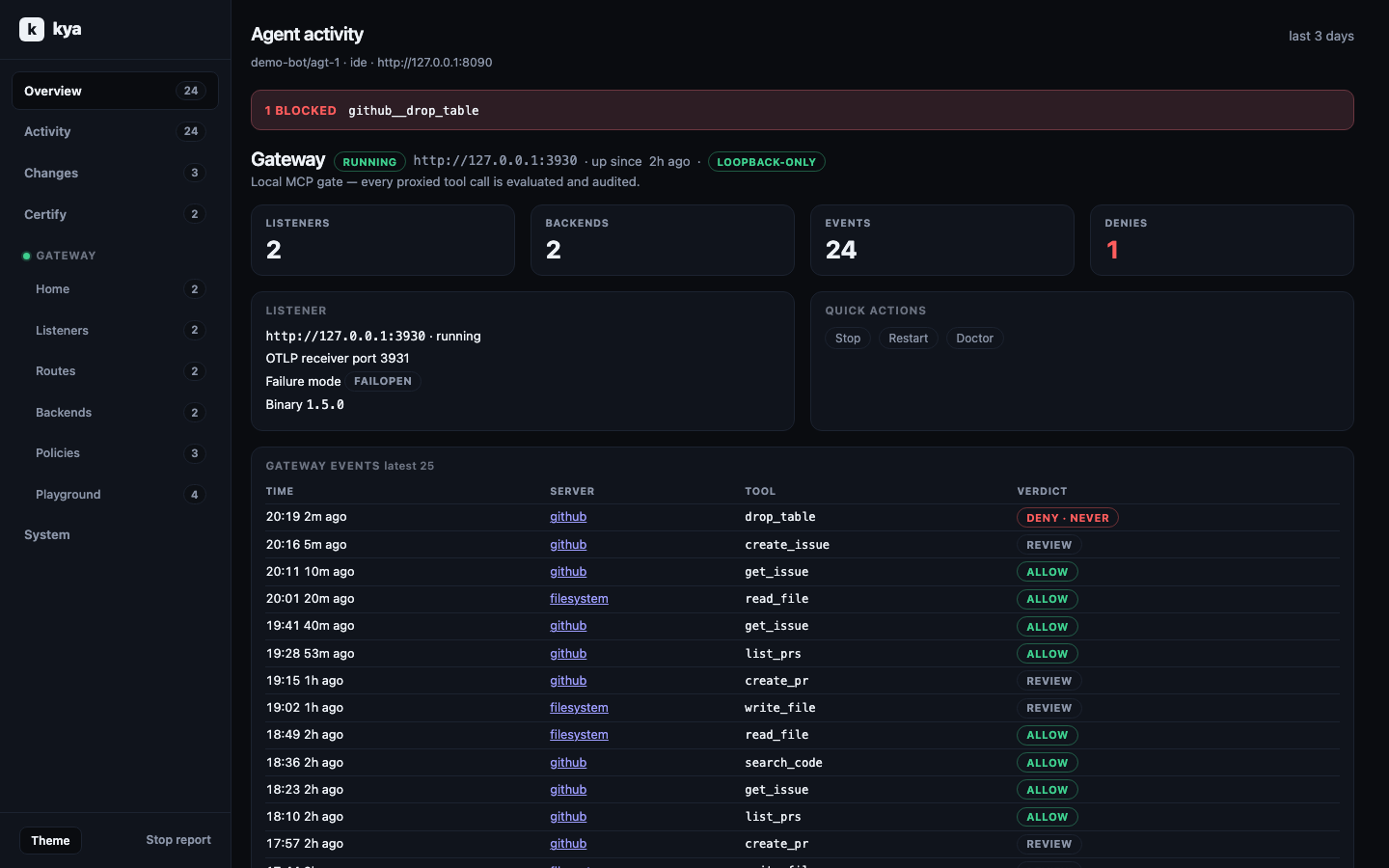
<!-- Local paths kept in package for offline viewers: assets/report-overview.png, assets/report-certify.png, assets/report-activity.png, assets/report-changes.png, assets/report-gateway.png (legacy: assets/activity-receipt.png) -->
```bash
kya start --no-open # wire only
kya start --force # rewrite MCP blocks
# Receipt change previews (clipped + redacted): on by default for writes
# KYA_DIFF_PREVIEW=0 to disable
```
## One command per host
`kya start` covers Claude Code, Cursor, and any host that reads `.mcp.json`. It also auto-wires the user-level config of every installed host it detects. For the rest, `kya connect` writes the host's own config dialect directly:
```bash
kya connect claude # ~/.claude.json (merges mcpServers only)
kya connect grok # ~/.grok/config.toml (appends [mcp_servers.shield-kya])
kya connect opencode # ~/.config/opencode/opencode.json
kya connect qwen # ~/.qwen/settings.json
kya connect amp # ~/.config/amp/settings.json
kya connect qwen --project # project scope instead of global
kya connect kiro --force # overwrite an existing shield-kya entry
```
Connect merges. It never rewrites a host config it cannot parse, and it keeps your other servers and keys. Supported hosts: `claude`, `grok`, `opencode`, `kilo`, `kiro`, `qwen`, `kimi`, `mastracode`, `amp`, `copilot`, `cursor`. Each wires `serve-mcp --stdio` with `KYA_OFFLINE=1` so the gate starts keyless (no API key). Set `KYA_API_KEY` in the host env when you point at an authenticated plane.
Hosts without a `connect` target still work: `kya wrap --offline -- <agent command>` puts the same evaluate gate in front of any CLI. Per-host recipes with verify steps and troubleshooting live in [docs/hosts/](docs/hosts/).
## Hook interception
`kya start` also wires a `PreToolUse` hook into every installed hook-capable host it detects: Claude Code (`~/.claude/settings.json`, merge-only), Grok (`~/.grok/hooks/shield-kya.json`, kya-managed file), and Kimi Code (`~/.kimi-code/config.toml`, `[[hooks]]` append). Every tool call the agent makes then passes through `kya hook` first: it is evaluated locally (offline, sub-second, no network) and written to the global record (trail). (If you opted in to anonymous usage stats, the hook also starts a detached helper at most once a day; see [Anonymous usage stats](#anonymous-usage-stats-opt-in-off-by-default).)
Decision mapping: a local never-list **DENY** blocks the tool call (exit `2` plus `hookSpecificOutput` deny JSON with `permissionDecision: "deny"`). **ALLOW** and **REQUIRE_APPROVE** are written to the record as advisory and the call proceeds. Manual wiring can pass `--strict` on the hook command to also block **REQUIRE_APPROVE**.
Hooks are fail-open: any hook error or timeout allows the call. They are alerts plus local never-list enforcement, not the sole barrier. Plane enforcement stays on the MCP `kya.policy_evaluate` path. Hooks take effect in new sessions; all three hosts load hooks at session start.
```bash
kya connect claude --hooks # wire the PreToolUse hook by hand
kya connect grok --hooks
kya connect kimi --hooks
```
## Claude Code plugin
This repo is also a Claude Code plugin marketplace named `shield-kya` with one plugin, `kya`:
```text
/plugin marketplace add The-Pixel-Boys/shield-kya
/plugin install kya@shield-kya
```
The plugin is **advisory and fails open**: it records every tool call on the local record (`~/.kya/trail.jsonl`) and blocks only the small never-list. If kya is missing, crashes or times out, the tool call proceeds and nothing is recorded. It evaluates offline, so it has no Hold and no approval. Hosted enforcement is the MCP gate path.
Team rollout: commit `extraKnownMarketplaces` (the `shield-kya` GitHub source) and `enabledPlugins` (`"kya@shield-kya": true`) to the repository's `.claude/settings.json`, or force it org-wide with managed settings. Details and limits: [docs/hosts/claude-plugin.md](docs/hosts/claude-plugin.md).
## GitHub Copilot CLI plugin
**Check first.** If the public repo has no `plugins/kya-copilot` folder yet (every release before the one that ships it), do not install the plugin in Copilot CLI: Copilot then gets the Claude Code plugin, and Copilot CLI 1.0.98 denies every tool call with it ("Denied by preToolUse hook ... (hook errored)"). If you already did, run `copilot plugin uninstall kya@shield-kya`, and use `kya connect copilot` (MCP server only, see [More hosts](#more-hosts)) until a release ships the folder.
From that release on:
```bash
copilot plugin marketplace add The-Pixel-Boys/shield-kya
copilot plugin install kya@shield-kya
```
Copilot reads `.plugin/marketplace.json` before `.claude-plugin/marketplace.json`, so `kya@shield-kya` resolves to `plugins/kya-copilot`: an Agent Plugins v1 manifest (`plugin.json`), hooks in `com.github.copilot/hooks/hooks.json` and the MCP server in `mcp.json`. Claude Code and Codex keep loading `plugins/kya` and never see this folder. Same behaviour: advisory, fails open. Copilot denies a tool call when a pre-tool hook exits non-zero. So the hook is a `bash` command that does nothing when `node` is not on Copilot's `PATH`. Otherwise it runs `scripts/copilot-hook.mjs` (which forwards only kya's never-list deny) and turns any exit other than `2` into `0`. Recording needs Node.js 22 or later on that `PATH`. Copilot names MCP tools `<server>-<tool>` (for example `postgres-drop_table`); the never-list does not recognise that form yet, so MCP calls are recorded but not blocked. Rows in the record show the product as `other`. Tested with Copilot CLI 1.0.98 on macOS. **Do not install it on Windows yet**: the pre-tool hook has only a `bash` form and has not been run on Windows; use `kya connect copilot` there. Details: [docs/hosts/copilot.md](docs/hosts/copilot.md#plugin).
## Codex plugin
The same repo is a Codex plugin marketplace (`.agents/plugins/marketplace.json`) with the same `kya` plugin:
```bash
codex plugin marketplace add The-Pixel-Boys/shield-kya
codex plugin add kya@shield-kya
```
Then open `/hooks` in Codex CLI and trust the two Shield KYA hooks: Codex runs no plugin hook until you do. Codex trusts the hook command, not the scripts it runs; the SessionStart command carries the kya version, so each kya release asks again. Codex also auto-upgrades Git marketplaces at startup, so whoever can push to this repo can change what runs next; teams can pin a release ref (see the guide). Same behaviour as the Claude Code plugin: advisory, fails open, records every tool call Codex sends through its hooks (shell, `apply_patch`, MCP and other local tools; not hosted tools such as web search), blocks only the never-list. It bundles no MCP server; add one with `kya connect codex`. Details: [docs/hosts/codex.md](docs/hosts/codex.md#codex-plugin).
## Gemini CLI extension
The repo root is also a Gemini CLI extension (`gemini-extension.json` + `hooks/hooks.json`):
```bash
gemini extensions install https://github.com/The-Pixel-Boys/shield-kya
```
Same behaviour as the other plugins: advisory, fails open, records every tool call Gemini sends through its `BeforeTool` hook, blocks only the never-list. Gemini runs extension hooks without a separate trust step. The extension pins the kya version it was released with. It bundles no MCP server; see the MCP examples. Details: [docs/hosts/gemini.md](docs/hosts/gemini.md#gemini-cli-extension).
## Gate (local MCP gateway)
`kya gate` puts one loopback-only listener (`127.0.0.1`, default port `3930`) in front of any MCP server you already use. Your host talks to the gateway; the gateway fans out to the real servers. Per-tool policy comes from the [top-20 server taxonomy](docs/mcp-servers.md). Destructive names (`drop`/`truncate`/`purge`/`transfer`) and each server's ADMIN-tier tools are denied outright and filtered from `tools/list`. Everything else runs in observe mode: allowed, and recorded. Every call is written to the local record and the live report, and can be forwarded as OTLP to the hosted intake.
**Zero-touch:** `kya start` already does this for you. It scans your detected host configs for third-party MCP servers, imports them into `.kya/gateways.json` (recorded with an `importedFrom` field that says where each server came from), installs the gateway binary, starts the listener, and rewrites each source host so the imported servers route through the gateway. The original host config is kept under `.kya/backups/` before anything is removed. Nothing found → nothing downloaded, no listener. Opt out with `kya start --no-gate` or `KYA_GATE=off`. If the binary download fails (offline, no network), `kya start` warns once and continues without the gateway. Host configs stay untouched. The manual path below is still there when you want full control:
```bash
kya gate init # scaffold .kya/gateways.json with ready-to-move recipes
# edit gateways.json: move a recipe into "servers", fill its placeholders
kya gate setup # download the pinned gateway binary into .kya/bin
kya gate run # generate the gateway config, start the listener detached
kya connect claude --gate # point the host at the gateway (server key shield-kya-gate)
kya gate doctor # binary, config, listener health, loopback-only posture
```
`kya gate stop` stops the supervisor and the binary with it. Honest notes: `kya gate setup` (and `kya start`'s auto-bootstrap, only when it found servers to govern) downloads the pinned gateway binary from our releases. Nothing else downloads anything. The only other network use is the opt-in anonymous usage stats in [docs/telemetry.md](docs/telemetry.md), off unless you say yes. `run` never downloads. Observe mode means allowed calls are recorded, not blocked. The deny set above is the only hard stop, and plane enforcement stays with `kya.policy_evaluate`. `kya connect <host> --gate` covers the same hosts as plain `connect`. Grok gets a `[mcp_servers.shield-kya-gate]` url table in its config.toml (Grok supports remote MCP servers over HTTP). Per-server tiers and recipes: [docs/mcp-servers.md](docs/mcp-servers.md).
## Longer path (optional)
```bash
# Offline sample evaluate
kya eval-tool --offline --tool-id org.sample.never.event --irreversible
kya wrap --offline --tool-id Write --irreversible --args '{"path":"src/x.ts","content":"hi"}'
kya receipt --open
# Org Hold: KYA_HOLD=1 kya wrap …
kya dash --once --offline
```
Install hub: [https://shield-agent.com/install](https://shield-agent.com/install)
## Activity record (global)
One record (trail) for all projects: `~/.kya/trail.jsonl` (`KYA_HOME` overrides `~`). `kya receipt --open` from any directory shows activity from every project. Each event carries its project folder name. The report adds a Projects rollup once two or more projects appear, and shows the project on each feed entry. Older per-project `<project>/.kya/trail.jsonl` files are still read and merged; no migration. The record is capped at 1 MB (tail-read: oldest events drop away) and shared across all projects.
The report itself is a dashboard. A hero row on top shows the live **Certify** result, the decision mix, an activity sparkline, and showback (cost per agent). Tabbed sections sit below: **Overview** (analytics, sessions, reasons), **Certify** (the full live requirement table: every requirement grouped by domain with status, evidence, and attestation), **Activity** (the filterable event feed), **System** (wired hosts, sandboxes, ORR). Everything is one standalone offline HTML page. The live view adds a single external link: "Star on GitHub". The live daemon from `kya start` re-renders it on every event.
### Sharing a report
`kya receipt --share` publishes a **redacted summary** of the current window (aggregate decision counts, product and reason-code rollups, and the Certify status; no paths, no tool arguments, no session IDs) to shield-agent.com and prints a public URL (`/r/<id>`) with its expiry date (7 days) that anyone can open, plus one line suggesting you send it to your security lead. Every shared page carries the one-line install so readers can audit their own agents, and a button to start a hosted workspace for the team. The Certify status on the page is labelled as self-reported by the CLI, not verified by Shield Agent. With `--json` the command prints only `{"url", "expiresAt"}`. Point it at a different collector with `--share-url <base>` or `KYA_SHARE_URL`.
Sharing is a single attempt by design (storm-proof: no silent retries against the collector). `--share-retries <n>` (max 3) opts into bounded retries on 429/5xx/network failures with exponential backoff plus jitter, and respects the server's `Retry-After`.
### Natural-language search
The **Activity** search box understands plain English. It runs a hybrid of BM25 over tool IDs, summaries, reason codes, decisions, projects, and MCP server labels, plus local MiniLM semantic reranking (shipped as an optional dependency; the report falls back to lexical-only if the model runtime is unavailable). A built-in concept glossary maps everyday words to the vocabulary events actually use, so `dangerous` finds rm/kill/delete/sudo calls, `blocked` finds denials, and `held` finds approval requests. You can also type things like `failed stripe transfers`, `files written by grok`, or `approval required production`. Stopwords and stemming are handled automatically, and the same search works across the global record.
- Offline or `KYA_OFFLINE=1` keeps search purely lexical (no model download).
- By default the live server downloads `BAAI/bge-small-en-v1.5` once into `~/.kya/models` and caches event vectors in `~/.kya/search-index.json`.
- `KYA_SEARCH_SEMANTIC=off` disables the model while still keeping BM25.
The hosted console uses the same hybrid search on the server side (Postgres full-text + optional OpenAI-compatible embeddings), so queries typed in either place behave the same way.
## Dual plane
```
host=ide (authoring) host=runtime (production)
│ │
└────────── same agent ────────┘
identity
policy evaluate → ALLOW | DENY | REQUIRE_APPROVE
approval + trail
```
Tag sessions with `KYA_HOST=ide` or `KYA_HOST=runtime`. Same policy path either way.
## Environment
| Variable | Required | Meaning |
|----------|----------|---------|
| `KYA_BASE_URL` | Yes (network cmds) | Control plane origin |
| `KYA_API_KEY` | When auth is on | API key (or Bearer JWT for decide verbs) |
| `KYA_HOST` | No (default `ide`) | `ide` \| `runtime` |
| `KYA_AGENT_ID` | After register | Agent principal id |
| `KYA_MCP_PORT` | No (default `3920`) | HTTP MCP listen port |
| `KYA_OFFLINE` | No | `1`/`true` for sample evaluate |
| `KYA_HOLD` | No | `1`/`true` for the org Hold path (REQUIRE_APPROVE opens a human ticket) |
| `KYA_DASH_PLAN` | No | `enterprise` unlocks licensed TUI panes |
| `KYA_DIFF_PREVIEW` | No | `0` disables clipped change previews on the receipt |
| `KYA_RECEIPT_AUTO` | No | `0` disables auto-open receipt after wrap; `1` forces |
| `KYA_SEARCH_SEMANTIC` | No | `off` disables MiniLM semantic reranking (BM25 still works) |
| `KYA_SHARE_URL` | No | `kya receipt --share` collector base (default `https://shield-agent.com`) |
| `KYA_TELEMETRY` | No | `0`/`off` forces anonymous usage stats off ([docs/telemetry.md](docs/telemetry.md)); they are off unless you opted in |
| `DO_NOT_TRACK` | No | `1` forces anonymous usage stats off, same as `KYA_TELEMETRY=0` |
Gate mode can also be set in the project's `.kya/config.json`:
`{"gateMode": "hold"}` or `{"gateMode": "offline"}` (exact values only;
anything else is ignored). The gate itself (wrap / hook / eval) follows it
with the precedence flags > env > config > observe, and `kya certify`
reports through the same resolver, so a certify pass on gate mode always
reflects how the gate actually runs.
## MCP tools
| Tool | Role |
|------|------|
| `kya.policy_evaluate` | `ALLOW` \| `DENY` \| `REQUIRE_APPROVE` |
| `kya.session_ingest` | Observe / raise-only risk |
| `kya.request_approval` | Open a human Hold. Does not execute the side effect |
MCP Registry entry: `server.json` plus package `mcpName` `io.github.The-Pixel-Boys/shield-kya`.
```json
{
"mcpServers": {
"shield-kya": {
"command": "npx",
"args": ["--no-install", "@shield-agent/kya@0.32.6-rc.1", "serve-mcp", "--stdio"],
"env": {
"KYA_BASE_URL": "http://127.0.0.1:8090",
"KYA_API_KEY": "${KYA_API_KEY}",
"KYA_HOST": "ide"
}
}
}
}
```
## Wrap and decide
```bash
npx @shield-agent/kya wrap --offline --tool-id org.sample.data.write --irreversible
npx @shield-agent/kya approve --id <approval-id>
npx @shield-agent/kya reject --id <approval-id>
```
A hosted high-risk request (HIGH priority now or before, or created with the irreversible hint) cannot be approved from the CLI or the TUI: the hosted plane answers 403 `kya.approval_console_mfa_required`. Approve it in the hosted console with a two-factor code. `reject` always works.
`wrap` evaluates and may open a pending ticket. It never executes the side effect. `invoke` asks the live plane to authorize after Allow or APPROVED. It does not run the write on this machine. The TUI (`dash`) can `a`/`x` decide only after `y` confirm with a JWT (`sk_*` refused).
## In-process SDK shims
Agents built on LangGraph.js, the Vercel AI SDK, Mastra, OpenAI Agents TS, or the Claude Agent SDK can route tool calls through the same evaluate path without a gateway:
```ts
import { governed, governLangGraphTool, KyaDeniedError } from "@shield-agent/kya/sdk";
const run = governed({ toolId: "write_file", server: "filesystem", fn: myWrite });
await run({ path: "out.txt", content: "hi" }); // throws KyaDeniedError on DENY
```
Offline evaluate by default (no network, no hosted plane); an explicit config uses the live plane. `governA2aSend` gates in-process agent-to-agent sends. A fail-open Python shim with a LangChain middleware is in development and not yet released. Support matrix and recipes: `docs/sdk-integrations.md`; runnable scripts: `examples/sdk/`.
## Claude connector
**Desktop / Claude Code (local stdio):**
```bash
# Prefer a preinstalled package (no registry auto-install):
npx --no-install @shield-agent/kya@0.32.6-rc.1 serve-mcp --stdio
# Or after npm i -g / local install:
kya serve-mcp --stdio
```
Copy `claude/claude_desktop_config.example.json` into Claude Desktop MCP settings, or use `.mcp.json` for Claude Code. Pack a Desktop extension with `npx @anthropic-ai/mcpb pack` (see `manifest.json`). That pack runs the packed `dist/cli.js`, not `npx -y`.
**Claude.ai / Cowork (hosted):** add a custom connector at `https://shield-agent.com/mcp` with request header `Authorization: Bearer <KYA_API_KEY>` (or `X-API-Key`). It is not Directory-listed yet (API-key auth, no OAuth DCR).
## OpenAI (Codex / Responses)
**Codex CLI plugin (hooks):** see [Codex plugin](#codex-plugin). **Codex CLI / IDE (MCP):** copy `openai/codex.config.example.toml` into `~/.codex/config.toml`. Local stdio uses `npx --no-install @shield-agent/kya@0.32.6-rc.1 serve-mcp --stdio`. Hosted Codex uses `url = "https://shield-agent.com/mcp"` with `bearer_token_env_var = "KYA_API_KEY"`.
**Responses API:** see `openai/responses-mcp.example.json` (`server_url` + `Authorization: Bearer <KYA_API_KEY>`).
**ChatGPT Apps (chatgpt.com):** deferred. Developer Mode wants OAuth. Use Codex until then.
## Gemini CLI
Merge `gemini/settings.example.json` (stdio) or `gemini/settings.hosted.example.json` (`httpUrl` + Bearer) into `~/.gemini/settings.json` or `.gemini/settings.json`. Do not enable both at once.
## Grok
**Grok CLI (local):** `kya connect grok` appends a `[mcp_servers.shield-kya]` table to `~/.grok/config.toml` (`serve-mcp --stdio`, keyless offline sample evaluate). In a running session, press `r` in `/mcps` to refresh.
**grok.com (hosted):** custom connector at `https://shield-agent.com/mcp` (see `grok/README.md`). Grok rejects localhost. Prefer a Bearer machine key when the UI offers a request header.
## More hosts
Each ships a copy-paste example in its own directory; `kya connect <host>` writes the same thing for the starred ones. Full recipes (verify, uninstall, troubleshooting): [docs/hosts/](docs/hosts/).
| Host | Setup | Example |
|------|-------|---------|
| Claude Code | `kya connect claude` (or `kya start`) | - (merges `~/.claude.json` / `.mcp.json`) |
| Grok CLI | `kya connect grok` | - (appends `[mcp_servers.shield-kya]` to `~/.grok/config.toml`) |
| OpenCode | `kya connect opencode` | `opencode/opencode.example.json` |
| Kilo Code | `kya connect kilo` | `kilo/kilo.example.json` |
| Kiro | `kya connect kiro` | `kiro/mcp.example.json` |
| Qwen Code | `kya connect qwen` | `qwen/settings.example.json` (+ `settings.hosted.example.json`) |
| Kimi Code | `kya connect kimi` | `kimi/mcp.example.json` |
| MastraCode | `kya connect mastracode` | `mastracode/mcp.example.json` |
| Amp | `kya connect amp` | `amp/settings.example.json` |
| GitHub Copilot CLI | `kya connect copilot` | `copilot/mcp-config.example.json` |
| Cline | `npm install -g @shield-agent/kya@latest`, then the steps in [`llms-install.md`](llms-install.md) | `cline/cline_mcp_settings.example.json` |
| Droid | `droid mcp add` (schema unverified) | `droid/mcp.example.json` |
| Pi · OMP · Devin · Hermes · Qoder · Maki · Muse · Antigravity | `kya wrap --offline -- <cmd>` | [docs/hosts/](docs/hosts/) |
## Cursor plugin
The package includes `.cursor-plugin/plugin.json`, `mcp.json`, and a wrap skill. Public listing repo: https://github.com/The-Pixel-Boys/shield-kya
## ORR (reporting only)
```bash
npx @shield-agent/kya orr run --path . --out ./orr-report --skip-optional-producers
npx @shield-agent/kya orr run --path . --out ./orr-report --scorecard ./scorecard.json --producer openssf.scorecard
npx @shield-agent/kya orr run --path . --out ./orr-report --producer harness.agentshield --agentshield-json ./agentshield-report.json
```
ORR checks if your agent setup is safe to run. It is a reporting board only. Scanners, `--scorecard`, and `harness.agentshield` are evidence. They never ALLOW a high-stakes side effect, so they are not a second policy gate. AgentShield is optional and read-only: no `--fix`, no MiniClaw, no runtime hook. This package does not depend on `ecc-agentshield`. If you pass `--producer harness.agentshield` and have neither `--agentshield-json` nor an `agentshield` binary, ORR records a coverage gap and still exits 0. Explicit `--producer` always attempts; `--skip-optional-producers` only skips producers you did not ask for.
## Certify (ongoing trust checks)
`kya certify` evaluates the open **Agent Trust Baseline** catalog (`catalog/agent-trust-baseline-v0.json`: 31 requirements across Data & Privacy, Security, Safety, Reliability, Accountability, Society) against local evidence: the global record, ORR output, wired hosts, sandbox inventory, receipts, showback, and your recorded attestations. It writes a gap report to `.kya/certify/` (JSON + Markdown + HTML). The gap list is your work plan. The receipt report shows the same state live: a **Certify** panel recomputed on every render (so `kya start`'s live report updates as events stream in), plus a dedicated **Certify** tab with the full live requirement table. Run `kya certify` for the full gap report plus a signed evidence bundle.
```bash
npx @shield-agent/kya certify # gap report; exit 1 when gaps exist (CI-friendly)
npx @shield-agent/kya certify --open # open the HTML report
npx @shield-agent/kya certify --fail-on never # report only, always exit 0
npx @shield-agent/kya certify --attest SOC-01 --text "Acceptable-use policy: https://example.com/aup"
npx @shield-agent/kya certify --sign # also emit a signed evidence-bundle.json
```
Certify is **evidence-only**. It never ALLOWs, DENYs, or blocks anything. The sole PEP (policy enforcement point: the component that can block a call) remains Shield KYA. Record-based machine checks never pass on an empty record (they report `insufficient_evidence`). What a machine cannot check is covered by explicit local attestations (`--attest`), recorded in `.kya/attestations.json`. These are unverified operator statements, labeled as such.
`--sign` emits `evidence-bundle.json`: canonical JSON, ed25519-signed (a public-key signature) by a locally generated key (`~/.kya/keys/evidence-ed25519.json`, mode 0600, auto-created on first use). Each `--sign` run prints the signing key fingerprint. When the key was just created, the CLI notes that key continuity resets there (earlier bundles stay verifiable only under the old pubkey). A self-signed developer key proves bundle **integrity** and **continuity of a key**, **not identity**. Bundles from `--sign` verify offline. On the public verify endpoint (`POST /api/v1/kya/evidence/verify`) and badge, they show a grey `self-signed` badge. Only a bundle signed with the key of an active hosted workspace earns the green Shield Verified badge. That ties the badge to a hosted account. It does not prove the legal identity of the company or the agent. The bundle format is open and documented in `docs/certify.md`; anyone can verify a bundle offline with the embedded pubkey.
`kya certify` is local, free, and offline: no account, no network calls, no license check (it never sends usage stats). The catalog is MIT-licensed and PRs are welcome. An EU AI Act crosswalk (baseline requirements mapped to Articles 9-15, 26, 72) ships in [docs/certify-eu-ai-act.md](docs/certify-eu-ai-act.md) and `src/certify/eu-ai-act-map.json`.
## Import traces (LangSmith, Langfuse, Phoenix, OTel, AGT, ADR Sensor, OpenShell)
Bring existing monitoring exports into the record so the receipt and certify see them:
```bash
kya import --from langsmith ./runs.json
kya import --from langfuse ./observations.jsonl
kya import --from otel ./otraces.json
kya import --from agt # Microsoft Agent Governance Toolkit audit log
kya import --from adr-sensor ./adr-sensor-events.jsonl
kya import --from openshell ./openshell-events.jsonl
```
The AGT importer verifies AGT's hash chain (a checksum link between log rows), flags tampered logs with chainVerified=false, and never duplicates rows on re-import; see [docs/import-agt.md](docs/import-agt.md). ADR Sensor events map one `AgentEvent` to one or more KYA events, with stable `uuid` dedup on re-import; see [docs/import-adr-sensor.md](docs/import-adr-sensor.md). OpenShell OCSF logs map one log line to one KYA event, with stable `uid` dedup on re-import; see [docs/import-openshell.md](docs/import-openshell.md). AGT's hash chain is unkeyed (it has no secret key), so "verified" means internally consistent, not authentic. The hosted console accepts the same formats ([docs/import-agt-hosted.md](docs/import-agt-hosted.md)).
Imports land as observe-mode events (`host: import`, `reasonCode: IMPORTED`, error runs become `DENY`/`IMPORTED_ERROR`), with latency and token counts mapped when the source carries them. Files over 50MB are refused. Broken records are skipped; they never stop the import. The report (`kya start` / `kya receipt`) shows an **Import** card with per-format counts, error count, and the latest imported event once any import has landed.
## Investigate (detections + fix briefs)
`kya investigate` runs fixed local detectors over the record, with no LLM calls: PII leaks in summaries, DENY spikes, approval retry loops, repeated never-event attempts, unknown tools under hold, slow tools. Findings group into incidents. Each incident renders a Markdown fix brief shaped to paste into Claude Code, Cursor, or Codex. Every run also saves a compact summary to `~/.kya/investigate-last.json`, which the report renders as an **Investigations** card (findings by severity with detector ids, plus the top fix brief).
```bash
kya investigate # summary: counts by severity + top incidents
kya investigate --json # findings + incidents + briefs, machine-readable
```
## Endpoint discovery
`kya discover` lists AI agents, IDE extensions, desktop apps, model runtimes, and MCP servers on the current workstation. The scanner only inspects paths and config files; it never executes discovered binaries and never connects to runtime ports. Snapshots are written to `~/.kya/discovery/<iso-ts>.json` with a `latest.json` copy, and the live report shows a **Discovery** card with totals, sanctioned/review counts, and top categories.
```bash
kya discover # scan, save snapshot, print summary
kya discover --json # print snapshot JSON to stdout
kya discover --diff ~/.kya/discovery/latest.json # compare current scan to saved snapshot
kya discover --push # scan and push to hosted console
```
Push requires `KYA_BASE_URL` and `KYA_API_KEY`:
```bash
export KYA_BASE_URL=https://shield-agent.com
export KYA_API_KEY=your-token
kya discover --push
```
Home-directory prefixes are redacted from evidence paths (replaced with `~`). The snapshot includes a stable `endpointUid` derived from the OS, a hostname hash, and a user hash. No raw hostname or username leaves the machine. See [docs/discovery.md](docs/discovery.md) for the full scan list and privacy notes.
## Alert webhooks (decision routing)
Route DENY / REQUIRE_APPROVE events to Slack, Microsoft Teams, Linear, Jira, or any webhook. Config lives in `.kya/config.json` (project) or `~/.kya/config.json` (global):
```json
{
"notify": {
"webhooks": [
{ "url": "https://hooks.slack.com/services/...", "template": "slack", "events": ["DENY", "REQUIRE_APPROVE"] },
{ "url": "https://<env>.environment.api.powerplatform.com:443/powerautomate/...", "template": "teams", "events": ["DENY"] },
{ "url": "https://example.invalid/jira", "template": "jira", "events": ["DENY"] }
]
}
}
```
Every Slack message ends with a line that says a Slack reaction or reply is not an approval. The hosted plane can also post new approval requests to Slack (Approvals > Slack notify in the console); that message only links to the console and has no approve button.
The `teams` template sends one Adaptive Card to a Teams Workflows webhook (in Teams: channel, Workflows, "Send webhook alerts to a channel", copy the webhook link). The card has no buttons and ends with a line that says a Teams reaction or reply is not an approval. Event text loses the characters that Teams uses for links, mentions and Markdown. The workflow URL holds a signature, so keep it secret; the notify log stores the host only. The hosted plane can also post new approval requests to Teams (Approvals > Teams notify in the console).
`KYA_NOTIFY_WEBHOOK=<url>` is the zero-config variant (generic payload). Delivery retries with exponential backoff (250ms/1s/4s + jitter), per-attempt timeouts, a per-URL circuit breaker (stops sending to a target that keeps failing), and a send rate limiter. Payloads are built only from redacted record fields, with an automatic minimized fallback if the secret scan finds something. From short-lived hook/wrap spawns, a detached helper (`kya notify-flush`) sends the webhooks, so the gate path never waits on the network. Every delivery attempt is appended to `~/.kya/notify-log.jsonl` (target host only, never the full URL; capped at the last 500 entries), and the report's System tab shows an **Alerts** panel with per-target delivered/failed counts and the last attempt.
## Optional sandbox wrap (Firecracker, OpenShell)
Beside the gate, not inside MCP. Opt-in only:
```bash
KYA_SANDBOX=mock kya sandbox spawn
KYA_SANDBOX=mock kya sandbox exec --sandbox-id <id> --cmd "true"
KYA_SANDBOX=mock kya sandbox kill --sandbox-id <id>
```
`org.sample.sandbox.exec` without `--sandbox-id` is **DENY** `MISSING_SANDBOX_ID`. Real Firecracker needs `firecracker` + `jailer` on PATH and kernel/rootfs env (`KYA_SANDBOX_KERNEL`, `KYA_SANDBOX_ROOTFS`). We do not ship those binaries. `KYA_SANDBOX=openshell` drives [NVIDIA OpenShell](https://github.com/NVIDIA/OpenShell) through the `openshell` CLI and needs `openshell` plus `docker` or `podman` on PATH; KYA renders an OpenShell policy per spawn, pins a minimum CLI version, and always sets `OPENSHELL_TELEMETRY_ENABLED=false`. See [docs/sandbox.md](docs/sandbox.md) for backend details. `serve-mcp` still exposes only evaluate / ingest / request_approval.
## Cost showback (observe only)
`kya orr run --usage ./usage.json` (or `.kya/usage.json`) adds a showback section: tokens and estimated USD by agent and run. Subagents nest under `parentRunId`. That section is not a billing meter and not a policy gate. Hosted metrics show the same rollup when usage is ingested with a session. Events in the record that carry host-reported token counts (hook payloads with a `usage` object, imported traces) are used before the static per-event estimate, and the report states how many window events had real usage.
## Enterprise (separate tier)
Pin, private registry, multi-tenant density, ORR board ops, and support are not required for the day-1 `npx` path above.
## Develop
```bash
pnpm install
pnpm test
pnpm build
```
## Docs
- [Install hub](https://shield-agent.com/install)
- [How KYA works](https://shield-agent.com/how-kya-works)
- [Per-host recipes (23 hosts)](docs/hosts/)
- [Top-20 MCP server support matrix (taxonomy + gate recipes)](docs/mcp-servers.md)
- [OTLP metrics (OSS + hosted)](docs/otlp.md)
- [Anonymous usage stats (opt-in): what is sent, controls, retention](docs/telemetry.md)
- [OWASP MCP governance map](docs/owasp-mcp-governance.md)
- [Claude Code plugin](docs/hosts/claude-plugin.md) · [Copilot CLI plugin](docs/hosts/copilot.md#plugin) · [Codex plugin](docs/hosts/codex.md#codex-plugin) · [Gemini CLI extension](docs/hosts/gemini.md#gemini-cli-extension)
- [Import the AGT audit log (CLI)](docs/import-agt.md) · [hosted](docs/import-agt-hosted.md)
- [kya certify - Agent Trust Baseline gap reports](docs/certify.md)
- [EU AI Act crosswalk for the Agent Trust Baseline](docs/certify-eu-ai-act.md)
- [Sandbox backends (mock / firecracker / openshell)](docs/sandbox.md)
- [Works with your observability stack](docs/marketing/observability-stack.md)
- [SDK & framework integrations (in-process shims)](docs/sdk-integrations.md)
- [Hosted operator SSO / SCIM (not in OSS CLI)](docs/hosted-operator-sso.md)
- [What is open source and what is hosted](docs/oss-vs-hosted.md)
- See also `LIMITATIONS.md` in this repo
## Anonymous usage stats (opt-in, off by default)
The first time you run `kya start`, `kya init` or `kya connect` in a terminal, KYA asks once whether to share anonymous usage stats (`[y/N]`, the default is No). Only an explicit `y` or `yes` turns it on. Nothing is sent in CI, in non-interactive runs, with `--json`, or when `DO_NOT_TRACK=1` / `KYA_TELEMETRY=0` is set. `kya hook` itself never touches the network; when you opted in it starts a detached helper at most once a day that sends one `ping`, so hook-only installs still count as active.
```bash
kya telemetry show # the exact payload, field by field
kya telemetry status # on / off / not asked, and what overrides it
kya telemetry off --purge # turn off and erase what the server holds for this install
```
Full details, the payload, retention and how to self-host the endpoint: [docs/telemetry.md](docs/telemetry.md).
## OTLP (optional)
Opt-in. Default off.
**OSS CLI:** set `KYA_OTLP_ENDPOINT` (or `OTEL_EXPORTER_OTLP_ENDPOINT`) to export thin evaluate latency (`kya.client.evaluate.latency`) with tags `verdict` and `host` only. No tool args or API keys.
**Decision span export:** set `KYA_OTLP_EXPORT_ENDPOINT` (or `"otlpExport": { "endpoint": ... }` in `.kya/config.json`) to emit every decision as an OTLP/JSON GenAI span (`gen_ai.tool.name`, `kya.verdict`, `kya.reason_code`, token attributes when known) to any OTLP/HTTP backend. Long-lived processes (MCP gate, gateway) export every decision. Hook/wrap spawns export DENY / REQUIRE_APPROVE via the detached `notify-flush` helper. Plaintext http is accepted for loopback only unless `"insecure": true`. Flush results collect in `~/.kya/otel-stats.json` (endpoint host label, spans sent/failed, last export time), shown as the **OTel export** panel on the report's System tab.
**Hosted plane:** richer Micrometer gauges and timers when `KYA_OTLP_ENABLED=true`.
Full env, Grafana/Datadog notes, forbid list, and a Collector sample: [`docs/otlp.md`](docs/otlp.md).
This server cannot be deployed
Maintenance
ActivityActive
ResponsivenessNo issues