Biel AI
Click on "Install Server".
Wait a few minutes for the server to deploy. Once ready, it will show a "Started" state.
In the chat, type
@followed by the MCP server name and your instructions, e.g., "@Biel AIwhat are the authentication requirements for the billing API?"
That's it! The server will respond to your query, and you can continue using it as needed.
Here is a step-by-step guide with screenshots.
Give AI tools like Cursor, VS Code, and Claude Desktop access to your company's product knowledge through the Biel.ai platform.
Biel.ai provides a hosted Retrieval-Augmented Generation (RAG) layer that makes your documentation searchable and useful to AI tools. This enables smarter completions, accurate technical answers, and context-aware suggestions—directly in your IDE or chat environment.
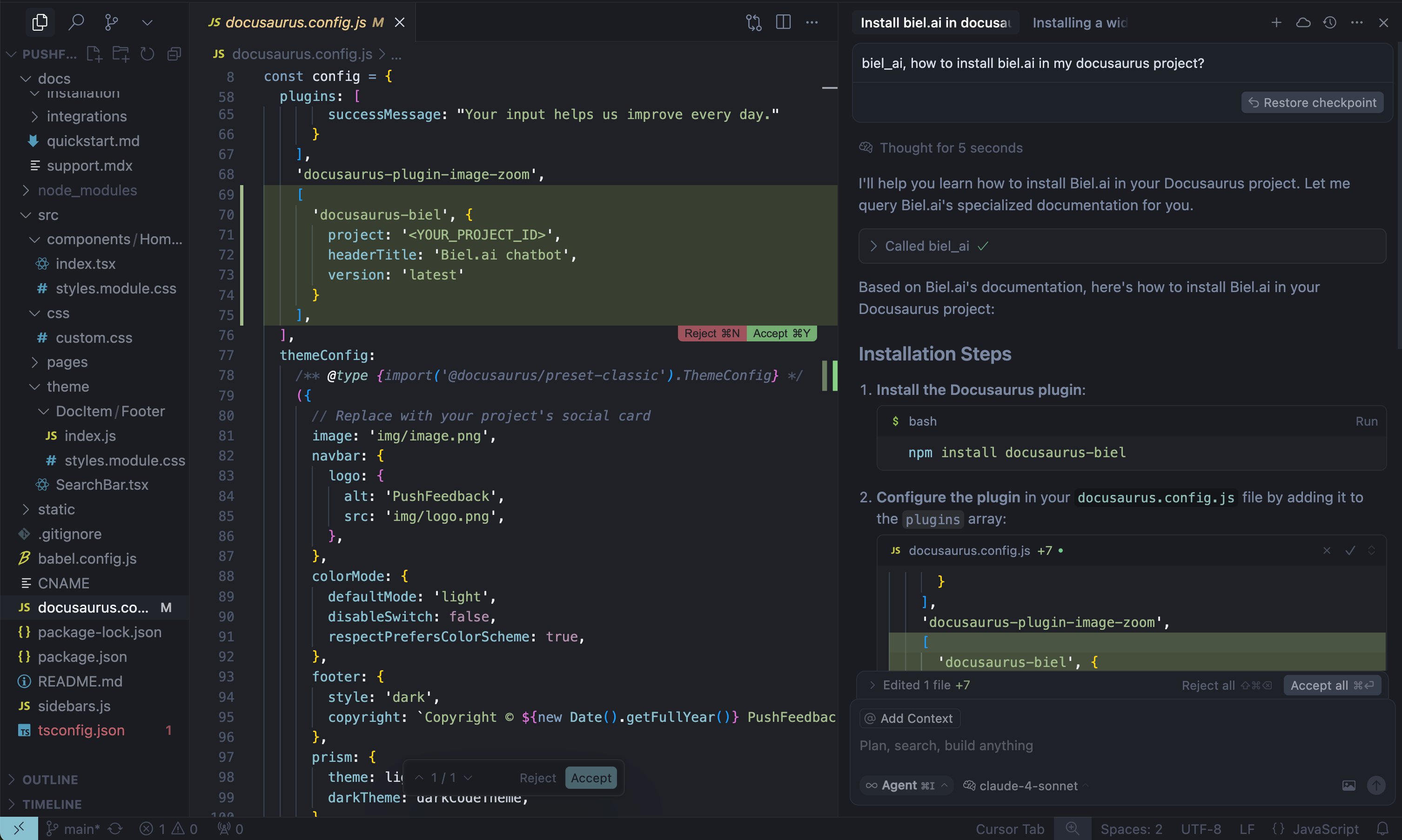
When AI tools can read your product documentation, they become significantly more helpful—generating more accurate code completions, answering technical questions with context, and guiding developers with real-time product knowledge.
Note: Requires a Biel.ai account and project setup. Start your free 15-day trial.
Getting started
1. Get your MCP configuration
{
"mcpServers": {
"biel-ai": {
"description": "Query your product's documentation, APIs, and knowledge base.",
"command": "npx",
"args": [
"mcp-remote",
"https://mcp.biel.ai/sse?project_slug=YOUR_PROJECT_SLUG&domain=https://your-docs-domain.com"
]
}
}
}Required: project_slug and domain
Optional: api_key (only needed for private projects)
2. Add to your AI tool
Cursor: Settings → *Tools & Integrations → New MCP server.
Claude Desktop: Edit
claude_desktop_config.jsonVS Code: Install MCP extension.
3. Start asking questions
Can you check in biel_ai what the auth headers are for the /users endpoint?Related MCP server: local_lense
Self-hosting (Optional)
For advanced users who prefer to run their own MCP server instance:
Local development
# Clone and run locally
git clone https://github.com/TechDocsStudio/biel-mcp
cd biel-mcp
pip install .
biel-mcpUse as a Python package
Applications that host their own ASGI stack can install the server directly from a tagged revision and import its FastAPI application:
pip install "biel-mcp @ git+https://github.com/TechDocsStudio/biel-mcp.git@VERSION"from biel_mcp.server import appDocker deployment
# Docker Compose (recommended)
docker-compose up -d --build
# Or Docker directly
docker build -t biel-mcp .
docker run -d -p 7832:7832 biel-mcpSupport
Issues: GitHub Issues
Contact: support@biel.ai
Custom Demo: Book a demo
Available Tools
1 toolbiel_aiC
Query Biel.ai's specialized AI about code, SDKs and documentation
| Name | Required | Description | Default |
|---|---|---|---|
| domain | No | Domain URL. Required only if 'Allowed domains' is enabled in project settings. | |
| api_key | No | API key for authentication (optional) | |
| message | Yes | Your question about code, SDK or documentation | |
| metadata | No | Metadata to tag the conversation source (optional) | |
| chat_uuid | No | Chat UUID to continue conversation (optional) |
TDQS
Does the description disclose side effects, auth requirements, rate limits, or destructive behavior?
With no annotations provided, the description carries the full burden of disclosing behavioral traits. It only says 'Query,' which implies a read-like operation, but does not disclose that this may send data to an external AI service, require authentication (though params suggest an API key), or have any side effects. Important behavioral context such as network calls, data privacy, or response handling is omitted.
Agents need to know what a tool does to the world before calling it. Descriptions should go beyond structured annotations to explain consequences.
Is the description appropriately sized, front-loaded, and free of redundancy?
The description is a single, focused sentence that front-loads the action and purpose without any filler. It is concise and well-structured, though it could potentially add a hint about response format or usage context without becoming verbose. Still, it earns its place and is not over-specified.
Shorter descriptions cost fewer tokens and are easier for agents to parse. Every sentence should earn its place.
Given the tool's complexity, does the description cover enough for an agent to succeed on first attempt?
While the input schema comprehensively documents all parameters, the description lacks guidance on what the AI returns (no output schema) and does not explain the broader context of how the tool should be invoked (e.g., optional domain, API key, chat continuation). For a query tool with 5 parameters, this is adequately functional but not rich enough to fully guide an agent without further clues.
Complex tools with many parameters or behaviors need more documentation. Simple tools need less. This dimension scales expectations accordingly.
Does the description clarify parameter syntax, constraints, interactions, or defaults beyond what the schema provides?
The schema description coverage is 100%, with all five parameters individually described in the input schema. The tool description itself adds no parameter-specific semantics beyond what the schema already provides. As a result, a baseline score of 3 is appropriate; the schema does the heavy lifting, and the description does not enhance understanding of parameters.
Input schemas describe structure but not intent. Descriptions should explain non-obvious parameter relationships and valid value ranges.
Does the description clearly state what the tool does and how it differs from similar tools?
The description clearly states the tool's function: querying Biel.ai's specialized AI about code, SDKs, and documentation. It uses a specific verb ('Query') and resource ('Biel.ai's specialized AI'), making the purpose distinct even without sibling tools to differentiate from. However, the term 'specialized AI' is somewhat generic, which prevents a perfect score.
Agents choose between tools based on descriptions. A clear purpose with a specific verb and resource helps agents select the right tool.
Does the description explain when to use this tool, when not to, or what alternatives exist?
The description provides no guidance on when to use this tool versus alternatives, and no exclusion criteria. Since there are no sibling tools or context signals, the agent is left without explicit usage conditions or scenarios where this tool should or shouldn't be used. This is a clear gap in usage guidance.
Agents often have multiple tools that could apply. Explicit usage guidance like "use X instead of Y when Z" prevents misuse.
TDQS
With only one tool, there is no ambiguity between tools. The tool's description clearly states its purpose, making selection straightforward.
The single tool name 'biel_ai' is clear and consistent with the server name. No pattern inconsistencies are possible with only one tool.
A single tool is on the low end, feeling thin for a server that might expect to offer more capabilities. It is not trivial, but the number is borderline and may be insufficient for broader use cases.
The tool covers the basic need of querying the specialized AI. However, there may be missing operations such as managing sessions or retrieving context, which could be expected in a full-featured AI interface.
Maintenance
Resources
Unclaimed servers have limited discoverability.
Looking for Admin?
If you are the server author, to access and configure the admin panel.
Related MCP Connectors
Connect Claude, Cursor, or ChatGPT to your business data. Ask questions, get answers.
Connect your team's living knowledge base — docs, data, issues, CRM — to Claude and ChatGPT.
The CustomGPT.ai MCP server is a fully managed, RAG-powered endpoint that connects large language models with private knowledge bases and external data sources. It provides tools for retrieval-augmented generation queries (send_message), data ingestion (upload_file), and source listing, enabling AI agents to query private documents like PDFs with high accuracy and real-time citations.
Ingest, manage, and retrieve documents for RAG-powered AI applications
Related MCP Servers
- AlicenseAqualityBmaintenanceMCP server that gives AI coding agents on-demand access to private project docs via BM25 ranked search. One setup for Claude Code, Cursor, Codex, Gemini CLI, and more. Docs stay private, never in public repos.1515Apache 2.0
- AlicenseNot gradedqualityDmaintenanceA local RAG-powered documentation search system that uses vector embeddings and Qdrant to enable semantic search across markdown, HTML, and other file formats. It provides an MCP interface for AI tools like Cursor to intelligently query and retrieve information from local knowledge bases.MIT
- AlicenseNot gradedqualityAmaintenanceLocal-first knowledge base MCP server. Lets AI agents (Claude Code, Cursor, etc.) read and write your personal knowledge base through 20 MCP tools. Zero cloud dependency — all files stay on your machine.1,758664MIT
- AlicenseNot gradedqualityDmaintenanceA self-hosted MCP server that provides up-to-date documentation for enterprise and development tools directly to AI coding assistants like Claude Code and Cursor.MIT
Appeared in Searches
Latest Blog Posts
- Who's Calling? MCP Hosts Are an Identity Blind Spot (And the Spec Knows It)By Om-Shree-0709 on .mcpAgent IdentityOAuth 2.1
- Your AI Chatbot Just Exposed Your CEO's Salary to an InternBy Om-Shree-0709 on .Agent IdentityMCP SecurityOAuth Delegation
- Why MCP Servers Need Execution Sandboxing (And Why Your Current Stack Isn't Enough)By Om-Shree-0709 on .Agentic AiPrompt InjectionWebAssembly
MCP directory API
We provide all the information about MCP servers via our MCP API.
curl -X GET 'https://glama.ai/api/mcp/v1/servers/TechDocsStudio/biel-mcp'
If you have feedback or need assistance with the MCP directory API, please join our Discord server