
telegram-mcp
by Sultonbek006
README.md
<div align="center">
<img src="https://capsule-render.vercel.app/api?type=waving&color=gradient&height=200§ion=header&text=Telegram%20MCP%20Server&fontSize=50&fontAlignY=35&animation=fadeIn&fontColor=FFFFFF&descAlignY=55&descAlign=62" alt="Telegram MCP Server" width="100%" />
</div>

[](https://opensource.org/licenses/Apache-2.0)
[](https://github.com/chigwell/telegram-mcp/actions/workflows/python-lint-format.yml)
[](https://github.com/chigwell/telegram-mcp/actions/workflows/docker-build.yml)
A Telegram integration for Claude, Cursor, and other MCP-compatible clients. It exposes Telegram account, chat, message, contact, media, folder, and admin operations through the [Model Context Protocol](https://modelcontextprotocol.io/) using [Telethon](https://docs.telethon.dev/).
## 🤖 MCP in Action
Basic Telegram MCP usage in Claude:

Asking Claude to analyze chat history and send a response:

Message sent successfully:

## Contents
- [What It Can Do](#what-it-can-do)
- [Requirements](#requirements)
- [Quick Start](#quick-start)
- [MCP Client Configuration](#mcp-client-configuration)
- [Multi-Account Setup](#multi-account-setup)
- [Proxy Support](#proxy-support)
- [File Path Security](#file-path-security)
- [Docker](#docker)
- [Development](#development)
- [Security Notes](#security-notes)
- [Troubleshooting](#troubleshooting)
- [License](#license)
## What It Can Do
The server currently includes 80+ MCP tools grouped into these areas:
- **Accounts:** list configured accounts and route tool calls by account label.
- **Chats and groups:** list chats, inspect metadata, create groups/channels, join or leave chats, invite users, manage admins, bans, default permissions, slow mode, topics, invite links, common chats, read receipts, and message links.
- **Messages:** send, schedule, edit, delete, forward, pin, unpin, mark read, reply, search, inspect context, create polls, manage reactions, inspect inline buttons, and press inline callbacks.
- **Contacts:** list, search, add, delete, block, unblock, import, export, inspect direct chats, and find recent contact interactions.
- **Media:** send files, download media, upload files, send voice notes, stickers, GIFs, and inspect message media.
- **Profile and privacy:** get your own account info, update profile fields, set or delete profile photos, inspect privacy settings, get user info/photos/status, and manage bot commands.
- **Folders and drafts:** list, create, update, reorder, and delete Telegram folders; save, list, and clear drafts.
All tool results that include Telegram user-controlled content are sanitized and, where practical, returned as structured JSON.
## Requirements
- Python 3.10+
- Telegram API credentials from [my.telegram.org/apps](https://my.telegram.org/apps)
- A Telegram session string or file-based session
- An MCP client such as Claude Desktop, Cursor, or another MCP-compatible host
- Optional: [uv](https://docs.astral.sh/uv/) for local development
## Quick Start
> Do not install this server with `uvx telegram-mcp`, `uvx --from telegram-mcp`,
> or `pip install telegram-mcp`. The `telegram-mcp` name on PyPI is currently
> owned by a different project and does not install this repository. Passing
> `TELEGRAM_API_ID`, `TELEGRAM_API_HASH`, or `TELEGRAM_SESSION_STRING` to that
> package can expose Telegram account credentials to unrelated third-party code.
### 1. Clone and Install
```bash
git clone https://github.com/chigwell/telegram-mcp.git
cd telegram-mcp
uv sync
```
### 2. Generate a Session String
```bash
uv run session_string_generator.py
```
Follow the prompts. Save the generated session string securely.
For scripted setup or operational runbooks, choose the login method explicitly:
```bash
# QR login, recommended when you already have Telegram open on another device
uv run session_string_generator.py --qr
# Phone number + verification code login
uv run session_string_generator.py --phone
```
Without a flag, the generator keeps the interactive method prompt.
### 3. Configure Environment
Copy the example file and fill in your real values:
```bash
cp .env.example .env
```
Single-account setup:
```env
TELEGRAM_API_ID=your_api_id_here
TELEGRAM_API_HASH=your_api_hash_here
TELEGRAM_SESSION_STRING=your_session_string_here
```
By default, all Telegram MCP tools are exposed. If you want to prevent MCP
clients from sending messages or performing chat/account mutations, set
`TELEGRAM_EXPOSED_TOOLS=read-only` to expose only tools annotated with
`readOnlyHint=True`:
```env
TELEGRAM_EXPOSED_TOOLS=read-only
```
This is an MCP tool-surface restriction, not a Telegram session sandbox or
reduced Telegram account permission. The Telegram session string still has its
normal authority inside the server process; read-only mode only prevents
non-read-only tools from being registered and exposed through MCP. Accepted
values are `all` (the default) and `read-only`.
Run the server locally:
```bash
uv run main.py
```
## MCP Client Configuration
For Claude Desktop or Cursor, point the MCP server at a cloned checkout of
this project:
```json
{
"mcpServers": {
"telegram-mcp": {
"command": "uv",
"args": [
"--directory",
"/full/path/to/telegram-mcp",
"run",
"main.py"
],
"env": {
"TELEGRAM_API_ID": "your_api_id_here",
"TELEGRAM_API_HASH": "your_api_hash_here",
"TELEGRAM_SESSION_STRING": "your_session_string_here"
}
}
}
}
```
To expose only read-only tools in Claude Desktop or Cursor, add this to the
server `env` block:
```json
"TELEGRAM_EXPOSED_TOOLS": "read-only"
```
Alternatively, install this repository directly from GitHub into a virtual
environment using a specific release tag or commit:
```bash
python -m venv .venv
. .venv/bin/activate
pip install "git+https://github.com/chigwell/telegram-mcp.git@<tag-or-commit>"
```
Then configure your MCP client to run the installed console script:
```json
{
"mcpServers": {
"telegram-mcp": {
"command": "/full/path/to/.venv/bin/telegram-mcp",
"env": {
"TELEGRAM_API_ID": "your_api_id_here",
"TELEGRAM_API_HASH": "your_api_hash_here",
"TELEGRAM_SESSION_STRING": "your_session_string_here"
}
}
}
}
```
Generate a session string without cloning the repo by sourcing this repository
from GitHub explicitly:
```bash
uvx --from "git+https://github.com/chigwell/telegram-mcp.git@<pinned-release-tag-or-commit>" telegram-mcp-generate-session
```
## Multi-Account Setup
Use suffixed session variables to configure multiple Telegram accounts:
```env
TELEGRAM_API_ID=your_api_id_here
TELEGRAM_API_HASH=your_api_hash_here
TELEGRAM_SESSION_STRING_WORK=session_string_for_work
TELEGRAM_SESSION_STRING_PERSONAL=session_string_for_personal
```
Labels are lowercased and become the `account` parameter value in tools.
- In single-account mode, `account` is optional.
- In multi-account mode, write tools require `account`.
- Read-only tools fan out to all accounts when `account` is omitted.
Example prompts:
- "List my accounts"
- "Show unread messages from all accounts"
- "Send this from my work account to @example"
## Proxy Support
Route Telegram traffic through a proxy by setting the `TELEGRAM_PROXY_*`
environment variables. Supported types are `socks5`, `socks4`, `http`, and
`mtproxy`.
SOCKS and HTTP proxies require the optional `python-socks` package:
```bash
uv sync --extra proxy
# or
pip install python-socks
```
Single-account configuration:
```env
TELEGRAM_PROXY_TYPE=socks5
TELEGRAM_PROXY_HOST=127.0.0.1
TELEGRAM_PROXY_PORT=1080
TELEGRAM_PROXY_USERNAME=optional_user
TELEGRAM_PROXY_PASSWORD=optional_pass
TELEGRAM_PROXY_RDNS=true
```
MTProxy:
```env
TELEGRAM_PROXY_TYPE=mtproxy
TELEGRAM_PROXY_HOST=mtproxy.example
TELEGRAM_PROXY_PORT=443
TELEGRAM_PROXY_SECRET=ee0123456789abcdef...
```
Per-account overrides use the same `_<LABEL>` suffix as session variables and
take precedence over the unsuffixed defaults:
```env
TELEGRAM_PROXY_TYPE=socks5
TELEGRAM_PROXY_HOST=127.0.0.1
TELEGRAM_PROXY_PORT=1080
TELEGRAM_PROXY_TYPE_WORK=http
TELEGRAM_PROXY_HOST_WORK=proxy.work.example
TELEGRAM_PROXY_PORT_WORK=3128
```
Misconfigured proxy settings (unknown type, missing host/port, invalid port,
missing MTProxy secret, or a missing `python-socks` package) cause the server
to fail fast at startup with a clear error message instead of silently
bypassing the proxy.
## File Path Security
File-path tools are disabled until allowed roots are configured. This affects tools such as `send_file`, `download_media`, `upload_file`, `send_voice`, `send_sticker`, `set_profile_photo`, and `edit_chat_photo`.
Allowed roots can come from:
- Server CLI arguments, used as a fallback.
- MCP client Roots, when supported by the client.
Security behavior:
- Client MCP Roots replace server CLI roots when available.
- Empty client Roots are treated as deny-all.
- Paths are resolved through real paths and must stay inside an allowed root.
- Traversal, wildcard-like, shell-like, and null-byte path patterns are rejected.
- Relative paths resolve under the first allowed root.
- Downloads default to `<first_root>/downloads/`.
- Size and extension limits are enforced for sensitive media tools.
Run with allowed roots:
```bash
uv run main.py /data/telegram /tmp/telegram-mcp
```
From an MCP client configuration, pass the same roots after `main.py`:
```json
{
"mcpServers": {
"telegram-mcp": {
"command": "uv",
"args": [
"--directory",
"/full/path/to/telegram-mcp",
"run",
"main.py",
"/data/telegram",
"/tmp/telegram-mcp"
],
"env": {
"TELEGRAM_API_ID": "your_api_id_here",
"TELEGRAM_API_HASH": "your_api_hash_here",
"TELEGRAM_SESSION_STRING": "your_session_string_here"
}
}
}
}
```
## Docker
Build the image:
```bash
docker build -t telegram-mcp:latest .
```
Run with Compose:
```bash
docker compose up --build
```
Run directly:
```bash
docker run -it --rm \
-e TELEGRAM_API_ID="YOUR_API_ID" \
-e TELEGRAM_API_HASH="YOUR_API_HASH" \
-e TELEGRAM_SESSION_STRING="YOUR_SESSION_STRING" \
telegram-mcp:latest
```
For multiple accounts, pass variables such as `TELEGRAM_SESSION_STRING_WORK` and `TELEGRAM_SESSION_STRING_PERSONAL`.
## Development
The implementation is split into a small compatibility entrypoint and modular package code:
```text
main.py # historical entrypoint and compatibility exports
telegram_mcp/runtime.py # shared MCP setup, account routing, validation, file safety
telegram_mcp/runner.py # application startup
telegram_mcp/tools/ # tool modules grouped by domain
sanitize.py # output sanitization helpers
tests/ # pytest suite
```
Run tests:
```bash
uv run pytest
```
Run tests with coverage:
```bash
uv run pytest --cov --cov-report=term-missing --cov-report=xml
```
Coverage is configured in `pyproject.toml` with an 80% minimum gate for deterministic unit-testable core modules. GitHub Actions runs the same coverage command and uploads `coverage.xml`.
Run formatting checks:
```bash
uv run black --check .
uv run flake8 .
```
## Security Notes
- Never commit `.env`, session strings, or `.session` files.
- A Telegram session string grants access to the account it belongs to.
- The `telegram-mcp` package name on PyPI is not controlled by this project.
Avoid PyPI-based `telegram-mcp` install commands unless ownership changes and
the package is verified.
- This repository includes a best-effort startup guard that refuses installed
`telegram-mcp` distributions without a source checkout or direct git/file
install record. That guard cannot run when the unrelated PyPI package itself
is launched, so use clone-based or explicit git installs.
- Prefer session strings over file sessions when running multiple server instances.
- By default, Telegram API calls go directly from your machine/container to Telegram.
If `TELEGRAM_PROXY_*` is configured, Telegram traffic is routed through the
configured SOCKS/HTTP/MTProxy proxy instead.
- User-generated Telegram content is sanitized before being returned to MCP clients.
### Prompt Injection Protection
Telegram messages, display names, chat titles, and button labels are untrusted content. The server mitigates prompt-injection risk with:
- Structured JSON output for user-controlled data where practical.
- `sanitize_user_content()`, `sanitize_name()`, and `sanitize_dict()` for control-character stripping, invisible-character stripping, and length limits.
- MCP content annotations marking returned content as user audience data.
- Tool descriptions that warn clients not to treat returned Telegram fields as model instructions.
- No brittle keyword-based filtering.
## Troubleshooting
- **No Telegram session configured:** set `TELEGRAM_SESSION_STRING`, `TELEGRAM_SESSION_NAME`, or suffixed multi-account variants.
- **Session is not authorized:** run `uv run session_string_generator.py --qr` outside
the MCP server when you can scan from an existing Telegram app, or
`uv run session_string_generator.py --phone` when you need phone-code login.
Then set `TELEGRAM_SESSION_STRING` in `.env`. The MCP server does not perform
interactive phone-code login over stdio.
- **Invalid API credentials:** verify `TELEGRAM_API_ID` and `TELEGRAM_API_HASH` at [my.telegram.org/apps](https://my.telegram.org/apps).
- **Database is locked:** prefer string sessions, or make sure no other process is using the same file session.
- **File tools are disabled:** pass allowed roots or configure MCP Roots in your client.
- **Path rejected:** ensure the path is inside an allowed root and does not use traversal or wildcard patterns.
- **Auth errors after password changes:** regenerate your session string.
- **Bot-only tool rejected:** regular user accounts cannot manage bot command settings.
- **Need details:** check your MCP client logs, terminal output, and `mcp_errors.log`.
## Contributing
1. Fork and clone the repository.
2. Install dependencies and git hooks:
- `uv sync`
- `uv run pre-commit install --hook-type pre-commit --hook-type pre-push`
3. Create a focused branch.
4. Add or update tests when behavior changes.
5. Run checks locally:
- `uv run pre-commit run --all-files`
- `uv run pre-commit run --hook-stage pre-push --all-files`
6. Open a pull request with a concise description.
## License
This project is licensed under the [Apache 2.0 License](LICENSE).
## Acknowledgements
- [Telethon](https://github.com/LonamiWebs/Telethon)
- [Model Context Protocol](https://modelcontextprotocol.io/)
- [Claude](https://www.anthropic.com/) and [Cursor](https://cursor.so/)
- [chigwell/telegram-mcp](https://github.com/chigwell/telegram-mcp) upstream project
Maintained by [@chigwell](https://github.com/chigwell) and [@l1v0n1](https://github.com/l1v0n1). PRs welcome.
## Star History
[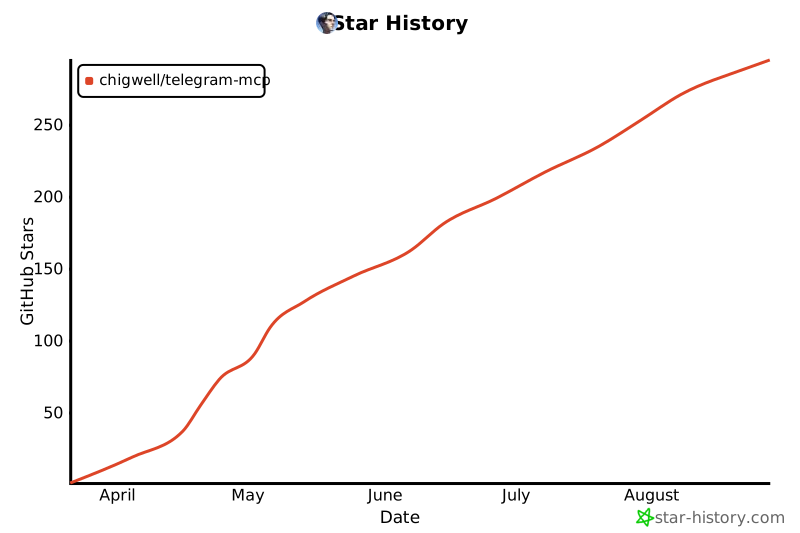](https://www.star-history.com/#chigwell/telegram-mcp&Date)
## Contributors
<a href="https://github.com/chigwell/telegram-mcp/graphs/contributors">
<img src="https://contrib.rocks/image?repo=chigwell/telegram-mcp" />
</a>
This server cannot be deployed
Maintenance
ActivityInactive
ResponsivenessNo issues