A
licenseB
qualityC
maintenanceA Model Context Protocol server that provides tools to manage Keycloak users and realms, allowing you to create and delete users, list available realms, and view users in specific realms.
4
23 npm
46
MIT

References Web Dev Simplified YouTube channel as the source of learning material for the MCP implementation, though does not appear to provide direct YouTube API integration.
Click on "Deploy Server".
Wait a few minutes for the server to deploy. Once ready, it will show a "Started" state.
In the chat, type @ followed by the MCP server name and your instructions, e.g., "@User Management MCP Server create a random user for testing"
That's it! The server will respond to your query, and you can continue using it as needed.
Here is a step-by-step guide with screenshots.
Source: Web Dev Simplified YouTube Video
Credits: Web Dev Simplified (YouTube channel)
Related MCP server: MCP PostgreSQL Server
Model Context Protocol (MCP) is a protocol that defines how a client (such as an LLM) can communicate and use tools and resources defined at the server level. It implements a client-server architecture with the following components:
Tools
Resources
Prompts
Samplings
Official documentation: modelcontextprotocol.io/introduction
Includes starter projects in multiple languages for MCP client and server implementation
The src/server.ts file contains the code for creating an MCP server and defining tools, resources, and prompts.
Build the server:
npm run server:buildAdd to VS Code using the "Add MCP server" command
Access server functionality in the Copilot chat UI
Use "#" followed by tool name to access implemented tools
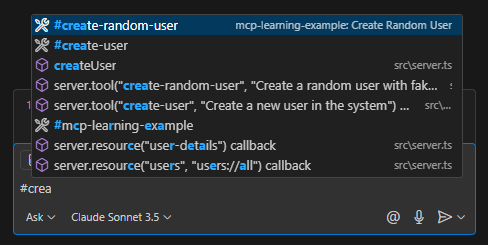
Note: to use the query and prompts from the client you will need a gemini ai api key, you can add this in the .env file
The src/client.ts file provides a CLI client for interacting with the MCP server. It connects to the server, lists available tools, resources, and prompts, and allows you to:
Query the LLM directly
Run tools (with parameter input)
Access resources (with dynamic URI parameters)
Use prompts (with argument input)
Connects to the MCP server using a transport layer.
Fetches available tools, resources, prompts, and resource templates.
Presents a menu for the user to select an action: Query, Tools, Resources, or Prompts.
Handles each action:
Query: Sends a prompt to the LLM and optionally invokes tools.
Tools: Lets you select and run a tool, entering parameters as needed.
Resources: Lets you select a resource or template, entering URI parameters if required, and displays the result.
Prompts: Lets you select a prompt, enter arguments, and view the generated output.
For prompts, you can choose to run the generated text through the LLM for further results.
When you run the client, you'll see a menu:
What would you like to do
❯ Query
  Tools
  Resources
  Prompts
Selecting an option will guide you through the available features interactively.
users: Retrieves all users from the JSON file
user-details: Retrieves user details by ID
create-user: Creates a new user with the following parameters:
username
address
age
phone number
create-random-user: Generates and creates a random user
generate-fake-user: Prompt with fixed fields for generating fake user data
create-random-user: This uses sampling i.e. calling requests on the LLM or clientto generate something.
Create a random user with fake data
| Name | Required | Description | Default |
|---|---|---|---|
No parameters | |||
Does the description disclose side effects, auth requirements, rate limits, or destructive behavior?
Annotations already indicate readOnly=false, destructive=false, and idempotent=false. The description adds that the data is fake, but it does not disclose other behavioral traits such as what side effects occur, whether the user is persisted, or what the return value contains. No contradiction with annotations.
Agents need to know what a tool does to the world before calling it. Descriptions should go beyond structured annotations to explain consequences.
Is the description appropriately sized, front-loaded, and free of redundancy?
One short, front-loaded sentence communicates the essential purpose without any redundant words or unnecessary detail.
Shorter descriptions cost fewer tokens and are easier for agents to parse. Every sentence should earn its place.
Given the tool's complexity, does the description cover enough for an agent to succeed on first attempt?
The tool is simple (no parameters), but there is no output schema and the description does not explain what the tool returns (e.g., the generated user's email, password, ID). This leaves a clear gap for an agent trying to use the result.
Complex tools with many parameters or behaviors need more documentation. Simple tools need less. This dimension scales expectations accordingly.
Does the description clarify parameter syntax, constraints, interactions, or defaults beyond what the schema provides?
The tool has zero parameters, so the baseline for this dimension is 4. The description correctly says nothing about parameters, and the empty input schema is fully consistent.
Input schemas describe structure but not intent. Descriptions should explain non-obvious parameter relationships and valid value ranges.
Does the description clearly state what the tool does and how it differs from similar tools?
The description clearly states the action ('Create'), the resource ('random user'), and the distinguishing characteristic ('with fake data'). This differentiates it from the sibling tool 'create-user', which presumably creates a real or specific user.
Agents choose between tools based on descriptions. A clear purpose with a specific verb and resource helps agents select the right tool.
Does the description explain when to use this tool, when not to, or what alternatives exist?
The description implies a usage context (generating fake/test data) through the words 'random user with fake data', but it does not explicitly say when to use this tool versus the sibling 'create-user', nor does it mention any exclusions or prerequisites.
Agents often have multiple tools that could apply. Explicit usage guidance like "use X instead of Y when Z" prevents misuse.
Create a new user in the system
| Name | Required | Description | Default |
|---|---|---|---|
| name | Yes | ||
| Yes | |||
| address | Yes | ||
| age | Yes | ||
| phone | Yes |
Does the description disclose side effects, auth requirements, rate limits, or destructive behavior?
The description states 'Create a new user', which aligns with the annotations indicating a write operation (readOnlyHint: false) and non-destructive action (destructiveHint: false). However, it doesn't add meaningful behavioral context beyond what annotations provide, such as authentication requirements, rate limits, or what happens on duplicate entries.
Agents need to know what a tool does to the world before calling it. Descriptions should go beyond structured annotations to explain consequences.
Is the description appropriately sized, front-loaded, and free of redundancy?
The description is a single, clear sentence with no wasted words. It's front-loaded with the core purpose and efficiently communicates the basic action without unnecessary elaboration.
Shorter descriptions cost fewer tokens and are easier for agents to parse. Every sentence should earn its place.
Given the tool's complexity, does the description cover enough for an agent to succeed on first attempt?
For a tool that creates users with 5 required parameters and no output schema, the description is insufficient. It lacks parameter explanations, usage guidance relative to siblings, and behavioral details not covered by annotations, making it incomplete for effective agent use.
Complex tools with many parameters or behaviors need more documentation. Simple tools need less. This dimension scales expectations accordingly.
Does the description clarify parameter syntax, constraints, interactions, or defaults beyond what the schema provides?
With 0% schema description coverage for 5 required parameters, the description provides no information about what 'name', 'email', 'address', 'age', or 'phone' mean in this context. It fails to compensate for the schema's lack of descriptions, leaving parameters semantically undefined.
Input schemas describe structure but not intent. Descriptions should explain non-obvious parameter relationships and valid value ranges.
Does the description clearly state what the tool does and how it differs from similar tools?
The description clearly states the action ('Create') and resource ('a new user in the system'), making the purpose immediately understandable. However, it doesn't differentiate from its sibling tool 'create-random-user', which appears to serve a similar purpose but with different parameters or behavior.
Agents choose between tools based on descriptions. A clear purpose with a specific verb and resource helps agents select the right tool.
Does the description explain when to use this tool, when not to, or what alternatives exist?
The description provides no guidance on when to use this tool versus its sibling 'create-random-user'. There's no mention of prerequisites, alternatives, or specific contexts where this tool is preferred, leaving the agent without usage direction.
Agents often have multiple tools that could apply. Explicit usage guidance like "use X instead of Y when Z" prevents misuse.
Recent tool additions, removals, and schema changes observed during successful MCP inspections.
create-random-usercreate-userScored across 2 tools
The two tools have highly overlapping purposes: both create users. 'create-random-user' and 'create-user' differ only in the data source (fake vs. system), which is a subtle distinction that agents will likely confuse. This is a classic case of ambiguous tool boundaries.
Both tools follow a consistent verb_noun pattern with hyphen-separated names. 'create-random-user' and 'create-user' are perfectly aligned in naming style, making them predictable and readable.
With only 2 tools, the server feels severely under-scoped for a 'User Management' domain. A user management system typically requires at least CRUD operations (create, read, update, delete) and possibly list/search tools. This minimal set is inadequate for the implied purpose.
The tool surface is extremely incomplete for user management. There are no tools to retrieve, update, delete, or list users, creating significant gaps that will cause agent failures. Agents cannot perform basic user management workflows beyond creation.
Model Context Protocol server for Studex tools, notifications, and profile integrations
A comprehensive Model Context Protocol (MCP) server that enables AI assistants to interact with yo…
A Model Context Protocol server for Wix AI tools
Model Context Protocol server for the Apideck Unified API. Connect any MCP-compatible agent framework to 100+ accounting systems, HRIS platforms, file storage providers, and more through one integration. More information https://www.apideck.com/mcp-server