
RepoGrammar
# RepoGrammar
Repository conventions for coding agents.
[Documentation](https://github.com/SioYooo/RepoGrammar/blob/main/docs/README.md) · [Quickstart](https://github.com/SioYooo/RepoGrammar/blob/main/docs/quickstart.md) · [Changelog](https://github.com/SioYooo/RepoGrammar/blob/main/CHANGELOG.md) · [Contributing](https://github.com/SioYooo/RepoGrammar/blob/main/CONTRIBUTING.md)
RepoGrammar indexes repeated implementations in your repository and gives coding
agents a source-backed read plan: examples of how this codebase implements a
route, fixture, model, or data-access role, with the evidence behind each match.
When the evidence is insufficient, it returns `UNKNOWN` with a recovery action.
It runs locally and exposes a pattern-first CLI and one read-only MCP tool.
There are no LLM calls, API keys, embeddings, or cloud services in the analysis
path. Python 3.10+ is required for the bundled Python analyzer.
Verified GitHub release baseline: **0.5.0**.
For current channel versions and their verification, see the
[publication evidence](https://github.com/SioYooo/RepoGrammar/blob/main/docs/promotion/launch-kit.md#current-publication-truth).
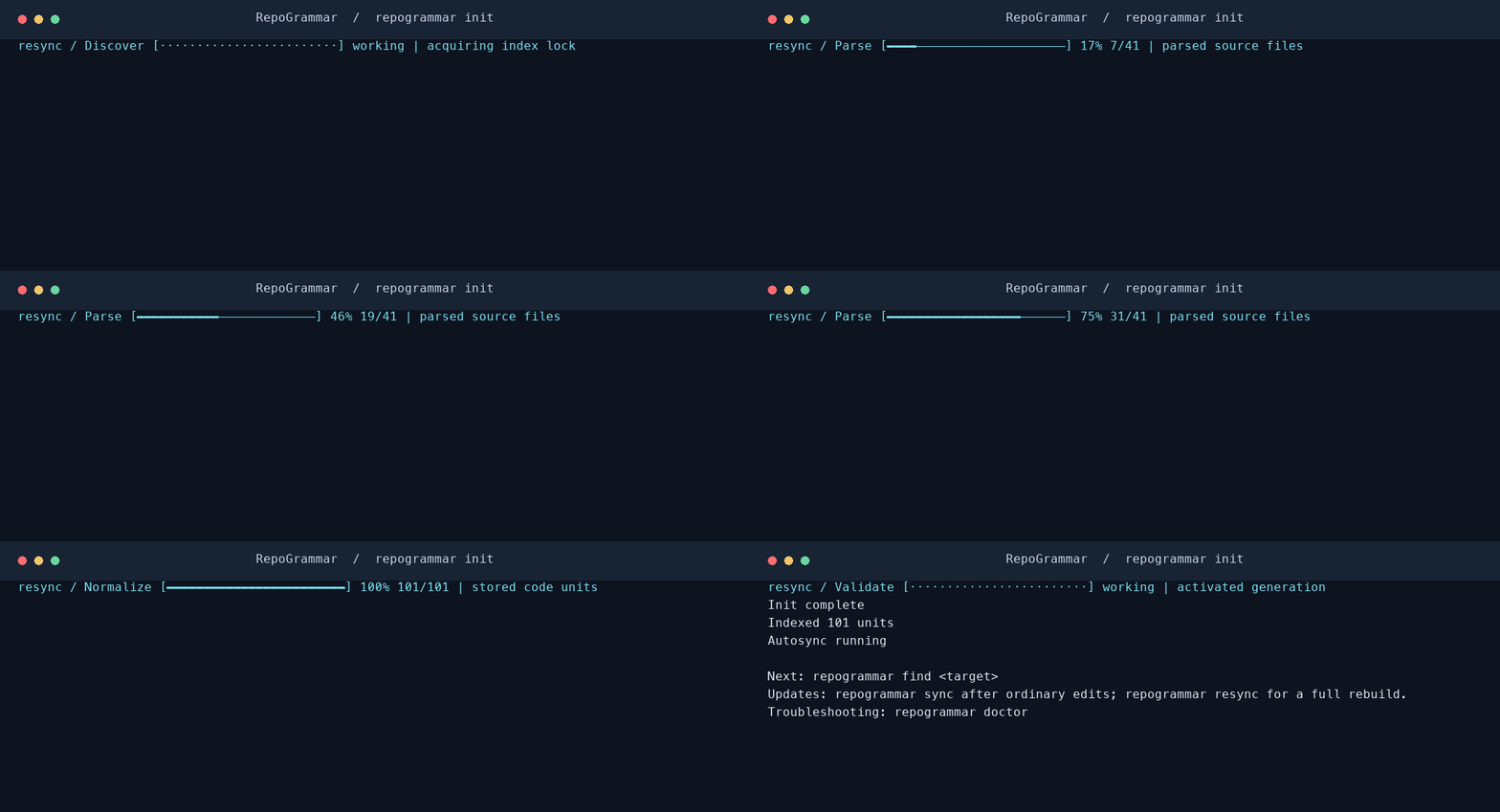
*Recorded from a real CLI run on a fixture repository; playback is slowed for readability.*
## Quick start
Choose an installation route, then **initialize your project → connect your
agent → verify**. Releases that include the
[one-command bootstrap](#one-command-bootstrap) can combine these steps.
Full Python project setup requires **Python 3.10+ within 3.x**, Git, Bash,
`curl`, `tar`, and `gzip`. CLI-only installation does not require Python.
Supported platforms are macOS arm64/x86_64, Linux x86_64 with glibc 2.35+, and
Linux arm64 with glibc 2.39+. The native installer does not require Rust, Cargo,
Node.js, Docker, or API keys. The npm launcher requires Node.js 18 or newer.
### 1. Install the CLI
Choose npm or the pinned native installer below; you do not need both.
#### npm
```bash
npm install -g @sioyooo/repogrammar &&
repogrammar version
```
The launcher downloads and verifies the matching native release on first use.
It does not initialize a project or configure an agent. Continue with step 2.
To pin a version, append `@<version>` to the package name; that version must
have matching GitHub native assets.
#### Pinned native baseline: 0.5.0
This single block downloads the pinned installer, verifies its checksum, and
installs the CLI. It does not alter coding-agent settings or index a repository.
For an existing installation, review the
[update and PATH behavior](https://github.com/SioYooo/RepoGrammar/blob/main/docs/quickstart.md#updates-path-and-partial-setup)
before rerunning the installer.
```bash
(
set -eu
install_tmp="$(mktemp -d)" || exit 1
trap 'rm -rf "$install_tmp"' EXIT
cd "$install_tmp" || exit 1
curl -fsSLO https://github.com/SioYooo/RepoGrammar/releases/download/v0.5.0/install.sh || exit 1
curl -fsSLO https://github.com/SioYooo/RepoGrammar/releases/download/v0.5.0/install.sh.sha256 || exit 1
if command -v sha256sum >/dev/null 2>&1; then
sha256sum -c install.sh.sha256 || exit 1
else
shasum -a 256 -c install.sh.sha256 || exit 1
fi
bash install.sh --version v0.5.0 --install-cli-only --yes
) &&
export PATH="$HOME/.local/bin:$PATH" &&
repogrammar version
```
Add the `export PATH` line to `~/.zshrc` or `~/.bashrc` once to keep the command
available in new terminals. Expected version: `0.5.0`.
### 2. Index your project
From your project's directory:
```bash
repogrammar init
```
`init` builds the current project's index and starts background
updates. There is no global repository scanner. Run `init` once in each project.
The explicit form `repogrammar init --project "$PWD" --yes` does the same thing;
use `--no-autosync` for CI or a one-shot index.
### 3. Connect your coding agent (optional)
```bash
repogrammar install --target auto --scope global --yes --no-telemetry
```
Restart the coding-agent session after connecting. Choose a specific client with
`--target codex`, `--target claude-code`, or `--target opencode`.
### 4. Verify setup
From the initialized project:
```bash
command -v repogrammar
repogrammar version
repogrammar status
```
Check that the version and command path match the installation you chose.
If the index is unavailable or stale, run `repogrammar doctor` and follow its
recovery guidance. After
restarting your agent, confirm that `repogrammar_context` is available in its
MCP tools. Installing the CLI alone does not establish a working agent session.
### One-command bootstrap
The 0.5.1 source includes `--quickstart`: review one plan, authorize it, then install
the CLI, connect detected supported agents, index the selected Git repository,
and start repository-local autosync. No agent is required for CLI/index setup.
After a successful quickstart, go straight to [Verify setup](#4-verify-setup);
the separate install, init and agent-connection steps are already handled.
Use an installer and matching binary that include the `quickstart-v1` capability;
the pinned 0.5.0 baseline above does not. The
[quickstart guide](https://github.com/SioYooo/RepoGrammar/blob/main/docs/quickstart.md)
records availability, verified commands, plan preview, noninteractive execution
and agent selection. The
[publication checklist](https://github.com/SioYooo/RepoGrammar/blob/main/docs/release/quickstart-release-checklist.md)
records the artifact and installation gates for this flow.
| I want to… | Guide |
| --- | --- |
| Install, update, or troubleshoot | [Quickstart](https://github.com/SioYooo/RepoGrammar/blob/main/docs/quickstart.md) |
| Connect Codex | [Codex setup](https://github.com/SioYooo/RepoGrammar/blob/main/docs/quickstart-codex.md) |
| Connect Claude Code | [Claude Code setup](https://github.com/SioYooo/RepoGrammar/blob/main/docs/quickstart-claude.md) |
| Connect opencode | [opencode setup](https://github.com/SioYooo/RepoGrammar/blob/main/docs/quickstart-opencode.md) |
| See every command | Run `repogrammar help --all` or read the [CLI reference](https://github.com/SioYooo/RepoGrammar/blob/main/docs/specifications/cli.md) |
| Understand evidence and limits | [Limitations](https://github.com/SioYooo/RepoGrammar/blob/main/docs/limitations.md) |
| Remove the installation | [Uninstall guide](https://github.com/SioYooo/RepoGrammar/blob/main/docs/quickstart.md#remove-an-installation-or-index) |
## When should I index again?
| Situation | Action |
| --- | --- |
| First time in a project | `repogrammar init` |
| Normal edits while autosync is running | Nothing; updates run in the background |
| Autosync is stopped, or you want an immediate update | `repogrammar sync` |
| You need a full rebuild, or recovery guidance requests one | `repogrammar resync` |
| You are unsure whether the index is ready | `repogrammar status`; use `repogrammar doctor` for recovery |
`index` remains available for compatibility. Use `init` to start, `sync` for
ordinary changes, and `resync` to rebuild. Do not repeatedly run `init` after
normal edits.
## Usage
Find examples for an exact repository location:
```bash
repogrammar find "path/to/routes.py:7" --project "$PWD" --mode compact
repogrammar families --project "$PWD"
repogrammar sync --project "$PWD"
```
Start with an exact path or symbol when available. Framework-qualified queries
such as `FastAPI route` are also supported. See the [CLI reference](https://github.com/SioYooo/RepoGrammar/blob/main/docs/specifications/cli.md)
for the complete commands and the [MCP contract](https://github.com/SioYooo/RepoGrammar/blob/main/docs/specifications/mcp-api.md)
for coding-agent integration.
## Background updates
`init` starts a daemon for that repository. On macOS and Linux, native file
notifications coalesce edits before a sync. Idle native operation reconciles
metadata periodically instead of rescanning the tree every second. Git-ignored
untracked directories are pruned before fingerprint traversal, while tracked
files and ignore exceptions remain visible.
If native watching fails, autosync logs the fallback and polls with bounded
idle backoff. Failed syncs retry with bounded backoff even without another edit.
File notifications are hints; explicit `sync` and query-time hashes remain the
freshness authority. These changes reduce background work; no battery-life
percentage is claimed.
```bash
repogrammar autosync status --project "$PWD"
repogrammar autosync stop --project "$PWD"
repogrammar autosync start --project "$PWD"
```
For CI or one-shot analysis, initialize with `--no-autosync`. See the
[autosync contract](https://github.com/SioYooo/RepoGrammar/blob/main/docs/specifications/cli.md) for intervals and recovery.
## How it works
```text
repository → local index → pattern families → examples + bounded read plan
└──────────→ UNKNOWN + recovery action
```
- **Repository conventions:** find compatible implementations and their exceptions.
- **Verifiable context:** every result carries provenance and freshness checks.
- **Incremental updates:** native filesystem events wake autosync; changes use the
existing incremental indexer. Periodic reconciliation and polling fallback
handle unavailable watchers.
- **Agent integration:** connect Codex, Claude Code, or opencode through MCP.
### How does it differ from other code tools?
| Tool or mechanism | What it contributes | Where RepoGrammar fits |
| --- | --- | --- |
| grep / text search | Exact strings and source locations | Qualifies repeated implementation-family context and the source reads still required |
| Semantic search / RAG | Retrieves material relevant to a query; a generation layer may use it | Provides a bounded local evidence contract, without embeddings or generation in its analysis path |
| CodeGraph / symbol graphs | Declarations, references, and call paths | Complements graph navigation with family selection, provenance, and abstention |
| Static analyzers | Checks under a tool's specified semantic model | Reports bounded convention evidence and static alignment; it is not a sound whole-program analyzer |
These are mechanism comparisons, not benchmark or superiority claims. Static
alignment is not proof of runtime equivalence. The
[FastAPI/pytest fixture walkthrough](https://github.com/SioYooo/RepoGrammar/blob/main/docs/examples/python-fastapi-pytest.md)
shows a read plan, optional source spans, and negative cases you can reproduce.
### What do UNKNOWN and a bounded read plan mean?
`UNKNOWN` means the requested claim lacks sufficient qualifying evidence. Its
typed reason and recovery action tell the agent what remains unresolved; it
does not mean the repository is incorrect. `PARTIAL_CONTEXT` can provide local
metadata without selecting a proven family. A bounded read plan names a limited
set of source locations and remaining reading obligations. Read the required
source before editing; the plan does not replace that obligation. See the
[MCP contract](https://github.com/SioYooo/RepoGrammar/blob/main/docs/specifications/mcp-api.md)
and [UNKNOWN policy](https://github.com/SioYooo/RepoGrammar/blob/main/docs/specifications/unknowns.md).
### Does repository code leave my machine?
RepoGrammar's analysis runs locally and makes no LLM, embedding, or cloud calls.
MCP responses contain metadata by default; source spans require explicit opt-in.
The coding agent receiving that response has its own data-handling policy and
may send metadata or requested source to its provider. Local analysis is not a
privacy guarantee for the entire agent session. Anonymous telemetry is off by
default and excludes source and paths; explicit upload is separate. See the
[telemetry contract](https://github.com/SioYooo/RepoGrammar/blob/main/docs/specifications/telemetry.md)
for local diagnostics and consent boundaries.
## Scope and limitations
The official language focus is Python: FastAPI, pytest, Pydantic, and SQLAlchemy.
Other languages have bounded structural or dependency-inventory capabilities;
these are not full language support. The strict Top-20 qualification program
remains **0/20 complete**. Read the [language audit](https://github.com/SioYooo/RepoGrammar/blob/main/docs/reports/language-support/top-20-final-program-audit.md)
for the evidence and unresolved gates.
RepoGrammar is pre-1.0. It is not a sound whole-program analyzer, and neither a
syntax match nor a dependency declaration proves behavior. Dynamic dispatch,
unsupported frameworks, stale indexes, and incomplete semantics can result in
abstention. Read [known limitations](https://github.com/SioYooo/RepoGrammar/blob/main/docs/limitations.md) before relying on a result.
Public binary targets are macOS arm64/x86_64 and glibc Linux arm64/x86_64.
Windows and musl Linux are not supported installation targets.
Use ordinary source inspection when a repository has few repeated patterns,
your framework is outside the bounded scope, or an answer remains `UNKNOWN`.
Use runtime tests or a suitable semantic analyzer when the question requires
behavioral correctness, security assurance, or whole-program proof.
## Development
```bash
cargo build --locked
cargo test --workspace --all-features
```
Read [CONTRIBUTING.md](https://github.com/SioYooo/RepoGrammar/blob/main/CONTRIBUTING.md) and the [testing policy](https://github.com/SioYooo/RepoGrammar/blob/main/docs/development/testing.md)
for the full checks. Architecture and specifications live in [docs/](https://github.com/SioYooo/RepoGrammar/blob/main/docs/README.md).
Report bugs through [GitHub Issues](https://github.com/SioYooo/RepoGrammar/issues);
report security issues according to [SECURITY.md](https://github.com/SioYooo/RepoGrammar/blob/main/SECURITY.md).
## License
[MIT](https://github.com/SioYooo/RepoGrammar/blob/main/LICENSE).
TDQS
Scored across 1 tool
With only one exposed tool there is no cross-tool selection risk, but that single tool internally multiplexes several distinct operations (find_analogues, explain_deviation, check_conformance, show_family, inspect_readiness, read_plan), and the boundary between them is only conveyed through a very dense prose description. An agent must parse a long block to know which mode to invoke and when, which is effectively ambiguity pushed inside one tool.
The single name repogrammar_context is readable and uses a consistent snake_case prefix_noun convention. There is no pattern to violate with only one tool, but the namespace-prefixed form is coherent and predictable for any future additions.
One tool for a surface that describes at least six distinct operations (pattern-family discovery, deviation explanation, conformance checks, family display, readiness/scoped-readiness inspection, change planning) plus setup/resync/autosync behavior is under-factored. The mega-tool approach forces mode dispatch and hidden branching, making the count too thin for the apparent scope.
The read-only analysis domain is partially covered: discovery, explanation, conformance, readiness, and planning are all reachable, and source-hydration is intentionally gated. However setup/resync/autosync are referenced only as behaviors of the same tool rather than distinct operations, and there is no explicit enumeration or listing of family ids beyond follow-up handles, leaving lifecycle steps implicit.