

A
licenseNot graded
qualityD
maintenanceAn MCP server that enables AI assistants to access up-to-date documentation for Python libraries like LangChain, LlamaIndex, and OpenAI through dynamic fetching from official sources.
1
MIT

Retrieves Milvus documentation and code snippets to generate PyMilvus code, convert between ORM and client styles, and translate code across multiple programming languages.
Click on "Deploy Server".
Wait a few minutes for the server to deploy. Once ready, it will show a "Started" state.
In the chat, type @ followed by the MCP server name and your instructions, e.g., "@milvus-sdk-code-helper How do I create a collection with an HNSW index using PyMilvus?"
That's it! The server will respond to your query, and you can continue using it as needed.
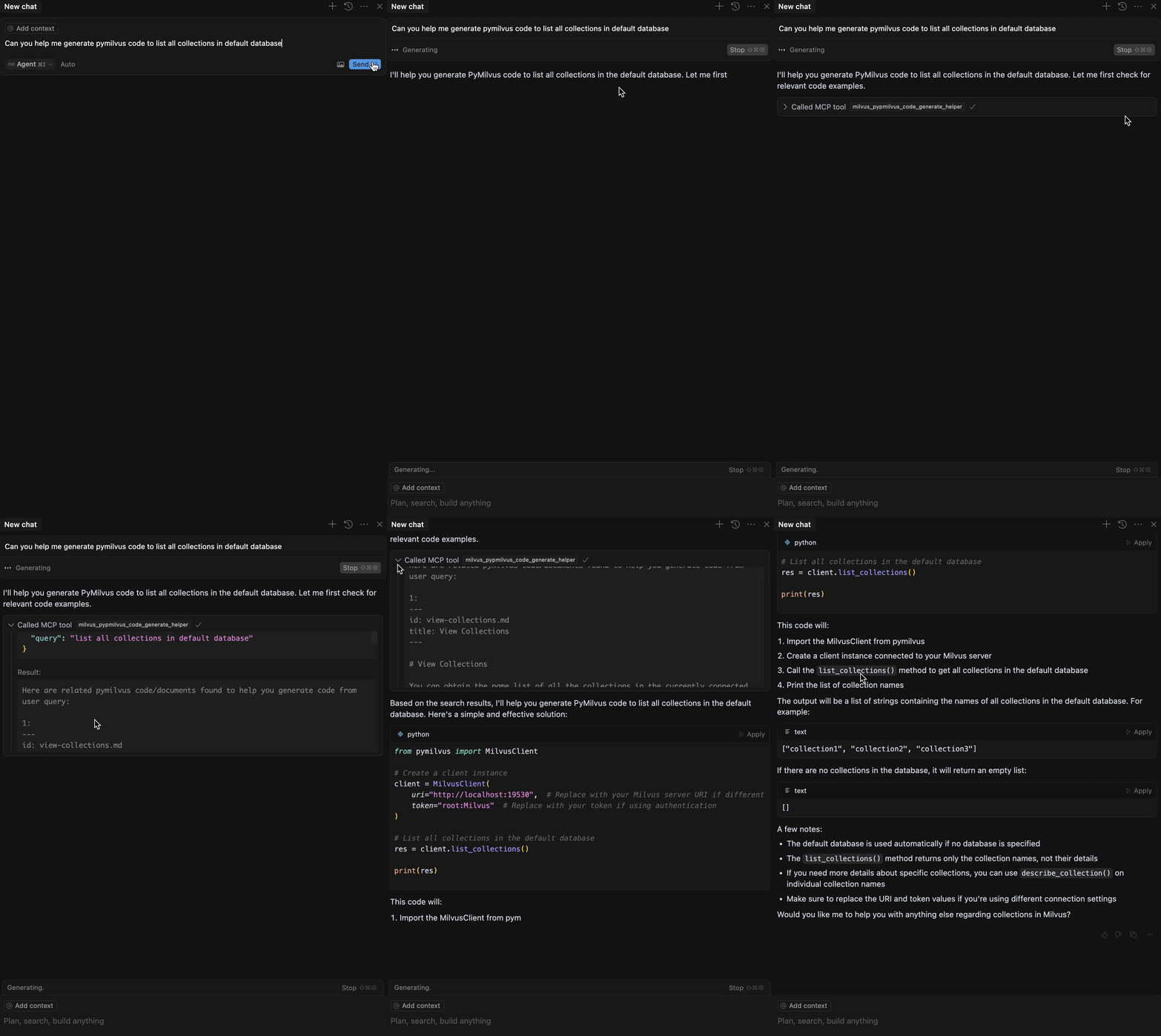
Here is a step-by-step guide with screenshots.
A Model Context Protocol server that retrieves relevant code snippets or documents to help generating pymilvus code.

Before using this MCP server, ensure you have:
Python 3.10 or higher
A running Milvus instance (local or remote)
uv installed (recommended for running the server)
Related MCP server: DocuMCP
The recommended way to use this MCP server is through FastMCP, which provides better performance and easier configuration.
For the first time running the server, use the main FastMCP server which will automatically update the document database:
uv run src/mcp_pymilvus_code_generate_helper/fastmcp_server.pyThis will:
Connect to your Milvus instance (default: http://localhost:19530)
Download and process the latest Milvus documentation
Start the MCP server with all three tools available
# Connect to remote Milvus server
uv run src/mcp_pymilvus_code_generate_helper/fastmcp_server.py --milvus_uri http://your-server:19530 --milvus_token your_token

# Change server host and port
uv run src/mcp_pymilvus_code_generate_helper/fastmcp_server.py --host 0.0.0.0 --port 8080

# Use different transport (default is http)
uv run src/mcp_pymilvus_code_generate_helper/fastmcp_server.py --transport sseAfter the initial setup, you can use the lightweight FastMCP server for faster startup:
uv run examples/fastmcp_server.pyThis lightweight version:
Skips document synchronization
Starts immediately without background tasks
Assumes documents are already loaded in Milvus
# Custom configuration for lightweight server
uv run examples/fastmcp_server.py --milvus_uri http://your-server:19530 --host 0.0.0.0 --port 8080 --transport httpAutomatically fetches and indexes the latest Milvus documentation version (可以获取最新文档版本)
Weekly auto-refresh via a lightweight background scheduler
Go to Cursor > Settings > MCP
Click on the + Add New Global MCP Server button
Configure based on your chosen mode:
{
  "mcpServers": {
    "milvus-sdk-code-helper": {
      "url": "http://localhost:8000/mcp"
    }
  }
}{
"mcpServers": {
"milvus-sdk-code-helper": {
"url": "http://localhost:8000"
}
}
}{
"mcpServers": {
"milvus-sdk-code-helper": {
"command": "/PATH/TO/uv",
"args": [
"--directory",
"/path/to/milvus-sdk-code-helper",
"run",
"examples/fastmcp_server.py",
"--transport",
"stdio",
"--milvus_uri",
"http://localhost:19530"
],
"env": {
"OPENAI_API_KEY": "YOUR_OPENAI_API_KEY"
}
}
}
}Install Claude Desktop from https://claude.ai/download
Open your Claude Desktop configuration:
macOS: ~/Library/Application Support/Claude/claude_desktop_config.json
Windows: %APPDATA%\Claude\claude_desktop_config.json
Add the following configuration:
{
  "mcpServers": {
    "milvus-sdk-code-helper": {
      "url": "http://localhost:8000/mcp"
    }
  }
}{
"mcpServers": {
"milvus-sdk-code-helper": {
"command": "/PATH/TO/uv",
"args": [
"--directory",
"/path/to/milvus-sdk-code-helper",
"run",
"examples/fastmcp_server.py",
"--transport",
"stdio",
"--milvus_uri",
"http://localhost:19530"
],
"env": {
"OPENAI_API_KEY": "YOUR_OPENAI_API_KEY"
}
}
}
}Restart Claude Desktop
⚠️ Note: Remember to set the
OPENAI_API_KEYenvironment variable when using STDIO transport.
# HTTP (recommended)
claude mcp add --transport http milvus-sdk-code-helper http://localhost:8000/mcp

# SSE
claude mcp add --transport sse milvus-sdk-code-helper http://localhost:8000

# STDIO
claude mcp add milvus-sdk-code-helper /ABS/PATH/TO/uv -- \
  --directory /ABS/PATH/TO/milvus-sdk-code-helper \
run examples/fastmcp_server.py --transport stdio --milvus_uri http://localhost:19530Global (~/.claude.json) – HTTP transport
{
  "mcpServers": {
    "milvus-sdk-code-helper": {
      "type": "http",
      "url": "http://localhost:8000/mcp"
    }
  }
}
Project (.mcp.json at project root) – STDIO transport
{
  "mcpServers": {
    "milvus-sdk-code-helper": {
      "type": "stdio",
      "command": "/ABS/PATH/TO/uv",
      "args": [
        "--directory",
        "/ABS/PATH/TO/milvus-sdk-code-helper",
        "run",
        "examples/fastmcp_server.py",
        "--transport",
        "stdio",
        "--milvus_uri",
        "http://localhost:19530"
      ],
      "env": {
        "OPENAI_API_KEY": "YOUR_OPENAI_API_KEY"
      }
    }
  }
}You can add a Gemini MCP server alongside this project in the same client. This is optional and independent of this server.
The server provides three powerful tools for Milvus code generation and translation:
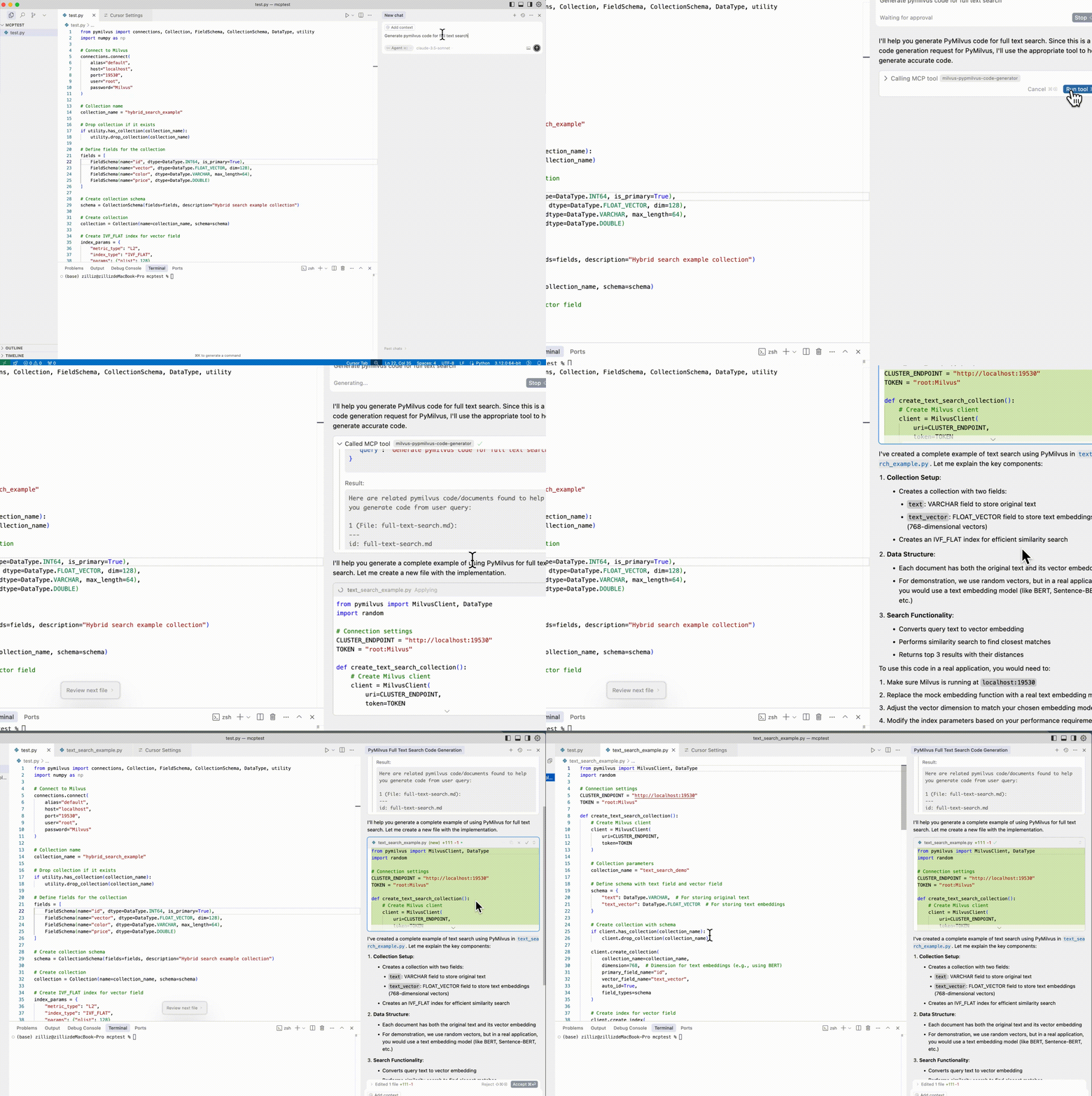
milvus_code_generatorGenerate or provide sample PyMilvus/Milvus code based on natural language input.
When to use: Code generation, sample code requests, "how to write" queries
Parameters:
query: Your natural language request for code generation
Example: "Generate pymilvus code for hybrid search"
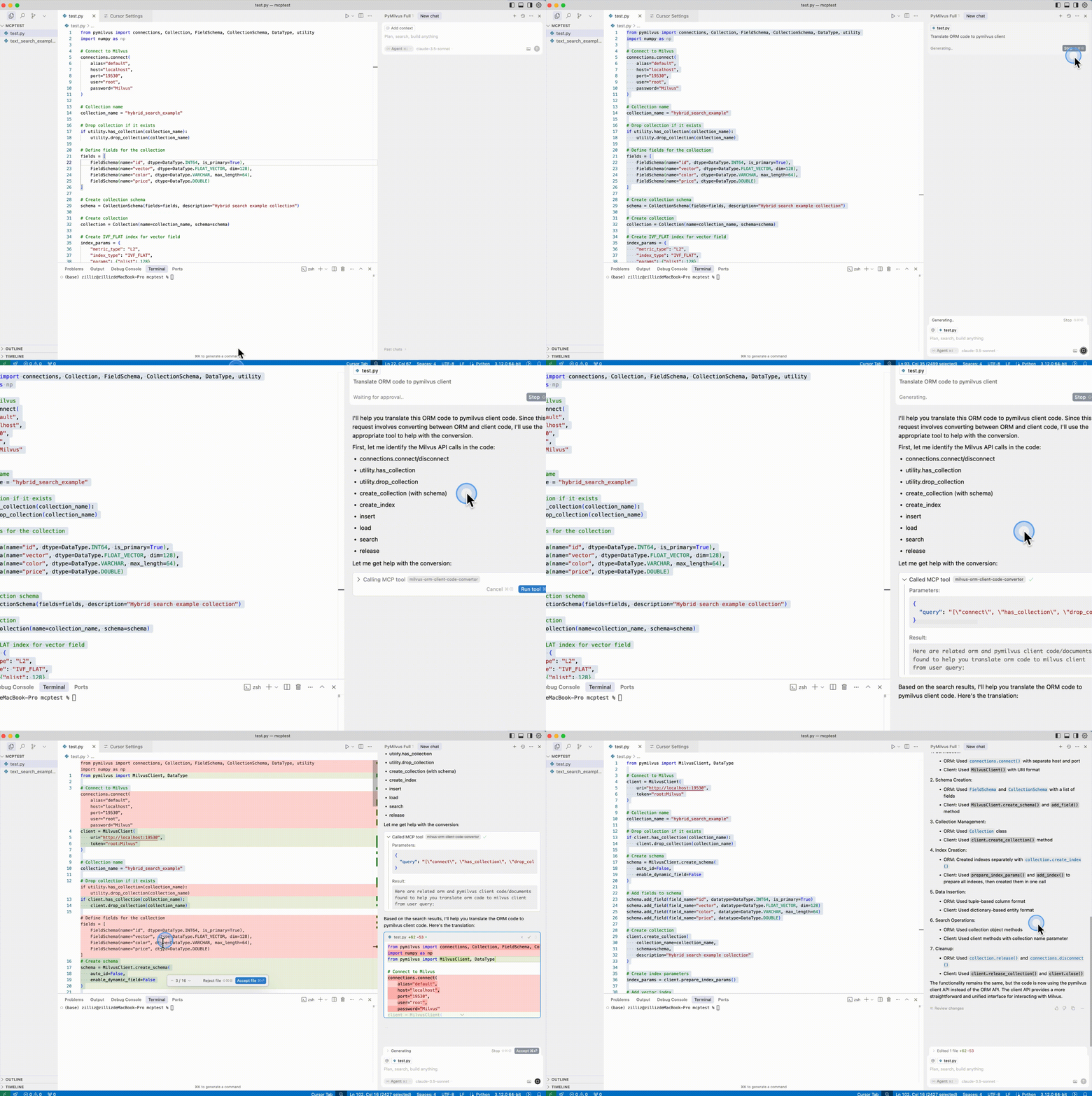
orm_client_code_convertorConvert between ORM and PyMilvus client code formats.
When to use: Converting between ORM and client styles, format adaptation
Parameters:
query: List of Milvus API names to convert (e.g., ["create_collection", "insert"])
Example: "Convert ORM code to PyMilvus client"
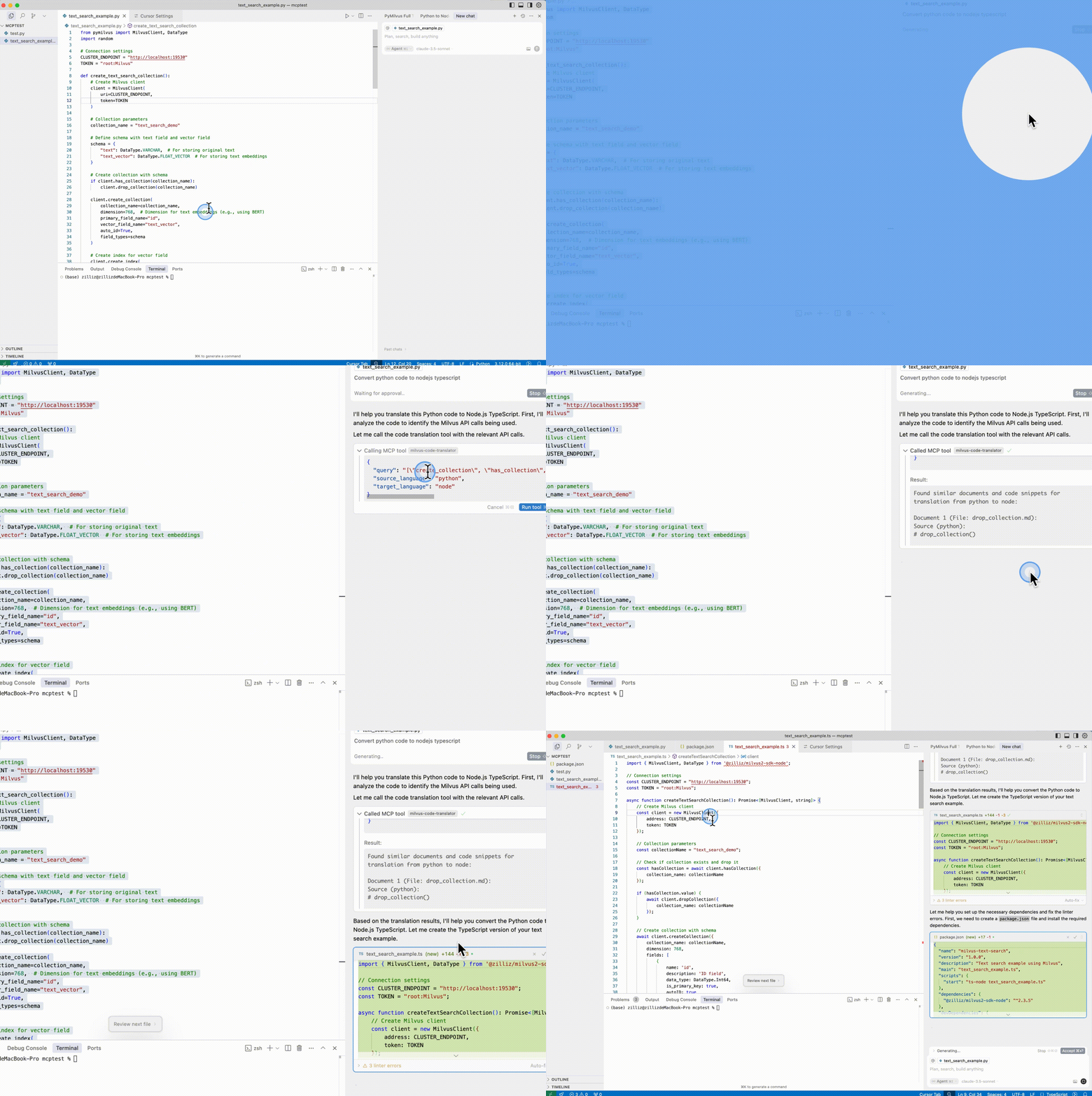
milvus_code_translatorTranslate Milvus code between different programming languages.
When to use: Cross-language code translation
Parameters:
query: List of Milvus API names in escaped double quotes format (e.g., [\"create_collection\", \"insert\", \"search\"])
source_language: Source programming language (python, java, go, csharp, node, restful)
target_language: Target programming language (python, java, go, csharp, node, restful)
Example: "Translate Python Milvus code to Java"
⚠️ Important: You don't need to specify tool names or parameters manually. Just describe your requirements naturally, and the MCP system will automatically select the appropriate tool and prepare the necessary parameters.
For backward compatibility, the server also supports SSE and STDIO transport modes:
# Start SSE server
uv run src/mcp_pymilvus_code_generate_helper/sse_server.py --milvus_uri http://localhost:19530

# Cursor configuration for SSE
{
  "mcpServers": {
    "milvus-sdk-code-helper": {
      "url": "http://localhost:23333/milvus-code-helper/sse"
    }
  }
}# Start STDIO server
uv run src/mcp_pymilvus_code_generate_helper/stdio_server.py --milvus_uri http://localhost:19530
# Cursor configuration for STDIO
{
"mcpServers": {
"milvus-sdk-code-helper": {
"command": "/PATH/TO/uv",
"args": [
"--directory",
"/path/to/milvus-sdk-code-helper",
"run",
"src/mcp_pymilvus_code_generate_helper/stdio_server.py",
"--milvus_uri",
"http://localhost:19530"
],
"env": {
"OPENAI_API_KEY": "YOUR_OPENAI_API_KEY"
}
}
}
}You can also run the server using Docker:
docker build -t milvus-code-helper .# First time run with document update
docker run -p 8000:8000 \
-e OPENAI_API_KEY=your_openai_key \
-e MILVUS_URI=http://your-milvus-host:19530 \
-e MILVUS_TOKEN=your_milvus_token \
milvus-code-helper
# Lightweight mode for subsequent runs
docker run -p 8000:8000 \
-e OPENAI_API_KEY=your_openai_key \
-e MILVUS_URI=http://your-milvus-host:19530 \
-e MILVUS_TOKEN=your_milvus_token \
milvus-code-helper examples/fastmcp_server.pyParameter | Description | Default |
| Milvus server URI |
|
| Milvus authentication token |
|
| Milvus database name |
|
| Server host address |
|
| Server port |
|
| HTTP endpoint path |
|
| Transport protocol |
|
http: RESTful HTTP transport (recommended)
sse: Server-Sent Events transport
stdio: Standard input/output transport
OPENAI_API_KEY: Required for document processing and embedding generation
MILVUS_URI: Alternative way to specify Milvus server URI
MILVUS_TOKEN: Alternative way to specify Milvus authentication token
Connection refused: Ensure Milvus is running and accessible
Authentication failed: Check your Milvus token and credentials
Port conflicts: Change the port using --port parameter
Missing documents: Run the full server first to populate the database
Enable debug logging:
PYTHONPATH=src python -m logging --level DEBUG src/mcp_pymilvus_code_generate_helper/fastmcp_server.pyContributions are welcome! If you have ideas for improving the retrieval results or adding new features, please submit a pull request or open an issue.
This project is licensed under the MIT License.
This server cannot be deployed
MCP server for agentverse documentation, generated by doc2mcp.
MCP server for langchain documentation, generated by doc2mcp.
An MCP server that gives your AI access to the source code and docs of all public github repos