
omarchy-mcp
# Omarchy MCP
A Model Context Protocol (MCP) server for integrating [Omarchy](https://omarchy.org) desktop environment theme management with AI assistants like Claude.
## Overview
Omarchy MCP enables AI assistants to manage themes in Omarchy - a Linux desktop environment that supports extensive theme customization including color schemes, backgrounds, and UI elements.
With this MCP server, AI assistants can:
- List themes with flexible filtering (installed, available, built-in, removable)
- Query the currently active theme
- Switch between installed themes
- Preview theme images before applying them
- Install new themes from GitHub repositories
- Remove installed extra themes
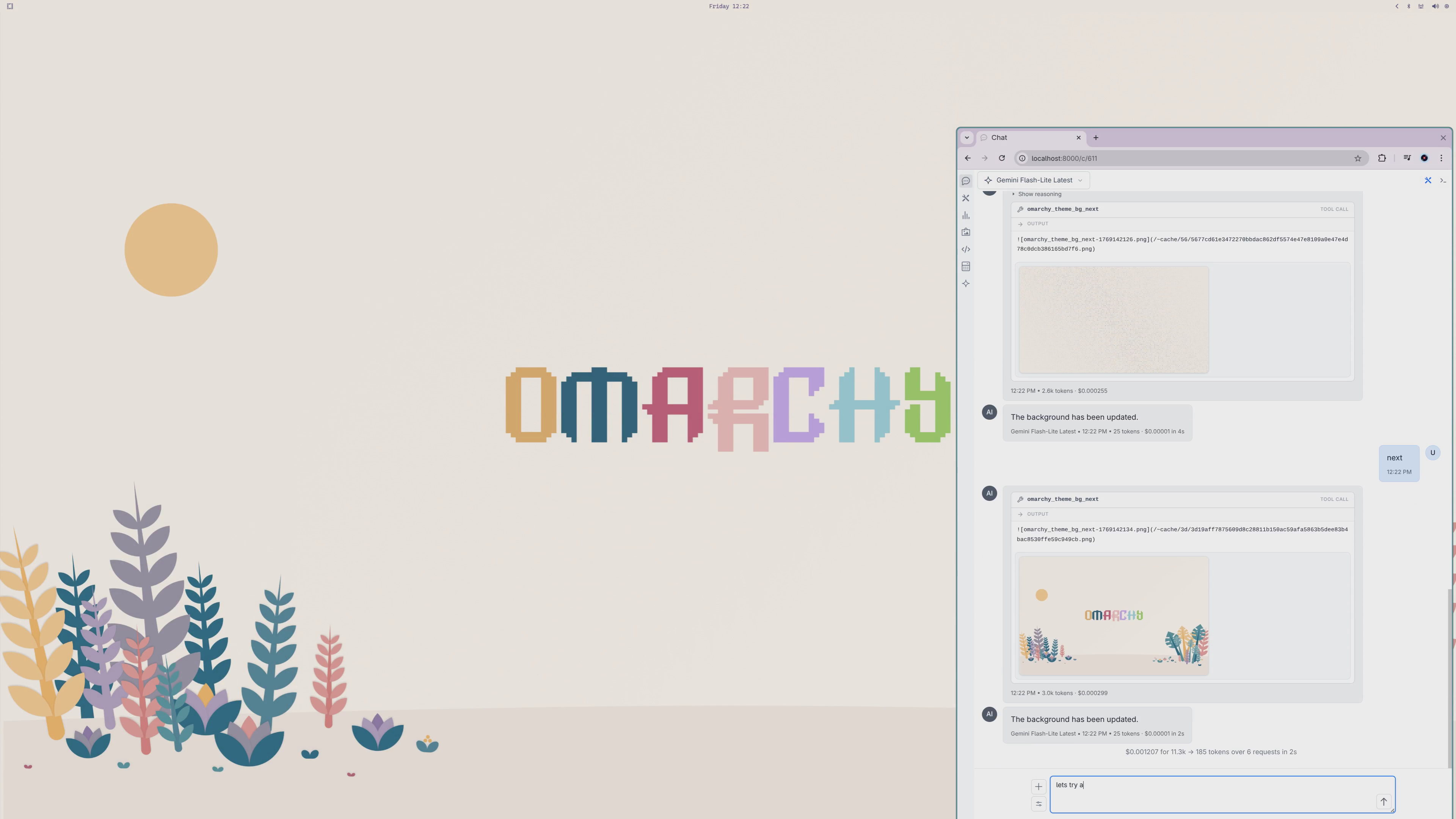
- Rotate background images
[](https://youtu.be/eV17C0cJz00?si=eGDeEL2d6KLddGBj)
[Youtube Video](https://youtu.be/eV17C0cJz00?si=eGDeEL2d6KLddGBj)
## Installation
### Using in llms .py
Or paste server configuration into [llms .py MCP Servers](https://llmspy.org/docs/mcp/fast_mcp):
Name: `omarchy-mcp`
```json
{
"description": "Manage Omarchy Desktop Themes",
"command": "uvx",
"args": [
"omarchy-mcp"
]
}
```
### Development Server
For development, you can run this server using `uv`:
```json
{
"mcpServers": {
{
"command": "uv",
"args": [
"run",
"--directory",
"/path/to/ServiceStack/omarchy-mcp",
"omarchy-mcp"
]
}
}
}
```
### Claude Desktop
Add to your Claude Desktop configuration file:
- **macOS**: `~/Library/Application Support/Claude/claude_desktop_config.json`
- **Windows**: `%APPDATA%\Claude\claude_desktop_config.json`
- **Linux**: `~/.config/Claude/claude_desktop_config.json`
```json
{
"mcpServers": {
"omarchy": {
"description": "Manage Omarchy Desktop Themes",
"command": "uvx",
"args": [
"omarchy-mcp"
]
}
}
}
```
## System Prompt
You can make your AI a more pleasant and personable Omarchy assistant by configuring it with a custom system prompt. The linked system prompt below creates "Archy" - a friendly, conversational assistant that knows Omarchy well and responds naturally to voice commands.
**[system-prompt.txt](https://github.com/ServiceStack/omarchy-mcp/blob/main/src/omarchy_mcp/system-prompt.txt)**
## Available Tools
### `omarchy_theme_list`
Lists Omarchy themes with flexible filtering options.
**Parameters:**
- `filter` (optional): Filter themes by type
- `"INSTALLED"` (default) - All installed themes
- `"ALL"` - All available themes (installed and not installed)
- `"CURRENT"` - Only the currently active theme
- `"BUILT_IN"` - Only built-in themes
- `"CAN_REMOVE"` - Only installed extra themes that can be removed
- `"CAN_INSTALL"` - Only themes available for installation
- `scheme` (optional): Filter by color scheme
- `"ANY"` (default) - All color schemes
- `"LIGHT"` - Light themed only
- `"DARK"` - Dark themed only
**Returns:** List of theme names with status indicators (current, built-in, installed)
### `omarchy_theme_set`
Applies a theme to the Omarchy desktop.
**Parameters:**
- `theme` (required): Theme name to apply (supports partial/case-insensitive matching)
**Returns:** Preview image of the applied theme
### `omarchy_theme_bg_next`
Rotates to the next background image in the current theme.
**Returns:** The new background image
### `omarchy_preview_theme`
Downloads and returns a preview image for a theme without applying it.
**Parameters:**
- `name` (required): Theme name (supports partial/case-insensitive matching)
**Returns:** Theme preview image
### `omarchy_install_theme`
Installs a new extra/community theme from its GitHub repository. Installing a theme automatically sets it as the current theme.
**Parameters:**
- `name` (required): Theme name to install
**Returns:** Theme preview image after installation
### `omarchy_remove_theme`
Uninstalls a previously installed extra/community theme. Built-in themes cannot be removed.
**Parameters:**
- `name` (required): Theme name to uninstall
**Returns:** Status message
## Theme Matching
Theme names support flexible matching:
- **Case-insensitive**: "tokyo night", "TOKYO NIGHT", and "Tokyo Night" all match
- **Partial matching**: "tokyo" matches "Tokyo Night"
- **Punctuation-insensitive**: "tokyo-night", "tokyo_night", and "tokyonight" all match
## Requirements
- **Python**: 3.10, 3.11, or 3.12
- **Omarchy**: Must be installed on the system
- **Linux**: With Wayland display server
### Dependencies
- `fastmcp>=0.1.0` - MCP server framework
- `aiohttp` - Async HTTP client for downloading preview images
## Built-in Themes
Omarchy comes with 14 built-in themes:
- Tokyo Night
- Catppuccin
- Ethereal
- Everforest
- Gruvbox
- Hackerman
- Osaka Jade
- Kanagawa
- Nord
- Matte Black
- Ristretto
- Flexoki Light
- Rose Pine
- Catppuccin Latte
## Extra Themes
Over 100 additional community themes are available for installation, including various color schemes for both dark and light preferences.
## Development
### Setup
```bash
git clone https://github.com/ServiceStack/omarchy-mcp.git
cd omarchy-mcp
pip install -e ".[dev]"
```
### Running Tests
```bash
pytest tests -v
```
### Linting and Formatting
```bash
ruff check .
ruff format .
```
### Building
```bash
python -m build
```
## License
BSD-3-Clause
TDQS
Scored across 6 tools
Each tool targets a distinct action on themes: install, preview, remove, cycle background, list, and set. There is no overlap or ambiguity; an agent can clearly distinguish when to use each.
All tools use snake_case with a consistent 'omarchy_' prefix. Most follow a verb_noun pattern (e.g., install_theme, preview_theme), though 'theme_bg_next' and 'theme_list' slightly deviate from the order. Overall, the pattern is clear and predictable.
Six tools is well-scoped for a theme management server. Each tool serves a necessary function without redundancy, covering installation, removal, listing, setting, previewing, and background cycling.
The tool set covers the main lifecycle of themes: install, remove, list, set, preview, and background control. A minor gap is the lack of an explicit 'get current theme' tool, but that may be inferred from the set action. Overall, it is sufficiently complete for typical theme management.