
env-doctor
by Ryano4507
README.md
<p align="center">
<img src="https://raw.githubusercontent.com/mitulgarg/env-doctor/main/docs/assets/logo.svg" alt="Env-Doctor Logo" width="80" height="80">
</p>
<h1 align="center">Env-Doctor</h1>
<p align="center">
<strong>The missing link between your GPU and Python AI libraries</strong>
</p>
<p align="center">
<a href="https://mitulgarg.github.io/env-doctor/">
<img src="https://img.shields.io/badge/docs-github.io-blueviolet?style=flat-square" alt="Documentation">
</a>
<a href="https://pypi.org/project/env-doctor/">
<img src="https://img.shields.io/pypi/v/env-doctor?style=flat-square&color=blue&label=PyPI" alt="PyPI">
</a>
<a href="https://pepy.tech/projects/env-doctor">
<img src="https://static.pepy.tech/personalized-badge/env-doctor?period=total&units=INTERNATIONAL_SYSTEM&left_color=BLACK&right_color=GREEN&left_text=downloads" alt="PyPI Downloads">
</a>
<img src="https://img.shields.io/badge/python-3.10%2B-blue?style=flat-square" alt="Python">
<a href="https://github.com/mitulgarg/env-doctor/blob/main/LICENSE">
<img src="https://img.shields.io/github/license/mitulgarg/env-doctor?style=flat-square&color=green" alt="License">
</a>
<a href="https://github.com/mitulgarg/env-doctor/stargazers">
<img src="https://img.shields.io/github/stars/mitulgarg/env-doctor?style=flat-square&color=yellow" alt="GitHub Stars">
</a>
<a href="https://discord.gg/5wDK6k8Fp">
<img src="https://img.shields.io/badge/Discord-Join-5865F2?style=flat-square&logo=discord&logoColor=white" alt="Discord">
</a>
</p>
---
> **"Why does my PyTorch crash with CUDA errors when I just installed it?"**
>
> Because your driver supports CUDA 11.8, but `pip install torch` gave you CUDA 12.4 wheels.
**Env-Doctor diagnoses and fixes the #1 frustration in GPU computing:** mismatched CUDA versions between your NVIDIA driver, system toolkit, cuDNN, and Python libraries.
It takes **5 seconds** to find out if your environment is broken - and exactly how to fix it.
## Doctor "Check" (Diagnosis)
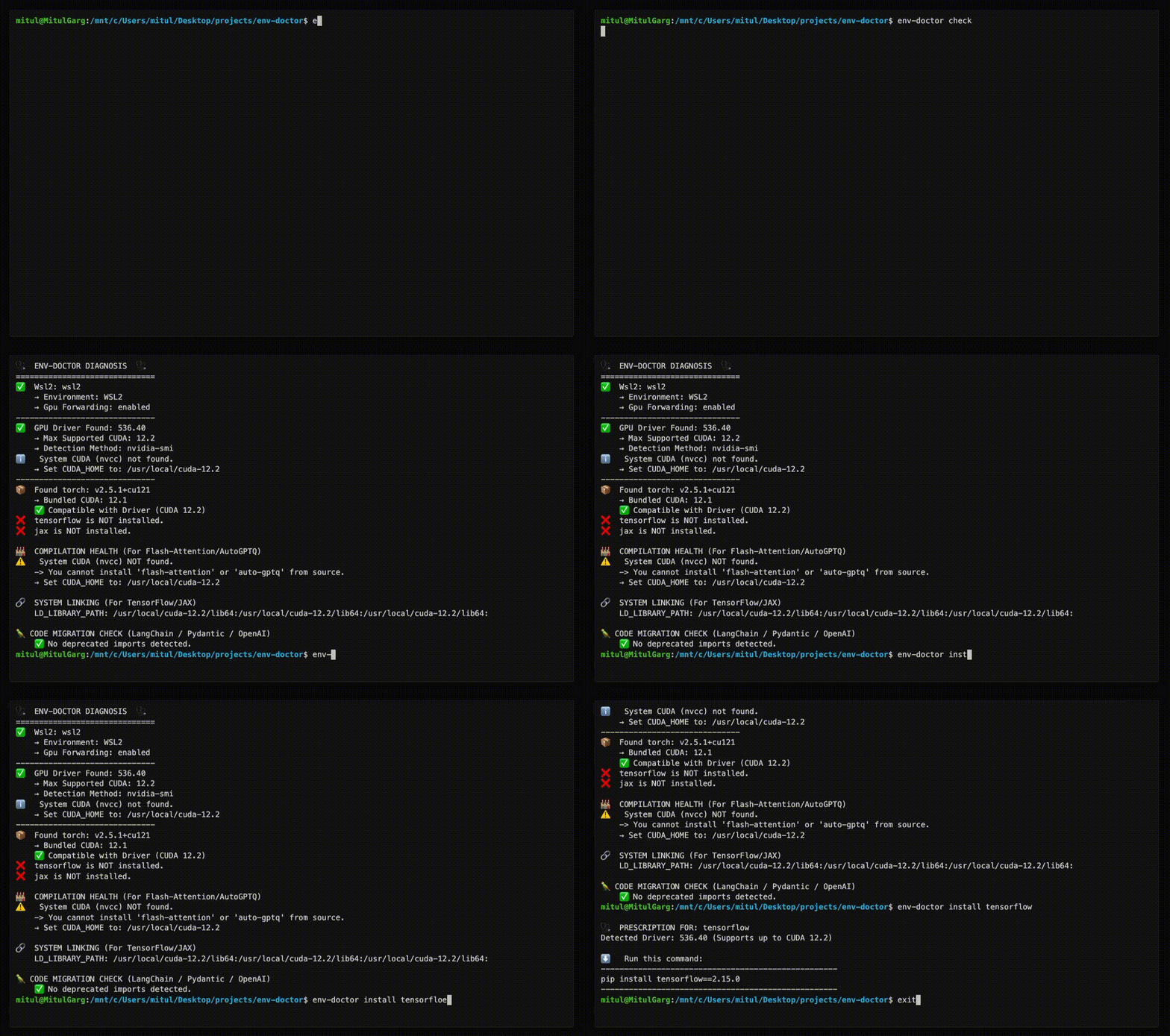
## Features
| Feature | What It Does |
|---------|--------------|
| **One-Command Diagnosis** | Check compatibility: GPU Driver → CUDA Toolkit → cuDNN → PyTorch/TensorFlow/JAX |
| **Compute Capability Check** | Detect GPU architecture mismatches — catches why `torch.cuda.is_available()` returns `False` on new GPUs (e.g. Blackwell) even when driver and CUDA are healthy |
| **Python Version Compatibility** | Detect Python version conflicts with AI libraries and dependency cascade impacts |
| **Jupyter / Notebook Output** | `from env_doctor import check; check()` renders a rich HTML diagnosis inline in Jupyter, Colab, or VS Code notebooks — falls back to text in the terminal |
| **CUDA Auto-Installer** | Execute CUDA Toolkit installation directly with `--run`; CI-friendly with `--yes`; preview with `--dry-run` |
| **Safe Install Commands** | Get the exact `pip install` command that works with YOUR driver |
| **Inference Engine Resolver** | Resolve vLLM / SGLang → torch → CUDA build → kernel libs against your driver; get the install command that actually runs instead of a default CUDA 13 wheel on a CUDA 12 box |
| **Extension Library Support** | Install compilation packages (flash-attn, SageAttention, auto-gptq, apex, xformers) with CUDA version matching |
| **AI Model Compatibility** | Check if LLMs, Diffusion, or Audio models fit on your GPU before downloading |
| **WSL2 GPU Support** | Validate GPU forwarding, detect driver conflicts within WSL2 env for Windows users |
| **Deep CUDA Analysis** | Find multiple installations, PATH issues, environment misconfigurations |
| **Container Validation** | Catch GPU config errors in Dockerfiles before you build |
| **MCP Server** | Expose diagnostics to AI assistants (Claude Desktop, Zed) via Model Context Protocol |
| **CI/CD Ready** | JSON output, proper exit codes, and CI-aware env-var persistence (GitHub Actions, GitLab CI, CircleCI, Azure Pipelines, Jenkins) |
| **Fleet Dashboard** *(optional)* | Web UI for monitoring multiple GPU machines — aggregate status, drill-down diagnostics, history timeline. Install with `pip install "env-doctor[dashboard]"` |
## Installation
### Core CLI
The core CLI has no heavy dependencies — installs in seconds.
```bash
pip install env-doctor
```
```bash
# Or with uv (faster, isolated)
uv tool install env-doctor
uvx env-doctor check
```
### With Fleet Dashboard
If you want to manage a distributed system of multiple GPU nodes, this dashboard can help you from a observability POV. It adds a web UI for monitoring multiple GPU machines and has no effect on the core CLI. You will be able to soon take action directly from the dashboard via distributed env-doctor cli instances on each VM!
```bash
pip install "env-doctor[dashboard]"
```
This adds: `fastapi`, `uvicorn`, `sqlalchemy`, `aiosqlite`
| | `pip install env-doctor` | `pip install "env-doctor[dashboard]"` |
|---|---|---|
| `env-doctor check` | ✅ | ✅ |
| All CLI commands | ✅ | ✅ |
| MCP server | ✅ | ✅ |
| `env-doctor check --report-to` | ✅ | ✅ |
| `env-doctor report install/status` | ✅ | ✅ |
| `env-doctor dashboard` (web UI) | ✗ | ✅ |
## MCP Server (AI Assistant Integration)
Env-Doctor includes a built-in [Model Context Protocol (MCP)](https://modelcontextprotocol.io) server that exposes 11 diagnostic tools to AI assistants like Claude Code and Claude Desktop.
### Quick Setup
```json
// Claude Desktop config (~/.config/Claude/claude_desktop_config.json)
{
"mcpServers": {
"env-doctor": {
"command": "env-doctor-mcp"
}
}
}
```
<video src="https://github.com/user-attachments/assets/7e761c28-1f44-44a0-8dfd-cf06cb9939a2" autoplay loop muted playsinline width="100%"></video>
Ask your AI assistant things like *"Check my GPU environment"*, *"Can I run Llama 3 70B on my GPU?"*, or *"Validate this Dockerfile for GPU issues"*.
**Learn more:** [MCP Integration Guide](docs/guides/mcp-integration.md)
---
## Fleet Dashboard *(optional)*
> The core CLI works standalone. The dashboard is an observability layer for teams running multiple GPU machines.
<video src="https://github.com/user-attachments/assets/1ef99c91-3656-467b-9b0d-31fab6ec9797" autoplay loop muted playsinline width="100%"></video>
`pip install "env-doctor[dashboard]"` unlocks a web UI that aggregates diagnostic results from every machine in your fleet into a single view — no SSH required.
### Quick Start
**1. Start the dashboard** (any machine — no GPU needed):
```bash
pip install "env-doctor[dashboard]"
env-doctor dashboard
# → Serving at http://localhost:8765
# → Generated API token at ~/.env-doctor/api-token
```
**2. Report from each GPU machine:**
```bash
pip install env-doctor
# One-time report
env-doctor check --report-to http://<dashboard-host>:8765 --token <token>
# Automatic reporting every 2 minutes (cron on Linux, Task Scheduler on Windows)
env-doctor report install --url http://<dashboard-host>:8765 --token <token> --interval 2m
```
### What You Get
- **Fleet overview** — sortable table with status, GPU, driver, CUDA, torch, and group filtering
- **Topology view** — force-directed graph of all machines, colour-coded by health, grouped into clusters
- **Activity log** — cross-fleet command log with status, output, and filtering
- **Machine detail** — full diagnostics + snapshot history timeline
- **Remote remediation** — queue `env-doctor` commands from the UI, executed on next check-in (no SSH needed)
Smart change detection means stable machines only POST ~1 heartbeat every 30 minutes, not on every poll.
**Learn more:** [Fleet Monitoring Guide](docs/guides/fleet-monitoring.md)
---
## Usage
### Diagnose Your Environment
```bash
env-doctor check
```
**Example output:**
```
🩺 ENV-DOCTOR DIAGNOSIS
============================================================
🖥️ Environment: Native Linux
🎮 GPU Driver
✅ NVIDIA Driver: 535.146.02
└─ Max CUDA: 12.2
🔧 CUDA Toolkit
✅ System CUDA: 12.1.1
📦 Python Libraries
✅ torch 2.1.0+cu121
✅ All checks passed!
```
**On new-generation GPUs** (e.g. RTX 5070 / Blackwell), env-doctor catches compute capability mismatches — the reason `torch.cuda.is_available()` returns `False` even when your driver and CUDA are healthy:
```
🎯 COMPUTE CAPABILITY CHECK
GPU: NVIDIA GeForce RTX 5070 (Compute 12.0, Blackwell, sm_120)
PyTorch compiled for: sm_50, sm_60, sm_70, sm_80, sm_90, compute_90
❌ ARCHITECTURE MISMATCH: Your GPU needs sm_120 but PyTorch 2.5.1 doesn't include it.
FIX: Install PyTorch nightly with sm_120 support:
pip install --pre torch torchvision torchaudio --index-url https://download.pytorch.org/whl/nightly/cu126
```
### Notebook / Jupyter Output
Inside a Jupyter, Colab, or VS Code notebook, the Python API renders a rich, self-contained HTML report inline:
```python
from env_doctor import check
check() # auto-renders HTML in notebooks, prints text in terminals
```
Install the optional extra for notebook support: `pip install "env-doctor[notebook]"`.
You can also force HTML from the CLI with `env-doctor check --format html > report.html`.
### Check Python Version Compatibility
```bash
env-doctor python-compat
```
```
🐍 PYTHON VERSION COMPATIBILITY CHECK
============================================================
Python Version: 3.13 (3.13.0)
❌ 2 compatibility issue(s) found:
tensorflow: supports Python <=3.12, but you have Python 3.13
torch: supports Python <=3.12, but you have Python 3.13
⚠️ Dependency Cascades:
tensorflow [high]: propagates to keras, tensorboard
torch [high]: propagates to torchvision, torchaudio, triton
💡 Consider using Python 3.12 or lower for full compatibility
============================================================
```
### Get Safe Install Command
```bash
env-doctor install torch
```
```
⬇️ Run this command to install the SAFE version:
---------------------------------------------------
pip install torch torchvision --index-url https://download.pytorch.org/whl/cu118
---------------------------------------------------
```
### Install vLLM / SGLang Without Breaking CUDA
```bash
env-doctor install vllm # or: env-doctor check --engine vllm
```
```
❌ Default `pip install vllm==0.30.0` pulls a CUDA 13.0 build (torch 2.13.0), but the driver supports up to CUDA 12.6.
→ Fix options (best first):
1. Install the CUDA 12.9 build of vLLM 0.30.0 — via CUDA minor-version compatibility
2. Upgrade the NVIDIA driver to ≥ 580 ... ⚠ RISKY
📋 Copy-to-fix: uv pip install vllm==0.30.0 --extra-index-url https://wheels.vllm.ai/0.30.0/cu129 --torch-backend=cu129
```
Prefers a different CUDA build of the same version, then a different engine version, and only last a driver change. SGLang's sgl-kernel / FlashInfer / torch co-pins are resolved the same way. Installed engines are checked automatically by `env-doctor check`.
### Install CUDA Toolkit
Display instructions or execute the installation directly:
```bash
# Show platform-specific steps (default)
env-doctor cuda-install
# Preview what would run — no changes made
env-doctor cuda-install --dry-run
# Execute interactively (asks [y/N] before running)
env-doctor cuda-install --run
# Execute headlessly — great for CI/scripts
env-doctor cuda-install --run --yes
# Install a specific version, headless
env-doctor cuda-install 12.6 --run --yes
```
**Example dry-run output (Windows):**
```
[DRY RUN] [1/1] winget install Nvidia.CUDA --version 12.2
[DRY RUN] [1/1] nvcc --version
CUDA 12.2 installation completed successfully.
Verification: PASSED
Full log: C:\Users\you\.env-doctor\install.log
```
Every run writes a timestamped log to `~/.env-doctor/install.log` for debugging.
**Supported Platforms:**
- Ubuntu 20.04, 22.04, 24.04
- Debian 11, 12
- RHEL 8, 9 / Rocky Linux / AlmaLinux
- Fedora 39+
- WSL2 (Ubuntu)
- Windows 10/11 (via `winget`)
- Conda (all platforms)
**Exit codes for CI pipelines:**
| Code | Meaning |
|------|---------|
| `0` | Installation succeeded and verified |
| `1` | An installation step failed |
| `2` | Installed but `nvcc --version` failed |
### Install Compilation Packages (Extension Libraries)
For packages like **flash-attn**, **SageAttention**, **auto-gptq**, **apex**, and **xformers** that compile from source, `env-doctor` detects CUDA mismatches and provides two fix paths:
```bash
env-doctor install flash-attn
```
```
🩺 PRESCRIPTION FOR: flash-attn
⚠️ CUDA VERSION MISMATCH DETECTED
System nvcc: 12.1.1 | PyTorch CUDA: 12.4.1
🔧 Two options:
📦 OPTION 1: Downgrade PyTorch to match nvcc (12.1) — no system changes
⚙️ OPTION 2: Upgrade nvcc to match PyTorch (12.4) — better long-term
(Full step-by-step commands shown for both options)
```
### Check Model Compatibility
```bash
env-doctor model llama-3-8b
```
```
🤖 Checking: LLAMA-3-8B (8.0B params)
🖥️ Your Hardware: RTX 3090 (24GB)
💾 VRAM Requirements:
✅ FP16: 19.2GB - fits with 4.8GB free
✅ INT4: 4.8GB - fits with 19.2GB free
✅ This model WILL FIT on your GPU!
```
List all models: `env-doctor model --list`
**Cloud GPU Recommendations:**
```bash
# Get cloud GPU recommendations for a model that doesn't fit
env-doctor model llama-3-70b --recommend
# Direct VRAM lookup (no model name needed)
env-doctor model --vram 80000 --recommend
```
```
☁️ Cloud GPU Recommendations
FP16 (~140.0 GB):
$27.20 /hr azure ND96asr_v4 8x A100 (40GB each) 180.0GB free
$29.39 /hr gcp a2-highgpu-8g 8x A100 (40GB each) 180.0GB free
...
```
Automatic HuggingFace Support (New ✨)
If a model isn't found locally, env-doctor automatically checks the HuggingFace Hub, fetches its parameter metadata, and caches it locally for future runs — no manual setup required.
```bash
# Fetches from HuggingFace on first run, cached afterward
env-doctor model bert-base-uncased
env-doctor model sentence-transformers/all-MiniLM-L6-v2
```
**Output:**
```
🤖 Checking: BERT-BASE-UNCASED
(Fetched from HuggingFace API - cached for future use)
Parameters: 0.11B
HuggingFace: bert-base-uncased
🖥️ Your Hardware:
RTX 3090 (24GB VRAM)
💾 VRAM Requirements & Compatibility
✅ FP16: 264 MB - Fits easily!
💡 Recommendations:
1. Use fp16 for best quality on your GPU
```
### Validate Dockerfiles
```bash
env-doctor dockerfile
```
```
🐳 DOCKERFILE VALIDATION
❌ Line 1: CPU-only base image: python:3.10
Fix: FROM nvidia/cuda:12.1.0-runtime-ubuntu22.04
❌ Line 8: PyTorch missing --index-url
Fix: pip install torch --index-url https://download.pytorch.org/whl/cu121
```
### More Commands
| Command | Purpose |
|---------|---------|
| `env-doctor check` | Full environment diagnosis |
| `env-doctor python-compat` | Check Python version compatibility with AI libraries |
| `env-doctor cuda-install` | Step-by-step CUDA Toolkit installation guide |
| `env-doctor install <lib>` | Safe install command for PyTorch/TensorFlow/JAX, inference engines (vLLM, SGLang), extension libraries (flash-attn, auto-gptq, apex, xformers, SageAttention, etc.) |
| `env-doctor check --engine vllm[@ver]` | Check an inference engine against your driver before installing |
| `env-doctor model <name>` | Check model VRAM requirements |
| `env-doctor cuda-info` | Detailed CUDA toolkit analysis |
| `env-doctor cudnn-info` | cuDNN library analysis |
| `env-doctor dockerfile` | Validate Dockerfile |
| `env-doctor docker-compose` | Validate docker-compose.yml |
| `env-doctor init --github-actions` | Generate GitHub Actions workflow |
| `env-doctor scan` | Scan for deprecated imports |
| `env-doctor debug` | Verbose detector output |
| `env-doctor dashboard` | Start fleet monitoring web UI *(requires `[dashboard]` extra)* |
| `env-doctor report install` | Set up periodic reporting via cron (Linux) or Task Scheduler (Windows) |
### CI/CD Integration
Generate a GitHub Actions workflow with one command:
```bash
env-doctor init --github-actions
```
This creates `.github/workflows/env-doctor.yml` — review, commit, and push. Your CI will validate the ML environment on every push and PR.
Or add manually:
```bash
# JSON output for scripting
env-doctor check --json
# CI mode with exit codes (0=pass, 1=warn, 2=error)
env-doctor check --ci
```
**Exit code semantics for `check --json` / `check --ci`:**
| Code | Meaning |
|------|---------|
| `0` | All detected components are compatible (uninstalled libraries do not count as failures) |
| `1` | Installed components have warnings or version conflicts |
| `2` | One or more components are in an error state |
**GitHub Actions example:**
```yaml
- run: pip install env-doctor
- run: env-doctor check --ci
```
## Documentation
**Full documentation:** https://mitulgarg.github.io/env-doctor/
- [Getting Started](docs/getting-started.md)
- [Command Reference](docs/commands/check.md)
- [MCP Integration Guide](docs/guides/mcp-integration.md)
- [WSL2 GPU Guide](docs/guides/wsl2.md)
- [CI/CD Integration](docs/guides/ci-cd.md)
- [Architecture](docs/architecture.md)
**Video Tutorial:** [Watch Demo on YouTube](https://youtu.be/mGAwxGuLpxk?si=Buf9yzNTSJmoirMU)
## Platform Support
Env-Doctor is built for **Linux** and **Windows** — the platforms where NVIDIA GPUs and CUDA are available. All GPU diagnostics (driver, CUDA, cuDNN, library compatibility) target these platforms.
**macOS** is supported for non-GPU features: Fleet Dashboard hosting, model memory checks (`env-doctor model`), Python compatibility, project import scanning, and the MCP server. This makes a Mac a great centralised dashboard host while your Linux/Windows VMs handle the GPU workloads.
> macOS uses zsh, which treats `[]` as a glob pattern. Quote extras when installing: `pip install "env-doctor[dashboard]"`
## Contributing
Contributions welcome! See [CONTRIBUTING.md](CONTRIBUTING.md) for details.
## License
MIT License - see [LICENSE](LICENSE)
This server cannot be deployed
Maintenance
ActivityActive
ResponsivenessNo issues