
The Think MCP Tool server enables AI agents to perform structured reasoning by recording explicit thoughts during complex workflows.
Think: Record and log thoughts as strings without modifying any external state, database, or environment — enabling the agent to process information, backtrack, or verify compliance mid-workflow
Tool output analysis: Reflect on and process results from previous tool calls
Policy compliance: Verify actions against guidelines before proceeding in policy-heavy environments
Sequential decision making: Build multi-step reasoning where each decision depends on prior ones
Advanced mode (
--advancedflag): Unlocks additional tools —criticize,plan, andsearch(the latter requires a Tavily API key)MCP integration: Compatible with Claude and other agentic LLMs via standard MCP server protocols
Uses the mcp[cli] package from PyPI as the foundation for implementing the standards-based MCP server
Click on "Install Server".
Wait a few minutes for the server to deploy. Once ready, it will show a "Started" state.
In the chat, type
@followed by the MCP server name and your instructions, e.g., "@Think MCP ToolI need to analyze these database query results before deciding which columns to select."
That's it! The server will respond to your query, and you can continue using it as needed.
Here is a step-by-step guide with screenshots.
Think MCP Tool
Think MCP is an implementation of an MCP (Model Context Protocol) server that provides a "think" tool for structured reasoning in agentic AI workflows. This project is inspired by the Anthropic engineering article: The "think" tool: Enabling Claude to stop and think in complex tool use situations.
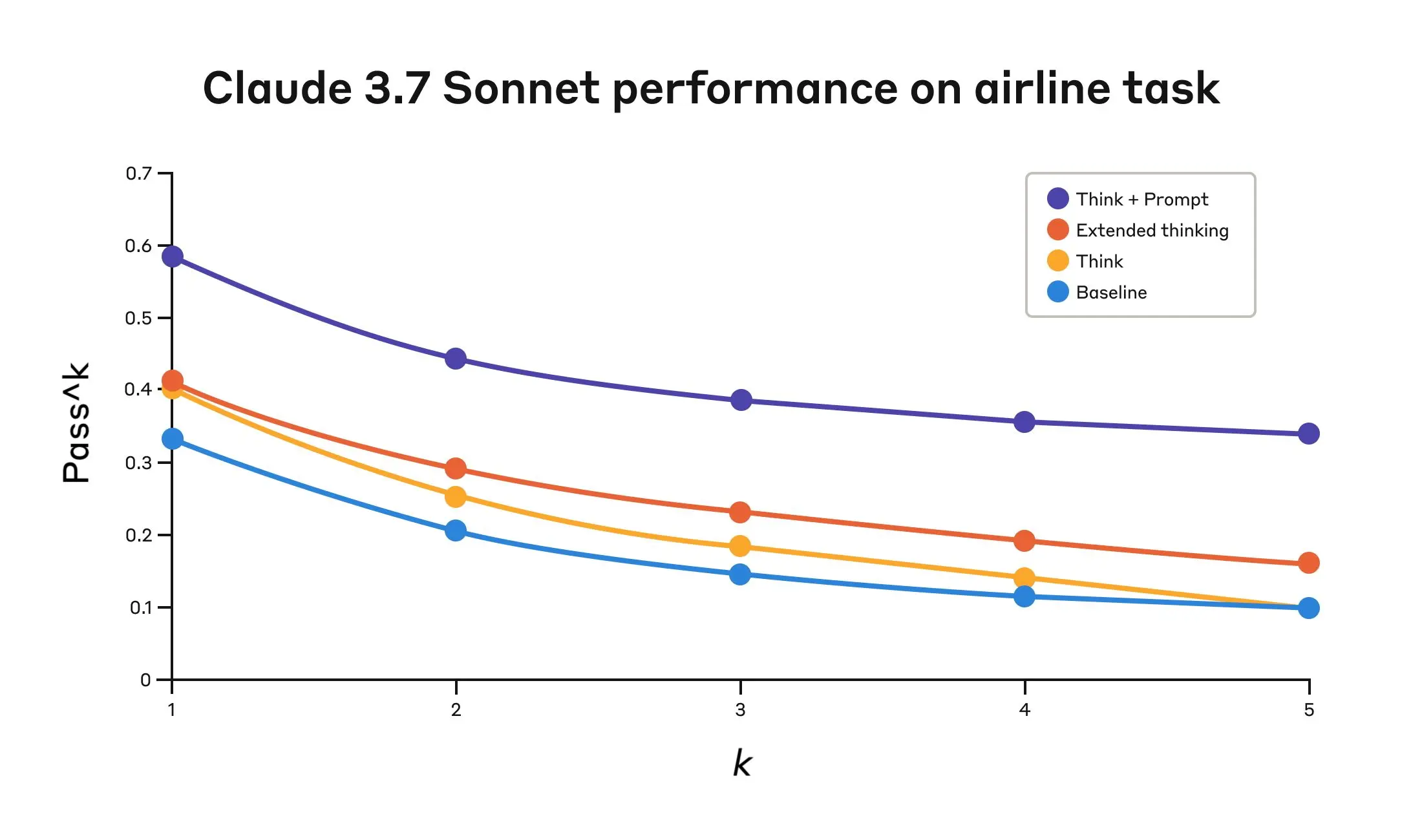
According to the referenced article, adding the think tool can lead to improved evaluation metrics by enabling reasoning capabilities even in models that do not natively possess advanced reasoning skills.
What is the "think" tool?
The "think" tool allows an AI agent to pause and record an explicit thought during complex reasoning or multi-step tool use. It does not change the environment or database, but appends the thought to the log, helping the agent process information, backtrack, or comply with detailed policies.
This approach is especially useful for:
Tool output analysis (processing results of previous tool calls)
Policy-heavy environments (verifying compliance with guidelines)
Sequential decision making (where each step builds on previous ones)
Related MCP server: think-mcp-server
Features
Implements the "think" tool as described in Anthropic's research
Minimal, standards-based MCP server using mcp[cli]
Ready for integration with Claude or other agentic LLMs
Usage
MCP server configuration
Add this MCP server to your facorite agent.
"mcpServers": {
    "think-mcp": {
        "command": "uvx",
        "args": ["think-mcp"],
        "enabled": true
    }
}
Tool definition
The "think" tool is defined as:
Input:
thought(string) — A thought to think about.Behavior: Appends the thought to the log for structured reasoning.
Advanced mode
Adds aditional tools for your agent:
criticize
plan
search
"mcpServers": {
    "think-mcp": {
        "command": "uvx",
        "args": ["think-mcp", "--advanced"],
        "enabled": true,
        "env": {
            "TAVILY_API_KEY": ... YOUR TAVILY API KEY HERE ...
        }
    }
}
Reference
License
MIT License — see LICENSE
