

A
licenseNot graded
qualityD
maintenanceAn MCP server that implements the 'think' tool, providing Claude with a dedicated space for structured thinking during complex problem-solving tasks to improve reasoning capabilities.
130
MIT

The Think MCP Tool server enables AI agents to perform structured reasoning by recording explicit thoughts during complex workflows.
Think: Record and log thoughts as strings without modifying any external state, database, or environment — enabling the agent to process information, backtrack, or verify compliance mid-workflow
Tool output analysis: Reflect on and process results from previous tool calls
Policy compliance: Verify actions against guidelines before proceeding in policy-heavy environments
Sequential decision making: Build multi-step reasoning where each decision depends on prior ones
Advanced mode (--advanced flag): Unlocks additional tools — criticize, plan, and search (the latter requires a Tavily API key)
MCP integration: Compatible with Claude and other agentic LLMs via standard MCP server protocols
Uses the mcp[cli] package from PyPI as the foundation for implementing the standards-based MCP server
Click on "Deploy Server".
Wait a few minutes for the server to deploy. Once ready, it will show a "Started" state.
In the chat, type @ followed by the MCP server name and your instructions, e.g., "@Think MCP Tool I need to analyze these database query results before deciding which columns to select."
That's it! The server will respond to your query, and you can continue using it as needed.
Here is a step-by-step guide with screenshots.
Think MCP is an implementation of an MCP (Model Context Protocol) server that provides a "think" tool for structured reasoning in agentic AI workflows. This project is inspired by the Anthropic engineering article: The "think" tool: Enabling Claude to stop and think in complex tool use situations.
According to the referenced article, adding the think tool can lead to improved evaluation metrics by enabling reasoning capabilities even in models that do not natively possess advanced reasoning skills.
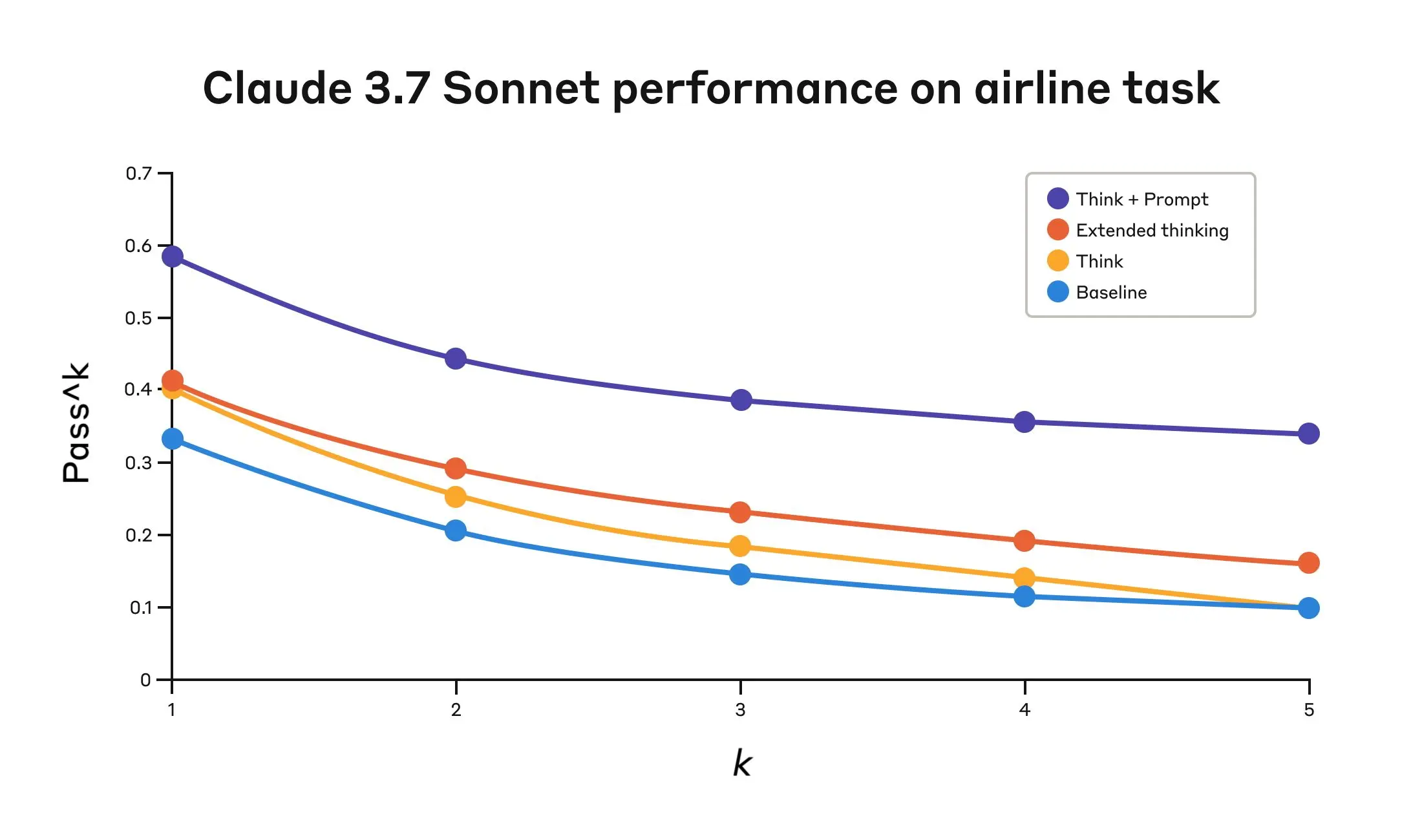
The "think" tool allows an AI agent to pause and record an explicit thought during complex reasoning or multi-step tool use. It does not change the environment or database, but appends the thought to the log, helping the agent process information, backtrack, or comply with detailed policies.
This approach is especially useful for:
Tool output analysis (processing results of previous tool calls)
Policy-heavy environments (verifying compliance with guidelines)
Sequential decision making (where each step builds on previous ones)
Related MCP server: think-mcp-server
Implements the "think" tool as described in Anthropic's research
Minimal, standards-based MCP server using mcp[cli]
Ready for integration with Claude or other agentic LLMs
Add this MCP server to your facorite agent.
"mcpServers": {
    "think-mcp": {
        "command": "uvx",
        "args": ["think-mcp"],
        "enabled": true
    }
}The "think" tool is defined as:
Input: thought (string) — A thought to think about.
Behavior: Appends the thought to the log for structured reasoning.
Adds aditional tools for your agent:
criticize
plan
search
"mcpServers": {
    "think-mcp": {
        "command": "uvx",
        "args": ["think-mcp", "--advanced"],
        "enabled": true,
        "env": {
            "TAVILY_API_KEY": ... YOUR TAVILY API KEY HERE ...
        }
    }
}MIT License — see LICENSE
Use the tool to think about something. It will not obtain new information or change the database, but just append the thought to the log. Use it when complex reasoning or some cache memory is needed.
| Name | Required | Description | Default |
|---|---|---|---|
| thought | Yes | A thought to think about. |
| Name | Required | Description |
|---|---|---|
| result | Yes |
Does the description disclose side effects, auth requirements, rate limits, or destructive behavior?
With no annotations provided, the description carries the full burden. It clearly discloses behavioral traits: 'It will not obtain new information or change the database, but just append the thought to the log,' indicating it's a non-destructive, logging-only operation. This adds useful context beyond the schema, though it could detail more about the log format or persistence.
Agents need to know what a tool does to the world before calling it. Descriptions should go beyond structured annotations to explain consequences.
Is the description appropriately sized, front-loaded, and free of redundancy?
The description is appropriately sized with three sentences that are front-loaded: the first states the purpose, the second clarifies behavior, and the third provides usage context. There's minimal waste, though it could be slightly more structured for clarity.
Shorter descriptions cost fewer tokens and are easier for agents to parse. Every sentence should earn its place.
Given the tool's complexity, does the description cover enough for an agent to succeed on first attempt?
Given the tool's low complexity (one parameter, no annotations, but has an output schema), the description is complete enough. It covers purpose, behavior, and usage, and since an output schema exists, it needn't explain return values. However, it could benefit from more detail on the log mechanism or examples.
Complex tools with many parameters or behaviors need more documentation. Simple tools need less. This dimension scales expectations accordingly.
Does the description clarify parameter syntax, constraints, interactions, or defaults beyond what the schema provides?
The input schema has 100% description coverage, with the parameter 'thought' well-documented. The description adds no additional parameter semantics beyond what the schema provides, such as format or examples for the thought. Given high schema coverage, the baseline score of 3 is appropriate as the description doesn't compensate but doesn't need to.
Input schemas describe structure but not intent. Descriptions should explain non-obvious parameter relationships and valid value ranges.
Does the description clearly state what the tool does and how it differs from similar tools?
The description states the tool is used 'to think about something' and 'append the thought to the log,' which provides a basic purpose. However, it's vague about what 'think' entails operationally and doesn't distinguish from siblings (though none exist). It avoids tautology by adding context about appending to a log, but lacks specificity in verb+resource clarity.
Agents choose between tools based on descriptions. A clear purpose with a specific verb and resource helps agents select the right tool.
Does the description explain when to use this tool, when not to, or what alternatives exist?
The description provides implied usage guidelines by stating 'Use it when complex reasoning or some cache memory is needed,' which gives context for when to invoke it. However, it lacks explicit alternatives or exclusions, and since there are no sibling tools, this guidance is minimal but adequate for basic direction.
Agents often have multiple tools that could apply. Explicit usage guidance like "use X instead of Y when Z" prevents misuse.
Recent tool additions, removals, and schema changes observed during successful MCP inspections.
v1.0.0thinkScored across 1 tool
With only one tool, there is no possibility of ambiguity or overlap with other tools. The tool 'think' has a clearly distinct and singular purpose, making misselection impossible.
A single tool inherently has perfect naming consistency as there are no other tools to compare against. The name 'think' follows a simple verb pattern, which is appropriate for its function.
One tool is too few for a server named 'Think MCP Tool', which suggests a broader scope. A single tool for thinking/logging feels thin and insufficient for typical MCP server purposes, indicating a mismatch with the implied domain.
The server is severely incomplete; with only a 'think' tool, there are no operations for data retrieval, modification, or interaction with external systems. This leaves significant gaps that will cause agent failures in most practical scenarios.
MCP server for building and testing AI agents with multi-model experimentation and insights.
MCP server for your apps' tools and custom tools, plus hosted AI agents and approval-gated workflows
Official MCP server for Agentwork — delegate tasks to AI agents with human-in-the-loop
Cloud-hosted MCP server for durable AI memory