
VSCode Debug MCP
Enables interactive debugging of C++ applications, allowing for breakpoint management, expression evaluation, and control over program execution flow.
Supports interactive debugging for Node.js environments, providing tools to set breakpoints, inspect program state, and manage execution steps.
Provides capabilities to interactively debug Python code, including the ability to manage breakpoints, evaluate expressions, and control program execution.
Click on "Deploy Server".
Wait a few minutes for the server to deploy. Once ready, it will show a "Started" state.
In the chat, type
@followed by the MCP server name and your instructions, e.g., "@VSCode Debug MCPset a breakpoint on line 20 of main.py and start debugging"
That's it! The server will respond to your query, and you can continue using it as needed.
Here is a step-by-step guide with screenshots.
VSCode Debug MCP


Enable an MCP Client to interactively debug code with breakpoints, expression evaluation, and program launching.
This is an MCP server and VS Code extension that exposes debugging capabilities via the Model Context Protocol. It's language-agnostic — it works with any debugger that has a valid launch.json in VS Code.
Tools
Tool | Actions | Description |
| launch, stop, continue, stepOver, stepIn, stepOut | Control program execution during debugging |
| set, remove, list | Manage breakpoints with support for conditions, hit counts, and log messages |
| evaluate, stackTrace | Inspect program state while paused at a breakpoint |
Getting Started
Download the extension from releases
Install the extension
If using
.vsixdirectly, go to the three dots in "Extensions" in VS Code and choose "Install from VSIX..."
Once installed, you'll see an "MCP Debug Server" panel in the Debug tab showing the server status, stdio path, and SSE address.
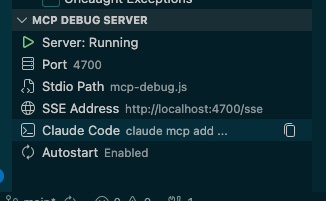
Claude Code
Copy the ready-to-paste setup command using the "Copy Claude Code Setup Command" button in the Debug tab's MCP Debug Server panel, or via the VS Code command palette ("VSCode Debug MCP: Copy Claude Code Setup Command").
Paste and run it in your terminal:
claude mcp add --transport stdio vscode-debug -- node /path/to/mcp-debug.jsOr add it to your project's .mcp.json:
{
  "mcpServers": {
    "vscode-debug": {
      "command": "node",
      "args": ["/path/to/mcp-debug.js"]
    }
  }
}
GitHub Copilot
Copy the stdio server path to your clipboard using the VS Code command "Copy MCP Debug Server stdio path to clipboard"
Open the VS Code command palette and run "MCP: Open Workspace Folder Configuration" to edit
.vscode/mcp.json, then add:
{
  "servers": {
    "vscode-debug": {
      "type": "stdio",
      "command": "node",
      "args": ["/path/to/mcp-debug.js"]
    }
  }
}
Configuration
mcpDebug.port— Server port (default:4711)mcpDebug.autostart— Automatically start the server on activation (default:true)
When multiple VS Code windows are open, the extension handles graceful hand-off of the MCP server between windows.
Architecture
graph LR
    subgraph MCP Clients
        A[Claude Code / stdio client]
        B[Cursor / SSE client]
    end

    subgraph Stdio Bridge
        C[mcp-debug.js]
    end

    subgraph VS Code Extension
        D[DebugServer]
        E[VS Code Debug API]
    end

    F[Any Debugger<br/>Python, Node.js, C++, Go, ...]

    A -- stdio --> C
    C -- HTTP POST /tcp --> D
    B -- SSE /sse --> D
    D --> E
    E --> F
The extension provides two ways for MCP clients to connect:
Stdio — A standalone Node.js bridge process (
mcp-debug.js) receives MCP requests over stdio and forwards them via HTTP to the extension's debug server. Used by Claude Code and other stdio-based clients.SSE — Clients connect directly to the extension's SSE endpoint. Used by Cursor and other SSE-capable clients.
Both paths use the VS Code Debug API under the hood, which means the extension works with any language/debugger that supports launch.json configurations (Python, Node.js, C++, Go, etc.).
Developing
Clone and open this repo in VS Code
Install dependencies:
npm install && cd mcp && npm install && cd ..Build:
npm run compilePress F5 to launch the extension in a new VS Code window
Rebuild after changes:
npm run compile
Packaging
vsce packageRelease Process
This project uses conventional commits and release-please for automated versioning and releases.
Commit Messages
All commits should follow the conventional commits format:
fix:— Bug fixes (patch version bump)feat:— New features (minor version bump)feat!:/fix!:/refactor!:— Breaking changes (major version bump)chore:,docs:,refactor:,test:— No version bump
PR Testing
Every pull request automatically builds a .vsix artifact via CI. Download it from the GitHub Actions "Artifacts" section on the PR's checks to install and test the extension locally before merging.
Releasing
When conventional commits are pushed to main, release-please automatically opens (or updates) a Release PR with a version bump and changelog entry. Merging that PR creates a GitHub release and builds the final .vsix, which is uploaded to the release assets.
Acknowledgements
This project is a fork of Claude Debugs For You by Jason McGhee. Thank you for creating the original extension and MCP server that this project builds upon.
This server cannot be deployed
Maintenance
Related MCP Connectors
Live browser debugging for AI assistants — DOM, console, network via MCP.
Agent Replay Debugger MCP — record every agent step + deterministic replay. Step-debugger for
A comprehensive Model Context Protocol (MCP) server that enables AI assistants to interact with yo…
MCP server for building and testing AI agents with multi-model experimentation and insights.