
F
licenseNot graded
qualityD
maintenanceEnables querying Yahoo Finance data including stock prices, historical data, financial statements, dividends, news, analyst recommendations, and company information through the yfinance library.
-

Click on "Deploy Server".
Wait a few minutes for the server to deploy. Once ready, it will show a "Started" state.
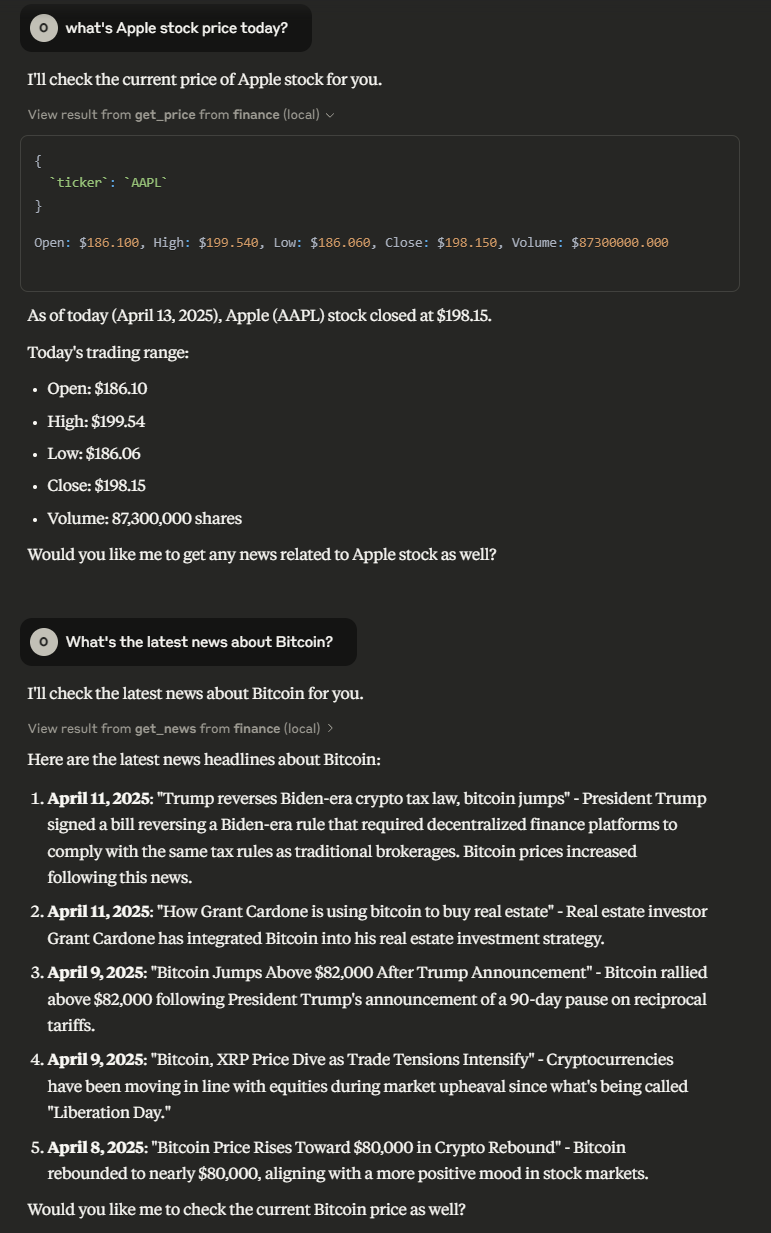
In the chat, type @ followed by the MCP server name and your instructions, e.g., "@yfinance MCP Server get the current price of AAPL"
That's it! The server will respond to your query, and you can continue using it as needed.
Here is a step-by-step guide with screenshots.
Model Context Protocol server that allows LLMs to get accurate and up-to-date prices and news about stock/cryptocurrencies tickers.
get_price_tool: Get the price of a stock/cryptocurrency ticker
Arguments:
ticker (string): Required - Ticker name or alias (e.g., "BTC-USD", "AAPL")
period (string): Optional - Time period (e.g., "1d", "5d", "1mo"). Defaults to "1d"
get_news_tool: Get the news of a stock/cryptocurrency ticker.
Required arguments:
ticker (string): Required
count (string): Optional - Number of articles to retrieve (default: 5)
Related MCP server: Yahoo Finance MCP Server
To install yfinance-mcp-server for Claude Desktop automatically via Smithery:
npx -y @smithery/cli install @Otman404/finance-mcp-server --client claudeInstall the package locally
uv pip install -e .Run the server
finance-mcp-serverUsing docker
# build the container
docker build -t finance-server .

# run the container
docker run -it finance-serverAdd the following to claude_desktop_config.json
"mcpServers": {
  "finance": {
    "command": "uvx",
    "args": ["finance-mcp-server"]
  }
}{
"mcpServers": {
"finance": {
"command": "docker",
"args": ["run", "-i", "--rm", "finance-server"]
}
}
}{
"key": "finance",
"command": "uvx",
"args": ["finance-mcp-server"]
}{
"key": "finance-server",
"command": "docker",
"args": ["run", "-i", "--rm", "finance-server"]
}
Get the news of a stock/crypto ticker.
| Name | Required | Description | Default |
|---|---|---|---|
| ticker | Yes | ||
| count | No |
Does the description disclose side effects, auth requirements, rate limits, or destructive behavior?
No annotations are provided, so the description must fully disclose behavior. It only states the basic function without mentioning rate limits, data sources, or potential errors. Minimal transparency.
Agents need to know what a tool does to the world before calling it. Descriptions should go beyond structured annotations to explain consequences.
Is the description appropriately sized, front-loaded, and free of redundancy?
The description is a single sentence, which is concise but lacks necessary detail. It is appropriately front-loaded but does not earn its place with substantive information.
Shorter descriptions cost fewer tokens and are easier for agents to parse. Every sentence should earn its place.
Given the tool's complexity, does the description cover enough for an agent to succeed on first attempt?
Given no output schema, the description should hint at return format or data structure. It does not, leaving the agent uninformed about what to expect after invocation.
Complex tools with many parameters or behaviors need more documentation. Simple tools need less. This dimension scales expectations accordingly.
Does the description clarify parameter syntax, constraints, interactions, or defaults beyond what the schema provides?
The description adds no additional meaning beyond the input schema. With 0% schema description coverage, it fails to explain what 'ticker' format is expected or what 'count' represents.
Input schemas describe structure but not intent. Descriptions should explain non-obvious parameter relationships and valid value ranges.
Does the description clearly state what the tool does and how it differs from similar tools?
The description clearly states the tool retrieves news for a stock/crypto ticker, using a specific verb and resource. It distinguishes from the sibling 'get_price' tool which presumably fetches price data.
Agents choose between tools based on descriptions. A clear purpose with a specific verb and resource helps agents select the right tool.
Does the description explain when to use this tool, when not to, or what alternatives exist?
No guidance is provided on when to use this tool versus 'get_price' or other alternatives. The description lacks any contextual cues for appropriate usage.
Agents often have multiple tools that could apply. Explicit usage guidance like "use X instead of Y when Z" prevents misuse.
Get the price of a stock/crypto ticker.
| Name | Required | Description | Default |
|---|---|---|---|
| ticker | Yes | ||
| period | No | 1d |
Does the description disclose side effects, auth requirements, rate limits, or destructive behavior?
No annotations are provided, and the description does not disclose behavioral traits such as network calls, rate limits, authentication needs, or what the 'period' parameter means. The description implies a single price, but the 'period' parameter suggests historical data, creating ambiguity and contradiction.
Agents need to know what a tool does to the world before calling it. Descriptions should go beyond structured annotations to explain consequences.
Is the description appropriately sized, front-loaded, and free of redundancy?
The description is a single sentence, concise but too brief for a tool with untrivial input parameters. It lacks structure and does not front-load critical information beyond the basic purpose.
Shorter descriptions cost fewer tokens and are easier for agents to parse. Every sentence should earn its place.
Given the tool's complexity, does the description cover enough for an agent to succeed on first attempt?
Given no output schema and unannotated parameters, the description does not explain what the tool returns (e.g., a number or object) or how the period affects the output. The context is incomplete for effective use, especially with the ambiguous period parameter.
Complex tools with many parameters or behaviors need more documentation. Simple tools need less. This dimension scales expectations accordingly.
Does the description clarify parameter syntax, constraints, interactions, or defaults beyond what the schema provides?
The input schema has 2 parameters (ticker, period) with 0% description coverage. The description does not explain the parameters or their expected values (e.g., what '1d' means or other valid periods), adding no value beyond the schema. The agent must infer usage from parameter names alone.
Input schemas describe structure but not intent. Descriptions should explain non-obvious parameter relationships and valid value ranges.
Does the description clearly state what the tool does and how it differs from similar tools?
The description clearly states the tool gets the price of a stock/crypto ticker, with a specific verb and resource. It distinguishes itself from the sibling 'get_news' by the type of data returned. However, it does not clarify whether it returns current or historical prices, leaving some ambiguity.
Agents choose between tools based on descriptions. A clear purpose with a specific verb and resource helps agents select the right tool.
Does the description explain when to use this tool, when not to, or what alternatives exist?
There is no guidance on when to use this tool versus alternatives, nor any mention of limitations, prerequisites, or when not to use it. The only sibling is 'get_news', but no explicit comparison is made.
Agents often have multiple tools that could apply. Explicit usage guidance like "use X instead of Y when Z" prevents misuse.
Recent tool additions, removals, and schema changes observed during successful MCP inspections.
v0.1.0get_newsget_priceScored across 2 tools
get_news and get_price target distinct aspects (news vs. price) with no overlap. An agent can easily choose the correct tool for the intended action.
Both tools follow the consistent pattern of get_<resource>, using snake_case and a clear verb-noun structure. No deviations.
With only 2 tools for a domain as rich as stock/crypto data, the set is far too sparse. Most financial APIs offer dozens of endpoints; this limited set feels incomplete.
Crucial operations are missing: no historical price data, no financial statements, no market statistics, no search. An agent cannot perform basic financial analysis with just news and current price.
Real-time financial news for AI agents: search by ticker and source, with sentiment and entities.
Stock market data for AI agents: real-time quotes, financials, options, SEC filings and news.
FinBERT news sentiment and price history for 42 crypto, FX, stock, ETF and commodity tickers.
Fetch current stock prices and key data for symbols across global markets. Look up companies like…