オムニMCP




OmniMCPは、モデルコンテキストプロトコル(MCP)とmicrosoft/OmniParserを通じて、AIモデルに豊富なUIコンテキストとインタラクション機能を提供します。視覚的な分析、構造化された計画、そして正確なインタラクション実行を通じて、ユーザーインターフェイスの深い理解を可能にすることに重点を置いています。
コア機能
視覚認識: OmniParser を使用して UI 要素を理解します。
**LLM 計画:**目標、履歴、視覚的な状態に基づいて次のアクションを計画します。
**エージェント エグゼキューター:**認識-計画-行動ループ ( omnimcp/agent_executor.py ) を調整します。
アクション実行: pynput ( omnimcp/input.py ) を介してマウス/キーボードを制御します。
**CLI インターフェース:**タスクを実行するためのシンプルなエントリ ポイント ( cli.py )。
**自動デプロイメント:**自動シャットダウン付きの AWS EC2 へのオプションの OmniParser サーバー デプロイメント。
**デバッグ:**ステップごとにタイムスタンプ付きのビジュアル ログを生成します。
Related MCP server: SupaUI MCP Server
概要
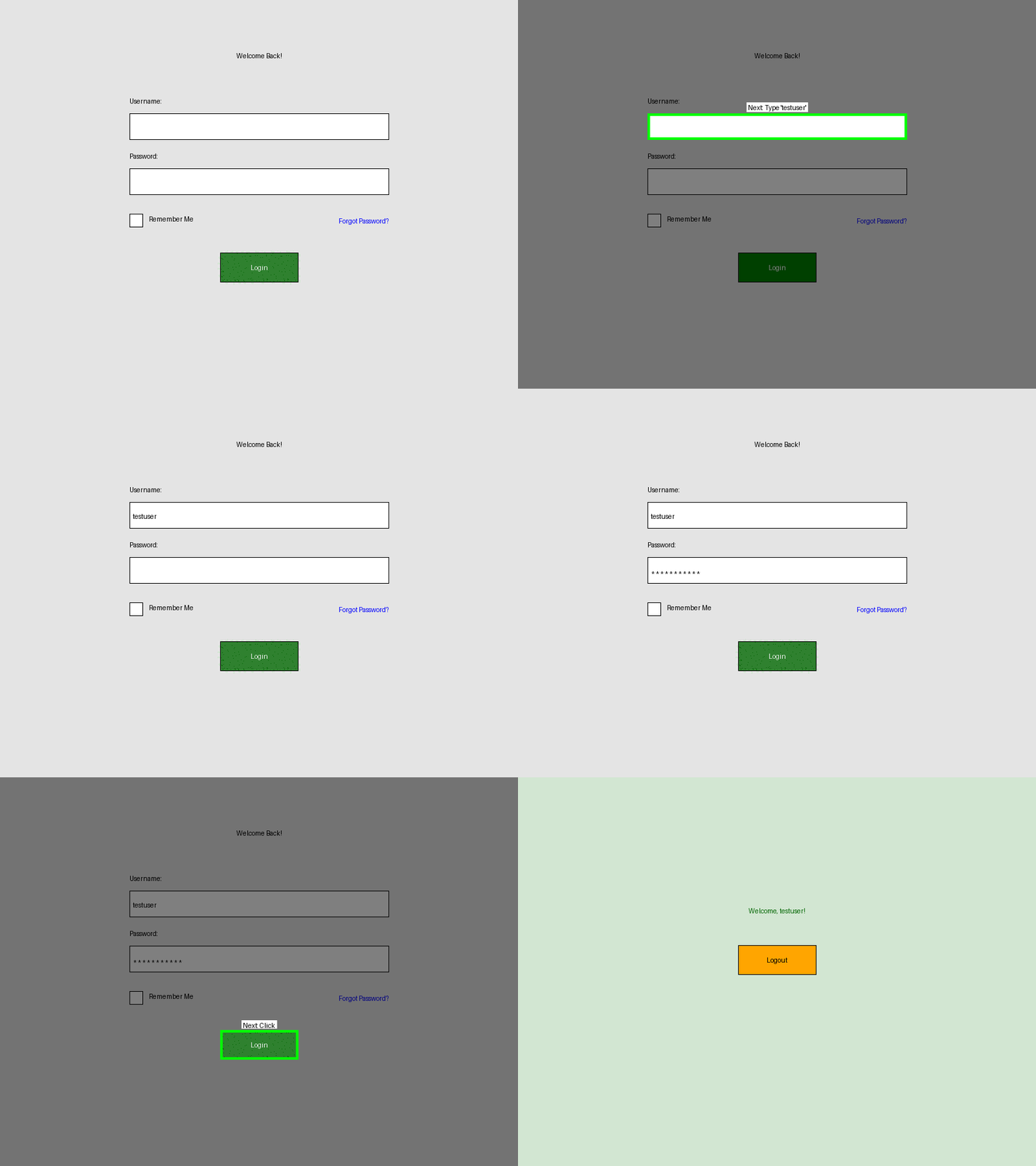
cli.py AgentExecutorを使用して、認識・計画・行動のループを実行します。画面をキャプチャし ( VisualState )、LLM を使用してプランニングを行い ( core.plan_action_for_ui )、アクションを実行します ( InputController )。
デモ
前提条件
(macOS ディスプレイのスケーリング依存関係はインストール中に自動的に処理されます)。
AWS デプロイメント機能について
.envにAWS認証情報が必要です( .env.exampleを参照)。警告: AWSリソース(EC2、Lambdaなど)が作成され、コストが発生します。クリーンアップするには、 python -m omnimcp.omniparser.server stopを使用してください。
AWS_ACCESS_KEY_ID=YOUR_ACCESS_KEY
AWS_SECRET_ACCESS_KEY=YOUR_SECRET_KEY
ANTHROPIC_API_KEY=YOUR_ANTHROPIC_KEY
# OMNIPARSER_URL=http://... # Optional: Skip auto-deploy
インストール
git clone [https://github.com/OpenAdaptAI/OmniMCP.git](https://github.com/OpenAdaptAI/OmniMCP.git)
cd OmniMCP
./install.sh # Creates .venv, installs deps incl. test extras
cp .env.example .env
# Edit .env with your keys
# Activate: source .venv/bin/activate (Linux/macOS) or relevant Windows command
クイックスタート
環境がアクティブ化され、 .envが構成されていることを確認します。
# Run default goal (Calculator task)
python cli.py

# Run custom goal
python cli.py --goal "Your goal here"

# See options
python cli.py --help
デバッグ出力はruns/<timestamp>/に保存されます。
**MCP サーバーに関する注意:**実験的な MCP サーバー ( omnimcp/mcp_server.pyのOmniMCPクラス) が存在しますが、プライマリcli.py / AgentExecutorワークフローとは別です。
建築
CLI ( cli.py ) - エントリ ポイント、セットアップ、Executor の起動。
エージェント エグゼキューター( omnimcp/agent_executor.py ) - ループをオーケストレーションし、状態/アーティファクトを管理します。
Visual State Manager ( omnimcp/visual_state.py ) - 認識 (スクリーンショット、パーサーの呼び出し)。
OmniParser クライアント & デプロイ( omnimcp/omniparser/ ) - OmniParser サーバーの通信/デプロイメントを管理します。
LLM プランナー( omnimcp/core.py ) - アクション プランを生成します。
入力コントローラ( omnimcp/input.py ) - アクション (マウス/キーボード) を実行します。
(オプション) MCP サーバー( omnimcp/mcp_server.py ) - 実験的な MCP インターフェース。
発達
環境設定とチェック
# Setup (if not done): ./install.sh
# Activate env: source .venv/bin/activate (or similar)
# Format/Lint: uv run ruff format . && uv run ruff check . --fix
# Run tests: uv run pytest tests/
デバッグサポート
python cli.pyを実行すると、次の内容を含むタイムスタンプ付きの実行がruns/に保存されます。
詳細なログはlogs/run_YYYY-MM-DD_HH-mm-ss.logにあります ( .envではLOG_LEVEL=DEBUG推奨されます)。
# --- Initialization & Auto-Deploy ---
2025-MM-DD HH:MM:SS | INFO     | omnimcp.omniparser.client:... - No server_url provided, attempting discovery/deployment...
2025-MM-DD HH:MM:SS | INFO     | omnimcp.omniparser.server:... - Creating new EC2 instance...
2025-MM-DD HH:MM:SS | SUCCESS  | omnimcp.omniparser.server:... - Instance i-... is running. Public IP: ...
2025-MM-DD HH:MM:SS | INFO     | omnimcp.omniparser.server:... - Setting up auto-shutdown infrastructure...
2025-MM-DD HH:MM:SS | SUCCESS  | omnimcp.omniparser.server:... - Auto-shutdown infrastructure setup completed...
... (SSH connection, Docker setup) ...
2025-MM-DD HH:MM:SS | SUCCESS  | omnimcp.omniparser.client:... - Auto-deployment successful. Server URL: http://...
... (Agent Executor Init) ...

# --- Agent Execution Loop Example Step ---
2025-MM-DD HH:MM:SS | INFO     | omnimcp.agent_executor:run:... - --- Step N/10 ---
2025-MM-DD HH:MM:SS | DEBUG    | omnimcp.agent_executor:run:... - Perceiving current screen state...
2025-MM-DD HH:MM:SS | INFO     | omnimcp.visual_state:update:... - VisualState update complete. Found X elements. Took Y.YYs.
2025-MM-DD HH:MM:SS | INFO     | omnimcp.agent_executor:run:... - Perceived state with X elements.
... (Save artifacts) ...
2025-MM-DD HH:MM:SS | DEBUG    | omnimcp.agent_executor:run:... - Planning next action...
... (LLM Call) ...
2025-MM-DD HH:MM:SS | INFO     | omnimcp.agent_executor:run:... - LLM Plan: Action=..., TargetID=..., GoalComplete=False
2025-MM-DD HH:MM:SS | DEBUG    | omnimcp.agent_executor:run:... - Added to history: Step N: Planned action ...
2025-MM-DD HH:MM:SS | INFO     | omnimcp.agent_executor:run:... - Executing action: ...
2025-MM-DD HH:MM:SS | SUCCESS  | omnimcp.agent_executor:run:... - Action executed successfully.
2025-MM-DD HH:MM:SS | DEBUG    | omnimcp.agent_executor:run:... - Step N duration: Z.ZZs
... (Loop continues or finishes) ...
(注: タイミング、カウント、IP、インスタンス ID、特定のプランなどの詳細は異なります)
ロードマップと制限事項
主な制限事項と将来の作業領域:
パフォーマンス: OmniParser のレイテンシを削減し (ローカル モデル、キャッシュなどを探索)、状態管理を最適化します (完全な再解析を回避します)。
堅牢性: LLM 計画の信頼性 (プロンプト、ReAct などのテクニック) を向上させ、アクション検証/エラー回復を追加し、要素のターゲティングを強化します。
**ターゲット API/アーキテクチャ:**より高レベルの宣言型 API (例: @omni.publishスタイル) に向けて進化し、ループ ロジックを実験的な MCP サーバー ( OmniMCPクラス) と統合する可能性があります。
一貫性: AgentExecutor使用するようにdemo_synthetic.pyをリファクタリングします。
**機能:**アクション スペースを拡張します (ドラッグ/ドロップ、ホバー)。
テスト: E2E テストを追加し、クロスプラットフォーム検証を拡大し、評価メトリックを定義します。
**調査:**微調整、プロセス グラフ (RAG)、フレームワークの統合を調査します。
プロジェクトのステータス
cli.py / AgentExecutor経由のコアループは基本的なタスクには機能します。パフォーマンスと堅牢性には大幅な改善が必要です。MCP との統合は試験段階です。
貢献
フォークリポジトリ
機能ブランチを作成する
変更を実装し、テストを追加する
チェックが合格したことを確認します ( uv run ruff format . 、 uv run ruff check . --fix 、 uv run pytest tests/ )
プルリクエストを送信する
ライセンス
MITライセンス
接触