Glama

AutoWP MCP Server - WordPress Automation MCP Server

AutoWP MCP Login Prompt Example

MCP badge MCP Server

AutoWP MCP (Model Context Protocol) server connects Claude to WordPress sites and allows users to ask Claude to work on different tasks on their WordPress site like create and post blog posts and other WordPress site management tasks. It acts as a bridge between LLM clients like Claude Desktop and WordPress websites.
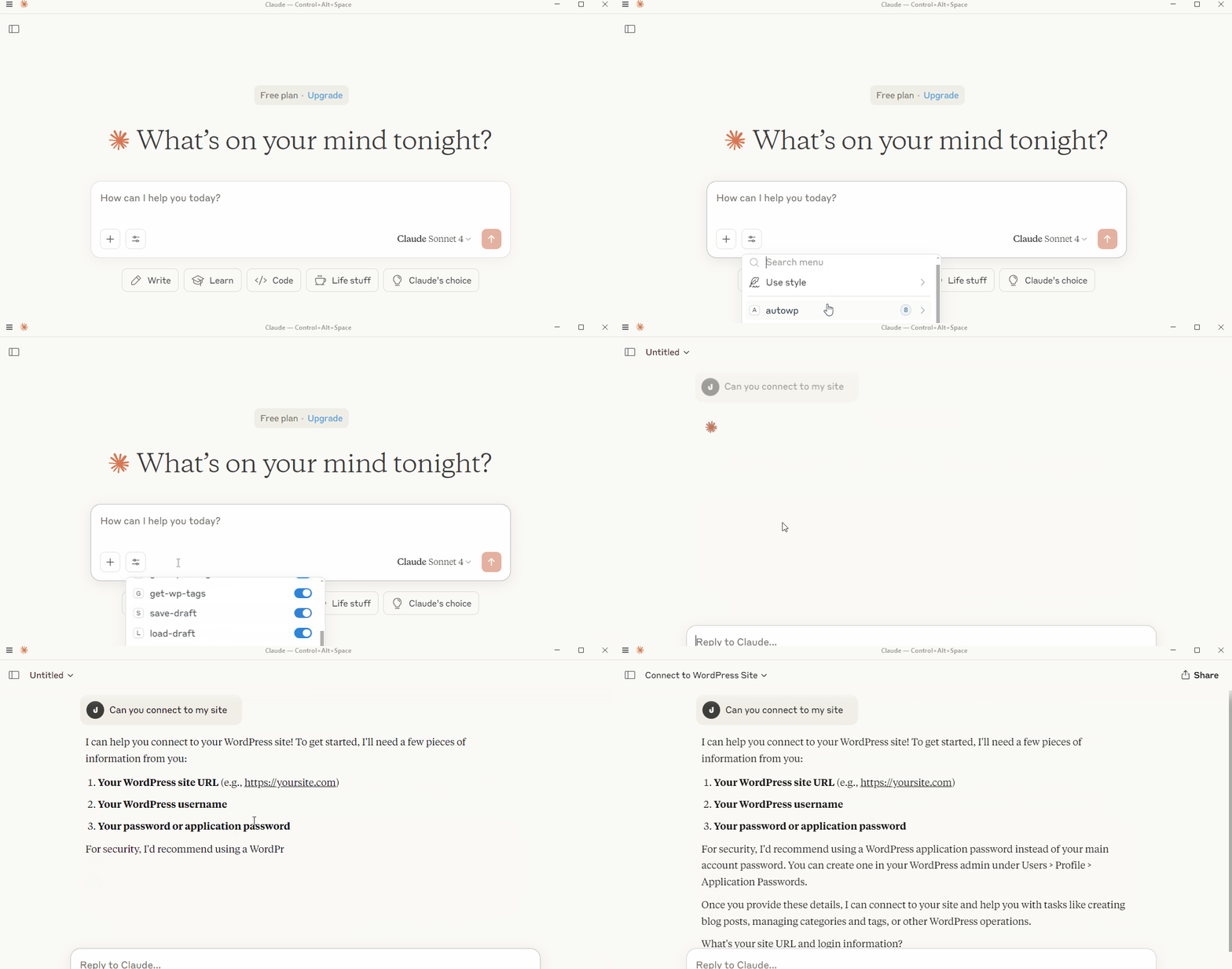
AutoWP MCP Login Prompt Example

Features

It provides a secure, standardized way for AI assistants to interact with WordPress sites through the WordPress REST API, without the need for direct database access.

Related MCP server: mcp-wordpress

Key Capabilities

  • Authentication & Security

    • Handles secure login using WordPress application passwords

    • Manages authentication sessions safely

    • Test site connectivity before attempting operations

  • Content Management

    • Creates and publishes blog posts

    • Formats raw text into WordPress-compatible HTML

    • Manages post metadata (titles, excerpts, status)

  • Site Information Access

    • Retrieves available categories and tags

    • Accesses the site structure and permissions

    • Respects user role limitations (like your contributor role)

  • Draft Workflow

    • Saves drafts locally for editing

    • Loads previously saved content

    • Enables iterative content development

Installation & Authentication

Setup

  1. Install & Build

    npm install
    npm run build
    npm start
  2. Configure Claude Desktop

Add to your Claude Desktop MCP configuration:

  {
  "mcpServers": {
    "autowp": {
      "command": "node",
      "args": ["/path/to/your/autowp-mcp/build/index.js"]
    }
  }
}

Available Tools

Authentication

  • authenticate-wp – Connect to your WordPress site

  • test-wp-connection – Test if a WordPress site is reachable


Content Management

  • create-blog-post – Create new blog posts with categories/tags

  • get-wp-categories – List all available categories

  • get-wp-tags – List all available tags

  • format-wp-content – Convert text to WordPress-ready HTML

    Draft Management

    • save-draft – Save posts locally for later

    • load-draft – Load previously saved drafts


Media Management Tools

Core Media Operations

  • upload-media – Upload files from local paths or URLs with metadata

  • list-media – Browse media library with pagination and filters

  • search-media – Find media by keyword, type, or date range

  • get-media-details – Retrieve detailed media information

  • delete-media – Remove files from media library

  • bulk-delete-media – Delete multiple media files at once

Media Enhancement

  • edit-media-metadata – Update title, caption, alt text, description

  • set-featured-image – Assign featured images to posts

  • optimize-media – Compress images via external APIs (e.g., TinyPNG)


Taxonomy & Classification Tools

Existing Taxonomies

  • get-wp-categories – List all WordPress categories

  • get-wp-tags – List all WordPress tags

Taxonomy Management

  • create-category – Create new categories with hierarchy support

  • create-tag – Create new tags with descriptions

  • update-category – Rename/edit categories and hierarchy

  • update-tag – Rename/edit tag details

  • delete-category – Remove categories with force option

  • delete-tag – Remove tags with force option

Advanced Taxonomy Operations

  • merge-categories – Combine categories (moves posts, optionally deletes source)

  • assign-categories-to-posts – Bulk assign categories to multiple posts

  • assign-tags-to-posts – Bulk assign tags to multiple posts

  • list-taxonomies – View all taxonomies including custom ones


User Management Tools

Core User Operations

  • list-users – List WordPress users with filters like role, search, or registration date

  • create-user – Create a new user with optional profile and role details

  • update-user – Update user profile data including email, name, bio, and password

  • disable-user – Temporarily deactivate a user account with an optional reason

  • reset-user-password – Generate a password reset link or email it to the user

Role & Permission Management

  • set-user-role – Assign a specific role to a user, optionally removing others

  • list-user-roles – View all available WordPress user roles and their capabilities


Site Settings Tools

  • get-site-settings – View WordPress site configuration and reading settings

  • update-site-settings – Update basic site configuration such as title, tagline, timezone, and front page behavior


Plugin Management Tools

  • list-plugins – List installed WordPress plugins with activation status


Upcoming Tools

Plugin Management

  • install-plugin – Install a plugin from the WordPress.org repository

  • toggle-plugin – Activate or deactivate a WordPress plugin

  • update-plugin – Update a WordPress plugin to its latest version

  • delete-plugin – Permanently delete a WordPress plugin

  • rollback-plugin – Rollback a plugin to a previous version

Theme Management

  • switch-theme – Change the active WordPress theme

  • get-theme-info – Get detailed information about installed themes

Settings Management

  • manage-comment-settings – Manage comment-related settings (Planned but not registered)

  • export-settings – Export current WordPress site settings (Planned)

  • import-settings – Import WordPress site settings from a file (Planned)

Site Health/ Maintenance & Testing / Core Updates

  • get-system-info - Get comprehensive WordPress system information

  • send-test-email – Send a test email to verify mail server configuration (Planned)

  • run-cron-jobs – Manually trigger WordPress cron jobs (Planned)

  • log-system-info – Log server and WordPress system info (Planned)

  • get-site-health - Check WordPress core health status and identify errors

  • check-core-updates - Check for available WordPress core updates

  • apply-core-update - Install available WordPress core updates

  • scan-for-malware - Scan WordPress site for malware and security threats

  • lock-site - Enable maintenance mode to lock the site

  • backup-database - Create a database backup


Why It's Useful

Instead of you having to log into WordPress manually, write posts, format content, and manage everything through the web interface, this MCP server helps you create, format, and publish content directly from our conversation. It's a WordPress automation assistant that bridges the gap between AI conversation and WordPress site management.

WordPress-Specific Tools

  • authenticate-wp - Connect to WordPress with credentials (which we just used)

  • test-wp-connection - Test if a WordPress site is reachable

  • create-blog-post - Create new blog posts with title, content, categories, tags, and status

  • get-wp-categories - Retrieve all available categories from your WordPress site

  • get-wp-tags - Retrieve all available tags from your WordPress site

  • format-wp-content - Convert raw text into WordPress-ready HTML format

Draft Management Tools

  • save-draft - Save blog post drafts locally for later use

  • load-draft - Load previously saved drafts

What You Can Do With These Tools

  • Content Creation: Write and format blog posts

  • Category Management: View and assign existing categories to posts

  • Tag Management: View and assign existing tags to posts

  • Draft Workflow: Save drafts locally and work on them over time

  • Publishing: Create posts as drafts or publish them directly - depending on your user permissions

Contribution

Contributions, issues, and feature requests are welcome! Feel free to check issues page or open a pull request.

License

This project is licensed under the terms described in the LICENSE file.

Support

If you find this project useful, give it a ⭐ on GitHub! If you have questions, feel free to email me.

Available Tools

47 tools
assign-categories-to-postsB

Bulk assign categories to multiple posts

Inputs: postIds (required), categoryIds (required), replaceExisting.

assign-tags-to-postsB

Bulk assign tags to multiple posts

Inputs: tagIds (required), postIds (required), replaceExisting.

authenticate-wpC

Connect to a WordPress site with credentials

Inputs: siteUrl (required), username (required), password, appPassword.

bulk-delete-mediaB

Delete multiple media files at once

Inputs: mediaIds (required), force.

bulk-update-postsC

Batch edit multiple WordPress posts

Inputs: postIds (required), updates (required).

clone-postC

Duplicate an existing WordPress post

Inputs: postId (required), status, newTitle.

create-blog-postC

Create a blog post in WordPress

Inputs: title (required), content (required), tags, status, +2 more.

create-categoryC

Create a new WordPress category

Inputs: name (required), slug, parent, description.

create-tagB

Create a new WordPress tag

Inputs: name (required), slug, description.

create-userB

Create a new WordPress user account

Inputs: email (required), password (required), username (required), bio, +6 more.

delete-categoryC

Delete a WordPress category

Inputs: categoryId (required), force.

delete-mediaA

Permanently delete media files from WordPress library

Inputs: mediaId (required), force.

delete-postC

Permanently delete a WordPress post

Inputs: postId (required), force.

delete-tagB

Delete a WordPress tag

Inputs: tagId (required), force.

disable-userB

Temporarily deactivate a WordPress user account

Inputs: userId (required), reason.

edit-media-metadataB

Update title, caption, alt text, and description of media files

Inputs: mediaId (required), title, altText, caption, +1 more.

format-wp-contentB

Format raw text into WordPress-ready HTML

Inputs: content (required).

get-author-usernameB

Get the username of a WordPress author by their ID

Inputs: authorId (required).

get-media-detailsB

Retrieve detailed information about a media file

Inputs: mediaId (required).

get-postB

Retrieve WordPress post details and revisions

Inputs: postId (required), includeRevisions.

get-site-settingsA

Get the current WordPress site settings

Inputs: no named parameters.

get-wp-categoriesB

Get available WordPress categories

Inputs: no named parameters.

get-wp-tagsA

Get available WordPress tags

Inputs: no named parameters.

list-mediaC

List WordPress media library with pagination and filters

Inputs: page, order, parent, orderBy, +3 more.

list-pluginsA

List installed WordPress plugins with activation status

Inputs: page, search, status, context, +1 more.

list-postsB

List WordPress posts with pagination and filters

Inputs: page, tags, order, author, +5 more.

list-taxonomiesB

View all available taxonomies including custom taxonomies

Inputs: type.

list-user-rolesA

View available WordPress user roles and their capabilities

Inputs: includeCapabilities.

list-usersC

List WordPress users with filtering options

Inputs: page, role, order, search, +4 more.

load-draftB

Load a saved draft

Inputs: postId (required).

merge-categoriesB

Merge two categories by moving all posts from source to target category

Inputs: sourceCategoryId (required), targetCategoryId (required), deleteSource.

optimize-mediaC

Compress and optimize images using external API (e.g., TinyPNG)

Inputs: mediaId (required), quality, replaceOriginal.

reset-user-passwordB

Generate a password reset link for a WordPress user

Inputs: email, userId, sendEmail.

restore-postA

Restore a WordPress post from trash

Inputs: postId (required).

save-draftA

Save a post draft locally

Inputs: title (required), postId (required), content (required).

schedule-postB

Schedule a WordPress post for future publication

Inputs: postId (required), publishDate (required).

search-mediaB

Search WordPress media library by keyword, type, or date

Inputs: query (required), limit, dateAfter, mediaType, +1 more.

set-user-roleB

Change a WordPress user's role and permissions

Inputs: role (required), userId (required), removeOtherRoles.

test-wp-connectionA

Test if a WordPress site is reachable

Inputs: siteUrl (required).

trash-postB

Move a WordPress post to trash

Inputs: postId (required).

update-categoryA

Update or rename an existing WordPress category

Inputs: categoryId (required), name, slug, parent, +1 more.

update-postC

Edit an existing WordPress post

Inputs: postId (required), tags, title, status, +3 more.

update-site-settingsC

Update basic WordPress site settings

Inputs: title, language, siteIcon, siteLogo, +11 more.

update-tagA

Update or rename an existing WordPress tag

Inputs: tagId (required), name, slug, description.

update-userB

Update an existing WordPress user's profile details

Inputs: userId (required), bio, email, website, +4 more.

upload-mediaA

Upload media files to WordPress from local paths or URLs

Inputs: source (required), title, altText, caption, +1 more.

Tool Schema Changelog

Recent tool additions, removals, and schema changes observed during successful MCP inspections.

Loading tool schema changelog…

    TDQS

    B3/5.0

    Scored across 47 tools

    Disambiguation4/5

    Most tools have clear, distinct purposes (create, list, update, delete). A few near-overlaps exist—list-media vs search-media, get-wp-categories vs list-taxonomies, authenticate-wp vs test-wp-connection—but descriptions likely help an agent disambiguate those pairs.

    Naming Consistency5/5

    All tool names follow a consistent hyphenated verb-noun pattern (e.g., create-post, list-users, delete-media, set-featured-image). The consistent snake/hyphen convention and common verbs make the naming scheme predictable and easy to reason about.

    Tool Count2/5

    47 tools is well above the 25+ threshold for a 'too many' rating. While the WordPress domain is broad, this count makes the toolset heavy, requiring an agent to scan a large surface and risk mis-selection.

    Completeness3/5

    The tool surface covers core WordPress workflows: posts, media, taxonomies, users, settings, and a plugin list. However, there are notable omissions such as comment management, plugin activation/deactivation/updates, and theme operations, leaving meaningful gaps for a general WordPress automation server.

    Maintenance

    ActivityInactive
    ResponsivenessNo recent community issues

    Related MCP Connectors

    Related MCP Servers