
kaeru
by NOGUCHILin
README.md
# kaeru
**Verified conversions — every one actually run, not just claimed.**
Your files are never uploaded to convert them.
One tool your AI agents and you both use.
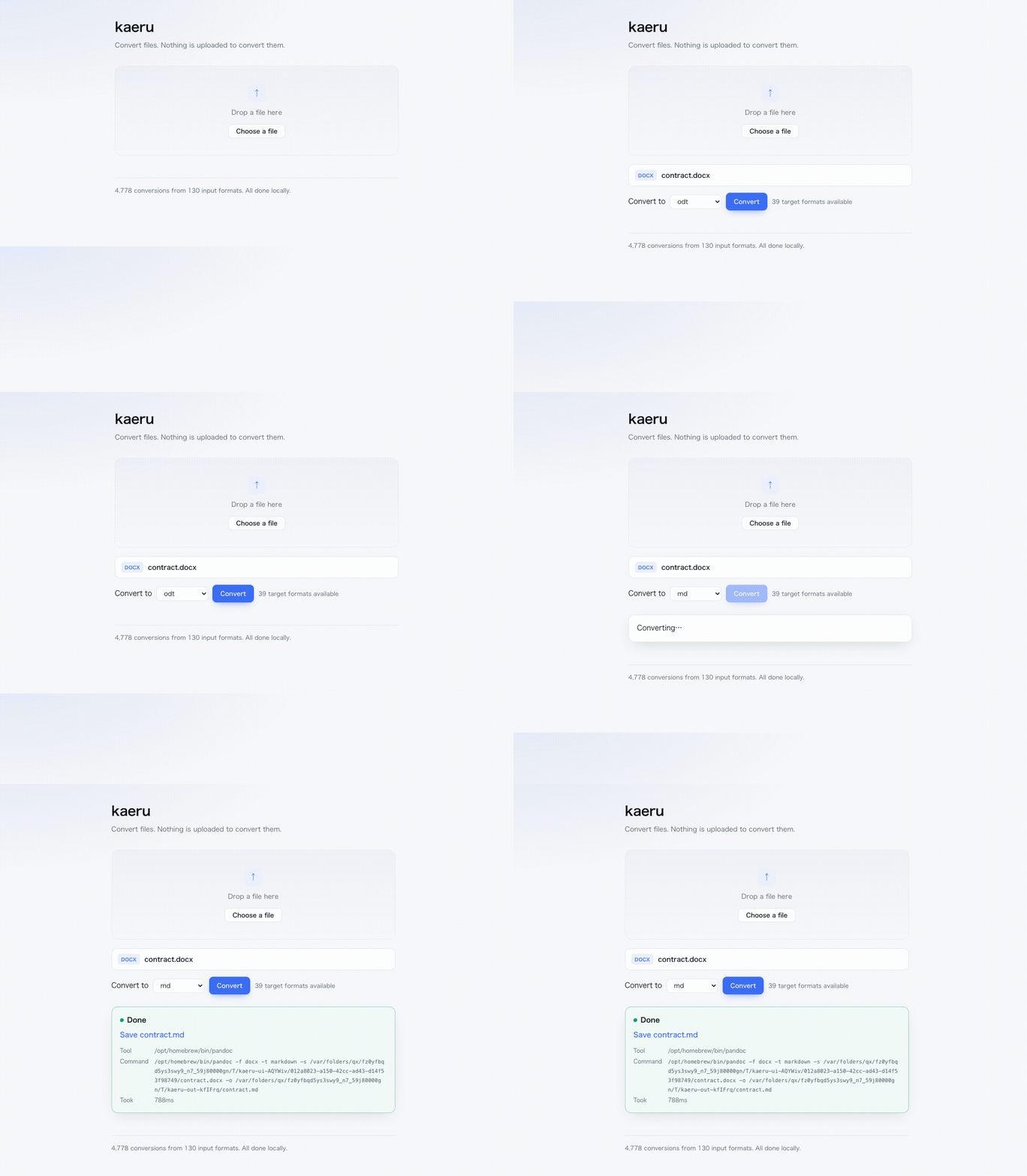
*A contract that cannot leave the building, turned into something an agent can read.
Note the **Tool** and **Command** lines: that is the binary on your machine, and the exact
command it ran. Nothing to take on faith.*
```bash
npx @noguchilin/kaeru --doctor # what can this machine convert?
```
## Verified, not claimed
Every conversion listed below was **actually run, one by one, on real machines** — and the
output was re-opened with a second tool to prove it isn't empty. The test suite ships with
the code, so you can re-run the count yourself.
| OS | Conversions offered | Actually passed | Tools installed |
|---|---|---|---|
| **macOS 26** | 4,779 | **4,753 / 4,753** | all |
| **Windows 11** | 4,062 | **3,708 / 3,952** | ImageMagick, pandoc |
| **Debian (Linux)** | 3,426 | **3,218 / 3,329** | ImageMagick, pandoc |
*The macOS row was re-run on 2026-08-25. The Windows and Debian rows are from
2026-08-18 on real machines that did not have poppler installed, so they predate
`pdf>txt` — install poppler there and each gains one more.*
```bash
npm test # re-run every combination on your machine
npm run list # print the conversion table (this is what the numbers count)
```
Numbers differ per machine **on purpose** — see below.
## The table adapts to your machine
kaeru doesn't bundle converters. It finds the ones you already have — and asks each one
what *its version* actually supports. **A conversion that can't work is never offered.**
```
$ npx @noguchilin/kaeru --doctor
This machine can do: 4,062 conversions
Tools:
✓ magick C:\Program Files\ImageMagick-7.1.2-Q16-HDRI\magick.EXE
✗ ffmpeg not found
...
Install these to unlock more:
ffmpeg +468 conversions winget install Gyan.FFmpeg
```
Nothing installed? Nothing breaks — you get 0 conversions and a list of one-line installs.
## Three doors, one engine
| Door | For | Start it |
|---|---|---|
| **Command line** | you, right now | `npx @noguchilin/kaeru photo.png --to jpg` |
| **MCP server** | your AI agents | add one line to `.mcp.json` |
| **Local web page** | you, with a file picker | `npm run ui` → http://127.0.0.1:19921 |
All three call the same code, so an agent and a human can never disagree about what's possible.
An option that would do nothing is refused rather than ignored — `--max` on `docx>pdf` comes
back with what that conversion *does* accept — and the web page only shows a field once the
engine says the chosen target accepts it.
### For agents (MCP)
```json
{ "mcpServers": { "kaeru": { "command": "npx", "args": ["-y", "@noguchilin/kaeru"] } } }
```
One tool, `convert`. Ask for something impossible and it replies with what *is* possible
from that input — or which tool to install.
### For humans, from the shell
```bash
npx @noguchilin/kaeru photo.png --to jpg
npx @noguchilin/kaeru report.pdf --to pdf --output smaller.pdf # same format = compress
npx @noguchilin/kaeru a.pdf b.pdf --to pdf --output merged.pdf # PDFs merge
npx @noguchilin/kaeru contract.pdf --to txt # text out of a PDF
npx @noguchilin/kaeru a.png b.png --to png --output tall.png # images stack
npx @noguchilin/kaeru a.png b.png c.png d.png --to png --columns 2 --output grid.png
npx @noguchilin/kaeru shot.png --to png --max 800 --output small.png # longest side ≤ 800
```
It prints the path it wrote and exits. Run it with no arguments and it becomes the MCP
server instead — that is how your agent starts it.
### For humans, from a page
`npm run ui` opens a single page on `127.0.0.1` only. Drop a file, pick a target, save the
result. **It does not stay running** — Ctrl-C and it's gone. No Docker, no daemon, no account.
## What it converts
Images · video · audio · documents (md, html, tex, docx, odt, epub, and ~30 more) · Office
and spreadsheets · PDF · 3D models · Parquet.
PDFs can be **merged, split, compressed, rasterised, and read as text**. Images, audio and
PDFs can be **shrunk without changing format**. `--max N` bounds an image's longest side —
it only ever shrinks, so a small image is returned untouched rather than blown up. Pass
several images and they are **joined into one** (`--columns` sets how many per row). Pass a
URL to pull from video sites.
**A scanned PDF has no text to give.** `--to txt` on one does not hand you an empty file
and call it a conversion — it tells you the pages are images, and points you at `--to png`.
That is the same rule as the headline: a result you can't verify isn't offered.
CJK encodings are detected automatically (a Shift_JIS CSV from Excel just works).
## Every result comes with its receipt
```
Converted: csv>xlsx
Output: /path/to/data.xlsx
Tool: soffice
Command: soffice --headless --convert-to xlsx --outdir /tmp/... /path/to/data.csv
Took: 3,512 ms
```
You can always see which program touched your file, and repeat it by hand.
## Install the converters
kaeru calls these; install the ones you need (or none, and add them later).
<details>
<summary><b>macOS</b></summary>
```bash
brew install imagemagick ffmpeg pandoc weasyprint qpdf poppler img2pdf yt-dlp assimp duckdb ghostscript
brew install --cask libreoffice
```
</details>
<details>
<summary><b>Windows</b></summary>
```powershell
winget install ImageMagick.ImageMagick Gyan.FFmpeg JohnMacFarlane.Pandoc QPDF.QPDF `
oschwartz10612.Poppler yt-dlp.yt-dlp Assimp.Assimp DuckDB.cli `
ArtifexSoftware.GhostScript TheDocumentFoundation.LibreOffice
pip install weasyprint img2pdf
```
</details>
<details>
<summary><b>Linux (apt)</b></summary>
```bash
sudo apt install imagemagick ffmpeg pandoc qpdf poppler-utils img2pdf yt-dlp assimp-utils ghostscript libreoffice
pip install weasyprint
```
</details>
## Privacy and security
- Files are processed by local programs. **kaeru makes no network requests** (except when you
explicitly pass a video-site URL — that path downloads, by definition).
- **What kaeru does not control: what you do with the result.** If your agent then *reads* the
converted file, its contents go to whatever model provider that agent uses. kaeru governs the
conversion, not the reading. For a file that must never reach a model, convert it and open it
yourself in the local web page (`npm run ui`) instead of handing it to an agent.
- The web page binds to `127.0.0.1`, rejects non-localhost `Host` headers, and hands results
back by an unguessable id.
- **Existing files are never overwritten** unless you ask for it.
- **No telemetry. Ever.** Not anonymous, not opt-out — none.
Three independent models reviewed the source on 2026-08-18; every exploitable finding was
fixed the same day. **One known risk is not fixed: converting untrusted HTML or SVG can embed
local files in the output.** Details, severities and mitigations: [SECURITY.md](SECURITY.md).
## Tests
| Command | What it checks |
|---|---|
| `npm test` | every listed conversion actually runs, output re-opens |
| `node test/quality.mjs` | images round-trip pixel-for-pixel; text survives |
| `node test/fidelity.mjs` | documents keep headings, tables, lists, emphasis |
| `node test/languages.mjs` | 12 writing systems keep their characters |
| `node test/platforms.mjs` | tool lookup is correct for macOS / Windows / Linux |
Known gaps are written down, not hidden — see `docs/`.
## Support
Issues are welcome. **This is a one-person project: no response time is promised.**
For a bundled installer or a support contract, see the bottom of this file.
## License
MIT. The converters it calls have their own licenses.
---
**Need this installed for a team, or with a support contract?** Open an issue titled
`commercial` and I'll get back to you.
TDQS
A4.6/5.0
Scored across 1 tool
Disambiguation5/5
ツールが convert のみで、他のツールと混同する余地がまったくない。単一ツールのためエージェントが選択を誤る可能性はない。
Naming Consistency5/5
ツール名が convert という明確な動詞で統一されており、命名の不整合や混在が存在しない。単一ツールでも分かりやすい命名と言える。
Tool Count4/5
ツールは1つだけだが、ファイル変換というサーバーの目的に対して convert が広範な形式と操作をカバーしており、実用上は十分に機能する。数は少ないが、無意味に分割せず1つに集約した設計は妥当。
Completeness5/5
画像・動画・音声・文書・PDF・3Dモデル・Parquet など主要な変換対象を網羅し、PDF結合や画像連結、動画URL取り込み、上書き制御などの必要な操作も備えている。変換ドメインにおける大きな欠落は見当たらない。
Maintenance
ActivityStale
ResponsivenessNo issues