Code Screenshot Generator
Generate beautiful, syntax-highlighted code screenshots with professional themes directly from Claude.
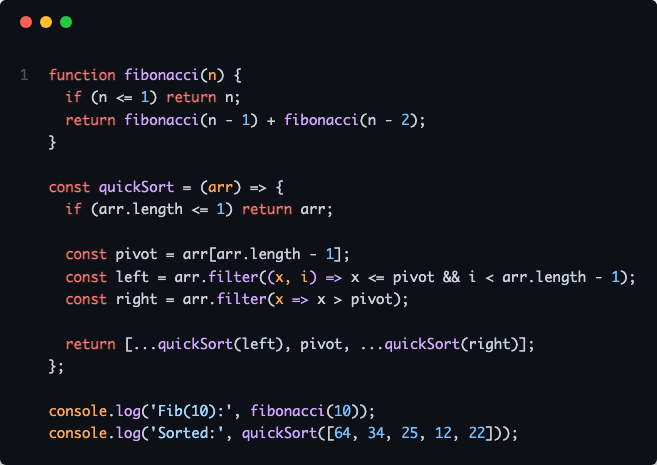
Generate code screenshots from code strings with syntax highlighting and language specification
Screenshot code from files with automatic language detection and optional line range selection
Visualize git diffs for staged or unstaged changes, for all files or specific files
Batch process multiple files simultaneously in a single operation
Choose from 5 professional themes: Dracula (default), Nord, Monokai, GitHub Light, and GitHub Dark
Support for 20+ programming languages including JavaScript, TypeScript, Python, Ruby, Java, Go, Rust, C/C++, C#, PHP, Swift, Kotlin, SQL, Shell, YAML, JSON, XML, HTML, CSS, SCSS, and Markdown
Direct integration with Claude Desktop and Claude Code via Model Context Protocol
Enables visualization of git diff output with syntax highlighting, supporting both staged and unstaged changes
Click on "Install Server".
Wait a few minutes for the server to deploy. Once ready, it will show a "Started" state.
In the chat, type
@followed by the MCP server name and your instructions, e.g., "@Code Screenshot Generatorscreenshot lines 15-30 of src/utils.ts with nord theme"
That's it! The server will respond to your query, and you can continue using it as needed.
Here is a step-by-step guide with screenshots.
Code Screenshot Generator MCP
MCP server for generating beautiful code screenshots directly from Claude
Overview
A Model Context Protocol (MCP) server that enables Claude to generate syntax-highlighted code screenshots with professional themes. Supports direct file reading, line selection, git diff visualization, and batch processing.
Related MCP server: Claude Code Starter Kit MCP
Features
5 Professional Themes: Dracula, Nord, Monokai, GitHub Light, GitHub Dark
File Integration: Screenshot code directly from file paths with line range selection
Git Diff Support: Visualize staged or unstaged changes
Batch Processing: Process multiple files simultaneously
Auto Language Detection: Supports 20+ programming languages
Native Claude Integration: Works with Claude Desktop and Claude Code
Installation
Prerequisites
npm install -g code-screenshot-mcpConfiguration
Quick Setup (Claude Code):
claude mcp add code-screenshot-mcpManual Setup (Claude Desktop):
Add to your Claude configuration file at ~/Library/Application Support/Claude/claude_desktop_config.json:
{
"mcpServers": {
"code-screenshot": {
"command": "code-screenshot-mcp"
}
}
}Restart Claude Desktop after configuration.
Development Setup
git clone https://github.com/MoussaabBadla/code-screenshot-mcp.git
cd code-screenshot-mcp
npm install
npm run buildQuick Start
Basic Screenshot
"Generate a code screenshot of this TypeScript function with Nord theme:
function fibonacci(n: number): number {
if (n <= 1) return n;
return fibonacci(n-1) + fibonacci(n-2);
}
"From File
"Screenshot src/index.ts with Dracula theme"Specific Lines
"Screenshot lines 20-45 of src/generator.ts with Monokai theme"Git Diff
"Screenshot my git diff with GitHub Dark theme"Batch Processing
"Screenshot src/index.ts, src/generator.ts, and src/templates.ts"Available Themes
dracula- Dark purple theme (default)nord- Arctic blue-tinted thememonokai- Classic dark themegithub-light- Clean light themegithub-dark- GitHub's dark theme
API Reference
generate_code_screenshot
Generate a screenshot from code string.
Parameters:
code(string, required) - Source code to screenshotlanguage(string, required) - Programming language identifiertheme(string, optional) - Color theme (default: "dracula")
Returns: PNG image with base64 encoding
screenshot_from_file
Screenshot code from file path with automatic language detection.
Parameters:
filePath(string, required) - Path to source filestartLine(number, optional) - Start line number (1-indexed)endLine(number, optional) - End line numbertheme(string, optional) - Color theme (default: "dracula")
Supported Extensions:
.js, .jsx, .ts, .tsx, .py, .rb, .go, .rs, .java, .c, .cpp, .cs, .php, .swift, .kt, .sql, .sh, .yml, .yaml, .json, .xml, .html, .css, .scss, .md
Returns: PNG image with base64 encoding
screenshot_git_diff
Generate screenshot of git diff output.
Parameters:
filePath(string, optional) - Specific file to diff (shows all if omitted)staged(boolean, optional) - Show staged changes instead of unstagedtheme(string, optional) - Color theme (default: "dracula")
Returns: PNG image with base64 encoding
batch_screenshot
Process multiple files in a single operation.
Parameters:
filePaths(string[], required) - Array of file pathstheme(string, optional) - Theme applied to all screenshots (default: "dracula")
Returns: Array of PNG images with success/failure status
Examples
Dracula Theme
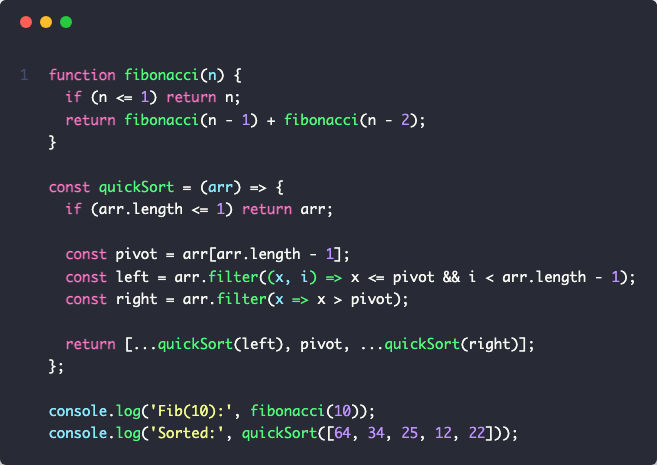
Nord Theme
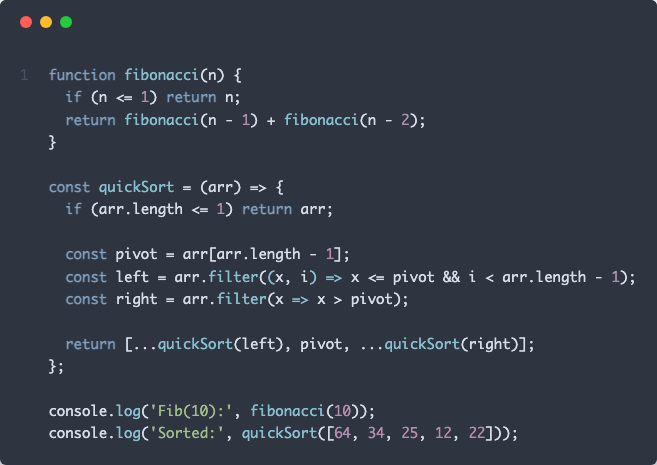
Monokai Theme
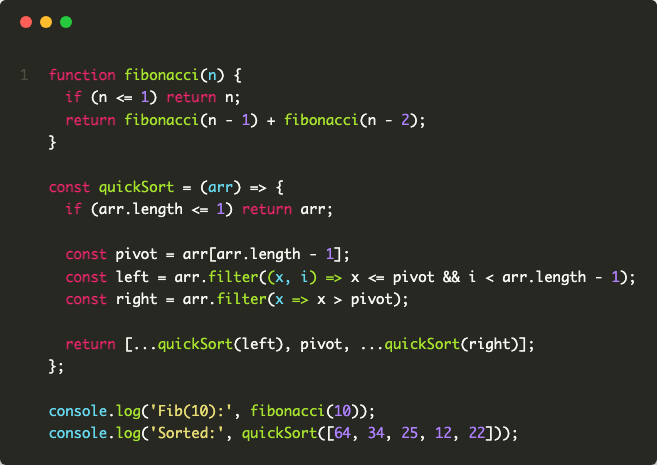
GitHub Light Theme
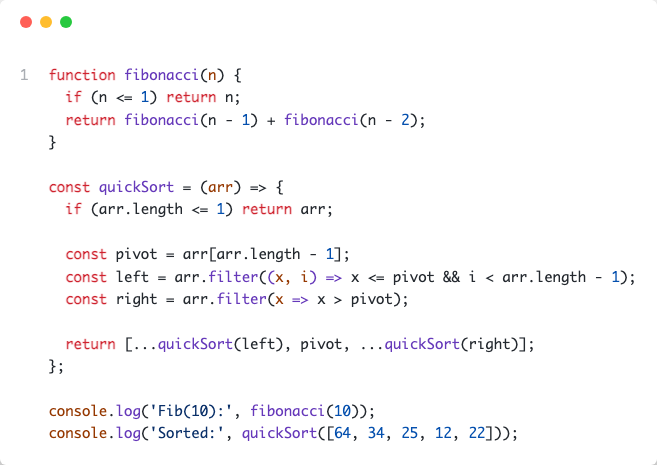
GitHub Dark Theme
Contributing
Contributions are welcome. Please follow these steps:
Fork the repository
Create a feature branch:
git checkout -b feature/your-featureCommit changes:
git commit -m 'Add your feature'Push to branch:
git push origin feature/your-featureSubmit a pull request
License
MIT License - Copyright (c) 2025 Moussaab Badla
See LICENSE file for details.
Acknowledgments
Built with Model Context Protocol, Playwright, and Highlight.js.
Repository: github.com/MoussaabBadla/code-screenshot-mcp
Available Tools
4 toolsbatch_screenshotB
Generate screenshots for multiple files at once. Useful for documenting multiple code files quickly.
| Name | Required | Description | Default |
|---|---|---|---|
| filePaths | Yes | Array of file paths to screenshot | |
| theme | No | Color theme to apply to all screenshots (dracula, nord, monokai, github-light, github-dark) |
TDQS
Does the description disclose side effects, auth requirements, rate limits, or destructive behavior?
No annotations are provided, so the description carries full burden. It mentions generating screenshots and a use case, but lacks critical behavioral details: it doesn't specify output format (e.g., image files, base64), file type support, error handling, performance characteristics, or whether it modifies files. For a tool with no annotation coverage, this is a significant gap in transparency.
Agents need to know what a tool does to the world before calling it. Descriptions should go beyond structured annotations to explain consequences.
Is the description appropriately sized, front-loaded, and free of redundancy?
The description is perfectly concise and front-loaded: two sentences with zero waste. The first sentence states the core purpose, and the second adds practical context. Every word earns its place without redundancy or fluff.
Shorter descriptions cost fewer tokens and are easier for agents to parse. Every sentence should earn its place.
Given the tool's complexity, does the description cover enough for an agent to succeed on first attempt?
Given no annotations, no output schema, and a tool that performs batch operations (implying complexity), the description is incomplete. It lacks information on what the tool returns (e.g., file paths, images), error conditions, or limitations (e.g., max files). For a tool with these contextual gaps, the description should provide more completeness.
Complex tools with many parameters or behaviors need more documentation. Simple tools need less. This dimension scales expectations accordingly.
Does the description clarify parameter syntax, constraints, interactions, or defaults beyond what the schema provides?
Schema description coverage is 100%, so the schema already fully documents both parameters (filePaths array, theme with enum). The description adds no additional parameter semantics beyond what's in the schema—it doesn't explain file path requirements, theme implications, or default behaviors. Baseline 3 is appropriate when the schema does all the work.
Input schemas describe structure but not intent. Descriptions should explain non-obvious parameter relationships and valid value ranges.
Does the description clearly state what the tool does and how it differs from similar tools?
The description clearly states the tool's purpose: 'Generate screenshots for multiple files at once' specifies the verb (generate) and resource (screenshots for files). It distinguishes from siblings by emphasizing batch processing ('multiple files at once'), but doesn't explicitly differentiate from each sibling tool by name or specific use case.
Agents choose between tools based on descriptions. A clear purpose with a specific verb and resource helps agents select the right tool.
Does the description explain when to use this tool, when not to, or what alternatives exist?
The description provides implied usage guidance: 'Useful for documenting multiple code files quickly' suggests a context of code documentation with efficiency needs. However, it doesn't explicitly state when to use this tool versus the sibling tools (generate_code_screenshot, screenshot_from_file, screenshot_git_diff) or provide any exclusion criteria.
Agents often have multiple tools that could apply. Explicit usage guidance like "use X instead of Y when Z" prevents misuse.
generate_code_screenshotC
Generate a beautiful screenshot of code with syntax highlighting and themes
| Name | Required | Description | Default |
|---|---|---|---|
| code | Yes | The code to screenshot | |
| language | Yes | Programming language (e.g., javascript, python, rust) | |
| theme | No | Color theme (dracula, nord, monokai, github-light, github-dark) |
TDQS
Does the description disclose side effects, auth requirements, rate limits, or destructive behavior?
No annotations are provided, so the description carries the full burden of behavioral disclosure. It mentions generating a 'beautiful screenshot' but doesn't specify output format (e.g., image type, size), performance aspects (e.g., rate limits, processing time), or error handling. For a tool with no annotations, this leaves significant gaps in understanding how it behaves beyond the basic action.
Agents need to know what a tool does to the world before calling it. Descriptions should go beyond structured annotations to explain consequences.
Is the description appropriately sized, front-loaded, and free of redundancy?
The description is concise and front-loaded in a single sentence that states the core purpose efficiently. There's no wasted text, and it directly communicates the tool's function. However, it could be slightly improved by structuring to include usage hints, but as is, it's appropriately sized for its content.
Shorter descriptions cost fewer tokens and are easier for agents to parse. Every sentence should earn its place.
Given the tool's complexity, does the description cover enough for an agent to succeed on first attempt?
Given the tool's complexity (generating visual output) and lack of annotations and output schema, the description is incomplete. It doesn't explain what the output looks like (e.g., image format, dimensions), potential limitations, or how errors are handled. For a tool with no structured output information, the description should provide more context to be fully helpful.
Complex tools with many parameters or behaviors need more documentation. Simple tools need less. This dimension scales expectations accordingly.
Does the description clarify parameter syntax, constraints, interactions, or defaults beyond what the schema provides?
The description adds minimal meaning beyond the input schema, which has 100% coverage with clear descriptions for all parameters. It implies parameters through 'code with syntax highlighting and themes' but doesn't detail semantics like how 'language' affects highlighting or what 'theme' visually entails. With high schema coverage, the baseline is 3, as the schema does most of the work without extra value from the description.
Input schemas describe structure but not intent. Descriptions should explain non-obvious parameter relationships and valid value ranges.
Does the description clearly state what the tool does and how it differs from similar tools?
The description clearly states the tool's purpose: 'Generate a beautiful screenshot of code with syntax highlighting and themes.' It specifies the verb ('generate'), resource ('screenshot of code'), and key features ('syntax highlighting and themes'), making the action distinct. However, it doesn't explicitly differentiate from sibling tools like 'batch_screenshot' or 'screenshot_from_file', which likely handle multiple codes or file inputs, so it misses full sibling distinction.
Agents choose between tools based on descriptions. A clear purpose with a specific verb and resource helps agents select the right tool.
Does the description explain when to use this tool, when not to, or what alternatives exist?
The description provides no guidance on when to use this tool versus alternatives. It doesn't mention sibling tools such as 'batch_screenshot' for multiple codes, 'screenshot_from_file' for code from files, or 'screenshot_git_diff' for diff outputs, leaving the agent without context for selection. Usage is implied only by the tool's name and description, with no explicit when/when-not instructions.
Agents often have multiple tools that could apply. Explicit usage guidance like "use X instead of Y when Z" prevents misuse.
screenshot_from_fileB
Screenshot code directly from a file path, with optional line range selection. Auto-detects language from file extension.
| Name | Required | Description | Default |
|---|---|---|---|
| filePath | Yes | Path to the code file | |
| startLine | No | Start line number (1-indexed, optional) | |
| endLine | No | End line number (optional) | |
| theme | No | Color theme (dracula, nord, monokai, github-light, github-dark) |
TDQS
Does the description disclose side effects, auth requirements, rate limits, or destructive behavior?
No annotations are provided, so the description carries the full burden of behavioral disclosure. It mentions 'auto-detects language from file extension', which adds useful context beyond the schema. However, it doesn't describe critical behaviors like output format (e.g., image type, size), error handling (e.g., for invalid file paths), or performance aspects (e.g., file size limits), leaving significant gaps for a tool that performs file I/O and image generation.
Agents need to know what a tool does to the world before calling it. Descriptions should go beyond structured annotations to explain consequences.
Is the description appropriately sized, front-loaded, and free of redundancy?
The description is a single, efficient sentence that front-loads the core purpose ('Screenshot code directly from a file path') and adds key features ('optional line range selection', 'auto-detects language'). It avoids redundancy and wastes no words, though it could be slightly more structured by separating usage notes.
Shorter descriptions cost fewer tokens and are easier for agents to parse. Every sentence should earn its place.
Given the tool's complexity, does the description cover enough for an agent to succeed on first attempt?
Given the tool's complexity (file I/O, image generation, language detection) and lack of annotations and output schema, the description is incomplete. It misses details on output (e.g., image format, where it's saved), error conditions, permissions needed for file access, and how it differs from siblings. For a tool with no structured behavioral hints, this leaves the agent under-informed.
Complex tools with many parameters or behaviors need more documentation. Simple tools need less. This dimension scales expectations accordingly.
Does the description clarify parameter syntax, constraints, interactions, or defaults beyond what the schema provides?
Schema description coverage is 100%, so the schema already documents all parameters thoroughly. The description adds minimal value beyond the schema by hinting at 'optional line range selection' (implied by startLine/endLine) and 'auto-detects language' (not directly parameter-related). With high schema coverage, the baseline is 3, as the description doesn't significantly enhance parameter understanding.
Input schemas describe structure but not intent. Descriptions should explain non-obvious parameter relationships and valid value ranges.
Does the description clearly state what the tool does and how it differs from similar tools?
The description clearly states the tool's purpose: 'Screenshot code directly from a file path' with the specific action 'screenshot' and resource 'code from a file path'. It distinguishes from siblings by mentioning 'from a file path' (vs. batch operations, git diffs, or generic generation), but doesn't explicitly name alternatives or contrast with all siblings like 'batch_screenshot' or 'screenshot_git_diff'.
Agents choose between tools based on descriptions. A clear purpose with a specific verb and resource helps agents select the right tool.
Does the description explain when to use this tool, when not to, or what alternatives exist?
The description implies usage context through 'optional line range selection' and 'auto-detects language from file extension', suggesting it's for capturing specific code sections from files. However, it lacks explicit guidance on when to use this tool versus siblings like 'batch_screenshot' (for multiple files) or 'screenshot_git_diff' (for diff outputs), leaving the agent to infer based on parameter names and descriptions.
Agents often have multiple tools that could apply. Explicit usage guidance like "use X instead of Y when Z" prevents misuse.
screenshot_git_diffB
Generate a screenshot of git diff output. Shows changes in your working directory or staged changes.
| Name | Required | Description | Default |
|---|---|---|---|
| filePath | No | Optional: Specific file to diff. If not provided, shows diff for all changes. | |
| staged | No | Show staged changes (git diff --staged) instead of unstaged changes | |
| theme | No | Color theme (dracula, nord, monokai, github-light, github-dark) |
TDQS
Does the description disclose side effects, auth requirements, rate limits, or destructive behavior?
With no annotations provided, the description carries the full burden of behavioral disclosure. It states the tool generates a screenshot, implying a read-only operation that produces an image, but does not disclose details such as output format (e.g., PNG, JPEG), size, permissions needed, rate limits, or whether it modifies any state. This leaves significant gaps for an AI agent to understand the tool's behavior fully.
Agents need to know what a tool does to the world before calling it. Descriptions should go beyond structured annotations to explain consequences.
Is the description appropriately sized, front-loaded, and free of redundancy?
The description is concise and front-loaded, with two sentences that directly state the tool's purpose and scope. There is no unnecessary information, and each sentence contributes to understanding the tool's function. However, it could be slightly more structured by explicitly separating purpose from usage hints.
Shorter descriptions cost fewer tokens and are easier for agents to parse. Every sentence should earn its place.
Given the tool's complexity, does the description cover enough for an agent to succeed on first attempt?
Given the tool's moderate complexity (3 parameters, no output schema, no annotations), the description is adequate but incomplete. It covers the basic purpose and scope but lacks details on output (e.g., image format, handling of errors), behavioral traits, and explicit usage guidelines. This makes it minimally viable but with clear gaps for effective tool invocation.
Complex tools with many parameters or behaviors need more documentation. Simple tools need less. This dimension scales expectations accordingly.
Does the description clarify parameter syntax, constraints, interactions, or defaults beyond what the schema provides?
The input schema has 100% description coverage, providing clear details for all parameters (filePath, staged, theme). The description adds no additional parameter semantics beyond what the schema already explains, such as not elaborating on default behaviors or interactions between parameters. Since schema coverage is high, the baseline score of 3 is appropriate, as the description does not compensate with extra insights.
Input schemas describe structure but not intent. Descriptions should explain non-obvious parameter relationships and valid value ranges.
Does the description clearly state what the tool does and how it differs from similar tools?
The description clearly states the tool's purpose: 'Generate a screenshot of git diff output' with the specific resource being git diff output. It distinguishes from siblings like 'batch_screenshot' or 'screenshot_from_file' by specifying git diff content, though it doesn't explicitly contrast with 'generate_code_screenshot' which might handle different code-related screenshots.
Agents choose between tools based on descriptions. A clear purpose with a specific verb and resource helps agents select the right tool.
Does the description explain when to use this tool, when not to, or what alternatives exist?
The description provides implied usage context by mentioning 'Shows changes in your working directory or staged changes,' which suggests when to use it (for git diff visualization). However, it lacks explicit guidance on when to choose this over alternatives like 'generate_code_screenshot' or 'screenshot_from_file,' and does not mention any exclusions or prerequisites.
Agents often have multiple tools that could apply. Explicit usage guidance like "use X instead of Y when Z" prevents misuse.
TDQS
The tools are mostly distinct with clear purposes: batch_screenshot for multiple files, generate_code_screenshot for general code, screenshot_from_file for file-based input, and screenshot_git_diff for git diffs. There is minor overlap between generate_code_screenshot and screenshot_from_file, as both handle single-file code screenshots, but the descriptions clarify the input method differences.
The naming is mixed with no consistent pattern: batch_screenshot uses verb_noun, generate_code_screenshot uses verb_adjective_noun, screenshot_from_file uses noun_preposition_noun, and screenshot_git_diff uses noun_noun. This inconsistency makes the set less predictable, though all names are readable and descriptive.
With 4 tools, the count is well-scoped for a code screenshot generator. Each tool serves a distinct use case (batch processing, general code, file input, git diffs), and there are no redundant or missing tools for the domain, making it efficient and focused.
The tool set covers the core workflows for code screenshots: single and batch generation, file-based input, and git diffs. A minor gap exists in lacking a tool for screenshot customization (e.g., themes or layout adjustments), but agents can work around this with the provided tools for most documentation needs.
Maintenance
Resources
Unclaimed servers have limited discoverability.
Looking for Admin?
If you are the server author, to access and configure the admin panel.
Related MCP Connectors
Persistent memory for Claude Code and Cursor. Stop re-explaining your project every session.
Code intelligence for LLMs. Analyze, search, and retrieve code from any public git repository.
Live SEO workflow tools for Claude Code, Codex, and AI agents.
Share context and questions between Claude instances — VS Code, claude.ai web, and mobile.
Related MCP Servers
- AlicenseBqualityCmaintenanceFrontend expert for Claude Code. Captures screenshots, runs Lighthouse + axe-core accessibility audits + code analysis, generates an expert review, and auto-fixes everything — 12 tools, completely free for Pro plan users.37639MIT
- AlicenseCqualityCmaintenanceEnables AI-powered automated testing, security scanning, code review, and maintenance tasks directly within Claude Code or desktop.124MIT
- AlicenseNot gradedqualityCmaintenanceGenerates beautiful code snippet images with syntax highlighting and customizable themes for sharing on social media.183MIT
- AlicenseAqualityCmaintenanceEnables Claude Code to describe images and extract text using Kimi/Moonshot vision API. Supports local image files with customizable prompts.2MIT
Appeared in Searches
Latest Blog Posts
- Who's Calling? MCP Hosts Are an Identity Blind Spot (And the Spec Knows It)By Om-Shree-0709 on .mcpAgent IdentityOAuth 2.1
- Your AI Chatbot Just Exposed Your CEO's Salary to an InternBy Om-Shree-0709 on .Agent IdentityMCP SecurityOAuth Delegation
- Why MCP Servers Need Execution Sandboxing (And Why Your Current Stack Isn't Enough)By Om-Shree-0709 on .Agentic AiPrompt InjectionWebAssembly
MCP directory API
We provide all the information about MCP servers via our MCP API.
curl -X GET 'https://glama.ai/api/mcp/v1/servers/MoussaabBadla/code-screenshot-mcp'
If you have feedback or need assistance with the MCP directory API, please join our Discord server
