
Context Bridge
README.md
# Context Bridge
**Find what you decided in past Claude and ChatGPT conversations, with citations.**
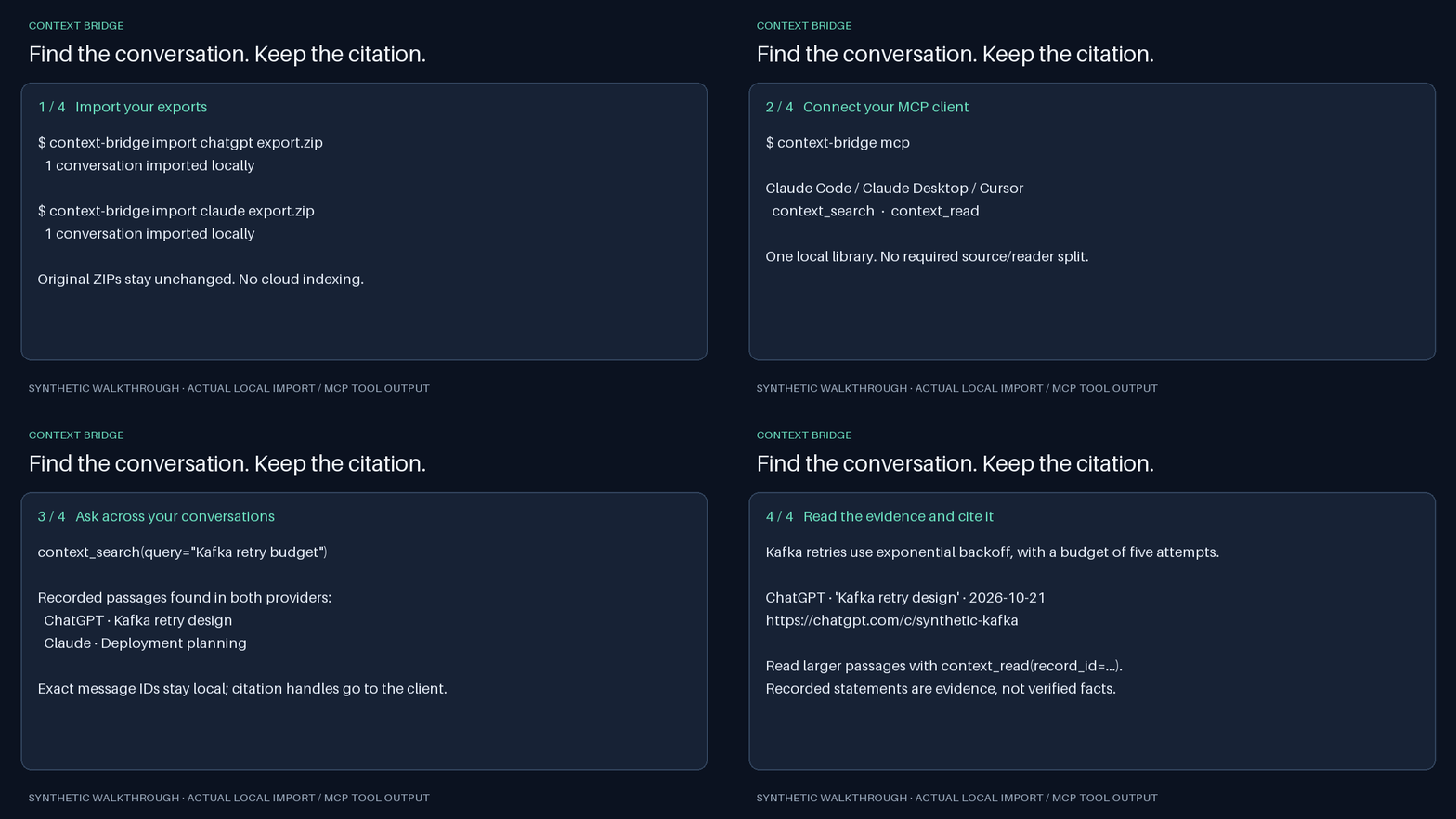
Import your exports, connect an MCP client, and ask: “What did I decide about Kafka retries last week?” Search stays on your computer. Results link to the original web conversation or an exact local transcript passage.
Beta (0.7.0b2) · Apache-2.0 · Python 3.9–3.13 · macOS and Linux · local-first · no telemetry
## Quickstart
The commands below use [uv](https://docs.astral.sh/uv/). If `uvx` is not installed yet:
```sh
brew install uv
# or: curl -LsSf https://astral.sh/uv/install.sh | sh
```
With an official ChatGPT export ZIP downloaded, import it:
```sh
uvx --from context-bridge-local context-bridge import chatgpt /path/to/export.zip
```
To keep a `context-bridge` command on your PATH instead, install it as a tool:
```sh
uv tool install context-bridge-local # or: pipx install context-bridge-local
context-bridge import chatgpt /path/to/export.zip
```
If the shell then reports `command not found`, run `uv tool update-shell` (or `pipx ensurepath`) and open a new terminal.
Without uv or pipx, install into a dedicated virtual environment. A bare `pip install` outside one either puts the command off your PATH (macOS's bundled Python 3.9) or is refused as an externally managed environment (Homebrew and python.org Python 3.12+):
```sh
python3 -m venv ~/.context-bridge
~/.context-bridge/bin/python -m pip install -U pip context-bridge-local
~/.context-bridge/bin/context-bridge import chatgpt /path/to/export.zip
```
For Claude.ai instead:
```sh
uvx --from context-bridge-local context-bridge import claude /path/to/export.zip
```
Connect Claude Code:
```sh
claude mcp add --transport stdio context-bridge -- uvx --from context-bridge-local context-bridge mcp
```
Ask: **“Use context_search to find what I decided about Kafka retries. Cite the conversation link. If needed, use context_read with the returned record_id and context=2 to read the surrounding turns.”**
There is no required source/reader window split. Every client using this local library searches the same approved imports. [All client setup instructions](docs/CLIENTS.md), including [ChatGPT desktop app setup and troubleshooting](docs/CLIENTS.md#chatgpt-desktop-app).
## Existing Claude Code conversations
Preview the projects available on this machine:
```sh
uvx --from context-bridge-local context-bridge import claude-code
```
Approve the displayed list at the prompt, or select one project explicitly:
```sh
uvx --from context-bridge-local context-bridge import claude-code --select 1,3 --yes
uvx --from context-bridge-local context-bridge import claude-code --path /path/to/project --yes
```
The preview numbers projects; an interactive terminal lets you choose numbers before approving. Raw dash-prefixed names also work with `--project -Users-alice-code-app` without an equals sign. The prompt approves the selected project directories, including future session files. New sessions are discovered during search refresh; other projects remain excluded. Existing 0.6.0a1 file-only imports need this project approval again to enable discovery. Session titles come from Claude Code's `ai-title` records when available. The optional `context-bridge start` manager creates and approves live Claude Code sessions; those sessions refresh automatically when searched.
## Keep accounts separate
Export metadata (`user.json`, account IDs or user IDs when present) is compared before any imported data is changed. A different or unverifiable account stops a noninteractive import; in a terminal you can explicitly confirm replacement. `--yes` does not bypass this check. Prefer a separate named profile:
```sh
uvx --from context-bridge-local context-bridge import chatgpt /path/to/export.zip --profile personal
uvx --from context-bridge-local context-bridge list --profile personal
uvx --from context-bridge-local context-bridge mcp --profile personal
```
Use the same `--profile` on import, MCP, list/stats/remove and the optional manager. Named profiles have separate files/databases under the base library's `profiles/NAME` directory. Only hashed account identifiers are stored. If both exports omit all account identifiers, account changes cannot be detected. Existing unidentified sources require explicit confirmation before adopting an identified account. To deliberately replace a provider's account snapshot, use `--confirm-account-switch`; absent conversations will be removed.
## Manage your library
```sh
uvx --from context-bridge-local context-bridge list
uvx --from context-bridge-local context-bridge stats
uvx --from context-bridge-local context-bridge remove --conversation 'https://chatgpt.com/c/CONVERSATION_ID'
uvx --from context-bridge-local context-bridge remove --conversation CONVERSATION_ID
uvx --from context-bridge-local context-bridge remove --provider chatgpt
uvx --from context-bridge-local context-bridge exclusions list --profile personal
uvx --from context-bridge-local context-bridge exclusions clear --conversation 'https://chatgpt.com/c/CONVERSATION_ID' --profile personal
```
Provider names are `chatgpt`, `claude`, and `claude-code`. List returns provider, title, creation date and indexed message count. Removal deletes index rows, FTS data, ingestion state, citation handles, metadata/config entries, and owned web-import copies. Original export ZIPs and Claude Code transcripts stay untouched. Removing a Claude Code provider also withdraws project-directory approval; removing one Code conversation prevents its automatic rediscovery. Removing a web conversation creates a durable exclusion in that profile: future ChatGPT/Claude imports skip it. Exclusions store only a provider and a SHA-256 digest of the provider/conversation ID, without titles or plaintext conversation IDs. `exclusions list` shows those hashes; use the original ID or provider link with `exclusions clear --conversation` to restore eligibility, then re-import. A link selects one provider; clearing a bare ID clears matching exclusions across both web providers. Use the same `--profile` consistently. Removing a whole provider preserves existing conversation exclusions but does not create exclusions for every remaining chat; a later export can restore those remaining chats. Only explicit `exclusions clear` clears the saved web exclusions.
Large export imports show progress on stderr and report `conversations_removed` and `conversations_excluded`. Excluded IDs are counted as skips, never imports or snapshot removals. Snapshot pruning does not create exclusions; absent chats can return in a later export. If an export contains objects without identifiable conversation IDs, pruning is skipped and reported as `pruning_skipped`; malformed entries with known IDs preserve their prior copy rather than masquerading as deletions.
## What you get
| Tool | Result |
| --- | --- |
| `context_search` | Relevant redacted passages with title, provider, date, conversation link and opaque record ID |
| `context_read` | Surrounding indexed turns (context=2 by default, maximum 10 each side), with pagination and changed-window checks |
ChatGPT imports follow the active message-tree branch. Claude.ai imports human/assistant text. Tools, thinking blocks and internal replayed API requests are excluded. Re-importing a new export updates the conversation without duplicate messages. Each provider export is an authoritative snapshot: re-importing it removes conversations absent from that export, including their index and managed copies. Do not use a partial export to merge accounts. Export imports do not capture new browser chats automatically.
Web citations open `chatgpt.com/c/<id>` or `claude.ai/chat/<uuid>` and require your normal provider access. Claude Code citations use `urn:context-bridge:record:<id>` handles resolved by `context_read`. They are not browser URLs. The MCP interface does not expose local filesystem locators. [Passage behavior](docs/PASSAGE-READING.md).
Search retrieves recorded statements; it does not establish that those statements are true. Explicit recency words influence ranking, but arbitrary date-range filtering is not implemented.
## Local-first privacy
- No Context Bridge account, hosted storage, analytics or usage telemetry.
- Indexing and default SQLite FTS5/BM25 search run locally, with no required runtime dependencies or cloud embedding calls.
- Recognized credentials, Slack/Discord webhook URLs and URL passwords are redacted before indexing and again on MCP output. JSON/YAML schema keys such as `primary_key`, `sort_key` and `cache_key` are preserved. Pattern matching cannot detect every arbitrary secret.
- Only explicitly imported or approved conversations are available. Original export ZIPs and Claude Code transcripts are not modified.
- Selected results are sent to your MCP client. If that client uses a cloud model, the provider receives those passages under your account settings.
- The database is plaintext. Local filesystem access can expose its content. Revocation prevents new retrieval; it cannot recall prior model responses.
Default macOS storage is `~/Library/Application Support/ContextBridge`; Linux uses `$XDG_DATA_HOME/context-bridge` or `~/.local/share/context-bridge`. Run `context-bridge paths`, or set the same absolute `CONTEXT_BRIDGE_HOME` for imports and MCP. [Security policy and boundaries](SECURITY.md).
## Test it
```sh
PYTHONPATH=prototype python3 -m unittest discover -s prototype/tests -v
PYTHONPATH=prototype python3 prototype/benchmark.py --files 5000 --min-messages 2 --max-messages 40 --runs 30
```
The tests and benchmark use invented conversations. Model-dependent tests skip without optional local assets. The benchmark uses 5,000 conversation files with 2–40 messages each, imports/re-imports an actual synthetic provider export, and measures search including per-file freshness checks. Its p95 target is 300 ms. Import, re-import and first-server-query times are reported separately; results depend on hardware and workload. [Independent 0.6.0a2 re-test results](docs/RETEST-0.6.0a2.md). [Verification details](docs/MILESTONES.md).
## Distribution
The executable is `context-bridge`; the distribution name is **`context-bridge-local`**. The PyPI name `context-bridge` belongs to an unrelated project.
Run the package with uvx:
```sh
uvx --from context-bridge-local context-bridge mcp
```
Pin this beta when you need a reproducible version:
```sh
uvx --from 'context-bridge-local==0.7.0b2' context-bridge mcp
```
[Release and registry process](docs/RELEASING.md).
## Install from source
For contributors, run from the repository root:
```sh
python3 -m venv .venv
.venv/bin/python -m pip install -U pip
.venv/bin/python -m pip install .
```
## Contribute
Bug reports with small synthetic examples are especially useful. See [contributing](CONTRIBUTING.md), [architecture and SDK decision](docs/ARCHITECTURE.md), and [third-party notices](THIRD_PARTY.md).
Research is frozen while the import/search product ships. Historical model comparisons and claim-support work live under [research](research/README.md). The claim-support checker is not part of MCP search.
Original project code is licensed under [Apache-2.0](LICENSE).
<!-- mcp-name: io.github.ModernFarm-hub/context-bridge -->
This server cannot be deployed
Maintenance
ActivityMaintained
ResponsivenessNo issues