

A
licenseB
qualityD
maintenanceThis server enables AI models to interact with MySQL databases through a standardized interface.
5
218 npm
169
MIT

Supports containerized deployment of the MCP server through Docker, allowing configuration of database connection parameters and port mappings.
Provides environment variable management for configuring database credentials and server settings through .env files.
Includes Mermaid diagram support for visualizing the server architecture and data flow between components.
Enables AI models to interact with MySQL databases by providing tools for executing SQL queries, creating tables, describing table schemas, getting query execution plans, and listing available tables.
Integrates with pandas for processing and analyzing database query results before returning them to AI models.
Built with Python, allowing direct execution of the server outside of Docker containers and easy extension through Python-based tools.
Click on "Deploy Server".
Wait a few minutes for the server to deploy. Once ready, it will show a "Started" state.
In the chat, type @ followed by the MCP server name and your instructions, e.g., "@MySQL MCP Server show me the list of tables in the database"
That's it! The server will respond to your query, and you can continue using it as needed.
Here is a step-by-step guide with screenshots.
Change the database connection information as needed.
docker run -d --name mcp-mysql \
  -e MYSQL_HOST=localhost \
  -e MYSQL_PORT=3306 \
  -e MYSQL_USER=root \
  -e MYSQL_PASSWORD=mcpTest1234!!! \
  -e MYSQL_DATABASE=mcp_test \
  -e MCP_PORT=8081 \
-p 3306:3306 mineru/mcp-mysql:1.0.0This will proceed with a pre-configured setup.
docker-compose up -dpip install -r requirements.txt
python mysql_mcp_server/main.py runMCP functionality is available from Cursor version 0.46 and above.
Additionally, the MCP feature is only accessible to Cursor Pro account users.
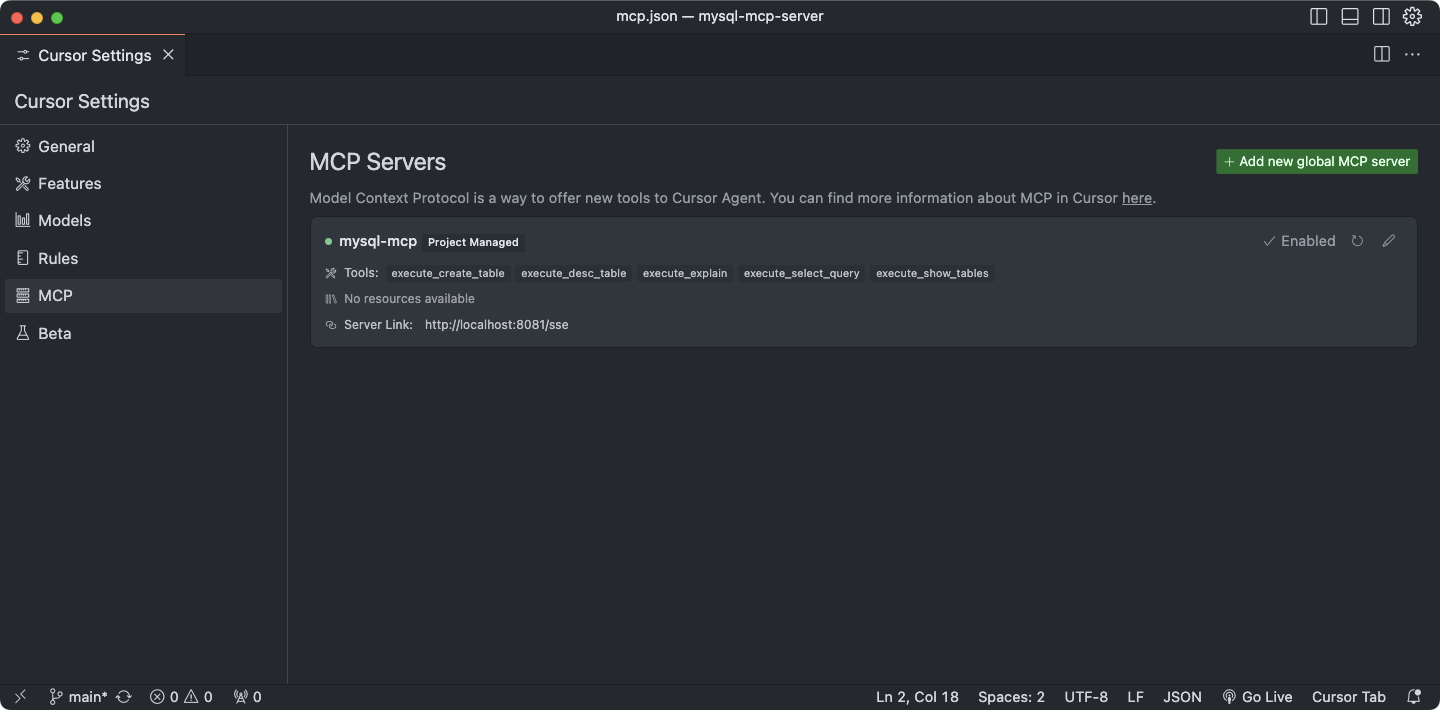
Adding a Tool
execute functions implement the actual logic execution (Service Layer).
The @tool decorator helps register the tool with MCP (Controller Layer).
Explanation
Each file under mysql_mcp_server/executors represents a single tool.
If a new tool is added, it must be imported in mysql_mcp_server/executors/__init__.py and included in the __all__ array.
This ensures the module is automatically registered in the TOOLS_DEFINITION variable.
flowchart LR;
    A[AI Model] -->|Request tool list| B[MCP Server]
    B -->|Return available tools| A

    A -->|Request specific tool execution| B
    B -->|Call the corresponding executor| C[Executors]

    subgraph Executors
        C1[execute_create_table] -->|Create table| D
        C2[execute_desc_table] -->|View table schema| D
        C3[execute_explain] -->|Query execution plan| D
        C4[execute_insert_query] -->|Execute INSERT query| D
        C5[execute_insight_starter] -->|Checking the schema for building reports| D
        C6[execute_invoke_viz_pro] -->|Visualization chart recommendations| D
        C7[execute_select_query] -->|Execute SELECT query| D
        C8[execute_show_tables] -->|Retrieve table list| D
    end

    D[DatabaseManager] -->|Connect to MySQL| E[MySQL 8.0]

    E -->|Return results| D
    D -->|Send results| C
    C -->|Return results| B
    B -->|Return execution results| A
Related MCP server: MCP MySQL Server
⚙️ Parameter Options
🔧 Enable/Disable Switch for Each Tool: Provide a function to reduce Input Context costs 💰
🔒 Query Security Level Setting: Offer optional control over functions that could damage asset value, such as DROP, DELETE, UPDATE 🚫
✨ Features
📊 Data Analysis Report Generation: Provide a report generation function optimized for the model to appropriately select various charts based on user requests 📈
📝 Reporting capabilities for prescribed forms
🖌️ Diversify report templates
🗄️ Extended Text2SQL Support
🌐 SSH Connection Support: Enable secure remote access via SSH for advanced operations 🔑
📥 File Extraction Function
📄 CSV
📑 JSON
📉 Excel
MCP MySQL Server is a server application for MySQL database operations based on MCP (Model Context Protocol). This server provides tools that allow AI models to interact with the MySQL database.
MCP Server: A FastMCP server that communicates with AI models
MySQL Database: Manages and stores data
Tools: Executors that perform database operations
Language: Python
Database: MySQL 8.0
Key Libraries:
mcp: Implements Model Context Protocol for AI communication
PyMySQL: Connects to MySQL and executes queries
pandas: Processes and analyzes data
python-dotenv: Manages environment variables
fire: Implements command-line interfaces
Containerized deployment via Docker and Docker Compose
Ports: 8081 (MCP Server), 3306 (MySQL)
MCPBoilerPlate/
├── mysql_mcp_server/           # Main application directory
│   ├── executors/              # Database operation executors
│   │   ├── create_table.py     # Tool for creating tables
│   │   ├── desc_table.py       # Tool for viewing table schema
│   │   ├── explain.py          # Tool for query execution plans
│   │   ├── insert_query.py     # Tool for INSERT query execution
│   │   ├── insight_starter.py  # Schema verification tools for write reports
│   │   ├── invoke_viz_pro.py   # Tool for Visualization chart recommendation
│   │   ├── select_query.py     # Tool for SELECT query execution
│   │   └── show_tables.py      # Tool for retrieving table lists
│   ├── helper/                 # Utility modules
│   │   ├── db_conn_helper.py   # Manages database connections
│   │   ├── logger_helper.py    # Logging utilities
│   │   └── tool_decorator.py   # Tool decorator
│   └── main.py                 # Application entry point
├── docker-compose.yml          # Docker Compose configuration
├── Dockerfile                  # Docker image build settings
├── requirements.txt            # Dependency package list
└── .env.example # Example environment variables fileInterface Layer: MCP Server (FastMCP)
Business Logic Layer: Handlers and Executors
Data Access Layer: Database connection and query execution
MySQLMCPServer: Main server class that initializes and runs the MCP server
DatabaseManager: Singleton pattern-based database connection manager
Executors: Collection of tools for database operations
execute_create_table: Creates tables
execute_desc_table: Checks table schema
execute_explain: Provides query execution plans
execute_insert_query: Executes INSETR queries
execute_select_query: Executes SELECT queries
execute_show_tables: Retrieves table lists
AI model requests a list of available tools from the MCP server.
The server returns the available tools list.
The AI model requests the execution of a specific tool.
The server calls the corresponding executor to perform the database operation.
The execution results are returned to the AI model.
Adding Tools: Implement new tools in the executors directory and register them in __init__.py.
Environment Configuration: Manage environment variables via the .env file.
Logging: Ensure consistent logging using logger_helper.
# Setup environment
cp .env.example .env
# Modify .env file as needed

# Install dependencies
pip install -r requirements.txt

# Run the server
python mysql_mcp_server/main.py run# Start database using Docker Compose
docker-compose up -d db
# Build and run mysql-mcp-server with Docker Compose (including rebuilds)
docker-compose up -d --build mysql-mcp-serverManage database credentials via environment variables.
Use strong passwords in production environments.
Consider implementing SSL/TLS encryption for database connections when necessary.
This server cannot be deployed
GibsonAI MCP server: manage your databases with natural language
Text-to-SQL MCP server: read-only queries on PostgreSQL, MySQL and SQL Server with your real schema
A comprehensive Model Context Protocol (MCP) server that enables AI assistants to interact with yo…
The Mercado Pago MCP Server implements the Model Context Protocol to provide AI agents and LLMs with access to Mercado Pago's APIs and tools within compatible development environments. It acts as an intermediary that translates Mercado Pago resources into executable functions (tools) that AI applications can invoke to perform actions and automate flows. The server simplifies integration, enables using documentation to implement or improve code, and optimizes operations through natural language interactions without manual implementations.