
Salesbuildr MCP Server
OfficialREADME.md
# Salesbuildr MCP Server
An [MCP](https://modelcontextprotocol.io) server for the [Salesbuildr](https://www.salesbuildr.com)
public API, the quoting and sales platform built for MSPs. It lets an AI agent search
companies, contacts, the product catalog, opportunities and quotes and, on explicit request,
create or update companies, contacts and opportunities, delete companies and contacts, and
create draft quotes from catalog products.
- Transport: MCP Streamable HTTP at `POST /mcp`, health probe at `GET /health`
- Stateless and multi-tenant: the API key arrives on every request as an HTTP header and is
never stored; every tool is listed from the first `tools/list`
- Python 3.12, [uv](https://docs.astral.sh/uv/), FastMCP, httpx
- License: Apache-2.0, Copyright 2026 MSPbots.ai
<div align="center">
## MSPbots Connector
**The MCP Gateway built for MSPs: visible, controlled, and your data stays where it belongs.**
[**Get started at connect.mspbots.ai →**](https://connect.mspbots.ai)
</div>
---
MSPbots Connector gives your AI clients one MCP URL to reach your entire MSP stack (RMM, PSA, documentation, security, finance), and gives you control over who can call which tool and a record of everything that was called.
**Hosted service: [connect.mspbots.ai](https://connect.mspbots.ai)** · Free to use.
### Why Connector
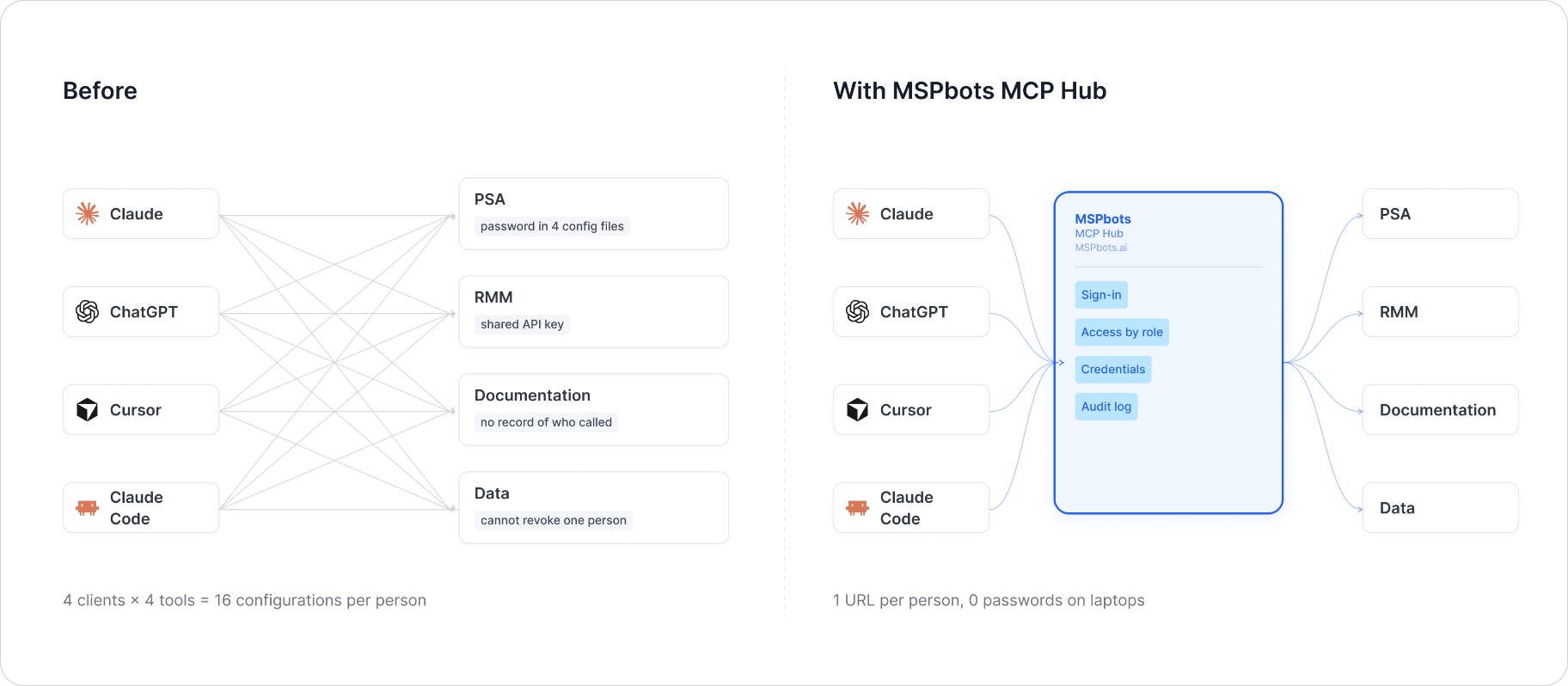
| | |
|---|---|
| **Visible** | Every tool call is logged: who, which vendor, when. Usage dashboard, CSV export, SIEM streaming. |
| **Controlled** | Role-based, per-tool allowlist. Deny by default. |
| **Protected** | Credentials encrypted per record. AI clients never see your vendor passwords or tokens. |
| **MSP-native** | Built for the MSP stack only: RMM, PSA, documentation, security, finance. |
### Quick start
1. **Sign up** at [connect.mspbots.ai](https://connect.mspbots.ai).
2. **Connect your vendors.** Pick from 150+ connectors and authorize each one on the vendor's own page, or bring your own API keys. No extra vendor accounts needed.
3. **Set access.** Create roles and decide which tools each role may call. Nothing is allowed until you allow it.
4. **Add your MCP URL to your AI client.** Copy the URL from your Connector dashboard into Claude, ChatGPT, Cursor, VS Code, Gemini, Codex, or any MCP-capable client.
5. **Ask your AI to do real work**, and watch every call appear in the audit log.
### Features
**Unified gateway**
- One MCP URL for all your AI clients
- 150+ connectors across the MSP stack
- Custom MCP servers supported, free
- Authorization happens on each vendor's own page; the AI never sees passwords or tokens
- Bring your own credentials: use the vendor API keys you already have
- Multiple accounts per app; connect once, reuse across AI clients
- Tool search: finds the right action for the task
- One sign-in; vendor credentials are injected behind the scenes and OAuth tokens refresh automatically
**Visibility**
- Audit log for every tool call (who, which vendor, when)
- Usage dashboard: call volume, top vendors, error rate, per-user activity
- Export audit logs to CSV, or stream to Loki, Graylog, or LogScale (SIEM)
- Optional recording of tool arguments and result summaries (off by default, enabled per organization)
**Control**
- Per-role, per-tool allowlist, deny by default
- owner / admin / member roles
- SCIM provisioning with Entra ID, Okta, JumpCloud, and Google Workspace
**Security**
- Credentials encrypted one record at a time (AES-256-GCM, per-record key)
- AI clients authenticate with OAuth 2.1 + PKCE
- Vendor responses are scanned for prompt-injection patterns and returned as structured data. This is one layer of defense, not a guarantee against every attack.
- Static egress IP for customer firewall and API allowlisting
### Pricing
**Free.**
Links: [connect.mspbots.ai](https://connect.mspbots.ai) · [mspbots.ai](https://mspbots.ai)
---
## Authentication headers
| Header | Required | Type | Default | Allowed values | Description | Example |
|---|---|---|---|---|---|---|
| `X-SalesBuildr-API-Key` | Yes | string | none | - | Salesbuildr public API key | `your-api-key` |
| `X-SalesBuildr-Base-Url` | No | string | `https://portal.salesbuildr.com` | https URL | Portal address, only for a non-default Salesbuildr environment | `https://portal.salesbuildr.com` |
Where to get it: a Salesbuildr administrator creates an API key in the Salesbuildr portal's
integration / API settings. The key acts on the whole Salesbuildr account.
How the key is sent to Salesbuildr: in the `api-key` header of every call to
`https://portal.salesbuildr.com/public-api/...`.
A request to `/mcp` without the key gets HTTP 401; a base URL that is not https gets HTTP 400.
## Tools
All tools return a JSON string. Lists search with `query`, page with `from` (offset) and `size`
(default 25, max 100) and return `{items, count, total, from, has_more, next_from}`, most
recently changed first.
| Tool | Purpose | Parameters (required in **bold**) |
|---|---|---|
| `salesbuildr_navigate` | Describe the tools of one area (changes nothing) | **domain** (`companies`, `contacts`, `products`, `opportunities`, `quotes`) |
| `salesbuildr_status` | Check the connection (the key works) and list the areas | - |
| `salesbuildr_companies_list` | Search companies | query, from, size |
| `salesbuildr_companies_get` | One company | **id** |
| `salesbuildr_companies_create` | Create a company (**write**) | **name**, domain, address, city, state, zip, country, phone, website, notes, number, type |
| `salesbuildr_companies_update` | Change a company; other fields keep their values (**write**) | **id**, name, domain, address, city, state, zip, country, phone, website, notes |
| `salesbuildr_companies_delete` | Delete a company (**write**, needs `confirm: true`) | **id**, confirm |
| `salesbuildr_contacts_list` | Search contacts, optionally in one company | query, companyId, from, size |
| `salesbuildr_contacts_get` | One contact | **id** |
| `salesbuildr_contacts_create` | Create a contact (**write**) | **firstName**, **lastName**, email, phone, companyId, mobilePhone |
| `salesbuildr_contacts_update` | Change a contact; other fields keep their values (**write**) | **id**, firstName, lastName, email, phone, companyId, mobilePhone |
| `salesbuildr_contacts_delete` | Delete a contact (**write**, needs `confirm: true`) | **id**, confirm |
| `salesbuildr_products_list` | Search the product catalog | query, from, size |
| `salesbuildr_products_get` | One product with pricing | **id** |
| `salesbuildr_opportunities_list` | Search pipeline opportunities | query, from, size |
| `salesbuildr_opportunities_get` | One opportunity | **id** |
| `salesbuildr_opportunities_create` | Create an opportunity (**write**) | **title**, companyId, contactId, value, monthlyValue, stage, probability, expectedCloseDate, notes |
| `salesbuildr_opportunities_update` | Change an opportunity (**write**) | **id**, title, companyId, contactId, value, monthlyValue, stage, probability, expectedCloseDate, notes |
| `salesbuildr_quotes_list` | Search quotes, optionally by company or opportunity | query, companyId, opportunityId, from, size |
| `salesbuildr_quotes_get` | One quote with line items | **id** |
| `salesbuildr_quotes_create` | Create a draft quote for an opportunity (**write**) | **title**, **opportunityId**, items [{**productId**, **quantity**, unitPrice}], templateId |
Field mapping to the API: company `phone` -> `telephone`, `notes` -> `stickyNote`, `address` /
`city` / `state` / `zip` / `country` -> the `address` object, `domain` -> `website` when no
website is given; opportunity `title` -> `name`, `value` -> one-time revenue, `monthlyValue` ->
monthly revenue, `stage` -> pipeline stage id, `notes` -> description, `probability` 0-1 (a
percentage above 1 is divided by 100).
Errors come back as a JSON envelope instead of an exception:
```json
{"error": {"code": "invalid_argument", "message": "Salesbuildr returned HTTP 400 for company: number must be a string", "retryable": false}}
```
`code` is one of `not_configured`, `unauthorized`, `not_found`, `invalid_argument`,
`rate_limited`, `upstream_error`. Reads are retried with backoff on 429, 5xx and network
errors; writes are retried only on 429.
## Run locally
```bash
uv sync
uv run python -m salesbuildr_mcp # listens on 0.0.0.0:8080
```
or with Docker:
```bash
docker build --platform linux/amd64 -t salesbuildr-mcp:dev .
docker run --rm -p 8080:8080 salesbuildr-mcp:dev
```
Configuration (environment variables, all optional): `MCP_HTTP_HOST` (default `0.0.0.0`),
`MCP_HTTP_PORT` (default `8080`), `LOG_LEVEL` (default `INFO`). The key is never read from the
environment.
## Testing example
```bash
# list tools
curl -s http://localhost:8080/mcp \
-H "Content-Type: application/json" \
-H "Accept: application/json, text/event-stream" \
-H "X-SalesBuildr-API-Key: your-api-key" \
-d '{"jsonrpc":"2.0","id":1,"method":"tools/list","params":{}}'
# quotes of one opportunity
curl -s http://localhost:8080/mcp \
-H "Content-Type: application/json" \
-H "Accept: application/json, text/event-stream" \
-H "X-SalesBuildr-API-Key: your-api-key" \
-d '{"jsonrpc":"2.0","id":2,"method":"tools/call","params":{"name":"salesbuildr_quotes_list","arguments":{"opportunityId":"your-opportunity-id"}}}'
```
Unit tests (no network access needed):
```bash
uv run pytest
```
## Delivery notes
- **Tool count (21).** Kept as is because the tool names are an existing contract.
- **API contract.** Requests follow Salesbuildr's published API reference
(`https://portal.salesbuildr.com/public-api`). Older versions sent field names the API does
not have (for example company `phone`, `zip` and `notes` at the top level, opportunity
`title` / `value` / `stage`, quote `items` with free-text names); those now map to the real
fields listed above, and parameters with no API field (contact `title` and `notes`, quote
`companyId` / `contactId` / `notes` / `validUntil`) were removed.
- **Quotes.** The API creates quotes only for an opportunity and only from catalog products,
so `opportunityId` is required and each line needs a `productId`.
- **Updates.** Company and contact updates replace the whole record in the API; this server
reads the current record first and changes only the fields given.
- **Deletes** need `confirm: true`.
## License
Apache License 2.0 - see [LICENSE](LICENSE) and [NOTICE](NOTICE).