
N-central MCP Server
README.md
# N-central MCP Server
An [MCP](https://modelcontextprotocol.io) server for the N-able N-central REST API
(API-Service). N-central is an RMM: it monitors MSP-managed devices organised as org units
(system > service organizations > customers > sites), raises monitoring issues and runs
scheduled tasks. This server lets an AI agent browse the org unit hierarchy, devices, assets,
lifecycle data, service status, active issues, scheduled tasks, custom properties, maintenance
windows and access groups and, on explicit request, run a script on a device, change custom
properties or lifecycle data, add or delete maintenance windows, and create access groups.
- Transport: MCP Streamable HTTP at `POST /mcp`, health probe at `GET /health`
- Stateless and multi-tenant: the server URL and token arrive on every request as HTTP headers
and are never stored; every tool is listed from the first `tools/list`
- Python 3.12, [uv](https://docs.astral.sh/uv/), FastMCP, httpx
- License: Apache-2.0, Copyright 2026 MSPbots.ai
<div align="center">
## MSPbots Connector
**The MCP Gateway built for MSPs: visible, controlled, and your data stays where it belongs.**
[**Get started at connect.mspbots.ai →**](https://connect.mspbots.ai)
</div>
---
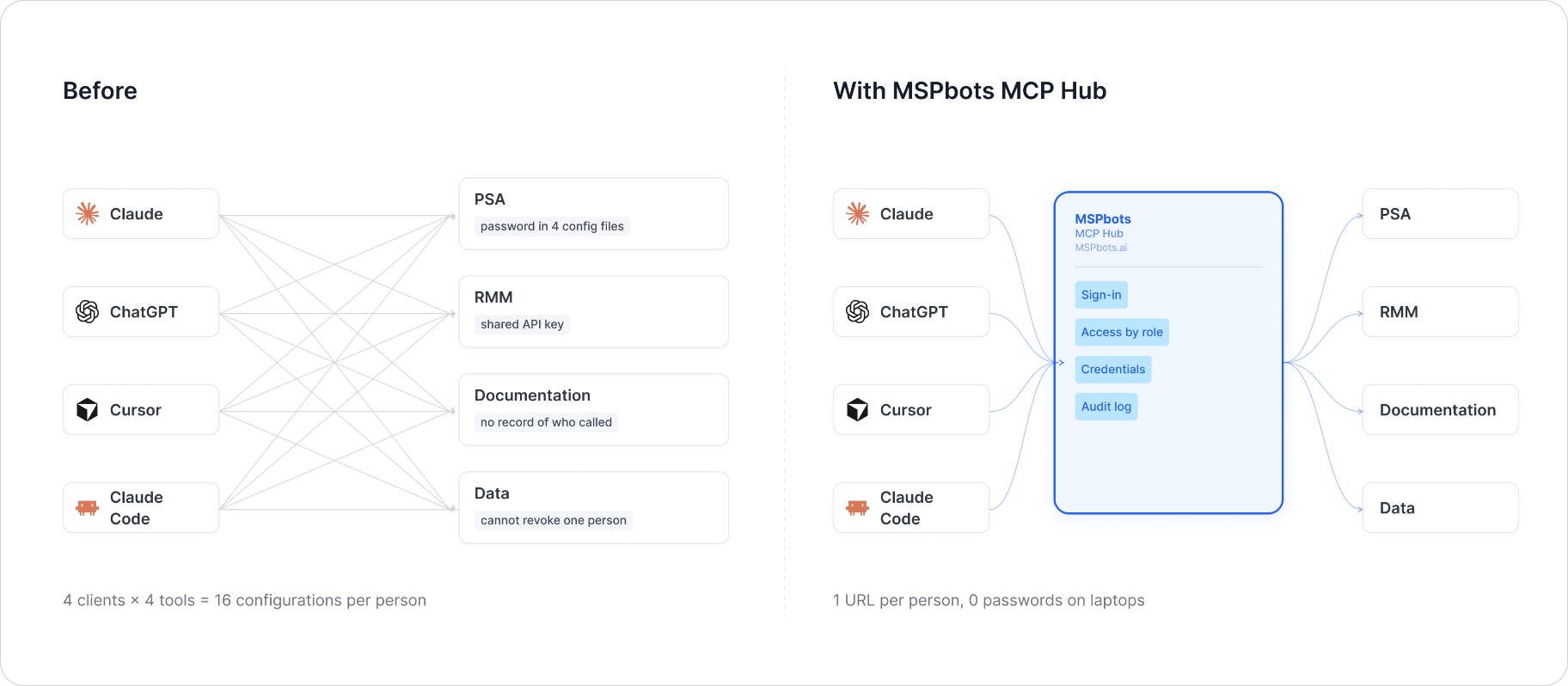
MSPbots Connector gives your AI clients one MCP URL to reach your entire MSP stack (RMM, PSA, documentation, security, finance), and gives you control over who can call which tool and a record of everything that was called.
**Hosted service: [connect.mspbots.ai](https://connect.mspbots.ai)** · Free to use.
### Why Connector
| | |
|---|---|
| **Visible** | Every tool call is logged: who, which vendor, when. Usage dashboard, CSV export, SIEM streaming. |
| **Controlled** | Role-based, per-tool allowlist. Deny by default. |
| **Protected** | Credentials encrypted per record. AI clients never see your vendor passwords or tokens. |
| **MSP-native** | Built for the MSP stack only: RMM, PSA, documentation, security, finance. |
### Quick start
1. **Sign up** at [connect.mspbots.ai](https://connect.mspbots.ai).
2. **Connect your vendors.** Pick from 150+ connectors and authorize each one on the vendor's own page, or bring your own API keys. No extra vendor accounts needed.
3. **Set access.** Create roles and decide which tools each role may call. Nothing is allowed until you allow it.
4. **Add your MCP URL to your AI client.** Copy the URL from your Connector dashboard into Claude, ChatGPT, Cursor, VS Code, Gemini, Codex, or any MCP-capable client.
5. **Ask your AI to do real work**, and watch every call appear in the audit log.
### Features
**Unified gateway**
- One MCP URL for all your AI clients
- 150+ connectors across the MSP stack
- Custom MCP servers supported, free
- Authorization happens on each vendor's own page; the AI never sees passwords or tokens
- Bring your own credentials: use the vendor API keys you already have
- Multiple accounts per app; connect once, reuse across AI clients
- Tool search: finds the right action for the task
- One sign-in; vendor credentials are injected behind the scenes and OAuth tokens refresh automatically
**Visibility**
- Audit log for every tool call (who, which vendor, when)
- Usage dashboard: call volume, top vendors, error rate, per-user activity
- Export audit logs to CSV, or stream to Loki, Graylog, or LogScale (SIEM)
- Optional recording of tool arguments and result summaries (off by default, enabled per organization)
**Control**
- Per-role, per-tool allowlist, deny by default
- owner / admin / member roles
- SCIM provisioning with Entra ID, Okta, JumpCloud, and Google Workspace
**Security**
- Credentials encrypted one record at a time (AES-256-GCM, per-record key)
- AI clients authenticate with OAuth 2.1 + PKCE
- Vendor responses are scanned for prompt-injection patterns and returned as structured data. This is one layer of defense, not a guarantee against every attack.
- Static egress IP for customer firewall and API allowlisting
### Pricing
**Free.**
Links: [connect.mspbots.ai](https://connect.mspbots.ai) · [mspbots.ai](https://mspbots.ai)
---
## Authentication headers
| Header | Required | Type | Default | Allowed values | Description | Example |
|---|---|---|---|---|---|---|
| `X-Ncentral-Server-Url` | Yes | string | none | https URL | Root URL of the N-central server (a trailing `/api` is ignored) | `https://ncentral.example.com` |
| `X-Ncentral-Jwt` | Yes | string | none | - | N-central User-API Token (JWT) of an API-only user | `your-jwt` |
Where to get it: create an API-only user in N-central with the roles and access groups the agent
should have (MFA must be off for that user), then in the N-central UI open Administration > User
Management > Users > the user > API Access > Generate JSON Web Token. The token acts with that
user's permissions.
How the token is sent to N-central: on each MCP request the JWT is exchanged once for a
short-lived access token (`POST {server}/api/auth/authenticate` with `Authorization: Bearer
<JWT>`); API calls then send `Authorization: Bearer <access token>`. The access token is kept
only for that one request.
A request to `/mcp` without both headers gets HTTP 401; a server URL that is not https gets
HTTP 400.
## Tools
All tools return a JSON string. Paged lists take `pageNumber` (from 1), `pageSize` (default 50,
max 200), `sortBy` and `sortOrder` (`asc` / `desc`; `ascending`, `natural`, `descending` and
`reverse` are also accepted) and add `summary {count, total, page, total_pages, has_more,
next_page}`. They also take `offset` (record position from 0, overrides `pageNumber`) and return
`offset` / `next_offset`: when a page is too large for one response only the records that fit
are returned, and `next_offset` continues right after them (the rest of a cut page is on no
other page number). Customer and site ids are org unit ids.
| Tool | Purpose | Parameters (required in **bold**) |
|---|---|---|
| `ncentral_navigate` | Describe the tool areas (changes nothing) | domain (`system`, `orgs`, `devices`, `monitoring`, `tasks`, `custom-properties`, `maintenance`, `access-groups`) |
| `ncentral_status` | Check the server and JWT and list the areas | - |
| `ncentral_health` | API-Service liveness (server time) | - |
| `ncentral_server_info` | N-central and API-Service versions | - |
| `ncentral_validate_token` | Check the access token works | - |
| `ncentral_list_service_orgs` | Service organizations | paging |
| `ncentral_list_customers` | Customers, optionally of one service organization | soId, paging |
| `ncentral_get_customer` | One customer | **customerId** |
| `ncentral_list_sites` | Sites, optionally of one customer | customerId, paging |
| `ncentral_get_site` | One site | **siteId** |
| `ncentral_list_org_units` | Every org unit with type and parent | paging |
| `ncentral_get_org_unit` | One org unit | **orgUnitId** |
| `ncentral_list_org_unit_children` | Org units under an org unit | **orgUnitId**, paging |
| `ncentral_get_registration_token` | Agent registration token (a secret) | **kind** (`customer` / `site` / `org-unit`), **id** |
| `ncentral_list_devices` | Devices, optionally through a saved filter | filterId, paging |
| `ncentral_get_device` | One device | **deviceId** |
| `ncentral_get_device_assets` | Asset inventory record | **deviceId** |
| `ncentral_get_device_lifecycle` | Warranty / lease / purchase data | **deviceId** |
| `ncentral_update_device_lifecycle` | Change lifecycle fields (**write**) | **deviceId**, **data** {warrantyExpiryDate, leaseExpiryDate, expectedReplacementDate, purchaseDate, cost, location, assetTag, description} |
| `ncentral_get_device_service_status` | State of each monitoring service | **deviceId** |
| `ncentral_list_devices_by_org_unit` | Devices of a customer or site | **orgUnitId**, paging |
| `ncentral_list_device_filters` | Saved device filters | paging |
| `ncentral_list_active_issues` | Active issues of a customer or site | **orgUnitId**, paging |
| `ncentral_list_job_statuses` | Job statuses of an org unit | **orgUnitId** |
| `ncentral_list_device_tasks` | Scheduled tasks of a device | **deviceId** |
| `ncentral_get_task` | One scheduled task | **taskId** |
| `ncentral_get_task_status` | Status counts of a task | **taskId** |
| `ncentral_get_task_status_details` | Status and output per device | **taskId** |
| `ncentral_create_direct_task` | Run a script / automation policy on one device now (**write**) | **name**, **deviceId**, **itemId**, **taskType** (`AutomationPolicy` / `Script` / `MacScript`), **customerId**, **credential** {**type** (`LocalSystem` / `DeviceCredentials` / `CustomCredentials`), username, password}, parameters [{**name**, value, description, type}] |
| `ncentral_list_org_custom_properties` | Custom properties of an org unit | **orgUnitId**, paging |
| `ncentral_get_org_custom_property` | One org unit custom property | **orgUnitId**, **propertyId** |
| `ncentral_update_org_custom_property` | Set an org unit custom property (**write**) | **orgUnitId**, **propertyId**, **value** |
| `ncentral_list_device_custom_properties` | Custom properties of a device | **deviceId** |
| `ncentral_get_device_custom_property` | One device custom property | **deviceId**, **propertyId** |
| `ncentral_update_device_custom_property` | Set a device custom property (**write**) | **deviceId**, **propertyId**, **value** |
| `ncentral_list_maintenance_windows` | Maintenance windows of a device | **deviceId** |
| `ncentral_add_maintenance_windows` | Add windows to devices (**write**) | **deviceIds**, **windows** [{**name**, **type**, **cron**, **duration**, **enabled**, **applicableAction**, reboot options}] |
| `ncentral_delete_maintenance_windows` | Delete device-level patch windows (**write**, needs `confirm: true`) | **scheduleIds**, confirm |
| `ncentral_list_access_groups` | Access groups of an org unit | **orgUnitId**, paging |
| `ncentral_get_access_group` | One access group | **accessGroupId** |
| `ncentral_create_device_access_group` | Group giving users access to devices (**write**) | **orgUnitId**, **groupName**, **groupDescription**, deviceIds, userIds |
| `ncentral_create_org_unit_access_group` | Group giving users access to org units (**write**) | **orgUnitId**, **groupName**, **groupDescription**, orgUnitIds, userIds, autoIncludeNewOrgUnits (`true` / `false`) |
Errors come back as a JSON envelope instead of an exception:
```json
{"error": {"code": "unauthorized", "message": "N-central rejected the User-API Token (JWT). ...", "retryable": false}}
```
`code` is one of `not_configured`, `unauthorized`, `not_found`, `invalid_argument`,
`rate_limited`, `upstream_error`. Reads are retried with backoff on 429, 5xx and network
errors; writes are retried only on 429. An expired access token is renewed once automatically.
## Run locally
```bash
uv sync
uv run python -m ncentral_mcp # listens on 0.0.0.0:8080
```
or with Docker:
```bash
docker build --platform linux/amd64 -t ncentral-mcp:dev .
docker run --rm -p 8080:8080 ncentral-mcp:dev
```
Configuration (environment variables, all optional): `MCP_HTTP_HOST` (default `0.0.0.0`),
`MCP_HTTP_PORT` (default `8080`), `LOG_LEVEL` (default `INFO`). Credentials are never read from
the environment.
## Testing example
```bash
# list tools
curl -s http://localhost:8080/mcp \
-H "Content-Type: application/json" \
-H "Accept: application/json, text/event-stream" \
-H "X-Ncentral-Server-Url: https://ncentral.example.com" \
-H "X-Ncentral-Jwt: your-jwt" \
-d '{"jsonrpc":"2.0","id":1,"method":"tools/list","params":{}}'
# active issues of one customer
curl -s http://localhost:8080/mcp \
-H "Content-Type: application/json" \
-H "Accept: application/json, text/event-stream" \
-H "X-Ncentral-Server-Url: https://ncentral.example.com" \
-H "X-Ncentral-Jwt: your-jwt" \
-d '{"jsonrpc":"2.0","id":2,"method":"tools/call","params":{"name":"ncentral_list_active_issues","arguments":{"orgUnitId":100}}}'
```
Unit tests (no network access needed):
```bash
uv run pytest
```
## Delivery notes
- **Tool count (42).** Kept as is because the tool names and camelCase parameter names are an
existing contract.
- **API contract.** Requests follow N-able's published N-central REST API reference
(`https://developer.n-able.com/n-central`). Many endpoints are marked preview there; their
behaviour can change between N-central releases.
- **Removed parameters.** Paging parameters were dropped from tools whose endpoints are not
paged: `ncentral_list_device_custom_properties`, `ncentral_list_maintenance_windows`,
`ncentral_list_device_tasks`, `ncentral_list_job_statuses` and
`ncentral_get_task_status_details`.
- **Direct tasks.** The API requires a description and type for each parameter; when omitted
they default to the parameter name and `string`.
- **Maintenance windows.** Each window is checked for the required fields before anything is
sent; deleting needs `confirm: true` and only removes device-level patch windows.
- **Annotations.** Read tools are annotated read-only; lifecycle and custom property updates are
annotated as overwriting existing values.
## License
Apache License 2.0 - see [LICENSE](LICENSE) and [NOTICE](NOTICE).
This server cannot be deployed
Maintenance
ActivityMaintained
ResponsivenessOutdated data