
nable-passportal-mcp
README.md
# nable-passportal-mcp
A stateless HTTP **MCP service** for the [N-able Passportal](https://documentation.n-able.com/passportal/userguide/Content/api/api_information.htm) Documents API. It exposes Passportal API v2 operations as [Model Context Protocol (MCP)](https://modelcontextprotocol.io/) tools consumable by Claude and other MCP clients.
<div align="center">
## MSPbots Connector
**The MCP Gateway built for MSPs: visible, controlled, and your data stays where it belongs.**
[**Get started at connect.mspbots.ai →**](https://connect.mspbots.ai)
</div>
---
MSPbots Connector gives your AI clients one MCP URL to reach your entire MSP stack (RMM, PSA, documentation, security, finance), and gives you control over who can call which tool and a record of everything that was called.
**Hosted service: [connect.mspbots.ai](https://connect.mspbots.ai)** · Free to use.
### Why Connector
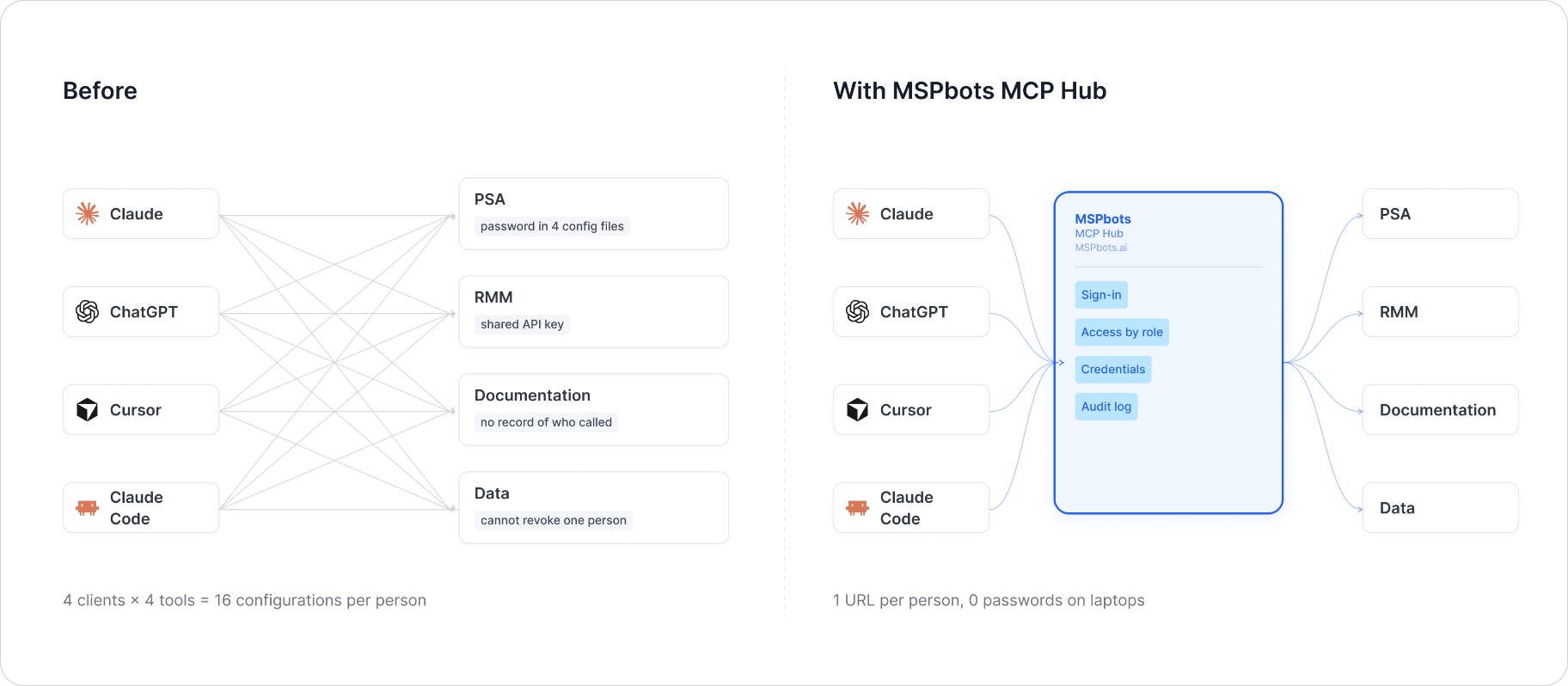
| | |
|---|---|
| **Visible** | Every tool call is logged: who, which vendor, when. Usage dashboard, CSV export, SIEM streaming. |
| **Controlled** | Role-based, per-tool allowlist. Deny by default. |
| **Protected** | Credentials encrypted per record. AI clients never see your vendor passwords or tokens. |
| **MSP-native** | Built for the MSP stack only: RMM, PSA, documentation, security, finance. |
### Quick start
1. **Sign up** at [connect.mspbots.ai](https://connect.mspbots.ai).
2. **Connect your vendors.** Pick from 150+ connectors and authorize each one on the vendor's own page, or bring your own API keys. No extra vendor accounts needed.
3. **Set access.** Create roles and decide which tools each role may call. Nothing is allowed until you allow it.
4. **Add your MCP URL to your AI client.** Copy the URL from your Connector dashboard into Claude, ChatGPT, Cursor, VS Code, Gemini, Codex, or any MCP-capable client.
5. **Ask your AI to do real work**, and watch every call appear in the audit log.
### Features
**Unified gateway**
- One MCP URL for all your AI clients
- 150+ connectors across the MSP stack
- Custom MCP servers supported, free
- Authorization happens on each vendor's own page; the AI never sees passwords or tokens
- Bring your own credentials: use the vendor API keys you already have
- Multiple accounts per app; connect once, reuse across AI clients
- Tool search: finds the right action for the task
- One sign-in; vendor credentials are injected behind the scenes and OAuth tokens refresh automatically
**Visibility**
- Audit log for every tool call (who, which vendor, when)
- Usage dashboard: call volume, top vendors, error rate, per-user activity
- Export audit logs to CSV, or stream to Loki, Graylog, or LogScale (SIEM)
- Optional recording of tool arguments and result summaries (off by default, enabled per organization)
**Control**
- Per-role, per-tool allowlist, deny by default
- owner / admin / member roles
- SCIM provisioning with Entra ID, Okta, JumpCloud, and Google Workspace
**Security**
- Credentials encrypted one record at a time (AES-256-GCM, per-record key)
- AI clients authenticate with OAuth 2.1 + PKCE
- Vendor responses are scanned for prompt-injection patterns and returned as structured data. This is one layer of defense, not a guarantee against every attack.
- Static egress IP for customer firewall and API allowlisting
### Pricing
**Free.**
Links: [connect.mspbots.ai](https://connect.mspbots.ai) · [mspbots.ai](https://mspbots.ai)
---
## Service overview
- **Stateless** — No user state or session data is stored; requests are fully isolated from each other. Only the derived short-lived access token is cached in-process (see "Authentication" below).
- **Concurrent-safe** — Per-request credentials and the instance base URL are isolated through Python `contextvars`, so concurrent requests never get mixed up.
- **Multi-tenant** — Each request carries its own Passportal Access Key / Secret Access Key and the customer instance base URL (gateway mode), so a single service instance can serve multiple Passportal customers.
- **Authentication** — Passportal uses an OAuth2 client-credentials, HMAC-signed authorization scheme: this service uses the long-lived Access Key / Secret Access Key pair to obtain a short-lived (about 55 minutes) access token from Passportal and caches it per tenant, so callers do not need to deal with HMAC computation or token renewal. Credentials are passed in the `x-passportal-access-key` / `x-passportal-secret-key` headers, and the customer instance address in `x-passportal-base-url`.
Upstream API references:
- API overview: https://documentation.n-able.com/passportal/userguide/Content/api/api_information.htm
- List Documents: https://documentation.n-able.com/passportal/userguide/Content/api/api_list_documents.htm
- Authorization flow: https://documentation.n-able.com/passportal/userguide/Content/api/api_authorization.htm
- HMAC token generation: https://documentation.n-able.com/passportal/userguide/Content/api/api_create_hmac.htm
## Endpoints
| Method | Path | Description |
|--------|-----------|--------------------------|
| POST | `/mcp` | MCP protocol entry point |
| GET | `/health` | Health check |
Default port: **8080** (configured via `MCP_HTTP_PORT`).
## HEADER authorization parameters
In Gateway mode (default, production, SOP-compliant), every `/mcp` request must carry the following headers:
### `x-passportal-access-key`
| Item | Description |
|----------|-----------------------------------------------------------------------------|
| Type | string |
| Required | Yes |
| Default | None |
| Allowed values | None |
| Description | Passportal Access Key (corresponds to `x-key` in the authorization request), generated in the Passportal portal. |
| Example | `x-passportal-access-key: 11111111111111111111111111111111` |
### `x-passportal-secret-key`
| Item | Description |
|----------|-------------------------------------------------------------------------------------------------------------------------|
| Type | string |
| Required | Yes |
| Default | None |
| Allowed values | None |
| Description | Passportal Secret Access Key. This service uses it in-process to HMAC-SHA256 sign each token exchange request (`x-hash`); it is never persisted and never forwarded anywhere other than Passportal. |
| Example | `x-passportal-secret-key: 22222222222222222222222222222222` |
### `x-passportal-base-url`
| Item | Description |
|----------|------------------------------------------------------------------------------------------|
| Type | string |
| Required | Yes |
| Default | None |
| Allowed values | None |
| Description | Base URL of the customer's Passportal instance (the root of the dashboard address, without a trailing `/`). For example, if the dashboard is `https://instance.passportalmsp.com//dashboard#/default`, enter `https://instance.passportalmsp.com` here. |
| Example | `x-passportal-base-url: https://instance.passportalmsp.com` |
> If any header is missing, the `/mcp` request returns `401`, and `required_headers` in the response body lists the three required header names.
### Internal authorization flow (automatic; callers do not need to care)
After receiving the three headers above, and before actually calling the Documents API, this service automatically:
1. Generates a random plaintext `content` and computes an `HMAC-SHA256` signature over it with the `Secret Access Key` to get `x-hash` (hex-encoded).
2. `POST {base_url}/api/v2/auth/client_token`, with headers `x-key` (= Access Key) and `x-hash`, and body `{ "scope": "docs_api", "content": "<the same plaintext>" }`, and gets back `access_token` and the expiry time `expiry_time`.
3. Uses the obtained `access_token` as the `x-access-token` header to call the actual Documents API (e.g. `GET /api/v2/documents`).
4. Caches the `access_token` in-process keyed by the fingerprint of `(base_url, access_key, secret_key)`, and only repeats the exchange above when `expiry_time` is near (falling back to 55 minutes if none is returned), so that every tool call does not need to re-sign and re-exchange the token.
Callers only need to provide the three static credentials (Access Key / Secret Access Key / base URL); HMAC computation, token exchange and renewal are all handled by this service.
## Tool List
### `passportal_list_documents`
List documents from N-able Passportal —`GET <base_url>/api/v2/documents`. All parameters are optional.
| Parameter | Type | Required | Allowed values | Description |
|------------------|---------|------|----------------------------------------------------------------------------------------------------------------------------------------------------------------|-------------------------------------------------------------|
| `resultsPerPage` | integer | No | — | Number of results returned per page (positive integer). |
| `pageNum` | integer | No | — | Page number / index (positive integer). |
| `orderBy` | string | No | `label`, `id` | Sort field. |
| `orderDir` | string | No | `asc`, `desc` | Sort direction. |
| `type` | string | No | `asset`, `active_directory`, `application`, `backup`, `email`, `file_sharing`, `contact`, `location`, `internet`, `lan`, `printing`, `remote_access`, `vendor`, `virtualization`, `voice`, `wireless`, `licencing`, `custom`, `ssl` | Filter by template type. |
| `templateUid` | string | No | — | Filter by a specific template; accepts a UID or ID (e.g. `tpl-101` or `101`). |
| `clientId` | integer | No | — | Filter by customer identifier. |
| `searchTxt` | string | No | — | Full-text search based on document attributes. |
The response is the raw Passportal JSON, with roughly the following structure:
```json
{
"success": true,
"apiRequestUid": "string",
"results": [
{
"id": 0,
"organization_id": 0,
"label": "string",
"description": "string",
"client_id": 0,
"customId": "string",
"templateId": 0,
"templateName": "string",
"type": "string"
}
],
"description": "string"
}
```
## Configuration
| Variable | Required | Default | Description |
|---------------------------------|---------------|-----------------------------|--------------------------------------------------------------------------------|
| `AUTH_MODE` | No | `gateway` | `gateway` (per-request headers, SOP-compliant) or `env` (shared credentials, local development only). |
| `PASSPORTAL_ACCESS_KEY_HEADER` | No | `x-passportal-access-key` | Header name carrying the Access Key in gateway mode. |
| `PASSPORTAL_SECRET_KEY_HEADER` | No | `x-passportal-secret-key` | Header name carrying the Secret Access Key in gateway mode. |
| `PASSPORTAL_BASE_URL_HEADER` | No | `x-passportal-base-url` | Header name carrying the instance base URL in gateway mode. |
| `PASSPORTAL_TOKEN_SCOPE` | No | `docs_api` | `scope` of the token exchange request, fixed by the Passportal Documents API; usually no need to change. |
| `PASSPORTAL_ACCESS_KEY` | env mode only | — | Passportal Access Key used in env mode. |
| `PASSPORTAL_SECRET_KEY` | env mode only | — | Passportal Secret Access Key used in env mode. |
| `PASSPORTAL_BASE_URL` | env mode only | — | Customer instance base URL in env mode, e.g. `https://instance.passportalmsp.com`. |
| `MCP_TRANSPORT` | No | `http` | Transport: `http` or `stdio`. |
| `MCP_HTTP_PORT` | No | `8080` | HTTP listen port. |
| `MCP_HTTP_HOST` | No | `0.0.0.0` | HTTP listen address. |
**`env` mode** (local development only, **not production SOP-compliant**): set `AUTH_MODE=env`, `PASSPORTAL_ACCESS_KEY`, `PASSPORTAL_SECRET_KEY` and `PASSPORTAL_BASE_URL`; all requests share the same credentials, so never use it in production / multi-tenant setups.
## Quick Start
### HTTP server (gateway mode — default, SOP-compliant)
```bash
uv sync
uv run nable-passportal-mcp
# Credentials and the instance address are passed per request via the x-passportal-access-key + x-passportal-secret-key + x-passportal-base-url
# headers; this service handles HMAC signing and token exchange/renewal internally
```
### HTTP server (env mode — local development only)
```bash
cp .env.example .env
# Edit .env: AUTH_MODE=env, PASSPORTAL_ACCESS_KEY=..., PASSPORTAL_SECRET_KEY=...,
# PASSPORTAL_BASE_URL=https://<instance>.passportalmsp.com
uv sync
uv run nable-passportal-mcp
# Service starts at http://0.0.0.0:8080
```
### Docker
```bash
docker compose up --build
```
## Test Examples
### Health check
```bash
curl http://localhost:8080/health
```
Expected response:
```json
{"status": "ok", "transport": "http", "auth_mode": "gateway"}
```
### Initialize (MCP handshake)
```bash
curl -X POST http://localhost:8080/mcp \
-H "Content-Type: application/json" \
-H "Accept: application/json, text/event-stream" \
-H "x-passportal-access-key: your_access_key" \
-H "x-passportal-secret-key: your_secret_access_key" \
-H "x-passportal-base-url: https://instance.passportalmsp.com" \
-d '{
"jsonrpc": "2.0",
"id": 1,
"method": "initialize",
"params": {
"protocolVersion": "2024-11-05",
"capabilities": {},
"clientInfo": {"name": "curl", "version": "1.0"}
}
}'
```
### List tools
```bash
curl -X POST http://localhost:8080/mcp \
-H "Content-Type: application/json" \
-H "Accept: application/json, text/event-stream" \
-H "x-passportal-access-key: your_access_key" \
-H "x-passportal-secret-key: your_secret_access_key" \
-H "x-passportal-base-url: https://instance.passportalmsp.com" \
-d '{"jsonrpc": "2.0", "id": 2, "method": "tools/list", "params": {}}'
```
### Call `passportal_list_documents`
```bash
curl -X POST http://localhost:8080/mcp \
-H "Content-Type: application/json" \
-H "Accept: application/json, text/event-stream" \
-H "x-passportal-access-key: your_access_key" \
-H "x-passportal-secret-key: your_secret_access_key" \
-H "x-passportal-base-url: https://instance.passportalmsp.com" \
-d '{
"jsonrpc": "2.0",
"id": 3,
"method": "tools/call",
"params": {
"name": "passportal_list_documents",
"arguments": {
"resultsPerPage": 20,
"pageNum": 1,
"orderBy": "label",
"orderDir": "asc",
"type": "asset"
}
}
}'
```
The first call triggers an internal HMAC token exchange (slightly more latency); subsequent calls within about 55 minutes reuse the cached access token.
## Security
- Each request's Access Key / Secret Access Key / base URL is stored in a `contextvars.ContextVar` and reset immediately after the request ends, so it never leaks across tenants.
- The obtained short-lived access token (valid for about 55 minutes) is cached in-process keyed by the `(base_url, access_key, secret_key)` fingerprint, purely to avoid redoing an HMAC signature + network round trip for every tool call; the cache holds only the derived short-lived token, not the Secret Access Key itself, and it is never written to disk or persisted across processes.
- The Secret Access Key is only used in-process to compute `x-hash` (`auth.py::compute_x_hash`); it is never logged and never forwarded anywhere other than Passportal.
- The container runs as a non-root user.
- Never commit real Access Key / Secret Access Key values — `.gitignore` already excludes `.env`.
This server cannot be deployed
Maintenance
ActivityMaintained
ResponsivenessNo issues