
mspbots-agent-mcp
OfficialREADME.md
# mspbots-agent-mcp
MCP server for the **MSPbots Agent Platform API** — exposes the Agent Platform's
connector inventory, agent triggers (scheduled/event tasks), and per-agent policy
(permissions, self-evaluation, human-in-the-loop approval) to MCP clients.
It follows the same design as the sibling `ticketqa-mcp` service: stateless, no
stored credentials, per-request header authentication over the
[Model Context Protocol](https://modelcontextprotocol.io/) (Streamable HTTP/SSE
transport).
<div align="center">
## MSPbots Connector
**The MCP Gateway built for MSPs: visible, controlled, and your data stays where it belongs.**
[**Get started at connect.mspbots.ai →**](https://connect.mspbots.ai)
</div>
---
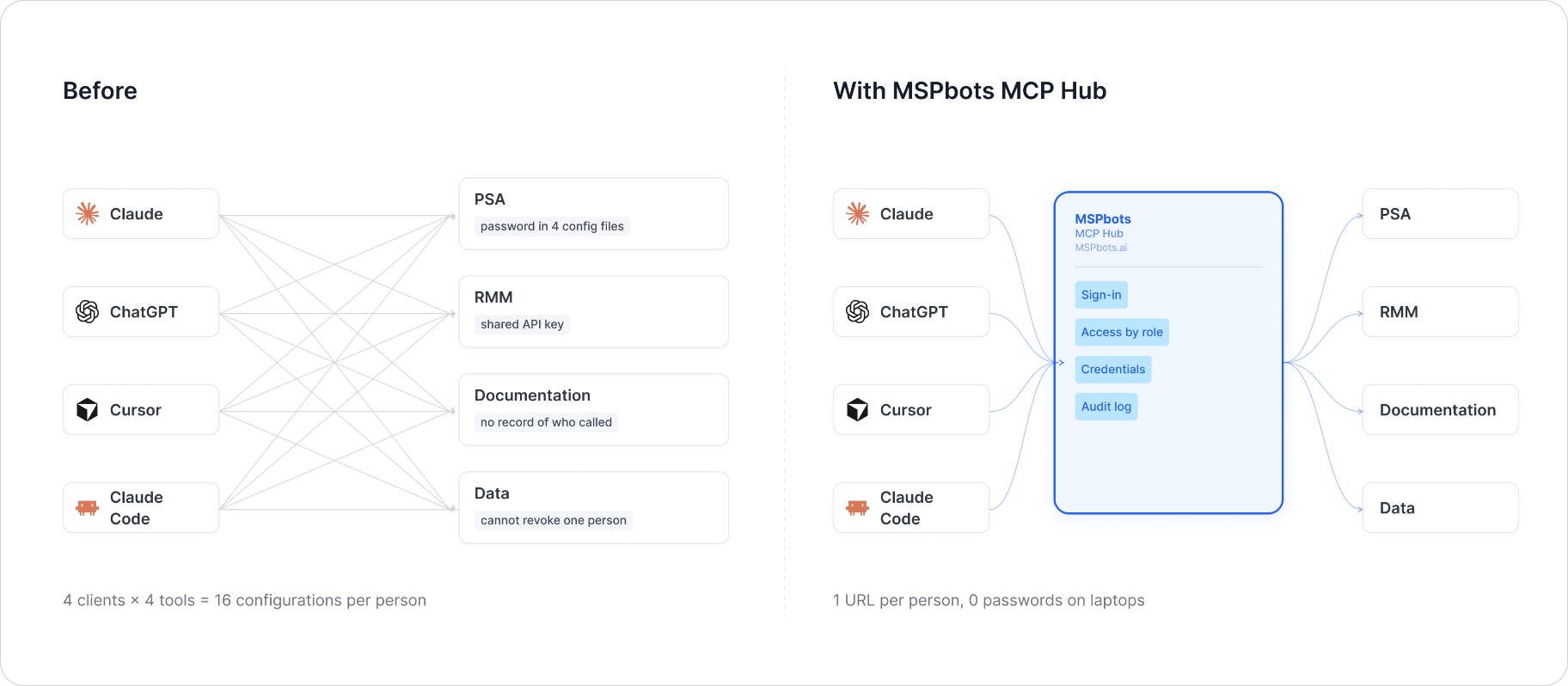
MSPbots Connector gives your AI clients one MCP URL to reach your entire MSP stack (RMM, PSA, documentation, security, finance), and gives you control over who can call which tool and a record of everything that was called.
**Hosted service: [connect.mspbots.ai](https://connect.mspbots.ai)** · Free to use.
### Why Connector
| | |
|---|---|
| **Visible** | Every tool call is logged: who, which vendor, when. Usage dashboard, CSV export, SIEM streaming. |
| **Controlled** | Role-based, per-tool allowlist. Deny by default. |
| **Protected** | Credentials encrypted per record. AI clients never see your vendor passwords or tokens. |
| **MSP-native** | Built for the MSP stack only: RMM, PSA, documentation, security, finance. |
### Quick start
1. **Sign up** at [connect.mspbots.ai](https://connect.mspbots.ai).
2. **Connect your vendors.** Pick from 150+ connectors and authorize each one on the vendor's own page, or bring your own API keys. No extra vendor accounts needed.
3. **Set access.** Create roles and decide which tools each role may call. Nothing is allowed until you allow it.
4. **Add your MCP URL to your AI client.** Copy the URL from your Connector dashboard into Claude, ChatGPT, Cursor, VS Code, Gemini, Codex, or any MCP-capable client.
5. **Ask your AI to do real work**, and watch every call appear in the audit log.
### Features
**Unified gateway**
- One MCP URL for all your AI clients
- 150+ connectors across the MSP stack
- Custom MCP servers supported, free
- Authorization happens on each vendor's own page; the AI never sees passwords or tokens
- Bring your own credentials: use the vendor API keys you already have
- Multiple accounts per app; connect once, reuse across AI clients
- Tool search: finds the right action for the task
- One sign-in; vendor credentials are injected behind the scenes and OAuth tokens refresh automatically
**Visibility**
- Audit log for every tool call (who, which vendor, when)
- Usage dashboard: call volume, top vendors, error rate, per-user activity
- Export audit logs to CSV, or stream to Loki, Graylog, or LogScale (SIEM)
- Optional recording of tool arguments and result summaries (off by default, enabled per organization)
**Control**
- Per-role, per-tool allowlist, deny by default
- owner / admin / member roles
- SCIM provisioning with Entra ID, Okta, JumpCloud, and Google Workspace
**Security**
- Credentials encrypted one record at a time (AES-256-GCM, per-record key)
- AI clients authenticate with OAuth 2.1 + PKCE
- Vendor responses are scanned for prompt-injection patterns and returned as structured data. This is one layer of defense, not a guarantee against every attack.
- Static egress IP for customer firewall and API allowlisting
### Pricing
**Free.**
Links: [connect.mspbots.ai](https://connect.mspbots.ai) · [mspbots.ai](https://mspbots.ai)
---
## When would you use this
This MCP is meta: it doesn't wrap a customer-facing integration, it wraps the
Agent Platform's own admin/config API for an agent. The "users" are platform
admins/builders setting up an agent, or an agent introspecting/adjusting its
own configuration:
- "What connectors does this tenant have hooked up, and which are actually
connected right now?" → `mspbotsagent_get_connectors`
- "What connectors can *this agent* use / what does it pull data from?" →
`mspbotsagent_get_sop_data_sources` (agent-scoped — not
`mspbotsagent_get_connectors`, which is tenant-wide)
- "Make this agent run every Monday morning to summarize open tickets" →
`mspbotsagent_upsert_trigger` (type `recurring`)
- "Kick this agent off automatically whenever a new ConnectWise ticket comes
in" → `mspbotsagent_upsert_trigger` (type `event`, after checking
`mspbotsagent_get_trigger_catalog`)
- "Lock down what this agent is allowed to do without asking first" →
`mspbotsagent_upsert_agent_permissions`
- "Require a human to sign off before this agent issues a refund" →
`mspbotsagent_upsert_agent_approval`
- "Write up this agent's SOP so it has a documented, repeatable procedure" →
`mspbotsagent_set_sop_purpose` / the other `mspbotsagent_set_sop_*` tools
- "What SOPs does this tenant have / which are still drafts?" →
`mspbotsagent_list_sops`
## Tools
Every tool takes its credentials from the request headers
(`X-API-Key` / `X-MSP-Tenant-Id` / `X-MSP-Host`) — no token is ever passed as a
tool argument.
### Connectors
| Tool | What it does | Parameters |
|---|---|---|
| `mspbotsagent_get_connectors` | List every connector on the current tenant, returning each one's name, whether it is installed, and its connection status | none |
| `mspbotsagent_list_connector_tools` | List one connector's tools **with their per-agent on/off switch state** (`enabled`) | `agent_id`, `capability_id` |
| `mspbotsagent_set_connector_tools` | Switch a connector's tools on/off for one agent (single or batch) | `agent_id`, `capability_id`, `tools[]`, `enabled` |
`mspbotsagent_get_connectors` is **tenant-scoped**: it takes no `agent_id` and
returns the same inventory regardless of which agent is being configured. For
the connectors a *specific* agent is declared to use, see
[`mspbotsagent_get_sop_data_sources`](#agent-sop-author) instead.
The two switch tools operate on **individual tools within a connector**. A
connector's tools all default to **on**; the backend records only the
exceptions (an opt-out list per agent + connector), so a tool with no override
reads `enabled: true`. `capability_id` is the connector `id` returned by
`mspbotsagent_get_connectors` (or by a `mspbotsagent_get_sop_data_sources`
entry). `mspbotsagent_list_connector_tools` returns the same tool names as
`mspbotsagent_get_sop_data_sources`, adding each tool's `enabled` flag.
`mspbotsagent_set_connector_tools` affects only the tool names you pass;
`enabled: false` switches them off (the agent can no longer see or call them),
`enabled: true` switches them back on. A change takes effect on the agent's
**next chat** — there is no ~30s restart to wait out and no need to start a new
thread. For "all on / all off", read the current names first and pass the whole
batch in **one** call (`restartRequired` in the response is always `true`, but
the agent picks the change up on its next chat regardless; `pending: true`
means the switch was saved but not yet synced to the agent's config).
`mspbotsagent_get_connectors` returns one row per connector:
| Field | Description |
|---|---|
| `name` | Connector display name |
| `integration` | Connector/integration key (e.g. `connectwise-command`) |
| `scope` | Connector scope (e.g. `mspbots`) |
| `managed` | How it is managed (e.g. `gateway`) |
| `installed` | Whether it is installed/enabled (bool, from the API's `enabled`) |
| `connected` | Whether it is currently connected (bool, from the API's `connected`) |
| `status` | Derived status: `not_installed` / `connected` / `installed_disconnected` |
> Every connector the API returns also carries a very large base64 `logo` field —
> this service **strips it** to keep responses lean.
Backing endpoint: `GET /apps/mb-platform-agent/api/capabilities/connectors`, which
returns `{"success": true, "data": {"list": [ {connector}, ... ]}}`.
### Triggers (agent scheduled / event tasks)
A trigger runs an agent automatically: on a cron schedule (`recurring`) or when an
event fires in an external integration (`event`). Its primary key is `taskId`, and it
belongs to one `agentId`.
| Tool | What it does | Parameters |
|---|---|---|
| `mspbotsagent_list_triggers` | List all of an agent's triggers (paginated) | `agent_id` (required), `page` (default 1), `page_size` (default 50) |
| `mspbotsagent_upsert_trigger` | Create or modify a trigger (with `task_id` = modify, without = create) | `agent_id`, `task_id`, `name`, `prompt`, `type` (`recurring`/`event`), `enabled`, `expires_in_days`; recurring: `schedule` (cron, 1h minimum), `timezone`, `run`; event: `trigger_integration`, `trigger_events` |
| `mspbotsagent_delete_trigger` | Delete a trigger (cannot be undone) | `task_id` (required) |
| `mspbotsagent_get_trigger_catalog` | List the integration + events combinations that are valid for event triggers | none |
| `mspbotsagent_run_trigger` 🚫 | Run one trigger manually, right now (for testing or a catch-up run) — **currently not exposed** | `task_id` (required) |
> 🚫 **`mspbotsagent_run_trigger` is currently not exposed.** Its `@mcp.tool`
> decorator is commented out in `src/mspbots_agent_mcp/tools/triggers.py`, so it
> no longer appears in `tools/list` and cannot be called by external clients. The
> implementation stays in that file; re-enable by uncommenting the decorator
> (and the matching entry in `tests/test_tools.py`). The row above describes it
> as implemented; the other four trigger tools are unaffected.
>
> Creating via `upsert` requires `agent_id`/`name`/`prompt`/`type`; `recurring` also
> requires `schedule` (cron, 1h minimum interval), and `event` requires
> `trigger_integration` + `trigger_events`, whose combination must appear in the
> `get_trigger_catalog` catalog. When modifying, submit only the fields you want to
> change.
>
> Backing endpoints: `GET|POST /api/tasks`, `PUT|DELETE /api/tasks/:taskId`,
> `GET /api/tasks/trigger-catalog`, `POST /api/tasks/:taskId/run`.
### Agent policy (permissions / evaluation / approval)
All three blocks of configuration hang off the **same agent record**: the reads share
one GET, and the writes share one **partial** PUT. So **do not write to the same agent
concurrently** (partial patches overwrite each other); and when a read comes back with
`policyError=true`, the upsert tools **refuse to write `permission`/`interruptOn` back**
(owners-only updates are unaffected) to avoid persisting a broken policy. The primary
key is `agentId` throughout.
| Tool | What it does | Parameters |
|---|---|---|
| `mspbotsagent_get_agent_permissions` | Read the permission config: `permission` / `interruptOn` / `owners` / `tools` (read-only) / `policyError` | `agent_id` (required) |
| `mspbotsagent_upsert_agent_permissions` | Update tool permissions, interrupt settings and ownership (partial; the three keys are independent, so sending owners alone is valid) | `agent_id` (required), `permission` (tool→`allow`/`ask`/`deny`), `interrupt_on` (tool→`true` or `{allowed_decisions, description}`), `owners` (`[{userId, name, email}]`) — at least one of the three |
| `mspbotsagent_get_agent_evaluation` | Read the self-evaluation config `review = {rules, max_iterations}` | `agent_id` (required) |
| `mspbotsagent_upsert_agent_evaluation` | Set/update the self-evaluation rules (an empty `rules` array turns self-evaluation off) | `agent_id` (required), `rules` (rule array), `max_iterations` |
| `mspbotsagent_get_agent_approval` | Read the human approval rules `approval` (array) | `agent_id` (required) |
| `mspbotsagent_upsert_agent_approval` | Set/update the human approval rules (an empty array removes every approval gate) | `agent_id` (required), `rules` (approval rule array) |
Rule object shapes:
- evaluation `rules[]`: `{ rubric, name, description, triggers: [regex/keywords] }`
- approval `rules[]`: `{ name, intent, triggers: [regex/keywords], tools: [...], decisions: [...] }`
> Backing endpoints: `GET /api/agents/:id` (shared by all three getters),
> `PUT /api/agents/:id` (shared by all three upserts, partial: writing
> `permission`/`interruptOn`, `review`, and `approval` respectively).
### Agent SOP author
An agent's SOP (standard operating procedure) draft has 5 independent fields, each with
its own read and write tool, and each field writes through its own separate endpoint
(unlike permission/evaluation/approval above, which share a single
`PUT /api/agents/:id`). Every write has the same shape: `PUT {"value": ...}`. The
primary key is `agentId`.
> Even though each field has a different endpoint, all 5 still live on the **same agent
> record** (the `sopAuthor` sub-document), so the rule from
> permission/evaluation/approval applies here too: **do not write to the same agent's
> SOP fields concurrently**, or they may overwrite each other. The SOP itself is a
> document — a planning draft describing what the agent "should do"; the
> permission/evaluation/approval config above is the behavior policy that actually takes
> effect at runtime, deciding what the agent "can actually do". The two are
> complementary but distinct kinds of configuration.
> 🚫 **The two `*_sop_procedure` tools are currently not exposed.** Their
> `@mcp.tool` decorators are commented out in
> `src/mspbots_agent_mcp/tools/sop_author.py`, so they no longer appear in
> `tools/list` and cannot be called by external clients. The implementations stay in
> that file; re-enable by uncommenting the two decorators (and the matching entries in
> `tests/test_tools.py`). The rows below describe them as implemented; the other four
> SOP fields are unaffected.
| Tool | What it does | Parameters |
|---|---|---|
| `mspbotsagent_get_sop_name` | Read the SOP name | `agent_id` (required) |
| `mspbotsagent_set_sop_name` | Set the SOP name (non-empty, ≤60 chars, unique within the tenant, cannot be cleared) | `agent_id` (required), `value` (required) |
| `mspbotsagent_get_sop_source` | Read the source (the original task description the SOP was written from) | `agent_id` (required) |
| `mspbotsagent_set_sop_source` | Set the source (pass null to clear it) | `agent_id` (required), `value` (required, string or null) |
| `mspbotsagent_get_sop_purpose` | Read the purpose (markdown) | `agent_id` (required) |
| `mspbotsagent_set_sop_purpose` | Set the purpose (markdown) | `agent_id` (required), `value` (required) |
| `mspbotsagent_get_sop_data_sources` | Read the dataSources list (structured object) | `agent_id` (required) |
| `mspbotsagent_set_sop_data_sources` | Set the dataSources list (structured object) | `agent_id` (required), `value` (required, object) |
| `mspbotsagent_get_sop_procedure` 🚫 | Read the procedure (markdown) — **currently not exposed** | `agent_id` (required) |
| `mspbotsagent_set_sop_procedure` 🚫 | Set the procedure (markdown) — **currently not exposed** | `agent_id` (required), `value` (required) |
The dataSources `value` shape (each source stores only `integration`, no
`preconditions`):
```json
{
"sources": [
{ "integration": "open-meteo" },
{ "integration": "ms-graph" }
]
}
```
Every entry `mspbotsagent_get_sop_data_sources` reads back is a connector (an MCP
server available to the agent); besides `integration` it carries connection status and
a tool list:
| Field | Type | Meaning |
|---|---|---|
| `integration` | string | Data source key |
| `org` | bool, optional | Present only when the source was added at the organization level |
| `found` | bool | `false` = the referenced connector has been deleted or disabled and is unusable; treat it as non-existent |
| `name` / `description` / `transport` / `endpoint` | string | Connector display info and its MCP endpoint (present only when `found`) |
| `connection` | string | Current connection status, see the table below. **Agent level wins over org level** |
| `tenantConnected` | bool | Whether an organization/tenant-level connection exists |
| `enabled` | bool | Whether the connector is enabled at the organization level |
| `managed` | string, optional | `"gateway"` for gateway-managed connectors |
| `tools` | array | The tools this connector provides (`{name, label, description}`); empty when not connected or when discovery failed |
`connection` values:
| Value | Meaning | How to treat it |
|---|---|---|
| `"agent"` | This agent connected with its own account (agent-level connection) | Usable |
| `"org"` | It is using the organization/tenant-level connection | Usable |
| `"none"` | Not connected (or the connector is disabled for the organization) | Not usable; the user has to connect it first |
| `"unavailable"` | The gateway status could not be read | ⚠️ **Does not mean disconnected** — it just could not be read at this moment. Do not call it "not connected" on this basis |
Two easy mistakes, both written into the tool descriptions:
- `connection` is a single value and agent wins. **When both levels are connected,
`connection` shows only `"agent"`**, and the tenant half is only visible in
`tenantConnected`. There is currently no symmetric standalone `agentConnected`
boolean, so agent level can only be detected via `connection === "agent"`.
- `"none"` and `"unavailable"` must be handled differently: the former really is not
connected (fine to prompt the user to go connect it), while the latter merely means
the status could not be read (lean towards still-usable, and do not misreport it).
Summary test: usable = `found === true` and `connection ∈ {agent, org}` (with
`unavailable` leaning usable); unusable = `found === false` or `connection === "none"`.
> `mspbotsagent_get_sop_data_sources` is the **agent-scoped** answer to
> "what connectors does this agent use", and its rows carry connection
> status, so it usually answers "can this agent use X" on its own.
> [`mspbotsagent_get_connectors`](#connectors) is the tenant-wide inventory
> — reach for it when the question is not about a particular agent.
> Backing endpoints: `GET|PUT /api/agents/:id/sop-author/{name,source,purpose,data-sources-list,procedure}`.
### Agent skills
> 🚫 **Currently not exposed.** These tools are commented out in
> `create_mcp_server()` (`src/mspbots_agent_mcp/server.py`), so they do not appear in
> `tools/list` and cannot be called by external clients. The implementation stays in
> `src/mspbots_agent_mcp/tools/skills.py`; re-enable by uncommenting the `skills`
> import and `skills.register(...)` call there (and the matching entries in
> `tests/test_tools.py`). The rest of this section describes them as implemented.
The skills available to an agent come in three kinds: `mspbots` (built into the
platform), `org` (shared across the organization), and `agent` (private to that agent).
Only private (`agent`) skills can be created/edited/deleted here; `mspbots`/`org`
skills can only be read, not changed. The primary key is `capabilityId` (the `id` on
each record from the list endpoint).
| Tool | What it does | Parameters |
|---|---|---|
| `mspbotsagent_list_agent_skills` | List every skill available to an agent (org-shared + that agent's private ones + platform `mspbots` ones) and whether each is switched on | `agent_id` (required) |
| `mspbotsagent_create_agent_skill` | Create a new private skill (scope=agent) for an agent, publish it as an npm version and install it into that agent's workspace | `agent_id` (required), `name` (required), `files` (required, must contain a `SKILL.md`) |
| `mspbotsagent_update_agent_skill_files` | Edit an agent's private skill files and publish a new version (whole-package replacement). Private skills owned by that agent only | `agent_id` (required), `capability_id` (required), `files` (required, the complete file set), `note` (optional, defaults to "Edit") |
| `mspbotsagent_delete_agent_skill` | Delete an agent's private skill: soft-delete the capability + clear the opt-out row + uninstall it from the workspace | `agent_id` (required), `capability_id` (required) |
| `mspbotsagent_set_agent_skill_enabled` | Turn one skill on or off for an agent without touching its files. Works on all three kinds, not just private ones | `agent_id` (required), `ref` (required, from the list tool), `enabled` (optional, default `true`), `skill_type` (optional, `mspbots`/`org`/`agent`, default `org`) |
`mspbotsagent_list_agent_skills` returns, for each skill,
`id`/`type` (`mspbots`|`org`|`agent`)/`ref`/`scope`/`name`/`skillName`/`description`/`version`/`enabled`/`selected`
(`true` when not opted out)/`available`, plus a `selectedIds` list. `selected` is
exactly the switch `mspbotsagent_set_agent_skill_enabled` writes, and each entry's
`ref` and `type` are what to pass back in as `ref` and `skill_type`.
> ⚠️ **The field structure of each element of `files` ("SkillFile") is not specified:
> the API spec handed over only said `"$ref": "#/definitions/SkillFile"`, without
> attaching that definitions block.**
> This implementation assumes `{"path": "<relative path, e.g. 'SKILL.md'>", "content": "<raw text content>"}`
> — inferred from the common SKILL.md packaging convention, **not verified against the
> real API**. Confirm the actual field names with the backend before relying on it
> (whether there is also an `encoding`/`executable`, etc.).
>
> Backing endpoints: `GET /api/agents/:id/skills`, `POST /api/agents/:id/skills/create`,
> `PUT /api/agents/:id/skills/:capabilityId/files`, `PUT /api/agents/:id/skills`,
> `DELETE /api/agents/:id/skills`
> (the last one's request body is `{"id": "<capabilityId>"}` — a DELETE with a body is
> unusual in HTTP, so this service sends it through httpx's low-level `request()`
> rather than `delete()`).
>
> `PUT /api/agents/:id/skills` takes `{ref, enabled, type}` and answers
> `{agentId, ref, enabled, restartRequired, pending}`. `restartRequired` is always
> `true`. `pending: true` means the flag was recorded but syncing the install/uninstall
> to the runtime failed, so the agent's capability is marked pending and will be retried
> later — the change is **not in effect yet**. An unresolvable `ref` or an unknown agent
> comes back as HTTP 200 with `{"success": false, "error": "…"}` rather than a 4xx, so
> the tool checks `success` explicitly and reports it as an error.
### SOP library (list + synchronous chat)
> 🚫 **`mspbotsagent_chat_with_sop` is currently not exposed.** Its `@mcp.tool`
> decorator is commented out in `src/mspbots_agent_mcp/tools/sops.py`, so it no
> longer appears in `tools/list` and cannot be called by external clients (its
> dedicated tests in `tests/test_sops.py` are `@pytest.mark.skip`-ed to match).
> The implementation stays in that file; re-enable by uncommenting the
> decorator (and the matching entry in `tests/test_tools.py`, and the skipped
> tests). Everything below describes it as implemented; `mspbotsagent_list_sops`
> is unaffected and still exposed.
A **SOP** (standard operating procedure) is a tenant-level record, and creating one
also opens a **dedicated agent** for it. That agent is what
`mspbotsagent_chat_with_sop` talks to, which is why it takes only `sop_id`, never
`agent_id`. This is a different thing from [Agent SOP author](#agent-sop-author) above:
those tools edit the **SOP draft sections** attached to an agent, while these read the
**SOP library** and actually run a turn of conversation.
| Tool | What it does | Parameters |
|---|---|---|
| `mspbotsagent_list_sops` | List the tenant's SOPs with pagination, returning each one's status and owning agent | `search` (fuzzy match on name only, does not search the body), `status` (`draft`/`published`), `page` (default 1), `page_size` (default 20, max 100) |
| `mspbotsagent_chat_with_sop` 🚫 | Hold **one synchronous turn** of conversation with a SOP's agent: blocks until the whole turn finishes, then returns the reply — **currently not exposed** | `sop_id` (required), `message` (required), `thread_id` (continue the same conversation), `new_thread` (start a new one) |
`mspbotsagent_list_sops` returns the backend's `GET /api/sops` response as-is
(`{total, list}`; every field on each row, snake_case, nothing projected away —
e.g. `id`/`name`/`description`/`status`/`source`/`tags`/`agent_id`/`agent_live`/`updated_at`).
`agent_live` being `false` means that agent record no longer exists — the SOP is still
readable, but it cannot be talked to, and no parameter on either tool can bring it back.
**How "the user names a SOP in their own words" turns into a `sop_id`:**
the backend's `search` only does `name ILIKE '%…%'` (`service/sop/db.ts:88`) — it does
not match description / tags / body, and there is no fuzzy, synonym or cross-language
matching. **So a miss does not mean it does not exist**; it usually just means the
wording differs (the user says "the refund one", the SOP is called `Refund Handling`).
Dropping the user's own words straight into `search`, getting 0 rows, and then
answering "there is no such SOP" is the most expensive mistake on this path. The right
move is to **not pass `search`**, read each row's `name` + `description` and pick it
yourself, using `total` to decide whether to page. Use `search` only for a name fragment
you already know for certain. This guidance lives in the `search` parameter's own
description (parameter descriptions do not count towards the 500-char limit), and is
guarded by `test_search_param_warns_that_a_miss_is_not_an_absence` in
`tests/test_sops.py`.
**When you only have an `agent_id`**: every `list_sops` row carries `agent_id`, so list
them and match on it to get the `sop_id`; `mspbotsagent_get_usage_overview` rows carry
both `sopId` and `agentId` too. Do not try to parse the agent's name — although a SOP
agent is created as `${sop.name} #${sop.id}` and renames propagate, `PUT /api/agents/:id`
lets a user change `name` directly, which decouples it immediately, and an ordinary
agent can be given the same name too.
`mspbotsagent_chat_with_sop` returns
`sopId`/`sopName`/`agentId`/`threadId`/`status`/`reply`, where `status` explains an
empty reply:
| `status` | Meaning |
|---|---|
| `completed` | Ran normally; `reply` is the last user-visible assistant message of this turn |
| `interrupted` | Paused on a human approval gate, with `pausedActions` attached; someone has to decide in the Agent Platform before it continues |
| `no_reply` | Finished, but produced no assistant message |
`reply` is extracted the same way the frontend's `lastAssistantText` does it in
`components/assistant-ui/aegra/messages.ts`: scan backwards for a
`type=ai`/`role=assistant` message, skipping the internal messages the UI hides
(`rubric_grader`, `sop_context`, `sop_suffix`, `compact_summary`, `task_notification`).
> ⚠️ **This call path differs from the other tools in two ways — do not revert them to
> the defaults:**
> 1. It **turns retries off** (`retries=0`). A request that runs an agent is not
> idempotent — re-sending after a lost response **runs the agent again** instead of
> recovering the first result.
> 2. It raises the read timeout to **300s** (the 30s default cannot survive a real agent
> turn; Aegra's own backstop is 1 hour). The error returned on timeout carries
> `retryable=false` and says explicitly: do not re-send, ask again on the same
> conversation instead.
>
> Backing endpoints: `GET /api/sops` (returns `{list, total}` when paginated),
> `GET /api/sops/:id` (to get `agent_id`), `POST /api/agents/:id/run/wait`. That last
> one **signals a failed run with HTTP 200 + `{"success": false}`** rather than a
> 4xx/5xx, so this tool checks the `success` field explicitly to avoid reading a failure
> as "succeeded but said nothing".
## Quick Start
### Docker (recommended)
```bash
docker compose up --build
```
The server starts on `http://localhost:8080`.
### Local (uv)
```bash
uv sync
python -m mspbots_agent_mcp
```
## Health Check
```bash
curl http://localhost:8080/health
# {"status": "ok"}
```
No credentials are required for the health endpoint.
## Authentication
Every request to `/mcp` must include the following HTTP headers (provided by the
MCP caller — kept consistent with `ticketqa-mcp`):
| Header | Type | Required | Description | Example |
|---|---|---|---|---|
| `X-API-Key` | string | Yes | An access credential already issued by the Agent Platform (JWT bearer token). This service forwards it verbatim as the downstream request's `Authorization: Bearer <token>`. | `X-API-Key: <jwt-bearer-token>` |
| `X-MSP-Tenant-Id` | string | Yes | Tenant identifier. Renamed to the `X_Tenant_ID` header when forwarded to the downstream API (the tenant is also embedded in the JWT). | `X-MSP-Tenant-Id: <tenant-id>` |
| `X-MSP-Host` | string | Yes | The host the Agent API lives on. | `X-MSP-Host: https://agent.mspbots.ai` |
> ⏳ **Transition (from 2026-09-23)**: `X-API-Key` replaces the former
> `X-MSP-Token`. Credentials saved before the rename still sit in the registry
> under the old name and the gateway injects them verbatim, so the middleware
> falls back to reading `X-MSP-Token` when `X-API-Key` is absent. When both are
> present `X-API-Key` wins. Once every tenant credential has been re-saved under
> the new name, delete the fallback in `server.py` and
> `tests/test_middleware.py::test_legacy_token_header_is_still_accepted`.
>
> `X-MSP-Tenant-Id` is **not** affected by this rename — still required, still
> forwarded downstream.
Missing any of the three headers returns `401 Unauthorized`.
## Environment Variables
| Variable | Default | Description |
|---|---|---|
| `MCP_HTTP_PORT` | `8080` | Listening port |
| `MCP_HTTP_HOST` | `0.0.0.0` | Listening host |
## MCP Endpoint
```
POST http://localhost:8080/mcp
```
Connect your MCP client with:
- Transport: `http` (Streamable HTTP / SSE)
- Headers: `X-API-Key`, `X-MSP-Tenant-Id`, `X-MSP-Host` (all required)
## Test Example
```bash
curl -X POST http://localhost:8080/mcp \
-H "Content-Type: application/json" \
-H "Accept: application/json, text/event-stream" \
-H "X-API-Key: <token>" \
-H "X-MSP-Tenant-Id: <tenant-id>" \
-H "X-MSP-Host: https://agent.mspbots.ai" \
-d '{
"jsonrpc": "2.0",
"id": 1,
"method": "tools/call",
"params": { "name": "mspbotsagent_get_connectors", "arguments": {} }
}'
```
> ⚠️ This is a public repository. Never write real tokens, tenant ids or other
> sensitive values into any committed file — the `<token>` / `<tenant-id>` above are
> placeholders only.
This server cannot be deployed
Maintenance
ActivityActive
ResponsivenessNo issues