
logmein-mcp
README.md
# logmein-mcp
MCP server for **LogMeIn Rescue** (remote support/screen-sharing platform).
Exposes the Rescue API's session, chat log, note, and reporting methods as
MCP tools.
> Naming note: MSPbots' own integration is registered as "LogMeIn"
> (`subjectCode=LOGMEIN`); the vendor's current product name is "LogMeIn
> Rescue" (part of GoTo). This MCP covers exactly the 4 methods MSPbots
> itself has configured (Report, Session, Chat, Note) — see **API
> Reference** below for where the full method catalog lives.
<div align="center">
## MSPbots Connector
**The MCP Gateway built for MSPs: visible, controlled, and your data stays where it belongs.**
[**Get started at connect.mspbots.ai →**](https://connect.mspbots.ai)
</div>
---
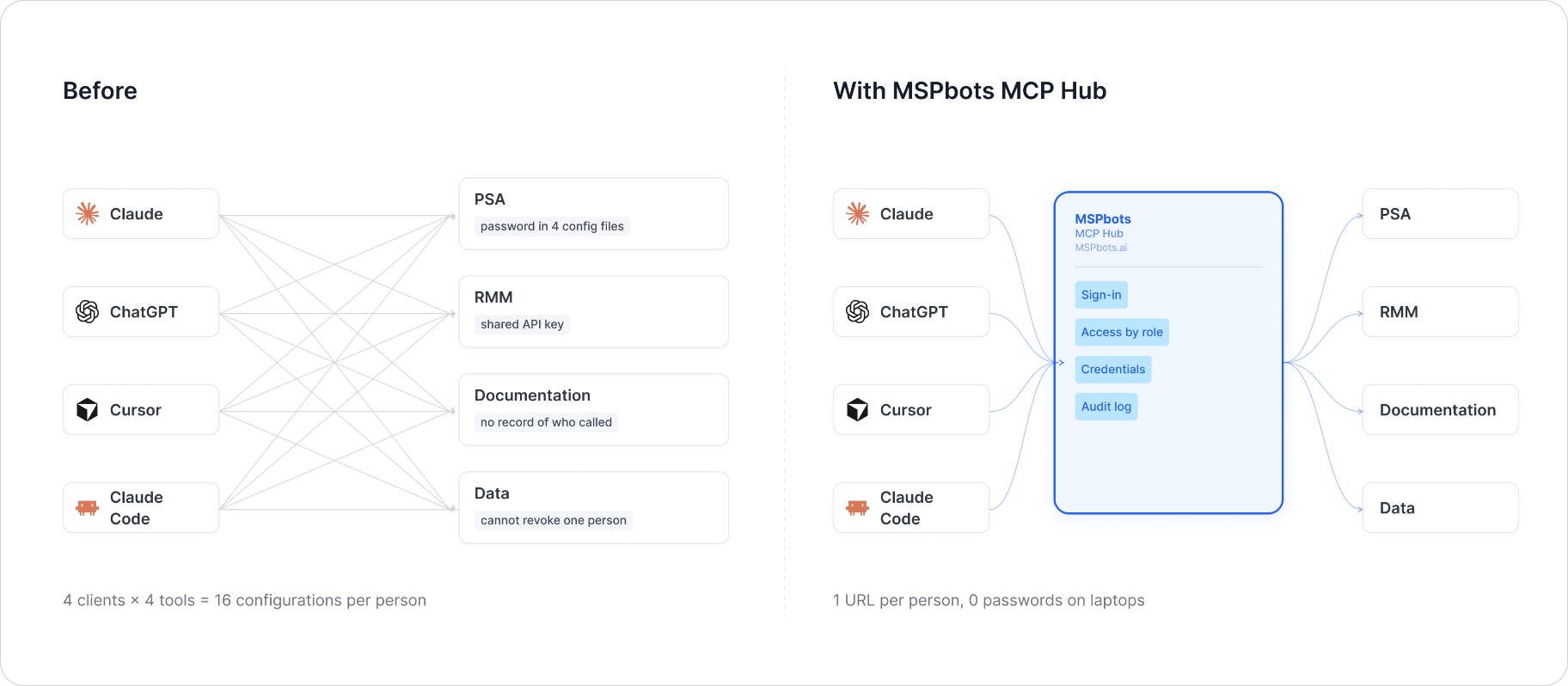
MSPbots Connector gives your AI clients one MCP URL to reach your entire MSP stack (RMM, PSA, documentation, security, finance), and gives you control over who can call which tool and a record of everything that was called.
**Hosted service: [connect.mspbots.ai](https://connect.mspbots.ai)** · Free to use.
### Why Connector
| | |
|---|---|
| **Visible** | Every tool call is logged: who, which vendor, when. Usage dashboard, CSV export, SIEM streaming. |
| **Controlled** | Role-based, per-tool allowlist. Deny by default. |
| **Protected** | Credentials encrypted per record. AI clients never see your vendor passwords or tokens. |
| **MSP-native** | Built for the MSP stack only: RMM, PSA, documentation, security, finance. |
### Quick start
1. **Sign up** at [connect.mspbots.ai](https://connect.mspbots.ai).
2. **Connect your vendors.** Pick from 150+ connectors and authorize each one on the vendor's own page, or bring your own API keys. No extra vendor accounts needed.
3. **Set access.** Create roles and decide which tools each role may call. Nothing is allowed until you allow it.
4. **Add your MCP URL to your AI client.** Copy the URL from your Connector dashboard into Claude, ChatGPT, Cursor, VS Code, Gemini, Codex, or any MCP-capable client.
5. **Ask your AI to do real work**, and watch every call appear in the audit log.
### Features
**Unified gateway**
- One MCP URL for all your AI clients
- 150+ connectors across the MSP stack
- Custom MCP servers supported, free
- Authorization happens on each vendor's own page; the AI never sees passwords or tokens
- Bring your own credentials: use the vendor API keys you already have
- Multiple accounts per app; connect once, reuse across AI clients
- Tool search: finds the right action for the task
- One sign-in; vendor credentials are injected behind the scenes and OAuth tokens refresh automatically
**Visibility**
- Audit log for every tool call (who, which vendor, when)
- Usage dashboard: call volume, top vendors, error rate, per-user activity
- Export audit logs to CSV, or stream to Loki, Graylog, or LogScale (SIEM)
- Optional recording of tool arguments and result summaries (off by default, enabled per organization)
**Control**
- Per-role, per-tool allowlist, deny by default
- owner / admin / member roles
- SCIM provisioning with Entra ID, Okta, JumpCloud, and Google Workspace
**Security**
- Credentials encrypted one record at a time (AES-256-GCM, per-record key)
- AI clients authenticate with OAuth 2.1 + PKCE
- Vendor responses are scanned for prompt-injection patterns and returned as structured data. This is one layer of defense, not a guarantee against every attack.
- Static egress IP for customer firewall and API allowlisting
### Pricing
**Free.**
Links: [connect.mspbots.ai](https://connect.mspbots.ai) · [mspbots.ai](https://mspbots.ai)
---
## Overview
- Stateless HTTP service. No credentials are ever persisted — each request
supplies its own username/password via headers, used only for the
lifetime of that single request.
- Supports concurrent requests; per-request credential isolation is done via
Python `contextvars`, not a global/shared client instance.
- Entry points: `POST /mcp` (MCP protocol) and `GET /health` (health check).
- Default port: `8080` (configurable via `MCP_HTTP_PORT`).
## Authentication
The Rescue API is a classic ASP.NET session-cookie API: `login.aspx`
authenticates with an email/username + password and returns an
`ASP.NET_SessionId` cookie, which every subsequent call relies on — there
is no bearer token or API key. To keep this server fully stateless (no
session cached across MCP calls), it performs a **fresh login on every
single tool invocation**, then makes the real API call(s) on that same
short-lived `httpx.AsyncClient` (and therefore the same cookie) before
discarding it entirely.
### HEADER Authorization Parameters
| Header | Type | Required | Default | Allowed values | Description | Example |
|---|---|---|---|---|---|---|
| `X-LogMeIn-Username` | string | Yes | None | None | LogMeIn Rescue account email/username | `admin@example.com` |
| `X-LogMeIn-Password` | string | Yes | None | None | Corresponding password | `••••••••` |
Missing either header returns `401`:
```json
{
"error": "Missing credentials",
"message": "This server requires the X-LogMeIn-Username and X-LogMeIn-Password headers",
"required_headers": ["X-LogMeIn-Username", "X-LogMeIn-Password"],
"optional_headers": []
}
```
An invalid username/password surfaces as a tool-level structured error
(`{"error":{"code":"unauthorized","message":"login failed: INVALID","retryable":false}}`),
not an HTTP-level error, since the failure only becomes known after the
login step inside the tool call. See **Error Handling** below for the
full error-code vocabulary.
## Environment Variables
| Variable | Type | Required | Default | Description |
|---|---|---|---|---|
| `MCP_HTTP_PORT` | int | No | `8080` | HTTP listen port |
| `MCP_HTTP_HOST` | string | No | `0.0.0.0` | HTTP listen address |
| `LOGMEIN_BASE_URL` | string | No | `https://secure.logmeinrescue.com/API` | Rescue API base URL |
## MCP Endpoint
- `POST /mcp` — MCP protocol (streamable HTTP transport)
- `GET /health` — health check, returns `{"status": "ok"}` (pure local probe, does not depend on the LogMeIn Rescue API being reachable)
## Tool List
All 4 tools are read-only (`readOnlyHint=True`); there are no write/delete tools in this service.
| Tool | Description | Parameters |
|---|---|---|
| `logmein_get_report` | Generate and fetch a Rescue report (calls setReportArea, then optionally setReportDate_v2, then getReport_v2) | `report_area` (required, enum 0-10), `node` (optional, default `-2`), `nodetype` (optional, default `EXTERNALROOT`), `begin_date`/`end_date` (optional) |
| `logmein_get_session` | List current/recent sessions of a node (technician/channel) | `node` (required), `noderef` (optional, `NODE`/`CHANNEL`, default `NODE`) |
| `logmein_get_chat` | Get the chat transcript of a given session | `session` (required, session ID) |
| `logmein_get_note` | Get the technician notes of a given session | `session` (required, session ID) |
On success, responses are the vendor's raw pipe-delimited text (starting
with `OK` or `ERROR`, never JSON), returned as-is — consistent with how
the Rescue API itself replies — capped at 20,000 characters (truncated
with a trailing notice if the vendor's response is larger).
## Error Handling
Transport/protocol-level failures (network errors, HTTP-level errors,
login failures, invalid report parameters) are returned as a structured
JSON error envelope instead of the raw vendor text:
```json
{"error": {"code": "unauthorized", "message": "login failed: INVALID", "retryable": false}}
```
`code` is one of a fixed vocabulary: `not_configured`, `unauthorized`,
`not_found`, `invalid_argument`, `rate_limited`, `upstream_error`.
`retryable` tells the caller whether retrying the same call might
succeed (true for `rate_limited`/`upstream_error`, false otherwise).
Network errors and HTTP `429`/`5xx` responses from the vendor are
retried automatically (up to 3 attempts, capped exponential backoff,
respecting `Retry-After`) before surfacing as `upstream_error`/
`rate_limited`.
A business-level `ERROR` body from the vendor's own API (e.g. an unknown
session ID passed to `logmein_get_chat`/`logmein_get_note`) is **not**
an error envelope — it is returned as-is in the raw text result, exactly
as the vendor's API replies, since that's a normal (if empty/negative)
query outcome rather than a transport failure.
## Test Example
```bash
# Health check
curl -s http://localhost:8080/health
# Call a tool via the MCP protocol (streamable HTTP) — requires an
# initialize handshake first per the MCP spec; abbreviated example below
# shows the tool-call request body only:
curl -s -X POST http://localhost:8080/mcp \
-H "X-LogMeIn-Username: admin@example.com" \
-H "X-LogMeIn-Password: <your-password>" \
-H "Content-Type: application/json" \
-H "Accept: application/json, text/event-stream" \
-H "mcp-session-id: <session-id-from-initialize>" \
-d '{
"jsonrpc": "2.0",
"id": 1,
"method": "tools/call",
"params": {
"name": "logmein_get_session",
"arguments": {"node": "57554", "noderef": "NODE"}
}
}'
```
**Live-verified** (2026-07-30) against a real Rescue account
(ThrottleNet, Inc): `logmein_get_session` (node = the account's own
AccountID) returned `OK` with the session table header (no active
sessions at test time — a valid empty result, not an error);
`logmein_get_report` with `report_area=2` (Login report) chained
`setReportArea` → `getReport_v2` and returned `OK` with the Login report's
column header; `logmein_get_chat` and `logmein_get_note` were called with
a non-existent session ID and correctly returned `ERROR` (the vendor's
documented response for an unknown session — not an auth failure,
confirming the login pipeline works). A separate handshake using a
deliberately wrong password correctly surfaced `Error: LogMeIn Rescue API
error: login failed: INVALID`.
## API Reference
- Overview (public, no login required): https://support.logmein.com/rescue/help/rescue-api-reference-guide-articles
- Method-specific pages used by this server:
- Login: https://support.logmein.com/rescue/help/API_map_account_info
- Session Management (getSession_v3): https://support.logmein.com/rescue/help/API_map_session_management
- Reporting (getChat, getNote, getReport_v2, setReportArea,
setReportDate_v2): https://support.logmein.com/rescue/help/API_map_reporting
## Known Gaps
- **Scope is exactly MSPbots' 4 configured endpoints (Report, Session,
Chat, Note), not the vendor's full API surface** — the Rescue API also
exposes Account Management, CRM integration, and ReportArea
configuration methods (date/time/delimiter/output format setters) that
MSPbots does not use; those are out of scope here.
- **The `authcode` field MSPbots also stores for this integration is not
used by this server.** The Rescue API documents `authcode` as an
alternative to logging in (mainly for the Session Management methods;
Reporting methods require login regardless of `authcode`). Live testing
showed that the provided `authcode` value was rejected
(`INVALID_SECRETAUTHCODE`) when passed, while plain
username+password login worked correctly and was sufficient for all 4
endpoints — matching MSPbots' own stored config, which has no auth
template defined beyond credentials. This server therefore relies
solely on the login-cookie flow.
- **The vendor rate-limits `getReport_v2` to once per 60 seconds per
account** (documented). Calling `logmein_get_report` more frequently
than that will likely fail at the vendor side.
- **`node`/`nodetype` defaults for `logmein_get_report`** (`-2` /
`EXTERNALROOT`, meaning "the whole External Technicians tree") were
chosen to match a whole-account report, mirroring MSPbots' generic
"Logmein Report" endpoint naming (MSPbots' own stored config has no
specific node/nodetype recorded). Callers needing a report scoped to a
single technician or group should override both parameters.
This server cannot be deployed
Maintenance
ActivityMaintained
ResponsivenessOutdated data