
Kaseya VSA MCP Server
README.md
# Kaseya VSA MCP Server
An [MCP](https://modelcontextprotocol.io) server for the [Kaseya VSA](https://www.kaseya.com/products/vsa/)
REST API (v1.0), the RMM MSPs use to manage endpoints. It lets an AI agent read agents (managed
endpoints), their software and hardware audit, patch status, agent procedures, alarms, tickets,
organizations and machine groups and, on explicit request with confirmation, deploy patches or
run an agent procedure on an endpoint.
- Transport: MCP Streamable HTTP at `POST /mcp`, health probe at `GET /health`
- Stateless and multi-tenant: credentials arrive on every request as HTTP headers and are
never stored; every tool is listed from the first `tools/list`
- Python 3.12, [uv](https://docs.astral.sh/uv/), FastMCP, httpx
- License: Apache-2.0, Copyright 2026 MSPbots.ai
<div align="center">
## MSPbots Connector
**The MCP Gateway built for MSPs: visible, controlled, and your data stays where it belongs.**
[**Get started at connect.mspbots.ai →**](https://connect.mspbots.ai)
</div>
---
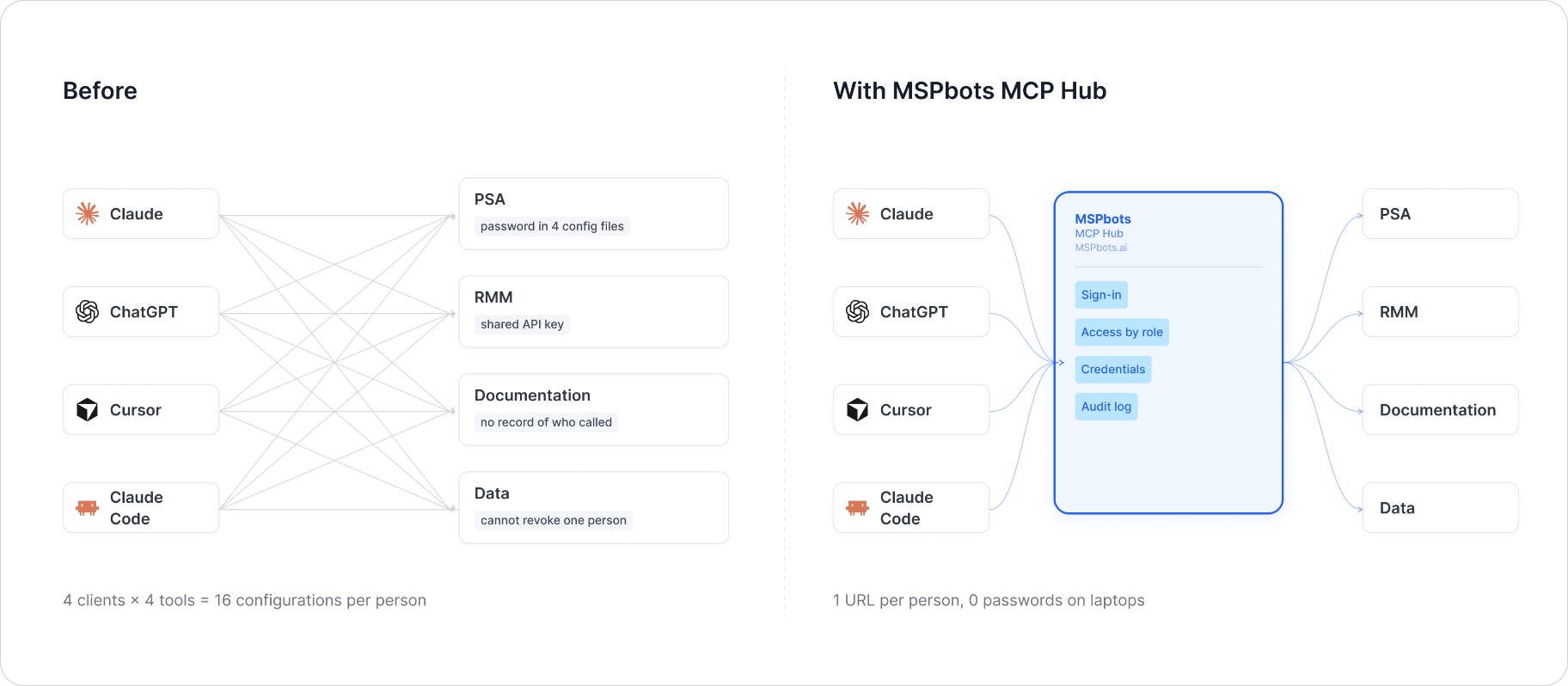
MSPbots Connector gives your AI clients one MCP URL to reach your entire MSP stack (RMM, PSA, documentation, security, finance), and gives you control over who can call which tool and a record of everything that was called.
**Hosted service: [connect.mspbots.ai](https://connect.mspbots.ai)** · Free to use.
### Why Connector
| | |
|---|---|
| **Visible** | Every tool call is logged: who, which vendor, when. Usage dashboard, CSV export, SIEM streaming. |
| **Controlled** | Role-based, per-tool allowlist. Deny by default. |
| **Protected** | Credentials encrypted per record. AI clients never see your vendor passwords or tokens. |
| **MSP-native** | Built for the MSP stack only: RMM, PSA, documentation, security, finance. |
### Quick start
1. **Sign up** at [connect.mspbots.ai](https://connect.mspbots.ai).
2. **Connect your vendors.** Pick from 150+ connectors and authorize each one on the vendor's own page, or bring your own API keys. No extra vendor accounts needed.
3. **Set access.** Create roles and decide which tools each role may call. Nothing is allowed until you allow it.
4. **Add your MCP URL to your AI client.** Copy the URL from your Connector dashboard into Claude, ChatGPT, Cursor, VS Code, Gemini, Codex, or any MCP-capable client.
5. **Ask your AI to do real work**, and watch every call appear in the audit log.
### Features
**Unified gateway**
- One MCP URL for all your AI clients
- 150+ connectors across the MSP stack
- Custom MCP servers supported, free
- Authorization happens on each vendor's own page; the AI never sees passwords or tokens
- Bring your own credentials: use the vendor API keys you already have
- Multiple accounts per app; connect once, reuse across AI clients
- Tool search: finds the right action for the task
- One sign-in; vendor credentials are injected behind the scenes and OAuth tokens refresh automatically
**Visibility**
- Audit log for every tool call (who, which vendor, when)
- Usage dashboard: call volume, top vendors, error rate, per-user activity
- Export audit logs to CSV, or stream to Loki, Graylog, or LogScale (SIEM)
- Optional recording of tool arguments and result summaries (off by default, enabled per organization)
**Control**
- Per-role, per-tool allowlist, deny by default
- owner / admin / member roles
- SCIM provisioning with Entra ID, Okta, JumpCloud, and Google Workspace
**Security**
- Credentials encrypted one record at a time (AES-256-GCM, per-record key)
- AI clients authenticate with OAuth 2.1 + PKCE
- Vendor responses are scanned for prompt-injection patterns and returned as structured data. This is one layer of defense, not a guarantee against every attack.
- Static egress IP for customer firewall and API allowlisting
### Pricing
**Free.**
Links: [connect.mspbots.ai](https://connect.mspbots.ai) · [mspbots.ai](https://mspbots.ai)
---
## Authentication headers
| Header | Required | Type | Default | Allowed values | Description | Example |
|---|---|---|---|---|---|---|
| `X-Kaseya-VSA-Tenant-Url` | Yes | string | none | https URL | The VSA server; `/api/v1.0` is added when missing | `https://vsa.example.com` |
| `X-Kaseya-VSA-Username` | With the password | string | none | - | VSA user name | `api-user` |
| `X-Kaseya-VSA-Password` | With the user name | string | none | - | That user's personal access token (or password) | `your-access-token` |
| `X-Kaseya-VSA-K1-Token` | Instead of the two above | string | none | - | A Kaseya One token | `your-k1-token` |
Where to get them: create a dedicated VSA user for the integration and a personal access token
for it, and give the user only the scopes the agent needs.
How they are used: the server signs in with `GET {url}/api/v1.0/auth` using HTTP Basic
`username:token` and uses the returned session token as `Authorization: Bearer` (servers that only
accept the older hashed sign-in header are tried with that form as well). A Kaseya One token is
exchanged at `/api/v1.0/auth/sso`. Session tokens are cached in memory, keyed by a SHA-256 of the
full credential set, until shortly before they expire, and renewed once when VSA answers 401.
When both a login and a Kaseya One token are sent, the login is used.
A request to `/mcp` without the URL, or without either credential form, gets HTTP 401 naming what
is missing; a non-https URL gets HTTP 400.
## Tools
All tools return a JSON string. Lists take an OData `filter`, `top` (default 50, max 200, read 100 per
request) and `skip`, and return `{count, total, has_more, next_skip}`; pass `next_skip` as `skip`
to continue (when a result is cut to fit the size limit it starts right after the last record
returned). Every tool that returns `next_skip` takes `skip`. Ids such as `OrgId` are decimals: filter
with an `M` suffix, e.g. `OrgId eq 10158420681076233316854711M`. The software `licenses` view masks
product keys and license codes to their last 5 characters unless `showKeys: true`. **confirm** marks
tools that change the endpoint and need `confirm: true`.
| Area | Tools |
|---|---|
| Agents | `kaseya_vsa_list_agents` (filter, top, skip), `kaseya_vsa_get_agent` (**agentId**) |
| Audit | `kaseya_vsa_get_software_inventory` (**agentId**, view: installed, add_remove, licenses, security, startup, top, skip, showKeys), `kaseya_vsa_get_hardware_inventory` (**agentId**) |
| Patches | `kaseya_vsa_get_patch_status` (**agentId**, skip); **confirm**: `kaseya_vsa_deploy_patches_now` (**agentId**) |
| Procedures | `kaseya_vsa_list_procedures` (**agentId**, top, skip); **confirm**: `kaseya_vsa_run_procedure` (**agentId**, **procedureId**) |
| Monitoring | `kaseya_vsa_list_alarms` (filter, top, skip, include_closed), `kaseya_vsa_list_tickets` (filter, top, skip, service_desk_id) |
| System | `kaseya_vsa_list_organizations` (top, skip, filter), `kaseya_vsa_list_machine_groups` (top, skip, filter) |
Errors come back as a JSON envelope instead of an exception:
```json
{"error": {"code": "unauthorized", "message": "Kaseya VSA rejected the user name and password / access token", "retryable": false}}
```
`code` is one of `not_configured`, `unauthorized`, `not_found`, `invalid_argument`,
`rate_limited`, `upstream_error`. Reads are retried with backoff on 429, 5xx and network errors;
writes only on 429.
## Run locally
```bash
uv sync
uv run python -m kaseya_vsa_mcp # listens on 0.0.0.0:8080
```
or with Docker:
```bash
docker build --platform linux/amd64 -t kaseya-vsa-mcp:dev .
docker run --rm -p 8080:8080 kaseya-vsa-mcp:dev
```
Configuration (environment variables, all optional): `MCP_HTTP_HOST` (default `0.0.0.0`),
`MCP_HTTP_PORT` (default `8080`), `LOG_LEVEL` (default `INFO`). Credentials are never read
from the environment.
## Testing example
```bash
# list tools
curl -s http://localhost:8080/mcp \
-H "Content-Type: application/json" \
-H "Accept: application/json, text/event-stream" \
-H "X-Kaseya-VSA-Tenant-Url: https://vsa.example.com" \
-H "X-Kaseya-VSA-Username: api-user" \
-H "X-Kaseya-VSA-Password: your-access-token" \
-d '{"jsonrpc":"2.0","id":1,"method":"tools/list","params":{}}'
# open alarms
curl -s http://localhost:8080/mcp \
-H "Content-Type: application/json" \
-H "Accept: application/json, text/event-stream" \
-H "X-Kaseya-VSA-Tenant-Url: https://vsa.example.com" \
-H "X-Kaseya-VSA-Username: api-user" \
-H "X-Kaseya-VSA-Password: your-access-token" \
-d '{"jsonrpc":"2.0","id":2,"method":"tools/call","params":{"name":"kaseya_vsa_list_alarms","arguments":{"top":20}}}'
```
Unit tests (no network access needed):
```bash
uv run pytest
```
## Delivery notes
- **Tool count (12).** Kept as is because the tool names are an existing contract; every earlier
parameter is still accepted.
- **Routes follow the VSA REST API** as implemented by Kaseya's own VSAModule PowerShell module.
Older versions called routes that do not exist; now: software `/assetmgmt/audit/{id}/software/...`
(installed applications by default), hardware `/assetmgmt/audit/{id}/summary` plus
`/hardware/diskvolumes|pcianddisk|printers`, patch status `/assetmgmt/patch/{id}/status` plus the
missing patches, deploy `PUT /assetmgmt/patch/runnow`, procedures `/automation/agentprocs` and
`PUT /automation/agentprocs/{agent}/{procedure}/runnow`, alarms `/assetmgmt/alarms/{false|true}`
and tickets `/automation/tickets` (or `/automation/servicedesks/{id}/tickets`).
- **Sign-in.** Plain Basic `username:token` is tried first, then the older hashed header that
earlier versions used exclusively.
- **Confirmation for endpoint actions.** Deploying patches and running procedures take
`confirm: true` (older versions asked through an interactive prompt the gateway cannot relay).
Agent procedures must be approved in VSA before they can run.
- **Lists** are no longer narrowed by an interactive prompt when no filter is given; `top` above
100 is read in pages of 100.
- **Result size exception (SOP 2.5).** `kaseya_vsa_get_software_inventory` and
`kaseya_vsa_list_procedures` keep a `top` of up to 500 (default 50 and 500); they also take
`skip`, so a result cut to 20,000 characters continues from `next_skip`.
- **Not included**: the device "card" UI resource of older versions (an MCP Apps HTML view); the
tools return the same data as JSON.
## License
Apache License 2.0 - see [LICENSE](LICENSE) and [NOTICE](NOTICE).
This server cannot be deployed
Maintenance
ActivityMaintained
ResponsivenessNo recent community issues